Pari vallal Kannan
Center for Integrated Circuits and Systems
University of Texas at Dallas
8051 – Serial Port
EE4380 Fall02
Class 10
26-Sep-02 2
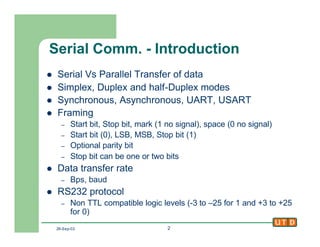
Serial Comm. - Introduction
l Serial Vs Parallel Transfer of data
l Simplex, Duplex and half-Duplex modes
l Synchronous, Asynchronous, UART, USART
l Framing
– Start bit, Stop bit, mark (1 no signal), space (0 no signal)
– Start bit (0), LSB, MSB, Stop bit (1)
– Optional parity bit
– Stop bit can be one or two bits
l Data transfer rate
– Bps, baud
l RS232 protocol
– Non TTL compatible logic levels (-3 to –25 for 1 and +3 to +25
for 0)
26-Sep-02 3
RS232 Pins
l Too many signals, but most are unused in the 8051
UART
l In non-handshaking mode, only three signals
– Pin2 : RxD – received data
– Pin3 : TxD – Transmitted data
– Pin5 : GND
l For 8051 to PC serial port (COMx) connection, use
null-modem connection
– RxD of 8051 system to TxD of PC
– TxD of 8051 system to RxD of PC
– GND to GND
– Need to set transfer mode to use software flow control
(XON/XOF)
26-Sep-02 4
RS232 Line driver
l RS232 uses TLL-incompatible logic levels
l Need Line drivers to interface 8051 to Rs232
protocol
l MAX232, MAX233 most commonly used line
drivers
– Dual channels
– Single supply, +5V operation
– MAX233 needs no external
capacitors
8051 MAX233
DB-9
TxD
RxD
11
10
5
4
2
3
5
26-Sep-02 5
8051 Serial Port
l 8051 has an internal UART
– Baud rate is set by Timer1
l Control Registers
– SBUF : Serial Buffer Register
l Data moved to SBUF is Transmitted serially
l Serial data Rx-ed is stored by 8051 in SBUF
– SCON : Serial Control Register
l Program the mode (start bit, stop bit, data bits length)
– Only Mode 1 (8, 1, 1) is of interest, as others are obsolete
l Receive enable REN
l RI and TI – Receive & Transmit Interrupt flags
26-Sep-02 6
Setting the Baud rate
l Timer 1is the timing controller for serial port in 8051
l Clock for the Timer1 in the UART is
– XTAL /12 /32 = 28,800Hz (for XTAL = 11.0592MHz)
l Set SMOD bit (PCON.7) to program 8051 to use 1/16
multiplier
l XTAL / 12 / 16 = 56,700Hz
l Effectively doubles the baud rate
l Timer1 has to be programmed in
– Mode 2, 8bit auto reload mode
– Load TH1 with the required value
26-Sep-02 7
Setting the Baud rate
l TH values (XTAL = 11.0592MHz)
– Baud Rate: 9600 = 28800/3 è TH1 = -3 = 0xFD
– Baud Rate: 4800 = 28800/6 è TH1 = -6 = 0xFA
– Baud Rate: 2400 = 28800/12 è TH1 = -12 = 0xF4
– Baud Rate: 1200 = 28800/24 è TH1 = -24 = 0xE8
l If SMOD (PCON.7) is set then the same values
for TH1 will give
– 19200 etc
26-Sep-02 8
SCON Register
l SCON.0 = RI
– Receive interrupt flag. Valid byte is received in SBUF
l SCON.1 = TI
– Transmit interrupt flag. Byte in SBUF was completely
transmitted.
l SCON.4 = REN
– Receive enable. Set to enable reception. Clr for transmit only
l SCON.7:SCON.6 = SM0:SM1
– Serial mode setting
– 01 = Mode 1 is the widely used mode
l 8bit data, 1start bit and 1 stop bit
l All other bits to be set to 0
26-Sep-02 9
Steps to Transmit a Byte
1. Program T1 for Mode2 (TMOD ß 0x20)
2. Load TH1 with the initial value (baud rate dependant)
(TH1 ß FD / FA / F4 / E8)
3. Program SCON for Mode1 (SCON ß 0x50)
4. Start Timer1 (setb TR1)
5. Clear TI
6. Load SBUF with the byte to be transferred (SBUF ß
byte)
7. Wait until TI becomes 1 (jnb TI, not_done)
8. Go back to Step5 for next byte
26-Sep-02 10
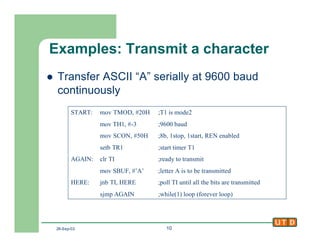
Examples: Transmit a character
l Transfer ASCII “A” serially at 9600 baud
continuously
START: mov TMOD, #20H ;T1 is mode2
mov TH1, #-3 ;9600 baud
mov SCON, #50H ;8b, 1stop, 1start, REN enabled
setb TR1 ;start timer T1
AGAIN: clr TI ;ready to transmit
mov SBUF, #’A’ ;letter A is to be transmitted
HERE: jnb TI, HERE ;poll TI until all the bits are transmitted
sjmp AGAIN ;while(1) loop (forever loop)
26-Sep-02 11
Steps to Receive a Byte
1. Program T1 for Mode2 (TMOD ß 0x20)
2. Load TH1 with the initial value (baud rate dependant)
(TH1 ß FD / FA / F4 / E8)
3. Program SCON for Mode1 (SCON ß 0x50)
4. Start Timer1 (setb TR1)
5. Clear RI
6. Wait until RI becomes 1 (jnb RI, not_done)
7. Store SBUF (A ß SBUF)
8. Go back to Step5 for next byte
26-Sep-02 12
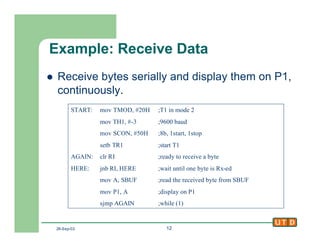
Example: Receive Data
l Receive bytes serially and display them on P1,
continuously.
START: mov TMOD, #20H ;T1 in mode 2
mov TH1, #-3 ;9600 baud
mov SCON, #50H ;8b, 1start, 1stop
setb TR1 ;start T1
AGAIN: clr RI ;ready to receive a byte
HERE: jnb RI, HERE ;wait until one byte is Rx-ed
mov A, SBUF ;read the received byte from SBUF
mov P1, A ;display on P1
sjmp AGAIN ;while (1)
26-Sep-02 13
Serial Ports with Interrupts
l Using serial port with interrupts is THE way it was
intended to be used.
l Both the RI and TI flags raise the Serial interrupt (S0),
if S0 is enabled in IE.
– ISR for S0 is at 0x0023
l Simple Case
– Transmit is polling based (Poll TI flag) and Receive is interrupt
driven
– Transmit is interrupt driven and Receive is polling based (Poll
RI flag)
l In these cases, the ISR of S0 will check for the
appropriate flag and either copy data to or from SBUF
26-Sep-02 14
Serial Ports with Interrupts
l General Case
– 8051 is in full duplex mode, I.e. receives and
transmits data continuously
– Both Transmit and Receive is interrupt driven
l Write the ISR for S0 such that
– ISR must first check which one of RI and TI raised
the S0 interrupt
– If RI is set, then read data from SBUF to a safe
place and clear RI
– If TI is set, then copy the next character to be
transmitted onto SBUF and clear TI.
26-Sep-02 15
Example : Simple case
l 8051 gets data from P1 and sends it to P2 continuously while receiving from Serial port. Serial
port data is to be displayed on P0
org 0
ljmp MAIN ;avoid the IVT
org 23H ;serial port ISR
ljmp SERIAL
org 30H
MAIN: mov P1, #0FFH ;P1 as input port
mov TMOD, #20 ;T1 in mode 2
mov TH1, #-3 ;9600 baud
mov SCON, #50H ; 8b, 1start, 1stop
mov IE, #10010000B ;enable S0 interrupt
setb TR1 ;enable T1
BACK: mov A, P1
mov P2, A
sjmp BACK
org 100H
SERIAL: jb TI, TRANS
mov A, SBUF ;copy received data
mov P0, A ;display it on P0
clr RI ;clear RI
RETI
TRANS: clr TI ;do nothing
RETI ;ISR does not handle TX
end
26-Sep-02 16
8051 Dev System Survey
l Paul’s 8051 Dev Board [http://www.pjrc.com]
– 87C52, 22MHz, 2 8255 devices, 50 I/O lines, LCD header, 30K Flash,
32K SRAM, proto area, 2 serial ports, ~80$ assembled
l Axman CME552 and CME562 [http://www.axman.com/]
– S80C552-12 CPU, 32K each of EPROM, EEPROM and SRAM, 8 A/D
inputs, 2 PWM outputs, LCD and keypad interface, 20 I/O lines, proto
area, ~120$
l New Micros [http://www.newmicros.com/]
– Many products, all have proto area, Cost from 40$ to 180$
l Bipom [http://www.bipom.com/]
– Many products, very small, no proto area, uses atmel devices with
onboard Flash and SRAM, ISP, LCD and keypad interface, 40 to 70$
l Tecel [http://www.tecel.com/t1/]
– Many products. Very small, upto 32K SRAM and EEPROM, many I/O
lines, No proto area, $40 to $70. T1 bare board is 12$ !
26-Sep-02 17
Next Class
l Interfacing analog sensors
l Interfacing Stepper Motors
l Embedded System Diagnostics

Class10

  • 1.
    Pari vallal Kannan Centerfor Integrated Circuits and Systems University of Texas at Dallas 8051 – Serial Port EE4380 Fall02 Class 10
  • 2.
    26-Sep-02 2 Serial Comm.- Introduction l Serial Vs Parallel Transfer of data l Simplex, Duplex and half-Duplex modes l Synchronous, Asynchronous, UART, USART l Framing – Start bit, Stop bit, mark (1 no signal), space (0 no signal) – Start bit (0), LSB, MSB, Stop bit (1) – Optional parity bit – Stop bit can be one or two bits l Data transfer rate – Bps, baud l RS232 protocol – Non TTL compatible logic levels (-3 to –25 for 1 and +3 to +25 for 0)
  • 3.
    26-Sep-02 3 RS232 Pins lToo many signals, but most are unused in the 8051 UART l In non-handshaking mode, only three signals – Pin2 : RxD – received data – Pin3 : TxD – Transmitted data – Pin5 : GND l For 8051 to PC serial port (COMx) connection, use null-modem connection – RxD of 8051 system to TxD of PC – TxD of 8051 system to RxD of PC – GND to GND – Need to set transfer mode to use software flow control (XON/XOF)
  • 4.
    26-Sep-02 4 RS232 Linedriver l RS232 uses TLL-incompatible logic levels l Need Line drivers to interface 8051 to Rs232 protocol l MAX232, MAX233 most commonly used line drivers – Dual channels – Single supply, +5V operation – MAX233 needs no external capacitors 8051 MAX233 DB-9 TxD RxD 11 10 5 4 2 3 5
  • 5.
    26-Sep-02 5 8051 SerialPort l 8051 has an internal UART – Baud rate is set by Timer1 l Control Registers – SBUF : Serial Buffer Register l Data moved to SBUF is Transmitted serially l Serial data Rx-ed is stored by 8051 in SBUF – SCON : Serial Control Register l Program the mode (start bit, stop bit, data bits length) – Only Mode 1 (8, 1, 1) is of interest, as others are obsolete l Receive enable REN l RI and TI – Receive & Transmit Interrupt flags
  • 6.
    26-Sep-02 6 Setting theBaud rate l Timer 1is the timing controller for serial port in 8051 l Clock for the Timer1 in the UART is – XTAL /12 /32 = 28,800Hz (for XTAL = 11.0592MHz) l Set SMOD bit (PCON.7) to program 8051 to use 1/16 multiplier l XTAL / 12 / 16 = 56,700Hz l Effectively doubles the baud rate l Timer1 has to be programmed in – Mode 2, 8bit auto reload mode – Load TH1 with the required value
  • 7.
    26-Sep-02 7 Setting theBaud rate l TH values (XTAL = 11.0592MHz) – Baud Rate: 9600 = 28800/3 è TH1 = -3 = 0xFD – Baud Rate: 4800 = 28800/6 è TH1 = -6 = 0xFA – Baud Rate: 2400 = 28800/12 è TH1 = -12 = 0xF4 – Baud Rate: 1200 = 28800/24 è TH1 = -24 = 0xE8 l If SMOD (PCON.7) is set then the same values for TH1 will give – 19200 etc
  • 8.
    26-Sep-02 8 SCON Register lSCON.0 = RI – Receive interrupt flag. Valid byte is received in SBUF l SCON.1 = TI – Transmit interrupt flag. Byte in SBUF was completely transmitted. l SCON.4 = REN – Receive enable. Set to enable reception. Clr for transmit only l SCON.7:SCON.6 = SM0:SM1 – Serial mode setting – 01 = Mode 1 is the widely used mode l 8bit data, 1start bit and 1 stop bit l All other bits to be set to 0
  • 9.
    26-Sep-02 9 Steps toTransmit a Byte 1. Program T1 for Mode2 (TMOD ß 0x20) 2. Load TH1 with the initial value (baud rate dependant) (TH1 ß FD / FA / F4 / E8) 3. Program SCON for Mode1 (SCON ß 0x50) 4. Start Timer1 (setb TR1) 5. Clear TI 6. Load SBUF with the byte to be transferred (SBUF ß byte) 7. Wait until TI becomes 1 (jnb TI, not_done) 8. Go back to Step5 for next byte
  • 10.
    26-Sep-02 10 Examples: Transmita character l Transfer ASCII “A” serially at 9600 baud continuously START: mov TMOD, #20H ;T1 is mode2 mov TH1, #-3 ;9600 baud mov SCON, #50H ;8b, 1stop, 1start, REN enabled setb TR1 ;start timer T1 AGAIN: clr TI ;ready to transmit mov SBUF, #’A’ ;letter A is to be transmitted HERE: jnb TI, HERE ;poll TI until all the bits are transmitted sjmp AGAIN ;while(1) loop (forever loop)
  • 11.
    26-Sep-02 11 Steps toReceive a Byte 1. Program T1 for Mode2 (TMOD ß 0x20) 2. Load TH1 with the initial value (baud rate dependant) (TH1 ß FD / FA / F4 / E8) 3. Program SCON for Mode1 (SCON ß 0x50) 4. Start Timer1 (setb TR1) 5. Clear RI 6. Wait until RI becomes 1 (jnb RI, not_done) 7. Store SBUF (A ß SBUF) 8. Go back to Step5 for next byte
  • 12.
    26-Sep-02 12 Example: ReceiveData l Receive bytes serially and display them on P1, continuously. START: mov TMOD, #20H ;T1 in mode 2 mov TH1, #-3 ;9600 baud mov SCON, #50H ;8b, 1start, 1stop setb TR1 ;start T1 AGAIN: clr RI ;ready to receive a byte HERE: jnb RI, HERE ;wait until one byte is Rx-ed mov A, SBUF ;read the received byte from SBUF mov P1, A ;display on P1 sjmp AGAIN ;while (1)
  • 13.
    26-Sep-02 13 Serial Portswith Interrupts l Using serial port with interrupts is THE way it was intended to be used. l Both the RI and TI flags raise the Serial interrupt (S0), if S0 is enabled in IE. – ISR for S0 is at 0x0023 l Simple Case – Transmit is polling based (Poll TI flag) and Receive is interrupt driven – Transmit is interrupt driven and Receive is polling based (Poll RI flag) l In these cases, the ISR of S0 will check for the appropriate flag and either copy data to or from SBUF
  • 14.
    26-Sep-02 14 Serial Portswith Interrupts l General Case – 8051 is in full duplex mode, I.e. receives and transmits data continuously – Both Transmit and Receive is interrupt driven l Write the ISR for S0 such that – ISR must first check which one of RI and TI raised the S0 interrupt – If RI is set, then read data from SBUF to a safe place and clear RI – If TI is set, then copy the next character to be transmitted onto SBUF and clear TI.
  • 15.
    26-Sep-02 15 Example :Simple case l 8051 gets data from P1 and sends it to P2 continuously while receiving from Serial port. Serial port data is to be displayed on P0 org 0 ljmp MAIN ;avoid the IVT org 23H ;serial port ISR ljmp SERIAL org 30H MAIN: mov P1, #0FFH ;P1 as input port mov TMOD, #20 ;T1 in mode 2 mov TH1, #-3 ;9600 baud mov SCON, #50H ; 8b, 1start, 1stop mov IE, #10010000B ;enable S0 interrupt setb TR1 ;enable T1 BACK: mov A, P1 mov P2, A sjmp BACK org 100H SERIAL: jb TI, TRANS mov A, SBUF ;copy received data mov P0, A ;display it on P0 clr RI ;clear RI RETI TRANS: clr TI ;do nothing RETI ;ISR does not handle TX end
  • 16.
    26-Sep-02 16 8051 DevSystem Survey l Paul’s 8051 Dev Board [http://www.pjrc.com] – 87C52, 22MHz, 2 8255 devices, 50 I/O lines, LCD header, 30K Flash, 32K SRAM, proto area, 2 serial ports, ~80$ assembled l Axman CME552 and CME562 [http://www.axman.com/] – S80C552-12 CPU, 32K each of EPROM, EEPROM and SRAM, 8 A/D inputs, 2 PWM outputs, LCD and keypad interface, 20 I/O lines, proto area, ~120$ l New Micros [http://www.newmicros.com/] – Many products, all have proto area, Cost from 40$ to 180$ l Bipom [http://www.bipom.com/] – Many products, very small, no proto area, uses atmel devices with onboard Flash and SRAM, ISP, LCD and keypad interface, 40 to 70$ l Tecel [http://www.tecel.com/t1/] – Many products. Very small, upto 32K SRAM and EEPROM, many I/O lines, No proto area, $40 to $70. T1 bare board is 12$ !
  • 17.
    26-Sep-02 17 Next Class lInterfacing analog sensors l Interfacing Stepper Motors l Embedded System Diagnostics