8051 SERIAL COMMUNICATION 
VENNAM MAHESH 
12MT06PED020
OUTLINE 
Key features of 8051 Serial Communication 
8051 connection to RS232 
Four different modes of operation 
Doubling baud rate 
Programs
Key Features Of 8051 Serial 
Communication 
 Full-duplex communication 
 Receive buffered 
 Special function registers 
SBUF Register 
SCON Register 
PCON Register 
 Four different modes of operation 
 Wide range of baud rates
8051 CONNECTION TO RS232 
RS232 standards 
◦ most widely used serial I/O interfacing standard 
◦ input and output voltage levels are not TTL 
compatible 
◦ 1 bit is represented by -3 to -25 V 
◦ 0 bit is +3 to +25 V 
◦ -3 to +3 is undefined 
◦ To connect RS232 to a microcontroller system must 
use voltage converters such as MAX232 to convert 
the TTL logic levels to the RS232 voltage levels, and 
vice versa 
◦ MAX232 IC chips are commonly referred to as line 
drivers
8051 CONNECTION TO RS232 
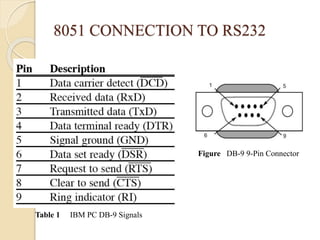
Figure DB-9 9-Pin Connector 
Table 1 IBM PC DB-9 Signals
8051 CONNECTION TO RS232 
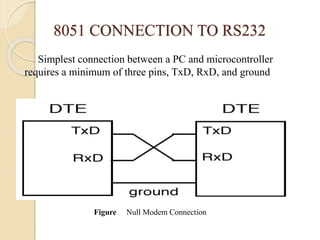
Simplest connection between a PC and microcontroller 
requires a minimum of three pins, TxD, RxD, and ground 
Figure Null Modem Connection
8051 CONNECTION TO RS232 
RxD and TxD pins in the 8051 
◦ 8051 has two pins used for transferring and receiving 
data serially 
◦ TxD and RxD are part of the port 3 group 
◦ pin 11 (P3.1) is assigned to TxD 
◦ pin 10 (P3.0) is designated as RxD 
◦ these pins are TTL compatible 
◦ require a line driver to make them RS232 compatible 
◦ driver is the MAX232 chip
8051 CONNECTION TO RS232 
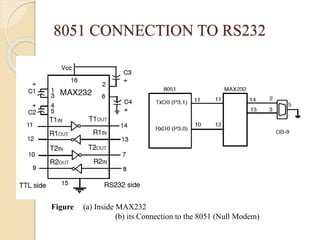
MAX232 
◦ converts from RS232 voltage levels to TTL 
voltage levels 
◦ uses a +5 V power source 
◦ MAX232 has two sets of line drivers for 
transferring and receiving data 
◦ line drivers used for TxD are called T1 and T2 
◦ line drivers for RxD are designated as R1 and R2 
◦ T1 and R1 are used together for TxD and RxD of 
the 8051 
◦ second set is left unused
8051 CONNECTION TO RS232 
Figure (a) Inside MAX232 
(b) its Connection to the 8051 (Null Modem)
8051 CONNECTION TO RS232 
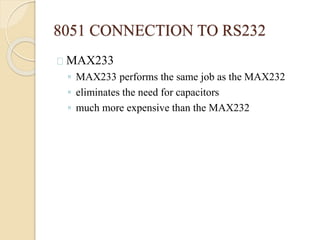
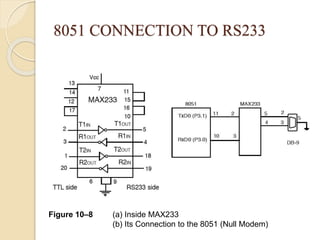
MAX233 
◦ MAX233 performs the same job as the MAX232 
◦ eliminates the need for capacitors 
◦ much more expensive than the MAX232
8051 CONNECTION TO RS233 
Figure 10–8 (a) Inside MAX233 
(b) Its Connection to the 8051 (Null Modem)
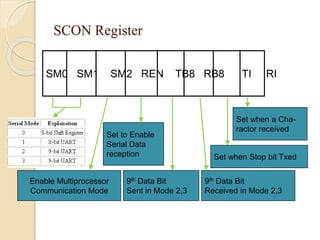
SCON Register 
SM0 SM1 SM2 REN TB8 RB8 TI RI 
Set to Enable 
Serial Data 
reception 
Enable Multiprocessor 
Communication Mode 
9th Data Bit 
Sent in Mode 2,3 
Set when a Cha-ractor 
received 
Set when Stop bit Txed 
9th Data Bit 
Received in Mode 2,3
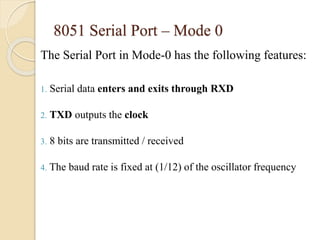
8051 Serial Port – Mode 0 
The Serial Port in Mode-0 has the following features: 
1. Serial data enters and exits through RXD 
2. TXD outputs the clock 
3. 8 bits are transmitted / received 
4. The baud rate is fixed at (1/12) of the oscillator frequency
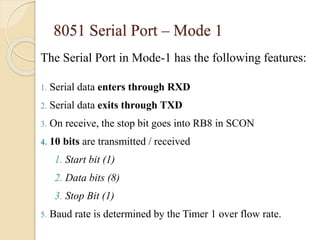
8051 Serial Port – Mode 1 
The Serial Port in Mode-1 has the following features: 
1. Serial data enters through RXD 
2. Serial data exits through TXD 
3. On receive, the stop bit goes into RB8 in SCON 
4. 10 bits are transmitted / received 
1. Start bit (1) 
2. Data bits (8) 
3. Stop Bit (1) 
5. Baud rate is determined by the Timer 1 over flow rate.
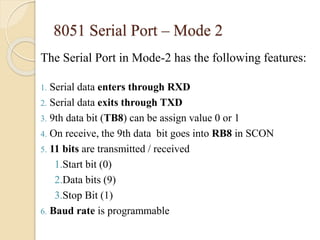
8051 Serial Port – Mode 2 
The Serial Port in Mode-2 has the following features: 
1. Serial data enters through RXD 
2. Serial data exits through TXD 
3. 9th data bit (TB8) can be assign value 0 or 1 
4. On receive, the 9th data bit goes into RB8 in SCON 
5. 11 bits are transmitted / received 
1.Start bit (0) 
2.Data bits (9) 
3.Stop Bit (1) 
6. Baud rate is programmable
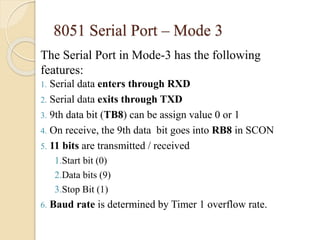
8051 Serial Port – Mode 3 
The Serial Port in Mode-3 has the following 
features: 
1. Serial data enters through RXD 
2. Serial data exits through TXD 
3. 9th data bit (TB8) can be assign value 0 or 1 
4. On receive, the 9th data bit goes into RB8 in SCON 
5. 11 bits are transmitted / received 
1.Start bit (0) 
2.Data bits (9) 
3.Stop Bit (1) 
6. Baud rate is determined by Timer 1 overflow rate.
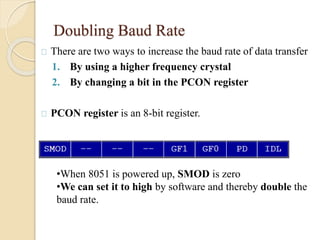
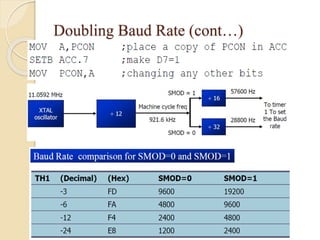
Doubling Baud Rate 
There are two ways to increase the baud rate of data transfer 
1. By using a higher frequency crystal 
2. By changing a bit in the PCON register 
PCON register is an 8-bit register. 
•When 8051 is powered up, SMOD is zero 
•We can set it to high by software and thereby double the 
baud rate.
Doubling Baud Rate (cont…)
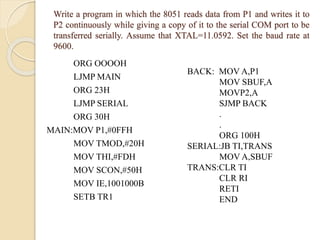
Write a program in which the 8051 reads data from P1 and writes it to 
P2 continuously while giving a copy of it to the serial COM port to be 
transferred serially. Assume that XTAL=11.0592. Set the baud rate at 
9600. 
ORG OOOOH 
LJMP MAIN 
ORG 23H 
LJMP SERIAL 
ORG 30H 
MAIN:MOV P1,#0FFH 
MOV TMOD,#20H 
MOV THI,#FDH 
MOV SCON,#50H 
MOV IE,1001000B 
SETB TR1 
BACK: MOV A,P1 
MOV SBUF,A 
MOVP2,A 
SJMP BACK 
. 
. 
ORG 100H 
SERIAL:JB TI,TRANS 
MOV A,SBUF 
TRANS:CLR TI 
CLR RI 
RETI 
END
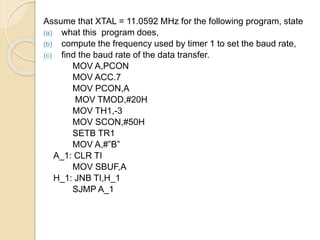
Assume that XTAL = 11.0592 MHz for the following program, state 
(a) what this program does, 
(b) compute the frequency used by timer 1 to set the baud rate, 
(c) find the baud rate of the data transfer. 
MOV A,PCON 
MOV ACC.7 
MOV PCON,A 
MOV TMOD,#20H 
MOV TH1,-3 
MOV SCON,#50H 
SETB TR1 
MOV A,#”B” 
A_1: CLR TI 
MOV SBUF,A 
H_1: JNB TI,H_1 
SJMP A_1
Solution: 
(a) This program transfers ASCII letter B (01000010 
binary) continuously 
(b) With XTAL = 11.0592 MHz and SMOD = 1 in the 
above program, we have: 11.0592 / 12 = 921.6 kHz 
machine cycle frequency. 
(c)921.6 / 16 = 57,600 Hz frequency used by timer 1 to set 
the baud rate. 57600 / 3 = 19,200, the baud rate.
CONCLUSION 
In this lecture we had seen how serial 
communication of 8051 operates in four 
different modes among the four modes mode1 is 
normally used to communicate with the 
conventional computer using RS232 rather than 
mode2 and mode3 can be used to multiprocessor 
communication.
8051 serial communication1

8051 serial communication1

  • 1.
    8051 SERIAL COMMUNICATION VENNAM MAHESH 12MT06PED020
  • 2.
    OUTLINE Key featuresof 8051 Serial Communication 8051 connection to RS232 Four different modes of operation Doubling baud rate Programs
  • 3.
    Key Features Of8051 Serial Communication  Full-duplex communication  Receive buffered  Special function registers SBUF Register SCON Register PCON Register  Four different modes of operation  Wide range of baud rates
  • 4.
    8051 CONNECTION TORS232 RS232 standards ◦ most widely used serial I/O interfacing standard ◦ input and output voltage levels are not TTL compatible ◦ 1 bit is represented by -3 to -25 V ◦ 0 bit is +3 to +25 V ◦ -3 to +3 is undefined ◦ To connect RS232 to a microcontroller system must use voltage converters such as MAX232 to convert the TTL logic levels to the RS232 voltage levels, and vice versa ◦ MAX232 IC chips are commonly referred to as line drivers
  • 5.
    8051 CONNECTION TORS232 Figure DB-9 9-Pin Connector Table 1 IBM PC DB-9 Signals
  • 6.
    8051 CONNECTION TORS232 Simplest connection between a PC and microcontroller requires a minimum of three pins, TxD, RxD, and ground Figure Null Modem Connection
  • 7.
    8051 CONNECTION TORS232 RxD and TxD pins in the 8051 ◦ 8051 has two pins used for transferring and receiving data serially ◦ TxD and RxD are part of the port 3 group ◦ pin 11 (P3.1) is assigned to TxD ◦ pin 10 (P3.0) is designated as RxD ◦ these pins are TTL compatible ◦ require a line driver to make them RS232 compatible ◦ driver is the MAX232 chip
  • 8.
    8051 CONNECTION TORS232 MAX232 ◦ converts from RS232 voltage levels to TTL voltage levels ◦ uses a +5 V power source ◦ MAX232 has two sets of line drivers for transferring and receiving data ◦ line drivers used for TxD are called T1 and T2 ◦ line drivers for RxD are designated as R1 and R2 ◦ T1 and R1 are used together for TxD and RxD of the 8051 ◦ second set is left unused
  • 9.
    8051 CONNECTION TORS232 Figure (a) Inside MAX232 (b) its Connection to the 8051 (Null Modem)
  • 10.
    8051 CONNECTION TORS232 MAX233 ◦ MAX233 performs the same job as the MAX232 ◦ eliminates the need for capacitors ◦ much more expensive than the MAX232
  • 11.
    8051 CONNECTION TORS233 Figure 10–8 (a) Inside MAX233 (b) Its Connection to the 8051 (Null Modem)
  • 12.
    SCON Register SM0SM1 SM2 REN TB8 RB8 TI RI Set to Enable Serial Data reception Enable Multiprocessor Communication Mode 9th Data Bit Sent in Mode 2,3 Set when a Cha-ractor received Set when Stop bit Txed 9th Data Bit Received in Mode 2,3
  • 13.
    8051 Serial Port– Mode 0 The Serial Port in Mode-0 has the following features: 1. Serial data enters and exits through RXD 2. TXD outputs the clock 3. 8 bits are transmitted / received 4. The baud rate is fixed at (1/12) of the oscillator frequency
  • 14.
    8051 Serial Port– Mode 1 The Serial Port in Mode-1 has the following features: 1. Serial data enters through RXD 2. Serial data exits through TXD 3. On receive, the stop bit goes into RB8 in SCON 4. 10 bits are transmitted / received 1. Start bit (1) 2. Data bits (8) 3. Stop Bit (1) 5. Baud rate is determined by the Timer 1 over flow rate.
  • 15.
    8051 Serial Port– Mode 2 The Serial Port in Mode-2 has the following features: 1. Serial data enters through RXD 2. Serial data exits through TXD 3. 9th data bit (TB8) can be assign value 0 or 1 4. On receive, the 9th data bit goes into RB8 in SCON 5. 11 bits are transmitted / received 1.Start bit (0) 2.Data bits (9) 3.Stop Bit (1) 6. Baud rate is programmable
  • 16.
    8051 Serial Port– Mode 3 The Serial Port in Mode-3 has the following features: 1. Serial data enters through RXD 2. Serial data exits through TXD 3. 9th data bit (TB8) can be assign value 0 or 1 4. On receive, the 9th data bit goes into RB8 in SCON 5. 11 bits are transmitted / received 1.Start bit (0) 2.Data bits (9) 3.Stop Bit (1) 6. Baud rate is determined by Timer 1 overflow rate.
  • 17.
    Doubling Baud Rate There are two ways to increase the baud rate of data transfer 1. By using a higher frequency crystal 2. By changing a bit in the PCON register PCON register is an 8-bit register. •When 8051 is powered up, SMOD is zero •We can set it to high by software and thereby double the baud rate.
  • 18.
  • 19.
    Write a programin which the 8051 reads data from P1 and writes it to P2 continuously while giving a copy of it to the serial COM port to be transferred serially. Assume that XTAL=11.0592. Set the baud rate at 9600. ORG OOOOH LJMP MAIN ORG 23H LJMP SERIAL ORG 30H MAIN:MOV P1,#0FFH MOV TMOD,#20H MOV THI,#FDH MOV SCON,#50H MOV IE,1001000B SETB TR1 BACK: MOV A,P1 MOV SBUF,A MOVP2,A SJMP BACK . . ORG 100H SERIAL:JB TI,TRANS MOV A,SBUF TRANS:CLR TI CLR RI RETI END
  • 20.
    Assume that XTAL= 11.0592 MHz for the following program, state (a) what this program does, (b) compute the frequency used by timer 1 to set the baud rate, (c) find the baud rate of the data transfer. MOV A,PCON MOV ACC.7 MOV PCON,A MOV TMOD,#20H MOV TH1,-3 MOV SCON,#50H SETB TR1 MOV A,#”B” A_1: CLR TI MOV SBUF,A H_1: JNB TI,H_1 SJMP A_1
  • 21.
    Solution: (a) Thisprogram transfers ASCII letter B (01000010 binary) continuously (b) With XTAL = 11.0592 MHz and SMOD = 1 in the above program, we have: 11.0592 / 12 = 921.6 kHz machine cycle frequency. (c)921.6 / 16 = 57,600 Hz frequency used by timer 1 to set the baud rate. 57600 / 3 = 19,200, the baud rate.
  • 22.
    CONCLUSION In thislecture we had seen how serial communication of 8051 operates in four different modes among the four modes mode1 is normally used to communicate with the conventional computer using RS232 rather than mode2 and mode3 can be used to multiprocessor communication.