LECTURE 5 – GANTT CHART
• GANTT Charts
• Constructing GANTT Charts
• Staffing and Re-scheduling
• Project Management Software
Software Project Management Maria Petridou
1
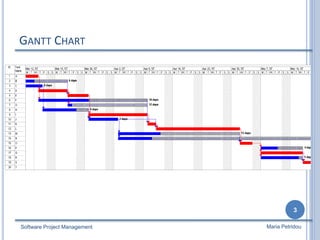
GANTT CHART
 A GANTT chart is a type of bar chart that illustrates a project
schedule.
 After the PERT/CPM analysis is completed, the following
phase is to construct the GANTT chart and then to re-
allocate resources and re-schedule if necessary.
 GANTT charts have become a common technique for
representing the phases and activities of a project work
breakdown structure.
 It was introduced by Henry Gantt around 1910 – 1915.
Software Project Management
2
Maria Petridou
GANTT CHART
Software Project Management
3
Maria Petridou
GANTT CHART
 Characteristics:
 The bar in each row identifies the corresponding task
 The horizontal position of the bar identifies start and end times
of the task
 Bar length represents the duration of the task
 Task durations can be compared easily
 Good for allocating resources and re-scheduling
 Precedence relationships can be represented using arrows
 Critical activities are usually highlighted
 Slack times are represented using bars with doted lines
 The bar of each activity begins at the activity earliest start time (ES)
 The bar of each activity ends at the activity latest finish time (LF).
Software Project Management
4
Maria Petridou
GANTT CHART
Software Project Management
5
Maria Petridou
 Advantages
 Simple
 Good visual communication to others
 Task durations can be compared easily
 Good for scheduling resources
 Disadvantages
 Dependencies are more difficult to visualise
 Minor changes in data can cause major changes in the chart
CONSTRUCTING GANTT CHART
 The steps to construct a GANTT chart from the information
obtained by PERT/CPM are:
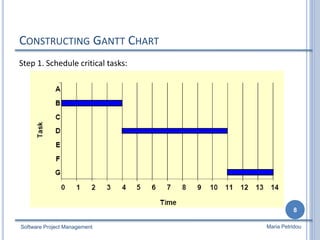
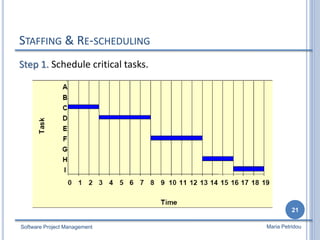
1. Schedule the critical tasks in the correct position.
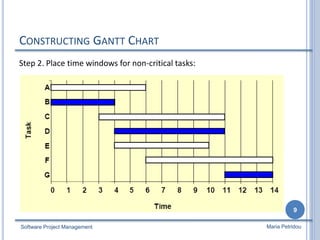
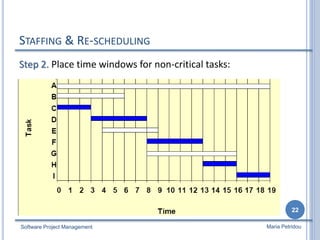
2. Place the time windows in which the non-critical tasks can be
scheduled.
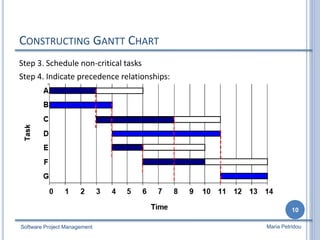
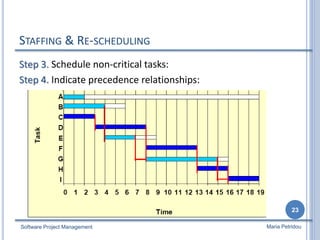
3. Schedule the non-critical tasks according to their earliest
starting times.
4. Indicate precedence relationships between tasks.
Software Project Management
6
Maria Petridou
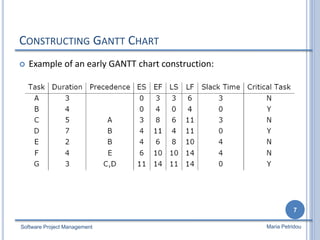
CONSTRUCTING GANTT CHART
 Example of an early GANTT chart construction:
Software Project Management
7
Maria Petridou
CONSTRUCTING GANTT CHART
Step 1. Schedule critical tasks:
Software Project Management
8
Maria Petridou
CONSTRUCTING GANTT CHART
Step 2. Place time windows for non-critical tasks:
Software Project Management
9
Maria Petridou
CONSTRUCTING GANTT CHART
Step 3. Schedule non-critical tasks
Step 4. Indicate precedence relationships:
Software Project Management
10
Maria Petridou
STAFFING & RE-SCHEDULING
 Once the project schedule, (e.g. GANTT chart), has been
constructed, take into account
 available staff hours
 slack times and
 the project schedule
Assign staff and other resources to each activity in the project
Software Project Management
11
Maria Petridou
STAFFING & RE-SCHEDULING
 Resource Smoothing is a technique used to re-allocate
resources and re-schedule activities.
 In resource smoothing, non-critical tasks are re-scheduled
within their time window.
 Staff Utilization:(duration of activity x staff required for each activity,
all added together) / (maximum staff required x duration of project)
Software Project Management
12
Maria Petridou
STAFFING & RE-SCHEDULING
Software Project Management
13
Maria Petridou
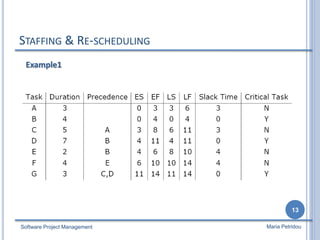
Example1
STAFFING & RE-SCHEDULING
Software Project Management
14
Maria Petridou
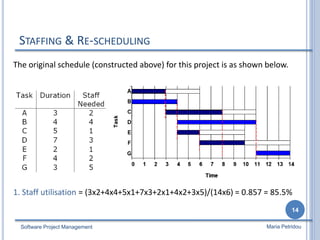
The original schedule (constructed above) for this project is as shown below.
1. Staff utilisation = (3x2+4x4+5x1+7x3+2x1+4x2+3x5)/(14x6) = 0.857 = 85.5%
STAFFING & RE-SCHEDULING
Software Project Management
15
Maria Petridou
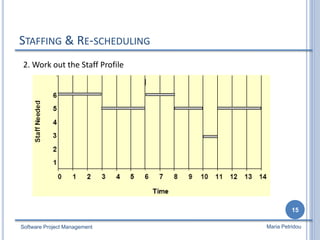
2. Work out the Staff Profile
STAFFING & RE-SCHEDULING
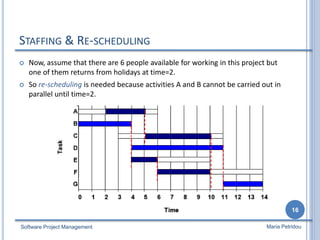
 Now, assume that there are 6 people available for working in this project but
one of them returns from holidays at time=2.
 So re-scheduling is needed because activities A and B cannot be carried out in
parallel until time=2.
Software Project Management
16
Maria Petridou
STAFFING & RE-SCHEDULING
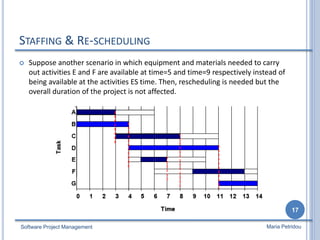
 Suppose another scenario in which equipment and materials needed to carry
out activities E and F are available at time=5 and time=9 respectively instead of
being available at the activities ES time. Then, rescheduling is needed but the
overall duration of the project is not affected.
Software Project Management
17
Maria Petridou
STAFFING & RE-SCHEDULING
 The obvious way to reduce the overall project duration, it is
by reducing the duration of the critical activities.
 Crashing Critical Activities refers to reducing the duration of
a critical activity by allocating more resources to it.
 The risk is that crashing activities may actually reduce
productivity and increase costs.
Software Project Management
18
Maria Petridou
STAFFING & RE-SCHEDULING
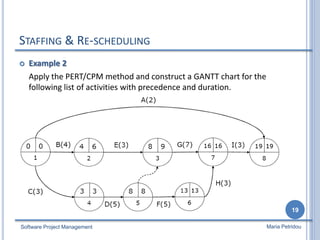
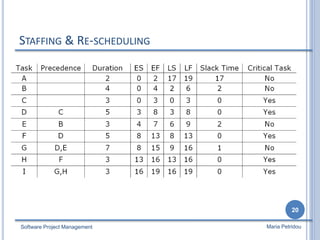
 Example 2
Apply the PERT/CPM method and construct a GANTT chart for the
following list of activities with precedence and duration.
Software Project Management
19
Maria Petridou
STAFFING & RE-SCHEDULING
Software Project Management
20
Maria Petridou
STAFFING & RE-SCHEDULING
Step 1. Schedule critical tasks.
Software Project Management
21
Maria Petridou
STAFFING & RE-SCHEDULING
Step 2. Place time windows for non-critical tasks:
Software Project Management
22
Maria Petridou
STAFFING & RE-SCHEDULING
Step 3. Schedule non-critical tasks:
Step 4. Indicate precedence relationships:
Software Project Management
23
Maria Petridou
PROJECT MANAGEMENT SOFTWARE
 There are a number of project management software tools
available to help in the planning and control of large software
development projects.
 E.g. MS Project is a CASE software tool for Project Management
 This software is available in the main computer room in CSIT
 Most tools include functions to plan, schedule and control, but
decision-making still has to be done by the project manager.
Software Project Management
24
Maria Petridou
PROJECT MANAGEMENT SOFTWARE
 Benefits of project management software:
 Calculate project schedule
 Resource smoothing
 Automatic generation of reports and charts
 Limitations of project management software
 Allocation of resources to tasks
 Estimation of tasks durations
 Make decisions
Reading: (Kendall&Kendall, chapter 3), (Dennis &Wixom, chapter 3).
Software Project Management
25
Maria Petridou

Lecture5---Gantt Chart

  • 1.
    LECTURE 5 –GANTT CHART • GANTT Charts • Constructing GANTT Charts • Staffing and Re-scheduling • Project Management Software Software Project Management Maria Petridou 1
  • 2.
    GANTT CHART  AGANTT chart is a type of bar chart that illustrates a project schedule.  After the PERT/CPM analysis is completed, the following phase is to construct the GANTT chart and then to re- allocate resources and re-schedule if necessary.  GANTT charts have become a common technique for representing the phases and activities of a project work breakdown structure.  It was introduced by Henry Gantt around 1910 – 1915. Software Project Management 2 Maria Petridou
  • 3.
    GANTT CHART Software ProjectManagement 3 Maria Petridou
  • 4.
    GANTT CHART  Characteristics: The bar in each row identifies the corresponding task  The horizontal position of the bar identifies start and end times of the task  Bar length represents the duration of the task  Task durations can be compared easily  Good for allocating resources and re-scheduling  Precedence relationships can be represented using arrows  Critical activities are usually highlighted  Slack times are represented using bars with doted lines  The bar of each activity begins at the activity earliest start time (ES)  The bar of each activity ends at the activity latest finish time (LF). Software Project Management 4 Maria Petridou
  • 5.
    GANTT CHART Software ProjectManagement 5 Maria Petridou  Advantages  Simple  Good visual communication to others  Task durations can be compared easily  Good for scheduling resources  Disadvantages  Dependencies are more difficult to visualise  Minor changes in data can cause major changes in the chart
  • 6.
    CONSTRUCTING GANTT CHART The steps to construct a GANTT chart from the information obtained by PERT/CPM are: 1. Schedule the critical tasks in the correct position. 2. Place the time windows in which the non-critical tasks can be scheduled. 3. Schedule the non-critical tasks according to their earliest starting times. 4. Indicate precedence relationships between tasks. Software Project Management 6 Maria Petridou
  • 7.
    CONSTRUCTING GANTT CHART Example of an early GANTT chart construction: Software Project Management 7 Maria Petridou
  • 8.
    CONSTRUCTING GANTT CHART Step1. Schedule critical tasks: Software Project Management 8 Maria Petridou
  • 9.
    CONSTRUCTING GANTT CHART Step2. Place time windows for non-critical tasks: Software Project Management 9 Maria Petridou
  • 10.
    CONSTRUCTING GANTT CHART Step3. Schedule non-critical tasks Step 4. Indicate precedence relationships: Software Project Management 10 Maria Petridou
  • 11.
    STAFFING & RE-SCHEDULING Once the project schedule, (e.g. GANTT chart), has been constructed, take into account  available staff hours  slack times and  the project schedule Assign staff and other resources to each activity in the project Software Project Management 11 Maria Petridou
  • 12.
    STAFFING & RE-SCHEDULING Resource Smoothing is a technique used to re-allocate resources and re-schedule activities.  In resource smoothing, non-critical tasks are re-scheduled within their time window.  Staff Utilization:(duration of activity x staff required for each activity, all added together) / (maximum staff required x duration of project) Software Project Management 12 Maria Petridou
  • 13.
    STAFFING & RE-SCHEDULING SoftwareProject Management 13 Maria Petridou Example1
  • 14.
    STAFFING & RE-SCHEDULING SoftwareProject Management 14 Maria Petridou The original schedule (constructed above) for this project is as shown below. 1. Staff utilisation = (3x2+4x4+5x1+7x3+2x1+4x2+3x5)/(14x6) = 0.857 = 85.5%
  • 15.
    STAFFING & RE-SCHEDULING SoftwareProject Management 15 Maria Petridou 2. Work out the Staff Profile
  • 16.
    STAFFING & RE-SCHEDULING Now, assume that there are 6 people available for working in this project but one of them returns from holidays at time=2.  So re-scheduling is needed because activities A and B cannot be carried out in parallel until time=2. Software Project Management 16 Maria Petridou
  • 17.
    STAFFING & RE-SCHEDULING Suppose another scenario in which equipment and materials needed to carry out activities E and F are available at time=5 and time=9 respectively instead of being available at the activities ES time. Then, rescheduling is needed but the overall duration of the project is not affected. Software Project Management 17 Maria Petridou
  • 18.
    STAFFING & RE-SCHEDULING The obvious way to reduce the overall project duration, it is by reducing the duration of the critical activities.  Crashing Critical Activities refers to reducing the duration of a critical activity by allocating more resources to it.  The risk is that crashing activities may actually reduce productivity and increase costs. Software Project Management 18 Maria Petridou
  • 19.
    STAFFING & RE-SCHEDULING Example 2 Apply the PERT/CPM method and construct a GANTT chart for the following list of activities with precedence and duration. Software Project Management 19 Maria Petridou
  • 20.
    STAFFING & RE-SCHEDULING SoftwareProject Management 20 Maria Petridou
  • 21.
    STAFFING & RE-SCHEDULING Step1. Schedule critical tasks. Software Project Management 21 Maria Petridou
  • 22.
    STAFFING & RE-SCHEDULING Step2. Place time windows for non-critical tasks: Software Project Management 22 Maria Petridou
  • 23.
    STAFFING & RE-SCHEDULING Step3. Schedule non-critical tasks: Step 4. Indicate precedence relationships: Software Project Management 23 Maria Petridou
  • 24.
    PROJECT MANAGEMENT SOFTWARE There are a number of project management software tools available to help in the planning and control of large software development projects.  E.g. MS Project is a CASE software tool for Project Management  This software is available in the main computer room in CSIT  Most tools include functions to plan, schedule and control, but decision-making still has to be done by the project manager. Software Project Management 24 Maria Petridou
  • 25.
    PROJECT MANAGEMENT SOFTWARE Benefits of project management software:  Calculate project schedule  Resource smoothing  Automatic generation of reports and charts  Limitations of project management software  Allocation of resources to tasks  Estimation of tasks durations  Make decisions Reading: (Kendall&Kendall, chapter 3), (Dennis &Wixom, chapter 3). Software Project Management 25 Maria Petridou