Project Management Orientation Program  Project Planning & Scheduling Basics Sadhanandavel R Dheenadayalan S
Projects happen in two ways:  Planned and then executed or  b) Executed, stopped, planned and then executed.
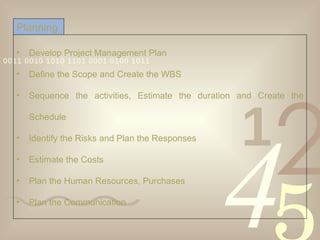
Develop Project Management Plan Define the Scope and Create the WBS Sequence the activities, Estimate the duration and Create the Schedule Identify the Risks and Plan the Responses Estimate the Costs Plan the Human Resources, Purchases Plan the Communication  Planning
Describes the Project Management Processes used by the Project Team  If the processes differ from Organization’s standards, the details of Project Specific Processes Project Team Structure Roles and Responsibilities of Project Team Communication needs – Status Reports, Review Meetings, Escalation Matrix PLANNING >   Project Management Plan
Defines the Project Life Cycle Describes management of:  Risk – Risk Dimensions, Approach to Risk Management Change Control – Change Control Process Configuration – Details of version control mechanisms  Quality – Project Metrics; Quality Audits PLANNING >   Project Management Plan
Integrates all the plans in one place Subsidiary plans are developed separately also PMP is different from Schedule Some plans include Earned Value Management PLANNING >   Project Management Plan
Product Scope – The functions and features of the product Project Scope – The work associated in the delivery of the product of the project with specified Methods for defining scope vary from industry to industry In Software, product scope is defined in SRS and Project Scope is defined in Project Plan, WBS Document Assumptions/Constraints Planning >   Scope Definition
Define the Deliverables of the Project – SRS, Project Plan, Design Specs, Test Plans, Test Cases, User Documents, Tested Product etc. Define the related work -  Deployment on Client Servers, User Training, Online Support etc. Document the Assumptions/Constraints Planning > Scope Definition >   Project Scope
Define the Functional and Non-functional requirements – Use Cases, Screen Shots, Process Flow Charts etc Define the Technical Requirements – Deployment Architecture, Technology used, License, Bandwidth requirements, Disaster Recovery Plan etc. A separate Technical Requirements Document may be prepared Document the assumptions, constraints Planning > Scope Definition >   Product Scope
“ Assumptions are important sources for Risk Identification!”
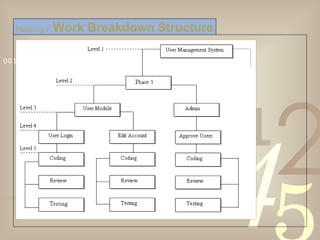
Represents the scope of the project into smaller, manageable hierarchy of components Enables allocation of resources and assignment of responsibilities at granular levels Improves the accuracy of Cost Estimation  Improves the Cost, Performance Measurement & Control Planning >   Work Breakdown Structure
Planning >   Work Breakdown Structure
Start at the project goal, and keep breaking down activities until you get to the smallest task Involve the team for identifying the tasks or  The Sub team approach (agree on level 1 activities, then have sub teams tackle each activity in detail; then check for duplication and missed tasks) Planning > WBS >   Top-down Approach
Agree on the top level activities using the top-down approach Then break into teams and brainstorm all the activities you think are within that overall activity Organize the activities, and check for missed tasks and redundancies Planning > WBS >   Bottom-up Approach
The top-down approach is more effective for generating a detailed WBS
The levels of hierarchy varies from project to project The division of levels can be based on Product Features (e.g. User Module), Process (e.g. Requirements)  The lowest level of the WBS contains items for which the cost can be tracked The items at the lowest level are called Work Packages or Terminal Elements Planning > WBS >   Levels of Hierarchy
Do not make it too detailed – Results Micro-Management Do not make it less detailed too – Tasks too large to manage 8/80 Rule – Thumb Rule says Work Package should be more than 8 and less than 80 hours in duration  Consider appropriate milestones as Control points as well as for Status Reporting Maintain Standard WBS for the organization based on project types Planning > WBS >   Points To Ponder
Decomposition – The process of arriving at components for WBS; Division of project scope into manageable components/activities to the level of work packages Rolling Wave Planning – The process of defining the tasks at a higher level (due to lack of information) and elaborating them later based on the clarification of details Planning > WBS >   Terminology
Develop the list of project activities (WBS/Activity List) Sequence the list of project activities Determine the relationships between activities Estimate the resource requirements for each activity Estimate the duration for each activity Determine the project duration (start and completion dates) Scheduling >   Steps Involved
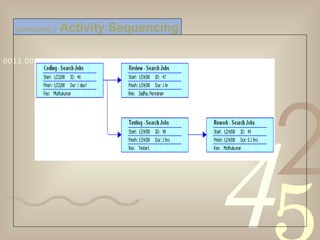
Scheduling >   Activity Sequencing
The resource related dependencies and constraints should not be considered for sequencing the activities
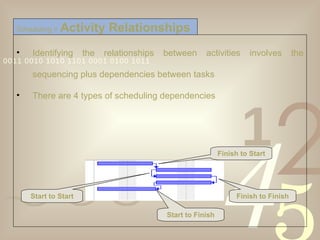
Identifying the relationships between activities involves the sequencing plus dependencies between tasks  There are 4 types of scheduling dependencies Scheduling >   Activity Relationships Finish to Start Start to Start Finish to Finish Start to Finish
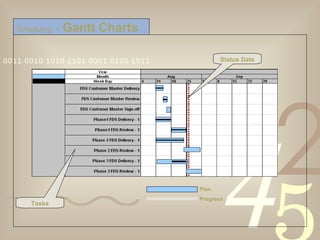
Two widely used diagramming techniques Bar / Gantt Charts Schedule and progress graphically depicted on a single chart Simple and most used scheduling diagram Good for Status Reporting  Network Diagrams Identifies activities that control the project length Clearly shows the task dependencies Shows available float for non-critical activities Scheduling  >   Schedule Diagrams
Scheduling  >   Gantt Charts Status Date Tasks Plan Progress
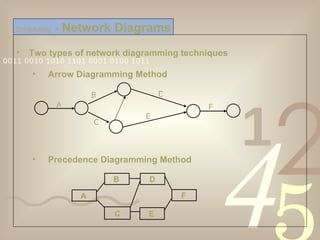
Two types of network diagramming techniques Arrow Diagramming Method  Precedence Diagramming Method  Scheduling  >   Network Diagrams A B C D E F C E F A B D
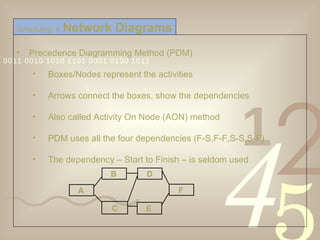
Precedence Diagramming Method (PDM) Boxes/Nodes represent the activities Arrows connect the boxes, show the dependencies Also called Activity On Node (AON) method PDM uses all the four dependencies (F-S,F-F,S-S,S-F) The dependency – Start to Finish – is seldom used Scheduling  >   Network Diagrams C E F A B D
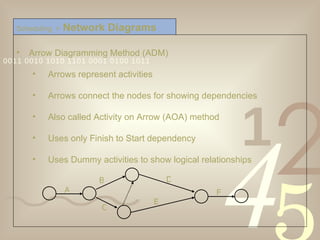
Arrow Diagramming Method (ADM) Arrows represent activities  Arrows connect the nodes for showing dependencies Also called Activity on Arrow (AOA) method Uses only Finish to Start dependency Uses Dummy activities to show logical relationships Scheduling  >   Network Diagrams A B C D E F
Estimate the resource requirement for each activity The information from previous projects will be helpful The dependency between tasks should be considered for estimating the resources Scheduling  >   Resource Estimation
People who are familiar with the work can estimate better Organizational Process Assets (Historical Info, Productivity Data etc.) will be helpful as a reference Estimation will be more accurate if it is obtained from more than one source and averaged  Consider the availability of a resource for a task. If the resource is available only 50%, the task will take twice the duration Scheduling  >   Duration Estimation
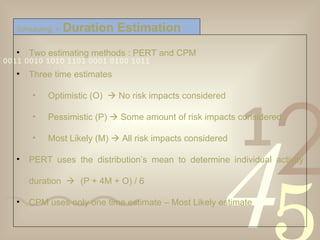
Two estimating methods : PERT and CPM  Three time estimates  Optimistic (O)    No risk impacts considered Pessimistic (P)    Some amount of risk impacts considered Most Likely (M)    All risk impacts considered PERT uses the distribution’s mean to determine individual activity duration   (P + 4M + O) / 6 CPM uses only one time estimate – Most Likely estimate Scheduling  >   Duration Estimation
A Milestone is an event specifically designated to represent some meaningful or specified goal that shows progress  Good Reference for Management Reporting Types of Milestones Key Milestones – Phase Gates Schedule Milestones – Any significant event in the schedule Scheduling  >   Milestones
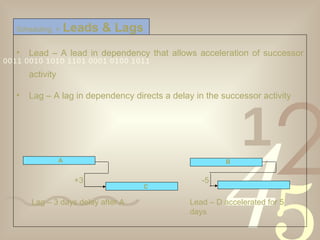
Lead – A lead in dependency that allows acceleration of successor activity Lag – A lag in dependency directs a delay in the successor activity Scheduling  >   Leads & Lags Lag – 3 days delay after A Lead – D accelerated for 5 days -5 B +3 A C
The path in a project with the longest duration.  The duration of the Critical Path is earliest completion date for the project Critical Path Method (CPM) Forward Pass calculates  Early Start and Early Finish  dates Backward Pass calculates  Late Start and Late Finish  dates  Scheduling  >   Critical Path
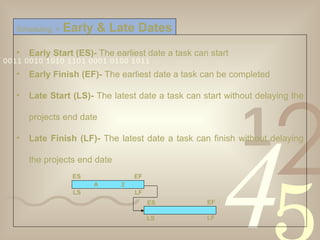
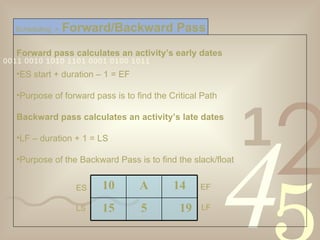
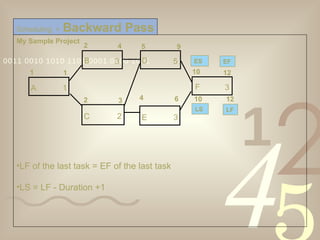
Early Start (ES)-  The earliest date a task can start Early Finish (EF)-  The earliest date a task can be completed Late Start (LS)-  The latest date a task can start without delaying the projects end date Late Finish (LF)-  The latest date a task can finish without delaying the projects end date Scheduling  >   Early & Late Dates A  2 ES EF ES EF LS LF LS LF
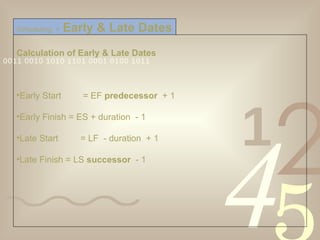
Calculation of Early & Late Dates Early Start  = EF  predecessor   + 1 Early Finish = ES + duration  - 1 Late Start = LF  - duration  + 1 Late Finish = LS  successor   - 1 Scheduling  >   Early & Late Dates
Forward pass calculates an activity’s early dates ES start + duration – 1 = EF Purpose of forward pass is to find the Critical Path Backward pass calculates an activity’s late dates LF – duration + 1 = LS Purpose of the Backward Pass is to find the slack/float Scheduling  >   Forward/Backward Pass ES EF LS LF 10 A 14 15 5 19
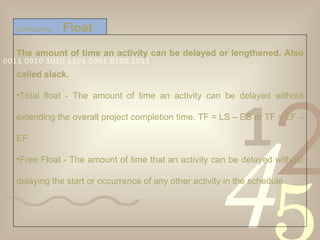
The amount of time an activity can be delayed or lengthened. Also called slack. Total float - The amount of time an activity can be delayed without extending the overall project completion time. TF = LS – ES or TF = LF – EF Free Float - The amount of time that an activity can be delayed without delaying the start or occurrence of any other activity in the schedule Scheduling  >   Float
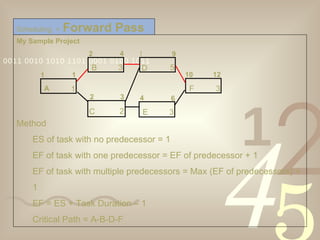
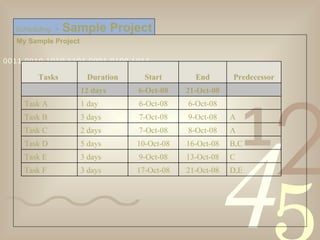
My Sample Project Scheduling  >   Sample Project Tasks  Duration Start End Predecessor 12 days 6-Oct-08 21-Oct-08   Task A 1 day 6-Oct-08 6-Oct-08   Task B 3 days 7-Oct-08 9-Oct-08 A Task C 2 days 7-Oct-08 8-Oct-08 A Task D 5 days 10-Oct-08 16-Oct-08 B,C Task E 3 days 9-Oct-08 13-Oct-08 C Task F 3 days 17-Oct-08 21-Oct-08 D,E
My Sample Project Method ES of task with no predecessor = 1 EF of task with one predecessor = EF of predecessor + 1 EF of task with multiple predecessors = Max (EF of predecessors) + 1 EF = ES + Task Duration – 1 Critical Path = A-B-D-F  Scheduling  >   Forward Pass 2 3 C 2 4 6 E 3 10 12 F 3 1 1 A 1 2 4 B 3 5 9 D 5
My Sample Project LF of the last task = EF of the last task  LS = LF - Duration +1 Scheduling  >   Backward Pass 2 3 C 2 4 6 E 3 10 12 F 3 1 1 A 1 2 4 B 3 5 9 D 5 LS 12 10 LF ES EF
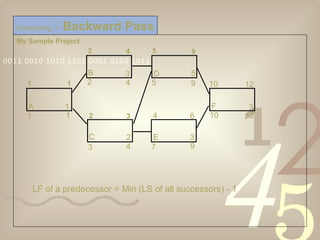
My Sample Project LF of a predecessor = Min (LS of all successors) - 1 Scheduling  >   Backward Pass 9 7 4 3 1 1 A 1 2 4 B 3 5 9 D 5 2 3 C 2 4 6 E 3 10 12 F 3 10 12 9 5 4 2 1 1
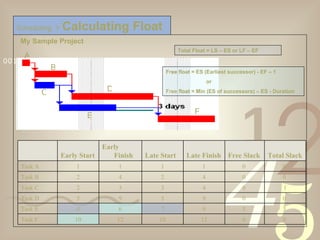
Scheduling  >   Calculating Float Total Float = LS – ES or LF – EF Free float = ES (Earliest successor) - EF – 1 or Free float = Min (ES of successors) – ES - Duration My Sample Project A B C D E F   Early Start Early Finish Late Start Late Finish Free Slack Total Slack Task A 1 1 1 1 0  0  Task B 2 4 2 4 0  0  Task C 2 3 3 4 0  1 Task D 5 9 5 9 0  0  Task E 4 6 7 9 3  3  Task F 10 12 10 12 0  0
Questions…?
Thank You

Project Planning Scheduling

  • 1.
    Project Management OrientationProgram Project Planning & Scheduling Basics Sadhanandavel R Dheenadayalan S
  • 2.
    Projects happen intwo ways: Planned and then executed or b) Executed, stopped, planned and then executed.
  • 3.
    Develop Project ManagementPlan Define the Scope and Create the WBS Sequence the activities, Estimate the duration and Create the Schedule Identify the Risks and Plan the Responses Estimate the Costs Plan the Human Resources, Purchases Plan the Communication Planning
  • 4.
    Describes the ProjectManagement Processes used by the Project Team If the processes differ from Organization’s standards, the details of Project Specific Processes Project Team Structure Roles and Responsibilities of Project Team Communication needs – Status Reports, Review Meetings, Escalation Matrix PLANNING > Project Management Plan
  • 5.
    Defines the ProjectLife Cycle Describes management of: Risk – Risk Dimensions, Approach to Risk Management Change Control – Change Control Process Configuration – Details of version control mechanisms Quality – Project Metrics; Quality Audits PLANNING > Project Management Plan
  • 6.
    Integrates all theplans in one place Subsidiary plans are developed separately also PMP is different from Schedule Some plans include Earned Value Management PLANNING > Project Management Plan
  • 7.
    Product Scope –The functions and features of the product Project Scope – The work associated in the delivery of the product of the project with specified Methods for defining scope vary from industry to industry In Software, product scope is defined in SRS and Project Scope is defined in Project Plan, WBS Document Assumptions/Constraints Planning > Scope Definition
  • 8.
    Define the Deliverablesof the Project – SRS, Project Plan, Design Specs, Test Plans, Test Cases, User Documents, Tested Product etc. Define the related work - Deployment on Client Servers, User Training, Online Support etc. Document the Assumptions/Constraints Planning > Scope Definition > Project Scope
  • 9.
    Define the Functionaland Non-functional requirements – Use Cases, Screen Shots, Process Flow Charts etc Define the Technical Requirements – Deployment Architecture, Technology used, License, Bandwidth requirements, Disaster Recovery Plan etc. A separate Technical Requirements Document may be prepared Document the assumptions, constraints Planning > Scope Definition > Product Scope
  • 10.
    “ Assumptions areimportant sources for Risk Identification!”
  • 11.
    Represents the scopeof the project into smaller, manageable hierarchy of components Enables allocation of resources and assignment of responsibilities at granular levels Improves the accuracy of Cost Estimation Improves the Cost, Performance Measurement & Control Planning > Work Breakdown Structure
  • 12.
    Planning > Work Breakdown Structure
  • 13.
    Start at theproject goal, and keep breaking down activities until you get to the smallest task Involve the team for identifying the tasks or The Sub team approach (agree on level 1 activities, then have sub teams tackle each activity in detail; then check for duplication and missed tasks) Planning > WBS > Top-down Approach
  • 14.
    Agree on thetop level activities using the top-down approach Then break into teams and brainstorm all the activities you think are within that overall activity Organize the activities, and check for missed tasks and redundancies Planning > WBS > Bottom-up Approach
  • 15.
    The top-down approachis more effective for generating a detailed WBS
  • 16.
    The levels ofhierarchy varies from project to project The division of levels can be based on Product Features (e.g. User Module), Process (e.g. Requirements) The lowest level of the WBS contains items for which the cost can be tracked The items at the lowest level are called Work Packages or Terminal Elements Planning > WBS > Levels of Hierarchy
  • 17.
    Do not makeit too detailed – Results Micro-Management Do not make it less detailed too – Tasks too large to manage 8/80 Rule – Thumb Rule says Work Package should be more than 8 and less than 80 hours in duration Consider appropriate milestones as Control points as well as for Status Reporting Maintain Standard WBS for the organization based on project types Planning > WBS > Points To Ponder
  • 18.
    Decomposition – Theprocess of arriving at components for WBS; Division of project scope into manageable components/activities to the level of work packages Rolling Wave Planning – The process of defining the tasks at a higher level (due to lack of information) and elaborating them later based on the clarification of details Planning > WBS > Terminology
  • 19.
    Develop the listof project activities (WBS/Activity List) Sequence the list of project activities Determine the relationships between activities Estimate the resource requirements for each activity Estimate the duration for each activity Determine the project duration (start and completion dates) Scheduling > Steps Involved
  • 20.
    Scheduling > Activity Sequencing
  • 21.
    The resource relateddependencies and constraints should not be considered for sequencing the activities
  • 22.
    Identifying the relationshipsbetween activities involves the sequencing plus dependencies between tasks There are 4 types of scheduling dependencies Scheduling > Activity Relationships Finish to Start Start to Start Finish to Finish Start to Finish
  • 23.
    Two widely useddiagramming techniques Bar / Gantt Charts Schedule and progress graphically depicted on a single chart Simple and most used scheduling diagram Good for Status Reporting Network Diagrams Identifies activities that control the project length Clearly shows the task dependencies Shows available float for non-critical activities Scheduling > Schedule Diagrams
  • 24.
    Scheduling > Gantt Charts Status Date Tasks Plan Progress
  • 25.
    Two types ofnetwork diagramming techniques Arrow Diagramming Method Precedence Diagramming Method Scheduling > Network Diagrams A B C D E F C E F A B D
  • 26.
    Precedence Diagramming Method(PDM) Boxes/Nodes represent the activities Arrows connect the boxes, show the dependencies Also called Activity On Node (AON) method PDM uses all the four dependencies (F-S,F-F,S-S,S-F) The dependency – Start to Finish – is seldom used Scheduling > Network Diagrams C E F A B D
  • 27.
    Arrow Diagramming Method(ADM) Arrows represent activities Arrows connect the nodes for showing dependencies Also called Activity on Arrow (AOA) method Uses only Finish to Start dependency Uses Dummy activities to show logical relationships Scheduling > Network Diagrams A B C D E F
  • 28.
    Estimate the resourcerequirement for each activity The information from previous projects will be helpful The dependency between tasks should be considered for estimating the resources Scheduling > Resource Estimation
  • 29.
    People who arefamiliar with the work can estimate better Organizational Process Assets (Historical Info, Productivity Data etc.) will be helpful as a reference Estimation will be more accurate if it is obtained from more than one source and averaged Consider the availability of a resource for a task. If the resource is available only 50%, the task will take twice the duration Scheduling > Duration Estimation
  • 30.
    Two estimating methods: PERT and CPM Three time estimates Optimistic (O)  No risk impacts considered Pessimistic (P)  Some amount of risk impacts considered Most Likely (M)  All risk impacts considered PERT uses the distribution’s mean to determine individual activity duration  (P + 4M + O) / 6 CPM uses only one time estimate – Most Likely estimate Scheduling > Duration Estimation
  • 31.
    A Milestone isan event specifically designated to represent some meaningful or specified goal that shows progress Good Reference for Management Reporting Types of Milestones Key Milestones – Phase Gates Schedule Milestones – Any significant event in the schedule Scheduling > Milestones
  • 32.
    Lead – Alead in dependency that allows acceleration of successor activity Lag – A lag in dependency directs a delay in the successor activity Scheduling > Leads & Lags Lag – 3 days delay after A Lead – D accelerated for 5 days -5 B +3 A C
  • 33.
    The path ina project with the longest duration. The duration of the Critical Path is earliest completion date for the project Critical Path Method (CPM) Forward Pass calculates Early Start and Early Finish dates Backward Pass calculates Late Start and Late Finish dates Scheduling > Critical Path
  • 34.
    Early Start (ES)- The earliest date a task can start Early Finish (EF)- The earliest date a task can be completed Late Start (LS)- The latest date a task can start without delaying the projects end date Late Finish (LF)- The latest date a task can finish without delaying the projects end date Scheduling > Early & Late Dates A 2 ES EF ES EF LS LF LS LF
  • 35.
    Calculation of Early& Late Dates Early Start = EF predecessor + 1 Early Finish = ES + duration - 1 Late Start = LF - duration + 1 Late Finish = LS successor - 1 Scheduling > Early & Late Dates
  • 36.
    Forward pass calculatesan activity’s early dates ES start + duration – 1 = EF Purpose of forward pass is to find the Critical Path Backward pass calculates an activity’s late dates LF – duration + 1 = LS Purpose of the Backward Pass is to find the slack/float Scheduling > Forward/Backward Pass ES EF LS LF 10 A 14 15 5 19
  • 37.
    The amount oftime an activity can be delayed or lengthened. Also called slack. Total float - The amount of time an activity can be delayed without extending the overall project completion time. TF = LS – ES or TF = LF – EF Free Float - The amount of time that an activity can be delayed without delaying the start or occurrence of any other activity in the schedule Scheduling > Float
  • 38.
    My Sample ProjectScheduling > Sample Project Tasks  Duration Start End Predecessor 12 days 6-Oct-08 21-Oct-08   Task A 1 day 6-Oct-08 6-Oct-08   Task B 3 days 7-Oct-08 9-Oct-08 A Task C 2 days 7-Oct-08 8-Oct-08 A Task D 5 days 10-Oct-08 16-Oct-08 B,C Task E 3 days 9-Oct-08 13-Oct-08 C Task F 3 days 17-Oct-08 21-Oct-08 D,E
  • 39.
    My Sample ProjectMethod ES of task with no predecessor = 1 EF of task with one predecessor = EF of predecessor + 1 EF of task with multiple predecessors = Max (EF of predecessors) + 1 EF = ES + Task Duration – 1 Critical Path = A-B-D-F Scheduling > Forward Pass 2 3 C 2 4 6 E 3 10 12 F 3 1 1 A 1 2 4 B 3 5 9 D 5
  • 40.
    My Sample ProjectLF of the last task = EF of the last task LS = LF - Duration +1 Scheduling > Backward Pass 2 3 C 2 4 6 E 3 10 12 F 3 1 1 A 1 2 4 B 3 5 9 D 5 LS 12 10 LF ES EF
  • 41.
    My Sample ProjectLF of a predecessor = Min (LS of all successors) - 1 Scheduling > Backward Pass 9 7 4 3 1 1 A 1 2 4 B 3 5 9 D 5 2 3 C 2 4 6 E 3 10 12 F 3 10 12 9 5 4 2 1 1
  • 42.
    Scheduling > Calculating Float Total Float = LS – ES or LF – EF Free float = ES (Earliest successor) - EF – 1 or Free float = Min (ES of successors) – ES - Duration My Sample Project A B C D E F   Early Start Early Finish Late Start Late Finish Free Slack Total Slack Task A 1 1 1 1 0 0 Task B 2 4 2 4 0 0 Task C 2 3 3 4 0 1 Task D 5 9 5 9 0 0 Task E 4 6 7 9 3 3 Task F 10 12 10 12 0 0
  • 43.
  • 44.