SUBMITTED TO
SUBMITTED TO
Dr. A. Bhavani.M.Sc(N),Ph.D,
Tutor in nursing
Government college of nursing,
Cuddalore.
SUBMITTED BY
S.P.Mahalakshmi,
M.Sc(n) II Year,
Government college of nursing,
Cuddalore.
 Nowadays Healthcare is being considered as an
industry.
 The optimization of resources and continuous
quality improvement application of network
analysis to hospital processes is must.
 A network is a graphic plan of all the activities
to be completed in order to reach to the end
objectives.
 There are three major techniques for this
analysis. Gantt chart, milestone budgeting and
Program Evaluation and Review Technique
(PERT) and critical path method (CPM).
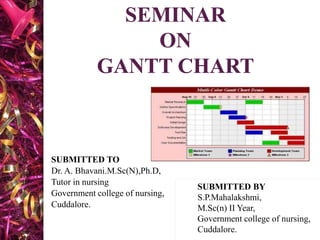
 A Gantt chart is a horizontal bar chart
developed as a production control tool in 1910
by Henry L Gantt, an American engineer and
social scientist.
 A Gantt chart provides a graphical illustration
of a schedule that helps to plan, coordinate and
track specific tasks in a project.
 Project usually involves more than one person
or more than one step poses many questions
and the answer is the time oriented diagram
(i.e) the Gantt chart.
 Karol Adamiecki -1896 – Harmonogram.
 1910-1915 Henry Gantt devised his own version of
the chart.
 The earliest Gantt charts were drawn on paper.
 In the 1980s personal computers allowed widespread
creation of complex and elaborate Gantt chart.
 At the end of 1990 Gantt chart became a common
feature of web-based applications by 2012 almost all
Gantt charts were made by software which can easily
adjust to schedule changes.
 1999 Gantt charts were identified as one of the most
widely used management tools for project scheduling
and control.
 PLANNING
planning is the process of determining the objectives
of administrative effort and devising the means
calculated to achieve them.
- Millet
 GANTT CHART
Gantt chart is a type of bar chart that illustrates a
project schedule
-Jogindra Vati
It is defined as a graphical device that illustrates the
tasks, machines, personnel and resources used to
complete your task. It is always done on a calendar
oriented grid.
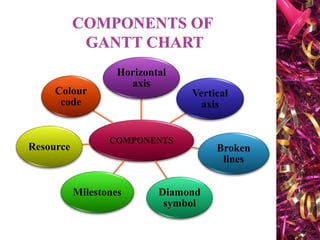
COMPONENTS
Horizontal
axis
Vertical
axis
Broken
lines
Diamond
symbol
Milestones
Resource
Colour
code
 LOAD CHART
 Schematic and graphic device to indicate the
amount of authorized work yet to be performed
by a machine, a group or any other producing
unit in a factory.
 SCHEDULE CHART
 Schedule chart focuses on that activity
sequence and timing for various components of
a job it can also be used to monitor the actual
progress of your job in relation to the plan.
 HORIZONTAL AXIS
Represents time scale expressed as absolute time
from the project start to its end. It indicates time
needed to do the project.
 VERTICAL AXIS
Used to represent the present point in time vertical
lines are indicated to denote progress and
completion. It helps to understand progress and
end of the project schedule.
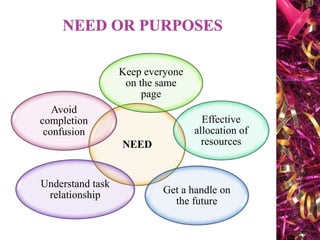
 BROKEN LINES indicates gap or slippage
times during the project schedule.
 DIAMOND SYMBOL indicates rescheduled
work.
 MILESTONES represented in the chart.
 RESOURCE allocation can be specified for
each task.
 COLOR CODE used for certain specific task.
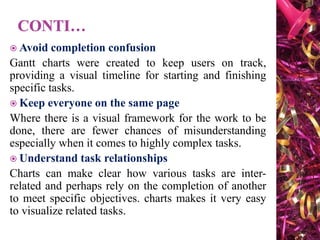
NEED
Keep everyone
on the same
page
Effective
allocation of
resources
Get a handle on
the future
Understand task
relationship
Avoid
completion
confusion
 Avoid completion confusion
Gantt charts were created to keep users on track,
providing a visual timeline for starting and finishing
specific tasks.
 Keep everyone on the same page
Where there is a visual framework for the work to be
done, there are fewer chances of misunderstanding
especially when it comes to highly complex tasks.
 Understand task relationships
Charts can make clear how various tasks are inter-
related and perhaps rely on the completion of another
to meet specific objectives. charts makes it very easy
to visualize related tasks.
 EFFECTIVELYALLOCATE RESOURCES
The more closely the chart is followed the better
chance there is of keeping project costs within
budget. While also better assuring on-time
completion.
 GET A HANDLE ON THE FUTURE
It helps decision makers look further ahead to ensure
each given project is working toward the
achievement of the organization’s long term strategic
objectives.
 To show the current schedule status.
 To measure task duration in the project.
 To represent cost, time and scope of the
project.
 A useful tool for planning and scheduling
projects.
 To plan how long a project should take.
 Lays out the order in which the tasks need to
be carried out.
 Modern Gantt chart software provides
dependencies between tasks.
 To monitor your project’s progress.
 To visualize immediately what should have
been achieved at any point in time.
 To assist in taking remedial action to bring the
project back on course, if required.
 FORWARD SCHEDULING
Here start from the beginning of the project and
work your way down to the deadline.
 BACKWARD SCHEDULING
Here start from the deadline and then logically
work your way up to the start.
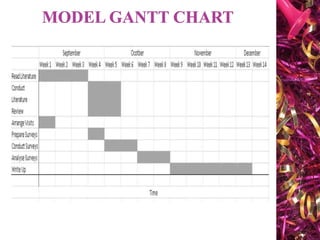
 The bar in each row identifies the
corresponding task.
 The horizontal position of the bar identifies
start and end times of the task.
 Bar length represents the duration of the task.
 Task durations can be compared easily.
 Good for allocating resources and re-
scheduling. Precedence relationships can be
represented using arrows.
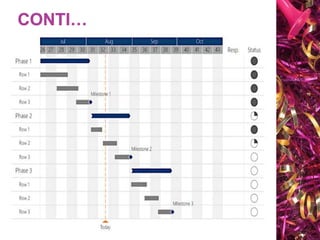
 Critical activities are usually highlighted.
 Slap times are represented using bars with
dotted lines.
 The bar of each activity begins at the activity
earliest start times.
 The bar of each activity inside the activity
latest finish time.
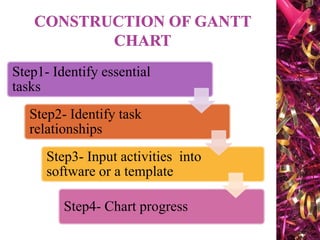
 Gather data.
 Analyze data.
 Develop a plan.
 Implement the plan.
 Evaluation, feedback and modification.
 Application of this controlling process by nurse
managers would be specific to the project or
program.
 The nurse manager’s goal is to complete each
activity or phase on or before the projected date.
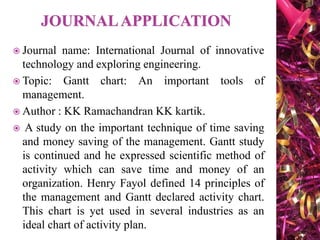
Step1- Identify essential
tasks
Step2- Identify task
relationships
Step3- Input activities into
software or a template
Step4- Chart progress
 Gantt charts don’t give useful information
unless they include all of the activities needed
for the project to be completed.
 So to start , list all of these activities . use a
work breakdown structure if you need to
establish what the tasks are.
 Then for each tasks, note its earlier start date
and its estimated duration.
 The chart shows the relationship between the
tasks in your project.
 Some tasks will need to be completed before
you can start the next one, and others can’t end
until proceeding once have ended.
 For example, if you are creating a brochure you
need to finish the design before you can send it
to print.
 This dependent activities are called
“sequential” or “linear” tasks other tasks will
be “parallel”.
 Draw your charts by hand or use specialist
software, such as Gantto, Matchware or
Microsoft project.
 Some of this tools are cloud - based, meaning
that you and your team can access the
document simultaneously from any location.
 This helps a lot when you are discussing
optimizing and reporting on a project.
 As project moves along it will evolve
 Update your chart to reflect changes as soon as
they occur.
 This will help you to keep your plans your
team and your sponsors up to date.
 For example if quality assurance of core
modules revealed a problem then you may
need to delay training, and halt development of
the management information system until the
issue is resolved.
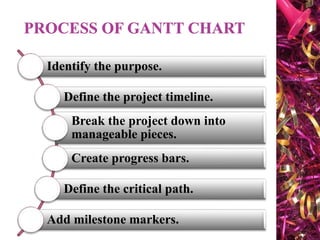
Identify the purpose.
Define the project timeline.
Break the project down into
manageable pieces.
Create progress bars.
Define the critical path.
Add milestone markers.
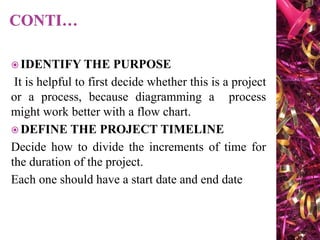
 IDENTIFY THE PURPOSE
It is helpful to first decide whether this is a project
or a process, because diagramming a process
might work better with a flow chart.
 DEFINE THE PROJECT TIMELINE
Decide how to divide the increments of time for
the duration of the project.
Each one should have a start date and end date
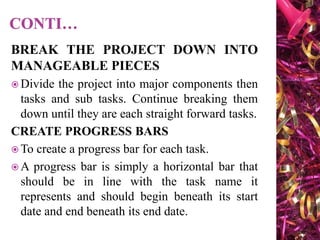
BREAK THE PROJECT DOWN INTO
MANAGEABLE PIECES
 Divide the project into major components then
tasks and sub tasks. Continue breaking them
down until they are each straight forward tasks.
CREATE PROGRESS BARS
 To create a progress bar for each task.
 A progress bar is simply a horizontal bar that
should be in line with the task name it
represents and should begin beneath its start
date and end beneath its end date.
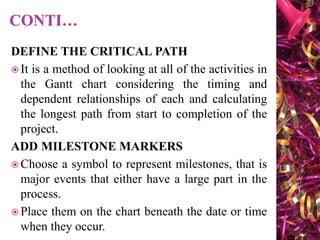
DEFINE THE CRITICAL PATH
 It is a method of looking at all of the activities in
the Gantt chart considering the timing and
dependent relationships of each and calculating
the longest path from start to completion of the
project.
ADD MILESTONE MARKERS
 Choose a symbol to represent milestones, that is
major events that either have a large part in the
process.
 Place them on the chart beneath the date or time
when they occur.
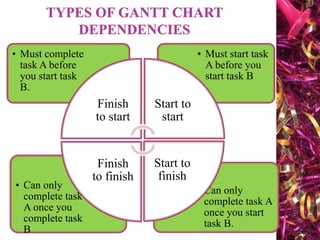
• Can only
complete task A
once you start
task B.
• Can only
complete task
A once you
complete task
B
• Must start task
A before you
start task B
• Must complete
task A before
you start task
B.
Finish
to start
Start to
start
Start to
finish
Finish
to finish
Once the project schedule has been constructed,
take into account,
 Available staff hours
 Slack times &
 Project schedule.
Resource smoothing is a technique used to
reallocate resources and reschedule activities.
In resource smoothing non - critical tasks are
rescheduled within their time window.
 Helps in planning and monitoring the work of
project.
 Time is explicitly expressed in the chart.
 All tasks are visible at a glance in relation to other.
 Deadlines are depicted in the chart.
 Excellent tool to communicate wide population.
 At a single glance work done can be analyzed
quickly through the work breakdown structure.
 Used as a reporting tool for large projects.
 Gives cost, time & scope of the project.
 It cannot effortlessly display more than 30
activities.
 It is valuable only for short projects.
 Chart can communicate only little information at a
time.
 Magnitude behind the schedule is easily
miscommunicated, since it does not represent full
size of the project.
 It does not explain the reasoning behind the chosen
duration of each activity.
 It do not consider project costs or resources.
 Difficult to update manually.
 Gantt chart provide a visual and organized way
to plan, schedule and track tasks within a
project.
 They enhance project management efficiency by
clearly displaying timelines, dependencies and
progress, fostering better communication among
team members.
 Integrating Gantt charts can lead to improved
project coordination and successful execution.
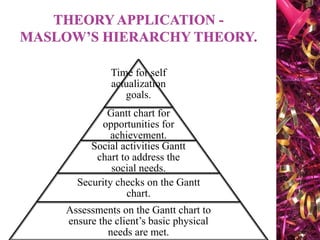
Time for self
actualization
goals.
Gantt chart for
opportunities for
achievement.
Social activities Gantt
chart to address the
social needs.
Security checks on the Gantt
chart.
Assessments on the Gantt chart to
ensure the client’s basic physical
needs are met.
 Journal name: International Journal of innovative
technology and exploring engineering.
 Topic: Gantt chart: An important tools of
management.
 Author : KK Ramachandran KK kartik.
 A study on the important technique of time saving
and money saving of the management. Gantt study
is continued and he expressed scientific method of
activity which can save time and money of an
organization. Henry Fayol defined 14 principles of
the management and Gantt declared activity chart.
This chart is yet used in several industries as an
ideal chart of activity plan.
 Write an assignment on Preparation of Gantt
chart for your research study.
GANTT CHART nursing Management for Msc nursing

GANTT CHART nursing Management for Msc nursing

  • 2.
    SUBMITTED TO SUBMITTED TO Dr.A. Bhavani.M.Sc(N),Ph.D, Tutor in nursing Government college of nursing, Cuddalore. SUBMITTED BY S.P.Mahalakshmi, M.Sc(n) II Year, Government college of nursing, Cuddalore.
  • 3.
     Nowadays Healthcareis being considered as an industry.  The optimization of resources and continuous quality improvement application of network analysis to hospital processes is must.  A network is a graphic plan of all the activities to be completed in order to reach to the end objectives.  There are three major techniques for this analysis. Gantt chart, milestone budgeting and Program Evaluation and Review Technique (PERT) and critical path method (CPM).
  • 4.
     A Ganttchart is a horizontal bar chart developed as a production control tool in 1910 by Henry L Gantt, an American engineer and social scientist.  A Gantt chart provides a graphical illustration of a schedule that helps to plan, coordinate and track specific tasks in a project.  Project usually involves more than one person or more than one step poses many questions and the answer is the time oriented diagram (i.e) the Gantt chart.
  • 5.
     Karol Adamiecki-1896 – Harmonogram.  1910-1915 Henry Gantt devised his own version of the chart.  The earliest Gantt charts were drawn on paper.  In the 1980s personal computers allowed widespread creation of complex and elaborate Gantt chart.  At the end of 1990 Gantt chart became a common feature of web-based applications by 2012 almost all Gantt charts were made by software which can easily adjust to schedule changes.  1999 Gantt charts were identified as one of the most widely used management tools for project scheduling and control.
  • 6.
     PLANNING planning isthe process of determining the objectives of administrative effort and devising the means calculated to achieve them. - Millet  GANTT CHART Gantt chart is a type of bar chart that illustrates a project schedule -Jogindra Vati It is defined as a graphical device that illustrates the tasks, machines, personnel and resources used to complete your task. It is always done on a calendar oriented grid.
  • 7.
  • 8.
     LOAD CHART Schematic and graphic device to indicate the amount of authorized work yet to be performed by a machine, a group or any other producing unit in a factory.  SCHEDULE CHART  Schedule chart focuses on that activity sequence and timing for various components of a job it can also be used to monitor the actual progress of your job in relation to the plan.
  • 9.
     HORIZONTAL AXIS Representstime scale expressed as absolute time from the project start to its end. It indicates time needed to do the project.  VERTICAL AXIS Used to represent the present point in time vertical lines are indicated to denote progress and completion. It helps to understand progress and end of the project schedule.
  • 10.
     BROKEN LINESindicates gap or slippage times during the project schedule.  DIAMOND SYMBOL indicates rescheduled work.  MILESTONES represented in the chart.  RESOURCE allocation can be specified for each task.  COLOR CODE used for certain specific task.
  • 11.
    NEED Keep everyone on thesame page Effective allocation of resources Get a handle on the future Understand task relationship Avoid completion confusion
  • 12.
     Avoid completionconfusion Gantt charts were created to keep users on track, providing a visual timeline for starting and finishing specific tasks.  Keep everyone on the same page Where there is a visual framework for the work to be done, there are fewer chances of misunderstanding especially when it comes to highly complex tasks.  Understand task relationships Charts can make clear how various tasks are inter- related and perhaps rely on the completion of another to meet specific objectives. charts makes it very easy to visualize related tasks.
  • 13.
     EFFECTIVELYALLOCATE RESOURCES Themore closely the chart is followed the better chance there is of keeping project costs within budget. While also better assuring on-time completion.  GET A HANDLE ON THE FUTURE It helps decision makers look further ahead to ensure each given project is working toward the achievement of the organization’s long term strategic objectives.
  • 14.
     To showthe current schedule status.  To measure task duration in the project.  To represent cost, time and scope of the project.  A useful tool for planning and scheduling projects.  To plan how long a project should take.  Lays out the order in which the tasks need to be carried out.
  • 15.
     Modern Ganttchart software provides dependencies between tasks.  To monitor your project’s progress.  To visualize immediately what should have been achieved at any point in time.  To assist in taking remedial action to bring the project back on course, if required.
  • 16.
     FORWARD SCHEDULING Herestart from the beginning of the project and work your way down to the deadline.  BACKWARD SCHEDULING Here start from the deadline and then logically work your way up to the start.
  • 17.
     The barin each row identifies the corresponding task.  The horizontal position of the bar identifies start and end times of the task.  Bar length represents the duration of the task.  Task durations can be compared easily.  Good for allocating resources and re- scheduling. Precedence relationships can be represented using arrows.
  • 18.
     Critical activitiesare usually highlighted.  Slap times are represented using bars with dotted lines.  The bar of each activity begins at the activity earliest start times.  The bar of each activity inside the activity latest finish time.
  • 19.
     Gather data. Analyze data.  Develop a plan.  Implement the plan.  Evaluation, feedback and modification.  Application of this controlling process by nurse managers would be specific to the project or program.  The nurse manager’s goal is to complete each activity or phase on or before the projected date.
  • 20.
    Step1- Identify essential tasks Step2-Identify task relationships Step3- Input activities into software or a template Step4- Chart progress
  • 21.
     Gantt chartsdon’t give useful information unless they include all of the activities needed for the project to be completed.  So to start , list all of these activities . use a work breakdown structure if you need to establish what the tasks are.  Then for each tasks, note its earlier start date and its estimated duration.
  • 22.
     The chartshows the relationship between the tasks in your project.  Some tasks will need to be completed before you can start the next one, and others can’t end until proceeding once have ended.  For example, if you are creating a brochure you need to finish the design before you can send it to print.  This dependent activities are called “sequential” or “linear” tasks other tasks will be “parallel”.
  • 23.
     Draw yourcharts by hand or use specialist software, such as Gantto, Matchware or Microsoft project.  Some of this tools are cloud - based, meaning that you and your team can access the document simultaneously from any location.  This helps a lot when you are discussing optimizing and reporting on a project.
  • 24.
     As projectmoves along it will evolve  Update your chart to reflect changes as soon as they occur.  This will help you to keep your plans your team and your sponsors up to date.  For example if quality assurance of core modules revealed a problem then you may need to delay training, and halt development of the management information system until the issue is resolved.
  • 25.
    Identify the purpose. Definethe project timeline. Break the project down into manageable pieces. Create progress bars. Define the critical path. Add milestone markers.
  • 26.
     IDENTIFY THEPURPOSE It is helpful to first decide whether this is a project or a process, because diagramming a process might work better with a flow chart.  DEFINE THE PROJECT TIMELINE Decide how to divide the increments of time for the duration of the project. Each one should have a start date and end date
  • 27.
    BREAK THE PROJECTDOWN INTO MANAGEABLE PIECES  Divide the project into major components then tasks and sub tasks. Continue breaking them down until they are each straight forward tasks. CREATE PROGRESS BARS  To create a progress bar for each task.  A progress bar is simply a horizontal bar that should be in line with the task name it represents and should begin beneath its start date and end beneath its end date.
  • 28.
    DEFINE THE CRITICALPATH  It is a method of looking at all of the activities in the Gantt chart considering the timing and dependent relationships of each and calculating the longest path from start to completion of the project. ADD MILESTONE MARKERS  Choose a symbol to represent milestones, that is major events that either have a large part in the process.  Place them on the chart beneath the date or time when they occur.
  • 29.
    • Can only completetask A once you start task B. • Can only complete task A once you complete task B • Must start task A before you start task B • Must complete task A before you start task B. Finish to start Start to start Start to finish Finish to finish
  • 32.
    Once the projectschedule has been constructed, take into account,  Available staff hours  Slack times &  Project schedule. Resource smoothing is a technique used to reallocate resources and reschedule activities. In resource smoothing non - critical tasks are rescheduled within their time window.
  • 33.
     Helps inplanning and monitoring the work of project.  Time is explicitly expressed in the chart.  All tasks are visible at a glance in relation to other.  Deadlines are depicted in the chart.  Excellent tool to communicate wide population.  At a single glance work done can be analyzed quickly through the work breakdown structure.  Used as a reporting tool for large projects.  Gives cost, time & scope of the project.
  • 34.
     It cannoteffortlessly display more than 30 activities.  It is valuable only for short projects.  Chart can communicate only little information at a time.  Magnitude behind the schedule is easily miscommunicated, since it does not represent full size of the project.  It does not explain the reasoning behind the chosen duration of each activity.  It do not consider project costs or resources.  Difficult to update manually.

  • 35.
     Gantt chartprovide a visual and organized way to plan, schedule and track tasks within a project.  They enhance project management efficiency by clearly displaying timelines, dependencies and progress, fostering better communication among team members.  Integrating Gantt charts can lead to improved project coordination and successful execution.
  • 36.
    Time for self actualization goals. Ganttchart for opportunities for achievement. Social activities Gantt chart to address the social needs. Security checks on the Gantt chart. Assessments on the Gantt chart to ensure the client’s basic physical needs are met.
  • 37.
     Journal name:International Journal of innovative technology and exploring engineering.  Topic: Gantt chart: An important tools of management.  Author : KK Ramachandran KK kartik.  A study on the important technique of time saving and money saving of the management. Gantt study is continued and he expressed scientific method of activity which can save time and money of an organization. Henry Fayol defined 14 principles of the management and Gantt declared activity chart. This chart is yet used in several industries as an ideal chart of activity plan.
  • 38.
     Write anassignment on Preparation of Gantt chart for your research study.