SCHEDULING-GANTT CHART
Course: MBA
Subject: Production & Operation
Management
Unit-4.3
Gantt Chart
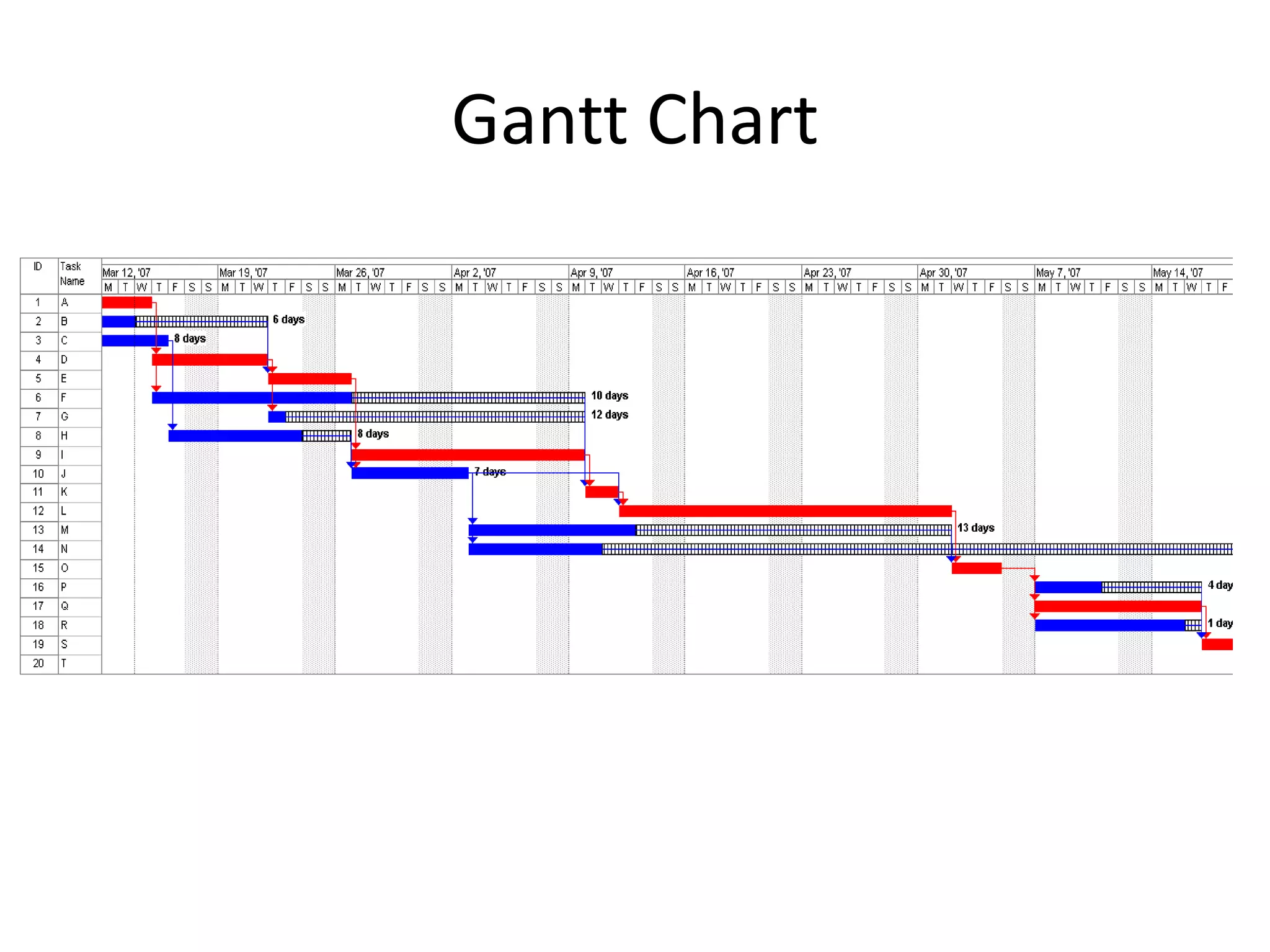
• A GANTT chart is a type of bar chart that
illustrates a project schedule.
• After the PERT/CPM analysis is completed, the
following phase is to construct the GANTT chart
and then to re-allocate resources and re-schedule
if necessary.
• GANTT charts have become a common technique
for representing the phases and activities of a
project work breakdown structure.
• It was introduced by Henry Gantt around 1910 –
1915.
Gantt Chart
Gantt Chart
• Characteristics:
– The bar in each row identifies the corresponding task
– The horizontal position of the bar identifies start and end times of the
task
– Bar length represents the duration of the task
– Task durations can be compared easily
– Good for allocating resources and re-scheduling
– Precedence relationships can be represented using arrows
– Critical activities are usually highlighted
– Slack times are represented using bars with doted lines
– The bar of each activity begins at the activity earliest start time (ES)
– The bar of each activity ends at the activity latest finish time (LF).
Gantt Chart
 Advantages
 Simple
 Good visual communication to others
 Task durations can be compared easily
 Good for scheduling resources
 Disadvantages
 Dependencies are more difficult to visualise
 Minor changes in data can cause major changes in the chart
Constructing Gantt Chart
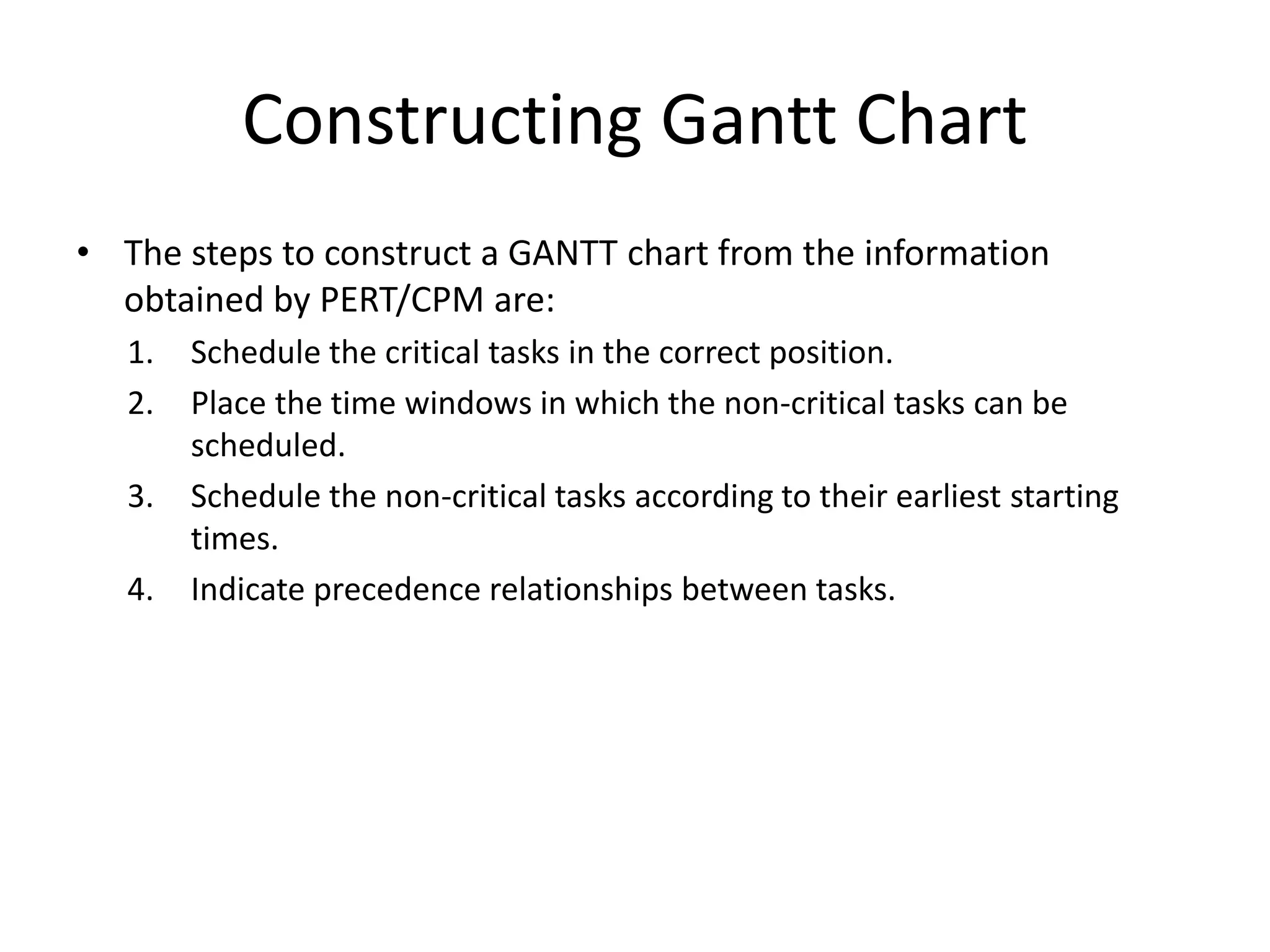
• The steps to construct a GANTT chart from the information
obtained by PERT/CPM are:
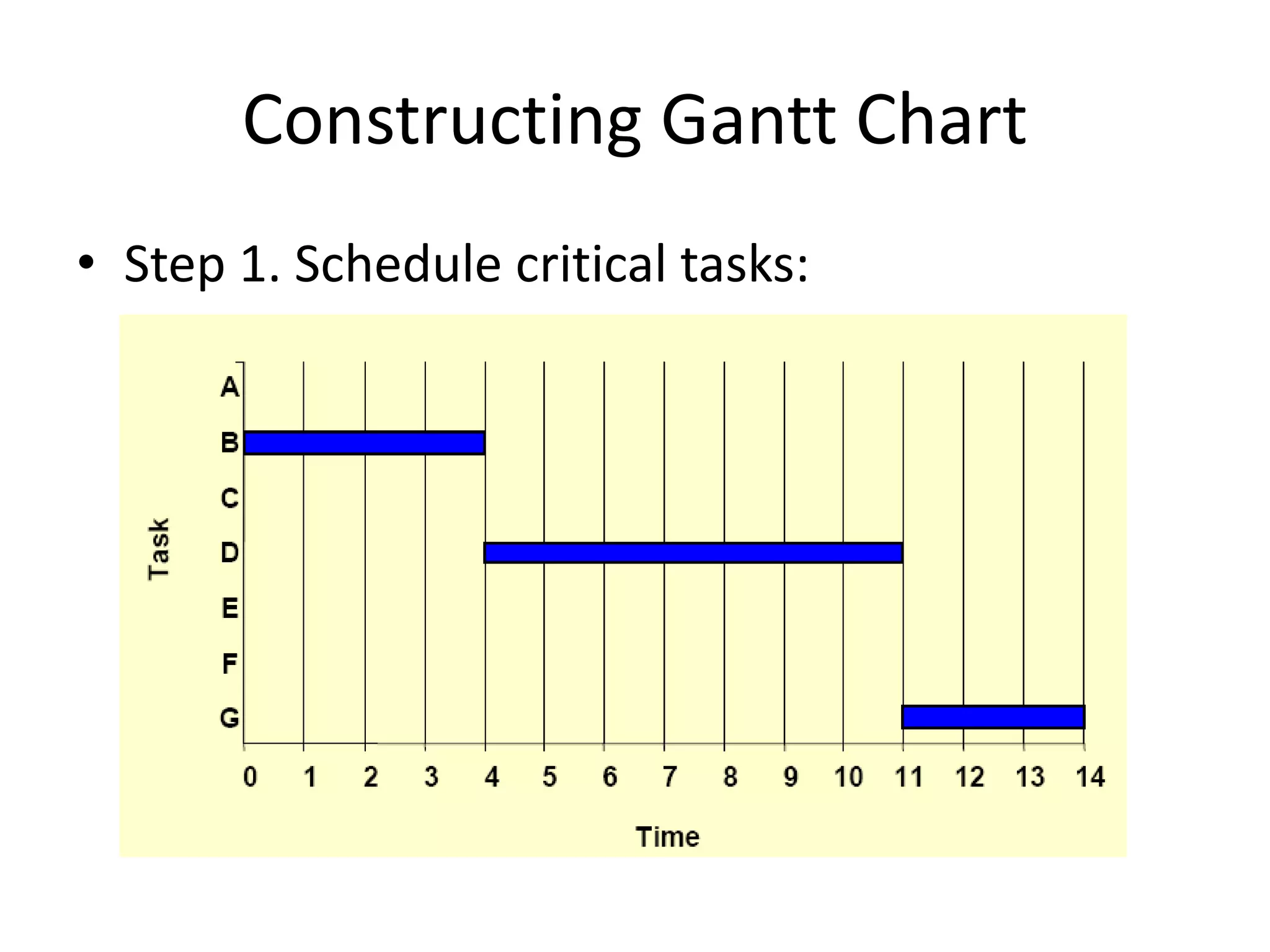
1. Schedule the critical tasks in the correct position.
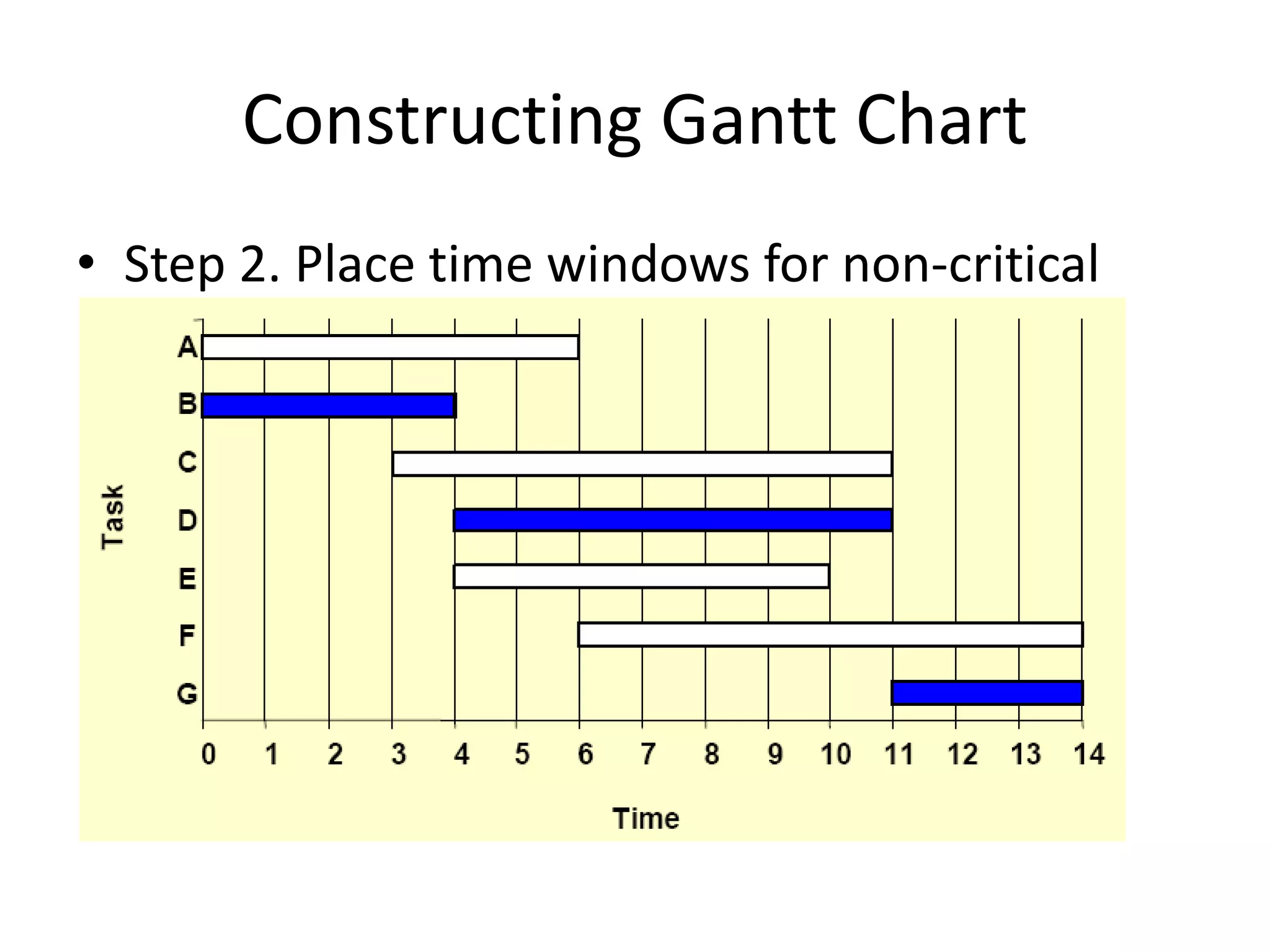
2. Place the time windows in which the non-critical tasks can be
scheduled.
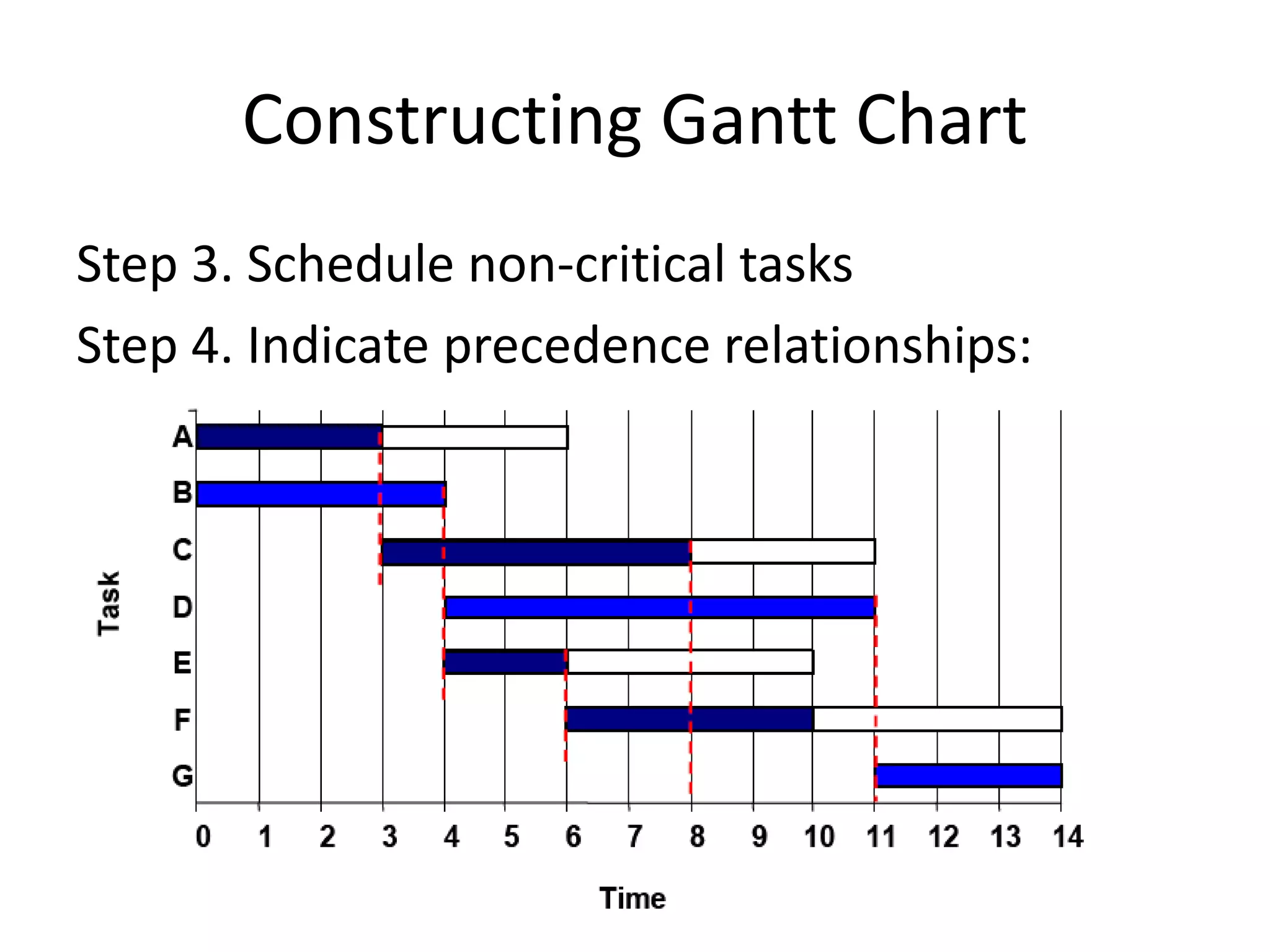
3. Schedule the non-critical tasks according to their earliest starting
times.
4. Indicate precedence relationships between tasks.
Constructing Gantt Chart
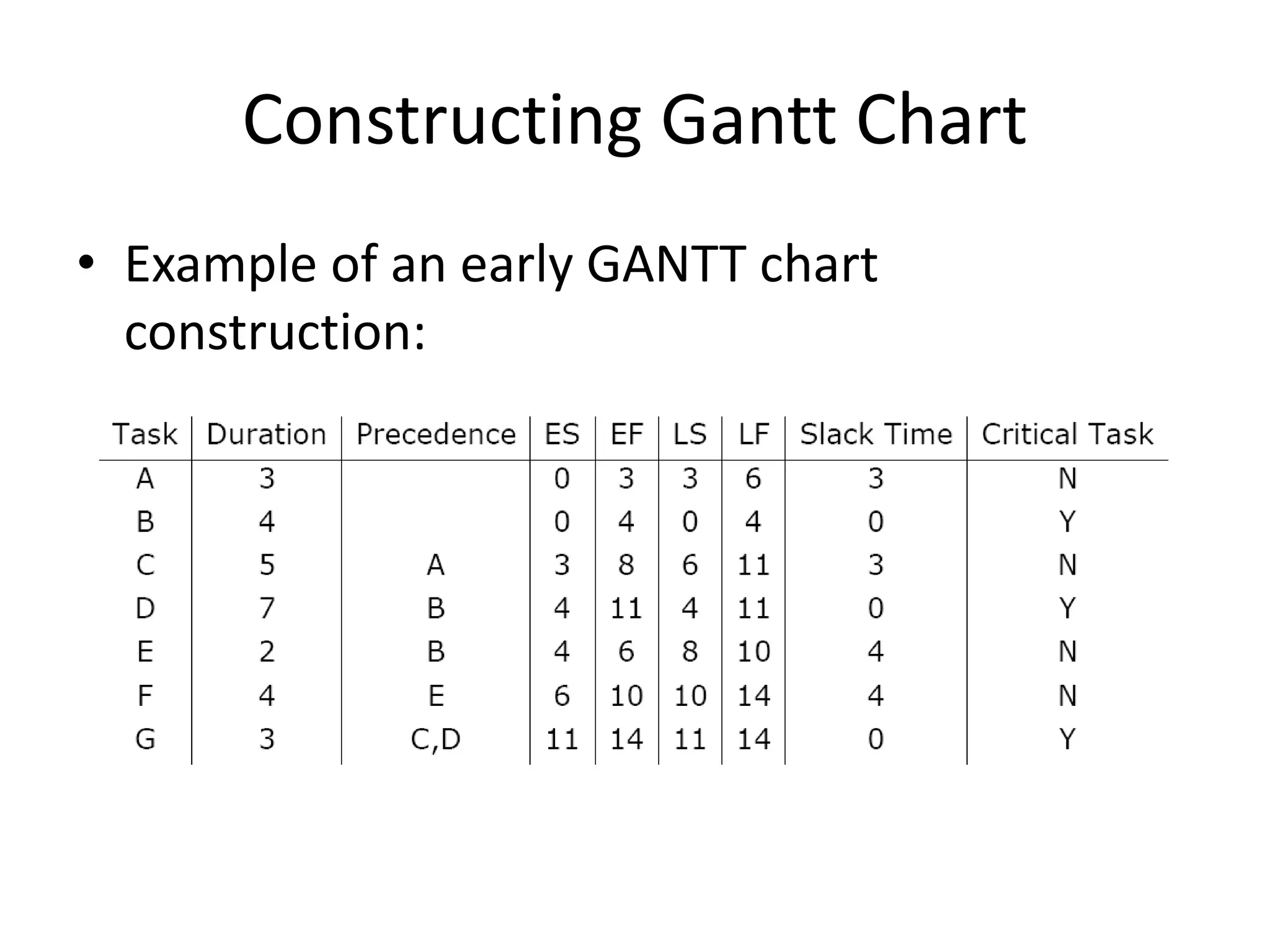
• Example of an early GANTT chart
construction:
Constructing Gantt Chart
• Step 1. Schedule critical tasks:
Constructing Gantt Chart
• Step 2. Place time windows for non-critical
tasks:
Constructing Gantt Chart
Step 3. Schedule non-critical tasks
Step 4. Indicate precedence relationships:
Staffing & Re-scheduling
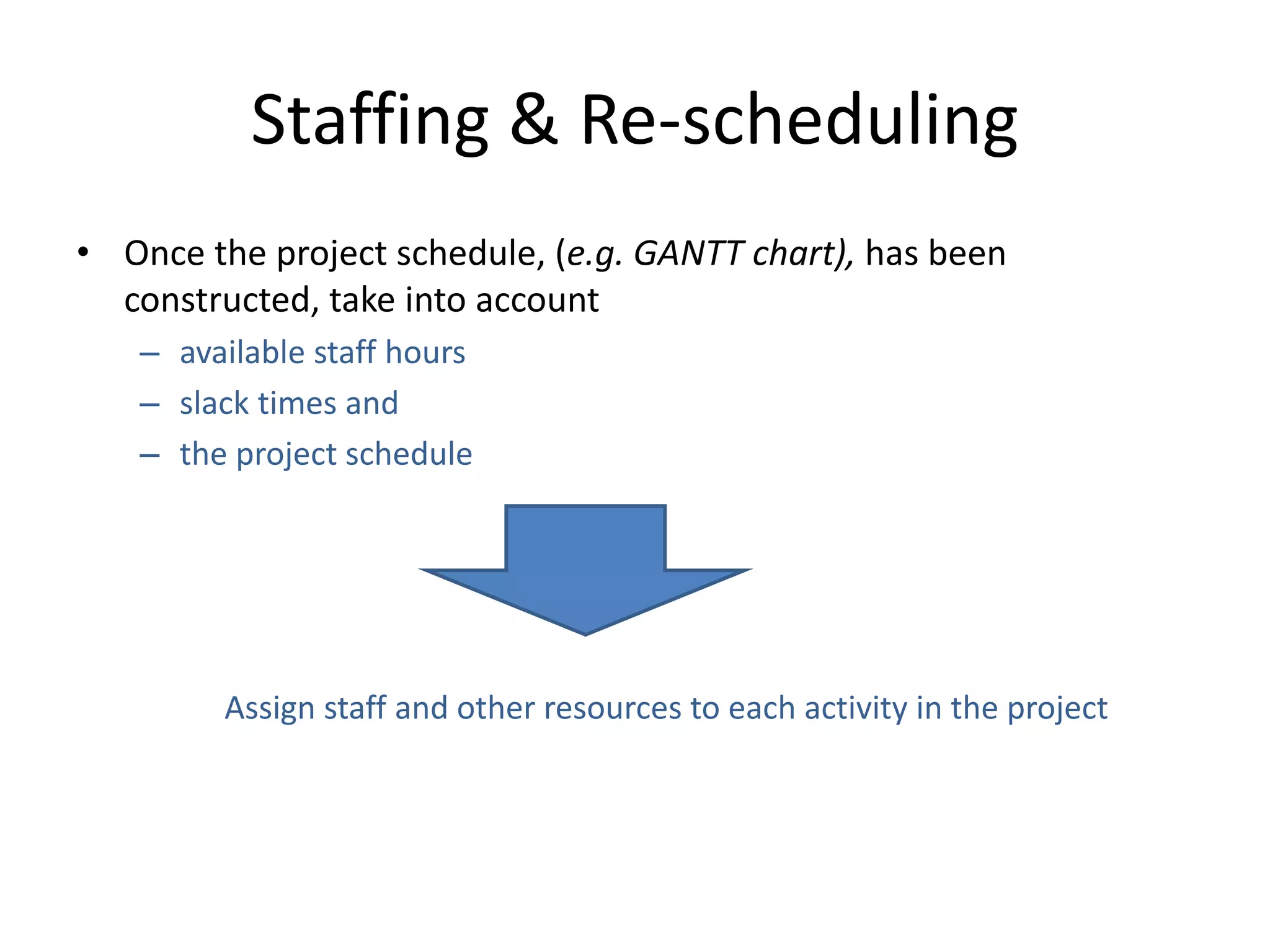
• Once the project schedule, (e.g. GANTT chart), has been
constructed, take into account
– available staff hours
– slack times and
– the project schedule
Assign staff and other resources to each activity in the project
Staffing & Re-scheduling
• Resource Smoothing is a technique used to re-
allocate resources and re-schedule activities.
• In resource smoothing, non-critical tasks are
re-scheduled within their time window.
• Staff Utilization:(duration of activity x staff
required for each activity, all added together) /
(maximum staff required x duration of project)
Staffing & Re-scheduling
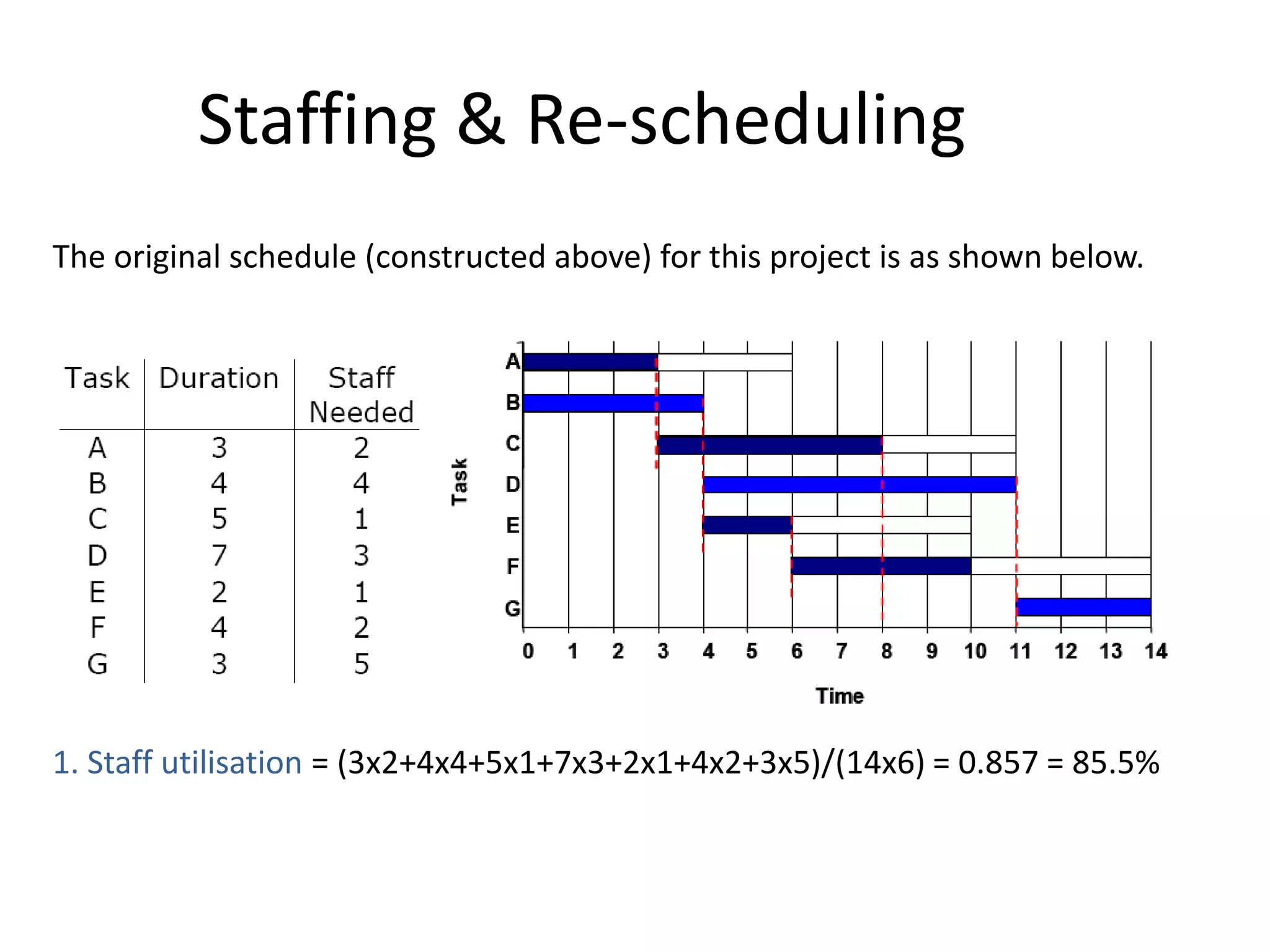
The original schedule (constructed above) for this project is as shown below.
1. Staff utilisation = (3x2+4x4+5x1+7x3+2x1+4x2+3x5)/(14x6) = 0.857 = 85.5%
Staffing & Re-scheduling
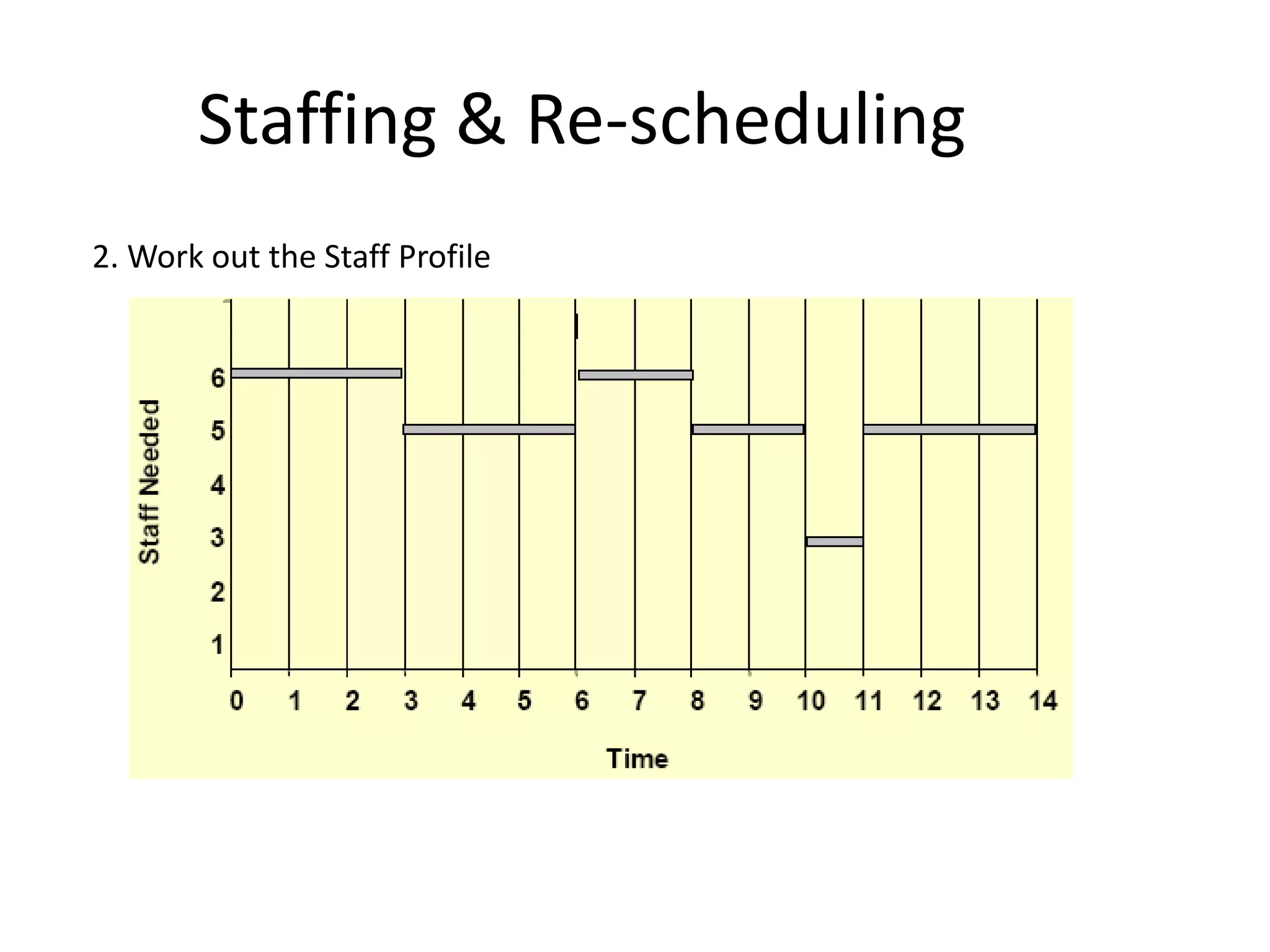
2. Work out the Staff Profile
Staffing & Re-scheduling
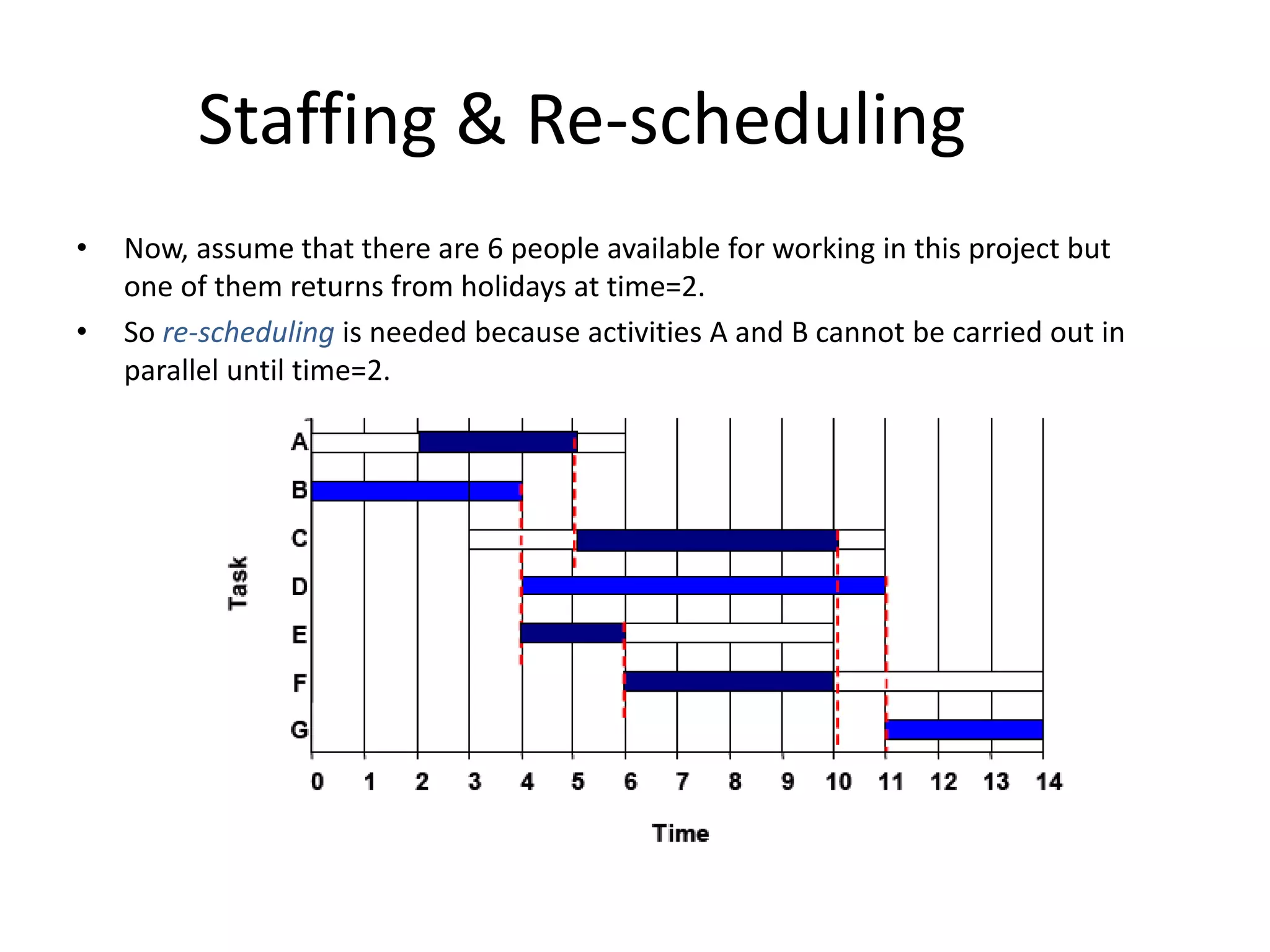
• Now, assume that there are 6 people available for working in this project but
one of them returns from holidays at time=2.
• So re-scheduling is needed because activities A and B cannot be carried out in
parallel until time=2.
Staffing & Re-scheduling
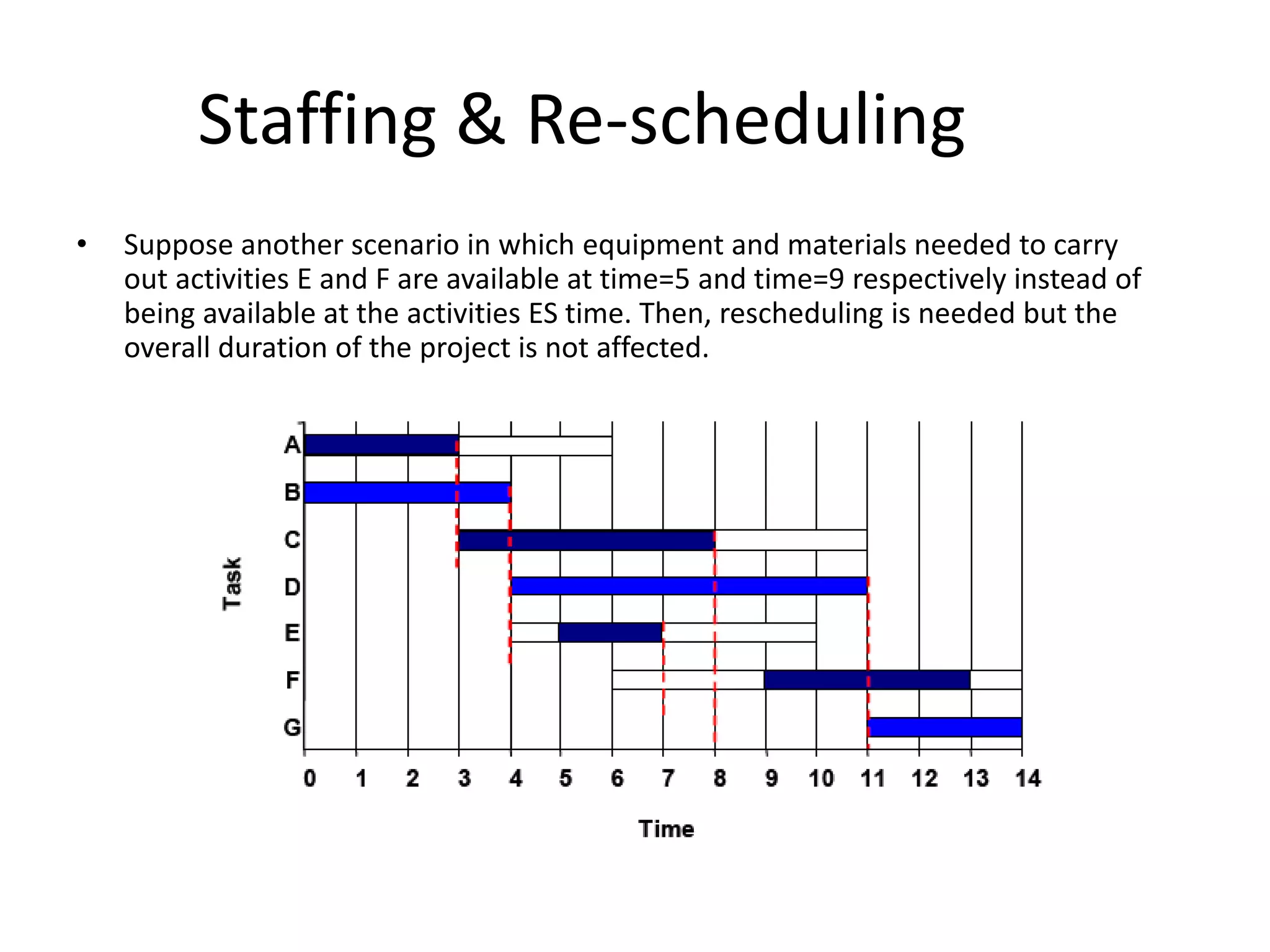
• Suppose another scenario in which equipment and materials needed to carry
out activities E and F are available at time=5 and time=9 respectively instead of
being available at the activities ES time. Then, rescheduling is needed but the
overall duration of the project is not affected.
Staffing & Re-scheduling
• The obvious way to reduce the overall project
duration, it is by reducing the duration of the
critical activities.
• Crashing Critical Activities refers to reducing
the duration of a critical activity by allocating
more resources to it.
• The risk is that crashing activities may actually
reduce productivity and increase costs.
Reference
• users.cis.fiu.edu

Mba ii pmom_unit-4.3 scheduling-gantt chart a

  • 1.
    SCHEDULING-GANTT CHART Course: MBA Subject:Production & Operation Management Unit-4.3
  • 2.
    Gantt Chart • AGANTT chart is a type of bar chart that illustrates a project schedule. • After the PERT/CPM analysis is completed, the following phase is to construct the GANTT chart and then to re-allocate resources and re-schedule if necessary. • GANTT charts have become a common technique for representing the phases and activities of a project work breakdown structure. • It was introduced by Henry Gantt around 1910 – 1915.
  • 3.
  • 4.
    Gantt Chart • Characteristics: –The bar in each row identifies the corresponding task – The horizontal position of the bar identifies start and end times of the task – Bar length represents the duration of the task – Task durations can be compared easily – Good for allocating resources and re-scheduling – Precedence relationships can be represented using arrows – Critical activities are usually highlighted – Slack times are represented using bars with doted lines – The bar of each activity begins at the activity earliest start time (ES) – The bar of each activity ends at the activity latest finish time (LF).
  • 5.
    Gantt Chart  Advantages Simple  Good visual communication to others  Task durations can be compared easily  Good for scheduling resources  Disadvantages  Dependencies are more difficult to visualise  Minor changes in data can cause major changes in the chart
  • 6.
    Constructing Gantt Chart •The steps to construct a GANTT chart from the information obtained by PERT/CPM are: 1. Schedule the critical tasks in the correct position. 2. Place the time windows in which the non-critical tasks can be scheduled. 3. Schedule the non-critical tasks according to their earliest starting times. 4. Indicate precedence relationships between tasks.
  • 7.
    Constructing Gantt Chart •Example of an early GANTT chart construction:
  • 8.
    Constructing Gantt Chart •Step 1. Schedule critical tasks:
  • 9.
    Constructing Gantt Chart •Step 2. Place time windows for non-critical tasks:
  • 10.
    Constructing Gantt Chart Step3. Schedule non-critical tasks Step 4. Indicate precedence relationships:
  • 11.
    Staffing & Re-scheduling •Once the project schedule, (e.g. GANTT chart), has been constructed, take into account – available staff hours – slack times and – the project schedule Assign staff and other resources to each activity in the project
  • 12.
    Staffing & Re-scheduling •Resource Smoothing is a technique used to re- allocate resources and re-schedule activities. • In resource smoothing, non-critical tasks are re-scheduled within their time window. • Staff Utilization:(duration of activity x staff required for each activity, all added together) / (maximum staff required x duration of project)
  • 13.
    Staffing & Re-scheduling Theoriginal schedule (constructed above) for this project is as shown below. 1. Staff utilisation = (3x2+4x4+5x1+7x3+2x1+4x2+3x5)/(14x6) = 0.857 = 85.5%
  • 14.
    Staffing & Re-scheduling 2.Work out the Staff Profile
  • 15.
    Staffing & Re-scheduling •Now, assume that there are 6 people available for working in this project but one of them returns from holidays at time=2. • So re-scheduling is needed because activities A and B cannot be carried out in parallel until time=2.
  • 16.
    Staffing & Re-scheduling •Suppose another scenario in which equipment and materials needed to carry out activities E and F are available at time=5 and time=9 respectively instead of being available at the activities ES time. Then, rescheduling is needed but the overall duration of the project is not affected.
  • 17.
    Staffing & Re-scheduling •The obvious way to reduce the overall project duration, it is by reducing the duration of the critical activities. • Crashing Critical Activities refers to reducing the duration of a critical activity by allocating more resources to it. • The risk is that crashing activities may actually reduce productivity and increase costs.
  • 18.