DATA COMMUNICATIONS &
          NETWORKING
           LECTURE-08

         Course Instructor : Sehrish Rafiq
         Department Of Computer Science
                  University Of Peshawar
LECTURE OVERVIEW
   Conversion methods
   Line coding
   Characteristics of line coding
   Signal level & Data Level
   Pulse Rate & Bit Rate
   DC Component
   Self Synchronization
   Line coding Schemes
   Unipolar
   Polar
   NRZ
   RZ
   Manchester and Differential Manchester
   Bipolar
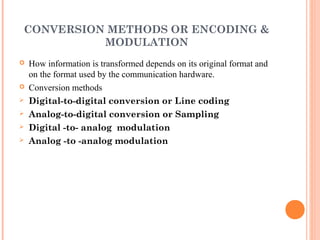
CONVERSION METHODS OR ENCODING &
          MODULATION
   How information is transformed depends on its original format and
    on the format used by the communication hardware.
   Conversion methods
   Digital-to-digital conversion or Line coding
   Analog-to-digital conversion or Sampling
   Digital -to- analog modulation
   Analog -to -analog modulation
LINE CODING
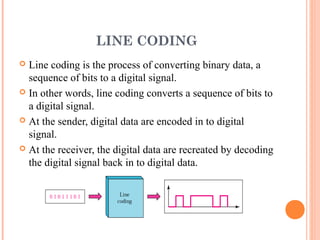
 Line coding is the process of converting binary data, a
  sequence of bits to a digital signal.
 In other words, line coding converts a sequence of bits to
  a digital signal.
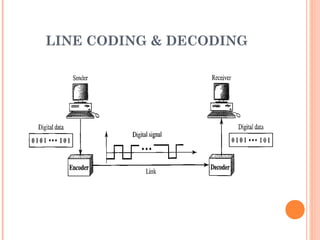
 At the sender, digital data are encoded in to digital
  signal.
 At the receiver, the digital data are recreated by decoding
  the digital signal back in to digital data.
LINE CODING & DECODING
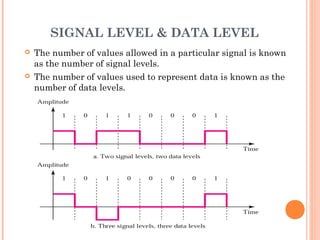
SIGNAL LEVEL & DATA LEVEL
   The number of values allowed in a particular signal is known
    as the number of signal levels.
   The number of values used to represent data is known as the
    number of data levels.
DATA ELEMENT VERSUS SIGNAL
             ELEMENT
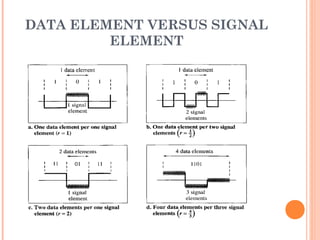
 A data Element is the smallest entity that can
  represent a piece of information this is the bit.
 A signal element is the shortest unit time wise of
  a digital signal.
 In other words data elements are what we need
  to send.
 Signal elements are what we can send.

 Data elements are being carried, signal elements
  are the carriers.
 r is defined as the ratio which is the number of
  data elements carried by each signal element.
DATA ELEMENT VERSUS SIGNAL
         ELEMENT
DATA RATE VERSUS SIGNAL
             RATE
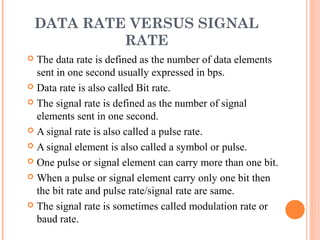
 The data rate is defined as the number of data elements
  sent in one second usually expressed in bps.
 Data rate is also called Bit rate.

 The signal rate is defined as the number of signal
  elements sent in one second.
 A signal rate is also called a pulse rate.

 A signal element is also called a symbol or pulse.

 One pulse or signal element can carry more than one bit.

 When a pulse or signal element carry only one bit then
  the bit rate and pulse rate/signal rate are same.
 The signal rate is sometimes called modulation rate or
  baud rate.
FORMULA FOR BIT RATE


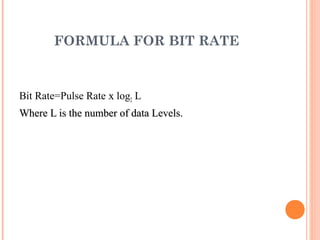
Bit Rate=Pulse Rate x log2 L
Where L is the number of data Levels.
Example 1

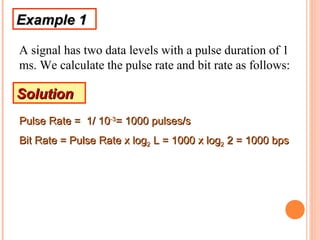
A signal has two data levels with a pulse duration of 1
ms. We calculate the pulse rate and bit rate as follows:

Solution
Pulse Rate = 1/ 10-3= 1000 pulses/s
Bit Rate = Pulse Rate x log2 L = 1000 x log2 2 = 1000 bps
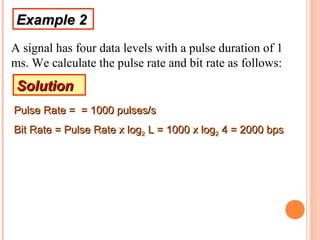
Example 2
A signal has four data levels with a pulse duration of 1
ms. We calculate the pulse rate and bit rate as follows:
 Solution
Pulse Rate = = 1000 pulses/s
Bit Rate = Pulse Rate x log2 L = 1000 x log2 4 = 2000 bps
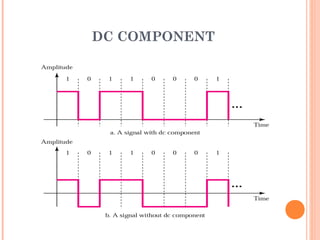
DC COMPONENT
 When the voltage level is constant for a while very low
  frequencies are often created.
 These frequencies around zero are called DC or Direct
  Current components.
 This component is undesirable for two reasons.

 First if a signal has to pass through a system (e.g. a
    telephone line which does not allow frequencies below 200 Hz)
  which does not allow low frequencies to pass the signal
  is distorted and may create errors in the output.
 Second this component is extra energy residing on the
  line and is useless.
DC COMPONENT
SELF-SYNCHRONIZATION
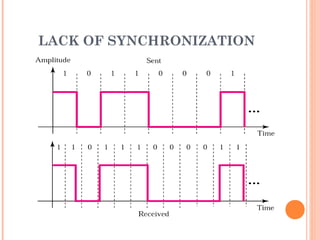
 To correctly interpret the signals received from the
  sender, the receiver’s bit intervals must correspond
  exactly to the sender’s bit intervals.
 If the receiver’s clock is faster or slower, the bit intervals
  are not matched and the receiver might interpret the
  signals differently then the sender intended.
 A self synchronizing digital signal includes timing
  information in the data being transmitted.
 This can be achieved if there are transitions in the signal
  that alert the receiver to the beginning, middle or end of
  the pulse.
 If the receiver clock is out of synchronization, these
  alerting points can reset the clock.
LACK OF SYNCHRONIZATION
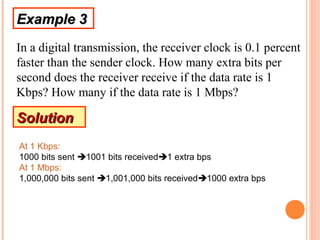
Example 3
In a digital transmission, the receiver clock is 0.1 percent
faster than the sender clock. How many extra bits per
second does the receiver receive if the data rate is 1
Kbps? How many if the data rate is 1 Mbps?

Solution
At 1 Kbps:
1000 bits sent 1001 bits received1 extra bps
At 1 Mbps:
1,000,000 bits sent 1,001,000 bits received1000 extra bps
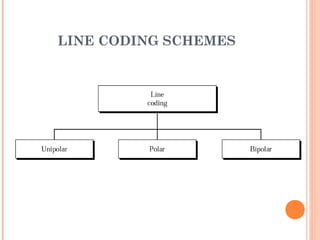
LINE CODING SCHEMES
UNIPOLAR SCHEME
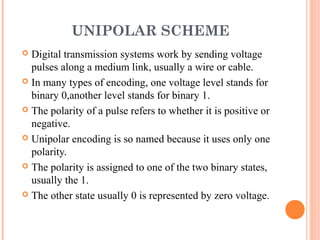
 Digital transmission systems work by sending voltage
  pulses along a medium link, usually a wire or cable.
 In many types of encoding, one voltage level stands for
  binary 0,another level stands for binary 1.
 The polarity of a pulse refers to whether it is positive or
  negative.
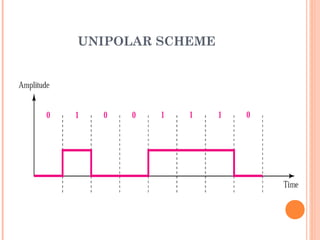
 Unipolar encoding is so named because it uses only one
  polarity.
 The polarity is assigned to one of the two binary states,
  usually the 1.
 The other state usually 0 is represented by zero voltage.
UNIPOLAR SCHEME
PROBLEMS USING UNI POLAR
             SCHEME
   DC Component
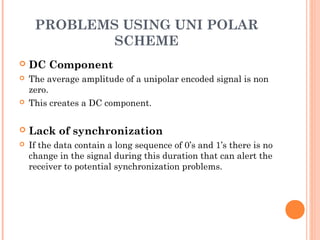
   The average amplitude of a unipolar encoded signal is non
    zero.
   This creates a DC component.

   Lack of synchronization
   If the data contain a long sequence of 0’s and 1’s there is no
    change in the signal during this duration that can alert the
    receiver to potential synchronization problems.
POLAR ENCODING SCHEMES
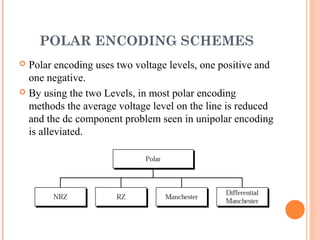
 Polar encoding uses two voltage levels, one positive and
  one negative.
 By using the two Levels, in most polar encoding
  methods the average voltage level on the line is reduced
  and the dc component problem seen in unipolar encoding
  is alleviated.
NRZ(NON RETURN TO ZERO)
           SCHEMES
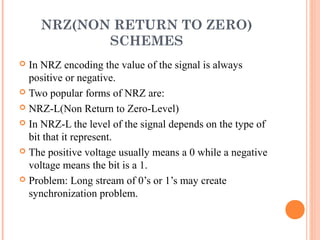
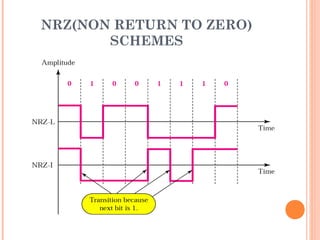
 In NRZ encoding the value of the signal is always
  positive or negative.
 Two popular forms of NRZ are:

 NRZ-L(Non Return to Zero-Level)

 In NRZ-L the level of the signal depends on the type of
  bit that it represent.
 The positive voltage usually means a 0 while a negative
  voltage means the bit is a 1.
 Problem: Long stream of 0’s or 1’s may create
  synchronization problem.
NRZ(NON RETURN TO ZERO)
              SCHEMES
   NRZ-I(NRZ-Invert)
   In NRZ-I ,an inversion of the voltage level represents a 1 bit.
   It is the transition between a positive and negative voltage, not the
    voltage itself, that represents a 1 bit.
   A 0 bit is represented by no change.
   NRZ-I is superior to NRZ-L due to the synchronization provided by
    the signal change each time a 1 bit is encountered.
   The existence of 1’s in the data stream allows the receiver to
    synchronize its timer to the actual arrival of transmission.
   A string of 0’s can still cause problems but because they are not as
    Likely,they are less of a problem.
NRZ(NON RETURN TO ZERO)
       SCHEMES
THANKS!!   !

Lecture 08

  • 1.
    DATA COMMUNICATIONS & NETWORKING LECTURE-08 Course Instructor : Sehrish Rafiq Department Of Computer Science University Of Peshawar
  • 2.
    LECTURE OVERVIEW  Conversion methods  Line coding  Characteristics of line coding  Signal level & Data Level  Pulse Rate & Bit Rate  DC Component  Self Synchronization  Line coding Schemes  Unipolar  Polar  NRZ  RZ  Manchester and Differential Manchester  Bipolar
  • 3.
    CONVERSION METHODS ORENCODING & MODULATION  How information is transformed depends on its original format and on the format used by the communication hardware.  Conversion methods  Digital-to-digital conversion or Line coding  Analog-to-digital conversion or Sampling  Digital -to- analog modulation  Analog -to -analog modulation
  • 4.
    LINE CODING  Linecoding is the process of converting binary data, a sequence of bits to a digital signal.  In other words, line coding converts a sequence of bits to a digital signal.  At the sender, digital data are encoded in to digital signal.  At the receiver, the digital data are recreated by decoding the digital signal back in to digital data.
  • 5.
    LINE CODING &DECODING
  • 6.
    SIGNAL LEVEL &DATA LEVEL  The number of values allowed in a particular signal is known as the number of signal levels.  The number of values used to represent data is known as the number of data levels.
  • 7.
    DATA ELEMENT VERSUSSIGNAL ELEMENT  A data Element is the smallest entity that can represent a piece of information this is the bit.  A signal element is the shortest unit time wise of a digital signal.  In other words data elements are what we need to send.  Signal elements are what we can send.  Data elements are being carried, signal elements are the carriers.  r is defined as the ratio which is the number of data elements carried by each signal element.
  • 8.
    DATA ELEMENT VERSUSSIGNAL ELEMENT
  • 9.
    DATA RATE VERSUSSIGNAL RATE  The data rate is defined as the number of data elements sent in one second usually expressed in bps.  Data rate is also called Bit rate.  The signal rate is defined as the number of signal elements sent in one second.  A signal rate is also called a pulse rate.  A signal element is also called a symbol or pulse.  One pulse or signal element can carry more than one bit.  When a pulse or signal element carry only one bit then the bit rate and pulse rate/signal rate are same.  The signal rate is sometimes called modulation rate or baud rate.
  • 10.
    FORMULA FOR BITRATE Bit Rate=Pulse Rate x log2 L Where L is the number of data Levels.
  • 11.
    Example 1 A signalhas two data levels with a pulse duration of 1 ms. We calculate the pulse rate and bit rate as follows: Solution Pulse Rate = 1/ 10-3= 1000 pulses/s Bit Rate = Pulse Rate x log2 L = 1000 x log2 2 = 1000 bps
  • 12.
    Example 2 A signalhas four data levels with a pulse duration of 1 ms. We calculate the pulse rate and bit rate as follows: Solution Pulse Rate = = 1000 pulses/s Bit Rate = Pulse Rate x log2 L = 1000 x log2 4 = 2000 bps
  • 13.
    DC COMPONENT  Whenthe voltage level is constant for a while very low frequencies are often created.  These frequencies around zero are called DC or Direct Current components.  This component is undesirable for two reasons.  First if a signal has to pass through a system (e.g. a telephone line which does not allow frequencies below 200 Hz) which does not allow low frequencies to pass the signal is distorted and may create errors in the output.  Second this component is extra energy residing on the line and is useless.
  • 14.
  • 15.
    SELF-SYNCHRONIZATION  To correctlyinterpret the signals received from the sender, the receiver’s bit intervals must correspond exactly to the sender’s bit intervals.  If the receiver’s clock is faster or slower, the bit intervals are not matched and the receiver might interpret the signals differently then the sender intended.  A self synchronizing digital signal includes timing information in the data being transmitted.  This can be achieved if there are transitions in the signal that alert the receiver to the beginning, middle or end of the pulse.  If the receiver clock is out of synchronization, these alerting points can reset the clock.
  • 16.
  • 17.
    Example 3 In adigital transmission, the receiver clock is 0.1 percent faster than the sender clock. How many extra bits per second does the receiver receive if the data rate is 1 Kbps? How many if the data rate is 1 Mbps? Solution At 1 Kbps: 1000 bits sent 1001 bits received1 extra bps At 1 Mbps: 1,000,000 bits sent 1,001,000 bits received1000 extra bps
  • 18.
  • 19.
    UNIPOLAR SCHEME  Digitaltransmission systems work by sending voltage pulses along a medium link, usually a wire or cable.  In many types of encoding, one voltage level stands for binary 0,another level stands for binary 1.  The polarity of a pulse refers to whether it is positive or negative.  Unipolar encoding is so named because it uses only one polarity.  The polarity is assigned to one of the two binary states, usually the 1.  The other state usually 0 is represented by zero voltage.
  • 20.
  • 21.
    PROBLEMS USING UNIPOLAR SCHEME  DC Component  The average amplitude of a unipolar encoded signal is non zero.  This creates a DC component.  Lack of synchronization  If the data contain a long sequence of 0’s and 1’s there is no change in the signal during this duration that can alert the receiver to potential synchronization problems.
  • 22.
    POLAR ENCODING SCHEMES Polar encoding uses two voltage levels, one positive and one negative.  By using the two Levels, in most polar encoding methods the average voltage level on the line is reduced and the dc component problem seen in unipolar encoding is alleviated.
  • 23.
    NRZ(NON RETURN TOZERO) SCHEMES  In NRZ encoding the value of the signal is always positive or negative.  Two popular forms of NRZ are:  NRZ-L(Non Return to Zero-Level)  In NRZ-L the level of the signal depends on the type of bit that it represent.  The positive voltage usually means a 0 while a negative voltage means the bit is a 1.  Problem: Long stream of 0’s or 1’s may create synchronization problem.
  • 24.
    NRZ(NON RETURN TOZERO) SCHEMES  NRZ-I(NRZ-Invert)  In NRZ-I ,an inversion of the voltage level represents a 1 bit.  It is the transition between a positive and negative voltage, not the voltage itself, that represents a 1 bit.  A 0 bit is represented by no change.  NRZ-I is superior to NRZ-L due to the synchronization provided by the signal change each time a 1 bit is encountered.  The existence of 1’s in the data stream allows the receiver to synchronize its timer to the actual arrival of transmission.  A string of 0’s can still cause problems but because they are not as Likely,they are less of a problem.
  • 25.
    NRZ(NON RETURN TOZERO) SCHEMES
  • 26.