
Data Communications & Networking
                       Lecture-10

           Course Instructor : Sehrish Rafiq
           Department Of Computer Science
                    University Of Peshawar
Lecture overview
Transmission mode
 Parallel and serial transmission
 Synchronous and asynchronous
  transmission
Transmission mode
 A given transmission on a communications
  channel between two machines can occur in
  several different ways.
 The transmission is characterized by:
 the direction of the exchanges.
 the transmission mode: the number of bits sent
  simultaneously.
 synchronization between the transmitter and receiver.
The direction of the exchanges
 There are 3 different transmission modes
  characterized according to the direction of the
  exchanges.
 Simplex
 Half Duplex
 Full Duplex
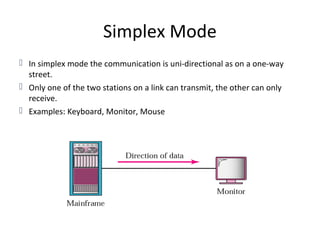
Simplex Mode
 In simplex mode the communication is uni-directional as on a one-way
  street.
 Only one of the two stations on a link can transmit, the other can only
  receive.
 Examples: Keyboard, Monitor, Mouse
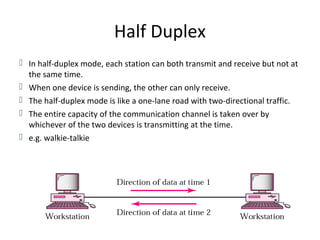
Half Duplex
 In half-duplex mode, each station can both transmit and receive but not at
  the same time.
 When one device is sending, the other can only receive.
 The half-duplex mode is like a one-lane road with two-directional traffic.
 The entire capacity of the communication channel is taken over by
  whichever of the two devices is transmitting at the time.
 e.g. walkie-talkie
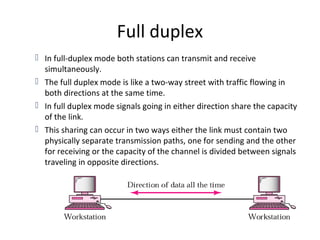
Full duplex
 In full-duplex mode both stations can transmit and receive
  simultaneously.
 The full duplex mode is like a two-way street with traffic flowing in
  both directions at the same time.
 In full duplex mode signals going in either direction share the capacity
  of the link.
 This sharing can occur in two ways either the link must contain two
  physically separate transmission paths, one for sending and the other
  for receiving or the capacity of the channel is divided between signals
  traveling in opposite directions.
Data Transmission

 The number of bits sent simultaneously
 When we talk about transmission of data from one
  device to another the important issue is wiring.
 When we consider wiring the important thing is
  how a data stream is sent.
 Parallel Transmission
 Serial Transmission
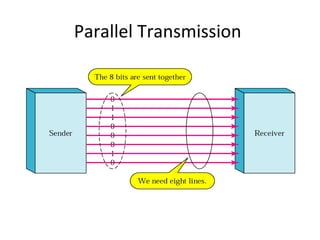
Parallel Transmission
 Binary data, consisting of 1’s and 0’s,may be
  organized in to groups of n bits each.
 Computers produce and consume data in groups of
  bits.
 By grouping we can send data n bits at one time.
 Each bit has its own wire.
 N bits of one group can be transmitted with each
  clock tick from one device to another.
Parallel Transmission
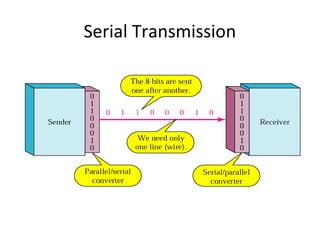
Serial Transmission
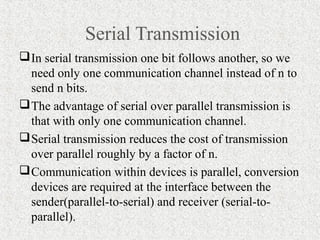
 In serial transmission one bit follows another, so we
  need only one communication channel instead of n to
  send n bits.
 The advantage of serial over parallel transmission is
  that with only one communication channel.
 Serial transmission reduces the cost of transmission
  over parallel roughly by a factor of n.
 Communication within devices is parallel, conversion
  devices are required at the interface between the
  sender(parallel-to-serial) and receiver (serial-to-
  parallel).
Serial Transmission
Serial Transmission
 Serial transmission can occur in one of two
  ways.
 Synchronous
 Asynchronous
Asynchronous Transmission
 Asynchronous is so named because the timing of a
  signal is unimportant.
 Information is received and translated by agreed
  upon patterns.
 The receiving device can retrieve the information
  without regard to the rhythm in which it is sent.
 Patterns:
 Patterns are based on grouping the bit stream in to bytes .
.
Asynchronous Transmission
          continued…
 Each group usually 8 bits is sent along the link as
  a unit.
 The sending system handles each group
  independently, relaying it to the link whenever the
  link is ready, without regarding to a timer.
 Without synchronization, the receiver cannot use
  timing to predict when the next group will
  arrive???
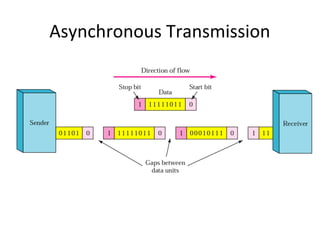
 Answer: Use Start & Stop bits
Start & Stop bits
 Start bit
 To alert the receiver to the arrival of a new group, therefore an
  extra bit is added to the beginning of each byte.
 This bit is usually a 0,is called the start bit.
 Stop bit
 To let the receiver know that the byte is finished, one or more
  additional bits are appended to the end of the byte.
 These bits usually 1’s are called stop bits.
 In addition, the transmission of each byte may be followed
  by a gap of varying duration.
 This gap can be represented either by an idle channel or by
  a stream of additional stop bits.
Asynchronous Transmission
Why called asynchronous???
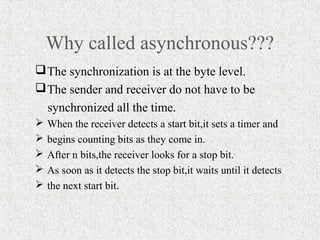
 The synchronization is at the byte level.
 The sender and receiver do not have to be
    synchronized all the time.
   When the receiver detects a start bit,it sets a timer and
   begins counting bits as they come in.
   After n bits,the receiver looks for a stop bit.
   As soon as it detects the stop bit,it waits until it detects
   the next start bit.
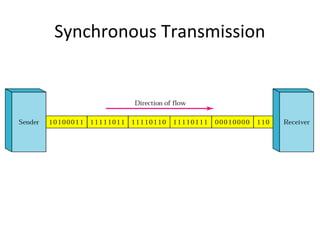
Synchronous Transmission
 In synchronous transmission, the bit stream is
  combined in to longer frames which may contain
  multiple bytes.
 Each byte is introduced on to the transmission link
  without a gap between it and the next one.
 It is left to the receiver to separate the bit stream in
  to bytes for decoding purposes.
 Timing is important in synchronous transmission
Synchronous Transmission
Advantages of synchronous transmission

The advantage of synchronous transmission
 is speed.
Byte synchronization is accomplished in the
 data link layer.
Wish You best of Luck
        for
     Your paper

Lecture 10

  • 1.
    Data Communications &Networking Lecture-10 Course Instructor : Sehrish Rafiq Department Of Computer Science University Of Peshawar
  • 2.
    Lecture overview Transmission mode Parallel and serial transmission  Synchronous and asynchronous transmission
  • 3.
    Transmission mode  Agiven transmission on a communications channel between two machines can occur in several different ways.  The transmission is characterized by:  the direction of the exchanges.  the transmission mode: the number of bits sent simultaneously.  synchronization between the transmitter and receiver.
  • 4.
    The direction ofthe exchanges  There are 3 different transmission modes characterized according to the direction of the exchanges.  Simplex  Half Duplex  Full Duplex
  • 5.
    Simplex Mode  Insimplex mode the communication is uni-directional as on a one-way street.  Only one of the two stations on a link can transmit, the other can only receive.  Examples: Keyboard, Monitor, Mouse
  • 6.
    Half Duplex  Inhalf-duplex mode, each station can both transmit and receive but not at the same time.  When one device is sending, the other can only receive.  The half-duplex mode is like a one-lane road with two-directional traffic.  The entire capacity of the communication channel is taken over by whichever of the two devices is transmitting at the time.  e.g. walkie-talkie
  • 7.
    Full duplex  Infull-duplex mode both stations can transmit and receive simultaneously.  The full duplex mode is like a two-way street with traffic flowing in both directions at the same time.  In full duplex mode signals going in either direction share the capacity of the link.  This sharing can occur in two ways either the link must contain two physically separate transmission paths, one for sending and the other for receiving or the capacity of the channel is divided between signals traveling in opposite directions.
  • 8.
    Data Transmission  Thenumber of bits sent simultaneously  When we talk about transmission of data from one device to another the important issue is wiring.  When we consider wiring the important thing is how a data stream is sent.  Parallel Transmission  Serial Transmission
  • 9.
    Parallel Transmission  Binarydata, consisting of 1’s and 0’s,may be organized in to groups of n bits each.  Computers produce and consume data in groups of bits.  By grouping we can send data n bits at one time.  Each bit has its own wire.  N bits of one group can be transmitted with each clock tick from one device to another.
  • 10.
  • 11.
    Serial Transmission  Inserial transmission one bit follows another, so we need only one communication channel instead of n to send n bits.  The advantage of serial over parallel transmission is that with only one communication channel.  Serial transmission reduces the cost of transmission over parallel roughly by a factor of n.  Communication within devices is parallel, conversion devices are required at the interface between the sender(parallel-to-serial) and receiver (serial-to- parallel).
  • 12.
  • 13.
    Serial Transmission  Serialtransmission can occur in one of two ways.  Synchronous  Asynchronous
  • 14.
    Asynchronous Transmission  Asynchronousis so named because the timing of a signal is unimportant.  Information is received and translated by agreed upon patterns.  The receiving device can retrieve the information without regard to the rhythm in which it is sent.  Patterns:  Patterns are based on grouping the bit stream in to bytes . .
  • 15.
    Asynchronous Transmission continued…  Each group usually 8 bits is sent along the link as a unit.  The sending system handles each group independently, relaying it to the link whenever the link is ready, without regarding to a timer.  Without synchronization, the receiver cannot use timing to predict when the next group will arrive???  Answer: Use Start & Stop bits
  • 16.
    Start & Stopbits  Start bit  To alert the receiver to the arrival of a new group, therefore an extra bit is added to the beginning of each byte.  This bit is usually a 0,is called the start bit.  Stop bit  To let the receiver know that the byte is finished, one or more additional bits are appended to the end of the byte.  These bits usually 1’s are called stop bits.  In addition, the transmission of each byte may be followed by a gap of varying duration.  This gap can be represented either by an idle channel or by a stream of additional stop bits.
  • 17.
  • 18.
    Why called asynchronous??? The synchronization is at the byte level.  The sender and receiver do not have to be synchronized all the time.  When the receiver detects a start bit,it sets a timer and  begins counting bits as they come in.  After n bits,the receiver looks for a stop bit.  As soon as it detects the stop bit,it waits until it detects  the next start bit.
  • 19.
    Synchronous Transmission  Insynchronous transmission, the bit stream is combined in to longer frames which may contain multiple bytes.  Each byte is introduced on to the transmission link without a gap between it and the next one.  It is left to the receiver to separate the bit stream in to bytes for decoding purposes.  Timing is important in synchronous transmission
  • 20.
  • 21.
    Advantages of synchronoustransmission The advantage of synchronous transmission is speed. Byte synchronization is accomplished in the data link layer.
  • 22.
    Wish You bestof Luck for Your paper