
Key Differences
E-learning vs. M-learning
Introduction
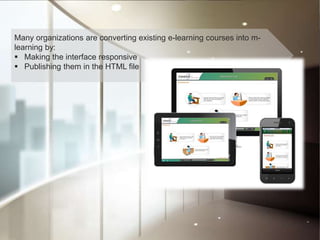
Many organizations are converting existing e-learning courses into m-learning by
making the interface responsive and by publishing them in the HTML file. The
reason behind this is to provide the most meaningful learning experience through
the use of mobile devices. In fact, most of them consider e-learning and m-learning
are the same. But in reality, e-learning is completely different from m-learning in
various aspects such as variable screen size, GUI, access, scrolling, interface, and
compatibility
Many organizations are converting existing e-learning courses into m-
learning by:
 Making the interface responsive
 Publishing them in the HTML file
Introduction
Many organizations are converting existing e-learning courses into m-learning by
making the interface responsive and by publishing them in the HTML file. The
reason behind this is to provide the most meaningful learning experience through
the use of mobile devices. In fact, most of them consider e-learning and m-learning
are the same. But in reality, e-learning is completely different from m-learning in
various aspects such as variable screen size, GUI, access, scrolling, interface, and
compatibility
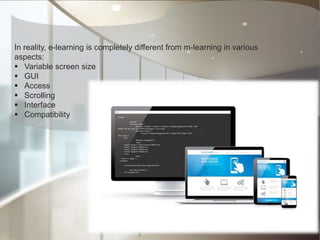
In reality, e-learning is completely different from m-learning in various
aspects:
 Variable screen size
 GUI
 Access
 Scrolling
 Interface
 Compatibility
What are the key points that e-learning designers need to follow while
converting existing e-learning courses into m-learning?
Learning Objectives
Each learning objective of an e-learning module can become an
independent m-learning module.
E-learning provides learning in detail and their courses are delivered on
desktops or laptops, whereas m-learning provides just-in-time (JIT) learning
and their courses are delivered on mobile devices.
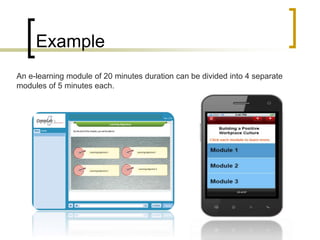
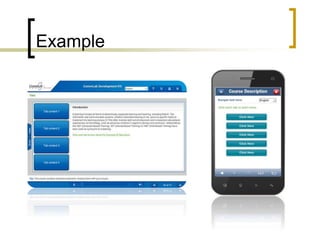
Example
An e-learning module of 20 minutes duration can be divided into 4 separate
modules of 5 minutes each.
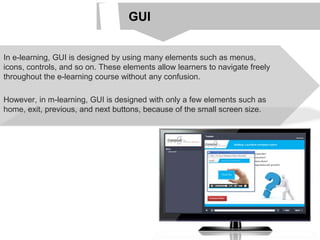
GUI
In e-learning, GUI is designed by using many elements such as menus,
icons, controls, and so on. These elements allow learners to navigate freely
throughout the e-learning course without any confusion.
However, in m-learning, GUI is designed with only a few elements such as
home, exit, previous, and next buttons, because of the small screen size.
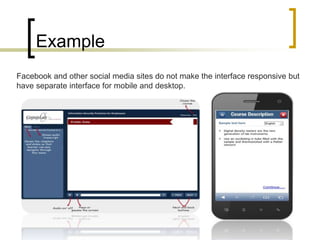
Example
Facebook and other social media sites do not make the interface responsive but
have separate interface for mobile and desktop.
Scrolling
In e-learning, scrolling can be done horizontally and vertically depending on
the length of the text.
Whereas in m-learning, scrolling can be done vertically.
It is recommended to avoid excessive scrolling in m-learning because it is
very difficult to handle this function on smaller screens.
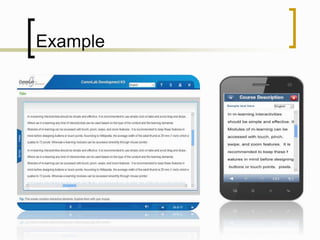
Example
Interactivities
In m-learning, interactivities should be simple and effective. It is
recommended to use simple click-on tabs and avoid drag and drops.
But in e-learning, any kind of interactivities can be used based on the type of
the content and the learning demands.
Example
Interactivities
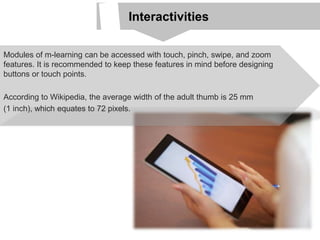
Modules of m-learning can be accessed with touch, pinch, swipe, and zoom
features. It is recommended to keep these features in mind before designing
buttons or touch points.
According to Wikipedia, the average width of the adult thumb is 25 mm
(1 inch), which equates to 72 pixels.
To know more about, Mobile Learning,
Checkout our free eBook on ”Mobile
Learning 101”
Download Now

Key Differences: E-learning vs. M-learning

  • 1.
  • 2.
    Introduction Many organizations areconverting existing e-learning courses into m-learning by making the interface responsive and by publishing them in the HTML file. The reason behind this is to provide the most meaningful learning experience through the use of mobile devices. In fact, most of them consider e-learning and m-learning are the same. But in reality, e-learning is completely different from m-learning in various aspects such as variable screen size, GUI, access, scrolling, interface, and compatibility Many organizations are converting existing e-learning courses into m- learning by:  Making the interface responsive  Publishing them in the HTML file
  • 3.
    Introduction Many organizations areconverting existing e-learning courses into m-learning by making the interface responsive and by publishing them in the HTML file. The reason behind this is to provide the most meaningful learning experience through the use of mobile devices. In fact, most of them consider e-learning and m-learning are the same. But in reality, e-learning is completely different from m-learning in various aspects such as variable screen size, GUI, access, scrolling, interface, and compatibility In reality, e-learning is completely different from m-learning in various aspects:  Variable screen size  GUI  Access  Scrolling  Interface  Compatibility
  • 4.
    What are thekey points that e-learning designers need to follow while converting existing e-learning courses into m-learning?
  • 5.
    Learning Objectives Each learningobjective of an e-learning module can become an independent m-learning module. E-learning provides learning in detail and their courses are delivered on desktops or laptops, whereas m-learning provides just-in-time (JIT) learning and their courses are delivered on mobile devices.
  • 6.
    Example An e-learning moduleof 20 minutes duration can be divided into 4 separate modules of 5 minutes each.
  • 7.
    GUI In e-learning, GUIis designed by using many elements such as menus, icons, controls, and so on. These elements allow learners to navigate freely throughout the e-learning course without any confusion. However, in m-learning, GUI is designed with only a few elements such as home, exit, previous, and next buttons, because of the small screen size.
  • 8.
    Example Facebook and othersocial media sites do not make the interface responsive but have separate interface for mobile and desktop.
  • 9.
    Scrolling In e-learning, scrollingcan be done horizontally and vertically depending on the length of the text. Whereas in m-learning, scrolling can be done vertically. It is recommended to avoid excessive scrolling in m-learning because it is very difficult to handle this function on smaller screens.
  • 10.
  • 11.
    Interactivities In m-learning, interactivitiesshould be simple and effective. It is recommended to use simple click-on tabs and avoid drag and drops. But in e-learning, any kind of interactivities can be used based on the type of the content and the learning demands.
  • 12.
  • 13.
    Interactivities Modules of m-learningcan be accessed with touch, pinch, swipe, and zoom features. It is recommended to keep these features in mind before designing buttons or touch points. According to Wikipedia, the average width of the adult thumb is 25 mm (1 inch), which equates to 72 pixels.
  • 14.
    To know moreabout, Mobile Learning, Checkout our free eBook on ”Mobile Learning 101” Download Now