www.aurionlearning.comE-LEARNING | TRAINING AND SUPPORT | PLATFORMS
What Does Responsive Learning Really Mean?
Dr Maureen Murphy & Damien Caldwell
www.aurionlearning.comE-LEARNING | TRAINING AND SUPPORT | PLATFORMS
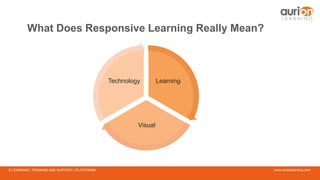
Learning
Visual
Technology
What Does Responsive Learning Really Mean?
www.aurionlearning.comE-LEARNING | TRAINING AND SUPPORT | PLATFORMS
What is responsive design?
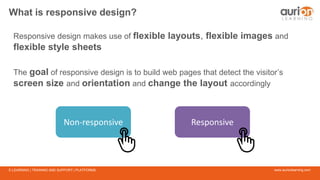
Responsive design makes use of flexible layouts, flexible images and
flexible style sheets
The goal of responsive design is to build web pages that detect the visitor’s
screen size and orientation and change the layout accordingly
Non-responsive Responsive
www.aurionlearning.comE-LEARNING | TRAINING AND SUPPORT | PLATFORMS
What are the
benefits of
responsive
design for
Learning?
www.aurionlearning.comE-LEARNING | TRAINING AND SUPPORT | PLATFORMS
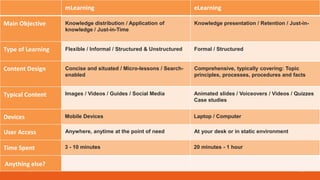
mLearning eLearning
Main Objective
Type of Learning
Content Design
Typical Content
Devices
User Access
Time Spent
Knowledge distribution / Application of
knowledge / Just-in-Time
Knowledge presentation / Retention / Just-in-
Flexible / Informal / Structured & Unstructured Formal / Structured
Concise and situated / Micro-lessons / Search-
enabled
Comprehensive, typically covering: Topic
principles, processes, procedures and facts
Images / Videos / Guides / Social Media Animated slides / Voiceovers / Videos / Quizzes
Case studies
Mobile Devices Laptop / Computer
Anywhere, anytime at the point of need At your desk or in static environment
3 - 10 minutes 20 minutes - 1 hour
Anything else?
www.aurionlearning.comE-LEARNING | TRAINING AND SUPPORT | PLATFORMS
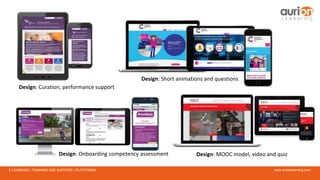
Design: Curation, performance support
Design: Short animations and questions
Design: MOOC model, video and quizDesign: Onboarding competency assessment
www.aurionlearning.comE-LEARNING | TRAINING AND SUPPORT | PLATFORMS
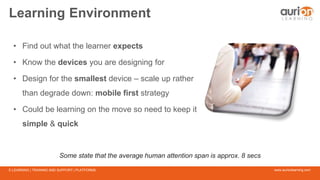
Learning Environment
• Find out what the learner expects
• Know the devices you are designing for
• Design for the smallest device – scale up rather
than degrade down: mobile first strategy
• Could be learning on the move so need to keep it
simple & quick
Some state that the average human attention span is approx. 8 secs
www.aurionlearning.comE-LEARNING | TRAINING AND SUPPORT | PLATFORMS
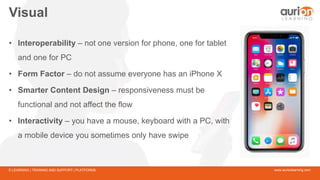
Visual
• Interoperability – not one version for phone, one for tablet
and one for PC
• Form Factor – do not assume everyone has an iPhone X
• Smarter Content Design – responsiveness must be
functional and not affect the flow
• Interactivity – you have a mouse, keyboard with a PC, with
a mobile device you sometimes only have swipe
www.aurionlearning.comE-LEARNING | TRAINING AND SUPPORT | PLATFORMS
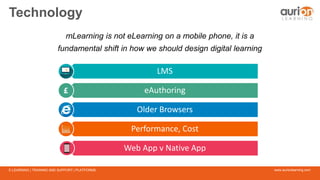
Technology
mLearning is not eLearning on a mobile phone, it is a
fundamental shift in how we should design digital learning
LMS
eAuthoring
Older Browsers
Performance, Cost
Web App v Native App
www.aurionlearning.comE-LEARNING | TRAINING AND SUPPORT | PLATFORMS
Instructional Design: mLearning (1)
A responsive design framework needs to be
supported by an equally robust instructional design approach
www.aurionlearning.comE-LEARNING | TRAINING AND SUPPORT | PLATFORMS
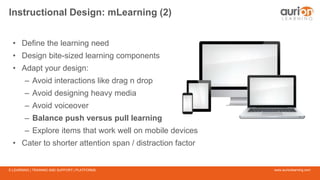
Instructional Design: mLearning (2)
• Define the learning need
• Design bite-sized learning components
• Adapt your design:
– Avoid interactions like drag n drop
– Avoid designing heavy media
– Avoid voiceover
– Balance push versus pull learning
– Explore items that work well on mobile devices
• Cater to shorter attention span / distraction factor
www.aurionlearning.comE-LEARNING | TRAINING AND SUPPORT | PLATFORMS
Instructional Design: mLearning (3)
Use the appropriate style of instruction:
• Use crisp engaging graphics, involving statistic etc.
• Use the correct user instructions for mobile
• Write for non-focused reading
• Write crisp, short, and precise sentences
• Use thought provoking images, infographics and animations
• Avoid cross-referencing
• Provide links wherever more depth of content is needed
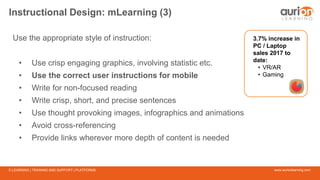
3.7% increase in
PC / Laptop
sales 2017 to
date:
• VR/AR
• Gaming
www.aurionlearning.comE-LEARNING | TRAINING AND SUPPORT | PLATFORMS
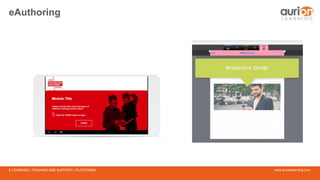
eAuthoring
www.aurionlearning.comE-LEARNING | TRAINING AND SUPPORT | PLATFORMS
Wrapping up
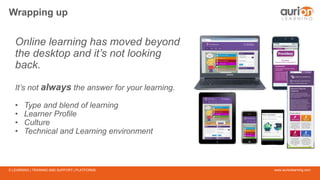
Online learning has moved beyond
the desktop and it’s not looking
back.
It’s not always the answer for your learning.
• Type and blend of learning
• Learner Profile
• Culture
• Technical and Learning environment
www.aurionlearning.comE-LEARNING | TRAINING AND SUPPORT | PLATFORMS

What Does Responsive Learning Really Mean?

  • 1.
    www.aurionlearning.comE-LEARNING | TRAININGAND SUPPORT | PLATFORMS What Does Responsive Learning Really Mean? Dr Maureen Murphy & Damien Caldwell
  • 2.
    www.aurionlearning.comE-LEARNING | TRAININGAND SUPPORT | PLATFORMS Learning Visual Technology What Does Responsive Learning Really Mean?
  • 3.
    www.aurionlearning.comE-LEARNING | TRAININGAND SUPPORT | PLATFORMS What is responsive design? Responsive design makes use of flexible layouts, flexible images and flexible style sheets The goal of responsive design is to build web pages that detect the visitor’s screen size and orientation and change the layout accordingly Non-responsive Responsive
  • 4.
    www.aurionlearning.comE-LEARNING | TRAININGAND SUPPORT | PLATFORMS What are the benefits of responsive design for Learning?
  • 5.
    www.aurionlearning.comE-LEARNING | TRAININGAND SUPPORT | PLATFORMS mLearning eLearning Main Objective Type of Learning Content Design Typical Content Devices User Access Time Spent Knowledge distribution / Application of knowledge / Just-in-Time Knowledge presentation / Retention / Just-in- Flexible / Informal / Structured & Unstructured Formal / Structured Concise and situated / Micro-lessons / Search- enabled Comprehensive, typically covering: Topic principles, processes, procedures and facts Images / Videos / Guides / Social Media Animated slides / Voiceovers / Videos / Quizzes Case studies Mobile Devices Laptop / Computer Anywhere, anytime at the point of need At your desk or in static environment 3 - 10 minutes 20 minutes - 1 hour Anything else?
  • 6.
    www.aurionlearning.comE-LEARNING | TRAININGAND SUPPORT | PLATFORMS Design: Curation, performance support Design: Short animations and questions Design: MOOC model, video and quizDesign: Onboarding competency assessment
  • 7.
    www.aurionlearning.comE-LEARNING | TRAININGAND SUPPORT | PLATFORMS Learning Environment • Find out what the learner expects • Know the devices you are designing for • Design for the smallest device – scale up rather than degrade down: mobile first strategy • Could be learning on the move so need to keep it simple & quick Some state that the average human attention span is approx. 8 secs
  • 8.
    www.aurionlearning.comE-LEARNING | TRAININGAND SUPPORT | PLATFORMS Visual • Interoperability – not one version for phone, one for tablet and one for PC • Form Factor – do not assume everyone has an iPhone X • Smarter Content Design – responsiveness must be functional and not affect the flow • Interactivity – you have a mouse, keyboard with a PC, with a mobile device you sometimes only have swipe
  • 9.
    www.aurionlearning.comE-LEARNING | TRAININGAND SUPPORT | PLATFORMS Technology mLearning is not eLearning on a mobile phone, it is a fundamental shift in how we should design digital learning LMS eAuthoring Older Browsers Performance, Cost Web App v Native App
  • 10.
    www.aurionlearning.comE-LEARNING | TRAININGAND SUPPORT | PLATFORMS Instructional Design: mLearning (1) A responsive design framework needs to be supported by an equally robust instructional design approach
  • 11.
    www.aurionlearning.comE-LEARNING | TRAININGAND SUPPORT | PLATFORMS Instructional Design: mLearning (2) • Define the learning need • Design bite-sized learning components • Adapt your design: – Avoid interactions like drag n drop – Avoid designing heavy media – Avoid voiceover – Balance push versus pull learning – Explore items that work well on mobile devices • Cater to shorter attention span / distraction factor
  • 12.
    www.aurionlearning.comE-LEARNING | TRAININGAND SUPPORT | PLATFORMS Instructional Design: mLearning (3) Use the appropriate style of instruction: • Use crisp engaging graphics, involving statistic etc. • Use the correct user instructions for mobile • Write for non-focused reading • Write crisp, short, and precise sentences • Use thought provoking images, infographics and animations • Avoid cross-referencing • Provide links wherever more depth of content is needed 3.7% increase in PC / Laptop sales 2017 to date: • VR/AR • Gaming
  • 13.
    www.aurionlearning.comE-LEARNING | TRAININGAND SUPPORT | PLATFORMS eAuthoring
  • 14.
    www.aurionlearning.comE-LEARNING | TRAININGAND SUPPORT | PLATFORMS Wrapping up Online learning has moved beyond the desktop and it’s not looking back. It’s not always the answer for your learning. • Type and blend of learning • Learner Profile • Culture • Technical and Learning environment
  • 15.