ISTE 2013
Students as Teachers: Screencasting
for Learning Foundational Mathematics
Carol Carruthers
Ewan Gibson
June 25, 2013
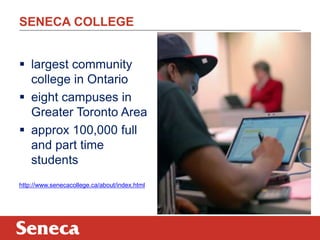
SENECA COLLEGE
 largest community
college in Ontario
 eight campuses in
Greater Toronto Area
 approx 100,000 full
and part time
students
http://www.senecacollege.ca/about/index.html
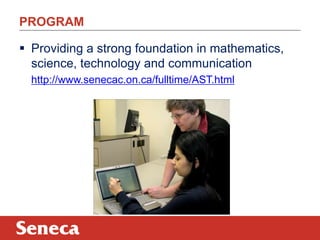
PROGRAM
 Providing a strong foundation in mathematics,
science, technology and communication
http://www.senecac.on.ca/fulltime/AST.html
Problem:
Some students do not like to learn mathematics.
Solution:
Collaborative/interactive/learner-directed use
of technology can re-engage students.
PROBLEM/POTENTIAL SOLUTION
COMPARISON OF PEN-INPUT WINDOWS DEVICES
 Comparison chart:
http://mobileoffice.about.com/b/2013/02/19/all-the-stylus-enabled-windows-
8-and-rt-tablet-pcs-compared-side-by-side-in-one-handy-chart.htm
 Multiple reviews:
http://www.youtube.com/user/MobileTechReview
 Wacom tablets:
http://www.wacom.com/static/oops.htm?aspxerrorpath=/en/products/pen-
tablets
HOW TO WRITE ON A WINDOWS BASED TABLET
 Windows Journal http://windows.microsoft.com/en-
ca/windows7/create-and-personalize-handwritten-notes-using-windows-
journal
 Microsoft Word>Review>Start inking
https://www.eng.vt.edu/sites/default/files/pageattachments/Inking+in+Office.
pdf
 OneNote http://office.microsoft.com/en-us/onenote/
 Tablet PC Input Panel http://windows.microsoft.com/en-
us/windows7/using-the-writing-pad-and-touch-keyboard-in-tablet-pc-input-
panel
 Math Input Panel http://windows.microsoft.com/en-
us/windows7/use-math-input-panel-to-write-and-correct-math-equations
HANDWRITTEN /SHARED/ SOCIAL POSTING:
 draw.to - Draw something and share it
http://draw.to/new
 Scribblar – Collaborate instantly
http://www.scribblar.com/
 DyKnow Vision – Interactive learning software
http://www.dyknow.com/educational-software-products/interactive-
learning-software/
WHAT IS SCREENCASTING?
Two reviews:
http://net.educause.edu/ir/library/pdf/ELI7012.pdf
http://www.oreillynet.com/pub/a/oreilly/digitalmedia/2005/
11/16/what-is-screencasting.html?page=1
WHY USE INSTRUCTOR SCREENCASTING?
In classroom mode:
 Student-directed learning
In flipped/mixed mode:
 Content is covered outside of class time
 Connection to instructor
The solution is to screencast!!
http://www.youtube.com/watch?v=yvKu2T9Kovo
FLIPPED AND MIXED MODE LEARNING:
 Peer instruction (Eric Mazur)
http://mazur.harvard.edu/
http://en.wikipedia.org/wiki/Peer_instruction
 Flip Classroom
http://en.wikipedia.org/wiki/Flip_teaching
http://net.educause.edu/ir/library/pdf/eli7081.pdf
 Mixed mode
http://en.wikipedia.org/wiki/Blended_learning
http://connectedprincipals.com/archives/5131
INSTRUCTOR DEVELOPED SCREENCASTS:
CONS
 Time required to
produce
 Teaching style the
same (videos are
copies of lessons)
 Passive (not active)
learning
PROS
 Students choose
when/where/how
often learning occurs
 Capitalize on „out of
class time‟ learning
 Provides review for
exams/tests/quizzes
BIG IDEA - STUDENT DEVELOPED MATHCASTS!!
CONNECTING COLLEGE TO CAREER (C^3):
Project Goal:
 To develop a categorized library of mathematics
and application videos (AODA compliant)
produced by and for students
“This initiative has received funding through the Seneca
Pillar Sponsorship program and the generous support of
Johnson Insurance Inc.”
3
C^3 FEATURES:
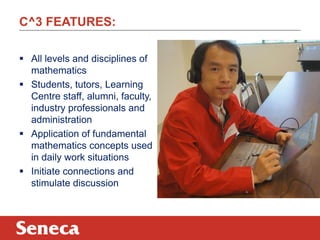
 All levels and disciplines of
mathematics
 Students, tutors, Learning
Centre staff, alumni, faculty,
industry professionals and
administration
 Application of fundamental
mathematics concepts used
in daily work situations
 Initiate connections and
stimulate discussion
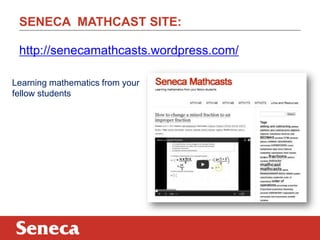
SENECA MATHCAST SITE:
Learning mathematics from your
fellow students
http://senecamathcasts.wordpress.com/
A FIRST ATTEMPT – JING
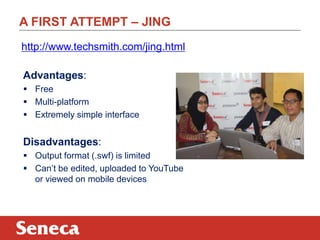
Advantages:
 Free
 Multi-platform
 Extremely simple interface
Disadvantages:
 Output format (.swf) is limited
 Can‟t be edited, uploaded to YouTube
or viewed on mobile devices
http://www.techsmith.com/jing.html
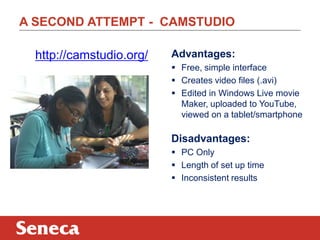
A SECOND ATTEMPT - CAMSTUDIO
http://camstudio.org/ Advantages:
 Free, simple interface
 Creates video files (.avi)
 Edited in Windows Live movie
Maker, uploaded to YouTube,
viewed on a tablet/smartphone
Disadvantages:
 PC Only
 Length of set up time
 Inconsistent results
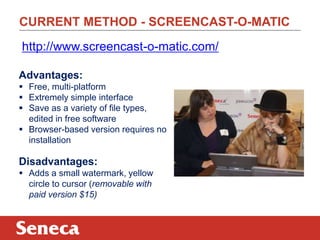
CURRENT METHOD - SCREENCAST-O-MATIC
Advantages:
 Free, multi-platform
 Extremely simple interface
 Save as a variety of file types,
edited in free software
 Browser-based version requires no
installation
Disadvantages:
 Adds a small watermark, yellow
circle to cursor (removable with
paid version $15)
http://www.screencast-o-matic.com/
IOS AND ANDROID DEVICES:
 A video describing use of non-windows based
devices:
http://www.youtube.com/watch?v=gtnFnIbQG9g&feature=youtu.be
SOFTWARE IN VIDEO
AirServer
http://www.airserver.com/
 Allows iOS devices (iPads, etc.) to share their screen
wirelessly to a PC or Mac
Droid@Screen
http://droid-at-screen.ribomation.com/
 Allows Android devices to share their screen with a
PC or Mac via USB
QuickTime Player
 Preinstalled on all Macs since 2008
INK APPS IN VIDEO
iOS
http://appadvice.com/appguides/show/handwriting-apps-for-ipad
 Paper
 Inkflow http://ipadapps4school.com/2013/01/17/inkflow-a-great-ipad-app-
for-visual-thinkers/
Android
https://play.google.com/store/search?q=pen+input+apps&c=apps
 SketchbookX
https://play.google.com/store/apps/details?id=com.adsk.sketchbookhdexpress&hl=en
 Big Fat Canvas
https://play.google.com/store/apps/details?id=com.justinholmgren.sketchpad&hl=en
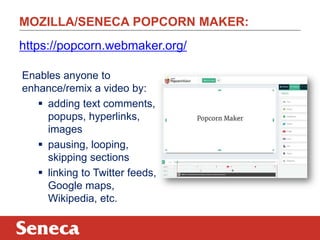
MOZILLA/SENECA POPCORN MAKER:
Enables anyone to
enhance/remix a video by:
 adding text comments,
popups, hyperlinks,
images
 pausing, looping,
skipping sections
 linking to Twitter feeds,
Google maps,
Wikipedia, etc.
https://popcorn.webmaker.org/
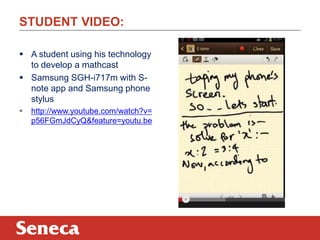
STUDENT VIDEO:
 A student using his technology
to develop a mathcast
 Samsung SGH-i717m with S-
note app and Samsung phone
stylus
 http://www.youtube.com/watch?v=
p56FGmJdCyQ&feature=youtu.be
THANK YOU AND MORE INFORMATION:
 Email: carol.carruthers@senecacollege.ca
@mathtech (twitter)
ewan.gibson@senecacollege.ca
@ewan_gibson (twitter)
 Seneca Mathcasts
http://senecamathcasts.wordpress.com/
WE WANT YOUR FEEDBACK!
There are 3 ways to provide feedback on this session.
Mobile App
Mobile Website
Conference Website

Iste13 carruthers

  • 1.
    ISTE 2013 Students asTeachers: Screencasting for Learning Foundational Mathematics Carol Carruthers Ewan Gibson June 25, 2013
  • 2.
    SENECA COLLEGE  largestcommunity college in Ontario  eight campuses in Greater Toronto Area  approx 100,000 full and part time students http://www.senecacollege.ca/about/index.html
  • 3.
    PROGRAM  Providing astrong foundation in mathematics, science, technology and communication http://www.senecac.on.ca/fulltime/AST.html
  • 4.
    Problem: Some students donot like to learn mathematics. Solution: Collaborative/interactive/learner-directed use of technology can re-engage students. PROBLEM/POTENTIAL SOLUTION
  • 5.
    COMPARISON OF PEN-INPUTWINDOWS DEVICES  Comparison chart: http://mobileoffice.about.com/b/2013/02/19/all-the-stylus-enabled-windows- 8-and-rt-tablet-pcs-compared-side-by-side-in-one-handy-chart.htm  Multiple reviews: http://www.youtube.com/user/MobileTechReview  Wacom tablets: http://www.wacom.com/static/oops.htm?aspxerrorpath=/en/products/pen- tablets
  • 6.
    HOW TO WRITEON A WINDOWS BASED TABLET  Windows Journal http://windows.microsoft.com/en- ca/windows7/create-and-personalize-handwritten-notes-using-windows- journal  Microsoft Word>Review>Start inking https://www.eng.vt.edu/sites/default/files/pageattachments/Inking+in+Office. pdf  OneNote http://office.microsoft.com/en-us/onenote/  Tablet PC Input Panel http://windows.microsoft.com/en- us/windows7/using-the-writing-pad-and-touch-keyboard-in-tablet-pc-input- panel  Math Input Panel http://windows.microsoft.com/en- us/windows7/use-math-input-panel-to-write-and-correct-math-equations
  • 7.
    HANDWRITTEN /SHARED/ SOCIALPOSTING:  draw.to - Draw something and share it http://draw.to/new  Scribblar – Collaborate instantly http://www.scribblar.com/  DyKnow Vision – Interactive learning software http://www.dyknow.com/educational-software-products/interactive- learning-software/
  • 8.
    WHAT IS SCREENCASTING? Tworeviews: http://net.educause.edu/ir/library/pdf/ELI7012.pdf http://www.oreillynet.com/pub/a/oreilly/digitalmedia/2005/ 11/16/what-is-screencasting.html?page=1
  • 9.
    WHY USE INSTRUCTORSCREENCASTING? In classroom mode:  Student-directed learning In flipped/mixed mode:  Content is covered outside of class time  Connection to instructor The solution is to screencast!! http://www.youtube.com/watch?v=yvKu2T9Kovo
  • 10.
    FLIPPED AND MIXEDMODE LEARNING:  Peer instruction (Eric Mazur) http://mazur.harvard.edu/ http://en.wikipedia.org/wiki/Peer_instruction  Flip Classroom http://en.wikipedia.org/wiki/Flip_teaching http://net.educause.edu/ir/library/pdf/eli7081.pdf  Mixed mode http://en.wikipedia.org/wiki/Blended_learning http://connectedprincipals.com/archives/5131
  • 11.
    INSTRUCTOR DEVELOPED SCREENCASTS: CONS Time required to produce  Teaching style the same (videos are copies of lessons)  Passive (not active) learning PROS  Students choose when/where/how often learning occurs  Capitalize on „out of class time‟ learning  Provides review for exams/tests/quizzes BIG IDEA - STUDENT DEVELOPED MATHCASTS!!
  • 12.
    CONNECTING COLLEGE TOCAREER (C^3): Project Goal:  To develop a categorized library of mathematics and application videos (AODA compliant) produced by and for students “This initiative has received funding through the Seneca Pillar Sponsorship program and the generous support of Johnson Insurance Inc.” 3
  • 13.
    C^3 FEATURES:  Alllevels and disciplines of mathematics  Students, tutors, Learning Centre staff, alumni, faculty, industry professionals and administration  Application of fundamental mathematics concepts used in daily work situations  Initiate connections and stimulate discussion
  • 14.
    SENECA MATHCAST SITE: Learningmathematics from your fellow students http://senecamathcasts.wordpress.com/
  • 15.
    A FIRST ATTEMPT– JING Advantages:  Free  Multi-platform  Extremely simple interface Disadvantages:  Output format (.swf) is limited  Can‟t be edited, uploaded to YouTube or viewed on mobile devices http://www.techsmith.com/jing.html
  • 16.
    A SECOND ATTEMPT- CAMSTUDIO http://camstudio.org/ Advantages:  Free, simple interface  Creates video files (.avi)  Edited in Windows Live movie Maker, uploaded to YouTube, viewed on a tablet/smartphone Disadvantages:  PC Only  Length of set up time  Inconsistent results
  • 17.
    CURRENT METHOD -SCREENCAST-O-MATIC Advantages:  Free, multi-platform  Extremely simple interface  Save as a variety of file types, edited in free software  Browser-based version requires no installation Disadvantages:  Adds a small watermark, yellow circle to cursor (removable with paid version $15) http://www.screencast-o-matic.com/
  • 18.
    IOS AND ANDROIDDEVICES:  A video describing use of non-windows based devices: http://www.youtube.com/watch?v=gtnFnIbQG9g&feature=youtu.be
  • 19.
    SOFTWARE IN VIDEO AirServer http://www.airserver.com/ Allows iOS devices (iPads, etc.) to share their screen wirelessly to a PC or Mac Droid@Screen http://droid-at-screen.ribomation.com/  Allows Android devices to share their screen with a PC or Mac via USB QuickTime Player  Preinstalled on all Macs since 2008
  • 20.
    INK APPS INVIDEO iOS http://appadvice.com/appguides/show/handwriting-apps-for-ipad  Paper  Inkflow http://ipadapps4school.com/2013/01/17/inkflow-a-great-ipad-app- for-visual-thinkers/ Android https://play.google.com/store/search?q=pen+input+apps&c=apps  SketchbookX https://play.google.com/store/apps/details?id=com.adsk.sketchbookhdexpress&hl=en  Big Fat Canvas https://play.google.com/store/apps/details?id=com.justinholmgren.sketchpad&hl=en
  • 21.
    MOZILLA/SENECA POPCORN MAKER: Enablesanyone to enhance/remix a video by:  adding text comments, popups, hyperlinks, images  pausing, looping, skipping sections  linking to Twitter feeds, Google maps, Wikipedia, etc. https://popcorn.webmaker.org/
  • 22.
    STUDENT VIDEO:  Astudent using his technology to develop a mathcast  Samsung SGH-i717m with S- note app and Samsung phone stylus  http://www.youtube.com/watch?v= p56FGmJdCyQ&feature=youtu.be
  • 23.
    THANK YOU ANDMORE INFORMATION:  Email: carol.carruthers@senecacollege.ca @mathtech (twitter) ewan.gibson@senecacollege.ca @ewan_gibson (twitter)  Seneca Mathcasts http://senecamathcasts.wordpress.com/
  • 24.
    WE WANT YOURFEEDBACK! There are 3 ways to provide feedback on this session. Mobile App Mobile Website Conference Website