VISITING DELEGATION - WALES 
Numeracy in Ontario: 
Seneca College’s Approach 
Carol Carruthers 
November 25, 2014
SENECA COLLEGE 
HTTP://SENECAC.ON.CA/ABOUT/INDEX.HTML 
 Largest community college in Ontario 
 Eight campuses in the Greater Toronto Area 
 Programs offered in over 260 fields of study 
 Approx 100,000 full and part time students 
 International students from 90 countries
FINDINGS 
http://csap.senecacollege.ca/en/ 
“Only 66% of students achieved “good grades” (A, 
B or C) in first-semester mathematics in college, 
while 34% received grades of D or F, placing them 
“at risk” of not completing their chosen program.” 
(College Mathematics Project, 2011, p. 1)
OUTCOMES 
 Canadian Achievement Test (CAT3 – level 19) 
 Foundations of Technical Mathematics course 
http://www.senecac.on.ca/cgi-bin/subject?s1=MTH148 
 Applied Science and Technology Program 
http://www.senecacollege.ca/fulltime/AST.html
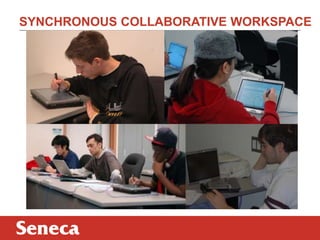
SYNCHRONOUS COLLABORATIVE WORKSPACE
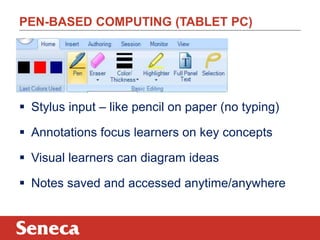
PEN-BASED COMPUTING (TABLET PC) 
 Stylus input – like pencil on paper (no typing) 
 Annotations focus learners on key concepts 
 Visual learners can diagram ideas 
 Notes saved and accessed anytime/anywhere
SYNCHRONOUS COLLABORATIVE WORKSPACE 
 Shared Teaching Responsibility 
 Parallel Solution Methodology 
 Online Groups Share a Common Screen 
 Immediate Anonymous Feedback 
 Real Time Assessment
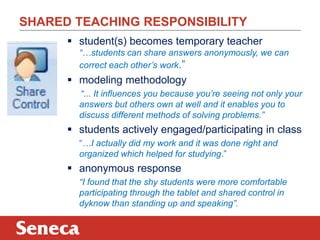
SHARED TEACHING RESPONSIBILITY 
 student(s) becomes temporary teacher 
“…students can share answers anonymously, we can 
correct each other’s work.” 
 modeling methodology 
“... It influences you because you’re seeing not only your 
answers but others own at well and it enables you to 
discuss different methods of solving problems.” 
 students actively engaged/participating in class 
“…I actually did my work and it was done right and 
organized which helped for studying.” 
 anonymous response 
“I found that the shy students were more comfortable 
participating through the tablet and shared control in 
dyknow than standing up and speaking”.
HYBRID - ASYNCHRONOUS ONLINE SPACES 
 Mixed-mode (hybrid) pedagogy 
 Teacher created online activities 
 Clearly defined learning outcomes 
 Increased student responsibility 
 Assessment strategy reflects outcomes
STUDENTS DESIGN LEARNING EXPERIENCE 
 InterACTIVE learning 
http://www.mathopenref.com/ 
 Real time response to problem solving 
http://www.mathsisfun.com/algebra/equation-formula.html 
 Group competition to solve problems 
http://jeopardylabs.com/play/ratio-and-proportion 
 Online worksheet generators 
http://www.math.com/students/worksheet/algebra_sp.htm 
http://www.math-aids.com/ 
 Homework used to gauge understanding 
Online textbook assignments
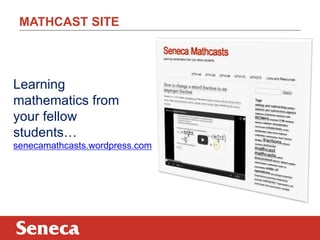
MATHCAST SITE 
Learning 
mathematics from 
your fellow 
students… 
senecamathcasts.wordpress.com
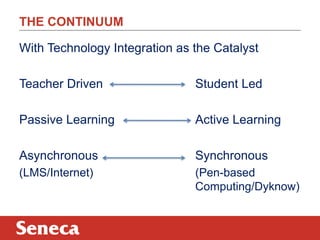
With Technology Integration as the Catalyst 
Teacher Driven Student Led 
Passive Learning Active Learning 
Asynchronous Synchronous 
(LMS/Internet) (Pen-based 
Computing/Dyknow) 
THE CONTINUUM
THANK YOU 
QUESTIONS?
MORE INFORMATION 
 Contact: carol.carruthers@senecacollege.ca 
@mathtech 
 Seneca Mathcasts 
senecamathcasts.wordpress.com 
 DyKnow software 
http://www.dyknow.com/ 
 Student videos 
http://www.youtube.com/watch?v=il-k65CFqpE 
http://www.youtube.com/watch?v=Hd7BsEF1x6g
HOW TO WRITE ON A WINDOWS BASED TABLET 
 Windows Journal http://windows.microsoft.com/en-ca/windows7/create-and-personalize- 
handwritten-notes-using-windows-journal 
 Microsoft Word>Review>Start inking 
https://www.eng.vt.edu/sites/default/files/pageattachments/Inking+in+Office.pdf 
 OneNote http://office.microsoft.com/en-us/onenote/ 
 Tablet PC Input Panel http://windows.microsoft.com/en-us/windows7/using-the- 
writing-pad-and-touch-keyboard-in-tablet-pc-input-panel 
 Math Input Panel http://windows.microsoft.com/en-us/windows7/use-math-input- 
panel-to-write-and-correct-math-equations
HANDWRITTEN /SHARED/ SOCIAL POSTING 
 draw.to - Draw something and share it http://draw.to/new 
 Scribblar – Collaborate instantly http://www.scribblar.com/ 
 DyKnow Vision – Interactive learning software 
http://www.dyknow.com/educational-software-products/interactive-learning-software/

11.25.14. wales delegation

  • 1.
    VISITING DELEGATION -WALES Numeracy in Ontario: Seneca College’s Approach Carol Carruthers November 25, 2014
  • 2.
    SENECA COLLEGE HTTP://SENECAC.ON.CA/ABOUT/INDEX.HTML  Largest community college in Ontario  Eight campuses in the Greater Toronto Area  Programs offered in over 260 fields of study  Approx 100,000 full and part time students  International students from 90 countries
  • 3.
    FINDINGS http://csap.senecacollege.ca/en/ “Only66% of students achieved “good grades” (A, B or C) in first-semester mathematics in college, while 34% received grades of D or F, placing them “at risk” of not completing their chosen program.” (College Mathematics Project, 2011, p. 1)
  • 4.
    OUTCOMES  CanadianAchievement Test (CAT3 – level 19)  Foundations of Technical Mathematics course http://www.senecac.on.ca/cgi-bin/subject?s1=MTH148  Applied Science and Technology Program http://www.senecacollege.ca/fulltime/AST.html
  • 5.
  • 6.
    PEN-BASED COMPUTING (TABLETPC)  Stylus input – like pencil on paper (no typing)  Annotations focus learners on key concepts  Visual learners can diagram ideas  Notes saved and accessed anytime/anywhere
  • 7.
    SYNCHRONOUS COLLABORATIVE WORKSPACE  Shared Teaching Responsibility  Parallel Solution Methodology  Online Groups Share a Common Screen  Immediate Anonymous Feedback  Real Time Assessment
  • 8.
    SHARED TEACHING RESPONSIBILITY  student(s) becomes temporary teacher “…students can share answers anonymously, we can correct each other’s work.”  modeling methodology “... It influences you because you’re seeing not only your answers but others own at well and it enables you to discuss different methods of solving problems.”  students actively engaged/participating in class “…I actually did my work and it was done right and organized which helped for studying.”  anonymous response “I found that the shy students were more comfortable participating through the tablet and shared control in dyknow than standing up and speaking”.
  • 9.
    HYBRID - ASYNCHRONOUSONLINE SPACES  Mixed-mode (hybrid) pedagogy  Teacher created online activities  Clearly defined learning outcomes  Increased student responsibility  Assessment strategy reflects outcomes
  • 10.
    STUDENTS DESIGN LEARNINGEXPERIENCE  InterACTIVE learning http://www.mathopenref.com/  Real time response to problem solving http://www.mathsisfun.com/algebra/equation-formula.html  Group competition to solve problems http://jeopardylabs.com/play/ratio-and-proportion  Online worksheet generators http://www.math.com/students/worksheet/algebra_sp.htm http://www.math-aids.com/  Homework used to gauge understanding Online textbook assignments
  • 11.
    MATHCAST SITE Learning mathematics from your fellow students… senecamathcasts.wordpress.com
  • 12.
    With Technology Integrationas the Catalyst Teacher Driven Student Led Passive Learning Active Learning Asynchronous Synchronous (LMS/Internet) (Pen-based Computing/Dyknow) THE CONTINUUM
  • 13.
  • 14.
    MORE INFORMATION Contact: carol.carruthers@senecacollege.ca @mathtech  Seneca Mathcasts senecamathcasts.wordpress.com  DyKnow software http://www.dyknow.com/  Student videos http://www.youtube.com/watch?v=il-k65CFqpE http://www.youtube.com/watch?v=Hd7BsEF1x6g
  • 15.
    HOW TO WRITEON A WINDOWS BASED TABLET  Windows Journal http://windows.microsoft.com/en-ca/windows7/create-and-personalize- handwritten-notes-using-windows-journal  Microsoft Word>Review>Start inking https://www.eng.vt.edu/sites/default/files/pageattachments/Inking+in+Office.pdf  OneNote http://office.microsoft.com/en-us/onenote/  Tablet PC Input Panel http://windows.microsoft.com/en-us/windows7/using-the- writing-pad-and-touch-keyboard-in-tablet-pc-input-panel  Math Input Panel http://windows.microsoft.com/en-us/windows7/use-math-input- panel-to-write-and-correct-math-equations
  • 16.
    HANDWRITTEN /SHARED/ SOCIALPOSTING  draw.to - Draw something and share it http://draw.to/new  Scribblar – Collaborate instantly http://www.scribblar.com/  DyKnow Vision – Interactive learning software http://www.dyknow.com/educational-software-products/interactive-learning-software/