INFORMATION SYSTEM
Information System
 Initially, the computers were developed to perform specific functions
such as a sequence of calculations.
 Today’s computers are important component of the information
system that is capable of performing many tasks including the
function of communication.
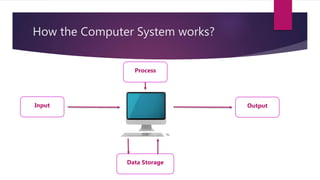
 Computer can be described in terms of input, processing, output and
storage.
How the Computer System works?
Input
Process
Data Storage
Output
Input
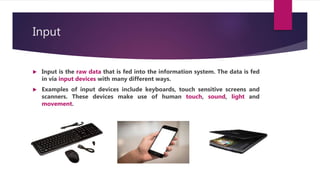
 Input is the raw data that is fed into the information system. The data is fed
in via input devices with many different ways.
 Examples of input devices include keyboards, touch sensitive screens and
scanners. These devices make use of human touch, sound, light and
movement.
Storage
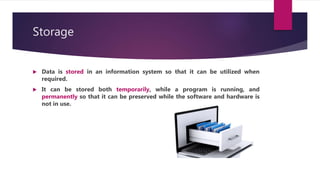
 Data is stored in an information system so that it can be utilized when
required.
 It can be stored both temporarily, while a program is running, and
permanently so that it can be preserved while the software and hardware is
not in use.
Processing
 This is the terms used to describe the way information systems
convert raw data into useful information.
 Processing includes the following functions:
 Storing
 Drawing
 Calculating
 Sorting
 Searching
Output
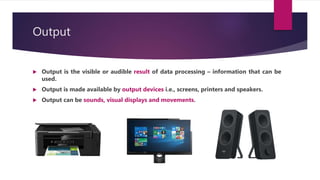
 Output is the visible or audible result of data processing – information that can be
used.
 Output is made available by output devices i.e., screens, printers and speakers.
 Output can be sounds, visual displays and movements.
System Unit
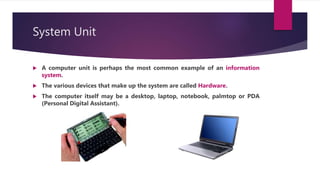
 A computer unit is perhaps the most common example of an information
system.
 The various devices that make up the system are called Hardware.
 The computer itself may be a desktop, laptop, notebook, palmtop or PDA
(Personal Digital Assistant).
Desktop PCs
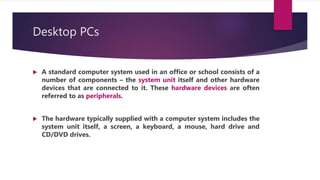
 A standard computer system used in an office or school consists of a
number of components – the system unit itself and other hardware
devices that are connected to it. These hardware devices are often
referred to as peripherals.
 The hardware typically supplied with a computer system includes the
system unit itself, a screen, a keyboard, a mouse, hard drive and
CD/DVD drives.
Block diagram of a system
Computer
Keyboard
Hard DiskMouse
CD ROM
Printer
Screen
Inside the computer
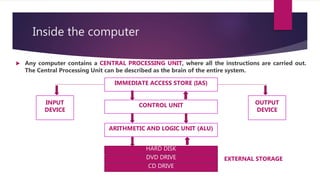
 Any computer contains a CENTRAL PROCESSING UNIT, where all the instructions are carried out.
The Central Processing Unit can be described as the brain of the entire system.
IMMEDIATE ACCESS STORE (IAS)
CONTROL UNIT
ARITHMETIC AND LOGIC UNIT (ALU)
HARD DISK
DVD DRIVE
CD DRIVE
INPUT
DEVICE
OUTPUT
DEVICE
EXTERNAL STORAGE
It includes the following:
o The control unit, which contains the timing of operations and
movements of data inside the computer and between the computer
and peripherals.
o The arithmetic and logic unit (ALU), where calculations are
performed and logical operations are made.
o The immediate access store (IAS), which is the built in memory of the
computer system. It is also called the primary or main storage.

Information system

  • 1.
  • 2.
    Information System  Initially,the computers were developed to perform specific functions such as a sequence of calculations.  Today’s computers are important component of the information system that is capable of performing many tasks including the function of communication.  Computer can be described in terms of input, processing, output and storage.
  • 3.
    How the ComputerSystem works? Input Process Data Storage Output
  • 4.
    Input  Input isthe raw data that is fed into the information system. The data is fed in via input devices with many different ways.  Examples of input devices include keyboards, touch sensitive screens and scanners. These devices make use of human touch, sound, light and movement.
  • 5.
    Storage  Data isstored in an information system so that it can be utilized when required.  It can be stored both temporarily, while a program is running, and permanently so that it can be preserved while the software and hardware is not in use.
  • 6.
    Processing  This isthe terms used to describe the way information systems convert raw data into useful information.  Processing includes the following functions:  Storing  Drawing  Calculating  Sorting  Searching
  • 7.
    Output  Output isthe visible or audible result of data processing – information that can be used.  Output is made available by output devices i.e., screens, printers and speakers.  Output can be sounds, visual displays and movements.
  • 8.
    System Unit  Acomputer unit is perhaps the most common example of an information system.  The various devices that make up the system are called Hardware.  The computer itself may be a desktop, laptop, notebook, palmtop or PDA (Personal Digital Assistant).
  • 9.
    Desktop PCs  Astandard computer system used in an office or school consists of a number of components – the system unit itself and other hardware devices that are connected to it. These hardware devices are often referred to as peripherals.  The hardware typically supplied with a computer system includes the system unit itself, a screen, a keyboard, a mouse, hard drive and CD/DVD drives.
  • 10.
    Block diagram ofa system Computer Keyboard Hard DiskMouse CD ROM Printer Screen
  • 11.
    Inside the computer Any computer contains a CENTRAL PROCESSING UNIT, where all the instructions are carried out. The Central Processing Unit can be described as the brain of the entire system. IMMEDIATE ACCESS STORE (IAS) CONTROL UNIT ARITHMETIC AND LOGIC UNIT (ALU) HARD DISK DVD DRIVE CD DRIVE INPUT DEVICE OUTPUT DEVICE EXTERNAL STORAGE
  • 12.
    It includes thefollowing: o The control unit, which contains the timing of operations and movements of data inside the computer and between the computer and peripherals. o The arithmetic and logic unit (ALU), where calculations are performed and logical operations are made. o The immediate access store (IAS), which is the built in memory of the computer system. It is also called the primary or main storage.