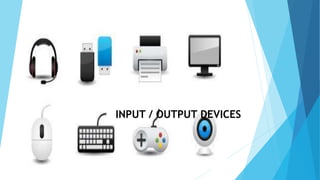
INPUT / OUTPUT DEVICES
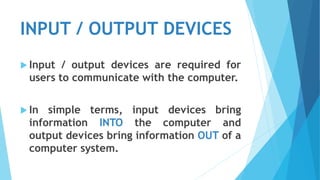
 Input / output devices are required for
users to communicate with the computer.
 In simple terms, input devices bring
information INTO the computer and
output devices bring information OUT of a
computer system.
Input Devices
 An input devices is used to enter the data and instructions into the computer.
Keyboard and mouse are the most commonly used input devices.
 Keyboard: Keyboard is the most popular
input device that allows user to type
alphabets, numbers and operators.
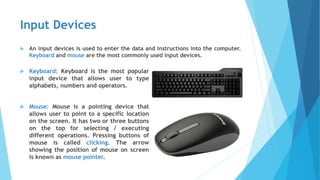
 Mouse: Mouse is a pointing device that
allows user to point to a specific location
on the screen. It has two or three buttons
on the top for selecting / executing
different operations. Pressing buttons of
mouse is called clicking. The arrow
showing the position of mouse on screen
is known as mouse pointer.
Other Input Devices
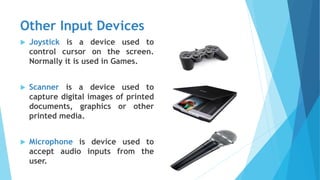
 Joystick is a device used to
control cursor on the screen.
Normally it is used in Games.
 Scanner is a device used to
capture digital images of printed
documents, graphics or other
printed media.
 Microphone is device used to
accept audio inputs from the
user.
Other Input Devices
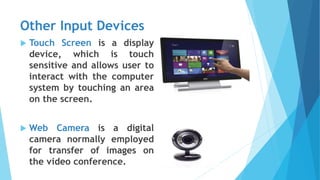
 Touch Screen is a display
device, which is touch
sensitive and allows user to
interact with the computer
system by touching an area
on the screen.
 Web Camera is a digital
camera normally employed
for transfer of images on
the video conference.
Output Devices
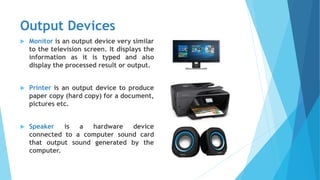
 Monitor is an output device very similar
to the television screen. It displays the
information as it is typed and also
display the processed result or output.
 Printer is an output device to produce
paper copy (hard copy) for a document,
pictures etc.
 Speaker is a hardware device
connected to a computer sound card
that output sound generated by the
computer.
Storage Devices
 Storing data is an important part of a computer system. The main concern
of all computer designers is to create fast and efficient storage devices.
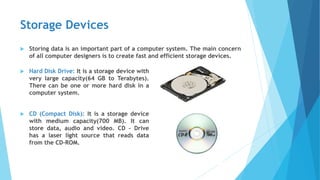
 Hard Disk Drive: It is a storage device with
very large capacity(64 GB to Terabytes).
There can be one or more hard disk in a
computer system.
 CD (Compact Disk): It is a storage device
with medium capacity(700 MB). It can
store data, audio and video. CD – Drive
has a laser light source that reads data
from the CD-ROM.
Other Storage Devices
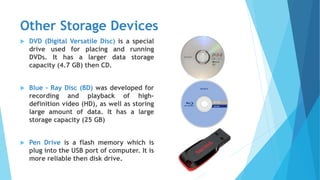
 DVD (Digital Versatile Disc) is a special
drive used for placing and running
DVDs. It has a larger data storage
capacity (4.7 GB) then CD.
 Blue – Ray Disc (BD) was developed for
recording and playback of high-
definition video (HD), as well as storing
large amount of data. It has a large
storage capacity (25 GB)
 Pen Drive is a flash memory which is
plug into the USB port of computer. It is
more reliable then disk drive.

Input output devices

  • 1.
  • 2.
    INPUT / OUTPUTDEVICES  Input / output devices are required for users to communicate with the computer.  In simple terms, input devices bring information INTO the computer and output devices bring information OUT of a computer system.
  • 3.
    Input Devices  Aninput devices is used to enter the data and instructions into the computer. Keyboard and mouse are the most commonly used input devices.  Keyboard: Keyboard is the most popular input device that allows user to type alphabets, numbers and operators.  Mouse: Mouse is a pointing device that allows user to point to a specific location on the screen. It has two or three buttons on the top for selecting / executing different operations. Pressing buttons of mouse is called clicking. The arrow showing the position of mouse on screen is known as mouse pointer.
  • 4.
    Other Input Devices Joystick is a device used to control cursor on the screen. Normally it is used in Games.  Scanner is a device used to capture digital images of printed documents, graphics or other printed media.  Microphone is device used to accept audio inputs from the user.
  • 5.
    Other Input Devices Touch Screen is a display device, which is touch sensitive and allows user to interact with the computer system by touching an area on the screen.  Web Camera is a digital camera normally employed for transfer of images on the video conference.
  • 6.
    Output Devices  Monitoris an output device very similar to the television screen. It displays the information as it is typed and also display the processed result or output.  Printer is an output device to produce paper copy (hard copy) for a document, pictures etc.  Speaker is a hardware device connected to a computer sound card that output sound generated by the computer.
  • 7.
    Storage Devices  Storingdata is an important part of a computer system. The main concern of all computer designers is to create fast and efficient storage devices.  Hard Disk Drive: It is a storage device with very large capacity(64 GB to Terabytes). There can be one or more hard disk in a computer system.  CD (Compact Disk): It is a storage device with medium capacity(700 MB). It can store data, audio and video. CD – Drive has a laser light source that reads data from the CD-ROM.
  • 8.
    Other Storage Devices DVD (Digital Versatile Disc) is a special drive used for placing and running DVDs. It has a larger data storage capacity (4.7 GB) then CD.  Blue – Ray Disc (BD) was developed for recording and playback of high- definition video (HD), as well as storing large amount of data. It has a large storage capacity (25 GB)  Pen Drive is a flash memory which is plug into the USB port of computer. It is more reliable then disk drive.