COMPUTER HARDWARE AND SOFT WARE
Group Members:
Name:Nandani,Dilisha,Bhupendra,Raj
COMPUTER HARDWARE AND SOFTWARE
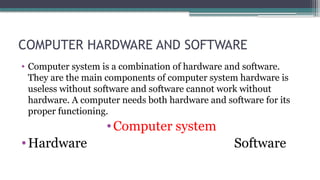
• Computer system is a combination of hardware and software.
They are the main components of computer system hardware is
useless without software and software cannot work without
hardware. A computer needs both hardware and software for its
proper functioning.
•Computer system
•Hardware Software
HARDWARE
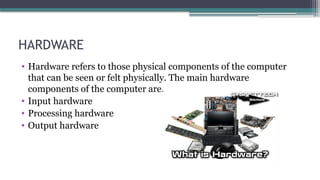
• Hardware refers to those physical components of the computer
that can be seen or felt physically. The main hardware
components of the computer are.
• Input hardware
• Processing hardware
• Output hardware
INPUT HARDWARE
• Input hardware is used to give data and instructions into the
computer system. It convers data and instruction into electrical
signals that can be accepted by the computer. There are varieties
of input hardware. Some of them are included keyboard,
mouse ,etc.
• A Keyboard consists of a set of typewriter-Keys that help to enter
data into the computer. It contains keys that allow you to type
letters of the alphabet, numbers, spaces ,punctuation marks and
other symbol. The most common English language key pattern
for a keyboard is called QWERTY.
KEYBOARD
MOUSE
• A mouse is a handheld pointing device for computers. It is used to
control the movement of the mouse pointer on the screen and to
make selections from the screen. It has one or more buttons on
the top and a ball underneath. It is moved across a flat surface
called a mouse pad. It allows you to draw pictures and choose
commands on the screen.
PROCESSING HARDWARE
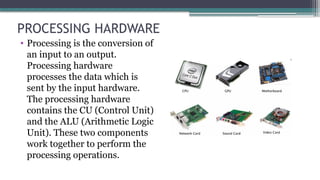
• Processing is the conversion of
an input to an output.
Processing hardware
processes the data which is
sent by the input hardware.
The processing hardware
contains the CU (Control Unit)
and the ALU (Arithmetic Logic
Unit). These two components
work together to perform the
processing operations.
CONTROL UNIT(CU)
• Control unit is the nervous system of the computer. It controls the
overall operation of the computer system. It controls all other
parts of the computer, directs them to operate in a proper way and
helps to perform different tasks.
ARITHMETIC and LOGIC UNIT(ALU)
• This unit performs two kinds of operations: the arithmetic
processing and logical processing. In arithmetic processing, it
preforms all mathematical operations such as addition,
subtraction, multiplication etc. In logical processing, it performs
the comparison of data(to find greater or smaller value).
OUTPUT HARDWARE
• Output hardware is used to get the processed information from a
computer. Output hardware converts binary coded data to number
and words which are easier to understand. Output hardware
includes the printer and the speaker.
PRINTER
• A printer is the most popular output hardware. It provides
information in a permanent readable form. It produces output of
results, program and information. The result produced by a
printer is called a hard copy output. Printers are classified into two
types:
• Impact printer
• Non impact printer
IMPACT PRINTER
• An impact printer is a type of printer that prints the characters by
striking against the ribbon and onto the paper. Impact printers
produce poor printing quality. Dot matrix and diasy wheel
printers are the examples of impact printers.
NON-IMPACT PRINTER
• A non impact printer is a type of printer that prints the characters
without striking against the ribbon and onto the paper. Non-
impact printer produce better printing quality. Ink-jet and laser
printers are the examples of non-impact printer.
SPEAKER
• Speaker are output devices used for listening to sound effects
and music from a computer. They are different in shape and
size. Some are inbuilt and others are plugged with the
computer. The result are produced by a speaker is called a soft
copy output.
SOFTWARE
• The software is the complete set of instructions written to solve a
problem on the computer. It instructs the hardware to perform
input operation, process the data and give the output. It acts as a
link between the user and the computer. The two most importance
types of computer software are:
• System software
• Application software
SYSTEM SOFTWARE
• System software is a set of programs designed to control the
operation of the computer which is found in every computer is
also called the operating system. One of the most popular and
user-friendly operating system is Microsoft Windows.
APPLICATION SOFTWARE
• Application software allows a user to perform one or more specific
tasks. It can process text, numbers, graphics or a combination of
these. Some examples of application software are MS-WORD,
MS-Excel, MS- PowerPoint etc.
ANY QUESTION?
?
THANK YOU

COMPUTER HARDWARE AND SOFT WARE nandani.pptx

  • 1.
    COMPUTER HARDWARE ANDSOFT WARE Group Members: Name:Nandani,Dilisha,Bhupendra,Raj
  • 2.
    COMPUTER HARDWARE ANDSOFTWARE • Computer system is a combination of hardware and software. They are the main components of computer system hardware is useless without software and software cannot work without hardware. A computer needs both hardware and software for its proper functioning. •Computer system •Hardware Software
  • 3.
    HARDWARE • Hardware refersto those physical components of the computer that can be seen or felt physically. The main hardware components of the computer are. • Input hardware • Processing hardware • Output hardware
  • 4.
    INPUT HARDWARE • Inputhardware is used to give data and instructions into the computer system. It convers data and instruction into electrical signals that can be accepted by the computer. There are varieties of input hardware. Some of them are included keyboard, mouse ,etc.
  • 5.
    • A Keyboardconsists of a set of typewriter-Keys that help to enter data into the computer. It contains keys that allow you to type letters of the alphabet, numbers, spaces ,punctuation marks and other symbol. The most common English language key pattern for a keyboard is called QWERTY. KEYBOARD
  • 6.
    MOUSE • A mouseis a handheld pointing device for computers. It is used to control the movement of the mouse pointer on the screen and to make selections from the screen. It has one or more buttons on the top and a ball underneath. It is moved across a flat surface called a mouse pad. It allows you to draw pictures and choose commands on the screen.
  • 7.
    PROCESSING HARDWARE • Processingis the conversion of an input to an output. Processing hardware processes the data which is sent by the input hardware. The processing hardware contains the CU (Control Unit) and the ALU (Arithmetic Logic Unit). These two components work together to perform the processing operations.
  • 8.
    CONTROL UNIT(CU) • Controlunit is the nervous system of the computer. It controls the overall operation of the computer system. It controls all other parts of the computer, directs them to operate in a proper way and helps to perform different tasks.
  • 9.
    ARITHMETIC and LOGICUNIT(ALU) • This unit performs two kinds of operations: the arithmetic processing and logical processing. In arithmetic processing, it preforms all mathematical operations such as addition, subtraction, multiplication etc. In logical processing, it performs the comparison of data(to find greater or smaller value).
  • 10.
    OUTPUT HARDWARE • Outputhardware is used to get the processed information from a computer. Output hardware converts binary coded data to number and words which are easier to understand. Output hardware includes the printer and the speaker.
  • 11.
    PRINTER • A printeris the most popular output hardware. It provides information in a permanent readable form. It produces output of results, program and information. The result produced by a printer is called a hard copy output. Printers are classified into two types: • Impact printer • Non impact printer
  • 12.
    IMPACT PRINTER • Animpact printer is a type of printer that prints the characters by striking against the ribbon and onto the paper. Impact printers produce poor printing quality. Dot matrix and diasy wheel printers are the examples of impact printers.
  • 13.
    NON-IMPACT PRINTER • Anon impact printer is a type of printer that prints the characters without striking against the ribbon and onto the paper. Non- impact printer produce better printing quality. Ink-jet and laser printers are the examples of non-impact printer.
  • 14.
    SPEAKER • Speaker areoutput devices used for listening to sound effects and music from a computer. They are different in shape and size. Some are inbuilt and others are plugged with the computer. The result are produced by a speaker is called a soft copy output.
  • 15.
    SOFTWARE • The softwareis the complete set of instructions written to solve a problem on the computer. It instructs the hardware to perform input operation, process the data and give the output. It acts as a link between the user and the computer. The two most importance types of computer software are: • System software • Application software
  • 16.
    SYSTEM SOFTWARE • Systemsoftware is a set of programs designed to control the operation of the computer which is found in every computer is also called the operating system. One of the most popular and user-friendly operating system is Microsoft Windows.
  • 17.
    APPLICATION SOFTWARE • Applicationsoftware allows a user to perform one or more specific tasks. It can process text, numbers, graphics or a combination of these. Some examples of application software are MS-WORD, MS-Excel, MS- PowerPoint etc.
  • 18.
  • 19.