WHAT IS COMPUTER NETWORK?
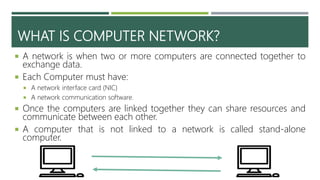
 A network is when two or more computers are connected together to
exchange data.
 Each Computer must have:
 A network interface card (NIC)
 A network communication software.
 Once the computers are linked together they can share resources and
communicate between each other.
 A computer that is not linked to a network is called stand-alone
computer.
LAN AND WAN
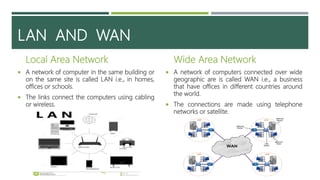
Local Area Network
 A network of computer in the same building or
on the same site is called LAN i.e., in homes,
offices or schools.
 The links connect the computers using cabling
or wireless.
Wide Area Network
 A network of computers connected over wide
geographic are is called WAN i.e., a business
that have offices in different countries around
the world.
 The connections are made using telephone
networks or satellite.
WI-FI
 Wi-Fi refers to any system where it is possible to connect to a
network or to a single computer through wireless
communications, for example:
 Wireless LAN (WLAN) are similar to LANs but there are no wires or
Cables.
 Laptops computers which are Wi-Fi enables.
 Peripheral devices such as Printers, Keyboards and Mouse which are
wireless.
WHAT IS NETWORK TOPOLOGY?
 The art of connecting different computers in a network is known as
Topology.
 The term network topology refers to the way in which the nodes (Computer
or other devices that need to communicate) of a network are linked
together.
 It determines the data paths, which may be used between any pair of nodes
in the network.
RING TOPOLOGY
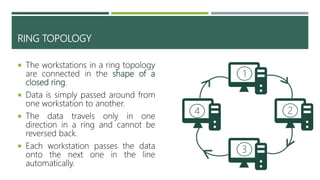
 The workstations in a ring topology
are connected in the shape of a
closed ring.
 Data is simply passed around from
one workstation to another.
 The data travels only in one
direction in a ring and cannot be
reversed back.
 Each workstation passes the data
onto the next one in the line
automatically.
1
3
24
ADVANTAGES AND DISADVANTAGES OF RING TOPOLOGY
Disadvantages
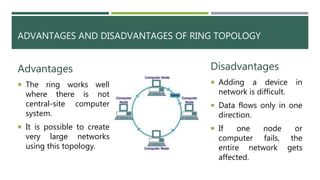
 Adding a device in
network is difficult.
 Data flows only in one
direction.
 If one node or
computer fails, the
entire network gets
affected.
Advantages
 The ring works well
where there is not
central-site computer
system.
 It is possible to create
very large networks
using this topology.
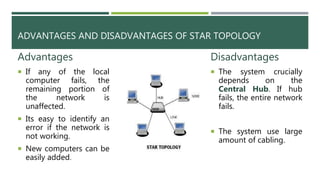
STAR TOPOLOGY
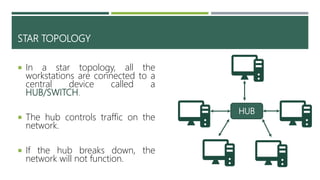
 In a star topology, all the
workstations are connected to a
central device called a
HUB/SWITCH.
 The hub controls traffic on the
network.
 If the hub breaks down, the
network will not function.
HUB
ADVANTAGES AND DISADVANTAGES OF STAR TOPOLOGY
Disadvantages
 The system crucially
depends on the
Central Hub. If hub
fails, the entire network
fails.
 The system use large
amount of cabling.
Advantages
 If any of the local
computer fails, the
remaining portion of
the network is
unaffected.
 Its easy to identify an
error if the network is
not working.
 New computers can be
easily added.
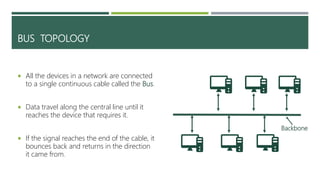
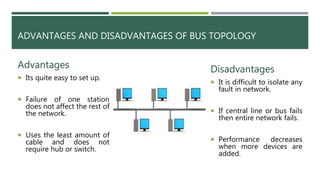
BUS TOPOLOGY
 All the devices in a network are connected
to a single continuous cable called the Bus.
 Data travel along the central line until it
reaches the device that requires it.
 If the signal reaches the end of the cable, it
bounces back and returns in the direction
it came from.
Backbone
ADVANTAGES AND DISADVANTAGES OF BUS TOPOLOGY
Disadvantages
 It is difficult to isolate any
fault in network.
 If central line or bus fails
then entire network fails.
 Performance decreases
when more devices are
added.
Advantages
 Its quite easy to set up.
 Failure of one station
does not affect the rest of
the network.
 Uses the least amount of
cable and does not
require hub or switch.
DIFFERENCE BETWEEN INTERNET AND WORLD WIDE WEB (WWW)
Internet
 It is a network of networks (i.e.,
all the computers connected
together)
 This does not contain information
but provides transport links for
information to pass between
computers.
WWW
 It is an application that runs on
the Internet.
 It is the largest and most used
services on the internet.
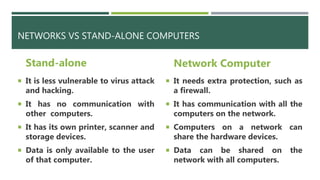
NETWORKS VS STAND-ALONE COMPUTERS
Stand-alone
 It is less vulnerable to virus attack
and hacking.
 It has no communication with
other computers.
 It has its own printer, scanner and
storage devices.
 Data is only available to the user
of that computer.
Network Computer
 It needs extra protection, such as
a firewall.
 It has communication with all the
computers on the network.
 Computers on a network can
share the hardware devices.
 Data can be shared on the
network with all computers.

Networking

  • 2.
    WHAT IS COMPUTERNETWORK?  A network is when two or more computers are connected together to exchange data.  Each Computer must have:  A network interface card (NIC)  A network communication software.  Once the computers are linked together they can share resources and communicate between each other.  A computer that is not linked to a network is called stand-alone computer.
  • 3.
    LAN AND WAN LocalArea Network  A network of computer in the same building or on the same site is called LAN i.e., in homes, offices or schools.  The links connect the computers using cabling or wireless. Wide Area Network  A network of computers connected over wide geographic are is called WAN i.e., a business that have offices in different countries around the world.  The connections are made using telephone networks or satellite.
  • 4.
    WI-FI  Wi-Fi refersto any system where it is possible to connect to a network or to a single computer through wireless communications, for example:  Wireless LAN (WLAN) are similar to LANs but there are no wires or Cables.  Laptops computers which are Wi-Fi enables.  Peripheral devices such as Printers, Keyboards and Mouse which are wireless.
  • 5.
    WHAT IS NETWORKTOPOLOGY?  The art of connecting different computers in a network is known as Topology.  The term network topology refers to the way in which the nodes (Computer or other devices that need to communicate) of a network are linked together.  It determines the data paths, which may be used between any pair of nodes in the network.
  • 6.
    RING TOPOLOGY  Theworkstations in a ring topology are connected in the shape of a closed ring.  Data is simply passed around from one workstation to another.  The data travels only in one direction in a ring and cannot be reversed back.  Each workstation passes the data onto the next one in the line automatically. 1 3 24
  • 7.
    ADVANTAGES AND DISADVANTAGESOF RING TOPOLOGY Disadvantages  Adding a device in network is difficult.  Data flows only in one direction.  If one node or computer fails, the entire network gets affected. Advantages  The ring works well where there is not central-site computer system.  It is possible to create very large networks using this topology.
  • 8.
    STAR TOPOLOGY  Ina star topology, all the workstations are connected to a central device called a HUB/SWITCH.  The hub controls traffic on the network.  If the hub breaks down, the network will not function. HUB
  • 9.
    ADVANTAGES AND DISADVANTAGESOF STAR TOPOLOGY Disadvantages  The system crucially depends on the Central Hub. If hub fails, the entire network fails.  The system use large amount of cabling. Advantages  If any of the local computer fails, the remaining portion of the network is unaffected.  Its easy to identify an error if the network is not working.  New computers can be easily added.
  • 10.
    BUS TOPOLOGY  Allthe devices in a network are connected to a single continuous cable called the Bus.  Data travel along the central line until it reaches the device that requires it.  If the signal reaches the end of the cable, it bounces back and returns in the direction it came from. Backbone
  • 11.
    ADVANTAGES AND DISADVANTAGESOF BUS TOPOLOGY Disadvantages  It is difficult to isolate any fault in network.  If central line or bus fails then entire network fails.  Performance decreases when more devices are added. Advantages  Its quite easy to set up.  Failure of one station does not affect the rest of the network.  Uses the least amount of cable and does not require hub or switch.
  • 12.
    DIFFERENCE BETWEEN INTERNETAND WORLD WIDE WEB (WWW) Internet  It is a network of networks (i.e., all the computers connected together)  This does not contain information but provides transport links for information to pass between computers. WWW  It is an application that runs on the Internet.  It is the largest and most used services on the internet.
  • 13.
    NETWORKS VS STAND-ALONECOMPUTERS Stand-alone  It is less vulnerable to virus attack and hacking.  It has no communication with other computers.  It has its own printer, scanner and storage devices.  Data is only available to the user of that computer. Network Computer  It needs extra protection, such as a firewall.  It has communication with all the computers on the network.  Computers on a network can share the hardware devices.  Data can be shared on the network with all computers.