Chapter Two
Computer System
Definition of system
What is system?
 is a group of components, consisting of subsystems or
 procedures that work in a coordination fashion to achieve some objective.
computer system: - composed of physical components (hardware) and non-
physical component (software) .
that work together in coordination to achieve a common goal (data processing).
Software
Consists of step by step instructions that tell the computer how to do its
work.
purpose of software is to convert data (unprocessed fact) into information
(processed facts).
2.1 Hardware
is physical part of the computer that processes data to create information
based on instructions of software.
It is controlled by the software.
Data
data consists of raw, unprocessed facts, including text, numbers, images,
sounds, etc.
When it is processed using computers, it becomes information.
continued….
A computer system composed of two main components:
Computer hardware and
Computer software
 Computer Hardware:-is the physical part of the computer that you can
see, you use and the parts you can touch.
continued….
we can divide computer hardware into four:
I. Input Device
II. Storage Device
III. Output Device
IV. Central Processing Unit (CPU)
2.1.1 Input devices
 used to enter information into computer.
They convert the data we give them into the form that can be manipulated in the
computer (electronic format).
1. Keyboard:-is an input device consisting of a set of typewriter-like keys that enable
one to enter data into a computer.
fig 2.1 keyboard
Continued…
The keys on the keyboard are often classified as follows
Alphanumeric keys - Letters and numbers
Punctuation keys - comma, period, semicolon, etc.
Special keys- function keys, control keys, arrow keys, caps lock, etc.
Continued…
2. Mouse:- Mouse is a hand-operated device that controls the movement of the
cursor or pointer on a display screen.
It is a small object that can be rolled along a rough flat surface.
Advantage:-
Easy to use
making menu selection
editing documents fig 2.2 mouse
Continued…
moving documents
Opening and closing programs etc.…
3. Scanner :- A scanner is a device that reads text or image on a paper and translates the
information into a form that a computer can manipulate.
4. Bar code reader :-Data coded in the form of small lines (known as bars) are known as bar
codes.
They are particularly used to unique identification of all types of goods, books, postal
packages, bags, tags etc.
5. Microphone
fig 2.5 computer microphone
uses to input sound to the computer system.
6. Light Pen
Light pen is a light sensitive pen. Fig 2.6 computer light pen
which is connected to a screen by wire and is used to write, draw, mark, or
select objects on the screen.
7. Digital Camera
A digital camera looks much like an ordinary camera,
but it captures the image it takes in a format that can be stored on disk.
The image can then be manipulated using graphics software.
fig 2.7 digital camera
2.1.2 Central Processing Unit
It is also called microprocessors or processors.
is a semiconductor device consisting mostly one software controlled LSI
chip which performs the functions of automatic data processing.
CPU executes instructions and performs the computer's processing
activities.
It functions the same purpose as the human brain for human being.
It is called the brain of the computer.
CPU has three sub-components:
Control Unit (CU)
Arithmetic Logic Unit (ALU)
Register
he three sub components are connected by a cable like device called bus.
I. Control Unit
As human brain control the body, control unit controls the computer.
It retrieves instruction from memory and this process is called fetch
instruction.
After fetching instruction, it translates that instruction into computer
understandable format,
and sends signals to other computer hardware units to carry out the
instruction.
This process (the process of translating instruction) is called decoding.
Continued…
II. Arithmetic Logic Unit
The purpose of ALU is to execute instruction.
It performs two operations:
Arithmetic operation
Logic Operation
Arithmetic operation: this includes mathematical operations
like addition, subtraction, multiplication, division, etc.
Continued…
Logical Operation: this is concerned with the comparison of data and it is
called logical operation.
 generally it performs logical operations.
III. Registers
. Registers are temporary storage location for data prior to execution in
ALU.
2.1.3 Output Devices
Output devices are used to get data out of a computer so that it can be
examined, analyzed or distributed to others.
It converts information from machine-understandable form to a human
understandable form.
Two types of output:
Soft copy: displayed on monitor, projector, or similar devices
Hard copy: printed on paper
Continued…
Examples
o Monitors, Printers, Plotters, Speakers
I. Monitor
It consists of a display surface called screen,
which displays output to the user.
There are two types of monitor: fig 2.8 computer monitor
1) CRT (Cathode Ray Tube)
2) LCD (Liquid Crystal Display)
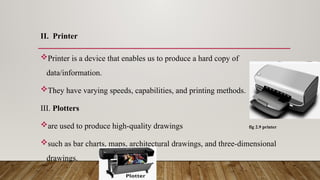
II. Printer
Printer is a device that enables us to produce a hard copy of
data/information.
They have varying speeds, capabilities, and printing methods.
III. Plotters
are used to produce high-quality drawings fig 2.9 printer
such as bar charts, maps, architectural drawings, and three-dimensional
drawings.
IV. Speakers
These devices are useful for sound output,
which were recorded using microphone, and they are useful for music and
sound output recording in multimedia.
fig 2.10 speaker
2.1.4 Storage Devices
Two types of storage devices:
Primary storage device
Secondary storage device
I. Primary Storage Devices (Main Memory)
memory refers to integrated circuit that stores program instructions and
data
Continued…
. Memory stores three things:
Operation system software instructions
Application software instruction
Data that is being processed
There are two types of primary memory:
RAM (Random Access Memory)
ROM (Read Only Memory)
RAM(Random Access Memory)
RAM is temporary storage.
the data is lost when the computer is off unlike secondary storage.
It is directly accessible by CPU.
It is called RAM because each memory location can be accessed randomly
using memory address.
Each unit in RAM has memory address by which it can be easily
accessed/referenced.
ROM (Read Only Memory)
ROM store information permanently.
They have programs built into them at the factory and that program could
not be changed or erased by the user, but read.
It is non-volatile, read-only (not changeable).
Read-only means data can't be altered or erased but read.
II. Secondary Storage
Secondary storage (also called auxiliary storage), takes many forms.
Based on information access, secondary storage devices are divided into
two:
Sequential Access: information is accessed sequentially.
To access information on such media, we start from the beginning and read
through to the end.
Jumping to some part is not possible. E.g. tape recorder cassette
Continued…
Random Access: : information can be accessed in any order.
You can access the first or the last part of information by jumping others.
E.g. floppy disk
2.2 Computer Software
A computer hardware is directed by a set of instructions.
Without these instructions, computer can do nothing.
These set of instructions are called software (also called programs).
Software are categorized into two:
System Software
Application Software
I. System Software
It consists of programs that are related to controlling the actual operations
of the computer equipment/resource.
There are three types of system software:
Operating System
Utility Software
Language translators
A) Operating System
Operating system coordinates the activity between the user and the
computer.
Operating system manage resources, provides a user interface, and run
application software.
 An Operating System Has Four Major Functions.
Process Management
Input/output Management
 Memory Management
System Administration
B) Utility Programs
Utilities are programs that make computing easier.
They perform specific tasks related to managing computer resources or
files.
There are different utility programs:
Troubleshooting programs, Anti-virus programs, File compression programs,
Uninstall programs, Back up software, Screen savers
C) Language Translator
Languages are used for writing instructions or software.
Basically, computer languages range from very complicated to human but
clear to computers to very easy for human but un-understandable by
computers.
II. Application Software
Application software performs useful work for the user.
These useful work could be:
Word processing-document creation
Spreadsheet-electronic calculation
Email/communicating-email sending and reading
Users use these software to perform different activities like calculation, video
editing, word processing, presentation, etc.
Chapter two computer system , for beginners in computer science

  • 1.
  • 2.
    Definition of system Whatis system?  is a group of components, consisting of subsystems or  procedures that work in a coordination fashion to achieve some objective. computer system: - composed of physical components (hardware) and non- physical component (software) . that work together in coordination to achieve a common goal (data processing).
  • 3.
    Software Consists of stepby step instructions that tell the computer how to do its work. purpose of software is to convert data (unprocessed fact) into information (processed facts).
  • 4.
    2.1 Hardware is physicalpart of the computer that processes data to create information based on instructions of software. It is controlled by the software.
  • 5.
    Data data consists ofraw, unprocessed facts, including text, numbers, images, sounds, etc. When it is processed using computers, it becomes information.
  • 6.
    continued…. A computer systemcomposed of two main components: Computer hardware and Computer software  Computer Hardware:-is the physical part of the computer that you can see, you use and the parts you can touch.
  • 7.
    continued…. we can dividecomputer hardware into four: I. Input Device II. Storage Device III. Output Device IV. Central Processing Unit (CPU)
  • 8.
    2.1.1 Input devices used to enter information into computer. They convert the data we give them into the form that can be manipulated in the computer (electronic format). 1. Keyboard:-is an input device consisting of a set of typewriter-like keys that enable one to enter data into a computer. fig 2.1 keyboard
  • 9.
    Continued… The keys onthe keyboard are often classified as follows Alphanumeric keys - Letters and numbers Punctuation keys - comma, period, semicolon, etc. Special keys- function keys, control keys, arrow keys, caps lock, etc.
  • 10.
    Continued… 2. Mouse:- Mouseis a hand-operated device that controls the movement of the cursor or pointer on a display screen. It is a small object that can be rolled along a rough flat surface. Advantage:- Easy to use making menu selection editing documents fig 2.2 mouse
  • 11.
    Continued… moving documents Opening andclosing programs etc.… 3. Scanner :- A scanner is a device that reads text or image on a paper and translates the information into a form that a computer can manipulate. 4. Bar code reader :-Data coded in the form of small lines (known as bars) are known as bar codes. They are particularly used to unique identification of all types of goods, books, postal packages, bags, tags etc.
  • 12.
    5. Microphone fig 2.5computer microphone uses to input sound to the computer system. 6. Light Pen Light pen is a light sensitive pen. Fig 2.6 computer light pen which is connected to a screen by wire and is used to write, draw, mark, or select objects on the screen.
  • 13.
    7. Digital Camera Adigital camera looks much like an ordinary camera, but it captures the image it takes in a format that can be stored on disk. The image can then be manipulated using graphics software. fig 2.7 digital camera
  • 14.
    2.1.2 Central ProcessingUnit It is also called microprocessors or processors. is a semiconductor device consisting mostly one software controlled LSI chip which performs the functions of automatic data processing. CPU executes instructions and performs the computer's processing activities. It functions the same purpose as the human brain for human being. It is called the brain of the computer.
  • 15.
    CPU has threesub-components: Control Unit (CU) Arithmetic Logic Unit (ALU) Register he three sub components are connected by a cable like device called bus. I. Control Unit As human brain control the body, control unit controls the computer.
  • 16.
    It retrieves instructionfrom memory and this process is called fetch instruction. After fetching instruction, it translates that instruction into computer understandable format, and sends signals to other computer hardware units to carry out the instruction. This process (the process of translating instruction) is called decoding. Continued…
  • 17.
    II. Arithmetic LogicUnit The purpose of ALU is to execute instruction. It performs two operations: Arithmetic operation Logic Operation Arithmetic operation: this includes mathematical operations like addition, subtraction, multiplication, division, etc.
  • 18.
    Continued… Logical Operation: thisis concerned with the comparison of data and it is called logical operation.  generally it performs logical operations. III. Registers . Registers are temporary storage location for data prior to execution in ALU.
  • 19.
    2.1.3 Output Devices Outputdevices are used to get data out of a computer so that it can be examined, analyzed or distributed to others. It converts information from machine-understandable form to a human understandable form. Two types of output: Soft copy: displayed on monitor, projector, or similar devices Hard copy: printed on paper
  • 20.
    Continued… Examples o Monitors, Printers,Plotters, Speakers I. Monitor It consists of a display surface called screen, which displays output to the user. There are two types of monitor: fig 2.8 computer monitor 1) CRT (Cathode Ray Tube) 2) LCD (Liquid Crystal Display)
  • 21.
    II. Printer Printer isa device that enables us to produce a hard copy of data/information. They have varying speeds, capabilities, and printing methods. III. Plotters are used to produce high-quality drawings fig 2.9 printer such as bar charts, maps, architectural drawings, and three-dimensional drawings.
  • 22.
    IV. Speakers These devicesare useful for sound output, which were recorded using microphone, and they are useful for music and sound output recording in multimedia. fig 2.10 speaker
  • 23.
    2.1.4 Storage Devices Twotypes of storage devices: Primary storage device Secondary storage device I. Primary Storage Devices (Main Memory) memory refers to integrated circuit that stores program instructions and data
  • 24.
    Continued… . Memory storesthree things: Operation system software instructions Application software instruction Data that is being processed There are two types of primary memory: RAM (Random Access Memory) ROM (Read Only Memory)
  • 25.
    RAM(Random Access Memory) RAMis temporary storage. the data is lost when the computer is off unlike secondary storage. It is directly accessible by CPU. It is called RAM because each memory location can be accessed randomly using memory address. Each unit in RAM has memory address by which it can be easily accessed/referenced.
  • 26.
    ROM (Read OnlyMemory) ROM store information permanently. They have programs built into them at the factory and that program could not be changed or erased by the user, but read. It is non-volatile, read-only (not changeable). Read-only means data can't be altered or erased but read.
  • 27.
    II. Secondary Storage Secondarystorage (also called auxiliary storage), takes many forms. Based on information access, secondary storage devices are divided into two: Sequential Access: information is accessed sequentially. To access information on such media, we start from the beginning and read through to the end. Jumping to some part is not possible. E.g. tape recorder cassette
  • 28.
    Continued… Random Access: :information can be accessed in any order. You can access the first or the last part of information by jumping others. E.g. floppy disk
  • 29.
    2.2 Computer Software Acomputer hardware is directed by a set of instructions. Without these instructions, computer can do nothing. These set of instructions are called software (also called programs). Software are categorized into two: System Software Application Software
  • 30.
    I. System Software Itconsists of programs that are related to controlling the actual operations of the computer equipment/resource. There are three types of system software: Operating System Utility Software Language translators
  • 31.
    A) Operating System Operatingsystem coordinates the activity between the user and the computer. Operating system manage resources, provides a user interface, and run application software.
  • 32.
     An OperatingSystem Has Four Major Functions. Process Management Input/output Management  Memory Management System Administration
  • 33.
    B) Utility Programs Utilitiesare programs that make computing easier. They perform specific tasks related to managing computer resources or files. There are different utility programs: Troubleshooting programs, Anti-virus programs, File compression programs, Uninstall programs, Back up software, Screen savers
  • 34.
    C) Language Translator Languagesare used for writing instructions or software. Basically, computer languages range from very complicated to human but clear to computers to very easy for human but un-understandable by computers.
  • 35.
    II. Application Software Applicationsoftware performs useful work for the user. These useful work could be: Word processing-document creation Spreadsheet-electronic calculation Email/communicating-email sending and reading Users use these software to perform different activities like calculation, video editing, word processing, presentation, etc.