FUNDAMENTALS
OF COMPUTER
Information Processing System
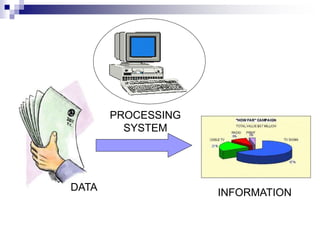
 DATA is a collection of independent and
unorganized facts.
 INFORMATION is the processed and
organized data presented in a meaningful
form.
 DATA PROCESSING is the course of
doing things in a sequence of steps.
Information Processing System
 COMPUTER is an electronic machine that
follows a set of instructions in order that it
may be able to accept and gather data
and transform these into information.
PROCESSING
SYSTEM
DATA INFORMATION
Functions of an Information
Processing System
1. It accepts and gather data. (INPUT)
2. It processes data to become information.
(PROCESSING)
3. It stores data and information. (STORE)
4. It presents information. (OUTPUT)
Three Major Components of an
Information Processing System
 HARDWARE is the tangible part of a
computer system.
 SOFTWARE is the non-tangible part that
tells the computer how to do its job.
 PEOPLE-WARE refer to people who use
and operate the computer system, write
computer programs, and analyze and
design the information system.
BASIC PC HARDWARE
 HARDWARE is the tangible part of a
computer system.
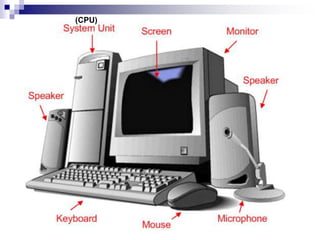
(CPU)
Basic hardware of a PC system
 Input Devices
 Central Processing Unit (CPU)
 Output Devices
 Memory Unit
 Secondary Storage Devices
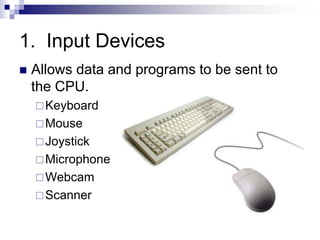
1. Input Devices
 Allows data and programs to be sent to
the CPU.
Keyboard
Mouse
Joystick
Microphone
Webcam
Scanner
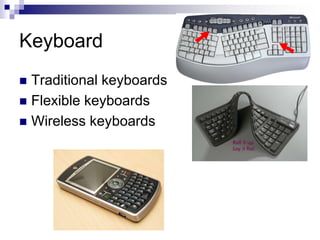
Keyboard
 Traditional keyboards
 Flexible keyboards
 Wireless keyboards
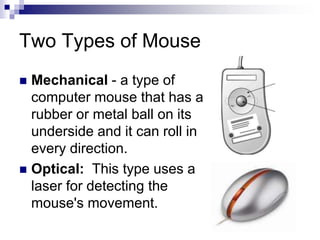
Two Types of Mouse
 Mechanical - a type of
computer mouse that has a
rubber or metal ball on its
underside and it can roll in
every direction.
 Optical: This type uses a
laser for detecting the
mouse's movement.
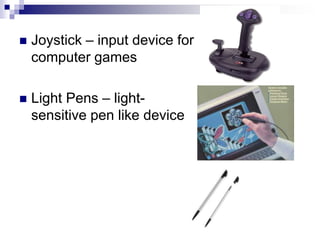
 Joystick – input device for
computer games
 Light Pens – light-
sensitive pen like device
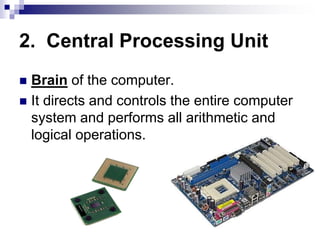
2. Central Processing Unit
 Brain of the computer.
 It directs and controls the entire computer
system and performs all arithmetic and
logical operations.
3. Output Devices
 Media used by the computer in displaying
its responses to our requests and
instructions.
 Monitor
 Audio Speakers
 Printer
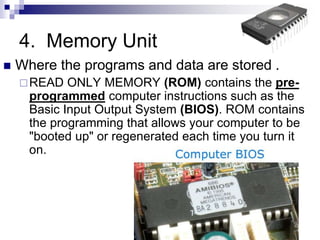
4. Memory Unit
 Where the programs and data are stored .
READ ONLY MEMORY (ROM) contains the pre-
programmed computer instructions such as the
Basic Input Output System (BIOS). ROM contains
the programming that allows your computer to be
"booted up" or regenerated each time you turn it
on.
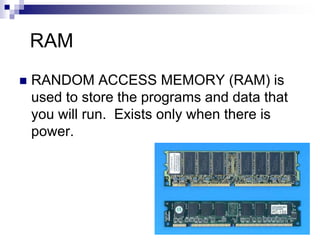
RAM
 RANDOM ACCESS MEMORY (RAM) is
used to store the programs and data that
you will run. Exists only when there is
power.
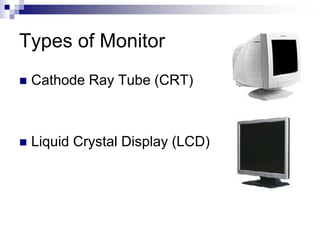
Types of Monitor
 Cathode Ray Tube (CRT)
 Liquid Crystal Display (LCD)
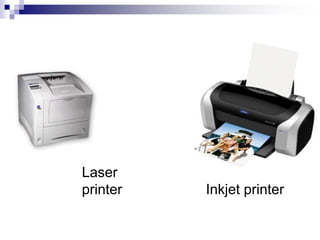
Inkjet printer
Laser
printer
5. Secondary Storage Devices
 Attached to the computer system to allow
you to store programs and data
permanently for the purpose of retrieving
them for future use.
 Hard disk, CD Rom
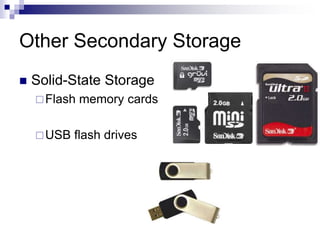
Other Secondary Storage
 Solid-State Storage
Flash memory cards
USB flash drives
Software
 Instructions that tell the computer how to
process data into the form you want.
2 Kinds of Software
1. System Software enables the application
software to interact with the computer
hardware.
 Operating Systems are programs that coordinate
computer resources, provide an interface between
users and the computer; and run applications.
 Device drivers are specialized programs designed
to allow particular input or output devices to
communicate with the rest of the computer system.
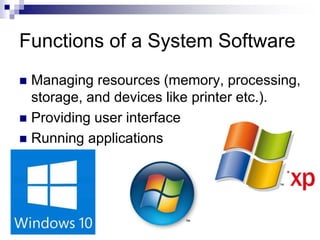
Functions of a System Software
 Managing resources (memory, processing,
storage, and devices like printer etc.).
 Providing user interface
 Running applications
2 Kinds of Software
2. Applications Software - provides the real
functionality of a computer. It help you
use your computer to do specific types
of work.
 Basic Applications, widely used in all career
areas.
GUI Operating
System
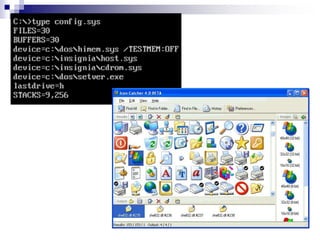
Graphical User Interface (GUI)
 Thru GUI, users can interact directly with
the operating system.
 Microsoft Windows
 Icons, Menus, Dialog boxes
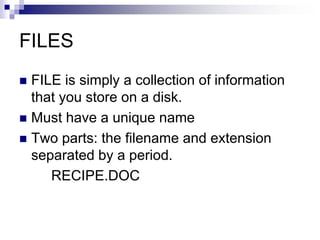
FILES
 FILE is simply a collection of information
that you store on a disk.
 Must have a unique name
 Two parts: the filename and extension
separated by a period.
RECIPE.DOC
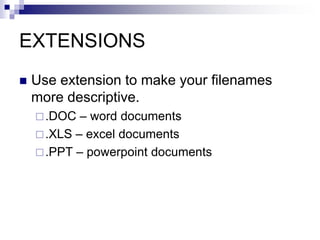
EXTENSIONS
 Use extension to make your filenames
more descriptive.
.DOC – word documents
.XLS – excel documents
.PPT – powerpoint documents

Fundamentals of computer

  • 1.
  • 2.
    Information Processing System DATA is a collection of independent and unorganized facts.  INFORMATION is the processed and organized data presented in a meaningful form.  DATA PROCESSING is the course of doing things in a sequence of steps.
  • 3.
    Information Processing System COMPUTER is an electronic machine that follows a set of instructions in order that it may be able to accept and gather data and transform these into information.
  • 4.
  • 5.
    Functions of anInformation Processing System 1. It accepts and gather data. (INPUT) 2. It processes data to become information. (PROCESSING) 3. It stores data and information. (STORE) 4. It presents information. (OUTPUT)
  • 6.
    Three Major Componentsof an Information Processing System  HARDWARE is the tangible part of a computer system.  SOFTWARE is the non-tangible part that tells the computer how to do its job.  PEOPLE-WARE refer to people who use and operate the computer system, write computer programs, and analyze and design the information system.
  • 7.
    BASIC PC HARDWARE HARDWARE is the tangible part of a computer system.
  • 8.
  • 9.
    Basic hardware ofa PC system  Input Devices  Central Processing Unit (CPU)  Output Devices  Memory Unit  Secondary Storage Devices
  • 10.
    1. Input Devices Allows data and programs to be sent to the CPU. Keyboard Mouse Joystick Microphone Webcam Scanner
  • 11.
    Keyboard  Traditional keyboards Flexible keyboards  Wireless keyboards
  • 12.
    Two Types ofMouse  Mechanical - a type of computer mouse that has a rubber or metal ball on its underside and it can roll in every direction.  Optical: This type uses a laser for detecting the mouse's movement.
  • 13.
     Joystick –input device for computer games  Light Pens – light- sensitive pen like device
  • 14.
    2. Central ProcessingUnit  Brain of the computer.  It directs and controls the entire computer system and performs all arithmetic and logical operations.
  • 15.
    3. Output Devices Media used by the computer in displaying its responses to our requests and instructions.  Monitor  Audio Speakers  Printer
  • 16.
    4. Memory Unit Where the programs and data are stored . READ ONLY MEMORY (ROM) contains the pre- programmed computer instructions such as the Basic Input Output System (BIOS). ROM contains the programming that allows your computer to be "booted up" or regenerated each time you turn it on.
  • 17.
    RAM  RANDOM ACCESSMEMORY (RAM) is used to store the programs and data that you will run. Exists only when there is power.
  • 18.
    Types of Monitor Cathode Ray Tube (CRT)  Liquid Crystal Display (LCD)
  • 19.
  • 20.
    5. Secondary StorageDevices  Attached to the computer system to allow you to store programs and data permanently for the purpose of retrieving them for future use.  Hard disk, CD Rom
  • 21.
    Other Secondary Storage Solid-State Storage Flash memory cards USB flash drives
  • 22.
    Software  Instructions thattell the computer how to process data into the form you want.
  • 23.
    2 Kinds ofSoftware 1. System Software enables the application software to interact with the computer hardware.  Operating Systems are programs that coordinate computer resources, provide an interface between users and the computer; and run applications.  Device drivers are specialized programs designed to allow particular input or output devices to communicate with the rest of the computer system.
  • 24.
    Functions of aSystem Software  Managing resources (memory, processing, storage, and devices like printer etc.).  Providing user interface  Running applications
  • 25.
    2 Kinds ofSoftware 2. Applications Software - provides the real functionality of a computer. It help you use your computer to do specific types of work.  Basic Applications, widely used in all career areas.
  • 26.
  • 27.
    Graphical User Interface(GUI)  Thru GUI, users can interact directly with the operating system.  Microsoft Windows  Icons, Menus, Dialog boxes
  • 29.
    FILES  FILE issimply a collection of information that you store on a disk.  Must have a unique name  Two parts: the filename and extension separated by a period. RECIPE.DOC
  • 30.
    EXTENSIONS  Use extensionto make your filenames more descriptive. .DOC – word documents .XLS – excel documents .PPT – powerpoint documents