Morphological Image Operation
   Download di http://rumah-belajar.org


                                           2
Mathematical Morphology

   Mathematical morphology is a powerful
    methodology which was initiated in the late
    1960s by G.Matheron and J.Serra at the
    Fontainebleau School of Mines in France.
   nowadays it offers many theoretic and
    algorithmic tools inspiring the development of
    research in the fields of signal
    processing, image processing, machine
    vision, and pattern recognition.


                                                     3
Morphological Operations -1

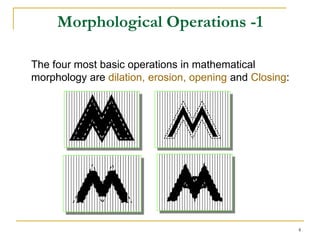
The four most basic operations in mathematical
morphology are dilation, erosion, opening and Closing:


                                                         4
Morphological Image Processing

   Boolean algebra
   Dilation and erosion
   Opening and closing
   Hit-or-miss
   Basic algorithms
   Extension to gray-scale


                                     5
Examples of Boolean Algebra
   Switching algebra
       S = {0, 1}
   Finite Boolean algebras
       Example: S = {(0, 0), (0, 1), (1, 0), (1, 1)}
       (a1, a2)’ = (a’1, a’2)
       (0, 1) (1, 0) = (0, 0)
   Set unions/intersections
       Union is like
       Intersection is like
       Empty set is like 0
       There is no 1 (universal set)


                                                        6
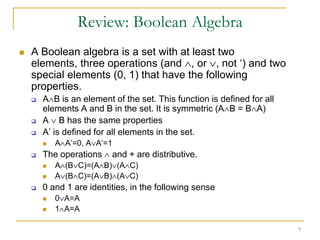
Review: Boolean Algebra
   A Boolean algebra is a set with at least two
    elements, three operations (and , or , not ‘) and two
    special elements (0, 1) that have the following
    properties.
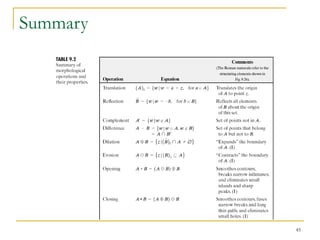
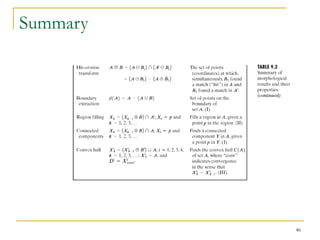
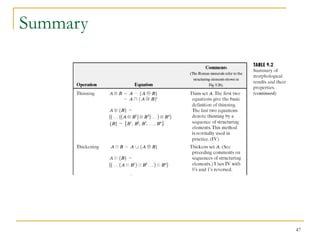
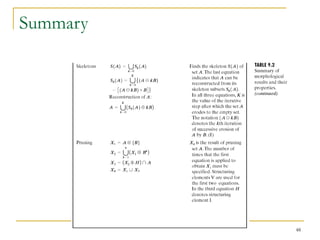
       A B is an element of the set. This function is defined for all
        elements A and B in the set. It is symmetric (A B = B A)
       A B has the same properties
       A’ is defined for all elements in the set.
           A A’=0, A A’=1
       The operations    and + are distributive.
           A (B C)=(A B) (A C)
           A (B C)=(A B) (A C)
       0 and 1 are identities, in the following sense
           0 A=A
           1 A=A

                                                                         7
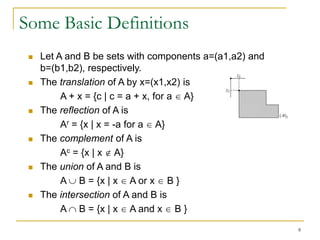
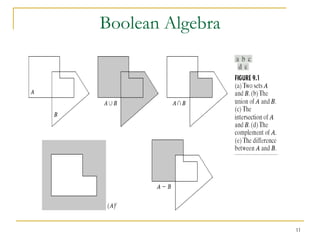
Some Basic Definitions
    Let A and B be sets with components a=(a1,a2) and
     b=(b1,b2), respectively.
    The translation of A by x=(x1,x2) is
          A + x = {c | c = a + x, for a A}
    The reflection of A is
          Ar = {x | x = -a for a A}
    The complement of A is
          Ac = {x | x A}
    The union of A and B is
          A B = {x | x A or x B }
    The intersection of A and B is
          A B = {x | x A and x B }
                                                         8
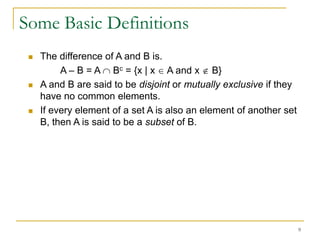
Some Basic Definitions
    The difference of A and B is.
          A – B = A Bc = {x | x A and x B}
    A and B are said to be disjoint or mutually exclusive if they
     have no common elements.
    If every element of a set A is also an element of another set
     B, then A is said to be a subset of B.


                                                                     9
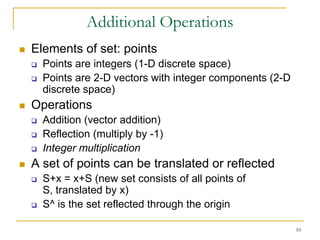
Additional Operations
   Elements of set: points
       Points are integers (1-D discrete space)
       Points are 2-D vectors with integer components (2-D
        discrete space)
   Operations
       Addition (vector addition)
       Reflection (multiply by -1)
       Integer multiplication
   A set of points can be translated or reflected
       S+x = x+S (new set consists of all points of
        S, translated by x)
       S^ is the set reflected through the origin

                                                              10
Boolean Algebra


                  11
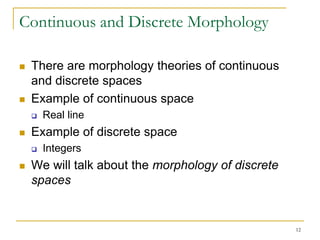
Continuous and Discrete Morphology

   There are morphology theories of continuous
    and discrete spaces
   Example of continuous space
       Real line
   Example of discrete space
       Integers
   We will talk about the morphology of discrete
    spaces


                                                    12
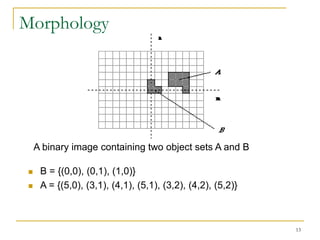
Morphology


     A binary image containing two object sets A and B

     B = {(0,0), (0,1), (1,0)}
     A = {(5,0), (3,1), (4,1), (5,1), (3,2), (4,2), (5,2)}


                                                              13
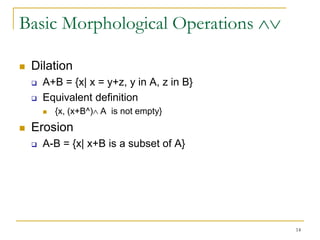
Basic Morphological Operations

   Dilation
       A+B = {x| x = y+z, y in A, z in B}
       Equivalent definition
           {x, (x+B^) A is not empty}
   Erosion
       A-B = {x| x+B is a subset of A}


                                             14
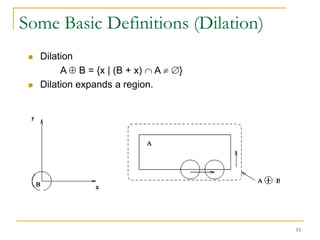
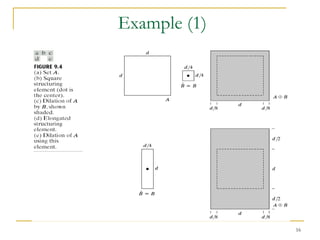
Some Basic Definitions (Dilation)
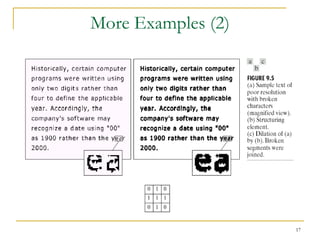
    Dilation
          A B = {x | (B + x) A    }
    Dilation expands a region.


                                      15
Example (1)


              16
More Examples (2)


                    17
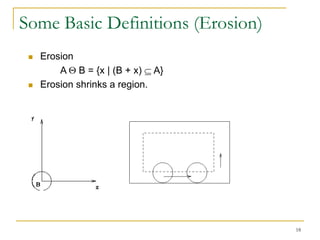
Some Basic Definitions (Erosion)
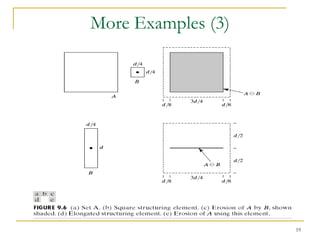
    Erosion
         A B = {x | (B + x) A}
    Erosion shrinks a region.


                                   18
More Examples (3)


                    19
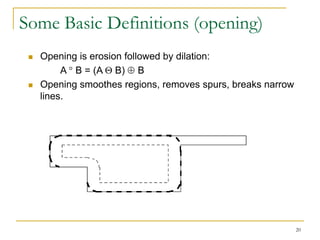
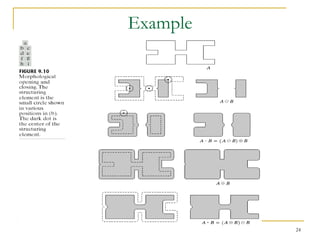
Some Basic Definitions (opening)
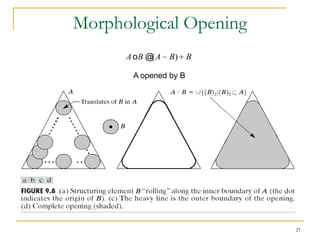
    Opening is erosion followed by dilation:
          A B = (A B) B
    Opening smoothes regions, removes spurs, breaks narrow
     lines.


                                                              20
Morphological Opening
      A oB @(A   B) B

        A opened by B


                         21
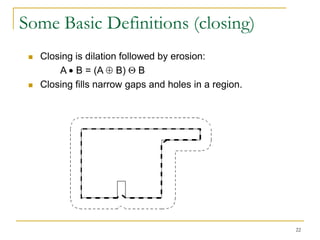
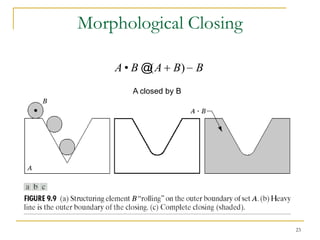
Some Basic Definitions (closing)
    Closing is dilation followed by erosion:
         A B = (A B) B
    Closing fills narrow gaps and holes in a region.


                                                        22
Morphological Closing

    A • B @(A B) B
       A closed by B


                        23
Example


          24
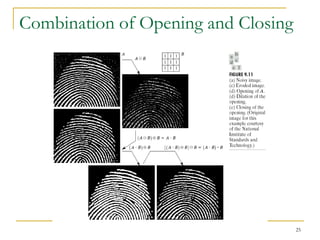
Combination of Opening and Closing


                                     25
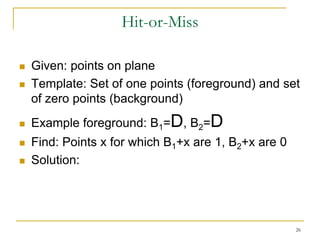
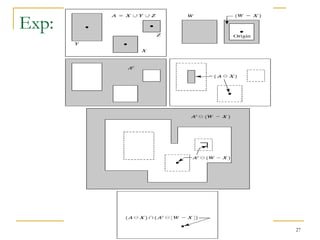
Hit-or-Miss

   Given: points on plane
   Template: Set of one points (foreground) and set
    of zero points (background)
   Example foreground: B1=D, B2=D
   Find: Points x for which B1+x are 1, B2+x are 0
   Solution:


                                                      26
Exp:


       27
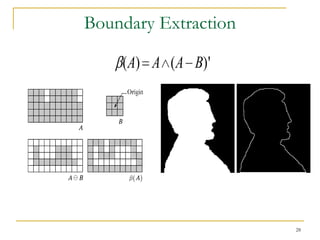
Boundary Extraction

    (A) A (A B)'


                      28
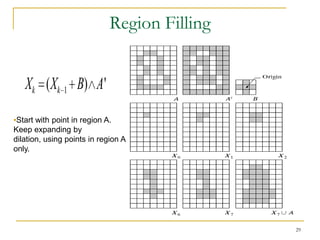
Region Filling


   Xk (Xk 1 B) A'
•Start with point in region A.
Keep expanding by
dilation, using points in region A
only.


                                              29
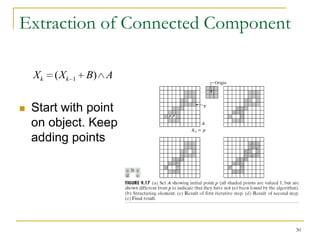
Extraction of Connected Component

    Xk   (Xk   1   B) A


   Start with point
    on object. Keep
    adding points


                                    30
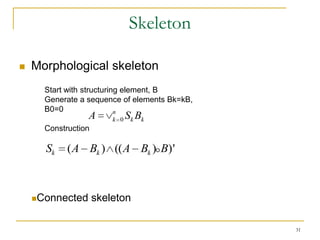
Skeleton

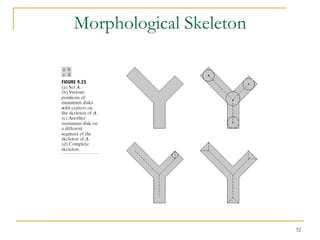
   Morphological skeleton
      Start with structuring element, B
      Generate a sequence of elements Bk=kB,
      B0=0                 n
                 A       k 0   Sk Bk
      Construction

      Sk    (A Bk ) ((A Bk ) B)'


    Connected       skeleton

                                               31
Morphological Skeleton


                         32
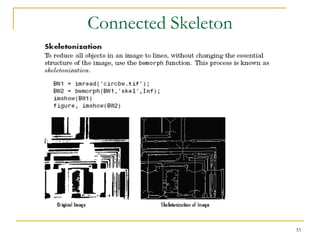
Connected Skeleton


                     33
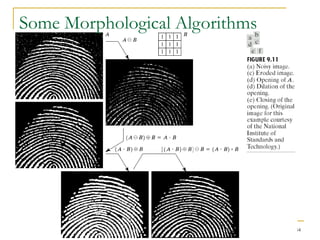
Some Morphological Algorithms


                                34
Some Morphological Algorithms
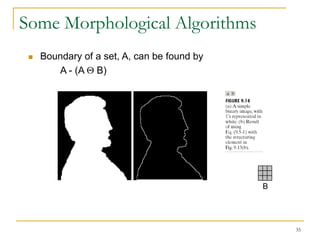
    Boundary of a set, A, can be found by
        A - (A B)


                                             B


                                                 35
Some Morphological Algorithms
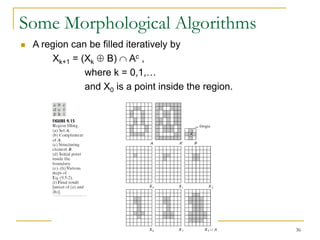
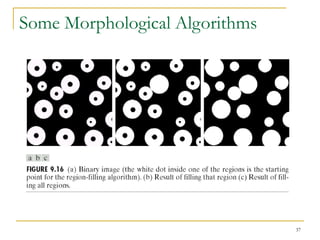
   A region can be filled iteratively by
        Xk+1 = (Xk B) Ac ,
                where k = 0,1,…
                and X0 is a point inside the region.


                                                       36
Some Morphological Algorithms


                                37
Morphological Operations

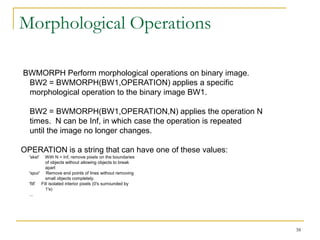
BWMORPH Perform morphological operations on binary image.
 BW2 = BWMORPH(BW1,OPERATION) applies a specific
 morphological operation to the binary image BW1.

  BW2 = BWMORPH(BW1,OPERATION,N) applies the operation N
  times. N can be Inf, in which case the operation is repeated
  until the image no longer changes.

OPERATION is a string that can have one of these values:
  'skel'   With N = Inf, remove pixels on the boundaries
           of objects without allowing objects to break
           apart
  'spur' Remove end points of lines without removing
           small objects completely.
  'fill' Fill isolated interior pixels (0's surrounded by
           1's)
  ...


                                                                 38
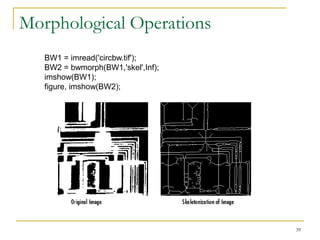
Morphological Operations
   BW1 = imread('circbw.tif');
   BW2 = bwmorph(BW1,'skel',Inf);
   imshow(BW1);
   figure, imshow(BW2);


                                    39
Morphological Operations
   BW1 = imread('circbw.tif');
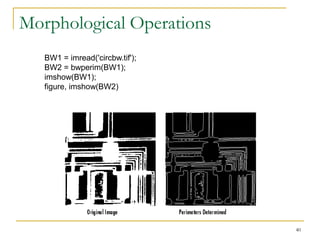
   BW2 = bwperim(BW1);
   imshow(BW1);
   figure, imshow(BW2)


                                 40
Morphological Operations

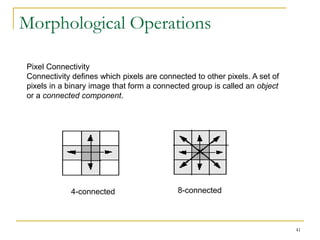
Pixel Connectivity
Connectivity defines which pixels are connected to other pixels. A set of
pixels in a binary image that form a connected group is called an object
or a connected component.


            4-connected                    8-connected


                                                                            41
Morphological Operations
BW = [0 0 0 0 0 0   0   0;
      0 1 1 0 0 1   1   1;
      0 1 1 0 0 0   1   1;    X = bwlabel(BW,4);
      0 1 1 0 0 0   0   0;    RGB = label2rgb(X, @jet, 'k');
      0 0 0 1 1 0   0   0;    imshow(RGB,'notruesize')
      0 0 0 1 1 0   0   0;
      0 0 0 1 1 0   0   0;
      0 0 0 0 0 0   0   0];
X = bwlabel(BW,4)
X =   0 0 0 0 0 0   0   0
      0 1 1 0 0 3   3   3
      0 1 1 0 0 0   3   3
      0 1 1 0 0 0   0   0
      0 0 0 2 2 0   0   0
      0 0 0 2 2 0   0   0
      0 0 0 2 2 0   0   0
      0 0 0 0 0 0   0   0

                                                               42
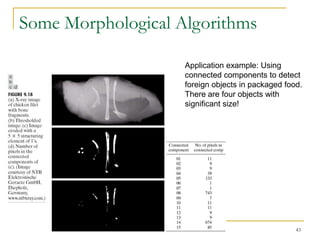
Some Morphological Algorithms

                    Application example: Using
                    connected components to detect
                    foreign objects in packaged food.
                    There are four objects with
                    significant size!


                                                   43
Some Morphological Algorithms
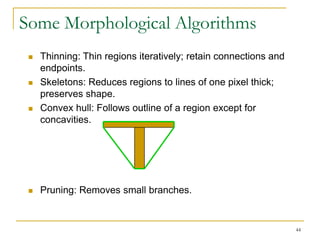
    Thinning: Thin regions iteratively; retain connections and
     endpoints.
    Skeletons: Reduces regions to lines of one pixel thick;
     preserves shape.
    Convex hull: Follows outline of a region except for
     concavities.


    Pruning: Removes small branches.


                                                                  44
Summary


          45
Summary


          46
Summary


          47
Summary


          48
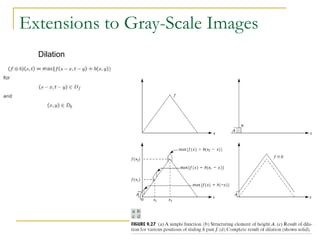
Extensions to Gray-Scale Images
  Dilation


                                  49
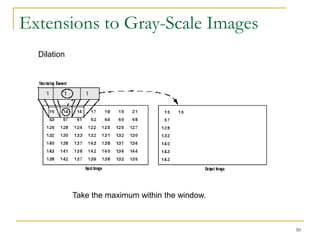
Extensions to Gray-Scale Images
  Dilation


             Take the maximum within the window.


                                                   50
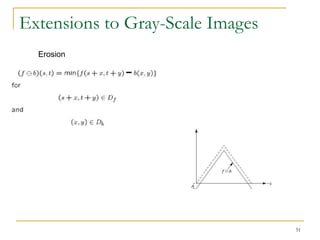
Extensions to Gray-Scale Images
  Erosion


                                  51
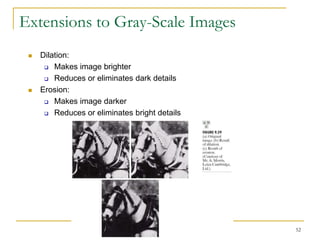
Extensions to Gray-Scale Images
    Dilation:
       Makes image brighter

       Reduces or eliminates dark details

    Erosion:
       Makes image darker

       Reduces or eliminates bright details


                                               52
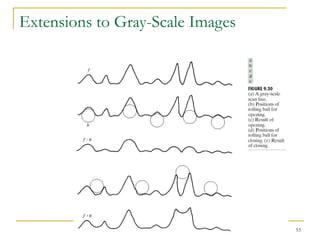
Extensions to Gray-Scale Images


                                  53
Extensions to Gray-Scale Images


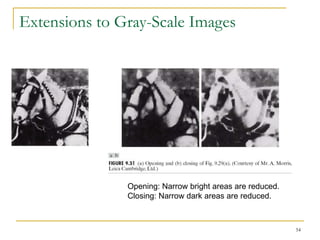
               Opening: Narrow bright areas are reduced.
               Closing: Narrow dark areas are reduced.


                                                           54
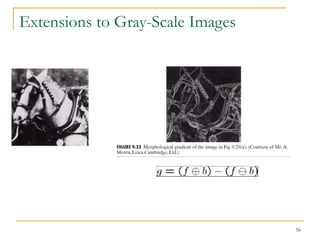
Extensions to Gray-Scale Images


                                  56
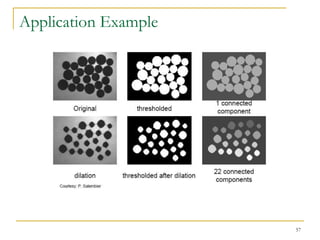
Application Example


                      57
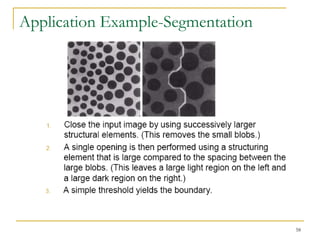
Application Example-Segmentation


                                   58
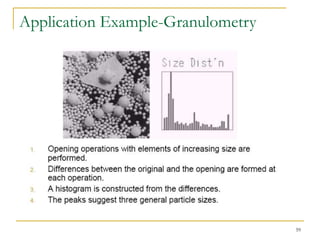
Application Example-Granulometry


                                   59
Morphological Reconstruction (exp.algo)

      Algorithm for binary reconstruction:
         1. M = V o K , where K is any SE.
         2. T = M,
         3. M= M      Ki , where i=4 or i=8,

         4. M = M∩ V, [Take only those pixels from M that are also in V .]
         5. if M     T then go to 2,

         6. else stop;


         Original (V)              Opened (M)          Reconstructed (T)
                                                                             60
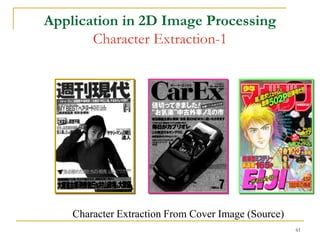
Application in 2D Image Processing
       Character Extraction-1


    Character Extraction From Cover Image (Source)
                                                     61
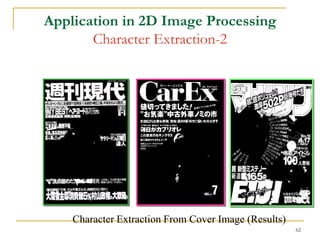
Application in 2D Image Processing
       Character Extraction-2


    Character Extraction From Cover Image (Results)
                                                      62
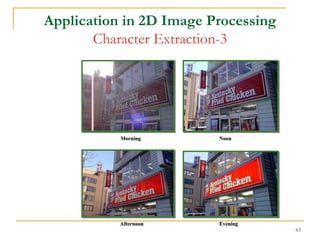
Application in 2D Image Processing
       Character Extraction-3


           Morning       Noon


           Afternoon     Evening
                                     63
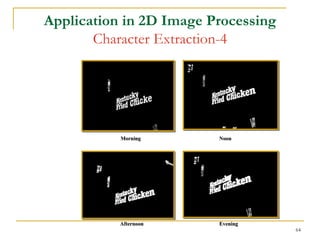
Application in 2D Image Processing
       Character Extraction-4


           Morning       Noon


           Afternoon     Evening
                                     64
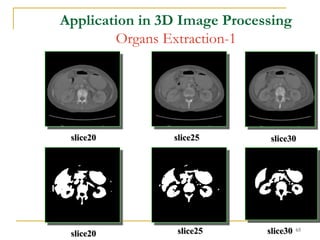
Application in 3D Image Processing
        Organs Extraction-1


 slice20        slice25        slice30


                 slice25      slice30   65
 slice20
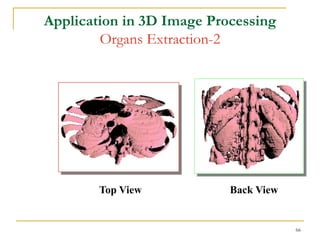
Application in 3D Image Processing
        Organs Extraction-2


        Top View           Back View


                                       66
Application in 3D Image Processing
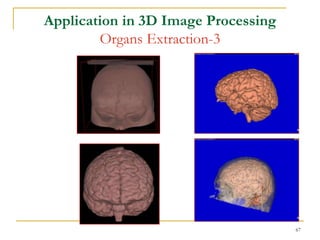
        Organs Extraction-3


                                     67
Application in 3D Image Processing
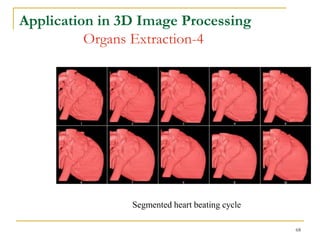
          Organs Extraction-4


                Segmented heart beating cycle

                                                68
Application in 3D Image Processing
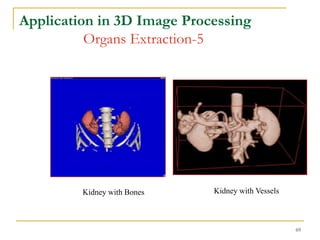
          Organs Extraction-5


         Kidney with Bones   Kidney with Vessels


                                                   69
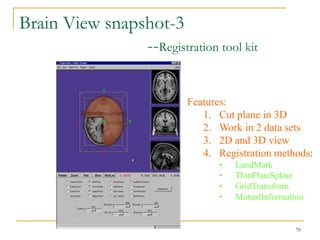
Brain View snapshot-3
                --Registration tool kit

                           Features:
                              1. Cut plane in 3D
                              2. Work in 2 data sets
                              3. 2D and 3D view
                              4. Registration methods:
                                 •   LandMark
                                 •   ThinPlateSpline
                                 •   GridTransform
                                 •   MutualInformation


                                                    70
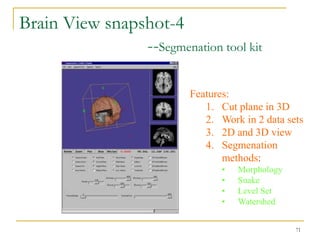
Brain View snapshot-4
                --Segmenation tool kit

                          Features:
                             1. Cut plane in 3D
                             2. Work in 2 data sets
                             3. 2D and 3D view
                             4. Segmenation
                                 methods:
                                 •   Morphology
                                 •   Snake
                                 •   Level Set
                                 •   Watershed


                                                  71
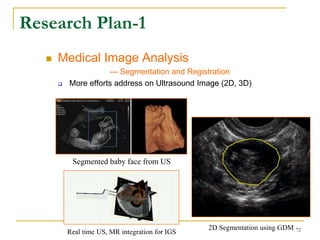
Research Plan-1
      Medical Image Analysis
                      --- Segmentation and Registration
          More efforts address on Ultrasound Image (2D, 3D)


            Segmented baby face from US


                                                  2D Segmentation using GDM 72
           Real time US, MR integration for IGS
73
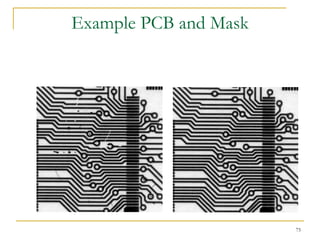
Image Comparison Techniques


•   Image Subtraction
    the simplest and most direct approach to PCB inspection
    problem. The PCB is compared to an image of an ideal part. The
    subtraction can be done by logical XOR operation between the
    two images .
•   Feature Matching
    an improved form of image subtraction, in which the extracted
    features from the object and those defined by the model are
    compared.
•   Phase Only Method


                                                                     74
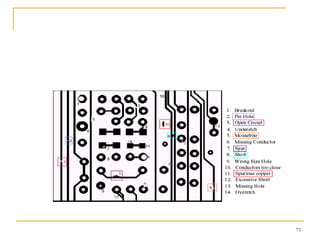
Example PCB and Mask


                       75
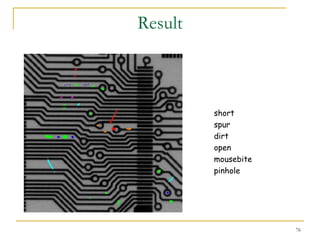
Result


         short
         spur
         dirt
         open
         mousebite
         pinhole


                     76
Question


           77

Image segmentation 3 morphology

  • 1.
  • 2.
    Download di http://rumah-belajar.org 2
  • 3.
    Mathematical Morphology  Mathematical morphology is a powerful methodology which was initiated in the late 1960s by G.Matheron and J.Serra at the Fontainebleau School of Mines in France.  nowadays it offers many theoretic and algorithmic tools inspiring the development of research in the fields of signal processing, image processing, machine vision, and pattern recognition. 3
  • 4.
    Morphological Operations -1 Thefour most basic operations in mathematical morphology are dilation, erosion, opening and Closing: 4
  • 5.
    Morphological Image Processing  Boolean algebra  Dilation and erosion  Opening and closing  Hit-or-miss  Basic algorithms  Extension to gray-scale 5
  • 6.
    Examples of BooleanAlgebra  Switching algebra  S = {0, 1}  Finite Boolean algebras  Example: S = {(0, 0), (0, 1), (1, 0), (1, 1)}  (a1, a2)’ = (a’1, a’2)  (0, 1) (1, 0) = (0, 0)  Set unions/intersections  Union is like  Intersection is like  Empty set is like 0  There is no 1 (universal set) 6
  • 7.
    Review: Boolean Algebra  A Boolean algebra is a set with at least two elements, three operations (and , or , not ‘) and two special elements (0, 1) that have the following properties.  A B is an element of the set. This function is defined for all elements A and B in the set. It is symmetric (A B = B A)  A B has the same properties  A’ is defined for all elements in the set.  A A’=0, A A’=1  The operations and + are distributive.  A (B C)=(A B) (A C)  A (B C)=(A B) (A C)  0 and 1 are identities, in the following sense  0 A=A  1 A=A 7
  • 8.
    Some Basic Definitions  Let A and B be sets with components a=(a1,a2) and b=(b1,b2), respectively.  The translation of A by x=(x1,x2) is A + x = {c | c = a + x, for a A}  The reflection of A is Ar = {x | x = -a for a A}  The complement of A is Ac = {x | x A}  The union of A and B is A B = {x | x A or x B }  The intersection of A and B is A B = {x | x A and x B } 8
  • 9.
    Some Basic Definitions  The difference of A and B is. A – B = A Bc = {x | x A and x B}  A and B are said to be disjoint or mutually exclusive if they have no common elements.  If every element of a set A is also an element of another set B, then A is said to be a subset of B. 9
  • 10.
    Additional Operations  Elements of set: points  Points are integers (1-D discrete space)  Points are 2-D vectors with integer components (2-D discrete space)  Operations  Addition (vector addition)  Reflection (multiply by -1)  Integer multiplication  A set of points can be translated or reflected  S+x = x+S (new set consists of all points of S, translated by x)  S^ is the set reflected through the origin 10
  • 11.
  • 12.
    Continuous and DiscreteMorphology  There are morphology theories of continuous and discrete spaces  Example of continuous space  Real line  Example of discrete space  Integers  We will talk about the morphology of discrete spaces 12
  • 13.
    Morphology A binary image containing two object sets A and B  B = {(0,0), (0,1), (1,0)}  A = {(5,0), (3,1), (4,1), (5,1), (3,2), (4,2), (5,2)} 13
  • 14.
    Basic Morphological Operations  Dilation  A+B = {x| x = y+z, y in A, z in B}  Equivalent definition  {x, (x+B^) A is not empty}  Erosion  A-B = {x| x+B is a subset of A} 14
  • 15.
    Some Basic Definitions(Dilation)  Dilation A B = {x | (B + x) A }  Dilation expands a region. 15
  • 16.
  • 17.
  • 18.
    Some Basic Definitions(Erosion)  Erosion A B = {x | (B + x) A}  Erosion shrinks a region. 18
  • 19.
  • 20.
    Some Basic Definitions(opening)  Opening is erosion followed by dilation: A B = (A B) B  Opening smoothes regions, removes spurs, breaks narrow lines. 20
  • 21.
    Morphological Opening A oB @(A B) B A opened by B 21
  • 22.
    Some Basic Definitions(closing)  Closing is dilation followed by erosion: A B = (A B) B  Closing fills narrow gaps and holes in a region. 22
  • 23.
    Morphological Closing A • B @(A B) B A closed by B 23
  • 24.
  • 25.
    Combination of Openingand Closing 25
  • 26.
    Hit-or-Miss  Given: points on plane  Template: Set of one points (foreground) and set of zero points (background)  Example foreground: B1=D, B2=D  Find: Points x for which B1+x are 1, B2+x are 0  Solution: 26
  • 27.
  • 28.
    Boundary Extraction (A) A (A B)' 28
  • 29.
    Region Filling Xk (Xk 1 B) A' •Start with point in region A. Keep expanding by dilation, using points in region A only. 29
  • 30.
    Extraction of ConnectedComponent Xk (Xk 1 B) A  Start with point on object. Keep adding points 30
  • 31.
    Skeleton  Morphological skeleton Start with structuring element, B Generate a sequence of elements Bk=kB, B0=0 n A k 0 Sk Bk Construction Sk (A Bk ) ((A Bk ) B)' Connected skeleton 31
  • 32.
  • 33.
  • 34.
  • 35.
    Some Morphological Algorithms  Boundary of a set, A, can be found by A - (A B) B 35
  • 36.
    Some Morphological Algorithms  A region can be filled iteratively by Xk+1 = (Xk B) Ac , where k = 0,1,… and X0 is a point inside the region. 36
  • 37.
  • 38.
    Morphological Operations BWMORPH Performmorphological operations on binary image. BW2 = BWMORPH(BW1,OPERATION) applies a specific morphological operation to the binary image BW1. BW2 = BWMORPH(BW1,OPERATION,N) applies the operation N times. N can be Inf, in which case the operation is repeated until the image no longer changes. OPERATION is a string that can have one of these values: 'skel' With N = Inf, remove pixels on the boundaries of objects without allowing objects to break apart 'spur' Remove end points of lines without removing small objects completely. 'fill' Fill isolated interior pixels (0's surrounded by 1's) ... 38
  • 39.
    Morphological Operations BW1 = imread('circbw.tif'); BW2 = bwmorph(BW1,'skel',Inf); imshow(BW1); figure, imshow(BW2); 39
  • 40.
    Morphological Operations BW1 = imread('circbw.tif'); BW2 = bwperim(BW1); imshow(BW1); figure, imshow(BW2) 40
  • 41.
    Morphological Operations Pixel Connectivity Connectivitydefines which pixels are connected to other pixels. A set of pixels in a binary image that form a connected group is called an object or a connected component. 4-connected 8-connected 41
  • 42.
    Morphological Operations BW =[0 0 0 0 0 0 0 0; 0 1 1 0 0 1 1 1; 0 1 1 0 0 0 1 1; X = bwlabel(BW,4); 0 1 1 0 0 0 0 0; RGB = label2rgb(X, @jet, 'k'); 0 0 0 1 1 0 0 0; imshow(RGB,'notruesize') 0 0 0 1 1 0 0 0; 0 0 0 1 1 0 0 0; 0 0 0 0 0 0 0 0]; X = bwlabel(BW,4) X = 0 0 0 0 0 0 0 0 0 1 1 0 0 3 3 3 0 1 1 0 0 0 3 3 0 1 1 0 0 0 0 0 0 0 0 2 2 0 0 0 0 0 0 2 2 0 0 0 0 0 0 2 2 0 0 0 0 0 0 0 0 0 0 0 42
  • 43.
    Some Morphological Algorithms Application example: Using connected components to detect foreign objects in packaged food. There are four objects with significant size! 43
  • 44.
    Some Morphological Algorithms  Thinning: Thin regions iteratively; retain connections and endpoints.  Skeletons: Reduces regions to lines of one pixel thick; preserves shape.  Convex hull: Follows outline of a region except for concavities.  Pruning: Removes small branches. 44
  • 45.
  • 46.
  • 47.
  • 48.
  • 49.
    Extensions to Gray-ScaleImages Dilation 49
  • 50.
    Extensions to Gray-ScaleImages Dilation Take the maximum within the window. 50
  • 51.
    Extensions to Gray-ScaleImages Erosion 51
  • 52.
    Extensions to Gray-ScaleImages  Dilation:  Makes image brighter  Reduces or eliminates dark details  Erosion:  Makes image darker  Reduces or eliminates bright details 52
  • 53.
  • 54.
    Extensions to Gray-ScaleImages Opening: Narrow bright areas are reduced. Closing: Narrow dark areas are reduced. 54
  • 55.
  • 56.
  • 57.
  • 58.
  • 59.
    Morphological Reconstruction (exp.algo)  Algorithm for binary reconstruction: 1. M = V o K , where K is any SE. 2. T = M, 3. M= M Ki , where i=4 or i=8, 4. M = M∩ V, [Take only those pixels from M that are also in V .] 5. if M T then go to 2, 6. else stop; Original (V) Opened (M) Reconstructed (T) 60
  • 60.
    Application in 2DImage Processing Character Extraction-1 Character Extraction From Cover Image (Source) 61
  • 61.
    Application in 2DImage Processing Character Extraction-2 Character Extraction From Cover Image (Results) 62
  • 62.
    Application in 2DImage Processing Character Extraction-3 Morning Noon Afternoon Evening 63
  • 63.
    Application in 2DImage Processing Character Extraction-4 Morning Noon Afternoon Evening 64
  • 64.
    Application in 3DImage Processing Organs Extraction-1 slice20 slice25 slice30 slice25 slice30 65 slice20
  • 65.
    Application in 3DImage Processing Organs Extraction-2 Top View Back View 66
  • 66.
    Application in 3DImage Processing Organs Extraction-3 67
  • 67.
    Application in 3DImage Processing Organs Extraction-4 Segmented heart beating cycle 68
  • 68.
    Application in 3DImage Processing Organs Extraction-5 Kidney with Bones Kidney with Vessels 69
  • 69.
    Brain View snapshot-3 --Registration tool kit Features: 1. Cut plane in 3D 2. Work in 2 data sets 3. 2D and 3D view 4. Registration methods: • LandMark • ThinPlateSpline • GridTransform • MutualInformation 70
  • 70.
    Brain View snapshot-4 --Segmenation tool kit Features: 1. Cut plane in 3D 2. Work in 2 data sets 3. 2D and 3D view 4. Segmenation methods: • Morphology • Snake • Level Set • Watershed 71
  • 71.
    Research Plan-1  Medical Image Analysis --- Segmentation and Registration  More efforts address on Ultrasound Image (2D, 3D) Segmented baby face from US 2D Segmentation using GDM 72 Real time US, MR integration for IGS
  • 72.
  • 73.
    Image Comparison Techniques • Image Subtraction the simplest and most direct approach to PCB inspection problem. The PCB is compared to an image of an ideal part. The subtraction can be done by logical XOR operation between the two images . • Feature Matching an improved form of image subtraction, in which the extracted features from the object and those defined by the model are compared. • Phase Only Method 74
  • 74.
  • 75.
    Result short spur dirt open mousebite pinhole 76
  • 76.