Morphological Image ProcessingMorphological Image Processing
Dr.U.S.N.Raju
Morphology
•The word morphology commonly denotes a branch of biology that
deals with the form and structure of animals and plants.
•We use the same word here in the context of mathematical
morphology as a tool for extracting image components that are
useful in the representation and description of region shape, such as
boundaries, skeletons, and the convex hull.
•We are also interested in morphological techniques for pre- and
post processing, such as morphological filtering, thinning and
pruning.
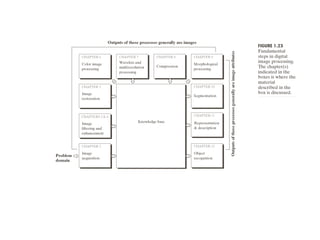
From now onwards, it begins a transition from a focus on
purely image processing methods, whose input and output are
images, to processes in which the inputs are images, but the
outputs are attributes extracted from those images.
 Common Usages include
Edge detection,
Noise removal,
Image enhancement and
Image segmentation.
 Forcing shapes onto region edges
 To count regions (or granules in morphological terms)
 To estimate sizes of regions (or granules).
Applications of Morphology
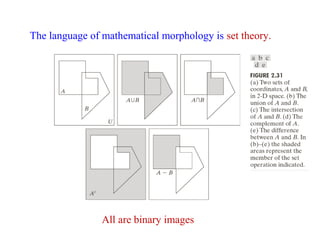
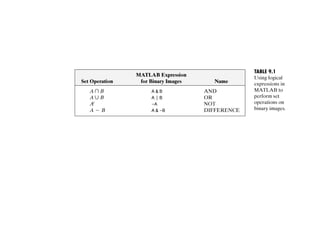
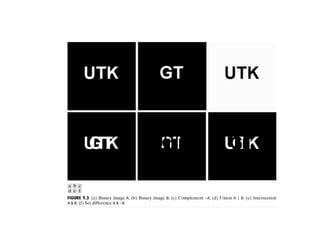
The language of mathematical morphology is set theory.
All are binary images
Binary images may contain numerous imperfections. In
particular, the binary regions produced by simple thresholding
are distorted by noise and texture.
Morphological image processing pursues the goals of removing
these imperfections by accounting for the form and structure of
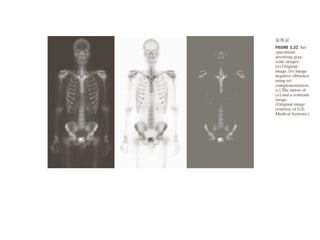
the image. These techniques can be extended to gray scale
images.
•Binary Morphology
•Gray Level Morphology
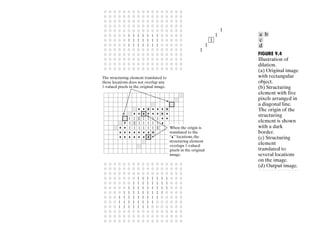
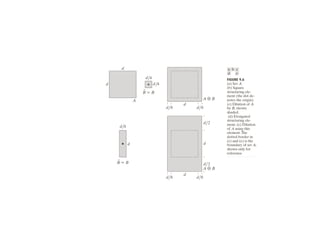
 Dilation(⊕)
 Erosion( )
Basic Morphological operations:
Morphological operations on Binary images
For a binary image, white pixels are normally taken to
represent foreground regions, while black pixels denote
background. (Note that in some implementations this
convention is reversed)
Binary Dilation:
The basic effect of the operator on a binary image is to
gradually enlarge the boundaries of regions of foreground pixels
(i.e. white pixels, typically). Thus areas of foreground pixels
grow in size while holes within those regions become smaller.
It will ‘Expand’ the image.
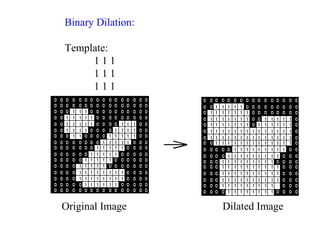
Binary Dilation:
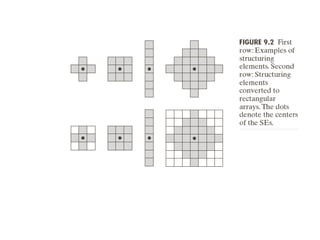
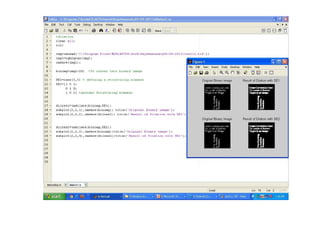
Template:
1 1 1
1 1 1
1 1 1
Original Image Dilated Image
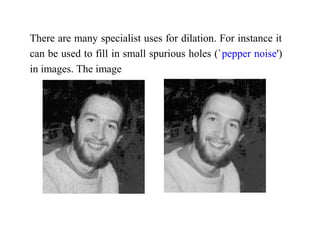
There are many specialist uses for dilation. For instance it
can be used to fill in small spurious holes (`pepper noise')
in images. The image
Common Names: Dilate, Grow, Expand
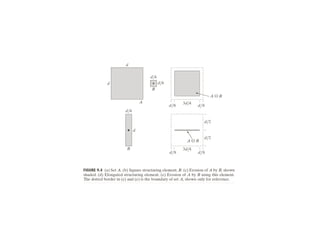
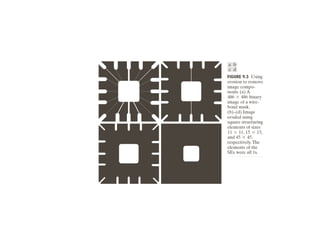
Erosion:
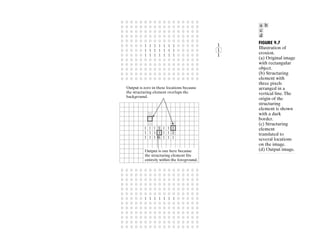
The basic effect of the operator on a binary image is to
erode away the boundaries of regions of foreground
pixels (i.e. white pixels, typically). Thus areas of
foreground pixels shrink in size, and holes within those
areas become larger.
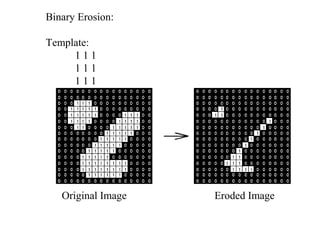
Binary Erosion:
Template:
1 1 1
1 1 1
1 1 1
Original Image Eroded Image
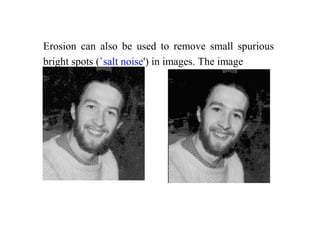
Erosion can also be used to remove small spurious
bright spots (`salt noise') in images. The image
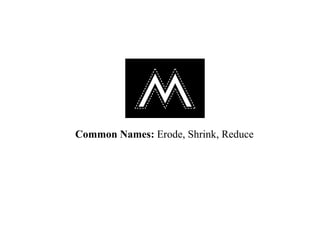
Common Names: Erode, Shrink, Reduce
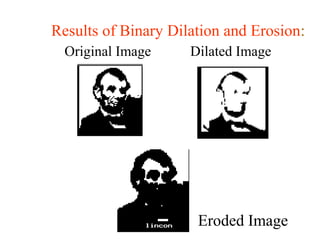
Results of Binary Dilation and Erosion:
Original Image Dilated Image
Eroded Image
The other Binary Morphological Operations are:
•Opening
•Closing
•Boundary extraction
•Region filling
•Connected components
•Hit-or-miss
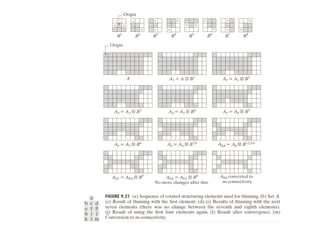
•Thinning
•Thickening
•Skeletons
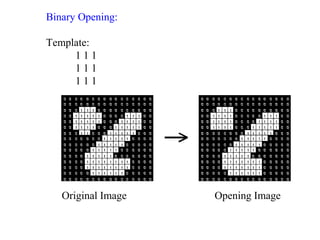
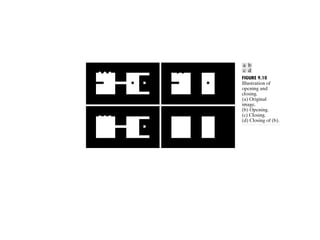
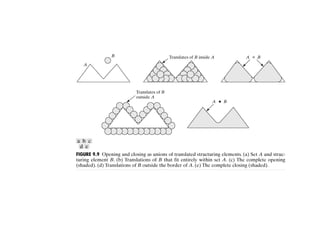
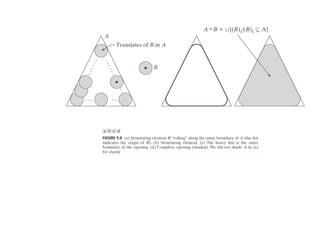
The basic effect of an opening is somewhat like erosion in that
it tends to remove some of the foreground (bright) pixels from
the edges of regions of foreground pixels. However it is less
destructive than erosion in general. As with other
morphological operators, the exact operation is determined by a
structuring element. The effect of the operator is to preserve
foreground regions that have a similar shape to this structuring
element, or that can completely contain the structuring element,
while eliminating all other regions of foreground pixels.
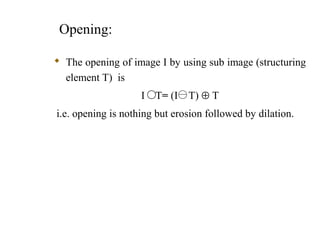
Opening:
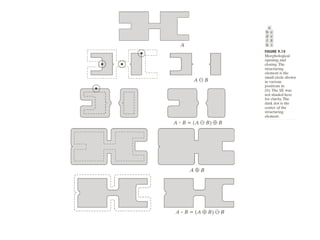
 The opening of image I by using sub image (structuring
element T) is
I T= (I T) ⊕ T
i.e. opening is nothing but erosion followed by dilation.
Binary Opening:
Template:
1 1 1
1 1 1
1 1 1
Original Image Opening Image
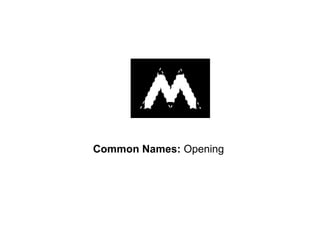
Common Names: Opening
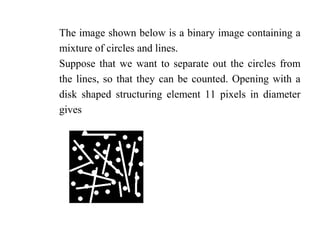
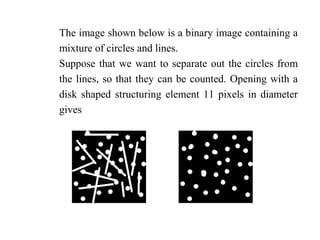
The image shown below is a binary image containing a
mixture of circles and lines.
Suppose that we want to separate out the circles from
the lines, so that they can be counted. Opening with a
disk shaped structuring element 11 pixels in diameter
gives
The image shown below is a binary image containing a
mixture of circles and lines.
Suppose that we want to separate out the circles from
the lines, so that they can be counted. Opening with a
disk shaped structuring element 11 pixels in diameter
gives
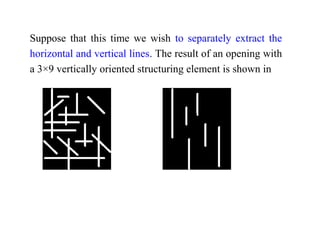
Suppose that this time we wish to separately extract the
horizontal and vertical lines. The result of an opening with
a 3×9 vertically oriented structuring element is shown in
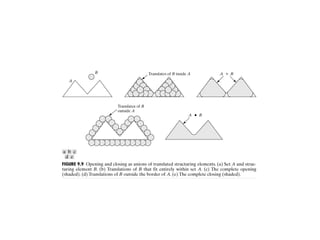
Closing:
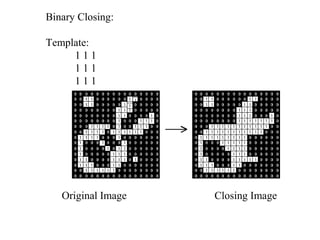
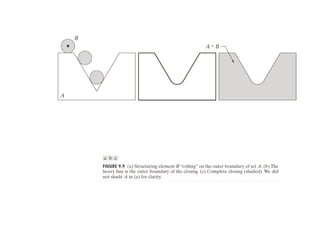
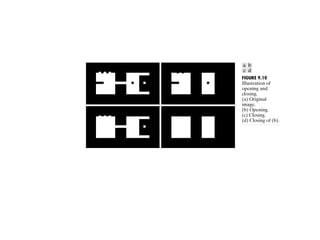
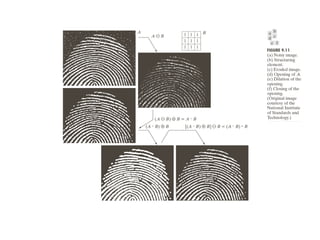
Closing is similar in some ways to dilation in that it tends to
enlarge the boundaries of foreground (bright) regions in an
image (and shrink background color holes in such regions),
but it is less destructive of the original boundary shape. The
effect of the operator is to preserve background regions that
have a similar shape to this structuring element, or that can
completely contain the structuring element, while eliminating
all other regions of background pixels.
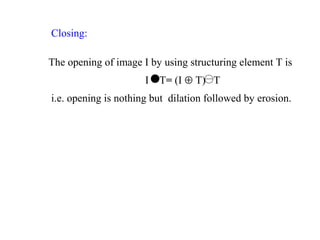
Closing:
The opening of image I by using structuring element T is
I T= (I ⊕ T) T
i.e. opening is nothing but dilation followed by erosion.
Binary Closing:
Template:
1 1 1
1 1 1
1 1 1
Original Image Closing Image
Common Names: Closing
Closing can sometimes be used to selectively fill in
particular background regions of an image. Whether or not
this can be done depends upon whether a suitable
structuring element can be found that fits well inside
regions that are to be preserved, but doesn't fit inside
regions that are to be removed.
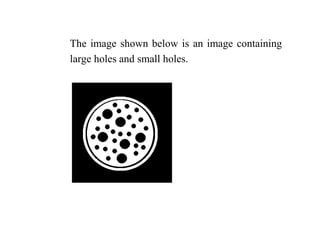
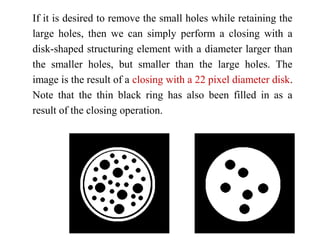
The image shown below is an image containing
large holes and small holes.
If it is desired to remove the small holes while retaining the
large holes, then we can simply perform a closing with a
disk-shaped structuring element with a diameter larger than
the smaller holes, but smaller than the large holes. The
image is the result of a closing with a 22 pixel diameter disk.
Note that the thin black ring has also been filled in as a
result of the closing operation.
1 1
1
0
1 1
1 1 1
0
1 1 1 0 1 1 1 1 1
0
1
1
1
1 1
1
1 1 1
1
1
1 1 1
1 1
1 1 1
1
1
1 1 1
1 1
1 1 1
1
1 1 1
1 1 1
1 1 1
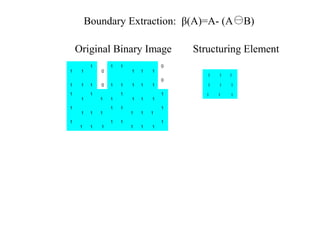
Original Binary Image Structuring Element
Boundary Extraction: β(A)=A- (A B)
1 1
1
0
1 1
1 1 1
0
1 1 1 0 1 1 1 1 1
0
1
1
1
1 1
1
1 1 1
1
1
1 1 1
1 1
1 1 1
1
1
1 1 1
1 1
1 1 1
1
1 1 1
1 1 1
1 1 1
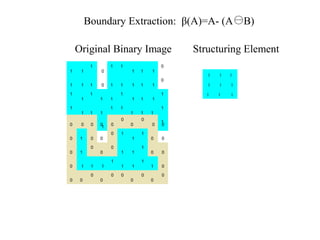
Original Binary Image Structuring Element
A B
Boundary Extraction: β(A)=A- (A B)
0 0 0 0 0
0
0
0
0 0
0 1 0 0
0 1
1
1
0 0
0 1
0
0
0
1 1
1
0 0
0 1 1 1
1
1 1
1
1 0
0 0
0
0
0 0
0
0
0
0
1 1
1
0
1 1
1 1 1
0
1 1 1 0 1 1 1 1 1
0
1
1
1
1 1
1
1 1 1
1
1
1 1 1
1 1
1 1 1
1
1
1 1 1
1 1
1 1 1
1
1 1 1
1 1 1
1 1 1
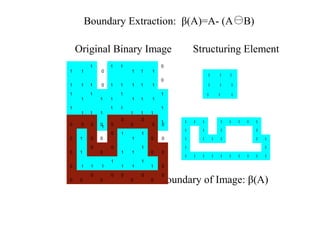
Original Binary Image Structuring Element
A B Boundary of Image: β(A)
Boundary Extraction: β(A)=A- (A B)
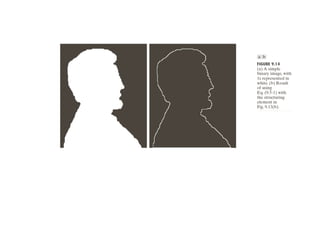
1 1 1 1 1 1 1 1
1 1 1 1
1 1 1 1 1 1
1 1
1 1 1 1 1 1 1 1 1 1
0 0 0 0 0
0
0
0
0 0
0 1 0 0
0 1
1
1
0 0
0 1
0
0
0
1 1
1
0 0
0 1 1 1
1
1 1
1
1 0
0 0
0
0
0 0
0
0
0
0
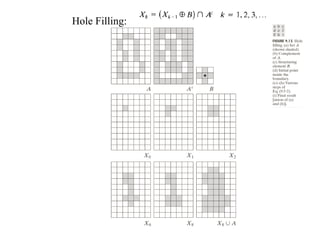
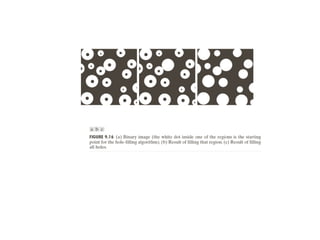
Hole Filling:
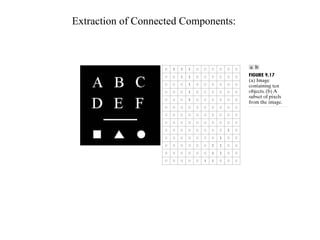
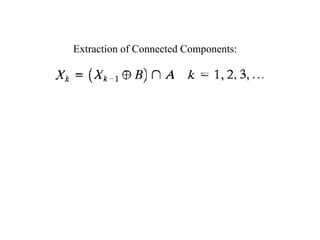
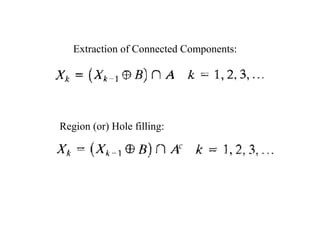
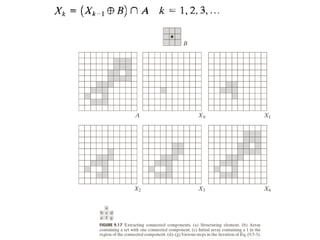
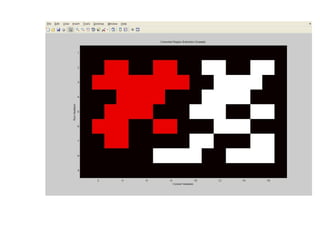
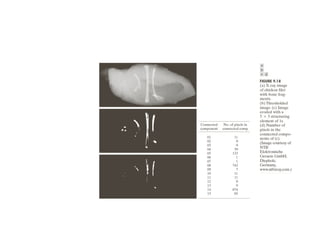
Extraction of Connected Components:
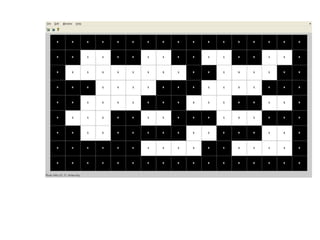
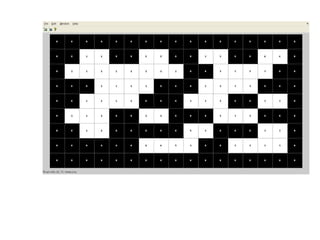
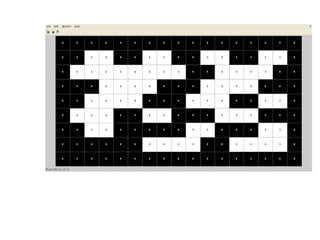
Region (or) Hole filling:
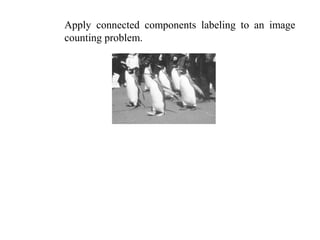
Apply connected components labeling to an image
counting problem.
Solution:
• Starting from produce a suitable binary image (i.e.
threshold the image).
• And then apply connected components labeling with
the aim of obtaining a distinct label for each penguin.
(Note, this may require some experimentation with
threshold values.)
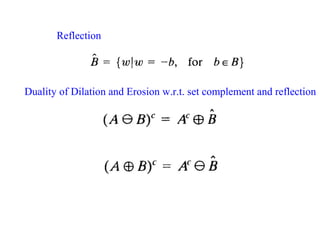
Reflection
Duality of Dilation and Erosion w.r.t. set complement and reflection
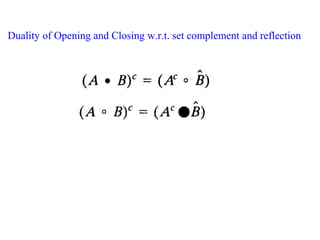
Duality of Opening and Closing w.r.t. set complement and reflection
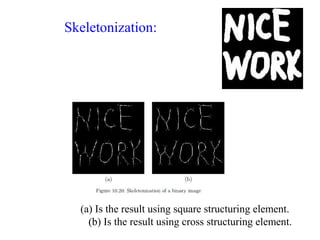
Skeletonization:
(a) Is the result using square structuring element.
(b) Is the result using cross structuring element.
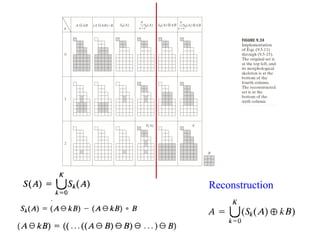
Reconstruction
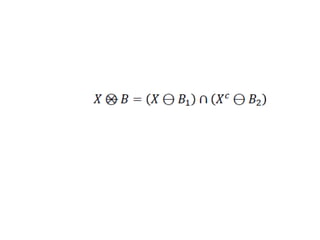
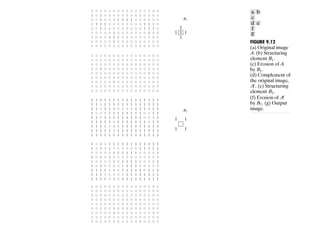
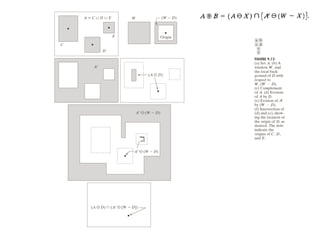
The hit-and-miss transform is a general binary morphological
operation that can be used to look for particular patterns of
foreground and background pixels in an image.
It is actually the basic operation of binary morphology since
almost all the other binary morphological operators can be
derived from it.
As with other binary morphological operators it takes as input
a binary image and a structuring element, and produces another
binary image as output.
Hit-or-Miss /Hit-and-Miss :
If the foreground and background pixels in the structuring
element exactly match foreground and background pixels in
the image, then the pixel underneath the origin of the
structuring element is set to the foreground color. If it doesn't
match, then that pixel is set to the background color.
The structuring element used in the hit-and-miss is a slight
extension to the type that has been introduced
for erosion and dilation, in that it can contain both foreground
and background pixels, rather than just foreground
pixels, i.e. both ones and zeros.
Note that the simpler type of structuring element used with
erosion and dilation is often depicted containing both ones and
zeros as well, but in that case the zeros really stand for `don't
care's', and are just used to fill out the structuring element to a
convenient shaped kernel, usually a square. In all our
illustrations, these `don't care's' are shown as blanks in the
kernel in order to avoid confusion.
As usual we denote foreground pixels using ones, and
background pixels using zeros.
The hit-and-miss operation is performed in much the same
way as other morphological operators, by translating the
origin of the structuring element to all points in the image, and
then comparing the structuring element with the underlying
image pixels. If the foreground and background pixels in the
structuring element exactly match foreground and background
pixels in the image, then the pixel underneath the origin of the
structuring element is set to the foreground color. If it doesn't
match, then that pixel is set to the background color.
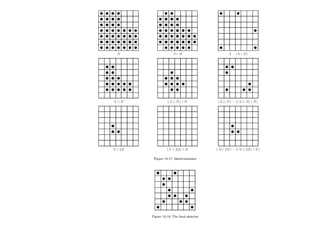
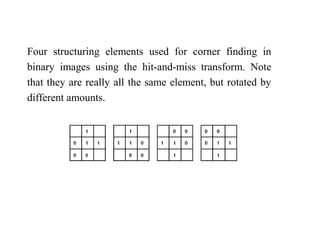
Four structuring elements used for corner finding in
binary images using the hit-and-miss transform. Note
that they are really all the same element, but rotated by
different amounts.
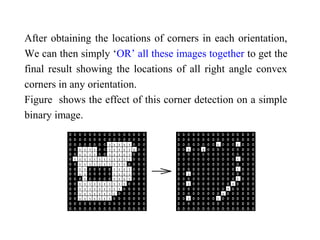
After obtaining the locations of corners in each orientation,
We can then simply ‘OR’ all these images together to get the
final result showing the locations of all right angle convex
corners in any orientation.
Figure shows the effect of this corner detection on a simple
binary image.
The operations of erosion, dilation, opening, closing,
thinning and thickening can all be derived from the hit-and-
miss transform in conjunction with simple set operations.
Figure 4 illustrates some structuring elements that can be
used for locating various binary features.
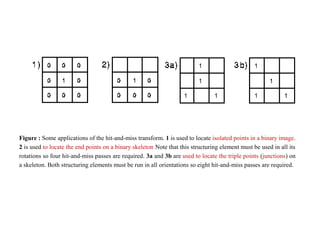
Figure : Some applications of the hit-and-miss transform. 1 is used to locate isolated points in a binary image.
2 is used to locate the end points on a binary skeleton Note that this structuring element must be used in all its
rotations so four hit-and-miss passes are required. 3a and 3b are used to locate the triple points (junctions) on
a skeleton. Both structuring elements must be run in all orientations so eight hit-and-miss passes are required.
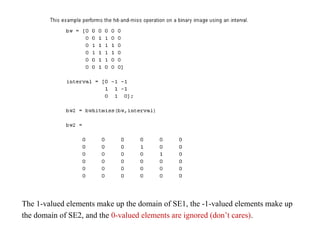
The 1-valued elements make up the domain of SE1, the -1-valued elements make up
the domain of SE2, and the 0-valued elements are ignored (don’t cares).
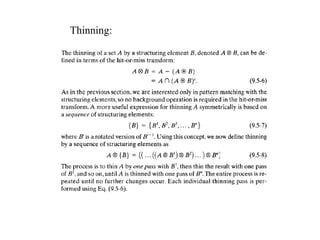
Thinning:
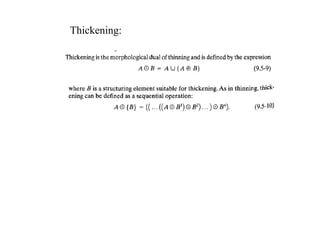
Thickening:
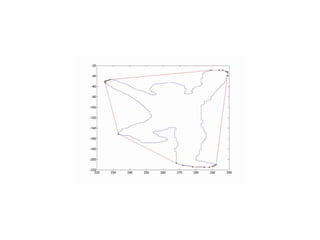
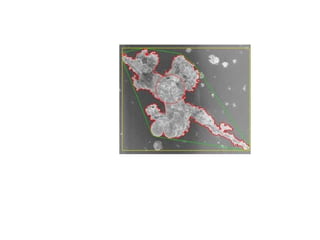
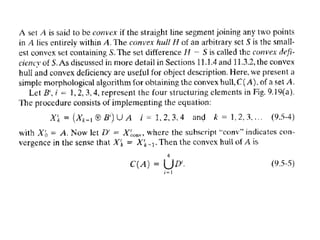
Convexhull
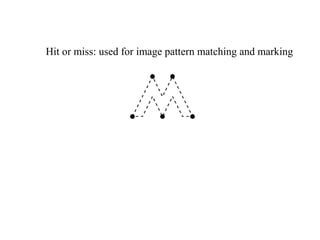
Hit or miss: used for image pattern matching and marking
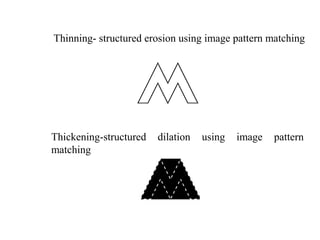
Thinning- structured erosion using image pattern matching
Thickening-structured dilation using image pattern
matching
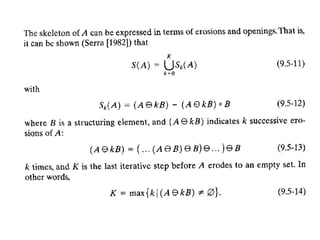
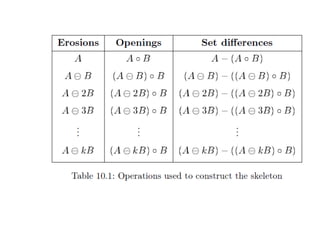
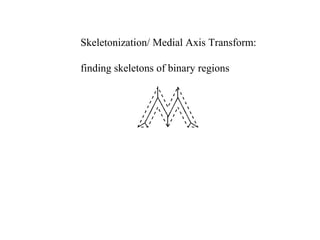
Skeletonization/ Medial Axis Transform:
finding skeletons of binary regions
Gray level morphology
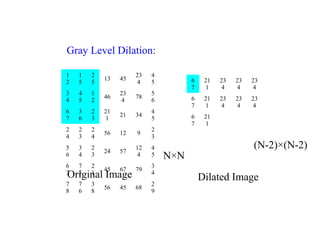
Gray Level Dilation:
Original Image
1
2
1
5
2
5
13 45
23
4
4
5
3
4
4
5
1
2
46
23
4
78
5
6
6
7
3
6
2
3
21
1
21 34
4
5
2
4
2
3
2
4
56 12 9
2
3
5
6
3
4
2
3
24 57
12
4
4
5
6
7
7
5
2
1
45 67 79
3
4
7
8
7
6
3
8
56 45 68
2
9
6
7
21
1
23
4
23
4
23
4
6
7
21
1
23
4
23
4
23
4
6
7
21
1
N×N
(N-2)×(N-2)
Dilated Image
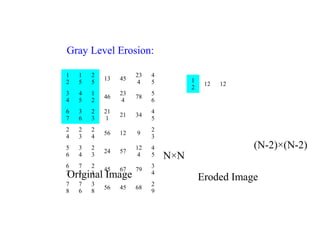
Gray Level Erosion:
Original Image
1
2
1
5
2
5
13 45
23
4
4
5
3
4
4
5
1
2
46
23
4
78
5
6
6
7
3
6
2
3
21
1
21 34
4
5
2
4
2
3
2
4
56 12 9
2
3
5
6
3
4
2
3
24 57
12
4
4
5
6
7
7
5
2
1
45 67 79
3
4
7
8
7
6
3
8
56 45 68
2
9
1
2
12 12
N×N
(N-2)×(N-2)
Eroded Image
Opening and Closing:
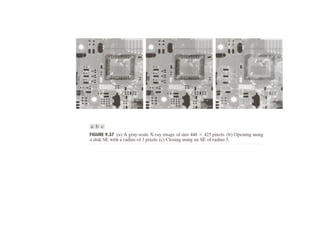
Opening suppresses the bright details smaller than the
specified SE and
Closing suppresses the dark details.
Some basic gray-scale morphological Algorithms:
Morphological Smoothing
Morphological gradient
Top-hat and Bottom-hat transformations
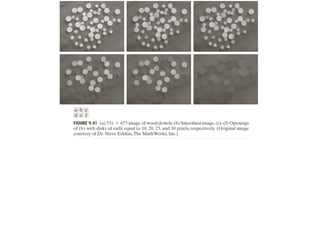
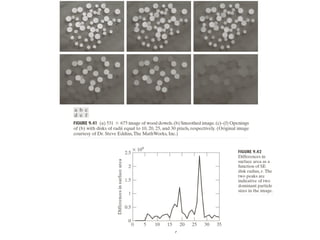
Granulometry
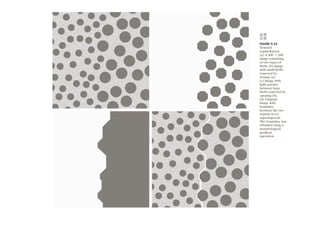
Textural Segmentations
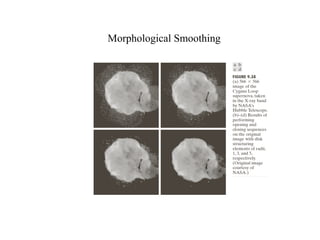
Morphological Smoothing
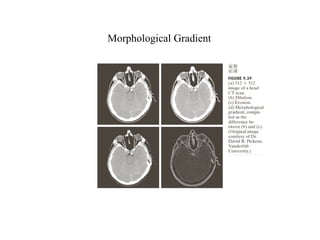
Morphological Gradient
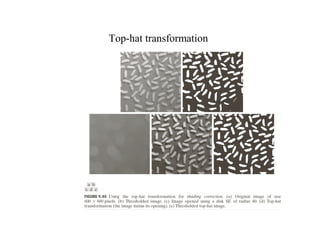
Top-hat transformation
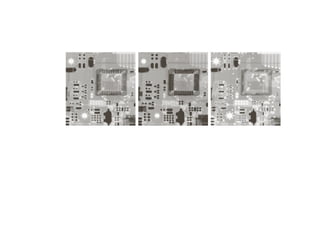
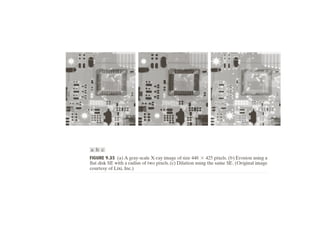
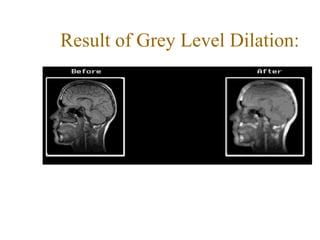
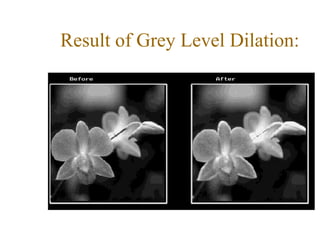
Result of Grey Level Dilation:
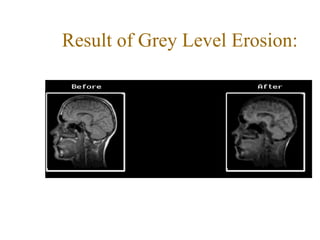
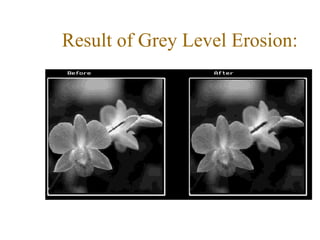
Result of Grey Level Erosion:
The other gray level morphological operations are :
•Opening
•Closing
•Morphological smoothing
•Morphological Gradient
•Top-hat transformation
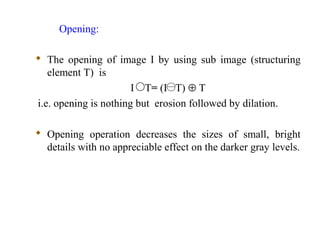
Opening:
 The opening of image I by using sub image (structuring
element T) is
I T= (I T) ⊕ T
i.e. opening is nothing but erosion followed by dilation.
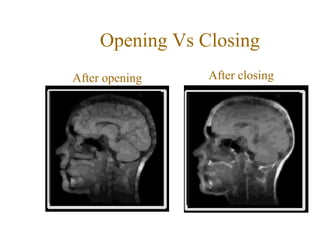
 Opening operation decreases the sizes of small, bright
details with no appreciable effect on the darker gray levels.
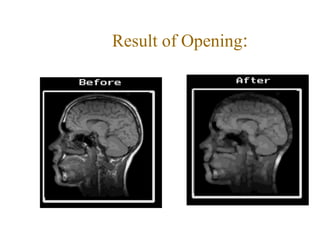
Result of Opening:
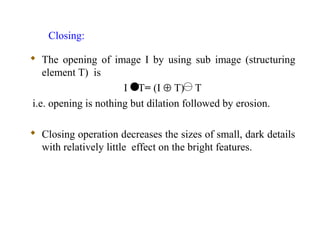
 The opening of image I by using sub image (structuring
element T) is
I T= (I ⊕ T) T
i.e. opening is nothing but dilation followed by erosion.
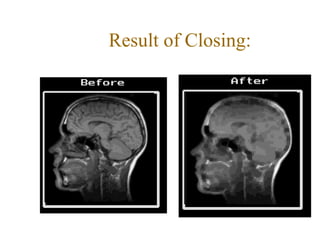
 Closing operation decreases the sizes of small, dark details
with relatively little effect on the bright features.
Closing:
Result of Closing:
Opening Vs Closing
After opening After closing
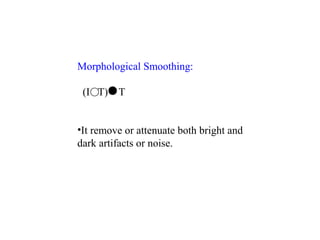
Morphological Smoothing:
(I T) T
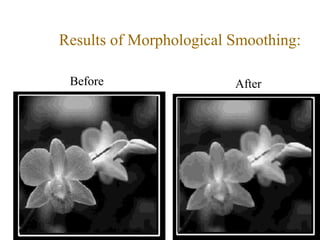
•It remove or attenuate both bright and
dark artifacts or noise.
Results of Morphological Smoothing:
Before After
Morphological Gradient:
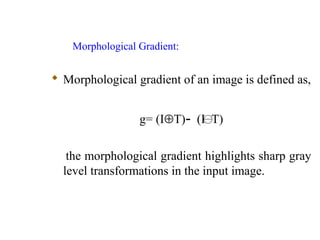
 Morphological gradient of an image is defined as,
g= (I⊕T)- (I T)
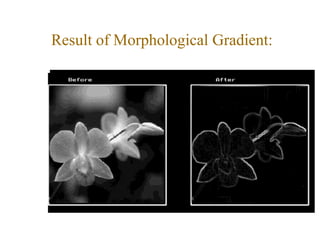
the morphological gradient highlights sharp gray
level transformations in the input image.
Result of Morphological Gradient:
Top-Hat Transformation:
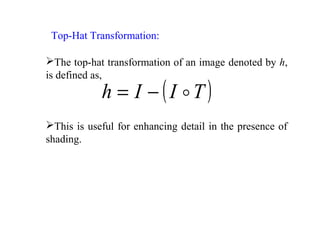
( )TIIh −=
The top-hat transformation of an image denoted by h,
is defined as,
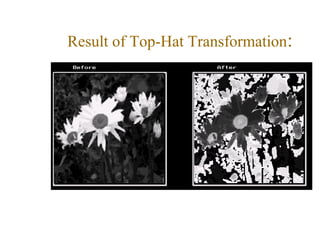
This is useful for enhancing detail in the presence of
shading.
Result of Top-Hat Transformation:

morphological image processing

  • 1.
    Morphological Image ProcessingMorphologicalImage Processing Dr.U.S.N.Raju
  • 2.
    Morphology •The word morphologycommonly denotes a branch of biology that deals with the form and structure of animals and plants. •We use the same word here in the context of mathematical morphology as a tool for extracting image components that are useful in the representation and description of region shape, such as boundaries, skeletons, and the convex hull. •We are also interested in morphological techniques for pre- and post processing, such as morphological filtering, thinning and pruning.
  • 3.
    From now onwards,it begins a transition from a focus on purely image processing methods, whose input and output are images, to processes in which the inputs are images, but the outputs are attributes extracted from those images.
  • 5.
     Common Usagesinclude Edge detection, Noise removal, Image enhancement and Image segmentation.  Forcing shapes onto region edges  To count regions (or granules in morphological terms)  To estimate sizes of regions (or granules). Applications of Morphology
  • 6.
    The language ofmathematical morphology is set theory. All are binary images
  • 11.
    Binary images maycontain numerous imperfections. In particular, the binary regions produced by simple thresholding are distorted by noise and texture. Morphological image processing pursues the goals of removing these imperfections by accounting for the form and structure of the image. These techniques can be extended to gray scale images.
  • 13.
  • 14.
     Dilation(⊕)  Erosion() Basic Morphological operations:
  • 15.
    Morphological operations onBinary images For a binary image, white pixels are normally taken to represent foreground regions, while black pixels denote background. (Note that in some implementations this convention is reversed)
  • 16.
    Binary Dilation: The basiceffect of the operator on a binary image is to gradually enlarge the boundaries of regions of foreground pixels (i.e. white pixels, typically). Thus areas of foreground pixels grow in size while holes within those regions become smaller. It will ‘Expand’ the image.
  • 17.
    Binary Dilation: Template: 1 11 1 1 1 1 1 1 Original Image Dilated Image
  • 22.
    There are manyspecialist uses for dilation. For instance it can be used to fill in small spurious holes (`pepper noise') in images. The image
  • 23.
  • 24.
    Erosion: The basic effectof the operator on a binary image is to erode away the boundaries of regions of foreground pixels (i.e. white pixels, typically). Thus areas of foreground pixels shrink in size, and holes within those areas become larger.
  • 25.
    Binary Erosion: Template: 1 11 1 1 1 1 1 1 Original Image Eroded Image
  • 29.
    Erosion can alsobe used to remove small spurious bright spots (`salt noise') in images. The image
  • 30.
    Common Names: Erode,Shrink, Reduce
  • 32.
    Results of BinaryDilation and Erosion: Original Image Dilated Image Eroded Image
  • 33.
    The other BinaryMorphological Operations are: •Opening •Closing •Boundary extraction •Region filling •Connected components •Hit-or-miss •Thinning •Thickening •Skeletons
  • 34.
    The basic effectof an opening is somewhat like erosion in that it tends to remove some of the foreground (bright) pixels from the edges of regions of foreground pixels. However it is less destructive than erosion in general. As with other morphological operators, the exact operation is determined by a structuring element. The effect of the operator is to preserve foreground regions that have a similar shape to this structuring element, or that can completely contain the structuring element, while eliminating all other regions of foreground pixels.
  • 35.
    Opening:  The openingof image I by using sub image (structuring element T) is I T= (I T) ⊕ T i.e. opening is nothing but erosion followed by dilation.
  • 36.
    Binary Opening: Template: 1 11 1 1 1 1 1 1 Original Image Opening Image
  • 39.
  • 41.
    The image shownbelow is a binary image containing a mixture of circles and lines. Suppose that we want to separate out the circles from the lines, so that they can be counted. Opening with a disk shaped structuring element 11 pixels in diameter gives
  • 42.
    The image shownbelow is a binary image containing a mixture of circles and lines. Suppose that we want to separate out the circles from the lines, so that they can be counted. Opening with a disk shaped structuring element 11 pixels in diameter gives
  • 43.
    Suppose that thistime we wish to separately extract the horizontal and vertical lines. The result of an opening with a 3×9 vertically oriented structuring element is shown in
  • 44.
    Closing: Closing is similarin some ways to dilation in that it tends to enlarge the boundaries of foreground (bright) regions in an image (and shrink background color holes in such regions), but it is less destructive of the original boundary shape. The effect of the operator is to preserve background regions that have a similar shape to this structuring element, or that can completely contain the structuring element, while eliminating all other regions of background pixels.
  • 45.
    Closing: The opening ofimage I by using structuring element T is I T= (I ⊕ T) T i.e. opening is nothing but dilation followed by erosion.
  • 46.
    Binary Closing: Template: 1 11 1 1 1 1 1 1 Original Image Closing Image
  • 52.
  • 53.
    Closing can sometimesbe used to selectively fill in particular background regions of an image. Whether or not this can be done depends upon whether a suitable structuring element can be found that fits well inside regions that are to be preserved, but doesn't fit inside regions that are to be removed.
  • 54.
    The image shownbelow is an image containing large holes and small holes.
  • 55.
    If it isdesired to remove the small holes while retaining the large holes, then we can simply perform a closing with a disk-shaped structuring element with a diameter larger than the smaller holes, but smaller than the large holes. The image is the result of a closing with a 22 pixel diameter disk. Note that the thin black ring has also been filled in as a result of the closing operation.
  • 56.
    1 1 1 0 1 1 11 1 0 1 1 1 0 1 1 1 1 1 0 1 1 1 1 1 1 1 1 1 1 1 1 1 1 1 1 1 1 1 1 1 1 1 1 1 1 1 1 1 1 1 1 1 1 1 1 1 1 1 Original Binary Image Structuring Element Boundary Extraction: β(A)=A- (A B)
  • 57.
    1 1 1 0 1 1 11 1 0 1 1 1 0 1 1 1 1 1 0 1 1 1 1 1 1 1 1 1 1 1 1 1 1 1 1 1 1 1 1 1 1 1 1 1 1 1 1 1 1 1 1 1 1 1 1 1 1 1 Original Binary Image Structuring Element A B Boundary Extraction: β(A)=A- (A B) 0 0 0 0 0 0 0 0 0 0 0 1 0 0 0 1 1 1 0 0 0 1 0 0 0 1 1 1 0 0 0 1 1 1 1 1 1 1 1 0 0 0 0 0 0 0 0 0 0 0
  • 58.
    1 1 1 0 1 1 11 1 0 1 1 1 0 1 1 1 1 1 0 1 1 1 1 1 1 1 1 1 1 1 1 1 1 1 1 1 1 1 1 1 1 1 1 1 1 1 1 1 1 1 1 1 1 1 1 1 1 1 Original Binary Image Structuring Element A B Boundary of Image: β(A) Boundary Extraction: β(A)=A- (A B) 1 1 1 1 1 1 1 1 1 1 1 1 1 1 1 1 1 1 1 1 1 1 1 1 1 1 1 1 1 1 0 0 0 0 0 0 0 0 0 0 0 1 0 0 0 1 1 1 0 0 0 1 0 0 0 1 1 1 0 0 0 1 1 1 1 1 1 1 1 0 0 0 0 0 0 0 0 0 0 0
  • 60.
  • 62.
  • 65.
  • 66.
    Extraction of ConnectedComponents: Region (or) Hole filling:
  • 72.
    Apply connected componentslabeling to an image counting problem.
  • 73.
    Solution: • Starting fromproduce a suitable binary image (i.e. threshold the image). • And then apply connected components labeling with the aim of obtaining a distinct label for each penguin. (Note, this may require some experimentation with threshold values.)
  • 74.
    Reflection Duality of Dilationand Erosion w.r.t. set complement and reflection
  • 75.
    Duality of Openingand Closing w.r.t. set complement and reflection
  • 77.
    Skeletonization: (a) Is theresult using square structuring element. (b) Is the result using cross structuring element.
  • 81.
  • 83.
    The hit-and-miss transformis a general binary morphological operation that can be used to look for particular patterns of foreground and background pixels in an image. It is actually the basic operation of binary morphology since almost all the other binary morphological operators can be derived from it. As with other binary morphological operators it takes as input a binary image and a structuring element, and produces another binary image as output. Hit-or-Miss /Hit-and-Miss :
  • 84.
    If the foregroundand background pixels in the structuring element exactly match foreground and background pixels in the image, then the pixel underneath the origin of the structuring element is set to the foreground color. If it doesn't match, then that pixel is set to the background color.
  • 85.
    The structuring elementused in the hit-and-miss is a slight extension to the type that has been introduced for erosion and dilation, in that it can contain both foreground and background pixels, rather than just foreground pixels, i.e. both ones and zeros.
  • 86.
    Note that thesimpler type of structuring element used with erosion and dilation is often depicted containing both ones and zeros as well, but in that case the zeros really stand for `don't care's', and are just used to fill out the structuring element to a convenient shaped kernel, usually a square. In all our illustrations, these `don't care's' are shown as blanks in the kernel in order to avoid confusion. As usual we denote foreground pixels using ones, and background pixels using zeros.
  • 87.
    The hit-and-miss operationis performed in much the same way as other morphological operators, by translating the origin of the structuring element to all points in the image, and then comparing the structuring element with the underlying image pixels. If the foreground and background pixels in the structuring element exactly match foreground and background pixels in the image, then the pixel underneath the origin of the structuring element is set to the foreground color. If it doesn't match, then that pixel is set to the background color.
  • 88.
    Four structuring elementsused for corner finding in binary images using the hit-and-miss transform. Note that they are really all the same element, but rotated by different amounts.
  • 89.
    After obtaining thelocations of corners in each orientation, We can then simply ‘OR’ all these images together to get the final result showing the locations of all right angle convex corners in any orientation. Figure shows the effect of this corner detection on a simple binary image.
  • 90.
    The operations oferosion, dilation, opening, closing, thinning and thickening can all be derived from the hit-and- miss transform in conjunction with simple set operations. Figure 4 illustrates some structuring elements that can be used for locating various binary features.
  • 91.
    Figure : Someapplications of the hit-and-miss transform. 1 is used to locate isolated points in a binary image. 2 is used to locate the end points on a binary skeleton Note that this structuring element must be used in all its rotations so four hit-and-miss passes are required. 3a and 3b are used to locate the triple points (junctions) on a skeleton. Both structuring elements must be run in all orientations so eight hit-and-miss passes are required.
  • 95.
    The 1-valued elementsmake up the domain of SE1, the -1-valued elements make up the domain of SE2, and the 0-valued elements are ignored (don’t cares).
  • 96.
  • 98.
  • 99.
  • 105.
    Hit or miss:used for image pattern matching and marking
  • 106.
    Thinning- structured erosionusing image pattern matching Thickening-structured dilation using image pattern matching
  • 107.
    Skeletonization/ Medial AxisTransform: finding skeletons of binary regions
  • 108.
  • 110.
    Gray Level Dilation: OriginalImage 1 2 1 5 2 5 13 45 23 4 4 5 3 4 4 5 1 2 46 23 4 78 5 6 6 7 3 6 2 3 21 1 21 34 4 5 2 4 2 3 2 4 56 12 9 2 3 5 6 3 4 2 3 24 57 12 4 4 5 6 7 7 5 2 1 45 67 79 3 4 7 8 7 6 3 8 56 45 68 2 9 6 7 21 1 23 4 23 4 23 4 6 7 21 1 23 4 23 4 23 4 6 7 21 1 N×N (N-2)×(N-2) Dilated Image
  • 111.
    Gray Level Erosion: OriginalImage 1 2 1 5 2 5 13 45 23 4 4 5 3 4 4 5 1 2 46 23 4 78 5 6 6 7 3 6 2 3 21 1 21 34 4 5 2 4 2 3 2 4 56 12 9 2 3 5 6 3 4 2 3 24 57 12 4 4 5 6 7 7 5 2 1 45 67 79 3 4 7 8 7 6 3 8 56 45 68 2 9 1 2 12 12 N×N (N-2)×(N-2) Eroded Image
  • 114.
    Opening and Closing: Openingsuppresses the bright details smaller than the specified SE and Closing suppresses the dark details.
  • 116.
    Some basic gray-scalemorphological Algorithms: Morphological Smoothing Morphological gradient Top-hat and Bottom-hat transformations Granulometry Textural Segmentations
  • 117.
  • 118.
  • 119.
  • 123.
    Result of GreyLevel Dilation:
  • 124.
    Result of GreyLevel Dilation:
  • 125.
    Result of GreyLevel Erosion:
  • 126.
    Result of GreyLevel Erosion:
  • 127.
    The other graylevel morphological operations are : •Opening •Closing •Morphological smoothing •Morphological Gradient •Top-hat transformation
  • 128.
    Opening:  The openingof image I by using sub image (structuring element T) is I T= (I T) ⊕ T i.e. opening is nothing but erosion followed by dilation.  Opening operation decreases the sizes of small, bright details with no appreciable effect on the darker gray levels.
  • 129.
  • 130.
     The openingof image I by using sub image (structuring element T) is I T= (I ⊕ T) T i.e. opening is nothing but dilation followed by erosion.  Closing operation decreases the sizes of small, dark details with relatively little effect on the bright features. Closing:
  • 131.
  • 132.
    Opening Vs Closing Afteropening After closing
  • 133.
    Morphological Smoothing: (I T)T •It remove or attenuate both bright and dark artifacts or noise.
  • 134.
    Results of MorphologicalSmoothing: Before After
  • 135.
    Morphological Gradient:  Morphologicalgradient of an image is defined as, g= (I⊕T)- (I T) the morphological gradient highlights sharp gray level transformations in the input image.
  • 136.
  • 137.
    Top-Hat Transformation: ( )TIIh−= The top-hat transformation of an image denoted by h, is defined as, This is useful for enhancing detail in the presence of shading.
  • 138.
    Result of Top-HatTransformation: