Introduction into Scale-out Storage
with Gluster
Niels de Vos
Red Hat Storage Engineer
GlusterFS co-maintainer
ndevos@redhat.com
November 28, 2015
Eindhoven
2
● What is Gluster?
● Architecture
● Quick start
● How to get involved?
Agenda
3
What is Gluster ?
Gluster is a distributed scale out filesystem that allows
rapid provisioning of additional storage based on your
storage consumption needs. It incorporates automatic
failover as a primary feature. All of this is accomplished
without a centralized metadata server.
4
● Scalable, general-purpose storage platform
● POSIX-y Distributed File System
● Object storage (swift)
● Flexible storage (libgfapi)
● No Metadata Server
● Heterogeneous Commodity Hardware
● Flexible and Agile Scaling
● Capacity – Petabytes and beyond
● Performance – Thousands of Clients
Gluster in Keywords
5
Gluster Use-Cases
● Content Delivery Networks
● Media Streaming
● Download Servers
● Archival
● Backup services
● Long term media archives
● Virtual Machine images
● High Performance / Distributed Computing
● Rendering Farms
● Big Data
6
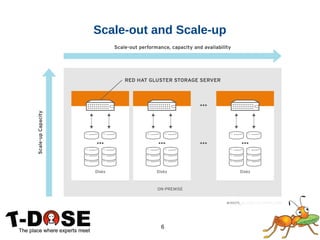
Scale-out and Scale-up
7
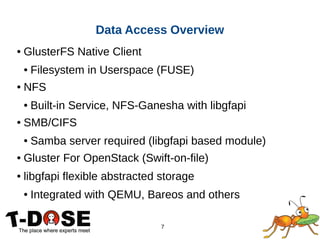
● GlusterFS Native Client
● Filesystem in Userspace (FUSE)
● NFS
● Built-in Service, NFS-Ganesha with libgfapi
● SMB/CIFS
● Samba server required (libgfapi based module)
● Gluster For OpenStack (Swift-on-file)
● libgfapi flexible abstracted storage
● Integrated with QEMU, Bareos and others
Data Access Overview
8
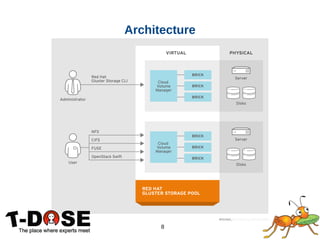
Architecture
9
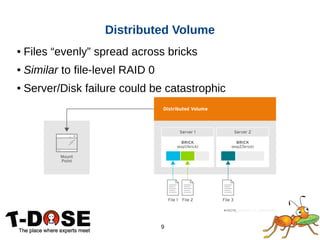
● Files “evenly” spread across bricks
● Similar to file-level RAID 0
● Server/Disk failure could be catastrophic
Distributed Volume
10
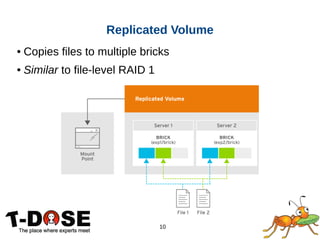
● Copies files to multiple bricks
● Similar to file-level RAID 1
Replicated Volume
11
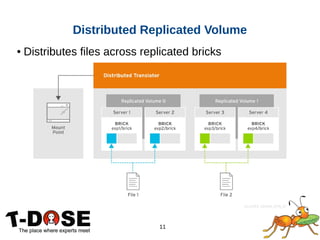
● Distributes files across replicated bricks
Distributed Replicated Volume
12
Quick start
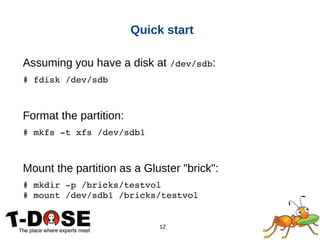
Assuming you have a disk at /dev/sdb:
# fdisk /dev/sdb
Format the partition:
# mkfs ­t xfs /dev/sdb1
Mount the partition as a Gluster "brick":
# mkdir ­p /bricks/testvol
# mount /dev/sdb1 /bricks/testvol
13
Quick start
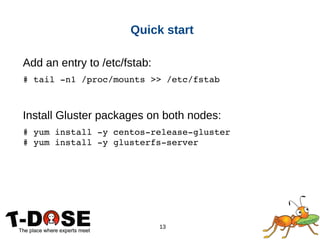
Add an entry to /etc/fstab:
# tail ­n1 /proc/mounts >> /etc/fstab
Install Gluster packages on both nodes:
# yum install ­y centos­release­gluster
# yum install ­y glusterfs­server
14
Quick start
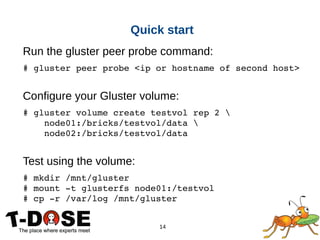
Run the gluster peer probe command:
# gluster peer probe <ip or hostname of second host>
Configure your Gluster volume:
# gluster volume create testvol rep 2 
    node01:/bricks/testvol/data 
    node02:/bricks/testvol/data
Test using the volume:
# mkdir /mnt/gluster
# mount ­t glusterfs node01:/testvol
# cp ­r /var/log /mnt/gluster
15
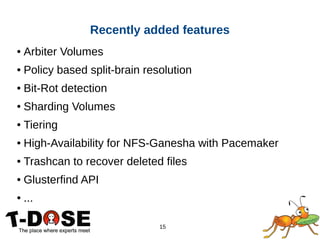
● Arbiter Volumes
● Policy based split-brain resolution
● Bit-Rot detection
● Sharding Volumes
● Tiering
● High-Availability for NFS-Ganesha with Pacemaker
● Trashcan to recover deleted files
● Glusterfind API
● ...
Recently added features
16
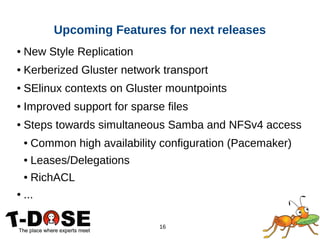
● New Style Replication
● Kerberized Gluster network transport
● SElinux contexts on Gluster mountpoints
● Improved support for sparse files
● Steps towards simultaneous Samba and NFSv4 access
● Common high availability configuration (Pacemaker)
● Leases/Delegations
● RichACL
● ...
Upcoming Features for next releases
17
How to get involved ?
● Homepage
http://gluster.org/
● Community IRC Chat (on Freenode)
#gluster (for general topics)
#gluster-dev (for developers)
#gluster-meeting (meeting room)
● Mailing Lists
http://www.gluster.org/mailman/listinfo/gluster-users
http://www.gluster.org/mailman/listinfo/gluster-devel
● Documentation
http://gluster.readthedocs.org/
https://access.redhat.com/ - Red Hat Gluster Storage
18
Thanks!

Gluster intro-tdose

  • 1.
    Introduction into Scale-outStorage with Gluster Niels de Vos Red Hat Storage Engineer GlusterFS co-maintainer ndevos@redhat.com November 28, 2015 Eindhoven
  • 2.
    2 ● What isGluster? ● Architecture ● Quick start ● How to get involved? Agenda
  • 3.
    3 What is Gluster? Gluster is a distributed scale out filesystem that allows rapid provisioning of additional storage based on your storage consumption needs. It incorporates automatic failover as a primary feature. All of this is accomplished without a centralized metadata server.
  • 4.
    4 ● Scalable, general-purposestorage platform ● POSIX-y Distributed File System ● Object storage (swift) ● Flexible storage (libgfapi) ● No Metadata Server ● Heterogeneous Commodity Hardware ● Flexible and Agile Scaling ● Capacity – Petabytes and beyond ● Performance – Thousands of Clients Gluster in Keywords
  • 5.
    5 Gluster Use-Cases ● ContentDelivery Networks ● Media Streaming ● Download Servers ● Archival ● Backup services ● Long term media archives ● Virtual Machine images ● High Performance / Distributed Computing ● Rendering Farms ● Big Data
  • 6.
  • 7.
    7 ● GlusterFS NativeClient ● Filesystem in Userspace (FUSE) ● NFS ● Built-in Service, NFS-Ganesha with libgfapi ● SMB/CIFS ● Samba server required (libgfapi based module) ● Gluster For OpenStack (Swift-on-file) ● libgfapi flexible abstracted storage ● Integrated with QEMU, Bareos and others Data Access Overview
  • 8.
  • 9.
    9 ● Files “evenly”spread across bricks ● Similar to file-level RAID 0 ● Server/Disk failure could be catastrophic Distributed Volume
  • 10.
    10 ● Copies filesto multiple bricks ● Similar to file-level RAID 1 Replicated Volume
  • 11.
    11 ● Distributes filesacross replicated bricks Distributed Replicated Volume
  • 12.
    12 Quick start Assuming youhave a disk at /dev/sdb: # fdisk /dev/sdb Format the partition: # mkfs ­t xfs /dev/sdb1 Mount the partition as a Gluster "brick": # mkdir ­p /bricks/testvol # mount /dev/sdb1 /bricks/testvol
  • 13.
    13 Quick start Add anentry to /etc/fstab: # tail ­n1 /proc/mounts >> /etc/fstab Install Gluster packages on both nodes: # yum install ­y centos­release­gluster # yum install ­y glusterfs­server
  • 14.
    14 Quick start Run thegluster peer probe command: # gluster peer probe <ip or hostname of second host> Configure your Gluster volume: # gluster volume create testvol rep 2      node01:/bricks/testvol/data      node02:/bricks/testvol/data Test using the volume: # mkdir /mnt/gluster # mount ­t glusterfs node01:/testvol # cp ­r /var/log /mnt/gluster
  • 15.
    15 ● Arbiter Volumes ●Policy based split-brain resolution ● Bit-Rot detection ● Sharding Volumes ● Tiering ● High-Availability for NFS-Ganesha with Pacemaker ● Trashcan to recover deleted files ● Glusterfind API ● ... Recently added features
  • 16.
    16 ● New StyleReplication ● Kerberized Gluster network transport ● SElinux contexts on Gluster mountpoints ● Improved support for sparse files ● Steps towards simultaneous Samba and NFSv4 access ● Common high availability configuration (Pacemaker) ● Leases/Delegations ● RichACL ● ... Upcoming Features for next releases
  • 17.
    17 How to getinvolved ? ● Homepage http://gluster.org/ ● Community IRC Chat (on Freenode) #gluster (for general topics) #gluster-dev (for developers) #gluster-meeting (meeting room) ● Mailing Lists http://www.gluster.org/mailman/listinfo/gluster-users http://www.gluster.org/mailman/listinfo/gluster-devel ● Documentation http://gluster.readthedocs.org/ https://access.redhat.com/ - Red Hat Gluster Storage
  • 18.