Gluster
Tutorial
Jeff Darcy, Red Hat
LISA 2016 (Boston)
Agenda
▸ Alternating info-dump and hands-on
▹ This is part of the info-dump ;)
▸ Gluster basics
▸ Initial setup
▸ Extra features
▸ Maintenance and trouble-shooting
Who Am I?
▸ One of three project-wide architects
▸ First Red Hat employee to be seriously
involved with Gluster (before
acquisition)
▸ Previously worked on NFS (v2..v4),
Lustre, PVFS2, others
▸ General distributed-storage blatherer
▹ http://pl.atyp.us / @Obdurodon
TEMPLATE CREDITS
Special thanks to all the people who made and released these
awesome resources for free:
▸ Presentation template by SlidesCarnival
▸ Photographs by Death to the Stock Photo (license)
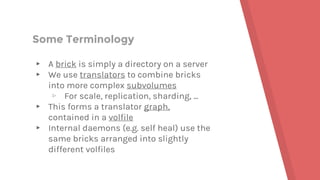
Some Terminology
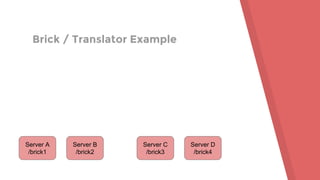
▸ A brick is simply a directory on a server
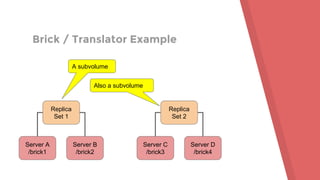
▸ We use translators to combine bricks
into more complex subvolumes
▹ For scale, replication, sharding, ...
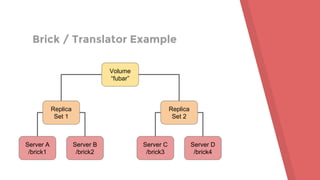
▸ This forms a translator graph,
contained in a volfile
▸ Internal daemons (e.g. self heal) use the
same bricks arranged into slightly
different volfiles
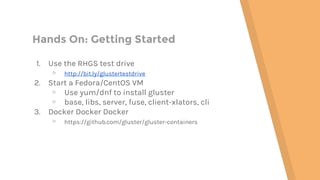
Hands On: Getting Started
1. Use the RHGS test drive
▹ http://bit.ly/glustertestdrive
2. Start a Fedora/CentOS VM
▹ Use yum/dnf to install gluster
▹ base, libs, server, fuse, client-xlators, cli
3. Docker Docker Docker
▹ https://github.com/gluster/gluster-containers
Brick / Translator Example
Server A
/brick1
Server B
/brick2
Server C
/brick3
Server D
/brick4
Brick / Translator Example
Server A
/brick1
Server B
/brick2
Replica
Set 1
Server C
/brick3
Server D
/brick4
Replica
Set 2
A subvolume
Also a subvolume
Brick / Translator Example
Server A
/brick1
Server B
/brick2
Replica
Set 1
Server C
/brick3
Server D
/brick4
Replica
Set 2
Volume
“fubar”
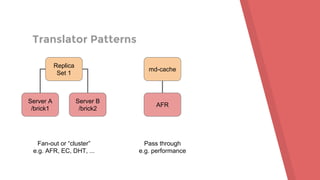
Translator Patterns
Server A
/brick1
Server B
/brick2
Replica
Set 1
Fan-out or “cluster”
e.g. AFR, EC, DHT, ...
AFR
md-cache
Pass through
e.g. performance
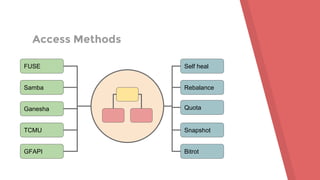
Access Methods
FUSE
Samba
Ganesha
TCMU
GFAPI
Self heal
Rebalance
Quota
Snapshot
Bitrot
GlusterD
▸ Management daemon
▸ Maintains membership, detects server
failures
▸ Stages configuration changes
▸ Starts and monitors other daemons
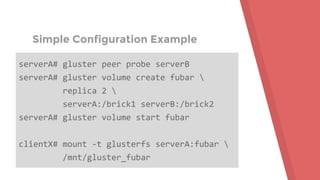
Simple Configuration Example
serverA# gluster peer probe serverB
serverA# gluster volume create fubar 
replica 2 
serverA:/brick1 serverB:/brick2
serverA# gluster volume start fubar
clientX# mount -t glusterfs serverA:fubar 
/mnt/gluster_fubar
Hands On: Connect Servers
[root@vagrant-testVM glusterfs]# gluster peer probe
192.168.121.66
peer probe: success.
[root@vagrant-testVM glusterfs]# gluster peer status
Number of Peers: 1
Hostname: 192.168.121.66
Uuid: 95aee0b5-c816-445b-8dbc-f88da7e95660
State: Accepted peer request (Connected)
Hands On: Server Volume Setup
[root@vagrant-testVM glusterfs]# gluster volume create fubar 
replica 2 testvm:/d/backends/fubar{0,1} force
volume create: fubar: success: please start the volume to
access data
[root@vagrant-testVM glusterfs]# gluster volume info fubar
... (see for yourself)
[root@vagrant-testVM glusterfs]# gluster volume status fubar
Volume fubar is not started
Hands On: Server Volume Setup
[root@vagrant-testVM glusterfs]# gluster volume start fubar
volume start: fubar: success
[root@vagrant-testVM glusterfs]# gluster volume status fubar
Status of volume: fubar
Gluster process TCP Port RDMA Port Online Pid
------------------------------------------------------------------------------
Brick testvm:/d/backends/fubar0 49152 0 Y 13104
Brick testvm:/d/backends/fubar1 49153 0 Y 13133
Self-heal Daemon on localhost N/A N/A Y 13163
Task Status of Volume fubar
------------------------------------------------------------------------------
There are no active volume tasks
Hands On: Client Volume Setup
[root@vagrant-testVM glusterfs]# mount -t glusterfs testvm:fubar 
/mnt/glusterfs/0
[root@vagrant-testVM glusterfs]# df /mnt/glusterfs/0
Filesystem 1K-blocks Used Available Use% Mounted on
testvm:fubar 5232640 33280 5199360 1% /mnt/glusterfs/0
[root@vagrant-testVM glusterfs]# ls -a /mnt/glusterfs/0
. ..
[root@vagrant-testVM glusterfs]# ls -a /d/backends/fubar0
. .. .glusterfs
Hands On: It’s a Filesystem!
▸ Create some files
▸ Create directories, symlinks, ...
▸ Rename, delete, ...
▸ Test performance
▹ OK, not yet
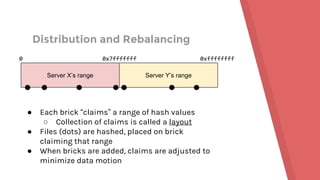
Distribution and Rebalancing
Server X’s range Server Y’s range
0 0x7fffffff 0xffffffff
● Each brick “claims” a range of hash values
○ Collection of claims is called a layout
● Files (dots) are hashed, placed on brick
claiming that range
● When bricks are added, claims are adjusted to
minimize data motion
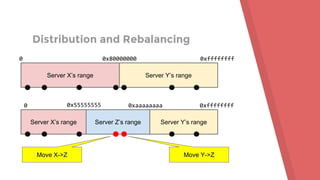
Distribution and Rebalancing
Server X’s range Server Y’s range
0 0x80000000 0xffffffff
Server X’s range Server Y’s range
0 0x55555555 0xaaaaaaaa 0xffffffff
Server Z’s range
Move X->Z Move Y->Z
Sharding
▸ Divides files into chunks
▸ Each chunk is placed separately
according to hash
▸ High probability (not certainty) of
chunks being on different subvolumes
▸ Spreads capacity and I/O across
subvolumes
Hands On: Adding a Brick
[root@vagrant-testVM glusterfs]# gluster volume create xyzzy
testvm:/d/backends/xyzzy{0,1}
[root@vagrant-testVM glusterfs]# getfattr -d -e hex 
-m trusted.glusterfs.dht /d/backends/xyzzy{0,1}
# file: d/backends/xyzzy0
trusted.glusterfs.dht=0x0000000100000000000000007ffffffe
# file: d/backends/xyzzy1
trusted.glusterfs.dht=0x00000001000000007fffffffffffffff
Hands On: Adding a Brick
[root@vagrant-testVM glusterfs]# gluster volume add-brick xyzzy 
testvm:/d/backends/xyzzy2
volume add-brick: success
[root@vagrant-testVM glusterfs]# gluster volume rebalance xyzzy 
fix-layout start
volume rebalance: xyzzy: success: Rebalance on xyzzy has been started
successfully. Use rebalance status command to check status of the
rebalance process.
ID: 88782248-7c12-4ba8-97f6-f5ce6815963
Hands On: Adding a Brick
[root@vagrant-testVM glusterfs]# getfattr -d -e hex -m 
trusted.glusterfs.dht /d/backends/xyzzy{0,1,2}
# file: d/backends/xyzzy0
trusted.glusterfs.dht=0x00000001000000000000000055555554
# file: d/backends/xyzzy1
trusted.glusterfs.dht=0x0000000100000000aaaaaaaaffffffff
# file: d/backends/xyzzy2
trusted.glusterfs.dht=0x000000010000000055555555aaaaaaa9
Split Brain (problem definition)
▸ “Split brain” is when we don’t have
enough information to determine
correct recovery action
▸ Can be caused by node failure or
network partition
▸ Every distributed data store has to
prevent and/or deal with it
How Replication Works
▸ Client sends operation (e.g. write) to all
replicas directly
▸ Coordination: pre-op, post-op, locking
▹ enables recovery in case of failure
▸ Self-heal (repair) usually done by
internal daemon
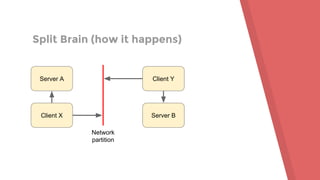
Split Brain (how it happens)
Server A
Client X
Client Y
Server B
Network
partition
Split Brain (what it looks like)
[root@vagrant-testVM glusterfs]# ls /mnt/glusterfs/0
ls: cannot access /mnt/glusterfs/0/best-sf: Input/output error
best-sf
[root@vagrant-testVM glusterfs]# cat /mnt/glusterfs/0/best-sf
cat: /mnt/glusterfs/0/best-sf: Input/output error
[root@vagrant-testVM glusterfs]# cat /d/backends/fubar0/best-sf
star trek
[root@vagrant-testVM glusterfs]# cat /d/backends/fubar1/best-sf
star wars
What the...?
Split Brain (dealing with it)
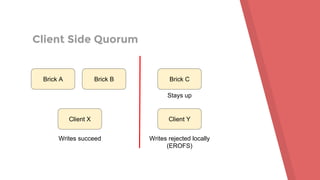
▸ Primary mechanism: quorum
▹ server side, client side, or both
▹ arbiters
▸ Secondary: rule-based resolution
▹ e.g. largest, latest timestamp
▹ Thanks, Facebook!
▸ Last choice: manual repair
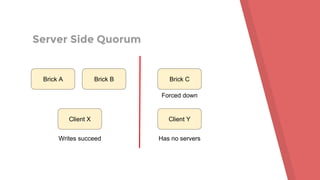
Server Side Quorum
Brick A Brick B Brick C
Client X Client Y
Writes succeed Has no servers
Forced down
Client Side Quorum
Brick A Brick B Brick C
Client X Client Y
Writes succeed Writes rejected locally
(EROFS)
Stays up
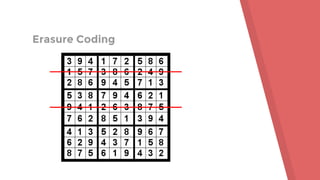
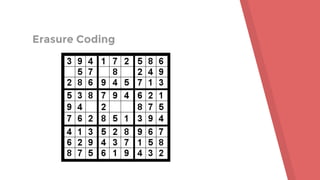
Erasure Coding
▸ Encode N input blocks into N+K output
blocks, so that original can be recovered
from any N.
▸ RAID is erasure coding with K=1 (RAID 5)
or K=2 (RAID 6)
▸ Our implementation mostly has the
same flow as replication
Erasure Coding
Erasure Coding
BREAK
Quota
▸ Gluster supports directory-level quota
▸ For nested directories, lowest applicable
limit applies
▸ Soft and hard limits
▹ Exceeding soft limit gets logged
▹ Exceeding hard limit gets EDQUOT
Quota
▸ Problem: global vs. local limits
▹ quota is global (per volume)
▹ files are pseudo-randomly distributed
across bricks
▸ How do we enforce this?
▸ Quota daemon exists to handle this
coordination
Hands On: Quota
[root@vagrant-testVM glusterfs]# gluster volume quota xyzzy enable
volume quota : success
[root@vagrant-testVM glusterfs]# gluster volume quota xyzzy soft-timeout 0
volume quota : success
[root@vagrant-testVM glusterfs]# gluster volume quota xyzzy hard-timeout 0
volume quota : success
[root@vagrant-testVM glusterfs]# gluster volume quota xyzzy 
limit-usage /john 100MB
volume quota : success
Hands On: Quota
[root@vagrant-testVM glusterfs]# gluster volume quota xyzzy list
Path Hard-limit Soft-limit
-----------------------------------------------------------------
/john 100.0MB 80%(80.0MB)
Used Available Soft-limit exceeded? Hard-limit exceeded?
--------------------------------------------------------------
0Bytes 100.0MB No No
Hands On: Quota
[root@vagrant-testVM glusterfs]# dd if=/dev/zero 
of=/mnt/glusterfs/0/john/bigfile bs=1048576 count=85 conv=sync
85+0 records in
85+0 records out
89128960 bytes (89 MB) copied, 1.83037 s, 48.7 MB/s
[root@vagrant-testVM glusterfs]# grep -i john /var/log/glusterfs/bricks/*
/var/log/glusterfs/bricks/d-backends-xyzzy0.log:[2016-11-29 14:31:44.581934]
A [MSGID: 120004] [quota.c:4973:quota_log_usage] 0-xyzzy-quota: Usage
crossed soft limit: 80.0MB used by /john
Hands On: Quota
[root@vagrant-testVM glusterfs]# dd if=/dev/zero 
of=/mnt/glusterfs/0/john/bigfile2 bs=1048576 count=85 conv=sync
dd: error writing '''/mnt/glusterfs/0/john/bigfile2''': Disk quota exceeded
[root@vagrant-testVM glusterfs]# gluster volume quota xyzzy list | cut -c
66-
Used Available Soft-limit exceeded? Hard-limit exceeded?
--------------------------------------------------------------
101.9MB 0Bytes Yes Yes
Snapshots
▸ Gluster supports read-only snapshots
and writable clones of snapshots
▸ Also, snapshot restores
▸ Support is based on / tied to LVM thin
provisioning
▹ originally supposed to be more
platform-agnostic
▹ maybe some day it really will be
Hands On: Snapshots
[root@vagrant-testVM glusterfs]# fallocate -l $((100*1024*1024)) 
/tmp/snap-brick0
[root@vagrant-testVM glusterfs]# losetup --show -f /tmp/snap-brick0 
/dev/loop3
[root@vagrant-testVM glusterfs]# vgcreate snap-vg0 /dev/loop3
Volume group "snap-vg0" successfully created
Hands On: Snapshots
[root@vagrant-testVM glusterfs]# lvcreate -L 50MB -T /dev/snap-vg0/thinpool
Rounding up size to full physical extent 52.00 MiB
Logical volume "thinpool" created.
[root@vagrant-testVM glusterfs]# lvcreate -V 200MB -T /dev/snap-vg0/thinpool
-n snap-lv0
Logical volume "snap-lv0" created.
[root@vagrant-testVM glusterfs]# mkfs.xfs /dev/snap-vg0/snap-lv0
...
[root@vagrant-testVM glusterfs]# mount /dev/snap-vg0/snap-lv0
/d/backends/xyzzy0
...
Hands On: Snapshots
[root@vagrant-testVM glusterfs]# gluster volume create xyzzy 
testvm:/d/backends/xyzzy{0,1} force
[root@vagrant-testVM glusterfs]# echo hello > /mnt/glusterfs/0/file1
[root@vagrant-testVM glusterfs]# echo hello > /mnt/glusterfs/0/file2
[root@vagrant-testVM glusterfs]# gluster snapshot create snap1 xyzzy
snapshot create: success: Snap snap1_GMT-2016.11.29-14.57.11 created
successfully
[root@vagrant-testVM glusterfs]# echo hello > /mnt/glusterfs/0/file3
Hands On: Snapshots
[root@vagrant-testVM glusterfs]# gluster snapshot activate 
snap1_GMT-2016.11.29-14.57.11
Snapshot activate: snap1_GMT-2016.11.29-14.57.11: Snap activated
successfully
[root@vagrant-testVM glusterfs]# mount -t glusterfs 
testvm:/snaps/snap1_GMT-2016.11.29-14.57.11/xyzzy /mnt/glusterfs/1
[root@vagrant-testVM glusterfs]# ls /mnt/glusterfs/1
file1 file2
[root@vagrant-testVM glusterfs]# echo hello > /mnt/glusterfs/1/file3
-bash: /mnt/glusterfs/1/file3: Read-only file system
Hands On: Snapshots
[root@vagrant-testVM glusterfs]# gluster snapshot clone clone1 
snap1_GMT-2016.11.29-14.57.11
snapshot clone: success: Clone clone1 created successfully
[root@vagrant-testVM glusterfs]# gluster volume start clone1
volume start: clone1: success
[root@vagrant-testVM glusterfs]# mount -t glusterfs testvm:/clone1 
/mnt/glusterfs/2
[root@vagrant-testVM glusterfs]# echo goodbye > /mnt/glusterfs/2/file3
Hands On: Snapshots
# Unmount and stop clone.
# Stop original volume - but leave snapshot activated!
[root@vagrant-testVM glusterfs]# gluster snapshot restore snap1_GMT-2016.11.29-14.57.11
Restore operation will replace the original volume with the snapshotted volume. Do you still want to
continue? (y/n) y
Snapshot restore: snap1_GMT-2016.11.29-14.57.11: Snap restored successfully
[root@vagrant-testVM glusterfs]# gluster volume start xyzzy
volume start: xyzzy: success
[root@vagrant-testVM glusterfs]# ls /mnt/glusterfs/0
file1 file2
BREAK
Other Features
▸ Geo-replication
▸ Bitrot detection
▸ Transport security
▸ Encryption, compression/dedup etc. can
be done locally on bricks
Gluster 4.x
▸ GlusterD 2
▹ higher scale + interfaces + smarts
▸ Server-side replication
▸ DHT improvements for scale
▸ More multitenancy
▹ subvolume mounts, throttling/QoS
Thank You!
http://gluster.org
jdarcy@redhat.com

Hands On Gluster with Jeff Darcy

  • 1.
    Gluster Tutorial Jeff Darcy, RedHat LISA 2016 (Boston)
  • 2.
    Agenda ▸ Alternating info-dumpand hands-on ▹ This is part of the info-dump ;) ▸ Gluster basics ▸ Initial setup ▸ Extra features ▸ Maintenance and trouble-shooting
  • 3.
    Who Am I? ▸One of three project-wide architects ▸ First Red Hat employee to be seriously involved with Gluster (before acquisition) ▸ Previously worked on NFS (v2..v4), Lustre, PVFS2, others ▸ General distributed-storage blatherer ▹ http://pl.atyp.us / @Obdurodon
  • 4.
    TEMPLATE CREDITS Special thanksto all the people who made and released these awesome resources for free: ▸ Presentation template by SlidesCarnival ▸ Photographs by Death to the Stock Photo (license)
  • 5.
    Some Terminology ▸ Abrick is simply a directory on a server ▸ We use translators to combine bricks into more complex subvolumes ▹ For scale, replication, sharding, ... ▸ This forms a translator graph, contained in a volfile ▸ Internal daemons (e.g. self heal) use the same bricks arranged into slightly different volfiles
  • 6.
    Hands On: GettingStarted 1. Use the RHGS test drive ▹ http://bit.ly/glustertestdrive 2. Start a Fedora/CentOS VM ▹ Use yum/dnf to install gluster ▹ base, libs, server, fuse, client-xlators, cli 3. Docker Docker Docker ▹ https://github.com/gluster/gluster-containers
  • 7.
    Brick / TranslatorExample Server A /brick1 Server B /brick2 Server C /brick3 Server D /brick4
  • 8.
    Brick / TranslatorExample Server A /brick1 Server B /brick2 Replica Set 1 Server C /brick3 Server D /brick4 Replica Set 2 A subvolume Also a subvolume
  • 9.
    Brick / TranslatorExample Server A /brick1 Server B /brick2 Replica Set 1 Server C /brick3 Server D /brick4 Replica Set 2 Volume “fubar”
  • 10.
    Translator Patterns Server A /brick1 ServerB /brick2 Replica Set 1 Fan-out or “cluster” e.g. AFR, EC, DHT, ... AFR md-cache Pass through e.g. performance
  • 11.
  • 12.
    GlusterD ▸ Management daemon ▸Maintains membership, detects server failures ▸ Stages configuration changes ▸ Starts and monitors other daemons
  • 13.
    Simple Configuration Example serverA#gluster peer probe serverB serverA# gluster volume create fubar replica 2 serverA:/brick1 serverB:/brick2 serverA# gluster volume start fubar clientX# mount -t glusterfs serverA:fubar /mnt/gluster_fubar
  • 14.
    Hands On: ConnectServers [root@vagrant-testVM glusterfs]# gluster peer probe 192.168.121.66 peer probe: success. [root@vagrant-testVM glusterfs]# gluster peer status Number of Peers: 1 Hostname: 192.168.121.66 Uuid: 95aee0b5-c816-445b-8dbc-f88da7e95660 State: Accepted peer request (Connected)
  • 15.
    Hands On: ServerVolume Setup [root@vagrant-testVM glusterfs]# gluster volume create fubar replica 2 testvm:/d/backends/fubar{0,1} force volume create: fubar: success: please start the volume to access data [root@vagrant-testVM glusterfs]# gluster volume info fubar ... (see for yourself) [root@vagrant-testVM glusterfs]# gluster volume status fubar Volume fubar is not started
  • 16.
    Hands On: ServerVolume Setup [root@vagrant-testVM glusterfs]# gluster volume start fubar volume start: fubar: success [root@vagrant-testVM glusterfs]# gluster volume status fubar Status of volume: fubar Gluster process TCP Port RDMA Port Online Pid ------------------------------------------------------------------------------ Brick testvm:/d/backends/fubar0 49152 0 Y 13104 Brick testvm:/d/backends/fubar1 49153 0 Y 13133 Self-heal Daemon on localhost N/A N/A Y 13163 Task Status of Volume fubar ------------------------------------------------------------------------------ There are no active volume tasks
  • 17.
    Hands On: ClientVolume Setup [root@vagrant-testVM glusterfs]# mount -t glusterfs testvm:fubar /mnt/glusterfs/0 [root@vagrant-testVM glusterfs]# df /mnt/glusterfs/0 Filesystem 1K-blocks Used Available Use% Mounted on testvm:fubar 5232640 33280 5199360 1% /mnt/glusterfs/0 [root@vagrant-testVM glusterfs]# ls -a /mnt/glusterfs/0 . .. [root@vagrant-testVM glusterfs]# ls -a /d/backends/fubar0 . .. .glusterfs
  • 18.
    Hands On: It’sa Filesystem! ▸ Create some files ▸ Create directories, symlinks, ... ▸ Rename, delete, ... ▸ Test performance ▹ OK, not yet
  • 19.
    Distribution and Rebalancing ServerX’s range Server Y’s range 0 0x7fffffff 0xffffffff ● Each brick “claims” a range of hash values ○ Collection of claims is called a layout ● Files (dots) are hashed, placed on brick claiming that range ● When bricks are added, claims are adjusted to minimize data motion
  • 20.
    Distribution and Rebalancing ServerX’s range Server Y’s range 0 0x80000000 0xffffffff Server X’s range Server Y’s range 0 0x55555555 0xaaaaaaaa 0xffffffff Server Z’s range Move X->Z Move Y->Z
  • 21.
    Sharding ▸ Divides filesinto chunks ▸ Each chunk is placed separately according to hash ▸ High probability (not certainty) of chunks being on different subvolumes ▸ Spreads capacity and I/O across subvolumes
  • 22.
    Hands On: Addinga Brick [root@vagrant-testVM glusterfs]# gluster volume create xyzzy testvm:/d/backends/xyzzy{0,1} [root@vagrant-testVM glusterfs]# getfattr -d -e hex -m trusted.glusterfs.dht /d/backends/xyzzy{0,1} # file: d/backends/xyzzy0 trusted.glusterfs.dht=0x0000000100000000000000007ffffffe # file: d/backends/xyzzy1 trusted.glusterfs.dht=0x00000001000000007fffffffffffffff
  • 23.
    Hands On: Addinga Brick [root@vagrant-testVM glusterfs]# gluster volume add-brick xyzzy testvm:/d/backends/xyzzy2 volume add-brick: success [root@vagrant-testVM glusterfs]# gluster volume rebalance xyzzy fix-layout start volume rebalance: xyzzy: success: Rebalance on xyzzy has been started successfully. Use rebalance status command to check status of the rebalance process. ID: 88782248-7c12-4ba8-97f6-f5ce6815963
  • 24.
    Hands On: Addinga Brick [root@vagrant-testVM glusterfs]# getfattr -d -e hex -m trusted.glusterfs.dht /d/backends/xyzzy{0,1,2} # file: d/backends/xyzzy0 trusted.glusterfs.dht=0x00000001000000000000000055555554 # file: d/backends/xyzzy1 trusted.glusterfs.dht=0x0000000100000000aaaaaaaaffffffff # file: d/backends/xyzzy2 trusted.glusterfs.dht=0x000000010000000055555555aaaaaaa9
  • 25.
    Split Brain (problemdefinition) ▸ “Split brain” is when we don’t have enough information to determine correct recovery action ▸ Can be caused by node failure or network partition ▸ Every distributed data store has to prevent and/or deal with it
  • 26.
    How Replication Works ▸Client sends operation (e.g. write) to all replicas directly ▸ Coordination: pre-op, post-op, locking ▹ enables recovery in case of failure ▸ Self-heal (repair) usually done by internal daemon
  • 27.
    Split Brain (howit happens) Server A Client X Client Y Server B Network partition
  • 28.
    Split Brain (whatit looks like) [root@vagrant-testVM glusterfs]# ls /mnt/glusterfs/0 ls: cannot access /mnt/glusterfs/0/best-sf: Input/output error best-sf [root@vagrant-testVM glusterfs]# cat /mnt/glusterfs/0/best-sf cat: /mnt/glusterfs/0/best-sf: Input/output error [root@vagrant-testVM glusterfs]# cat /d/backends/fubar0/best-sf star trek [root@vagrant-testVM glusterfs]# cat /d/backends/fubar1/best-sf star wars What the...?
  • 29.
    Split Brain (dealingwith it) ▸ Primary mechanism: quorum ▹ server side, client side, or both ▹ arbiters ▸ Secondary: rule-based resolution ▹ e.g. largest, latest timestamp ▹ Thanks, Facebook! ▸ Last choice: manual repair
  • 30.
    Server Side Quorum BrickA Brick B Brick C Client X Client Y Writes succeed Has no servers Forced down
  • 31.
    Client Side Quorum BrickA Brick B Brick C Client X Client Y Writes succeed Writes rejected locally (EROFS) Stays up
  • 32.
    Erasure Coding ▸ EncodeN input blocks into N+K output blocks, so that original can be recovered from any N. ▸ RAID is erasure coding with K=1 (RAID 5) or K=2 (RAID 6) ▸ Our implementation mostly has the same flow as replication
  • 33.
  • 34.
  • 35.
  • 36.
    Quota ▸ Gluster supportsdirectory-level quota ▸ For nested directories, lowest applicable limit applies ▸ Soft and hard limits ▹ Exceeding soft limit gets logged ▹ Exceeding hard limit gets EDQUOT
  • 37.
    Quota ▸ Problem: globalvs. local limits ▹ quota is global (per volume) ▹ files are pseudo-randomly distributed across bricks ▸ How do we enforce this? ▸ Quota daemon exists to handle this coordination
  • 38.
    Hands On: Quota [root@vagrant-testVMglusterfs]# gluster volume quota xyzzy enable volume quota : success [root@vagrant-testVM glusterfs]# gluster volume quota xyzzy soft-timeout 0 volume quota : success [root@vagrant-testVM glusterfs]# gluster volume quota xyzzy hard-timeout 0 volume quota : success [root@vagrant-testVM glusterfs]# gluster volume quota xyzzy limit-usage /john 100MB volume quota : success
  • 39.
    Hands On: Quota [root@vagrant-testVMglusterfs]# gluster volume quota xyzzy list Path Hard-limit Soft-limit ----------------------------------------------------------------- /john 100.0MB 80%(80.0MB) Used Available Soft-limit exceeded? Hard-limit exceeded? -------------------------------------------------------------- 0Bytes 100.0MB No No
  • 40.
    Hands On: Quota [root@vagrant-testVMglusterfs]# dd if=/dev/zero of=/mnt/glusterfs/0/john/bigfile bs=1048576 count=85 conv=sync 85+0 records in 85+0 records out 89128960 bytes (89 MB) copied, 1.83037 s, 48.7 MB/s [root@vagrant-testVM glusterfs]# grep -i john /var/log/glusterfs/bricks/* /var/log/glusterfs/bricks/d-backends-xyzzy0.log:[2016-11-29 14:31:44.581934] A [MSGID: 120004] [quota.c:4973:quota_log_usage] 0-xyzzy-quota: Usage crossed soft limit: 80.0MB used by /john
  • 41.
    Hands On: Quota [root@vagrant-testVMglusterfs]# dd if=/dev/zero of=/mnt/glusterfs/0/john/bigfile2 bs=1048576 count=85 conv=sync dd: error writing '''/mnt/glusterfs/0/john/bigfile2''': Disk quota exceeded [root@vagrant-testVM glusterfs]# gluster volume quota xyzzy list | cut -c 66- Used Available Soft-limit exceeded? Hard-limit exceeded? -------------------------------------------------------------- 101.9MB 0Bytes Yes Yes
  • 42.
    Snapshots ▸ Gluster supportsread-only snapshots and writable clones of snapshots ▸ Also, snapshot restores ▸ Support is based on / tied to LVM thin provisioning ▹ originally supposed to be more platform-agnostic ▹ maybe some day it really will be
  • 43.
    Hands On: Snapshots [root@vagrant-testVMglusterfs]# fallocate -l $((100*1024*1024)) /tmp/snap-brick0 [root@vagrant-testVM glusterfs]# losetup --show -f /tmp/snap-brick0 /dev/loop3 [root@vagrant-testVM glusterfs]# vgcreate snap-vg0 /dev/loop3 Volume group "snap-vg0" successfully created
  • 44.
    Hands On: Snapshots [root@vagrant-testVMglusterfs]# lvcreate -L 50MB -T /dev/snap-vg0/thinpool Rounding up size to full physical extent 52.00 MiB Logical volume "thinpool" created. [root@vagrant-testVM glusterfs]# lvcreate -V 200MB -T /dev/snap-vg0/thinpool -n snap-lv0 Logical volume "snap-lv0" created. [root@vagrant-testVM glusterfs]# mkfs.xfs /dev/snap-vg0/snap-lv0 ... [root@vagrant-testVM glusterfs]# mount /dev/snap-vg0/snap-lv0 /d/backends/xyzzy0 ...
  • 45.
    Hands On: Snapshots [root@vagrant-testVMglusterfs]# gluster volume create xyzzy testvm:/d/backends/xyzzy{0,1} force [root@vagrant-testVM glusterfs]# echo hello > /mnt/glusterfs/0/file1 [root@vagrant-testVM glusterfs]# echo hello > /mnt/glusterfs/0/file2 [root@vagrant-testVM glusterfs]# gluster snapshot create snap1 xyzzy snapshot create: success: Snap snap1_GMT-2016.11.29-14.57.11 created successfully [root@vagrant-testVM glusterfs]# echo hello > /mnt/glusterfs/0/file3
  • 46.
    Hands On: Snapshots [root@vagrant-testVMglusterfs]# gluster snapshot activate snap1_GMT-2016.11.29-14.57.11 Snapshot activate: snap1_GMT-2016.11.29-14.57.11: Snap activated successfully [root@vagrant-testVM glusterfs]# mount -t glusterfs testvm:/snaps/snap1_GMT-2016.11.29-14.57.11/xyzzy /mnt/glusterfs/1 [root@vagrant-testVM glusterfs]# ls /mnt/glusterfs/1 file1 file2 [root@vagrant-testVM glusterfs]# echo hello > /mnt/glusterfs/1/file3 -bash: /mnt/glusterfs/1/file3: Read-only file system
  • 47.
    Hands On: Snapshots [root@vagrant-testVMglusterfs]# gluster snapshot clone clone1 snap1_GMT-2016.11.29-14.57.11 snapshot clone: success: Clone clone1 created successfully [root@vagrant-testVM glusterfs]# gluster volume start clone1 volume start: clone1: success [root@vagrant-testVM glusterfs]# mount -t glusterfs testvm:/clone1 /mnt/glusterfs/2 [root@vagrant-testVM glusterfs]# echo goodbye > /mnt/glusterfs/2/file3
  • 48.
    Hands On: Snapshots #Unmount and stop clone. # Stop original volume - but leave snapshot activated! [root@vagrant-testVM glusterfs]# gluster snapshot restore snap1_GMT-2016.11.29-14.57.11 Restore operation will replace the original volume with the snapshotted volume. Do you still want to continue? (y/n) y Snapshot restore: snap1_GMT-2016.11.29-14.57.11: Snap restored successfully [root@vagrant-testVM glusterfs]# gluster volume start xyzzy volume start: xyzzy: success [root@vagrant-testVM glusterfs]# ls /mnt/glusterfs/0 file1 file2
  • 49.
  • 50.
    Other Features ▸ Geo-replication ▸Bitrot detection ▸ Transport security ▸ Encryption, compression/dedup etc. can be done locally on bricks
  • 51.
    Gluster 4.x ▸ GlusterD2 ▹ higher scale + interfaces + smarts ▸ Server-side replication ▸ DHT improvements for scale ▸ More multitenancy ▹ subvolume mounts, throttling/QoS
  • 52.