Debugging GlusterFS with
Wireshark
25 February 2013
Niels de Vos
Sr. Software Maintenance Engineer
Support Engineering Group
Red Hat Global Support Services
Agenda
● Brief description of Wireshark
● How to capture network traffic
● Explanation of the basic GlusterFS protocols
● Identifying packets
● Filtering for certain network packets
● Commandline tools and scripting
What is Wireshark?
● One of the most well known network protocol
analyzers
● Can capture network traffic
● Can display hundreds of protocols
● Version 1.8 and newer support GlusterFS
● Comes with several useful commandline tools
●
tshark, editcap, capinfos, ...
● Homepage: www.wireshark.org
Capturing network traffic
● Capture with Wireshark
● Convenient, nice graphical interface
● Analyze on the system used for capturing
● Got (a recent) Wireshark on your server?
● Capture with tcpdump
● Headless, no graphical environment needed
● Separate production and analysis systems
● Save in a file for off-line analysis
● Can capture with rotating filenames
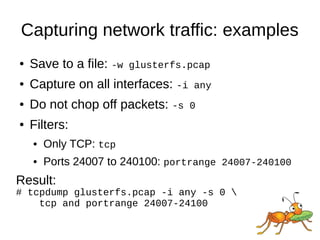
Capturing network traffic: examples
● Save to a file: -w glusterfs.pcap
● Capture on all interfaces: -i any
● Do not chop off packets: -s 0
● Filters:
● Only TCP: tcp
● Ports 24007 to 240100: portrange 24007-240100
Result:
# tcpdump glusterfs.pcap -i any -s 0 
tcp and portrange 24007-24100
GlusterFS protocols
● Everything is TCP
● Based on SUN Remote Procedure Calls
● RFC 5531
● Data is encoded in XDR (RFC 4506)
● Similarities with portmapper and NFS
● A number of sub-protocols are used
● GlusterFS is the most important one (I/O)
Identifying packets
● Each packet has a source and a destination
● RPC Calls are made by the client
● RPC Replies are sent by the server
● The RPC header contains the number for the
sub-protocol (GlusterFS, Gluster CLI, ...)
● Server side ports are mostly unique
● Only exception is glusterd on port 24007
● Each brick (glusterfsd) listens on its own port
Identifying packets: example
Minimal packet details needed:
Internet Protocol Version 4
Source: 172.31.122.154
Destination: 172.31.122.104
Transmission Control Protocol
Source port: 24009
Destination port: 1022
Remote Procedure Call
Message Type: Reply (1)
[Program: GlusterFS (1298437)]
[Program Version: 330]
[Procedure: LOOKUP (27)]
Identifying packets: step 1
Step 1:
Remote Procedure Call
Message Type: Reply (1)
[Program: GlusterFS (1298437)]
[Program Version: 330]
[Procedure: LOOKUP (27)]
● A reply on a LOOKUP is sent from a brick to a
client.
● The GlusterFS protocol is handled by a brick
process (glusterfsd) on the server.
Identifying packets: step 2
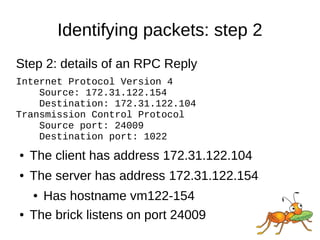
Step 2: details of an RPC Reply
Internet Protocol Version 4
Source: 172.31.122.154
Destination: 172.31.122.104
Transmission Control Protocol
Source port: 24009
Destination port: 1022
● The client has address 172.31.122.104
● The server has address 172.31.122.154
● Has hostname vm122-154
● The brick listens on port 24009
Identifying packets: step 3a
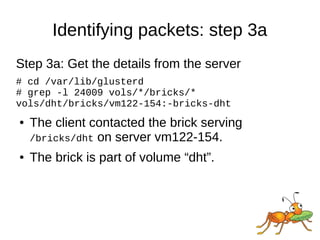
Step 3a: Get the details from the server
# cd /var/lib/glusterd
# grep -l 24009 vols/*/bricks/*
vols/dht/bricks/vm122-154:-bricks-dht
● The client contacted the brick serving
/bricks/dht on server vm122-154.
● The brick is part of volume “dht”.
Identifying packets: step 3b
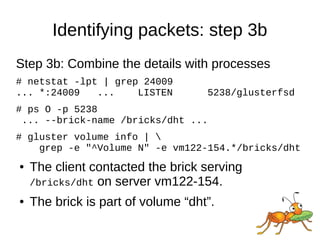
Step 3b: Combine the details with processes
# netstat -lpt | grep 24009
... *:24009 ... LISTEN 5238/glusterfsd
# ps O -p 5238
... --brick-name /bricks/dht ...
# gluster volume info | 
grep -e "^Volume N" -e vm122-154.*/bricks/dht
● The client contacted the brick serving
/bricks/dht on server vm122-154.
● The brick is part of volume “dht”.
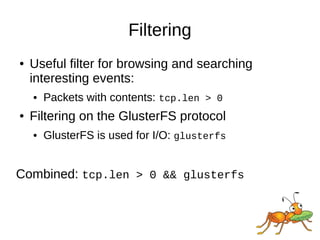
Filtering
● Useful filter for browsing and searching
interesting events:
● Packets with contents: tcp.len > 0
● Filtering on the GlusterFS protocol
● GlusterFS is used for I/O: glusterfs
Combined: tcp.len > 0 && glusterfs
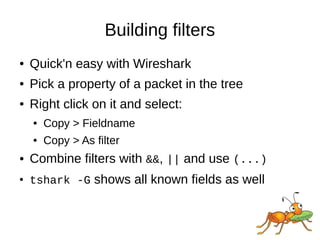
Building filters
● Quick'n easy with Wireshark
● Pick a property of a packet in the tree
● Right click on it and select:
● Copy > Fieldname
● Copy > As filter
● Combine filters with &&, || and use (...)
●
tshark -G shows all known fields as well
Filtering on RPC Credentials
The RPC Credentials sent with a Call contain:
Remote Procedure Call, Type:Call
Program: GlusterFS (1298437)
Procedure: CREATE (23)
Credentials
Flavor: AUTH_GLUSTERFS (390039)
PID: 2442
UID: 500
GID: 500
Auxiliary GIDs (1) [500]
GID: 500
An RPC Reply does not contain the Credentials,
but there is a reference to the Call.
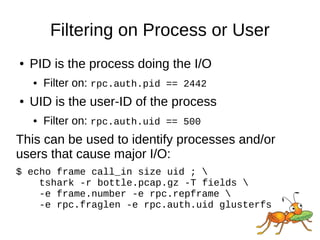
Filtering on Process or User
● PID is the process doing the I/O
● Filter on: rpc.auth.pid == 2442
● UID is the user-ID of the process
● Filter on: rpc.auth.uid == 500
This can be used to identify processes and/or
users that cause major I/O:
$ echo frame call_in size uid ; 
tshark -r bottle.pcap.gz -T fields 
-e frame.number -e rpc.repframe 
-e rpc.fraglen -e rpc.auth.uid glusterfs
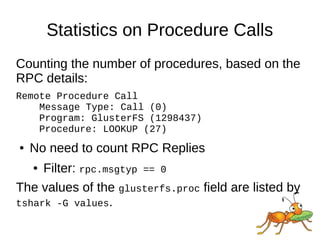
Statistics on Procedure Calls
Counting the number of procedures, based on the
RPC details:
Remote Procedure Call
Message Type: Call (0)
Program: GlusterFS (1298437)
Procedure: LOOKUP (27)
● No need to count RPC Replies
● Filter: rpc.msgtyp == 0
The values of the glusterfs.proc field are listed by
tshark -G values.
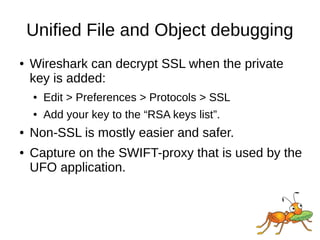
Unified File and Object debugging
● Wireshark can decrypt SSL when the private
key is added:
● Edit > Preferences > Protocols > SSL
● Add your key to the “RSA keys list”.
● Non-SSL is mostly easier and safer.
● Capture on the SWIFT-proxy that is used by the
UFO application.
Downloads
● This presentation and example scripts:
● http://people.redhat.com/ndevos/talks/
inside debugging-glusterfs-with-wireshark.d
● Wireshark-1.8+ for RHEL-6 based distributions:
● http://devos.fedorapeople.org/wireshark-gluster/
Thanks!
You can reach me
● As ndevos in #gluster
on Freenode
● ndevos@redhat.com
● Or on LinkedIn

Debugging with-wireshark-niels-de-vos

  • 1.
    Debugging GlusterFS with Wireshark 25February 2013 Niels de Vos Sr. Software Maintenance Engineer Support Engineering Group Red Hat Global Support Services
  • 2.
    Agenda ● Brief descriptionof Wireshark ● How to capture network traffic ● Explanation of the basic GlusterFS protocols ● Identifying packets ● Filtering for certain network packets ● Commandline tools and scripting
  • 3.
    What is Wireshark? ●One of the most well known network protocol analyzers ● Can capture network traffic ● Can display hundreds of protocols ● Version 1.8 and newer support GlusterFS ● Comes with several useful commandline tools ● tshark, editcap, capinfos, ... ● Homepage: www.wireshark.org
  • 4.
    Capturing network traffic ●Capture with Wireshark ● Convenient, nice graphical interface ● Analyze on the system used for capturing ● Got (a recent) Wireshark on your server? ● Capture with tcpdump ● Headless, no graphical environment needed ● Separate production and analysis systems ● Save in a file for off-line analysis ● Can capture with rotating filenames
  • 5.
    Capturing network traffic:examples ● Save to a file: -w glusterfs.pcap ● Capture on all interfaces: -i any ● Do not chop off packets: -s 0 ● Filters: ● Only TCP: tcp ● Ports 24007 to 240100: portrange 24007-240100 Result: # tcpdump glusterfs.pcap -i any -s 0 tcp and portrange 24007-24100
  • 6.
    GlusterFS protocols ● Everythingis TCP ● Based on SUN Remote Procedure Calls ● RFC 5531 ● Data is encoded in XDR (RFC 4506) ● Similarities with portmapper and NFS ● A number of sub-protocols are used ● GlusterFS is the most important one (I/O)
  • 7.
    Identifying packets ● Eachpacket has a source and a destination ● RPC Calls are made by the client ● RPC Replies are sent by the server ● The RPC header contains the number for the sub-protocol (GlusterFS, Gluster CLI, ...) ● Server side ports are mostly unique ● Only exception is glusterd on port 24007 ● Each brick (glusterfsd) listens on its own port
  • 8.
    Identifying packets: example Minimalpacket details needed: Internet Protocol Version 4 Source: 172.31.122.154 Destination: 172.31.122.104 Transmission Control Protocol Source port: 24009 Destination port: 1022 Remote Procedure Call Message Type: Reply (1) [Program: GlusterFS (1298437)] [Program Version: 330] [Procedure: LOOKUP (27)]
  • 9.
    Identifying packets: step1 Step 1: Remote Procedure Call Message Type: Reply (1) [Program: GlusterFS (1298437)] [Program Version: 330] [Procedure: LOOKUP (27)] ● A reply on a LOOKUP is sent from a brick to a client. ● The GlusterFS protocol is handled by a brick process (glusterfsd) on the server.
  • 10.
    Identifying packets: step2 Step 2: details of an RPC Reply Internet Protocol Version 4 Source: 172.31.122.154 Destination: 172.31.122.104 Transmission Control Protocol Source port: 24009 Destination port: 1022 ● The client has address 172.31.122.104 ● The server has address 172.31.122.154 ● Has hostname vm122-154 ● The brick listens on port 24009
  • 11.
    Identifying packets: step3a Step 3a: Get the details from the server # cd /var/lib/glusterd # grep -l 24009 vols/*/bricks/* vols/dht/bricks/vm122-154:-bricks-dht ● The client contacted the brick serving /bricks/dht on server vm122-154. ● The brick is part of volume “dht”.
  • 12.
    Identifying packets: step3b Step 3b: Combine the details with processes # netstat -lpt | grep 24009 ... *:24009 ... LISTEN 5238/glusterfsd # ps O -p 5238 ... --brick-name /bricks/dht ... # gluster volume info | grep -e "^Volume N" -e vm122-154.*/bricks/dht ● The client contacted the brick serving /bricks/dht on server vm122-154. ● The brick is part of volume “dht”.
  • 13.
    Filtering ● Useful filterfor browsing and searching interesting events: ● Packets with contents: tcp.len > 0 ● Filtering on the GlusterFS protocol ● GlusterFS is used for I/O: glusterfs Combined: tcp.len > 0 && glusterfs
  • 14.
    Building filters ● Quick'neasy with Wireshark ● Pick a property of a packet in the tree ● Right click on it and select: ● Copy > Fieldname ● Copy > As filter ● Combine filters with &&, || and use (...) ● tshark -G shows all known fields as well
  • 15.
    Filtering on RPCCredentials The RPC Credentials sent with a Call contain: Remote Procedure Call, Type:Call Program: GlusterFS (1298437) Procedure: CREATE (23) Credentials Flavor: AUTH_GLUSTERFS (390039) PID: 2442 UID: 500 GID: 500 Auxiliary GIDs (1) [500] GID: 500 An RPC Reply does not contain the Credentials, but there is a reference to the Call.
  • 16.
    Filtering on Processor User ● PID is the process doing the I/O ● Filter on: rpc.auth.pid == 2442 ● UID is the user-ID of the process ● Filter on: rpc.auth.uid == 500 This can be used to identify processes and/or users that cause major I/O: $ echo frame call_in size uid ; tshark -r bottle.pcap.gz -T fields -e frame.number -e rpc.repframe -e rpc.fraglen -e rpc.auth.uid glusterfs
  • 17.
    Statistics on ProcedureCalls Counting the number of procedures, based on the RPC details: Remote Procedure Call Message Type: Call (0) Program: GlusterFS (1298437) Procedure: LOOKUP (27) ● No need to count RPC Replies ● Filter: rpc.msgtyp == 0 The values of the glusterfs.proc field are listed by tshark -G values.
  • 18.
    Unified File andObject debugging ● Wireshark can decrypt SSL when the private key is added: ● Edit > Preferences > Protocols > SSL ● Add your key to the “RSA keys list”. ● Non-SSL is mostly easier and safer. ● Capture on the SWIFT-proxy that is used by the UFO application.
  • 19.
    Downloads ● This presentationand example scripts: ● http://people.redhat.com/ndevos/talks/ inside debugging-glusterfs-with-wireshark.d ● Wireshark-1.8+ for RHEL-6 based distributions: ● http://devos.fedorapeople.org/wireshark-gluster/
  • 20.
    Thanks! You can reachme ● As ndevos in #gluster on Freenode ● ndevos@redhat.com ● Or on LinkedIn