Gluster Containerized
Storage for Cloud
Applications
Humble Chirammal
Luis Pabón
Gluster Summit, October 7, 2016
Warning: Lots of information coming ahead!
1. Provide my customers a platform for
their containerized applications and
storage needs
2. Manage compute, network, and
storage as a single converged cluster
I want to easily deploy my containerized
application with persistent storage
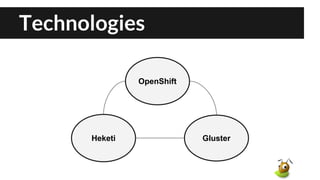
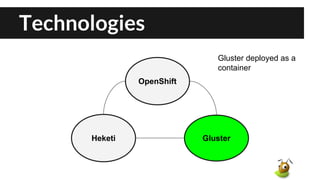
Technologies
OpenShift
GlusterHeketi
Technologies
OpenShift provides
platform as a service
infrastructure based on
Kubernetes container
management
OpenShift
GlusterHeketi
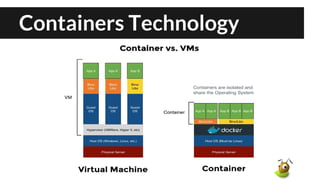
Containers Technology
Docker
Kubernetes
Master Node A Node B
Technologies
OpenShift
GlusterHeketi
Gluster deployed as a
container
Containerized Gluster
Pull Gluster container image :
# docker pull gluster/gluster-centos:gluster3u7_centos7
Example of how to start Gluster Container:
# docker run --name gluster -d -v /etc/glusterfs:/etc/glusterfs:z -v
/var/lib/glusterd:/var/lib/glusterd:z -v /var/log/glusterfs:/var/log/glusterfs:z -v
/sys/fs/cgroup:/sys/fs/cgroup:ro --net=host --privileged=true -v /dev:/dev
gluster/gluster-centos:gluster3u7_centos7
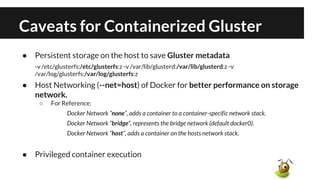
Caveats for Containerized Gluster
● Persistent storage on the host to save Gluster metadata
-v /etc/glusterfs:/etc/glusterfs:z -v /var/lib/glusterd:/var/lib/glusterd:z -v
/var/log/glusterfs:/var/log/glusterfs:z
● Host Networking (--net=host) of Docker for better performance on storage
network.
○ For Reference:
Docker Network “none”, adds a container to a container-specific network stack.
Docker Network ”bridge”, represents the bridge network (default docker0).
Docker Network ”host”, adds a container on the hosts network stack.
● Privileged container execution
Gluster Pods in Kubernetes
Gluster
Pod
Node A
Gluster
Pod
Node B
Gluster
Pod
Node C
Trusted
Pool
Disks on
Host
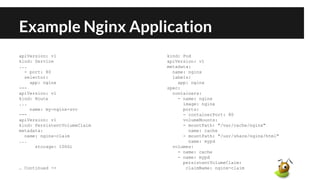
Example Nginx Application
apiVersion: v1
kind: Service
...
- port: 80
selector:
app: nginx
---
apiVersion: v1
kind: Route
...
name: my-nginx-svc
---
apiVersion: v1
kind: PersistentVolumeClaim
metadata:
name: nginx-claim
...
storage: 100Gi
… Continued ->
kind: Pod
apiVersion: v1
metadata:
name: nginx
labels:
app: nginx
spec:
containers:
- name: nginx
image: nginx
ports:
- containerPort: 80
volumeMounts:
- mountPath: "/var/cache/nginx"
name: cache
- mountPath: "/usr/share/nginx/html"
name: mypd
volumes:
- name: cache
- name: mypd
persistentVolumeClaim:
claimName: nginx-claim
Example Nginx Application
apiVersion: v1
kind: Service
...
- port: 80
selector:
app: nginx
---
apiVersion: v1
kind: Route
...
name: my-nginx-svc
---
apiVersion: v1
kind: PersistentVolumeClaim
metadata:
name: nginx-claim
...
storage: 100Gi
… Continued ->
kind: Pod
apiVersion: v1
metadata:
name: nginx
labels:
app: nginx
spec:
containers:
- name: nginx
image: nginx
ports:
- containerPort: 80
volumeMounts:
- mountPath: "/var/cache/nginx"
name: cache
- mountPath: "/usr/share/nginx/html"
name: mypd
volumes:
- name: cache
- name: mypd
persistentVolumeClaim:
claimName: nginx-claim
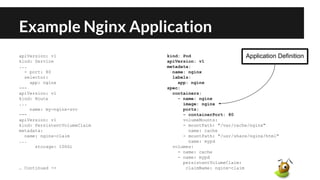
Application Definition
Example Nginx Application
apiVersion: v1
kind: Service
...
- port: 80
selector:
app: nginx
---
apiVersion: v1
kind: Route
...
name: my-nginx-svc
---
apiVersion: v1
kind: PersistentVolumeClaim
metadata:
name: nginx-claim
...
storage: 100Gi
… Continued ->
kind: Pod
apiVersion: v1
metadata:
name: nginx
labels:
app: nginx
spec:
containers:
- name: nginx
image: nginx
ports:
- containerPort: 80
volumeMounts:
- mountPath: "/var/cache/nginx"
name: cache
- mountPath: "/usr/share/nginx/html"
name: mypd
volumes:
- name: cache
- name: mypd
persistentVolumeClaim:
claimName: nginx-claim
Storage Request
Example Nginx Application
apiVersion: v1
kind: Service
...
- port: 80
selector:
app: nginx
---
apiVersion: v1
kind: Route
...
name: my-nginx-svc
---
apiVersion: v1
kind: PersistentVolumeClaim
metadata:
name: nginx-claim
...
storage: 100Gi
… Continued ->
kind: Pod
apiVersion: v1
metadata:
name: nginx
labels:
app: nginx
spec:
containers:
- name: nginx
image: nginx
ports:
- containerPort: 80
volumeMounts:
- mountPath: "/var/cache/nginx"
name: cache
- mountPath: "/usr/share/nginx/html"
name: mypd
volumes:
- name: cache
- name: mypd
persistentVolumeClaim:
claimName: nginx-claim
Mount point in
application container
Kubernetes Gluster Mount Plugin
Gluster
Pod
Application Pod
Mounted Volume
Node A Node B
Bind Mount Volume
Architecture
Technologies
OpenShift
GlusterHeketi
Heketi provides dynamic
Gluster volume life cycle
management
Heketi
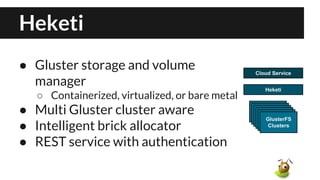
● Gluster storage and volume
manager
○ Containerized, virtualized, or bare metal
● Multi Gluster cluster aware
● Intelligent brick allocator
● REST service with authentication
Architecture
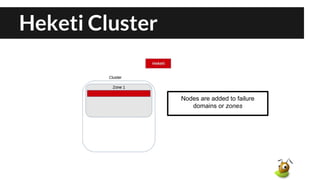
Heketi Cluster
Heketi Cluster
Nodes are added to failure
domains or zones
Heketi Cluster
Peer probes automatically
when adding nodes to a cluster
Heketi Cluster
Raw devices are registered and
initialized
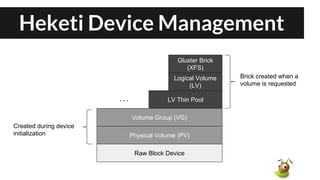
Heketi Device Management
Raw Block Device
Physical Volume (PV)
Volume Group (VG)
LV Thin Pool
Logical Volume
(LV)
Gluster Brick
(XFS)
. . .
Created during device
initialization
Brick created when a
volume is requested
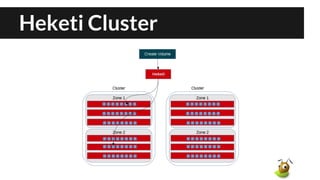
Heketi Cluster
Heketi Cluster
Brick Allocator
[
...
{Zone3, Node 192.168.13.100, Device /dev/sda},
{Zone2, Node 192.168.12.100, Device /dev/sda},
{Zone4, Node 192.168.14.100, Device /dev/sda},
{Zone1, Node 192.168.11.100, Device /dev/sda},
{Zone3, Node 192.168.13.100, Device /dev/sdb},
{Zone2, Node 192.168.12.100, Device /dev/sdb},
...
]
Heketi Cluster
Heketi Cluster
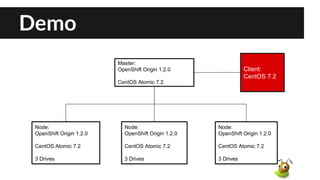
Demo
Node:
OpenShift Origin 1.2.0
CentOS Atomic 7.2
3 Drives
Node:
OpenShift Origin 1.2.0
CentOS Atomic 7.2
3 Drives
Node:
OpenShift Origin 1.2.0
CentOS Atomic 7.2
3 Drives
Master:
OpenShift Origin 1.2.0
CentOS Atomic 7.2
Client:
CentOS 7.2
Demo
Next ...
● Heketi
○ Failed hardware support: #161
○ Full Kubernetes support: #527
○ Block Storage API Proposal
● Kubernetes
○ Gluster Dynamic Provisioning
■ Available now! (Kubernetes 1.4)
■ Demo # https://youtu.be/uOBu7I5yg5s
○ Easier installation and deployment methods
More information
Heketi:
https://github.com/heketi/heketi

Gluster Containerized Storage for Cloud Applications

  • 1.
    Gluster Containerized Storage forCloud Applications Humble Chirammal Luis Pabón Gluster Summit, October 7, 2016
  • 2.
    Warning: Lots ofinformation coming ahead!
  • 3.
    1. Provide mycustomers a platform for their containerized applications and storage needs
  • 4.
    2. Manage compute,network, and storage as a single converged cluster
  • 5.
    I want toeasily deploy my containerized application with persistent storage
  • 6.
  • 7.
    Technologies OpenShift provides platform asa service infrastructure based on Kubernetes container management OpenShift GlusterHeketi
  • 8.
  • 9.
  • 10.
  • 11.
  • 12.
    Containerized Gluster Pull Glustercontainer image : # docker pull gluster/gluster-centos:gluster3u7_centos7 Example of how to start Gluster Container: # docker run --name gluster -d -v /etc/glusterfs:/etc/glusterfs:z -v /var/lib/glusterd:/var/lib/glusterd:z -v /var/log/glusterfs:/var/log/glusterfs:z -v /sys/fs/cgroup:/sys/fs/cgroup:ro --net=host --privileged=true -v /dev:/dev gluster/gluster-centos:gluster3u7_centos7
  • 13.
    Caveats for ContainerizedGluster ● Persistent storage on the host to save Gluster metadata -v /etc/glusterfs:/etc/glusterfs:z -v /var/lib/glusterd:/var/lib/glusterd:z -v /var/log/glusterfs:/var/log/glusterfs:z ● Host Networking (--net=host) of Docker for better performance on storage network. ○ For Reference: Docker Network “none”, adds a container to a container-specific network stack. Docker Network ”bridge”, represents the bridge network (default docker0). Docker Network ”host”, adds a container on the hosts network stack. ● Privileged container execution
  • 14.
    Gluster Pods inKubernetes Gluster Pod Node A Gluster Pod Node B Gluster Pod Node C Trusted Pool Disks on Host
  • 15.
    Example Nginx Application apiVersion:v1 kind: Service ... - port: 80 selector: app: nginx --- apiVersion: v1 kind: Route ... name: my-nginx-svc --- apiVersion: v1 kind: PersistentVolumeClaim metadata: name: nginx-claim ... storage: 100Gi … Continued -> kind: Pod apiVersion: v1 metadata: name: nginx labels: app: nginx spec: containers: - name: nginx image: nginx ports: - containerPort: 80 volumeMounts: - mountPath: "/var/cache/nginx" name: cache - mountPath: "/usr/share/nginx/html" name: mypd volumes: - name: cache - name: mypd persistentVolumeClaim: claimName: nginx-claim
  • 16.
    Example Nginx Application apiVersion:v1 kind: Service ... - port: 80 selector: app: nginx --- apiVersion: v1 kind: Route ... name: my-nginx-svc --- apiVersion: v1 kind: PersistentVolumeClaim metadata: name: nginx-claim ... storage: 100Gi … Continued -> kind: Pod apiVersion: v1 metadata: name: nginx labels: app: nginx spec: containers: - name: nginx image: nginx ports: - containerPort: 80 volumeMounts: - mountPath: "/var/cache/nginx" name: cache - mountPath: "/usr/share/nginx/html" name: mypd volumes: - name: cache - name: mypd persistentVolumeClaim: claimName: nginx-claim Application Definition
  • 17.
    Example Nginx Application apiVersion:v1 kind: Service ... - port: 80 selector: app: nginx --- apiVersion: v1 kind: Route ... name: my-nginx-svc --- apiVersion: v1 kind: PersistentVolumeClaim metadata: name: nginx-claim ... storage: 100Gi … Continued -> kind: Pod apiVersion: v1 metadata: name: nginx labels: app: nginx spec: containers: - name: nginx image: nginx ports: - containerPort: 80 volumeMounts: - mountPath: "/var/cache/nginx" name: cache - mountPath: "/usr/share/nginx/html" name: mypd volumes: - name: cache - name: mypd persistentVolumeClaim: claimName: nginx-claim Storage Request
  • 18.
    Example Nginx Application apiVersion:v1 kind: Service ... - port: 80 selector: app: nginx --- apiVersion: v1 kind: Route ... name: my-nginx-svc --- apiVersion: v1 kind: PersistentVolumeClaim metadata: name: nginx-claim ... storage: 100Gi … Continued -> kind: Pod apiVersion: v1 metadata: name: nginx labels: app: nginx spec: containers: - name: nginx image: nginx ports: - containerPort: 80 volumeMounts: - mountPath: "/var/cache/nginx" name: cache - mountPath: "/usr/share/nginx/html" name: mypd volumes: - name: cache - name: mypd persistentVolumeClaim: claimName: nginx-claim Mount point in application container
  • 19.
    Kubernetes Gluster MountPlugin Gluster Pod Application Pod Mounted Volume Node A Node B Bind Mount Volume
  • 20.
  • 21.
  • 22.
    Heketi ● Gluster storageand volume manager ○ Containerized, virtualized, or bare metal ● Multi Gluster cluster aware ● Intelligent brick allocator ● REST service with authentication
  • 23.
  • 24.
  • 25.
    Heketi Cluster Nodes areadded to failure domains or zones
  • 26.
    Heketi Cluster Peer probesautomatically when adding nodes to a cluster
  • 27.
    Heketi Cluster Raw devicesare registered and initialized
  • 28.
    Heketi Device Management RawBlock Device Physical Volume (PV) Volume Group (VG) LV Thin Pool Logical Volume (LV) Gluster Brick (XFS) . . . Created during device initialization Brick created when a volume is requested
  • 29.
  • 30.
  • 31.
    Brick Allocator [ ... {Zone3, Node192.168.13.100, Device /dev/sda}, {Zone2, Node 192.168.12.100, Device /dev/sda}, {Zone4, Node 192.168.14.100, Device /dev/sda}, {Zone1, Node 192.168.11.100, Device /dev/sda}, {Zone3, Node 192.168.13.100, Device /dev/sdb}, {Zone2, Node 192.168.12.100, Device /dev/sdb}, ... ]
  • 32.
  • 33.
  • 34.
    Demo Node: OpenShift Origin 1.2.0 CentOSAtomic 7.2 3 Drives Node: OpenShift Origin 1.2.0 CentOS Atomic 7.2 3 Drives Node: OpenShift Origin 1.2.0 CentOS Atomic 7.2 3 Drives Master: OpenShift Origin 1.2.0 CentOS Atomic 7.2 Client: CentOS 7.2
  • 35.
  • 36.
    Next ... ● Heketi ○Failed hardware support: #161 ○ Full Kubernetes support: #527 ○ Block Storage API Proposal ● Kubernetes ○ Gluster Dynamic Provisioning ■ Available now! (Kubernetes 1.4) ■ Demo # https://youtu.be/uOBu7I5yg5s ○ Easier installation and deployment methods
  • 37.