
Dan Lambright1
Software Defined Storage
NMAMIT, Nitte
Presented by the Gluster community
redhat storage
April 11, 2014
Dan Lambright2
$ whoami
dlambrig@redhat.com
Formally of EMC, DELL
Dan Lambright3
AGENDA
● Storage Overview
● History
● Types
● Case study: EMC Symmetrix, DELL Equallogic
● Software Defined Storage
● Definition
● Pros and Cons
● Case study: Gluster
Dan Lambright4
STORAGE
● Data is..
● Critical
● Ever growing
● Storage persists data
● Reliable
● Fast
● Affordable
Dan Lambright5
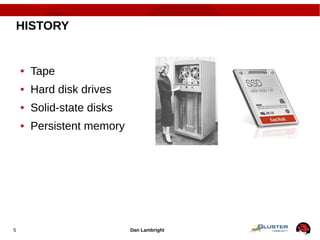
HISTORY
● Tape
● Hard disk drives
● Solid-state disks
● Persistent memory
STORAGE ATTRIBUTES
Dan Lambright7
RELIABILITY
● Failure vectors
● Hardware
● Software
● Interconnect
● Strategies
● Backups
● Redundant hardware
● Replicate data
● RAID / erasure codes
Dan Lambright8
PERFORMANCE
● Caching
● On server
● On client
● Parallelism
Dan Lambright9
ACCESS
● Architecture
● Direct attached storage (DASD)
● Storage area network (SAN)
● Network attached (NAS)
● Protocol
● SCSI
● Fiber channel
● Ethernet
Dan Lambright10
ENCAPSULATION / ORGANIZATION
● Container
● Block
● File - hierarchical
● Object – two level
● Locating data
● Flat index
● Filesystem
● Database
Dan Lambright11
SCALE UP
● Grow resources on machine
● Capacity
● Performance
● Feature set
Dan Lambright12
SCALE OUT
● Add resources by adding nodes
● CPU
● Redundancy
● Bandwidth
● Inexpensive to grow
Dan Lambright13
FEATURES
● Backup
● Archive
● Disaster Recovery
● SNAP
● Compression
● Deduplication
Dan Lambright14
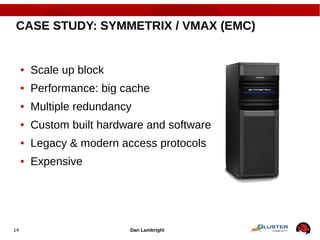
CASE STUDY: SYMMETRIX / VMAX (EMC)
● Scale up block
● Performance: big cache
● Multiple redundancy
● Custom built hardware and software
● Legacy & modern access protocols
● Expensive
Dan Lambright15
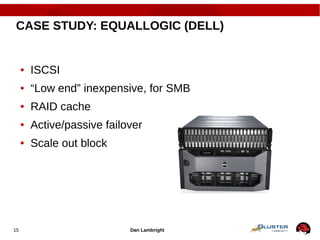
CASE STUDY: EQUALLOGIC (DELL)
● ISCSI
● “Low end” inexpensive, for SMB
● RAID cache
● Active/passive failover
● Scale out block
SOFTWARE DEFINED
STORAGE (SDS)
Dan Lambright17
SOFTWARE STORAGE STACK
● Typically..
● Runs on commodity hardware
● Modular design / components
● In user space
● Open source
Dan Lambright18
USE CASE: CLOUD
● Typically..
● Metered resources
● Virtual
● Self service
● Remotely accessible
Dan Lambright19
SDS PROS
● Easy to evolve
● No vendor lock-in
● Portable to different platforms
Dan Lambright20
SDS CONS
● Software slower than hardware
● May be harder to manage
● If open source, quality varies
Dan Lambright21
CASE STUDY: GLUSTER
● Open source
● Scale-out
● Multi-protocol access
● Support from Red Hat available
Niels de Vos, Sr. SME22
22
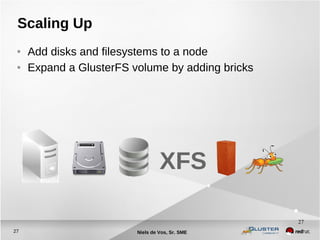
Scaling Up
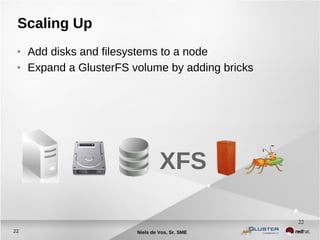
● Add disks and filesystems to a node
● Expand a GlusterFS volume by adding bricks
XFS
Niels de Vos, Sr. SME23
23
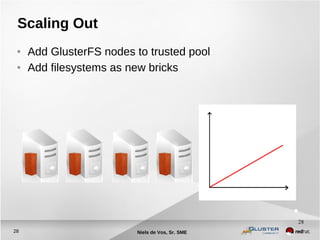
Scaling Out
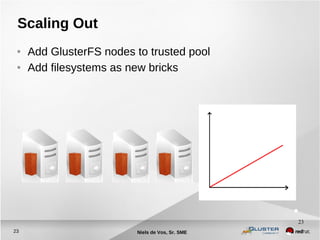
● Add GlusterFS nodes to trusted pool
● Add filesystems as new bricks
Dan Lambright24
DEMO: GLUSTER
● Volume creation
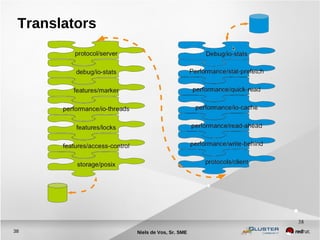
● Layered functionality translators
● Linux application
● No special hardware
● Free (download)
25
Do it!
● Build a test environment in VMs in just minutes!
● Get the bits:
● Fedora has GlusterFS packages natively
● RHS ISO available on Red Hat Portal
● CentOS Storage SIG
● Go upstream: www.gluster.org
RED HAT CONFIDENTIAL – DO NOT DISTRIBUTE
Thank You!
● dlambright@redhat.com
● RHS:
www.redhat.com/storage/
● GlusterFS:
www.gluster.org
●
@Glusterorg
@RedHatStorage
Gluster
Red Hat Storage
Slides Available at:
http://www.redhat.com/people/dlambrig/talks
Niels de Vos, Sr. SME27
27
Scaling Up
● Add disks and filesystems to a node
● Expand a GlusterFS volume by adding bricks
XFS
Niels de Vos, Sr. SME28
28
Scaling Out
● Add GlusterFS nodes to trusted pool
● Add filesystems as new bricks
TECHNOLOGY OVERVIEW
Dan Lambright30
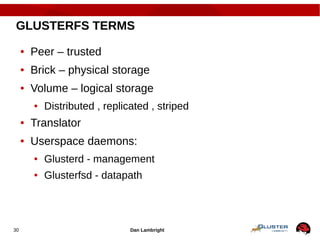
GLUSTERFS TERMS
● Peer – trusted
● Brick – physical storage
● Volume – logical storage
● Distributed , replicated , striped
● Translator
● Userspace daemons:
● Glusterd - management
● Glusterfsd - datapath
Dan Lambright31
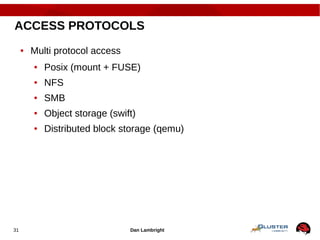
ACCESS PROTOCOLS
● Multi protocol access
● Posix (mount + FUSE)
● NFS
● SMB
● Object storage (swift)
● Distributed block storage (qemu)
Niels de Vos, Sr. SME32
32
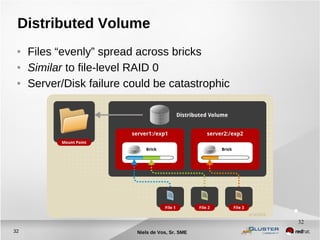
Distributed Volume
● Files “evenly” spread across bricks
● Similar to file-level RAID 0
● Server/Disk failure could be catastrophic
Niels de Vos, Sr. SME33
33
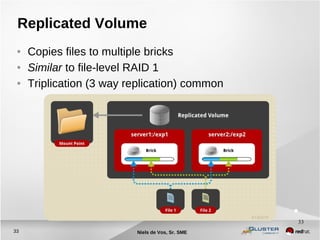
Replicated Volume
● Copies files to multiple bricks
● Similar to file-level RAID 1
● Triplication (3 way replication) common
Niels de Vos, Sr. SME34
34
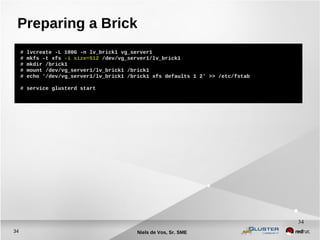
Preparing a Brick
# lvcreate -L 100G -n lv_brick1 vg_server1
# mkfs -t xfs -i size=512 /dev/vg_server1/lv_brick1
# mkdir /brick1
# mount /dev/vg_server1/lv_brick1 /brick1
# echo '/dev/vg_server1/lv_brick1 /brick1 xfs defaults 1 2' >> /etc/fstab
# service glusterd start
Niels de Vos, Sr. SME35
35
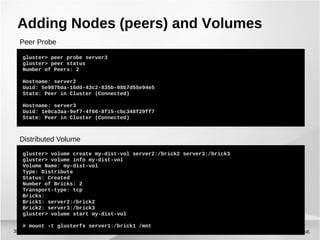
Adding Nodes (peers) and Volumes
gluster> peer probe server3
gluster> peer status
Number of Peers: 2
Hostname: server2
Uuid: 5e987bda-16dd-43c2-835b-08b7d55e94e5
State: Peer in Cluster (Connected)
Hostname: server3
Uuid: 1e0ca3aa-9ef7-4f66-8f15-cbc348f29ff7
State: Peer in Cluster (Connected)
gluster> volume create my-dist-vol server2:/brick2 server3:/brick3
gluster> volume info my-dist-vol
Volume Name: my-dist-vol
Type: Distribute
Status: Created
Number of Bricks: 2
Transport-type: tcp
Bricks:
Brick1: server2:/brick2
Brick2: server3:/brick3
gluster> volume start my-dist-vol
# mount -t glusterfs server1:/brick1 /mnt
Distributed Volume
Peer Probe
GLUSTERFS INTERNALS
Dan Lambright37
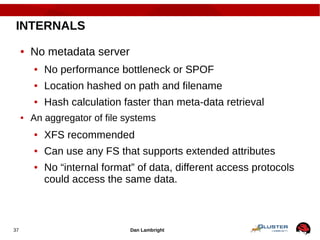
INTERNALS
● No metadata server
● No performance bottleneck or SPOF
● Location hashed on path and filename
● Hash calculation faster than meta-data retrieval
● An aggregator of file systems
● XFS recommended
● Can use any FS that supports extended attributes
● No “internal format” of data, different access protocols
could access the same data.
Niels de Vos, Sr. SME38
38
Translators
Dan Lambright39
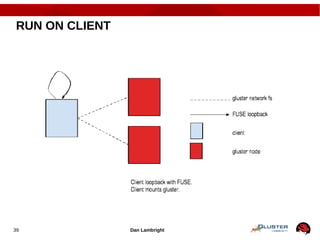
RUN ON CLIENT
Dan Lambright40
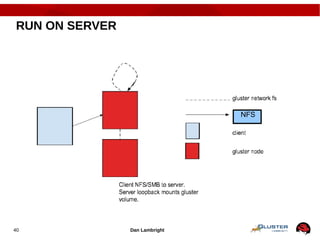
RUN ON SERVER
NFS
41
Do it!
● Build a test environment in VMs in just minutes!
● Get the bits:
● Fedora 19 has GlusterFS packages natively
● RHS 2.1 ISO available on Red Hat Portal
● Go upstream: www.gluster.org
RED HAT CONFIDENTIAL – DO NOT DISTRIBUTE
Thank You!
● dlambright@redhat.com
● RHS:
www.redhat.com/storage/
● GlusterFS:
www.gluster.org
●
@Glusterorg
@RedHatStorage
Gluster
Red Hat Storage
Slides Available at:
http://www.redhat.com/people/dlambrig/talks
(based on the slide deck from Niels de Vos)
Dan Lambright43
ISCSI IMPLICATIONS
● Multipath
● Raid
● Scsi timeout
● Change lun size
● Run iSCSI target on client

Software defined storage

  • 1.
    Dan Lambright1 Software DefinedStorage NMAMIT, Nitte Presented by the Gluster community redhat storage April 11, 2014
  • 2.
  • 3.
    Dan Lambright3 AGENDA ● StorageOverview ● History ● Types ● Case study: EMC Symmetrix, DELL Equallogic ● Software Defined Storage ● Definition ● Pros and Cons ● Case study: Gluster
  • 4.
    Dan Lambright4 STORAGE ● Datais.. ● Critical ● Ever growing ● Storage persists data ● Reliable ● Fast ● Affordable
  • 5.
    Dan Lambright5 HISTORY ● Tape ●Hard disk drives ● Solid-state disks ● Persistent memory
  • 6.
  • 7.
    Dan Lambright7 RELIABILITY ● Failurevectors ● Hardware ● Software ● Interconnect ● Strategies ● Backups ● Redundant hardware ● Replicate data ● RAID / erasure codes
  • 8.
    Dan Lambright8 PERFORMANCE ● Caching ●On server ● On client ● Parallelism
  • 9.
    Dan Lambright9 ACCESS ● Architecture ●Direct attached storage (DASD) ● Storage area network (SAN) ● Network attached (NAS) ● Protocol ● SCSI ● Fiber channel ● Ethernet
  • 10.
    Dan Lambright10 ENCAPSULATION /ORGANIZATION ● Container ● Block ● File - hierarchical ● Object – two level ● Locating data ● Flat index ● Filesystem ● Database
  • 11.
    Dan Lambright11 SCALE UP ●Grow resources on machine ● Capacity ● Performance ● Feature set
  • 12.
    Dan Lambright12 SCALE OUT ●Add resources by adding nodes ● CPU ● Redundancy ● Bandwidth ● Inexpensive to grow
  • 13.
    Dan Lambright13 FEATURES ● Backup ●Archive ● Disaster Recovery ● SNAP ● Compression ● Deduplication
  • 14.
    Dan Lambright14 CASE STUDY:SYMMETRIX / VMAX (EMC) ● Scale up block ● Performance: big cache ● Multiple redundancy ● Custom built hardware and software ● Legacy & modern access protocols ● Expensive
  • 15.
    Dan Lambright15 CASE STUDY:EQUALLOGIC (DELL) ● ISCSI ● “Low end” inexpensive, for SMB ● RAID cache ● Active/passive failover ● Scale out block
  • 16.
  • 17.
    Dan Lambright17 SOFTWARE STORAGESTACK ● Typically.. ● Runs on commodity hardware ● Modular design / components ● In user space ● Open source
  • 18.
    Dan Lambright18 USE CASE:CLOUD ● Typically.. ● Metered resources ● Virtual ● Self service ● Remotely accessible
  • 19.
    Dan Lambright19 SDS PROS ●Easy to evolve ● No vendor lock-in ● Portable to different platforms
  • 20.
    Dan Lambright20 SDS CONS ●Software slower than hardware ● May be harder to manage ● If open source, quality varies
  • 21.
    Dan Lambright21 CASE STUDY:GLUSTER ● Open source ● Scale-out ● Multi-protocol access ● Support from Red Hat available
  • 22.
    Niels de Vos,Sr. SME22 22 Scaling Up ● Add disks and filesystems to a node ● Expand a GlusterFS volume by adding bricks XFS
  • 23.
    Niels de Vos,Sr. SME23 23 Scaling Out ● Add GlusterFS nodes to trusted pool ● Add filesystems as new bricks
  • 24.
    Dan Lambright24 DEMO: GLUSTER ●Volume creation ● Layered functionality translators ● Linux application ● No special hardware ● Free (download)
  • 25.
    25 Do it! ● Builda test environment in VMs in just minutes! ● Get the bits: ● Fedora has GlusterFS packages natively ● RHS ISO available on Red Hat Portal ● CentOS Storage SIG ● Go upstream: www.gluster.org
  • 26.
    RED HAT CONFIDENTIAL– DO NOT DISTRIBUTE Thank You! ● dlambright@redhat.com ● RHS: www.redhat.com/storage/ ● GlusterFS: www.gluster.org ● @Glusterorg @RedHatStorage Gluster Red Hat Storage Slides Available at: http://www.redhat.com/people/dlambrig/talks
  • 27.
    Niels de Vos,Sr. SME27 27 Scaling Up ● Add disks and filesystems to a node ● Expand a GlusterFS volume by adding bricks XFS
  • 28.
    Niels de Vos,Sr. SME28 28 Scaling Out ● Add GlusterFS nodes to trusted pool ● Add filesystems as new bricks
  • 29.
  • 30.
    Dan Lambright30 GLUSTERFS TERMS ●Peer – trusted ● Brick – physical storage ● Volume – logical storage ● Distributed , replicated , striped ● Translator ● Userspace daemons: ● Glusterd - management ● Glusterfsd - datapath
  • 31.
    Dan Lambright31 ACCESS PROTOCOLS ●Multi protocol access ● Posix (mount + FUSE) ● NFS ● SMB ● Object storage (swift) ● Distributed block storage (qemu)
  • 32.
    Niels de Vos,Sr. SME32 32 Distributed Volume ● Files “evenly” spread across bricks ● Similar to file-level RAID 0 ● Server/Disk failure could be catastrophic
  • 33.
    Niels de Vos,Sr. SME33 33 Replicated Volume ● Copies files to multiple bricks ● Similar to file-level RAID 1 ● Triplication (3 way replication) common
  • 34.
    Niels de Vos,Sr. SME34 34 Preparing a Brick # lvcreate -L 100G -n lv_brick1 vg_server1 # mkfs -t xfs -i size=512 /dev/vg_server1/lv_brick1 # mkdir /brick1 # mount /dev/vg_server1/lv_brick1 /brick1 # echo '/dev/vg_server1/lv_brick1 /brick1 xfs defaults 1 2' >> /etc/fstab # service glusterd start
  • 35.
    Niels de Vos,Sr. SME35 35 Adding Nodes (peers) and Volumes gluster> peer probe server3 gluster> peer status Number of Peers: 2 Hostname: server2 Uuid: 5e987bda-16dd-43c2-835b-08b7d55e94e5 State: Peer in Cluster (Connected) Hostname: server3 Uuid: 1e0ca3aa-9ef7-4f66-8f15-cbc348f29ff7 State: Peer in Cluster (Connected) gluster> volume create my-dist-vol server2:/brick2 server3:/brick3 gluster> volume info my-dist-vol Volume Name: my-dist-vol Type: Distribute Status: Created Number of Bricks: 2 Transport-type: tcp Bricks: Brick1: server2:/brick2 Brick2: server3:/brick3 gluster> volume start my-dist-vol # mount -t glusterfs server1:/brick1 /mnt Distributed Volume Peer Probe
  • 36.
  • 37.
    Dan Lambright37 INTERNALS ● Nometadata server ● No performance bottleneck or SPOF ● Location hashed on path and filename ● Hash calculation faster than meta-data retrieval ● An aggregator of file systems ● XFS recommended ● Can use any FS that supports extended attributes ● No “internal format” of data, different access protocols could access the same data.
  • 38.
    Niels de Vos,Sr. SME38 38 Translators
  • 39.
  • 40.
  • 41.
    41 Do it! ● Builda test environment in VMs in just minutes! ● Get the bits: ● Fedora 19 has GlusterFS packages natively ● RHS 2.1 ISO available on Red Hat Portal ● Go upstream: www.gluster.org
  • 42.
    RED HAT CONFIDENTIAL– DO NOT DISTRIBUTE Thank You! ● dlambright@redhat.com ● RHS: www.redhat.com/storage/ ● GlusterFS: www.gluster.org ● @Glusterorg @RedHatStorage Gluster Red Hat Storage Slides Available at: http://www.redhat.com/people/dlambrig/talks (based on the slide deck from Niels de Vos)
  • 43.
    Dan Lambright43 ISCSI IMPLICATIONS ●Multipath ● Raid ● Scsi timeout ● Change lun size ● Run iSCSI target on client

Editor's Notes

  • #27 Question notes: -Vs. CEPH -CEPH is object-based at its core, with distributed filesystem as a layered function. GlusterFS is file-based at its core, with object methods (UFO) as a layered function. -CEPH stores underlying data in files, but outside the CEPH constructs they are meaningless. Except for striping, GlusterFS files maintain complete integrity at the brick level. -With CEPH, you define storage resources and data architecture (replication) separate, and CEPH actively and dynamically manages the mapping of the architecture to the storage. With GlusterFS, you manually manage both the storage resources and the data architecture.
  • #35 An inode size smaller than 512 leaves no room for extended attributes (xattr). This means that every active inode will require a separate block for these. This has both a performance hit as well as a disk space usage penalty.
  • #36 -peer status command shows all other peer nodes – excludes the local node -I understand this to be a bug that's in the process of being fixed
  • #39 Modular building blocks for functionality, like bricks are for storage
  • #43 Question notes: -Vs. CEPH -CEPH is object-based at its core, with distributed filesystem as a layered function. GlusterFS is file-based at its core, with object methods (UFO) as a layered function. -CEPH stores underlying data in files, but outside the CEPH constructs they are meaningless. Except for striping, GlusterFS files maintain complete integrity at the brick level. -With CEPH, you define storage resources and data architecture (replication) separate, and CEPH actively and dynamically manages the mapping of the architecture to the storage. With GlusterFS, you manually manage both the storage resources and the data architecture.