PERFORMANCE AND SCALABILITY
OF CNS 3.6 IN OCP WITH BRICK-
MULTIPLEX ENABLED
ELVIR KURIC, SHEKHAR BERRY
Gluster Summit, 28th October 2017
CONTENTS
Introduction/Motivation
What is Brick Multiplexing
Performance Analysis
Scalability Analysis
Next Steps
Conclusion
INTRODUCTION
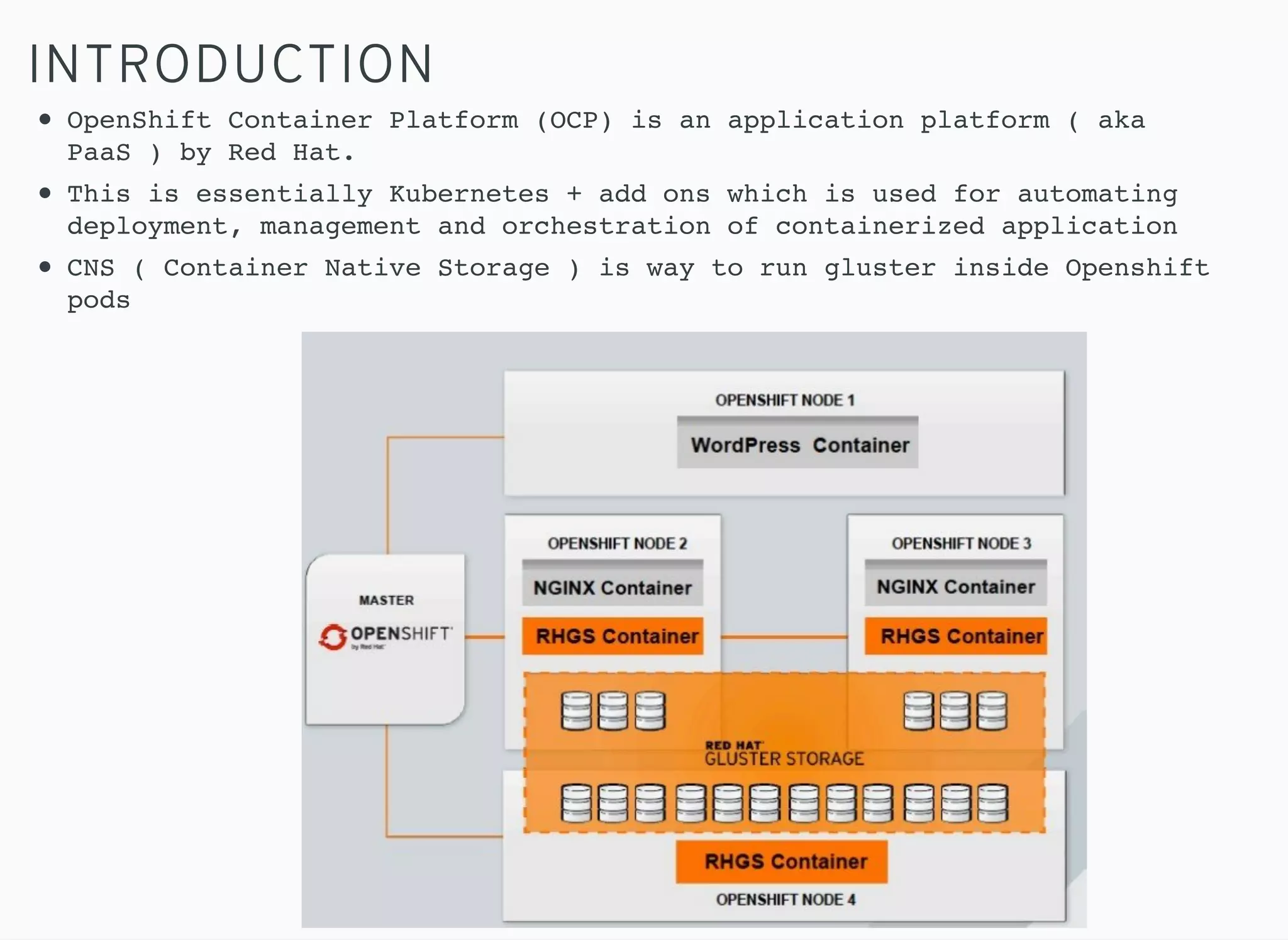
OpenShift Container Platform (OCP) is an application platform ( aka
PaaS ) by Red Hat.
This is essentially Kubernetes + add ons which is used for automating
deployment, management and orchestration of containerized application
CNS ( Container Native Storage ) is way to run gluster inside Openshift
pods
MOTIVATION
OBJECTIVES OF THIS TESTING:
Brick Multiplexing is a salient feature of Gluster 3.10
To find out effect of brick multiplexing on IO performance.
Compare performance between brick multiplex enabled and
disabled environment
To observe how brick multiplex helps in scaling of
persistent volume
To find out resource consumption at highest scale and
compare with brick multiplex disabled environment
BRICK MULTIPLEXING
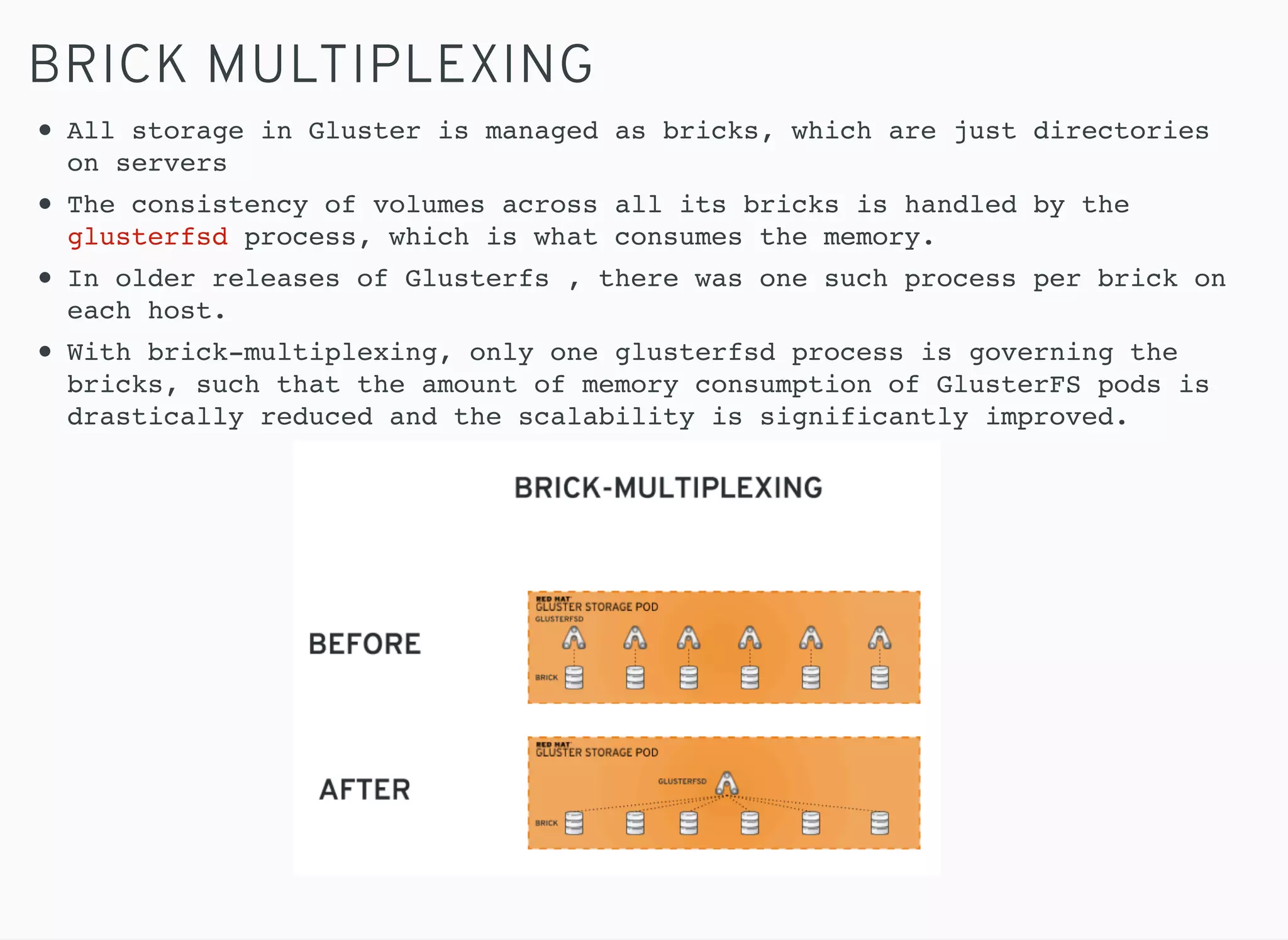
All storage in Gluster is managed as bricks, which are just directories
on servers
The consistency of volumes across all its bricks is handled by the
glusterfsd process, which is what consumes the memory.
In older releases of Glusterfs , there was one such process per brick on
each host.
With brick-multiplexing, only one glusterfsd process is governing the
bricks, such that the amount of memory consumption of GlusterFS pods is
drastically reduced and the scalability is significantly improved.
BRICK MULTIPLEXING
RESOURCE CONSTRAINTS SEEN PRIOR TO BRICK MULTIPLEXING:
Ports
Memory
CPU
Brick multiplexing puts multiple bricks into one process.
Thus, many bricks can consume *one* port, *one* set of global
data structures, and *one* pool of global threads reducing
resource consumption and contention.
PERFORMANCE ANALYSIS
TEST ENVIRONMENT
8 Nodes (3 Dedicated CNS nodes, 5 App nodes including
master)
48 GB RAM, 2 CPU sockets with 6 cores each, 12 processors
in total on all 8 servers
3 CNS nodes comprised 12 7200 RPMs Hard Drives of 930GB
capacity. Total capacity of ~11TB
10GbE Ethernet link was used for IO and 1GbE was used for
management
OCP v3.6 , kubernetes 1.6
glusterfs-3.8.44, heketi-5.0.0-1
docker images: rhgs3/rhgs-server-rhel7:3.3.0-24,:
rhgs3/rhgs-volmanager-rhel7:3.3.0-27
PERFORMANCE ANALYSIS
TEST PROCEDURE
Persistent Volumes were scaled from 100,200,300,500 to 1000 in
brick-multiplexed environment and mounted inside application
pod
pbench-fio was used to run concurrent sequential and random
workload on the persistent volumes mounted inside pod
Tests were repeated to get reproducible numbers
Performance comparison between brick multiplex enabled and
disabled was done for a particular number of persistent volumes
PERFORMANCE ANALYSIS
TEST RESULTS
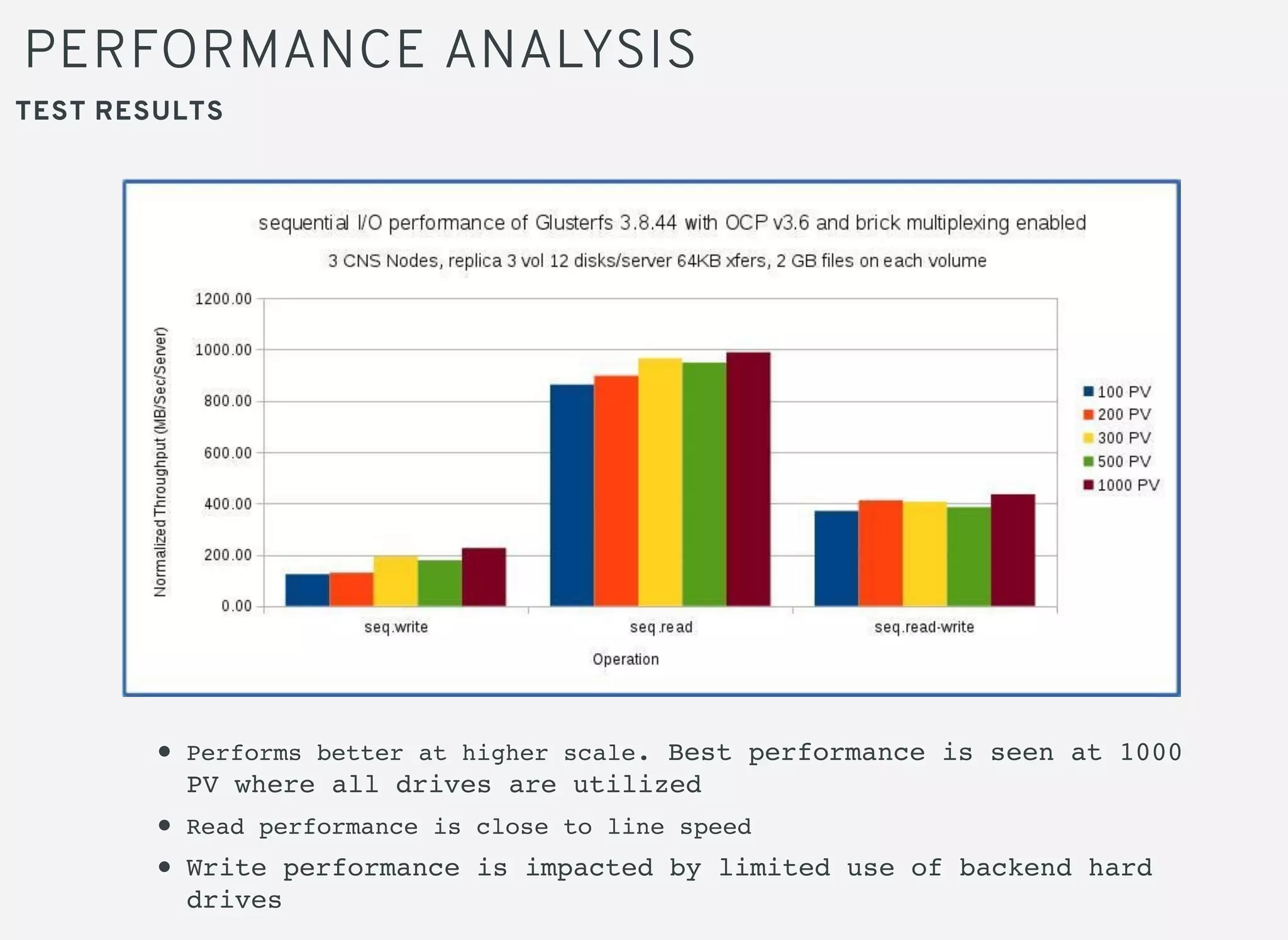
Performs better at higher scale. Best performance is seen at 1000
PV where all drives are utilized
Read performance is close to line speed
Write performance is impacted by limited use of backend hard
drives
PERFORMANCE ANALYSIS
TEST RESULTS
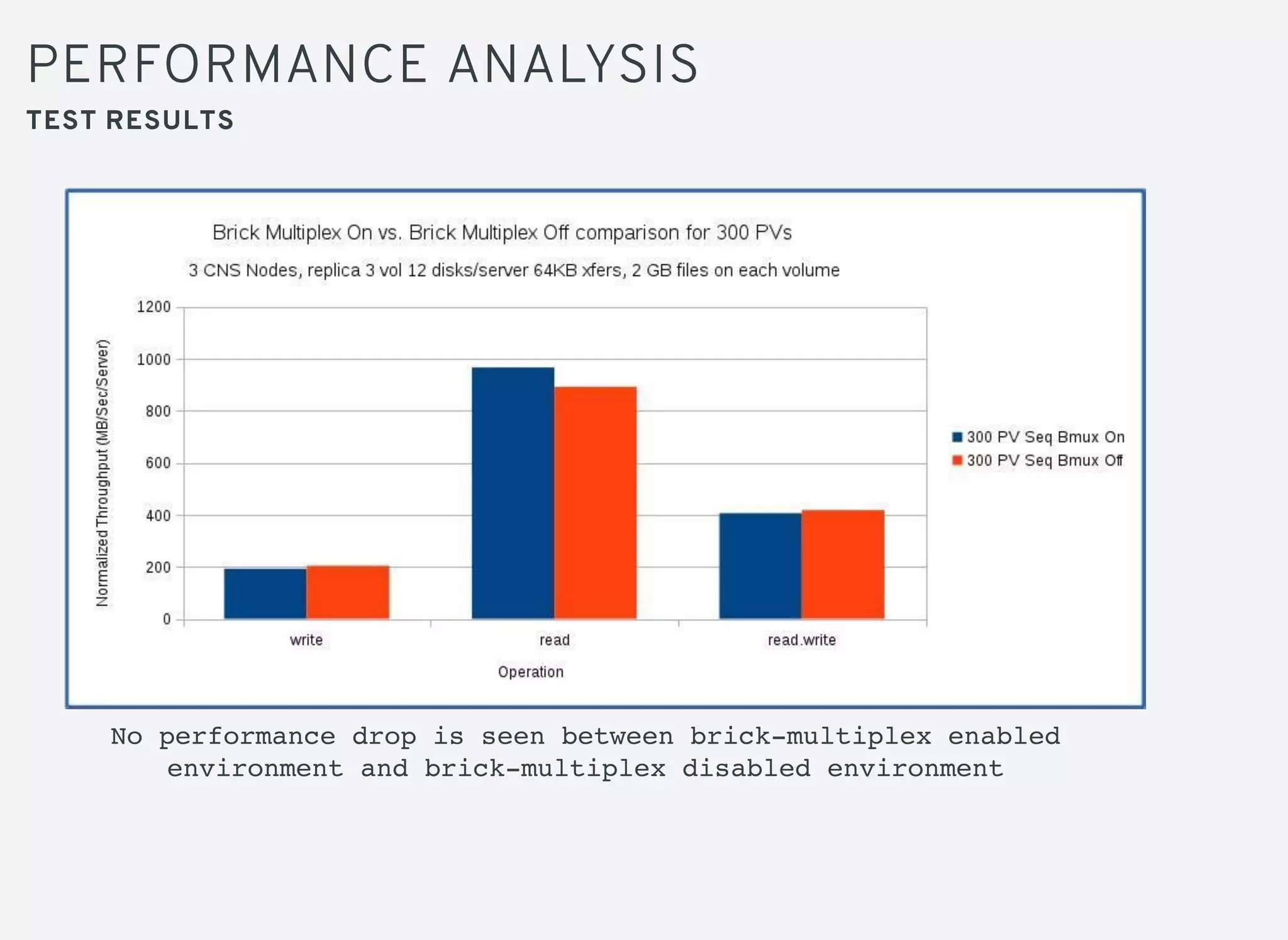
No performance drop is seen between brick-multiplex enabled
environment and brick-multiplex disabled environment
SCALABILITY ANALYSIS
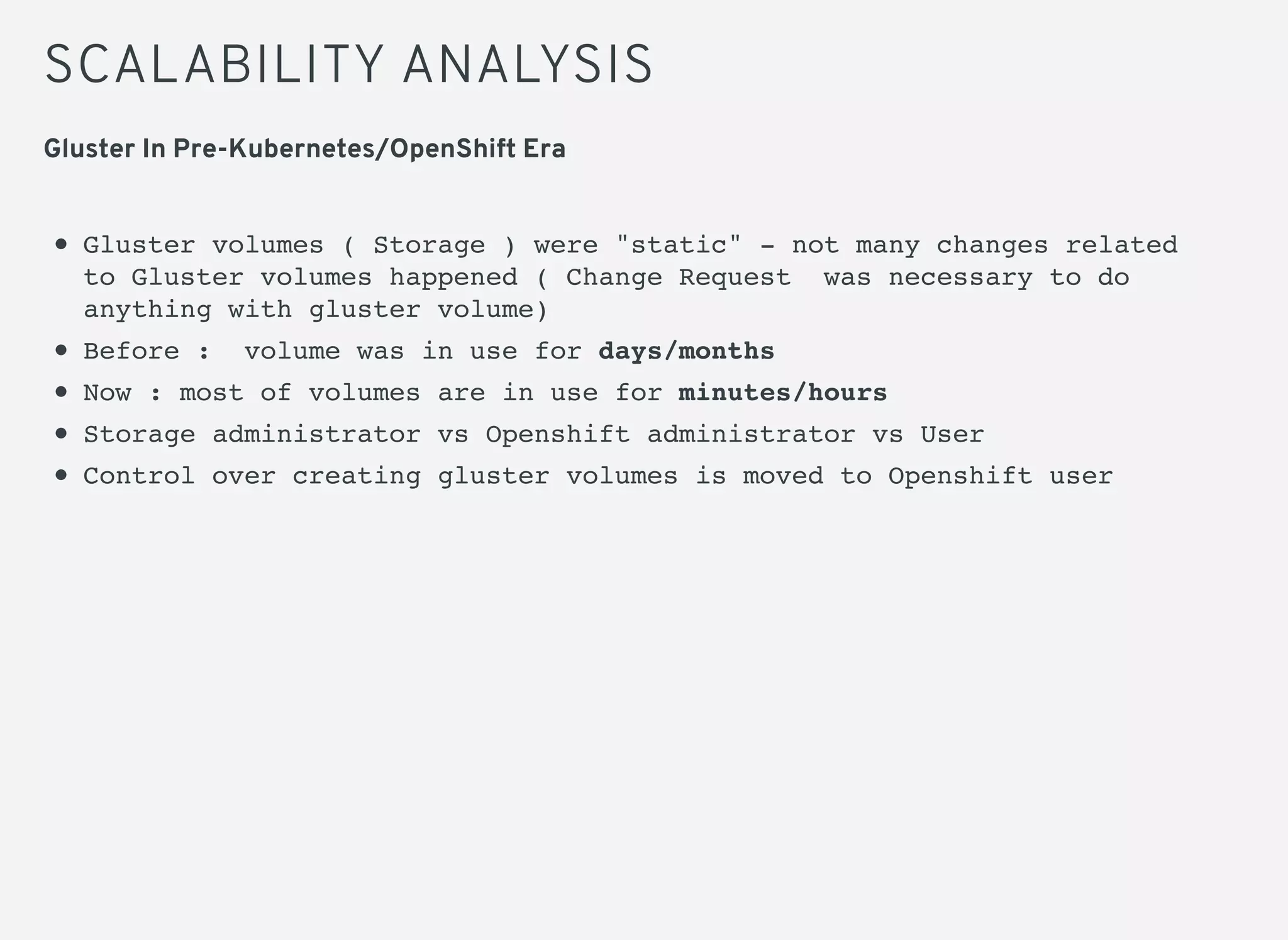
Gluster volumes ( Storage ) were "static" - not many changes related
to Gluster volumes happened ( Change Request was necessary to do
anything with gluster volume)
Before : volume was in use for days/months
Now : most of volumes are in use for minutes/hours
Storage administrator vs Openshift administrator vs User
Control over creating gluster volumes is moved to Openshift user
Gluster In Pre-Kubernetes/OpenShift Era
SCALABILITY ANALYSIS
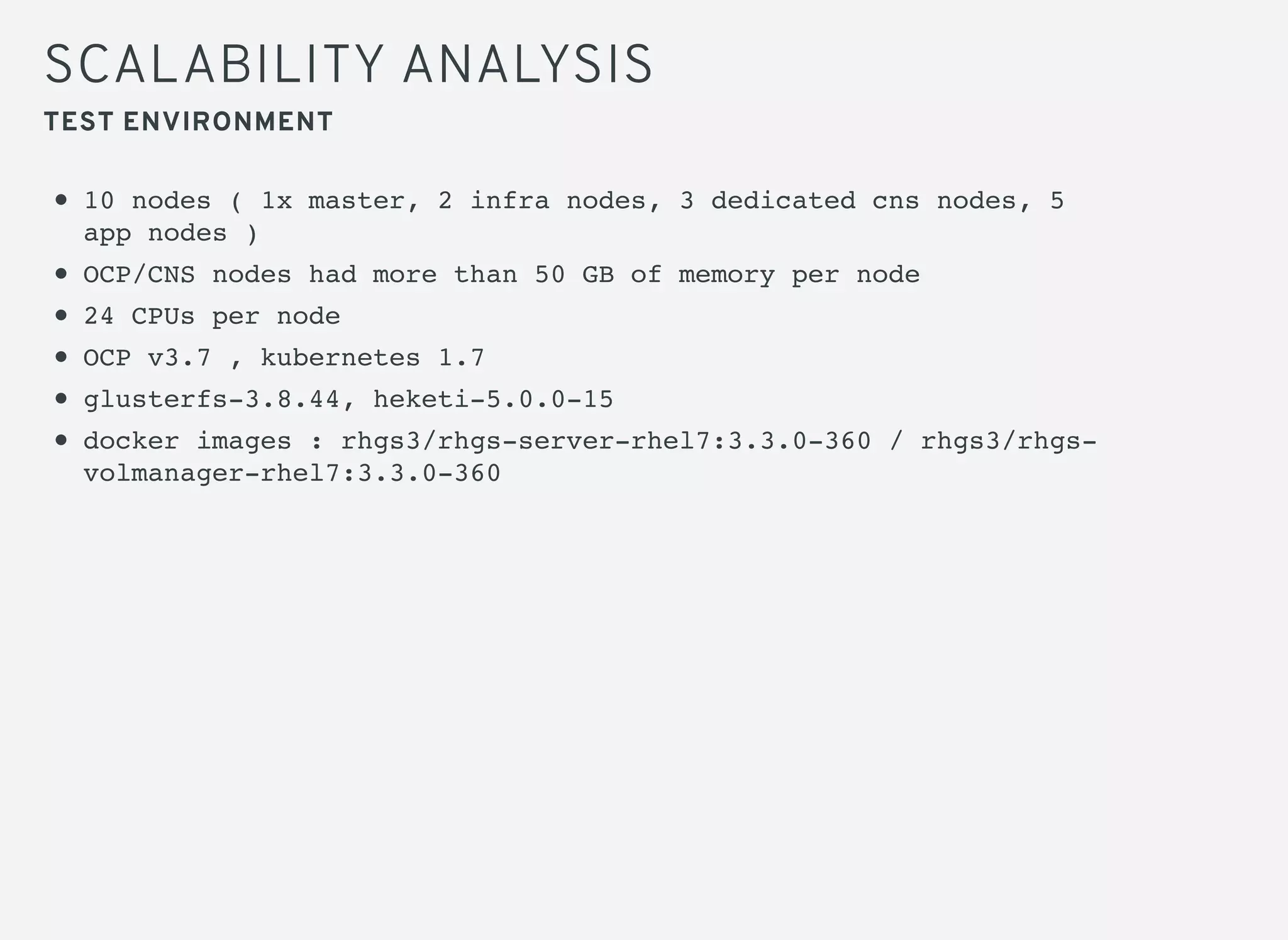
10 nodes ( 1x master, 2 infra nodes, 3 dedicated cns nodes, 5
app nodes )
OCP/CNS nodes had more than 50 GB of memory per node
24 CPUs per node
OCP v3.7 , kubernetes 1.7
glusterfs-3.8.44, heketi-5.0.0-15
docker images : rhgs3/rhgs-server-rhel7:3.3.0-360 / rhgs3/rhgs-
volmanager-rhel7:3.3.0-360
TEST ENVIRONMENT
SCALABILITY ANALYSIS
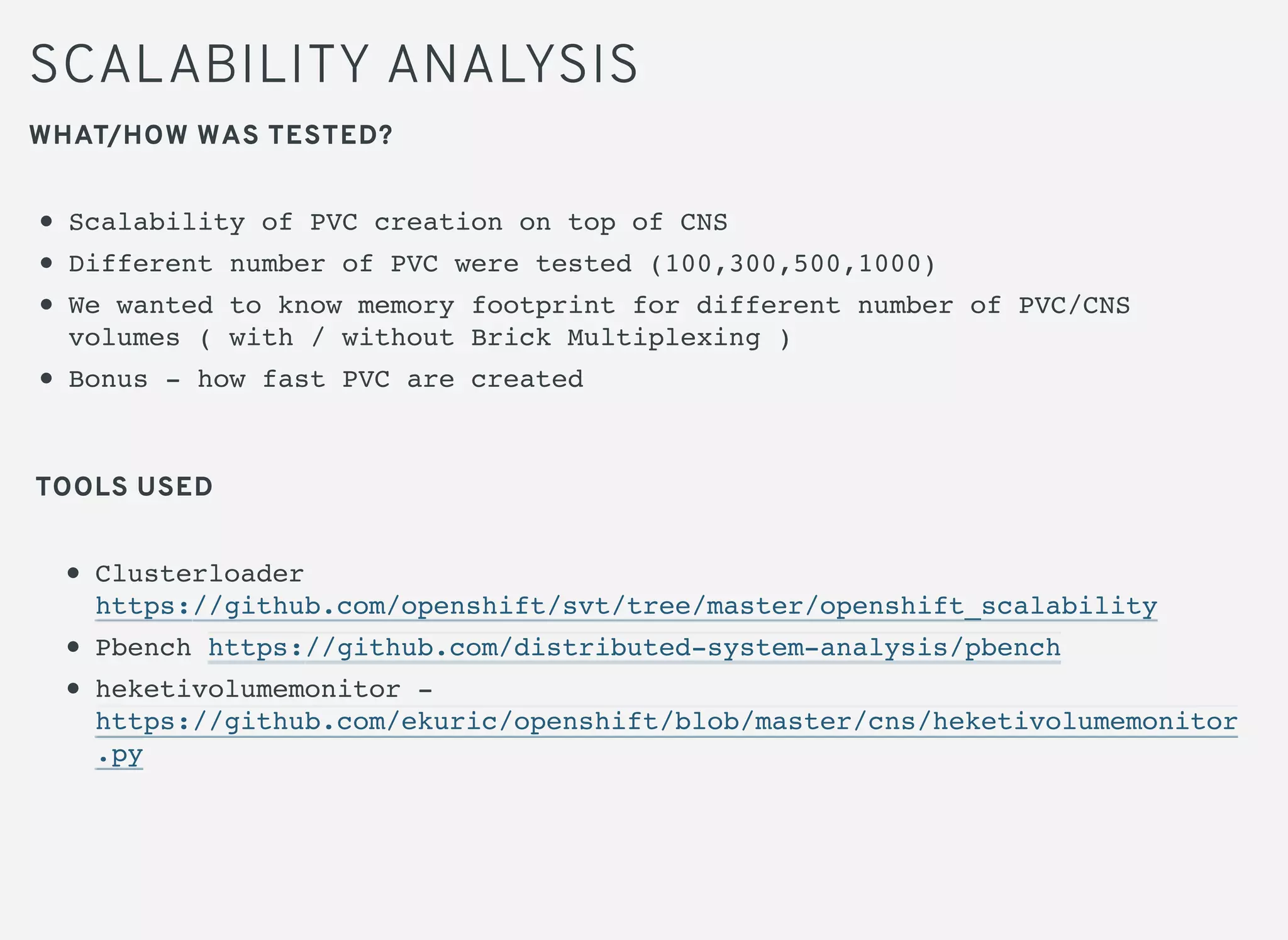
WHAT/HOW WAS TESTED?
Scalability of PVC creation on top of CNS
Different number of PVC were tested (100,300,500,1000)
We wanted to know memory footprint for different number of PVC/CNS
volumes ( with / without Brick Multiplexing )
Bonus - how fast PVC are created
Clusterloader
https://github.com/openshift/svt/tree/master/openshift_scalability
Pbench https://github.com/distributed-system-analysis/pbench
heketivolumemonitor -
https://github.com/ekuric/openshift/blob/master/cns/heketivolumemonitor
.py
TOOLS USED
SCALABILITY ANALYSIS
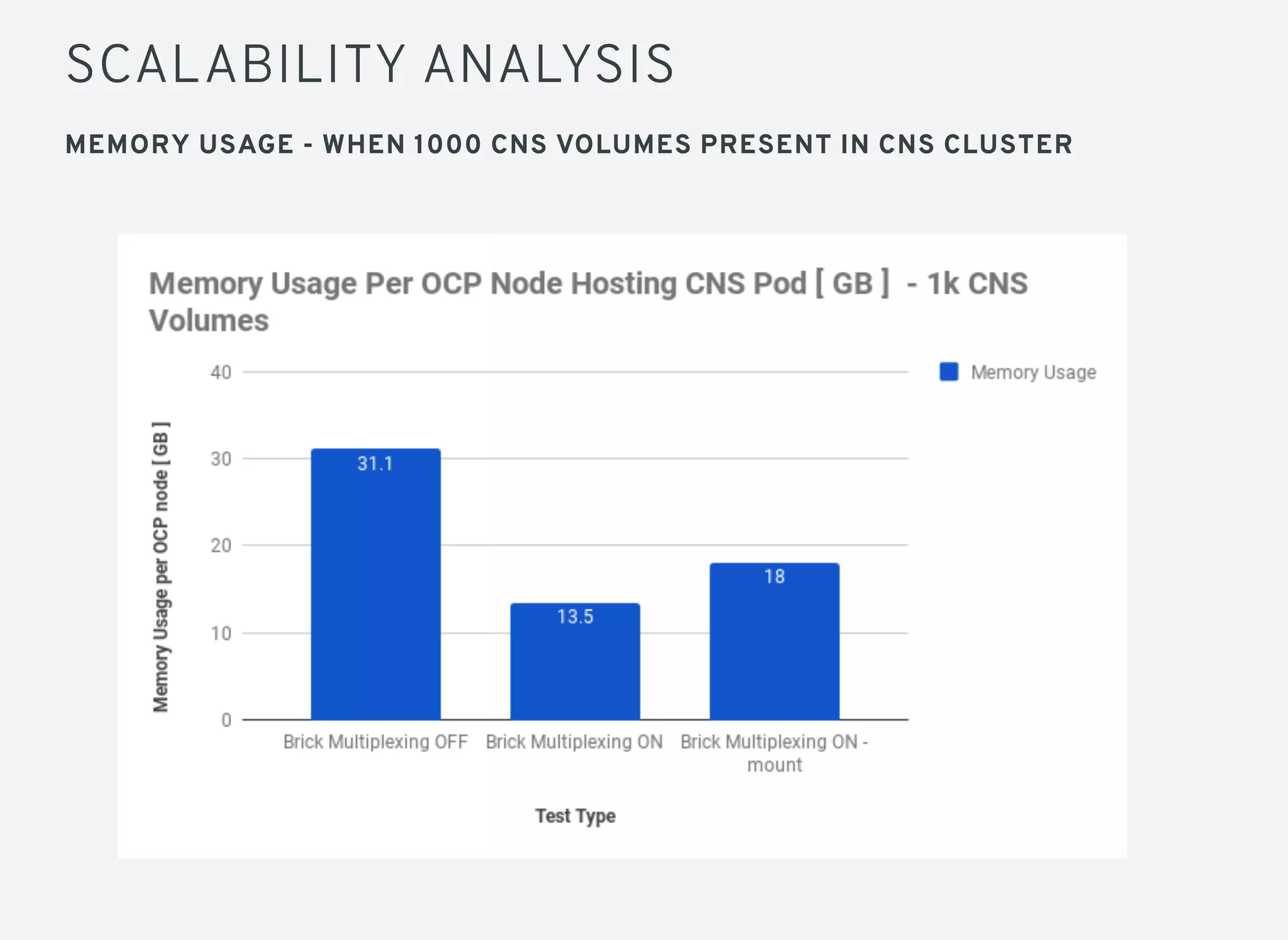
MEMORY USAGE - WHEN 1000 CNS VOLUMES PRESENT IN CNS CLUSTER
SCALABILITY ANALYSIS
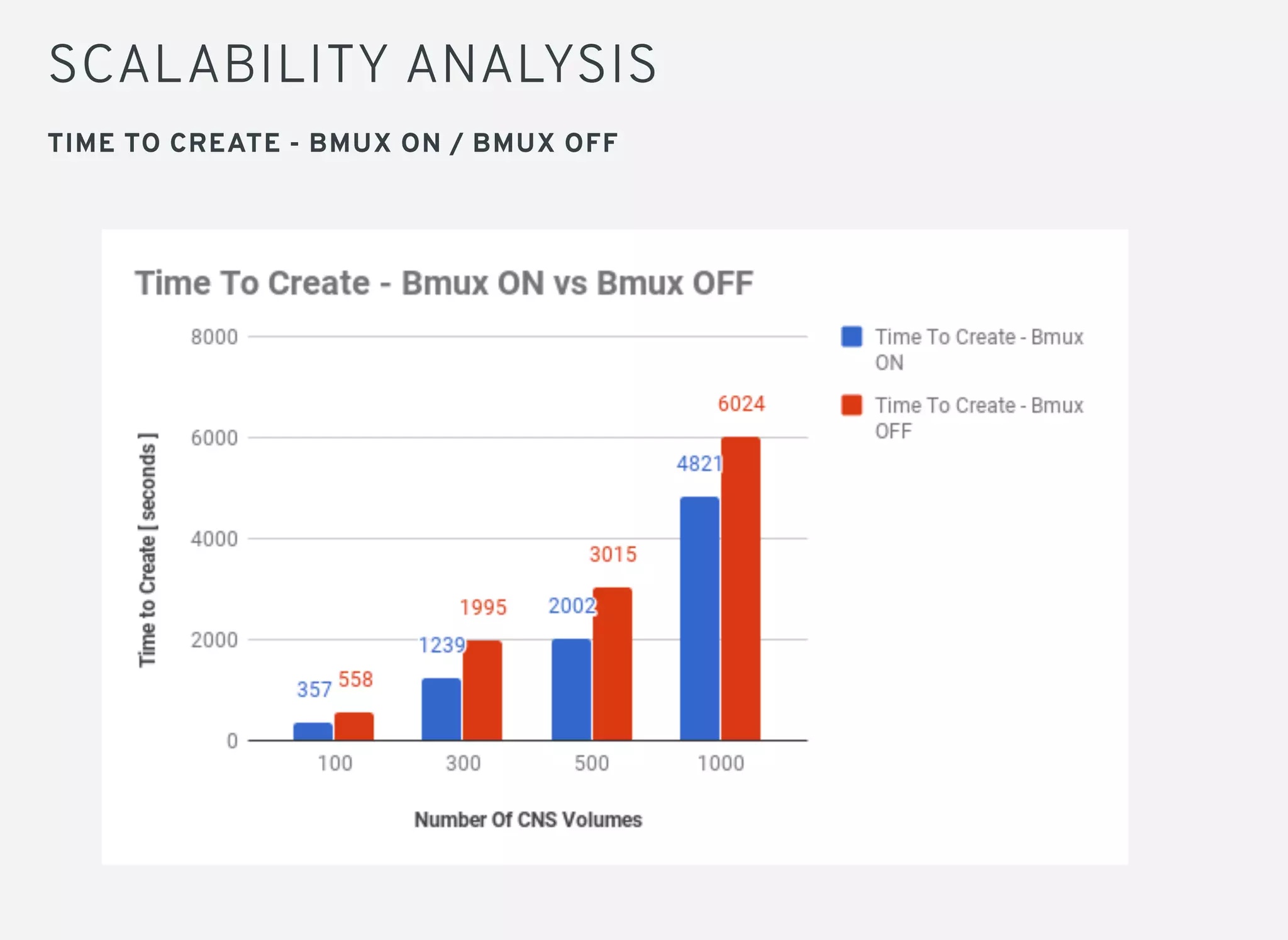
TIME TO CREATE - BMUX ON / BMUX OFF
SCALABILITY ANALYSIS
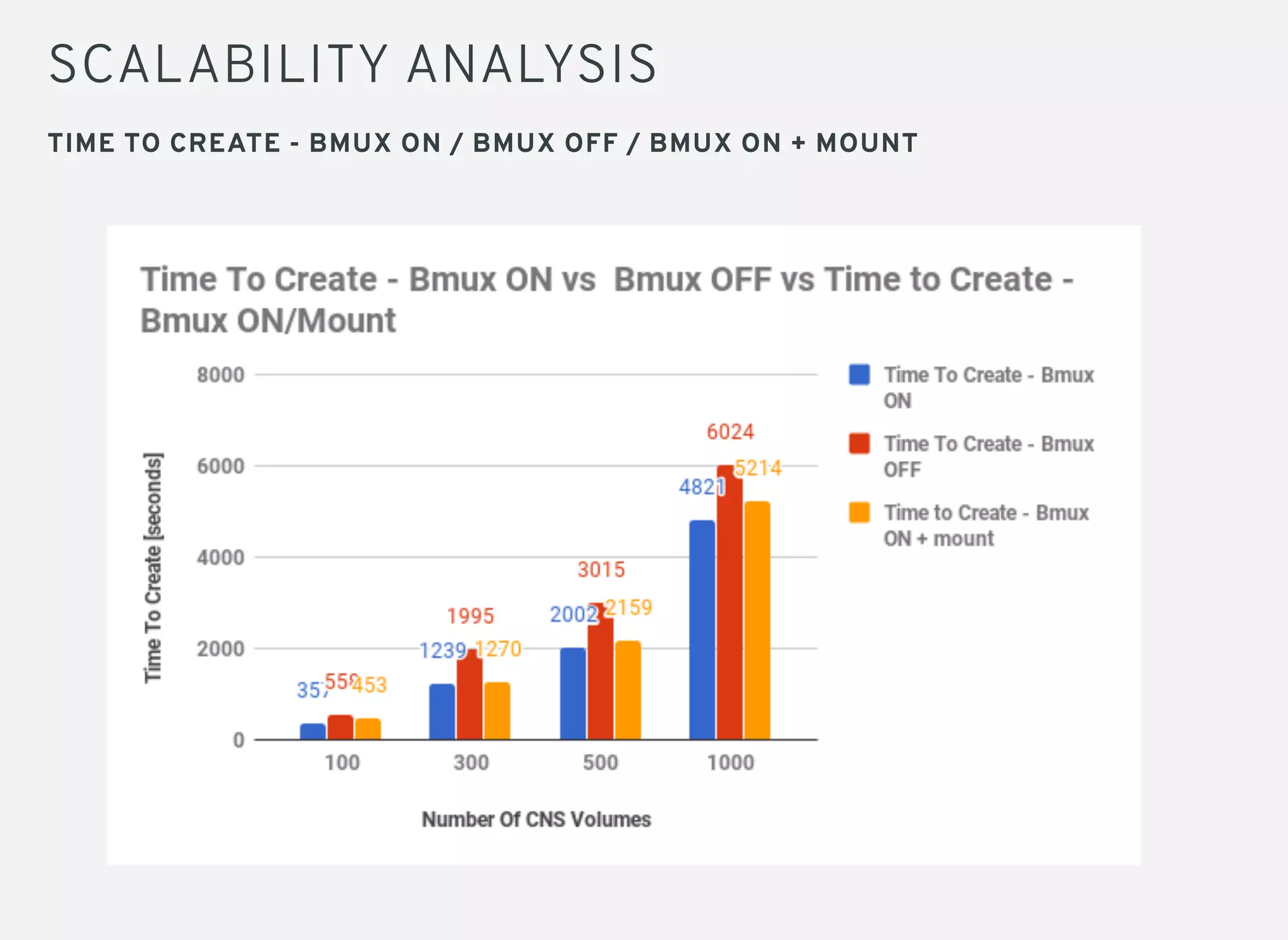
TIME TO CREATE - BMUX ON / BMUX OFF / BMUX ON + MOUNT
SCALABILITY ANALYSIS
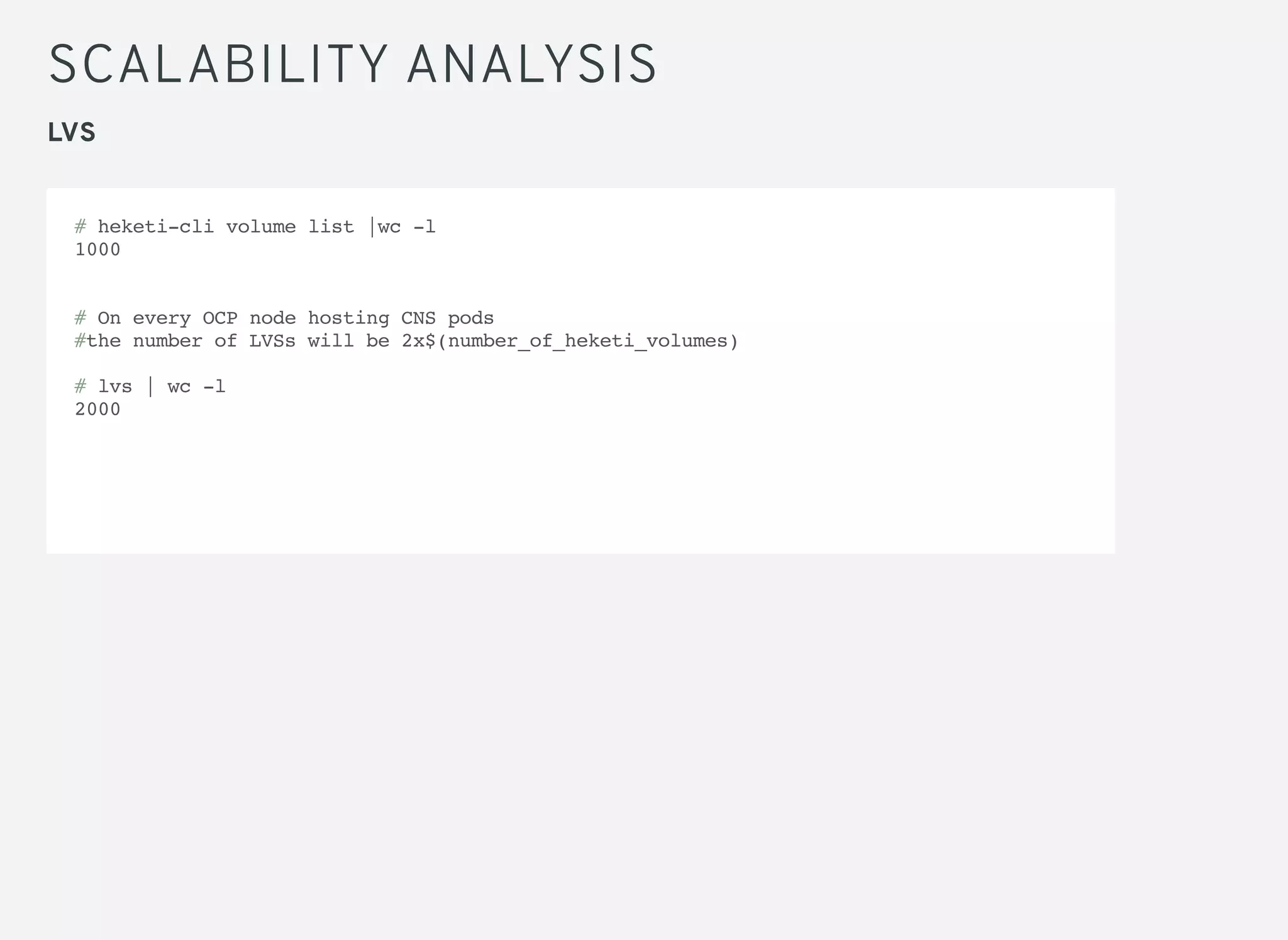
LVS
# heketi-cli volume list |wc -l
1000
# On every OCP node hosting CNS pods
#the number of LVSs will be 2x$(number_of_heketi_volumes)
# lvs | wc -l
2000
BEST PRACTICES
Monitor OCP nodes hosting CNS pods ( memory / cpu )
If possible give CNS pods dedicated nodes
Stay inside supported boundaries for specific OCP/CNS release
regarding number of volumes
CNS pods are important pods
NEXT STEPS
Random performance is captured but its skewed in CNS environment.
Smallfile workload performance will be captured as well.
CNS block device feature - scale test / IO test
OCP infra apps using CNS ( file/block ) OCP metrics/logging
Cassandra/MariaDB/MongoDB ( CNS block )
CONCLUSIONS
No Performance degradation is seen with brick multiplexing enabled
for large file workload
Brick Multiplexing brings improvements from memory usage point of
view
Brick Multiplex helps to scale faster
Possible to "pack" more CNS volumes on same HW with smaller memory
footprint
Brick Multiplexing is enabled by default - it is recommended not to
disable it
QUESTIONS ??
twitter.com/RedHatNews
youtube.com/redhat
facebook.com/redhatinc
THANK YOU!
plus.google.com/+RedHat
linkedin.com/company/red-hat

Scalability and Performance of CNS 3.6

  • 1.
    PERFORMANCE AND SCALABILITY OFCNS 3.6 IN OCP WITH BRICK- MULTIPLEX ENABLED ELVIR KURIC, SHEKHAR BERRY Gluster Summit, 28th October 2017
  • 2.
    CONTENTS Introduction/Motivation What is BrickMultiplexing Performance Analysis Scalability Analysis Next Steps Conclusion
  • 3.
    INTRODUCTION OpenShift Container Platform(OCP) is an application platform ( aka PaaS ) by Red Hat. This is essentially Kubernetes + add ons which is used for automating deployment, management and orchestration of containerized application CNS ( Container Native Storage ) is way to run gluster inside Openshift pods
  • 4.
    MOTIVATION OBJECTIVES OF THISTESTING: Brick Multiplexing is a salient feature of Gluster 3.10 To find out effect of brick multiplexing on IO performance. Compare performance between brick multiplex enabled and disabled environment To observe how brick multiplex helps in scaling of persistent volume To find out resource consumption at highest scale and compare with brick multiplex disabled environment
  • 5.
    BRICK MULTIPLEXING All storagein Gluster is managed as bricks, which are just directories on servers The consistency of volumes across all its bricks is handled by the glusterfsd process, which is what consumes the memory. In older releases of Glusterfs , there was one such process per brick on each host. With brick-multiplexing, only one glusterfsd process is governing the bricks, such that the amount of memory consumption of GlusterFS pods is drastically reduced and the scalability is significantly improved.
  • 6.
    BRICK MULTIPLEXING RESOURCE CONSTRAINTSSEEN PRIOR TO BRICK MULTIPLEXING: Ports Memory CPU Brick multiplexing puts multiple bricks into one process. Thus, many bricks can consume *one* port, *one* set of global data structures, and *one* pool of global threads reducing resource consumption and contention.
  • 7.
    PERFORMANCE ANALYSIS TEST ENVIRONMENT 8Nodes (3 Dedicated CNS nodes, 5 App nodes including master) 48 GB RAM, 2 CPU sockets with 6 cores each, 12 processors in total on all 8 servers 3 CNS nodes comprised 12 7200 RPMs Hard Drives of 930GB capacity. Total capacity of ~11TB 10GbE Ethernet link was used for IO and 1GbE was used for management OCP v3.6 , kubernetes 1.6 glusterfs-3.8.44, heketi-5.0.0-1 docker images: rhgs3/rhgs-server-rhel7:3.3.0-24,: rhgs3/rhgs-volmanager-rhel7:3.3.0-27
  • 8.
    PERFORMANCE ANALYSIS TEST PROCEDURE PersistentVolumes were scaled from 100,200,300,500 to 1000 in brick-multiplexed environment and mounted inside application pod pbench-fio was used to run concurrent sequential and random workload on the persistent volumes mounted inside pod Tests were repeated to get reproducible numbers Performance comparison between brick multiplex enabled and disabled was done for a particular number of persistent volumes
  • 9.
    PERFORMANCE ANALYSIS TEST RESULTS Performsbetter at higher scale. Best performance is seen at 1000 PV where all drives are utilized Read performance is close to line speed Write performance is impacted by limited use of backend hard drives
  • 10.
    PERFORMANCE ANALYSIS TEST RESULTS Noperformance drop is seen between brick-multiplex enabled environment and brick-multiplex disabled environment
  • 11.
    SCALABILITY ANALYSIS Gluster volumes( Storage ) were "static" - not many changes related to Gluster volumes happened ( Change Request was necessary to do anything with gluster volume) Before : volume was in use for days/months Now : most of volumes are in use for minutes/hours Storage administrator vs Openshift administrator vs User Control over creating gluster volumes is moved to Openshift user Gluster In Pre-Kubernetes/OpenShift Era
  • 12.
    SCALABILITY ANALYSIS 10 nodes( 1x master, 2 infra nodes, 3 dedicated cns nodes, 5 app nodes ) OCP/CNS nodes had more than 50 GB of memory per node 24 CPUs per node OCP v3.7 , kubernetes 1.7 glusterfs-3.8.44, heketi-5.0.0-15 docker images : rhgs3/rhgs-server-rhel7:3.3.0-360 / rhgs3/rhgs- volmanager-rhel7:3.3.0-360 TEST ENVIRONMENT
  • 13.
    SCALABILITY ANALYSIS WHAT/HOW WASTESTED? Scalability of PVC creation on top of CNS Different number of PVC were tested (100,300,500,1000) We wanted to know memory footprint for different number of PVC/CNS volumes ( with / without Brick Multiplexing ) Bonus - how fast PVC are created Clusterloader https://github.com/openshift/svt/tree/master/openshift_scalability Pbench https://github.com/distributed-system-analysis/pbench heketivolumemonitor - https://github.com/ekuric/openshift/blob/master/cns/heketivolumemonitor .py TOOLS USED
  • 14.
    SCALABILITY ANALYSIS MEMORY USAGE- WHEN 1000 CNS VOLUMES PRESENT IN CNS CLUSTER
  • 15.
    SCALABILITY ANALYSIS TIME TOCREATE - BMUX ON / BMUX OFF
  • 16.
    SCALABILITY ANALYSIS TIME TOCREATE - BMUX ON / BMUX OFF / BMUX ON + MOUNT
  • 17.
    SCALABILITY ANALYSIS LVS # heketi-clivolume list |wc -l 1000 # On every OCP node hosting CNS pods #the number of LVSs will be 2x$(number_of_heketi_volumes) # lvs | wc -l 2000
  • 18.
    BEST PRACTICES Monitor OCPnodes hosting CNS pods ( memory / cpu ) If possible give CNS pods dedicated nodes Stay inside supported boundaries for specific OCP/CNS release regarding number of volumes CNS pods are important pods
  • 19.
    NEXT STEPS Random performanceis captured but its skewed in CNS environment. Smallfile workload performance will be captured as well. CNS block device feature - scale test / IO test OCP infra apps using CNS ( file/block ) OCP metrics/logging Cassandra/MariaDB/MongoDB ( CNS block )
  • 20.
    CONCLUSIONS No Performance degradationis seen with brick multiplexing enabled for large file workload Brick Multiplexing brings improvements from memory usage point of view Brick Multiplex helps to scale faster Possible to "pack" more CNS volumes on same HW with smaller memory footprint Brick Multiplexing is enabled by default - it is recommended not to disable it
  • 21.
  • 22.