Genomic Selection with
Bayesian Generalized Linear
Regression model using R
by Avjinder Kaler
Avjinder Singh Kaler
University of Arkansas, Fayetteville, AR
avjindersingh@gmail.com
This tutorial is used to perform a genomic prediction.
Anyone can use and learn about genomic prediction using
BGLR R package and if you have question related to
genomic prediction and other models, you can contact me
using above email.
Download and Install software.
1. R program
https://cran.r-project.org/bin/windows/base/
2. R Studio
https://www.rstudio.com/products/rstudio/download/
Steps in Genomic Prediction
Step 1: Data Formatting
Format the genotype and phenotype data files needed for BGLR package.
Three types of files are required; genotype file in numeric form, phenotype
file, and kinship matrix.
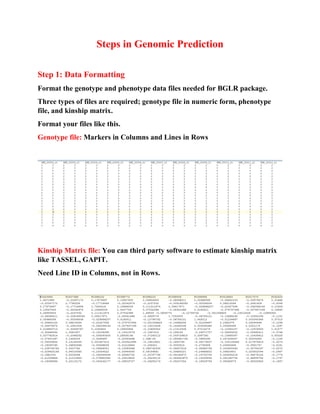
Format your files like this.
Genotype file: Markers in Columns and Lines in Rows
Kinship Matrix file: You can third party software to estimate kinship matrix
like TASSEL, GAPIT.
Need Line ID in Columns, not in Rows.
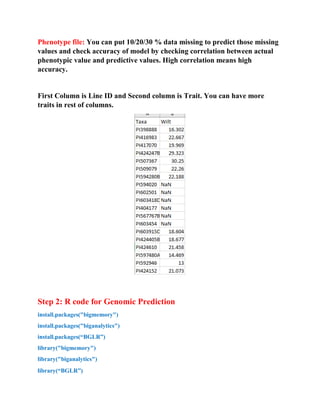
Phenotype file: You can put 10/20/30 % data missing to predict those missing
values and check accuracy of model by checking correlation between actual
phenotypic value and predictive values. High correlation means high
accuracy.
First Column is Line ID and Second column is Trait. You can have more
traits in rest of columns.
Step 2: R code for Genomic Prediction
install.packages("bigmemory")
install.packages("biganalytics")
install.packages(“BGLR”)
library("bigmemory")
library("biganalytics")
library(“BGLR”)
Step 3: Set working directory and import data
Set your working directory where you have your data files.
# Read all files
#Phenotype file loading
Y <- read.table("AAE.txt", head = TRUE)
y<-Y[,2]
#Genotype file loading
X <- read.table("g3.txt", head = TRUE)
#Kinship matrix file loading
A<- read.table("k3.txt", head = TRUE)
# Check the dimensions for all files, need to be same dimension for Lines
dim(y)
dim(X)
dim(A)
#Computing the genomic relationship matrix
X<-scale(X,center=TRUE,scale=TRUE)
G<-tcrossprod(X)/ncol(X)
#Computing the eigen-value decomposition of G
EVD <-eigen(G)
#Setting the linear predictor
ETA<-list(list(K=A, model='RKHS'),
list(V=EVD$vectors,d=EVD$values, model='RKHS')
)
#Fitting the model
fm<-BGLR(y=y, ETA=ETA, nIter=12000, burnIn=2000,saveAt='PGBLUP_')
save(fm,file='fmPG_BLUP.rda')
#Predictions
yHat<-fm$yHat
tmp<-range(c(y,yHat))
plot(yHat~y,xlab='Observed',ylab='Predicted',col=2,
xlim=tmp,ylim=tmp); abline(a=0,b=1,col=4,lwd=2)
#Exporting your Genomic prediction values
write.table(yHat, "C:/Folder/file. xt", sep="t")
#Godness of fit and related statistics
fm$fit
fm$varE # compare to var(y)
#Variance components associated with the genomic and pedigree
fm$ETA[[1]]$varU
fm$ETA[[2]]$varU
# Residual variance
varE<-scan('PGBLUP_varE.dat')
plot(varE,type='o',col=2,cex=.5);
Note:
# Check results in your folder and correlate predictive values with
actual phenotypic values, see how accurate is your model.
For other Tutorials, you can visit here:
http://www.slideshare.net/AvjinderSingh

Genomic Selection with Bayesian Generalized Linear Regression model using R

  • 1.
    Genomic Selection with BayesianGeneralized Linear Regression model using R by Avjinder Kaler Avjinder Singh Kaler University of Arkansas, Fayetteville, AR avjindersingh@gmail.com This tutorial is used to perform a genomic prediction. Anyone can use and learn about genomic prediction using BGLR R package and if you have question related to genomic prediction and other models, you can contact me using above email. Download and Install software. 1. R program https://cran.r-project.org/bin/windows/base/ 2. R Studio https://www.rstudio.com/products/rstudio/download/
  • 2.
    Steps in GenomicPrediction Step 1: Data Formatting Format the genotype and phenotype data files needed for BGLR package. Three types of files are required; genotype file in numeric form, phenotype file, and kinship matrix. Format your files like this. Genotype file: Markers in Columns and Lines in Rows Kinship Matrix file: You can third party software to estimate kinship matrix like TASSEL, GAPIT. Need Line ID in Columns, not in Rows.
  • 3.
    Phenotype file: Youcan put 10/20/30 % data missing to predict those missing values and check accuracy of model by checking correlation between actual phenotypic value and predictive values. High correlation means high accuracy. First Column is Line ID and Second column is Trait. You can have more traits in rest of columns. Step 2: R code for Genomic Prediction install.packages("bigmemory") install.packages("biganalytics") install.packages(“BGLR”) library("bigmemory") library("biganalytics") library(“BGLR”)
  • 4.
    Step 3: Setworking directory and import data Set your working directory where you have your data files. # Read all files #Phenotype file loading Y <- read.table("AAE.txt", head = TRUE) y<-Y[,2] #Genotype file loading X <- read.table("g3.txt", head = TRUE) #Kinship matrix file loading A<- read.table("k3.txt", head = TRUE) # Check the dimensions for all files, need to be same dimension for Lines dim(y) dim(X) dim(A) #Computing the genomic relationship matrix X<-scale(X,center=TRUE,scale=TRUE) G<-tcrossprod(X)/ncol(X) #Computing the eigen-value decomposition of G EVD <-eigen(G) #Setting the linear predictor ETA<-list(list(K=A, model='RKHS'), list(V=EVD$vectors,d=EVD$values, model='RKHS') ) #Fitting the model fm<-BGLR(y=y, ETA=ETA, nIter=12000, burnIn=2000,saveAt='PGBLUP_')
  • 5.
    save(fm,file='fmPG_BLUP.rda') #Predictions yHat<-fm$yHat tmp<-range(c(y,yHat)) plot(yHat~y,xlab='Observed',ylab='Predicted',col=2, xlim=tmp,ylim=tmp); abline(a=0,b=1,col=4,lwd=2) #Exporting yourGenomic prediction values write.table(yHat, "C:/Folder/file. xt", sep="t") #Godness of fit and related statistics fm$fit fm$varE # compare to var(y) #Variance components associated with the genomic and pedigree fm$ETA[[1]]$varU fm$ETA[[2]]$varU # Residual variance varE<-scan('PGBLUP_varE.dat') plot(varE,type='o',col=2,cex=.5); Note: # Check results in your folder and correlate predictive values with actual phenotypic values, see how accurate is your model. For other Tutorials, you can visit here: http://www.slideshare.net/AvjinderSingh