Chapter I
Data, Information,
Knowledge and Processing
12 ICT - AS & A LEVEL Anjan Mahanta
anjan.mahanta@satreephuketipc.com
2
Syllabus Content
1.1 Data, information and knowledge
● define data, clearly identifying that data has no meaning
● define information and show how data can become information through
context and meaning
● define knowledge and understand that information becomes knowledge
when human experience is applied
3
Syllabus Content
1.2 Sources of data
● define static data and give an example
● define dynamic data and give an example
● compare the use of static information sources with dynamic information
sources
● define direct and indirect data source
● understand the advantages and disadvantages of gathering data from
direct and indirect data sources
4
Syllabus Content
1.3 Quality of information
• understand how accuracy, relevance, age, level of detail and completeness of
the information can affect its quality
5
Syllabus Content
1.4 Coding, encoding and encrypting data
● describe the coding of data (including: M for male, F for female) and more intricate codes
(including: clothing type, sizes and colour of garment)
● discuss the advantages and disadvantages of the coding of data
● evaluate the need for encoding data and analyse the different methods that can be used to encode
data (including: codecs)
● define encryption and describe different methods of encryption (including: symmetric,
asymmetric, public key, private key)
● evaluate the need for encryption and how it can be used to protect data such as on a hard disk,
email or in HTTPS websites
● discuss encryption protocols (including: the purpose of Secure Socket Layer (SSL)/Transport Layer
Security (TLS) and the use of SSL/TLS in client server communication)
6
Syllabus Content
1.5 Checking the accuracy of data
● define validation and analyse a range of validation methods (including:
presence check, range check, type check, length check, format check and
check digit, lookup check, consistency check, limit check)
● define verification and analyse verification methods (including: visual
checking and double data entry)
● explain the need for both validation and verification
● define proof reading
7
DATA
Data is raw numbers, letters, symbols, sounds or images with no meaning.
The data P952BR could have several meanings.
It could possibly be:
• a product code
• a postal / ZIP code
• a car registration number.
As it is not known what the data means, it is
meaningless.
8
DATA
9
INFORMATION
● When data items are given context
and meaning, they become
information.
● A person reading the information
will then know what it means.
● Data is given context by identifying
what sort of data it is. This still does
not make it information but it is a
step on the way to it becoming
information as shown in the
example.
10
INFORMATION
● For the data to become information,
it needs to be given meaning.
Information is useful because it
means something.
11
TASK
Describe the difference between data and information.
12
TASK - Solution
Describe the difference between data and information.
Data usually refers to raw data/unprocessed data.
Information is data that has been processed in such a way as
to be meaningful to the person who receives it.
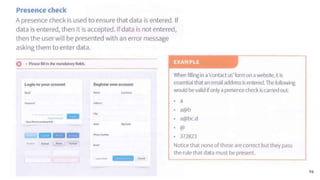
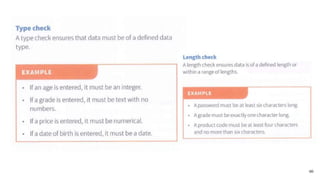
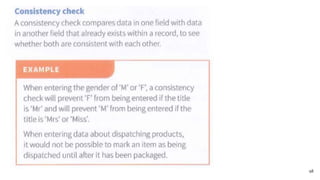
Information is data that has structure and context
13
KNOWLEDGE
● Knowledge is basically what a person knows.
● This is known as their knowledge base.
● A knowledge base gets larger over time as a person gains experience or learning.
● Knowledge requires a person to understand what information is, based on their
experience and knowledge base.
● In computing terms, knowledge is also what a machine knows through the use of
a knowledge base consisting of rules and facts, often found in knowledge-based
systems, modelling and simulation software.
14
KNOWLEDGE
● Crown Prince Salman was
appointed Crown Prince of Saudi
Arabia on 18 June 2012. This is
information.
● Knowing that he had been Crown
Prince for 2 years on 1 August
2014 is knowledge.
15
Key Terms
16
Discussions
17
Sources of data
18
STATIC DATA
● Static means ‘still’.
● It is data that does not normally
change.
● Static data is either fixed or has to
be changed manually by editing a
document.
19
DYNAMIC DATA
● Dynamic means ‘moving’.
● It is data that updates as a result of the source
data changing.
● Dynamic data is updated automatically
without user intervention.
20
DYNAMIC DATA
21
STATIC COMPARED WITH DYNAMIC INFORMATION SOURCES
Static Information Source Dynamic Information Source
The information does not change on a regular basis. Information is updated automatically when the
original data changes.
The information can go out of date quickly because
it is not designed to be changed on a regular basis.
It is most likely to be up to date as it changes
automatically based on the source data.
The information can be viewed of line because live
data is not required.
An internet or network connection to the source
data is required, which can be costly and can also be
slow in remote areas.
It is more likely to be accurate because time will
have been taken to check the information being
published, as it will be available for a long period of
time.
The data may have been produced very quickly and
so may contain errors.
22
TASK
A newspaper story is regarded as static data.
Using another appropriate example, describe what is meant by static data.
23
TASK - Solution
Example: CD_ROM
● Data that do not change.
● It can be read without being written back to a file/not changed when written
back.
● Limited amount of information in a static information source because as
soon as it is created it is difficult to have information added to it.
● Static data tends to go out of date quickly.
24
DISCUSSION
25
TASK
● Look at the Al Jazeera website www.aljazeera.com and identify which data is
static and which data is dynamic (updates automatically).
26
DIRECT DATA SOURCE
● Look at the Al Jazeera website www.aljazeera.com and identify which data is
static and which data is dynamic (updates automatically).
27
DATA TYPES (ACCESS)
28
TASK
29
TASK - Solution
30
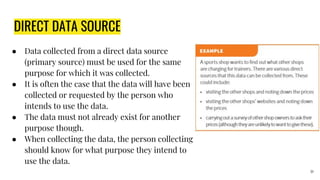
DIRECT DATA SOURCE
● Data collected from a direct data source
(primary source) must be used for the same
purpose for which it was collected.
● It is often the case that the data will have been
collected or requested by the person who
intends to use the data.
● The data must not already exist for another
purpose though.
● When collecting the data, the person collecting
should know for what purpose they intend to
use the data.
31
INDIRECT DATA SOURCE
● Data collected from an indirect
data source (secondary source)
already existed for another
purpose.
● Although it can still be
collected by the person who
intends to use it, it was often
collected by a different person
or organisation.
32
TASK Which of the following are direct data sources and which are indirect data sources?
33
Data Reason Collected Reason Used
Names and email addresses of
members of a political party
To record their membership and to
be able to contact them.
To contact members by email to
see if they will donate some money.
Employee attendance dates and
times
To identify when employees
attended work and to calculate
their wages.
To allow a police officer to check
an employee’s alibi if a crime has
been committed.
Flight times and prices from airline
websites
To compare the prices and times
for a trip to Florida.
To decide the best flight to use for
a trip to Florida.
Names, ages and addresses of
people
For a national census. To allow a marketing company to
find out which areas have the
highest population of children.
Weather measurements from a
weather station
To record the current weather. To show the current temperature
and rainfall on a website.
DISCUSSION
34
Advantages & Disadvantages of gathering data from direct and
indirect sources
35
Direct Data Source Indirect Data Source
The data will be relevant because what is needed has
been collected.
Additional data that is not required will exist that may
take time to sort through and some data that is required
may not exist.
The original source is known and so can be trusted. The original source may not be known and so it can’t be
assumed that it is reliable.
It can take a long time to gather original data rather than
use data that already exists.
The data is immediately available.
A large sample of statistical data can be difficult to
collect for one-of purposes.
If statistical analysis is required, then there are more
likely to be large samples available.
The data is likely to be up to date because it has been
collected recently.
Data may be out of date because it was collected at a
different time.
Advantages & Disadvantages of gathering data from direct and
indirect sources
36
Direct Data Source Indirect Data Source
Bias can be eliminated by asking specific questions. Original data may be biased due to its source.
The data can be collected and presented in the format
required.
The data is unlikely to be in the format required, which
may make extracting the data difficult.
ASSIGNMENT
37
QUALITY OF INFORMATION
The quality of information is determined by a number of attributes.
● Accuracy
● Relevance
● Age
● Level of detail
● Completeness
38
ACCURACY
● Information that is inaccurate is
clearly not good enough.
● Data must be accurate in order to be
considered of good quality.
● Imagine being told that you need to
check in at the airport 45 minutes
before the flight leaves, so you turn
up at 18:10 for a 19:05 flight only to
find that you were actually supposed
to check in one hour early.
39
RELEVANCE
● Information must be relevant to its
purpose.
● Having additional information that is
not required means that the user has
to search through the data to find
what is actually required.
40
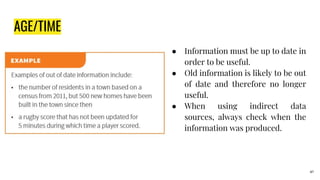
AGE/TIME
● Information must be up to date in
order to be useful.
● Old information is likely to be out
of date and therefore no longer
useful.
● When using indirect data
sources, always check when the
information was produced.
41
LEVEL OF DETAIL/INFORMATION
● There needs to be the right amount
of information for it to be good
quality.
● It’s possible to have either too little
or too much information provided.
● If there is too much information,
then it can be difficult to find the
exact information required.
● If there is not enough information,
then it is not possible to use it
correctly.
42
COMPLETENESS
● All information that is required
must be provided in order for it to
be of good quality.
● Not having all the information
required means it cannot be used
properly.
43
TASK
44
QUESTIONS
45
CODING, ENCODING AND ENCRYPTING DATA
Coding data
● You are probably very familiar with coding data already.
● When you send a text message or instant message you probably code your
data. You might use codes like:
○ LOL = laugh out loud
○ ROFL = roll on floor laughing
○ FYI = for your information
○ BTW = by the way
○ 2 = to
○ 4 = for
○ BRB = be right back
46
CODING, ENCODING AND ENCRYPTING DATA
In a similar way, data stored on a computer can be coded.
Coding is the process of representing data by assigning a code to it for
classification or identification.
Often genders are coded as M for male and F for female.
● Clothing can be coded by the type, size and colour:
○ DR = dress
○ 2XL = extra extra large
○ BL = blue
○ DR2XLBL = a dress in size extra extra large and colour blue
47
CODING - EXAMPLES
48
ADVANTAGES OF CODING DATA
49
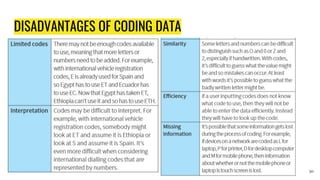
DISADVANTAGES OF CODING DATA
50
DISCUSSION
51
TASK
52
ENCODING DATA
● When data is encoded, it is stored in a specific format.
● Computers do not recognise text, sound and images in the same way we do.
● Computers use binary digits which are 1 and 0.
● One means on and zero means off.
● A typical binary number would look like this: 11011010. Therefore, data needs
to be encoded into a format which the computer understands.
● Codecs are programs that are used to encode data for images, audio and
video. The codecs are also needed to read the data.
53
TEXT
● Text is encoded as a number that is then
represented by a binary number.
● A common encoding method is ASCII
(American Standard Code for Information
Interchange).
● ASCII consists of 256 codes from 0 to 255.
● Here is a subset of the ASCII code table:
54
TASK
55
IMAGES
● Encoding is also used to store
images.
● At the most basic level, images
are encoded as bitmaps.
● A Microsoft Windows bitmap
includes the following data
when encoding an image (this
is not the complete list):
56
RASTER DATA
57
SAMPLE QUESTIONS
58
SAMPLE QUESTIONS
59
SAMPLE QUESTIONS
60
SOLUTIONS - SAMPLE QUESTIONS
61
RLE - RUN LENGTH ENCODING
62
RLE - RUN LENGTH ENCODING
Lossy Compression
63
TASK
64
POSSIBLE ANSWER
● Formats such asPNG and GIF enabling transparent backgrounds
● Formats such as GIF allowing animated images
● Formats such as JPG allowing a very large colour depth, meaning that the image will be of
high quality
● Formats such as bitmap image file (BMP) including all the original uncompressed data so
that the image is of the highest possible quality and can be manipulated
● Formats that are designed for specific software such as PaintShopPro and Photoshop
containing layers which allow for various adjustments to be made to the image and being
able to enable or remove those layers
● Vector formats such as SVG storing the shapes rather than the pixels so that graphics can
be enlarged and reduced without loss of quality due to pixelation. 65
SOUND
● When sound is encoded,the sample rate,bit depth and bit rate
are stored. When sound is recorded, it is converted from its
original analogue format into a digital format,which is broken
down into thousands of samples per second.
● The sample rate, also known as the frequency, is the number
of audio samples per second. The higher the sample rate, the
higher the quality of the music, but also the more storage that
is required.
● Each sample is stored as binary data. The sample rate is
measured in hertz(Hz). Typically, music on a CD will use a
sample rate of 44.1 kHz (kilohertz) whereas a simple telephone
call would find 8kHz sufficient.
66
SOUND
● The bit depth is the number of bits (Is and Os) used for each sound clip. A
higher bit depth will give a higher quality sound. CDs use a bit depth of 16
which means 16 bits (Os and Is) are used. 16 bits gives 65536 combinations of
binary storage.
● The bit rate is the number of bits that are processed every second. It is
measured in kilo bits per second (kbps). The bit rate is calculated using this
calculation:
Bit rate = sample rate x bit depth x number of channel
67
TASK
68
69
ENCODING SOUND
● The encoding method above does not compress the file and a typical storage
format is WAV (Waveform Audio File format), which is used on PCs.
● However, music files are often compressed to allow for efficient streaming
across the internet and to enable lots of music files to be stored on a single
storage medium.
● Compression reduces the file size.
● There are two types of compression: lossy compression and lossless
compression.
● Lossless compression reduces the file size without losing any quality, but it
can only reduce the file size by about 50%. 70
71
VIDEO
● When video is encoded it needs to store images as well as sound.
● Images are stored as frames.
● A standard quality video would normally have 24 frames per second (fps).
● High definition (HD) uses 50 fps and 60 fps.
● The higher the number of frames per second, the more storage that is
required, but the higher quality the video will be.
● The size of the image is also important.
● A HD video will have an image size of 1920 pixels wide and 1080 pixels high.
● The higher the image size, the more storage that is required. 72
VIDEO
● The bit rate for videos combines both the audio and frames that need to be
processed every second.
● The bit rate is the number of bits that need to be processed every second. A
higher frame rate requires a higher bit rate.
73
VIDEO
● A one hour, eight-bit HD video with 24 fps would require 334 GB (gigabytes) of
storage. This would be far too much data to download or even broadcast.
● Therefore, compression is required. Compression usually involves reducing
the:
○ Resolution
○ imagesize or
○ bitrate
● These all result in lossy compression. A common lossy compression format is
MP4, which is a codec created by MPEG (Moving Pictures Expert Group).
● There are also lossless compression methods such as digital video (DV).
74
TASk
75
ADVANTAGES & DISADVANTAGES OF ENCODING DATA
76
ADVANTAGES DISADVANTAGES
TASK
77
ENCRYPTION
● One specific type of encoding is encryption.
● This is when data is scrambled so that it cannot be understood.
● The purpose of encryption is to make the data difficult or impossible to read
if it is accessed by an unauthorised user.
● Data can be encrypted when it is stored on disks or other storage media, or
it can be encrypted when it is sent across a network such as a local area
network or the internet.
● Accessing encrypted data legitimately is known as decryption.
78
CAESAR CIPHER
● A cipher is a secret way of writing. In other words it is a code.
● Ciphers are used to convert a message in to an encrypted message.
● It is a special type of algorithm which defines the set of rules to follow to
encrypt a message.
● Roman Emperor Julius Caesar created the Caesar cipher so that he could
communicate in secret with his generals.
● The Caesar cipher is sometimes known as a shift cipher because it selects
replacement letters by shifting along the alphabet.
79
EXAMPLE
●
80
TASK
81
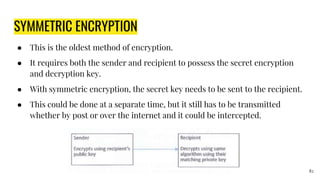
SYMMETRIC ENCRYPTION
● This is the oldest method of encryption.
● It requires both the sender and recipient to possess the secret encryption
and decryption key.
● With symmetric encryption, the secret key needs to be sent to the recipient.
● This could be done at a separate time, but it still has to be transmitted
whether by post or over the internet and it could be intercepted.
82
ASYMMETRIC ENCRYPTION
● A symmetric encryption is also known as public-key cryptography.
● A symmetric encryption overcomes the problem of symmetric encryption
keys being intercepted by using a pair of keys.
● This will include a publickey which is available to anybody wanting to send
data, and a private key that is known only to the recipient.
● The key is the algorithm required to encrypt and decrypt the data.
● This method requires a lot more processing than symmetric encryption and
so it takes longer to decrypt the data.
83
ASYMMETRIC ENCRYPTION
● In order to find a publickey, digital certificates are required which identify
the user or server and provide the public key.
● A digital certificate is unique to each user or server. A digital certificate
usually includes:
○ Organisation name
○ Organisation that issued the certificate
○ User’s email address
○ User’s country
○ User’s public key
84
EXAMPLE
● In the next example, Tomasz sends a
message to Helene.
● Tomasz encrypts the message using
Helene’s public key.
● Helene receives the encrypted message
and decrypts it using her private key.
85
HARD DISK
● Disk encryption will encrypt every single bit of data stored on a disk. This is
different to encrypting single files.
● In order to access any file on the disk, the encryption key will be required.
● This type of encryption is not limited to disks and can be used on other storage
media such as backup tapes and Universal Serial Bus (USB) flash memory.
● It is particularly important that USB flash memory and backup tapes are
encrypted because these are portable storage media and so are susceptible to
being lost or stolen.
● The data is usually accessed by entering a password or using a fingerprint to
unlock the encryption. 86
HTTPS
● Normal web pages that are not encrypted are fetched and transmitted using
Hypertext Transfer Protocol (HTTP).
● Hypertext Transfer Protocol Secure (HTTPS) is the encryption standard used for
secure web pages.
● It uses Secure Sockets Layer (SSL) or Transport Layer Security (TLS) to encrypt
and decrypt pages and information sent and received by web users.
● This is the encryption method that is used by banks when a user logs onto online
banking.
87
HTTPS
●
88
Email
● Email encryption uses asymmetric encryption.
● This means that recipients of emails must have the private key that matches
the public key used to encrypt the original email.
● In order for this to work, both the sender and recipient need to send each
other a digitally signed message that will add the person’s digital certificate
to the contact for that person.
● Encrypting an email will also encrypt any attachments.
89
QUESTIONS
90
CHECKING THE ACCURACY OF DATA
91
VALIDATION
● Validation takes place when data is input into a computer system.
● The purpose is to ensure the data is sensible and conforms to defined rules.
A railway season ticket will have an expiry date.
● The season ticket is valid until it expires.
● When data is validated, if it conforms to the rules then it will be accepted.
● If it does not conform to the rules, then it will be rejected and an error
message will be presented.
92
TASK
93
94
95
96
97
98
99
100
101
VERIFICATION
Verification is the process of checking that the data entered into the computer
system matches the original source.
Visual checking
A method of verification can be for the user to visually check that the data
entered matches the original source.
This can be done by reading the data displayed on screen and comparing it with
the original data.
102
DOUBLE DATA ENTRY
● Another method of verification is to input
data into the computer system twice.
● The two items of data are compared by the
computer system and if they match, then
they are verified.
● If there are any differences, then one of
the inputs must have been incorrect.
103
VALIDATION AND VERIFICATION
● The need for both validation and verification
As you will have seen in the two sections
above, it is possible to enter valid data that is
still in correct.
● It is also possible to verify in correct data. By
using both validation and verification, the
chances of entering incorrect data are
reduced.
● If data that is incorrect passes a validation
check, then the verification check is likely to
spot the error.
104
PROOF READING
● Proofreading is the process of checking information.
● For example, when this book was written it was checked for spelling errors,
grammar errors, formatting and accuracy.
● Proofreading can take place for a document or when data is input. When
proofreading a document, it is best to have a proofreader who is different from
the original author of the document, as they will be able to check the work
objectively and identify errors.
● However, it is also possible for the original author to proofread their own
document, but they may not notice some of their own errors. When data is input,
it is usually proofread by the person inputting the data.
105
106
107

Data, Information, Knowledge and Processing

  • 1.
    Chapter I Data, Information, Knowledgeand Processing 12 ICT - AS & A LEVEL Anjan Mahanta anjan.mahanta@satreephuketipc.com
  • 2.
  • 3.
    Syllabus Content 1.1 Data,information and knowledge ● define data, clearly identifying that data has no meaning ● define information and show how data can become information through context and meaning ● define knowledge and understand that information becomes knowledge when human experience is applied 3
  • 4.
    Syllabus Content 1.2 Sourcesof data ● define static data and give an example ● define dynamic data and give an example ● compare the use of static information sources with dynamic information sources ● define direct and indirect data source ● understand the advantages and disadvantages of gathering data from direct and indirect data sources 4
  • 5.
    Syllabus Content 1.3 Qualityof information • understand how accuracy, relevance, age, level of detail and completeness of the information can affect its quality 5
  • 6.
    Syllabus Content 1.4 Coding,encoding and encrypting data ● describe the coding of data (including: M for male, F for female) and more intricate codes (including: clothing type, sizes and colour of garment) ● discuss the advantages and disadvantages of the coding of data ● evaluate the need for encoding data and analyse the different methods that can be used to encode data (including: codecs) ● define encryption and describe different methods of encryption (including: symmetric, asymmetric, public key, private key) ● evaluate the need for encryption and how it can be used to protect data such as on a hard disk, email or in HTTPS websites ● discuss encryption protocols (including: the purpose of Secure Socket Layer (SSL)/Transport Layer Security (TLS) and the use of SSL/TLS in client server communication) 6
  • 7.
    Syllabus Content 1.5 Checkingthe accuracy of data ● define validation and analyse a range of validation methods (including: presence check, range check, type check, length check, format check and check digit, lookup check, consistency check, limit check) ● define verification and analyse verification methods (including: visual checking and double data entry) ● explain the need for both validation and verification ● define proof reading 7
  • 8.
    DATA Data is rawnumbers, letters, symbols, sounds or images with no meaning. The data P952BR could have several meanings. It could possibly be: • a product code • a postal / ZIP code • a car registration number. As it is not known what the data means, it is meaningless. 8
  • 9.
  • 10.
    INFORMATION ● When dataitems are given context and meaning, they become information. ● A person reading the information will then know what it means. ● Data is given context by identifying what sort of data it is. This still does not make it information but it is a step on the way to it becoming information as shown in the example. 10
  • 11.
    INFORMATION ● For thedata to become information, it needs to be given meaning. Information is useful because it means something. 11
  • 12.
    TASK Describe the differencebetween data and information. 12
  • 13.
    TASK - Solution Describethe difference between data and information. Data usually refers to raw data/unprocessed data. Information is data that has been processed in such a way as to be meaningful to the person who receives it. Information is data that has structure and context 13
  • 14.
    KNOWLEDGE ● Knowledge isbasically what a person knows. ● This is known as their knowledge base. ● A knowledge base gets larger over time as a person gains experience or learning. ● Knowledge requires a person to understand what information is, based on their experience and knowledge base. ● In computing terms, knowledge is also what a machine knows through the use of a knowledge base consisting of rules and facts, often found in knowledge-based systems, modelling and simulation software. 14
  • 15.
    KNOWLEDGE ● Crown PrinceSalman was appointed Crown Prince of Saudi Arabia on 18 June 2012. This is information. ● Knowing that he had been Crown Prince for 2 years on 1 August 2014 is knowledge. 15
  • 16.
  • 17.
  • 18.
  • 19.
    STATIC DATA ● Staticmeans ‘still’. ● It is data that does not normally change. ● Static data is either fixed or has to be changed manually by editing a document. 19
  • 20.
    DYNAMIC DATA ● Dynamicmeans ‘moving’. ● It is data that updates as a result of the source data changing. ● Dynamic data is updated automatically without user intervention. 20
  • 21.
  • 22.
    STATIC COMPARED WITHDYNAMIC INFORMATION SOURCES Static Information Source Dynamic Information Source The information does not change on a regular basis. Information is updated automatically when the original data changes. The information can go out of date quickly because it is not designed to be changed on a regular basis. It is most likely to be up to date as it changes automatically based on the source data. The information can be viewed of line because live data is not required. An internet or network connection to the source data is required, which can be costly and can also be slow in remote areas. It is more likely to be accurate because time will have been taken to check the information being published, as it will be available for a long period of time. The data may have been produced very quickly and so may contain errors. 22
  • 23.
    TASK A newspaper storyis regarded as static data. Using another appropriate example, describe what is meant by static data. 23
  • 24.
    TASK - Solution Example:CD_ROM ● Data that do not change. ● It can be read without being written back to a file/not changed when written back. ● Limited amount of information in a static information source because as soon as it is created it is difficult to have information added to it. ● Static data tends to go out of date quickly. 24
  • 25.
  • 26.
    TASK ● Look atthe Al Jazeera website www.aljazeera.com and identify which data is static and which data is dynamic (updates automatically). 26
  • 27.
    DIRECT DATA SOURCE ●Look at the Al Jazeera website www.aljazeera.com and identify which data is static and which data is dynamic (updates automatically). 27
  • 28.
  • 29.
  • 30.
  • 31.
    DIRECT DATA SOURCE ●Data collected from a direct data source (primary source) must be used for the same purpose for which it was collected. ● It is often the case that the data will have been collected or requested by the person who intends to use the data. ● The data must not already exist for another purpose though. ● When collecting the data, the person collecting should know for what purpose they intend to use the data. 31
  • 32.
    INDIRECT DATA SOURCE ●Data collected from an indirect data source (secondary source) already existed for another purpose. ● Although it can still be collected by the person who intends to use it, it was often collected by a different person or organisation. 32
  • 33.
    TASK Which ofthe following are direct data sources and which are indirect data sources? 33 Data Reason Collected Reason Used Names and email addresses of members of a political party To record their membership and to be able to contact them. To contact members by email to see if they will donate some money. Employee attendance dates and times To identify when employees attended work and to calculate their wages. To allow a police officer to check an employee’s alibi if a crime has been committed. Flight times and prices from airline websites To compare the prices and times for a trip to Florida. To decide the best flight to use for a trip to Florida. Names, ages and addresses of people For a national census. To allow a marketing company to find out which areas have the highest population of children. Weather measurements from a weather station To record the current weather. To show the current temperature and rainfall on a website.
  • 34.
  • 35.
    Advantages & Disadvantagesof gathering data from direct and indirect sources 35 Direct Data Source Indirect Data Source The data will be relevant because what is needed has been collected. Additional data that is not required will exist that may take time to sort through and some data that is required may not exist. The original source is known and so can be trusted. The original source may not be known and so it can’t be assumed that it is reliable. It can take a long time to gather original data rather than use data that already exists. The data is immediately available. A large sample of statistical data can be difficult to collect for one-of purposes. If statistical analysis is required, then there are more likely to be large samples available. The data is likely to be up to date because it has been collected recently. Data may be out of date because it was collected at a different time.
  • 36.
    Advantages & Disadvantagesof gathering data from direct and indirect sources 36 Direct Data Source Indirect Data Source Bias can be eliminated by asking specific questions. Original data may be biased due to its source. The data can be collected and presented in the format required. The data is unlikely to be in the format required, which may make extracting the data difficult.
  • 37.
  • 38.
    QUALITY OF INFORMATION Thequality of information is determined by a number of attributes. ● Accuracy ● Relevance ● Age ● Level of detail ● Completeness 38
  • 39.
    ACCURACY ● Information thatis inaccurate is clearly not good enough. ● Data must be accurate in order to be considered of good quality. ● Imagine being told that you need to check in at the airport 45 minutes before the flight leaves, so you turn up at 18:10 for a 19:05 flight only to find that you were actually supposed to check in one hour early. 39
  • 40.
    RELEVANCE ● Information mustbe relevant to its purpose. ● Having additional information that is not required means that the user has to search through the data to find what is actually required. 40
  • 41.
    AGE/TIME ● Information mustbe up to date in order to be useful. ● Old information is likely to be out of date and therefore no longer useful. ● When using indirect data sources, always check when the information was produced. 41
  • 42.
    LEVEL OF DETAIL/INFORMATION ●There needs to be the right amount of information for it to be good quality. ● It’s possible to have either too little or too much information provided. ● If there is too much information, then it can be difficult to find the exact information required. ● If there is not enough information, then it is not possible to use it correctly. 42
  • 43.
    COMPLETENESS ● All informationthat is required must be provided in order for it to be of good quality. ● Not having all the information required means it cannot be used properly. 43
  • 44.
  • 45.
  • 46.
    CODING, ENCODING ANDENCRYPTING DATA Coding data ● You are probably very familiar with coding data already. ● When you send a text message or instant message you probably code your data. You might use codes like: ○ LOL = laugh out loud ○ ROFL = roll on floor laughing ○ FYI = for your information ○ BTW = by the way ○ 2 = to ○ 4 = for ○ BRB = be right back 46
  • 47.
    CODING, ENCODING ANDENCRYPTING DATA In a similar way, data stored on a computer can be coded. Coding is the process of representing data by assigning a code to it for classification or identification. Often genders are coded as M for male and F for female. ● Clothing can be coded by the type, size and colour: ○ DR = dress ○ 2XL = extra extra large ○ BL = blue ○ DR2XLBL = a dress in size extra extra large and colour blue 47
  • 48.
  • 49.
  • 50.
  • 51.
  • 52.
  • 53.
    ENCODING DATA ● Whendata is encoded, it is stored in a specific format. ● Computers do not recognise text, sound and images in the same way we do. ● Computers use binary digits which are 1 and 0. ● One means on and zero means off. ● A typical binary number would look like this: 11011010. Therefore, data needs to be encoded into a format which the computer understands. ● Codecs are programs that are used to encode data for images, audio and video. The codecs are also needed to read the data. 53
  • 54.
    TEXT ● Text isencoded as a number that is then represented by a binary number. ● A common encoding method is ASCII (American Standard Code for Information Interchange). ● ASCII consists of 256 codes from 0 to 255. ● Here is a subset of the ASCII code table: 54
  • 55.
  • 56.
    IMAGES ● Encoding isalso used to store images. ● At the most basic level, images are encoded as bitmaps. ● A Microsoft Windows bitmap includes the following data when encoding an image (this is not the complete list): 56
  • 57.
  • 58.
  • 59.
  • 60.
  • 61.
    SOLUTIONS - SAMPLEQUESTIONS 61
  • 62.
    RLE - RUNLENGTH ENCODING 62
  • 63.
    RLE - RUNLENGTH ENCODING Lossy Compression 63
  • 64.
  • 65.
    POSSIBLE ANSWER ● Formatssuch asPNG and GIF enabling transparent backgrounds ● Formats such as GIF allowing animated images ● Formats such as JPG allowing a very large colour depth, meaning that the image will be of high quality ● Formats such as bitmap image file (BMP) including all the original uncompressed data so that the image is of the highest possible quality and can be manipulated ● Formats that are designed for specific software such as PaintShopPro and Photoshop containing layers which allow for various adjustments to be made to the image and being able to enable or remove those layers ● Vector formats such as SVG storing the shapes rather than the pixels so that graphics can be enlarged and reduced without loss of quality due to pixelation. 65
  • 66.
    SOUND ● When soundis encoded,the sample rate,bit depth and bit rate are stored. When sound is recorded, it is converted from its original analogue format into a digital format,which is broken down into thousands of samples per second. ● The sample rate, also known as the frequency, is the number of audio samples per second. The higher the sample rate, the higher the quality of the music, but also the more storage that is required. ● Each sample is stored as binary data. The sample rate is measured in hertz(Hz). Typically, music on a CD will use a sample rate of 44.1 kHz (kilohertz) whereas a simple telephone call would find 8kHz sufficient. 66
  • 67.
    SOUND ● The bitdepth is the number of bits (Is and Os) used for each sound clip. A higher bit depth will give a higher quality sound. CDs use a bit depth of 16 which means 16 bits (Os and Is) are used. 16 bits gives 65536 combinations of binary storage. ● The bit rate is the number of bits that are processed every second. It is measured in kilo bits per second (kbps). The bit rate is calculated using this calculation: Bit rate = sample rate x bit depth x number of channel 67
  • 68.
  • 69.
  • 70.
    ENCODING SOUND ● Theencoding method above does not compress the file and a typical storage format is WAV (Waveform Audio File format), which is used on PCs. ● However, music files are often compressed to allow for efficient streaming across the internet and to enable lots of music files to be stored on a single storage medium. ● Compression reduces the file size. ● There are two types of compression: lossy compression and lossless compression. ● Lossless compression reduces the file size without losing any quality, but it can only reduce the file size by about 50%. 70
  • 71.
  • 72.
    VIDEO ● When videois encoded it needs to store images as well as sound. ● Images are stored as frames. ● A standard quality video would normally have 24 frames per second (fps). ● High definition (HD) uses 50 fps and 60 fps. ● The higher the number of frames per second, the more storage that is required, but the higher quality the video will be. ● The size of the image is also important. ● A HD video will have an image size of 1920 pixels wide and 1080 pixels high. ● The higher the image size, the more storage that is required. 72
  • 73.
    VIDEO ● The bitrate for videos combines both the audio and frames that need to be processed every second. ● The bit rate is the number of bits that need to be processed every second. A higher frame rate requires a higher bit rate. 73
  • 74.
    VIDEO ● A onehour, eight-bit HD video with 24 fps would require 334 GB (gigabytes) of storage. This would be far too much data to download or even broadcast. ● Therefore, compression is required. Compression usually involves reducing the: ○ Resolution ○ imagesize or ○ bitrate ● These all result in lossy compression. A common lossy compression format is MP4, which is a codec created by MPEG (Moving Pictures Expert Group). ● There are also lossless compression methods such as digital video (DV). 74
  • 75.
  • 76.
    ADVANTAGES & DISADVANTAGESOF ENCODING DATA 76 ADVANTAGES DISADVANTAGES
  • 77.
  • 78.
    ENCRYPTION ● One specifictype of encoding is encryption. ● This is when data is scrambled so that it cannot be understood. ● The purpose of encryption is to make the data difficult or impossible to read if it is accessed by an unauthorised user. ● Data can be encrypted when it is stored on disks or other storage media, or it can be encrypted when it is sent across a network such as a local area network or the internet. ● Accessing encrypted data legitimately is known as decryption. 78
  • 79.
    CAESAR CIPHER ● Acipher is a secret way of writing. In other words it is a code. ● Ciphers are used to convert a message in to an encrypted message. ● It is a special type of algorithm which defines the set of rules to follow to encrypt a message. ● Roman Emperor Julius Caesar created the Caesar cipher so that he could communicate in secret with his generals. ● The Caesar cipher is sometimes known as a shift cipher because it selects replacement letters by shifting along the alphabet. 79
  • 80.
  • 81.
  • 82.
    SYMMETRIC ENCRYPTION ● Thisis the oldest method of encryption. ● It requires both the sender and recipient to possess the secret encryption and decryption key. ● With symmetric encryption, the secret key needs to be sent to the recipient. ● This could be done at a separate time, but it still has to be transmitted whether by post or over the internet and it could be intercepted. 82
  • 83.
    ASYMMETRIC ENCRYPTION ● Asymmetric encryption is also known as public-key cryptography. ● A symmetric encryption overcomes the problem of symmetric encryption keys being intercepted by using a pair of keys. ● This will include a publickey which is available to anybody wanting to send data, and a private key that is known only to the recipient. ● The key is the algorithm required to encrypt and decrypt the data. ● This method requires a lot more processing than symmetric encryption and so it takes longer to decrypt the data. 83
  • 84.
    ASYMMETRIC ENCRYPTION ● Inorder to find a publickey, digital certificates are required which identify the user or server and provide the public key. ● A digital certificate is unique to each user or server. A digital certificate usually includes: ○ Organisation name ○ Organisation that issued the certificate ○ User’s email address ○ User’s country ○ User’s public key 84
  • 85.
    EXAMPLE ● In thenext example, Tomasz sends a message to Helene. ● Tomasz encrypts the message using Helene’s public key. ● Helene receives the encrypted message and decrypts it using her private key. 85
  • 86.
    HARD DISK ● Diskencryption will encrypt every single bit of data stored on a disk. This is different to encrypting single files. ● In order to access any file on the disk, the encryption key will be required. ● This type of encryption is not limited to disks and can be used on other storage media such as backup tapes and Universal Serial Bus (USB) flash memory. ● It is particularly important that USB flash memory and backup tapes are encrypted because these are portable storage media and so are susceptible to being lost or stolen. ● The data is usually accessed by entering a password or using a fingerprint to unlock the encryption. 86
  • 87.
    HTTPS ● Normal webpages that are not encrypted are fetched and transmitted using Hypertext Transfer Protocol (HTTP). ● Hypertext Transfer Protocol Secure (HTTPS) is the encryption standard used for secure web pages. ● It uses Secure Sockets Layer (SSL) or Transport Layer Security (TLS) to encrypt and decrypt pages and information sent and received by web users. ● This is the encryption method that is used by banks when a user logs onto online banking. 87
  • 88.
  • 89.
    Email ● Email encryptionuses asymmetric encryption. ● This means that recipients of emails must have the private key that matches the public key used to encrypt the original email. ● In order for this to work, both the sender and recipient need to send each other a digitally signed message that will add the person’s digital certificate to the contact for that person. ● Encrypting an email will also encrypt any attachments. 89
  • 90.
  • 91.
  • 92.
    VALIDATION ● Validation takesplace when data is input into a computer system. ● The purpose is to ensure the data is sensible and conforms to defined rules. A railway season ticket will have an expiry date. ● The season ticket is valid until it expires. ● When data is validated, if it conforms to the rules then it will be accepted. ● If it does not conform to the rules, then it will be rejected and an error message will be presented. 92
  • 93.
  • 94.
  • 95.
  • 96.
  • 97.
  • 98.
  • 99.
  • 100.
  • 101.
  • 102.
    VERIFICATION Verification is theprocess of checking that the data entered into the computer system matches the original source. Visual checking A method of verification can be for the user to visually check that the data entered matches the original source. This can be done by reading the data displayed on screen and comparing it with the original data. 102
  • 103.
    DOUBLE DATA ENTRY ●Another method of verification is to input data into the computer system twice. ● The two items of data are compared by the computer system and if they match, then they are verified. ● If there are any differences, then one of the inputs must have been incorrect. 103
  • 104.
    VALIDATION AND VERIFICATION ●The need for both validation and verification As you will have seen in the two sections above, it is possible to enter valid data that is still in correct. ● It is also possible to verify in correct data. By using both validation and verification, the chances of entering incorrect data are reduced. ● If data that is incorrect passes a validation check, then the verification check is likely to spot the error. 104
  • 105.
    PROOF READING ● Proofreadingis the process of checking information. ● For example, when this book was written it was checked for spelling errors, grammar errors, formatting and accuracy. ● Proofreading can take place for a document or when data is input. When proofreading a document, it is best to have a proofreader who is different from the original author of the document, as they will be able to check the work objectively and identify errors. ● However, it is also possible for the original author to proofread their own document, but they may not notice some of their own errors. When data is input, it is usually proofread by the person inputting the data. 105
  • 106.
  • 107.