STORAGE MEDIA AND
DEVICES
IGCSE - 0417
WHAT IS DATA STORAGE?
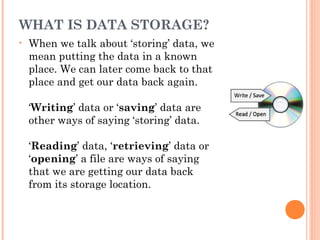
• When we talk about ‘storing’ data, we
mean putting the data in a known
place. We can later come back to that
place and get our data back again.
‘Writing’ data or ‘saving’ data are
other ways of saying ‘storing’ data.
‘Reading’ data, ‘retrieving’ data or
‘opening’ a file are ways of saying
that we are getting our data back
from its storage location.
BACKING STORAGE VS MAIN
MEMORY
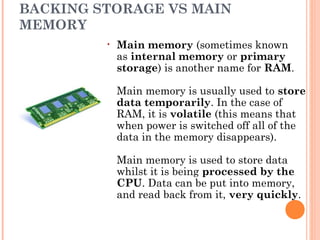
• Main memory (sometimes known
as internal memory or primary
storage) is another name for RAM.
Main memory is usually used to store
data temporarily. In the case of
RAM, it is volatile (this means that
when power is switched off all of the
data in the memory disappears). 
Main memory is used to store data
whilst it is being processed by the
CPU. Data can be put into memory,
and read back from it, very quickly. 
 Backing Storage
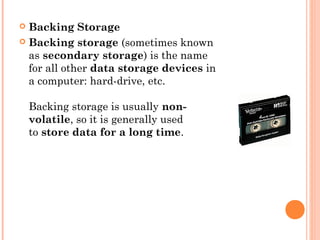
 Backing storage (sometimes known
as secondary storage) is the name
for all other data storage devices in
a computer: hard-drive, etc.
Backing storage is usually non-
volatile, so it is generally used
to store data for a long time.
STORAGE MEDIA & DEVICES
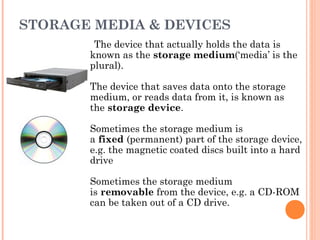
The device that actually holds the data is
known as the storage medium(‘media’ is the
plural). 
The device that saves data onto the storage
medium, or reads data from it, is known as
the storage device.
Sometimes the storage medium is
a fixed (permanent) part of the storage device,
e.g. the magnetic coated discs built into a hard
drive
Sometimes the storage medium
is removable from the device, e.g. a CD-ROM
can be taken out of a CD drive.
ACCESSING STORED DATA
• We refer to a collection of data stored in a
computer system as a ‘file’. Files are often
organised into ‘folders’.
Whenever you click ‘Save’ in an
application, burn files to a CD-R, copy music
onto your MP3 player, or drag and drop a file
onto memory stick, you are using storage devices
- devices that can store and retrieve data.
SERIAL / SEQUENTIAL ACCESS
• A serial (or sequential) access storage
device is one that stores files one-by-
one in a sequence. 
A non-computer serial access device
that will be familiar to you is a VHS
videotape. Because video is stored on
a long piece of tape, when TV shows
are recorded onto the tape, they go
on one-by-one, in order...
• If you want to watch a show that you
recorded earlier, you have to rewind /
fast-forward through all other shows
until you find it. 
The shows are only accessible in
the same order that you recorded
them. This type of one-by-one storage
and access is called serial access.
DIRECT / RANDOM ACCESS
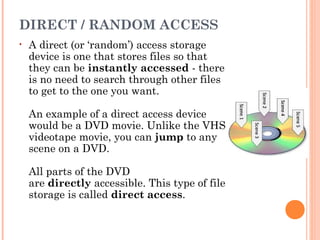
• A direct (or ‘random’) access storage
device is one that stores files so that
they can be instantly accessed - there
is no need to search through other files
to get to the one you want.
An example of a direct access device
would be a DVD movie. Unlike the VHS
videotape movie, you can jump to any
scene on a DVD.
All parts of the DVD
are directly accessible. This type of file
storage is called direct access.
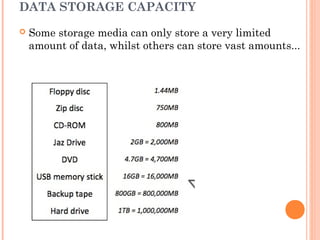
DATA STORAGE CAPACITY
 Some storage media can only store a very limited
amount of data, whilst others can store vast amounts...
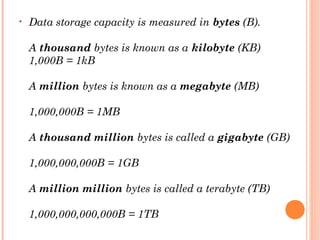
• Data storage capacity is measured in bytes (B). 
A thousand bytes is known as a kilobyte (KB)
1,000B = 1kB
A million bytes is known as a megabyte (MB)
1,000,000B = 1MB
A thousand million bytes is called a gigabyte (GB)
1,000,000,000B = 1GB
A million million bytes is called a terabyte (TB)
1,000,000,000,000B = 1TB
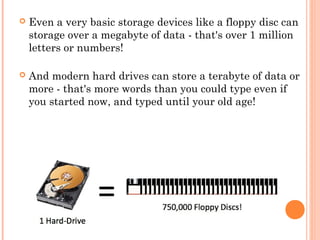
 Even a very basic storage devices like a floppy disc can
storage over a megabyte of data - that's over 1 million
letters or numbers! 
 And modern hard drives can store a terabyte of data or
more - that's more words than you could type even if
you started now, and typed until your old age!
DATA ACCESS SPEEDS
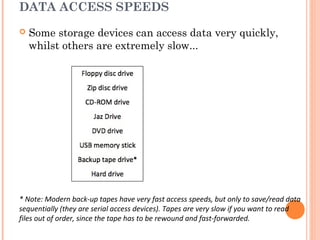
 Some storage devices can access data very quickly,
whilst others are extremely slow...
* Note: Modern back-up tapes have very fast access speeds, but only to save/read data
sequentially (they are serial access devices). Tapes are very slow if you want to read
files out of order, since the tape has to be rewound and fast-forwarded.
MAGNETIC STORAGE DEVICES / MEDIA
• Why Magnetic?
• Magnetic storage media and devices store data in the
form of tiny magnetised dots. These dots are created,
read and erased using magnetic fields created by very
tiny electromagnets.
In the case of magnetic tape the dots are arranged
along the length of a long plastic strip which has
been coated with a magnetisable layer (audio and
video tapes use a similar technology).
In the case of magnetic discs (e.g. floppy disc or hard-
drive), the dots are arranged in circles on the surface
of a plastic, metal or glass disc that has a
magnetisable coating.
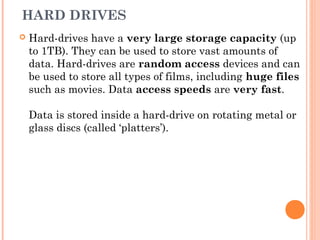
HARD DRIVES
 Hard-drives have a very large storage capacity (up
to 1TB). They can be used to store vast amounts of
data. Hard-drives are random access devices and can
be used to store all types of films, including huge files
such as movies. Data access speeds are very fast.
Data is stored inside a hard-drive on rotating metal or
glass discs (called ‘platters’).
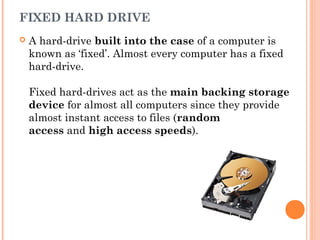
FIXED HARD DRIVE
 A hard-drive built into the case of a computer is
known as ‘fixed’. Almost every computer has a fixed
hard-drive. 
Fixed hard-drives act as the main backing storage
device for almost all computers since they provide
almost instant access to files (random
access and high access speeds).
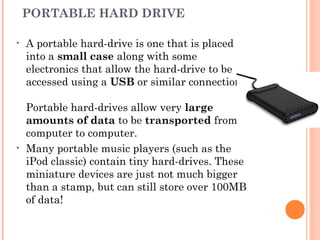
PORTABLE HARD DRIVE
• A portable hard-drive is one that is placed
into a small case along with some
electronics that allow the hard-drive to be
accessed using a USB or similar connection. 
Portable hard-drives allow very large
amounts of data to be transported from
computer to computer.
• Many portable music players (such as the
iPod classic) contain tiny hard-drives. These
miniature devices are just not much bigger
than a stamp, but can still store over 100MB
of data!
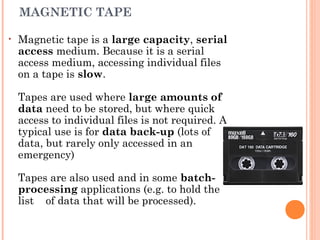
MAGNETIC TAPE
• Magnetic tape is a large capacity, serial
access medium. Because it is a serial
access medium, accessing individual files
on a tape is slow.
Tapes are used where large amounts of
data need to be stored, but where quick
access to individual files is not required. A
typical use is for data back-up (lots of
data, but rarely only accessed in an
emergency)
Tapes are also used and in some batch-
processing applications (e.g. to hold the
list of data that will be processed).
REMOVABLE MEDIA MAGNETIC DISCS
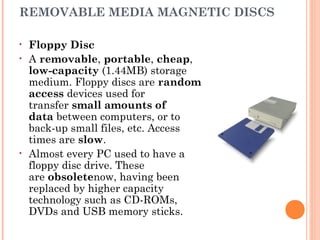
• Floppy Disc
• A removable, portable, cheap, 
low-capacity (1.44MB) storage
medium. Floppy discs are random
access devices used for
transfer small amounts of
data between computers, or to
back-up small files, etc. Access
times are slow.
• Almost every PC used to have a
floppy disc drive. These
are obsoletenow, having been
replaced by higher capacity
technology such as CD-ROMs,
DVDs and USB memory sticks.
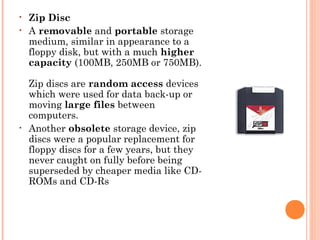
• Zip Disc
• A removable and portable storage
medium, similar in appearance to a
floppy disk, but with a much higher
capacity (100MB, 250MB or 750MB). 
Zip discs are random access devices
which were used for data back-up or
moving large files between
computers.
• Another obsolete storage device, zip
discs were a popular replacement for
floppy discs for a few years, but they
never caught on fully before being
superseded by cheaper media like CD-
ROMs and CD-Rs
JAZ DISC
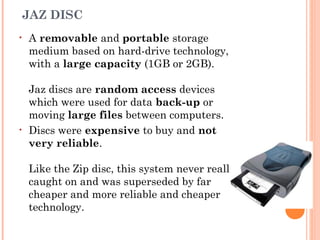
• A removable and portable storage
medium based on hard-drive technology,
with a large capacity (1GB or 2GB). 
Jaz discs are random access devices
which were used for data back-up or
moving large files between computers.
• Discs were expensive to buy and not
very reliable. 
Like the Zip disc, this system never really
caught on and was superseded by far
cheaper and more reliable and cheaper
technology.
OPTICAL STORAGE DEVICES / MEDIA
• Why 'Optical'?
• Optical storage devices save data as patterns
of dots that can be read using light. A laser beam is
the usual light source.
The data on the storage medium is read by bouncing
the laser beam off the surface of the medium. If the
beam hits a dot it is reflected back differently to how
it would be if there were no dot. This difference can be
detected, so the data can be read.
Dots can be created using the laser beam (for media
that is writable such as CD-Rs). The beam is used in
a high-power mode to actually mark the surface of the
medium, making a dot. This process is known as
‘burning’ data onto a disc.
READ-ONLY OPTICAL DISCS
• Read-only optical discs have data
written onto them when they are
manufactured. This data cannot be
changed.
• CD-ROM
• Compact Disc - Read-Only Memory
(CD-ROM) discs can hold
around800MB of data. The data
cannot be altered (non-volatile), so
cannot be accidently deleted. CD-
ROMs are random-access devices.
• CD-ROMs are used to distribute all
sorts of data: software (e.g. office
applications or games), music,
electronic books (e.g. an encyclopedia
with sound and video.)
DVD-ROM
 Digital Versatile Disc - Read-Only Memory (DVD-
ROM) discs can hold around 4.7GB of data (a dual-
layer DVD can hold twice that). DVD-ROMs
are random-access devices.
 DVD-ROMs are used in the same way as CD-ROMs
(see above) but, since they can hold more data, they
are also used to store high-quality video.
HIGH CAPACITY OPTICAL DISCS
• Blu-Ray
• Blu-Ray disks are a recent replacement
for DVDs. A Blu-Ray disc can hold25 -
50GB of data (a dual-layer Blu-Ray disc
can hold twice that). Blu-Ray discs
are random-access devices.
• Blu-Ray discs are used in the same way as
DVD-ROMs (see above) but, since they
can hold more data, they are also used to
store very high-quality, high-definition
(HD)video.
HD DVD
• High-density DVD (HD-DVD) discs
can hold around 15GB of data (a
dual-layer HD-DVD can hold twice
that). HD-DVDs are random-
access devices.
• HD-DVD discs are used in the same
way as DVD-ROMs (see above) but,
since they can hold more data, they
are also used to store very high-
quality, high-definition
(HD) video.
RECORDABLE OPTICAL DISCS
• Recordable optical discs can have data written onto
them (‘burnt’) by a computer user using a special disc
drive (a disc ‘burner’).
• CD-R and DVD-R
• CD-Recordable (CD-R) and DVD-recordable (DVD-R)
discs can have data burnt onto them, but not
erased. You can keep adding data until the disc is
full, but you cannot remove any data or re-use a full
disc.
• CD-RW and DVD-RW
• CD-ReWritable (CD-RW) and DVD-ReWritable (DVD-
RW) discs, unlike CD-Rs and DVD-Rs, can have data
burnt onto them and also erased so that the discs
can be re-used.
DVD-RAM
• DVD-Random Access Memory (DVD-RAM) discs are a
type of re-writable DVD. They often come in a floppy-
disc style case (to protect the disc). 
DVD-RAM discs have a similar capacity to a normal
DVD, holding 4.7GB of data. DVD-RAM discs
are random-access devices.
• DVD-RAM discs are used in many camcorders (video
recording cameras). 
The discs are much higher quality than normal DVD-
RWs and can reliably store data for up to 30 years.
This means that they are often used for video and
data back-up and archiving.
'SOLID-STATE'?
• The term ‘solid-state’ essentially means ‘no
moving parts’. 
Solid-state storage devices are based
on electronic circuits with no moving
parts (no reels of tape, no spinning discs, no
laser beams, etc.)
Solid-state storage devices store data using a
special type of memory called flash memory...
FLASH MEMORY
 Flash memory is a type of Electronically-Erasable
Programmable Read-Only Memory (EEPROM). Flash
memory is non-volatile (like ROM) but the data
stored in it can also be erased or changed (like
RAM).
Flash memory can be found in many data storage
devices...
USB MEMORY STICKS
• Memory sticks (or ‘thumb-drives’) have made many other
forms of portable storage almost obsolete (why burn a CD or
DVD when you can more easily copy your files onto a
memory stick?). 
Memory sticks are non-volatile, random-access storage
devices.
Each of these small devices has some flash
memory connected to a USB interface. Plug it into your
computer and it appears as a drive. You can then add files,
erase files, etc. You can use it to move any type of file
between computers.
Flash memory used to be very expensive, but in recent
years it has become much cheaper and you can now buy a
16GB memory stick for just a few dollars.
MEMORY CARDS
• Many of our digital devices (cameras, mobile
phones, MP3 players, etc.) require compact, non-
volatile data storage. Flash memory cards provide this and
come in a variety of shapes and sizes.
One of the most common formats used by digital cameras is
the SD Card. The cards store the digital images taken by
the camera.
• Mobile phones contain a Subscriber Identity Module (SIM)
card that contains the phone’s number, the phonebook
numbers, text messages, etc. 
Many phones also have extra memory cards to store music,
video, photos, etc. (e.g Tiny Micro-SD cards).
•
SMART CARDS
• Many credit cards (e.g. ‘chip-and-pin’ cards),
door entry cards, satellite TV cards, etc. have
replaced the very limited storage of the magnetic
strip (the dark strip on the back of older cards)
with flash memory. This is more reliable and
has a much larger storage capacity. 
Cards with flash memory are called smart
cards.
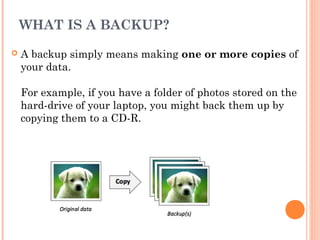
WHAT IS A BACKUP?
 A backup simply means making one or more copies of
your data.
For example, if you have a folder of photos stored on the
hard-drive of your laptop, you might back them up by
copying them to a CD-R.
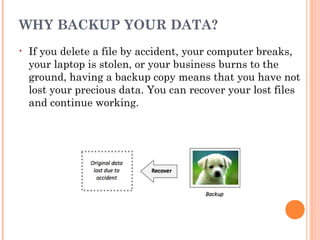
WHY BACKUP YOUR DATA?
• If you delete a file by accident, your computer breaks,
your laptop is stolen, or your business burns to the
ground, having a backup copy means that you have not
lost your precious data. You can recover your lost files
and continue working.
HOW ARE BACKUPS CREATED?
• Personal backups of the data on your hard-drive can
be made by…
Burning files to a CD-R
• Copying files to an external hard-drive
• Copying the files to another computer on a network
• Businesses backup essential data by…
Making copies of data very regularly
• Using large-capacity media such as magnetic tape
• Keeping old copies of backups, just in case
• Automating the system so that nobody forgets to do
it!
• Keeping backup media off-site (in case of fire or theft)

Chapter 3 storage media and devices

  • 1.
  • 2.
    WHAT IS DATASTORAGE? • When we talk about ‘storing’ data, we mean putting the data in a known place. We can later come back to that place and get our data back again. ‘Writing’ data or ‘saving’ data are other ways of saying ‘storing’ data. ‘Reading’ data, ‘retrieving’ data or ‘opening’ a file are ways of saying that we are getting our data back from its storage location.
  • 3.
    BACKING STORAGE VSMAIN MEMORY • Main memory (sometimes known as internal memory or primary storage) is another name for RAM. Main memory is usually used to store data temporarily. In the case of RAM, it is volatile (this means that when power is switched off all of the data in the memory disappears).  Main memory is used to store data whilst it is being processed by the CPU. Data can be put into memory, and read back from it, very quickly. 
  • 4.
     Backing Storage Backing storage (sometimes known as secondary storage) is the name for all other data storage devices in a computer: hard-drive, etc. Backing storage is usually non- volatile, so it is generally used to store data for a long time.
  • 5.
    STORAGE MEDIA &DEVICES The device that actually holds the data is known as the storage medium(‘media’ is the plural).  The device that saves data onto the storage medium, or reads data from it, is known as the storage device. Sometimes the storage medium is a fixed (permanent) part of the storage device, e.g. the magnetic coated discs built into a hard drive Sometimes the storage medium is removable from the device, e.g. a CD-ROM can be taken out of a CD drive.
  • 6.
    ACCESSING STORED DATA •We refer to a collection of data stored in a computer system as a ‘file’. Files are often organised into ‘folders’. Whenever you click ‘Save’ in an application, burn files to a CD-R, copy music onto your MP3 player, or drag and drop a file onto memory stick, you are using storage devices - devices that can store and retrieve data.
  • 7.
    SERIAL / SEQUENTIALACCESS • A serial (or sequential) access storage device is one that stores files one-by- one in a sequence.  A non-computer serial access device that will be familiar to you is a VHS videotape. Because video is stored on a long piece of tape, when TV shows are recorded onto the tape, they go on one-by-one, in order... • If you want to watch a show that you recorded earlier, you have to rewind / fast-forward through all other shows until you find it.  The shows are only accessible in the same order that you recorded them. This type of one-by-one storage and access is called serial access.
  • 8.
    DIRECT / RANDOMACCESS • A direct (or ‘random’) access storage device is one that stores files so that they can be instantly accessed - there is no need to search through other files to get to the one you want. An example of a direct access device would be a DVD movie. Unlike the VHS videotape movie, you can jump to any scene on a DVD. All parts of the DVD are directly accessible. This type of file storage is called direct access.
  • 9.
    DATA STORAGE CAPACITY Some storage media can only store a very limited amount of data, whilst others can store vast amounts...
  • 10.
    • Data storagecapacity is measured in bytes (B).  A thousand bytes is known as a kilobyte (KB) 1,000B = 1kB A million bytes is known as a megabyte (MB) 1,000,000B = 1MB A thousand million bytes is called a gigabyte (GB) 1,000,000,000B = 1GB A million million bytes is called a terabyte (TB) 1,000,000,000,000B = 1TB
  • 11.
     Even avery basic storage devices like a floppy disc can storage over a megabyte of data - that's over 1 million letters or numbers!   And modern hard drives can store a terabyte of data or more - that's more words than you could type even if you started now, and typed until your old age!
  • 12.
    DATA ACCESS SPEEDS Some storage devices can access data very quickly, whilst others are extremely slow... * Note: Modern back-up tapes have very fast access speeds, but only to save/read data sequentially (they are serial access devices). Tapes are very slow if you want to read files out of order, since the tape has to be rewound and fast-forwarded.
  • 13.
    MAGNETIC STORAGE DEVICES/ MEDIA • Why Magnetic? • Magnetic storage media and devices store data in the form of tiny magnetised dots. These dots are created, read and erased using magnetic fields created by very tiny electromagnets. In the case of magnetic tape the dots are arranged along the length of a long plastic strip which has been coated with a magnetisable layer (audio and video tapes use a similar technology). In the case of magnetic discs (e.g. floppy disc or hard- drive), the dots are arranged in circles on the surface of a plastic, metal or glass disc that has a magnetisable coating.
  • 14.
    HARD DRIVES  Hard-driveshave a very large storage capacity (up to 1TB). They can be used to store vast amounts of data. Hard-drives are random access devices and can be used to store all types of films, including huge files such as movies. Data access speeds are very fast. Data is stored inside a hard-drive on rotating metal or glass discs (called ‘platters’).
  • 15.
    FIXED HARD DRIVE A hard-drive built into the case of a computer is known as ‘fixed’. Almost every computer has a fixed hard-drive.  Fixed hard-drives act as the main backing storage device for almost all computers since they provide almost instant access to files (random access and high access speeds).
  • 16.
    PORTABLE HARD DRIVE •A portable hard-drive is one that is placed into a small case along with some electronics that allow the hard-drive to be accessed using a USB or similar connection.  Portable hard-drives allow very large amounts of data to be transported from computer to computer. • Many portable music players (such as the iPod classic) contain tiny hard-drives. These miniature devices are just not much bigger than a stamp, but can still store over 100MB of data!
  • 17.
    MAGNETIC TAPE • Magnetictape is a large capacity, serial access medium. Because it is a serial access medium, accessing individual files on a tape is slow. Tapes are used where large amounts of data need to be stored, but where quick access to individual files is not required. A typical use is for data back-up (lots of data, but rarely only accessed in an emergency) Tapes are also used and in some batch- processing applications (e.g. to hold the list of data that will be processed).
  • 18.
    REMOVABLE MEDIA MAGNETICDISCS • Floppy Disc • A removable, portable, cheap,  low-capacity (1.44MB) storage medium. Floppy discs are random access devices used for transfer small amounts of data between computers, or to back-up small files, etc. Access times are slow. • Almost every PC used to have a floppy disc drive. These are obsoletenow, having been replaced by higher capacity technology such as CD-ROMs, DVDs and USB memory sticks.
  • 19.
    • Zip Disc •A removable and portable storage medium, similar in appearance to a floppy disk, but with a much higher capacity (100MB, 250MB or 750MB).  Zip discs are random access devices which were used for data back-up or moving large files between computers. • Another obsolete storage device, zip discs were a popular replacement for floppy discs for a few years, but they never caught on fully before being superseded by cheaper media like CD- ROMs and CD-Rs
  • 20.
    JAZ DISC • A removable and portable storage mediumbased on hard-drive technology, with a large capacity (1GB or 2GB).  Jaz discs are random access devices which were used for data back-up or moving large files between computers. • Discs were expensive to buy and not very reliable.  Like the Zip disc, this system never really caught on and was superseded by far cheaper and more reliable and cheaper technology.
  • 21.
    OPTICAL STORAGE DEVICES/ MEDIA • Why 'Optical'? • Optical storage devices save data as patterns of dots that can be read using light. A laser beam is the usual light source. The data on the storage medium is read by bouncing the laser beam off the surface of the medium. If the beam hits a dot it is reflected back differently to how it would be if there were no dot. This difference can be detected, so the data can be read. Dots can be created using the laser beam (for media that is writable such as CD-Rs). The beam is used in a high-power mode to actually mark the surface of the medium, making a dot. This process is known as ‘burning’ data onto a disc.
  • 22.
    READ-ONLY OPTICAL DISCS •Read-only optical discs have data written onto them when they are manufactured. This data cannot be changed. • CD-ROM • Compact Disc - Read-Only Memory (CD-ROM) discs can hold around800MB of data. The data cannot be altered (non-volatile), so cannot be accidently deleted. CD- ROMs are random-access devices. • CD-ROMs are used to distribute all sorts of data: software (e.g. office applications or games), music, electronic books (e.g. an encyclopedia with sound and video.)
  • 23.
    DVD-ROM  Digital VersatileDisc - Read-Only Memory (DVD- ROM) discs can hold around 4.7GB of data (a dual- layer DVD can hold twice that). DVD-ROMs are random-access devices.  DVD-ROMs are used in the same way as CD-ROMs (see above) but, since they can hold more data, they are also used to store high-quality video.
  • 24.
    HIGH CAPACITY OPTICALDISCS • Blu-Ray • Blu-Ray disks are a recent replacement for DVDs. A Blu-Ray disc can hold25 - 50GB of data (a dual-layer Blu-Ray disc can hold twice that). Blu-Ray discs are random-access devices. • Blu-Ray discs are used in the same way as DVD-ROMs (see above) but, since they can hold more data, they are also used to store very high-quality, high-definition (HD)video.
  • 25.
    HD DVD • High-densityDVD (HD-DVD) discs can hold around 15GB of data (a dual-layer HD-DVD can hold twice that). HD-DVDs are random- access devices. • HD-DVD discs are used in the same way as DVD-ROMs (see above) but, since they can hold more data, they are also used to store very high- quality, high-definition (HD) video.
  • 26.
    RECORDABLE OPTICAL DISCS •Recordable optical discs can have data written onto them (‘burnt’) by a computer user using a special disc drive (a disc ‘burner’). • CD-R and DVD-R • CD-Recordable (CD-R) and DVD-recordable (DVD-R) discs can have data burnt onto them, but not erased. You can keep adding data until the disc is full, but you cannot remove any data or re-use a full disc. • CD-RW and DVD-RW • CD-ReWritable (CD-RW) and DVD-ReWritable (DVD- RW) discs, unlike CD-Rs and DVD-Rs, can have data burnt onto them and also erased so that the discs can be re-used.
  • 27.
    DVD-RAM • DVD-Random AccessMemory (DVD-RAM) discs are a type of re-writable DVD. They often come in a floppy- disc style case (to protect the disc).  DVD-RAM discs have a similar capacity to a normal DVD, holding 4.7GB of data. DVD-RAM discs are random-access devices. • DVD-RAM discs are used in many camcorders (video recording cameras).  The discs are much higher quality than normal DVD- RWs and can reliably store data for up to 30 years. This means that they are often used for video and data back-up and archiving.
  • 28.
    'SOLID-STATE'? • The term‘solid-state’ essentially means ‘no moving parts’.  Solid-state storage devices are based on electronic circuits with no moving parts (no reels of tape, no spinning discs, no laser beams, etc.) Solid-state storage devices store data using a special type of memory called flash memory...
  • 29.
    FLASH MEMORY  Flashmemory is a type of Electronically-Erasable Programmable Read-Only Memory (EEPROM). Flash memory is non-volatile (like ROM) but the data stored in it can also be erased or changed (like RAM). Flash memory can be found in many data storage devices...
  • 30.
    USB MEMORY STICKS •Memory sticks (or ‘thumb-drives’) have made many other forms of portable storage almost obsolete (why burn a CD or DVD when you can more easily copy your files onto a memory stick?).  Memory sticks are non-volatile, random-access storage devices. Each of these small devices has some flash memory connected to a USB interface. Plug it into your computer and it appears as a drive. You can then add files, erase files, etc. You can use it to move any type of file between computers. Flash memory used to be very expensive, but in recent years it has become much cheaper and you can now buy a 16GB memory stick for just a few dollars.
  • 31.
    MEMORY CARDS • Manyof our digital devices (cameras, mobile phones, MP3 players, etc.) require compact, non- volatile data storage. Flash memory cards provide this and come in a variety of shapes and sizes. One of the most common formats used by digital cameras is the SD Card. The cards store the digital images taken by the camera. • Mobile phones contain a Subscriber Identity Module (SIM) card that contains the phone’s number, the phonebook numbers, text messages, etc.  Many phones also have extra memory cards to store music, video, photos, etc. (e.g Tiny Micro-SD cards). •
  • 32.
    SMART CARDS • Manycredit cards (e.g. ‘chip-and-pin’ cards), door entry cards, satellite TV cards, etc. have replaced the very limited storage of the magnetic strip (the dark strip on the back of older cards) with flash memory. This is more reliable and has a much larger storage capacity.  Cards with flash memory are called smart cards.
  • 33.
    WHAT IS ABACKUP?  A backup simply means making one or more copies of your data. For example, if you have a folder of photos stored on the hard-drive of your laptop, you might back them up by copying them to a CD-R.
  • 34.
    WHY BACKUP YOURDATA? • If you delete a file by accident, your computer breaks, your laptop is stolen, or your business burns to the ground, having a backup copy means that you have not lost your precious data. You can recover your lost files and continue working.
  • 35.
    HOW ARE BACKUPSCREATED? • Personal backups of the data on your hard-drive can be made by… Burning files to a CD-R • Copying files to an external hard-drive • Copying the files to another computer on a network • Businesses backup essential data by… Making copies of data very regularly • Using large-capacity media such as magnetic tape • Keeping old copies of backups, just in case • Automating the system so that nobody forgets to do it! • Keeping backup media off-site (in case of fire or theft)