FOUNDATION OF INFORMATION
SYSTEM
Information is a collection of interrelated data that has been processed into a
meaningful form.
Information system (IS) is an organized combination of people, hardware,
software, communications network and data resources that collects,
transforms and disseminates information in an organization.
INFORMATION
The quantities, characters, or symbols on which operations are performed by a
computer, which may be stored and transmitted in the form of electrical
signals and recorded on magnetic, optical, or mechanical recording media.
Data are raw or unorganized forms (alphabets, numbers, or symbols) that refer
to, or represent conditions, ideas or objects
All data held in the enterprise qualifies as or will need to qualify as
information
DATA
In accurate or timely data is obsolete and lacks integrity
Data that is not specific and organized for a purpose cannot be used.
Data that doesn’t provide understanding or is redundant is not useful.
DATA
Consists of four stages:
Data Origination: hiring, ordering, selling etc
Processing and immediate use : statistical tool
Ready access storage: storage units
Data Destruction
DATA LIFE CYCLE
It is simply the conversion of raw data to meaningful information.
Data is manipulated to produce results that lead to a resolution of a problem.
DATA PROCESSING
Collection
Preparation
Input
Processing
Output and Iterpretation
Storage
STAGES OF DATA PROCESSING
Manual Data Processing: From collection to storage everything is manual
Mechanical Data Processing: Typewriters, printing machine
Electronic Data Processing
Online Transaction processing
Batch Processing
Centralized data processing
Decentralized data processing
TYPES OF DATA PROCESSING
Online system handles transaction as and when they happen and provides
output at the particular instance.
As the processing is interactive it lowers delays and provides constant
interaction between user and the system.
Example: Airline ticket reservation, Banking system
ONLINE PROCESSING
 The system processes transactions
completely when and where they occur
 Users interact directly with the information
system.
 Users can access data randomly
 The information system must be available
whenever necessary to support business
functions.
 It is the execution of a series of jobs in
a program on a computer without manual
intervention. It is a processing mode: the
execution of a series of programs each on a
set or "batch" of inputs, rather than
a single input.
 Data is collected and processed in groups or
batches.
 Eg: Cheque
 It processes transaction data immediately after
they are generated and can provide immediate
output.
 In RTS data is processed as soon as it is
originated or recorded, without waiting to
accumulate batches of data
 Real time data processing involves a continual
input, process and output of data. Data must be
processed in a small time period (or near real
time). Radar systems, customer services and
bank ATMs are examples.
 Real time data processing and analytics
allows an organization the ability to
take immediate action for those times when
acting within seconds or minutes is
significant. The goal is to obtain the insight
required to act prudently at the right time -
which increasingly means immediately.
 Processing performed in one computer or in
a cluster of coupled computers in a single
location
 The emergence of data takes place only at one
place
 The loss of data is minimized
 The methods and machines can be
standardized
 Services of more competent and technical
personnel can be taken
 It is also very cost –effective particularly in the
case of large operations
 Duplication of work can be aoided.
 Lack of co-operation form managers, who do
not like to be under control of centralized
data processing system
 Resistance from managers for mechanizing
data processing
 Difficult to provide equitable service
 Data security is also questioned.
 Although data may be transmitted between
the computers periodically, it implies limited
daily communications. Contrast with
distributed computing and
centralized processing.
 Familiarity with local problems
 Rapid response to local processing needs
 Profit and loss responsibility can be easily
fixed.
 There is duplication of activities and
redundancy
 Difficulty to maintain uniformity
 High cost
 Data that is accurate and timely, specific and
organized for a purpose, presented within a context
that gives it meaning and relevance, and can lead
to an increase in understanding and decrease in
uncertainty.
 Information is valuable because it can affect
behavior, a decision, or an outcome.
 For example, if a manager is told his/her company's
net profit decreased in the past month, he/she may
use this information as a reason to cut financial
spending for the next month.
 Processed form of interrelated data in
meaningful form is called information.
 Raw data that has bee verified to be
accurate and timely, is specific and
organized for a purpose, is presented within
a context that gives it meaning and
relevance and which leads to increase in
understanding and decrease in uncertainity
 Organizations success completely depends
on effective flow of information.
 when GM tried to introduce the Nova in Latin
America they thought they could use the
same brand name they used in the United
States. They couldn't figure out why no one
wanted it until they learned it translated in
Spanish to 'No-go.'
 Structure of the organization
 Size of the organization
 Amount of information
 Method used
 Importance
 Necessity
 Staff competence
 Software and hardware systems
 Different sources of information generation.
 Accounting
 Finance
 Personnel
 Public Relations
 Sales
 Market Research
 Production
 Purchasing
 Government
 Auditor
 Shareholders and investors
 Customers
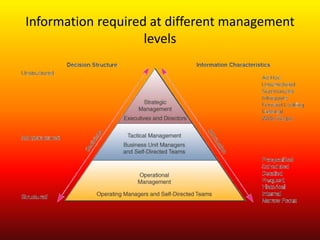
Information required at different management
levels
 Process of determining the value of that
information by pin pointing the data to be
analyzed
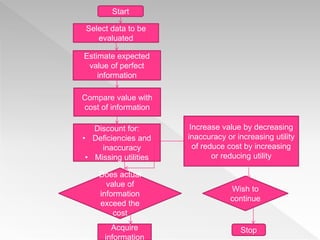
Start
Select data to be
evaluated
Estimate expected
value of perfect
information
Compare value with
cost of information
Discount for:
• Deficiencies and
inaccuracy
• Missing utilities
Acquire
information
Increase value by decreasing
inaccuracy or increasing utility
of reduce cost by increasing
or reducing utility
Does actual
value of
information
exceed the
cost
Wish to
continue
Stop
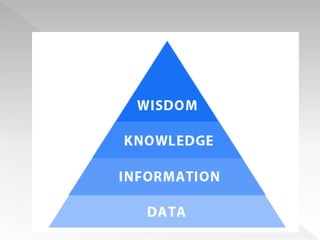
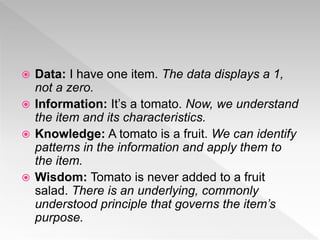
 Data: I have one item. The data displays a 1,
not a zero.
 Information: It’s a tomato. Now, we understand
the item and its characteristics.
 Knowledge: A tomato is a fruit. We can identify
patterns in the information and apply them to
the item.
 Wisdom: Tomato is never added to a fruit
salad. There is an underlying, commonly
understood principle that governs the item’s
purpose.
 Data are raw facts
and figures that on
their own have no
meaning
 These can be any
alphanumeric
characters i.e. text,
numbers, symbols
Note the “are” bit above? What does this mean?
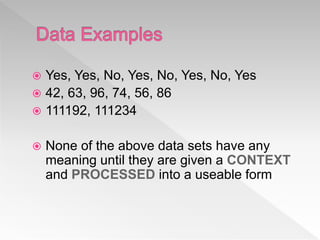
 Yes, Yes, No, Yes, No, Yes, No, Yes
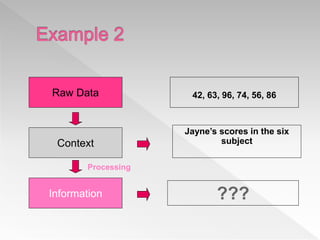
 42, 63, 96, 74, 56, 86
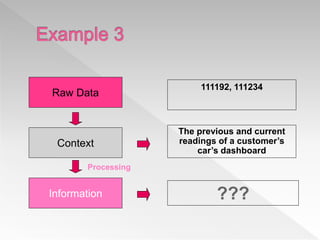
 111192, 111234
 None of the above data sets have any
meaning until they are given a CONTEXT
and PROCESSED into a useable form
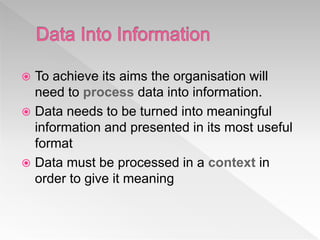
 To achieve its aims the organisation will
need to process data into information.
 Data needs to be turned into meaningful
information and presented in its most useful
format
 Data must be processed in a context in
order to give it meaning
 Data that has been processed within a
context to give it meaning
OR
 Data that has been processed into a form
that gives it meaning
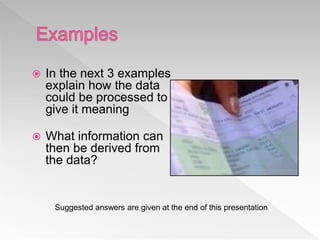
 In the next 3 examples
explain how the data
could be processed to
give it meaning
 What information can
then be derived from
the data?
Suggested answers are given at the end of this presentation
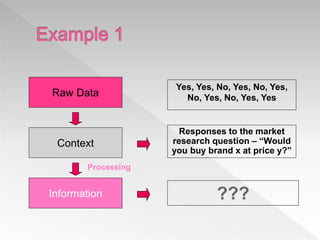
Yes, Yes, No, Yes, No, Yes,
No, Yes, No, Yes, YesRaw Data
Context
Responses to the market
research question – “Would
you buy brand x at price y?”
Information ???
Processing
Raw Data
Context
Information
42, 63, 96, 74, 56, 86
Jayne’s scores in the six
subject
???
Processing
Raw Data
Context
Information
111192, 111234
The previous and current
readings of a customer’s
car’s dashboard
???
Processing
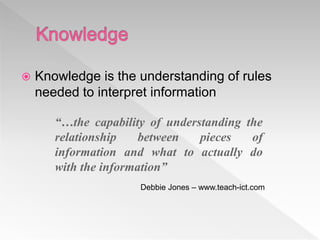
 Knowledge is the understanding of rules
needed to interpret information
“…the capability of understanding the
relationship between pieces of
information and what to actually do
with the information”
Debbie Jones – www.teach-ict.com
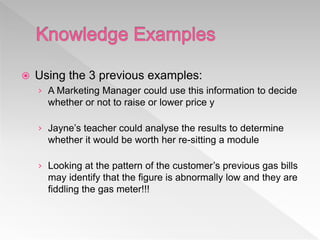
 Using the 3 previous examples:
› A Marketing Manager could use this information to decide
whether or not to raise or lower price y
› Jayne’s teacher could analyse the results to determine
whether it would be worth her re-sitting a module
› Looking at the pattern of the customer’s previous gas bills
may identify that the figure is abnormally low and they are
fiddling the gas meter!!!
 Knowledge workers have specialist
knowledge that makes them “experts”
› Based on formal and informal rules they have
learned through training and experience
 Examples include doctors, managers,
librarians, scientists…
 Because many rules are
based on probabilities
computers can be
programmed with “subject
knowledge” to mimic the role
of experts
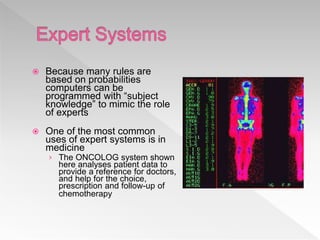
 One of the most common
uses of expert systems is in
medicine
› The ONCOLOG system shown
here analyses patient data to
provide a reference for doctors,
and help for the choice,
prescription and follow-up of
chemotherapy
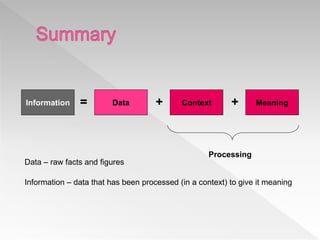
Information Data Context Meaning= ++
Processing
Data – raw facts and figures
Information – data that has been processed (in a context) to give it meaning
Basis of Distinction Data Information
Definition
Data are raw numbers or
other findings which, by
themselves, are of limited
value.
Information is data that
has been converted into a
meaningful and useful
context.
Example
Ticket sales on a band on
tour.
Sales report by region
and venue – tells us
which venue is most
profitable.
Significance
Data by itself alone is not
significant.
Information is significant
by itself.
Etymology
Data is a plural of datum,
which is originally a Latin
noun meaning “something
given.” Its origin dates
back to the 1600s.
Its origin dates back to the
1300s
 Environmental Information
› Government Policies
› Economic trends
› Technological information
› Factors of Production
 Competitive Information
› Industry Demand
› Firm Demand
› Competition
› Past Performance
› Present activity
› Future Plans
 Internal Information
› Sales Forecast
› Financial Plan
› Supply Factors
› Policies
 Non-action information
 Action Information
 Recurring Information
 Non-recurring Information
 Documentary Information
 Non Documentary Information
 Internal Information
 External Information
 Accuracy
 Timeliness
 Relevance
 Pertinent
 Completeness
 Accessibility
 Granularity
 Consistency
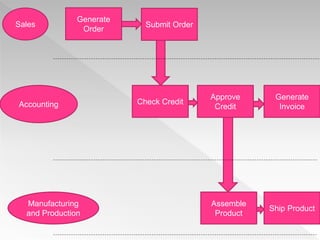
 IT has automated all company functions from sales
to manufacturing. Invoicing to shipping.
 New technologies come in handy for business
houses to change the processing of the business.
 Downloading music, movies, shopping are
completely new aspects of IT that has
revolutionized businesses.
 Droom.in, amazon.com, muncha.com, alibaba.com,
are few examples of the revolution.
 Ola, mycab, sixt, revolutionized through the use of
mobile and IS.
Sales
Accounting
Manufacturing
and Production
Generate
Order
Submit Order
Generate
Invoice
Approve
Credit
Check Credit
Ship Product
Assemble
Product
 Information systems is defined as the
process of and tools for storing, managing,
using and gathering of data and
communications in an organization.
 An example of information systems are
tools for sending out communications and
storing files in a business.
 Economic Importance
 Information Systems Improve Performance
 Importance in Decision Making
 Organizational Behavior Change
 Communication
 Operations
 Records
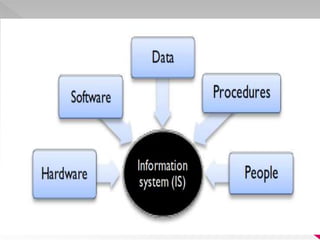
Basically there are 5 components available.
Hardware
Software
Data
Procedures
People
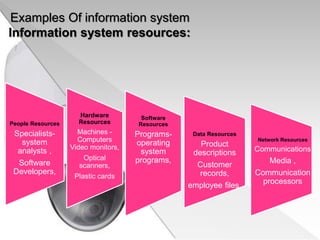
Examples Of information system
Information system resources:
People Resources
Specialists-
system
analysts ,
Software
Developers,
Hardware
Resources
Machines -
Computers
Video monitors,
Optical
scanners,
Plastic cards
Software
Resources
Programs-
operating
system
programs,
Data Resources
Product
descriptions
Customer
records,
employee files,
Network Resources
Communications
Media ,
Communication
processors
The term hardware refers to machinery.
This category includes the computer itself,
which is often referred to as the central
processing unit (CPU), and all of its support
equipments.
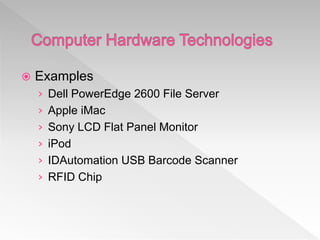
 Examples
› Dell PowerEdge 2600 File Server
› Apple iMac
› Sony LCD Flat Panel Monitor
› iPod
› IDAutomation USB Barcode Scanner
› RFID Chip
The term software refers to computer
programs and the manuals (if any) that support
them.
 Examples
› Windows XP
› Graphics Card Driver Software
› PowerPoint
› mySAP Customer Relationship Management
› Peachtree Accounting
› iTunes Software
Data are facts that are used by programs to
produce useful information.
 Examples
› IBM DB2 8.2
› Microsoft SQL Server 2000
› Oracle Database 10g
› MySQL
› Data Mining Software
Procedures are the policies that govern the
operation of a computer system.
People mean the end user of the Systems.
Every CBIS (Computer Based Information
System) needs people if it is to be useful.
 People are the 5th component of an
Information System
 Everyone forgets the importance of people in
an information system.
 Example: End User, Data Entry Person,
Manager, Programmer, DB Administrator,
Cashier, Secretary, Professor.
 Examples
› Ethernet
› Netgear Wireless Router
› Cable Modem
› Cell Phone
› WiFi, WiMax card
› Bluetooth device
 The challenge of competitors
 Threat of new entry
 Threat of substitute product
 Bargaining Power of customer
 Bargaining Power of supplier
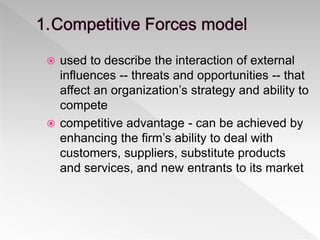
 used to describe the interaction of external
influences -- threats and opportunities -- that
affect an organization’s strategy and ability to
compete
 competitive advantage - can be achieved by
enhancing the firm’s ability to deal with
customers, suppliers, substitute products
and services, and new entrants to its market
 Objective - use this model to identify
potential areas where IT can be used to gain
a competitive advantage
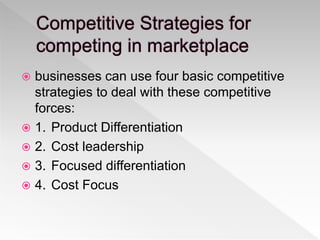
 businesses can use four basic competitive
strategies to deal with these competitive
forces:
 1. Product Differentiation
 2. Cost leadership
 3. Focused differentiation
 4. Cost Focus
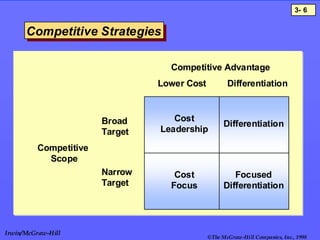
©The McGraw-Hill Companies, Inc., 1998
3- 6
Irwin/McGraw-Hill
Competitive StrategiesCompetitive Strategies
Competitive AdvantageCompetitive Advantage
CompetitiveCompetitive
ScopeScope
Lower Cost Differentiation
Broad
Target
Narrow
Target
Cost
Leadership
Cost
Focus
Differentiation
Focused
Differentiation
 competitive strategy for creating brand
loyalty
 Develop products & services which are
different from what the competition offers
 . superior attributes
 . distinguishing features
 to prevent new competitors from entering
their markets, businesses produce
goods/services at lower price than
competition
 based on efficient operations
 based on effective operations
 economies of scale
 develop new market niche for specialized
products or services
 so that business can compete in target
market better than its competitors
 Company serves narrow market segment
with product/service
 which it offers at a significantly lower cost
than competitors
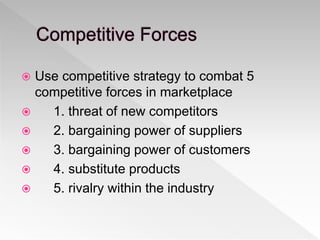
 Use competitive strategy to combat 5
competitive forces in marketplace
 1. threat of new competitors
 2. bargaining power of suppliers
 3. bargaining power of customers
 4. substitute products
 5. rivalry within the industry
 Use IT to enact or counteract these forces
with respect to
› customers
› existing & potential competitors
› suppliers
 Erect barriers to entry:
 use IT to slow down new firms entering
market
› SABRE
› ASAP
 Change basis of competition
› novel IS can perhaps change the basis of
competition - help offer product/service with new
features
› e.g. delivery service allows customer to track
progress of package
› you are now differentiated from competition
› no longer compete just on price basis
 Deliver products with better value
 identify and track a market niche with IS that
you can serve better than others
 try to prevent substitution
 Introduce switching costs
› cost of switching to competitor
› deters customers from switching
› e.g. due to training and contracts, travel agents
unlikely to switch to different airline reservation
system
 Develop Alternatives
 use IS to maintain information on available
alternative sources of supply
 Communication
 Globalization and cultural gap
 Availability
 Creation of new types of jobs
 Cost effectiveness and productivity
 Unemployment and lack of job security
 Dominant culture
 Security issues
 Implementation expenses
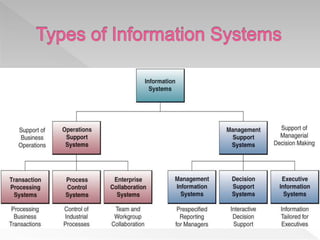
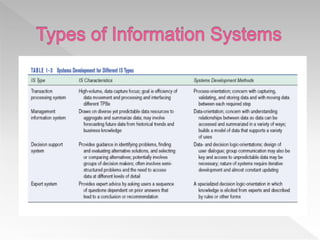
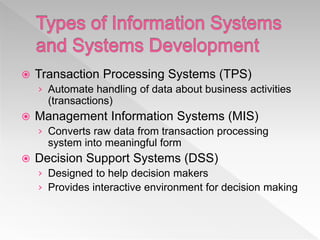
 Transaction Processing Systems (TPS)
› Automate handling of data about business activities
(transactions)
 Management Information Systems (MIS)
› Converts raw data from transaction processing
system into meaningful form
 Decision Support Systems (DSS)
› Designed to help decision makers
› Provides interactive environment for decision making
 Expert Systems (ES)
› Replicates decision making process
› Knowledge representation describes the way an
expert would approach the problem
1.88
 A transaction process system (TPS) is an
information processing system for business
transactions involving the collection,
modification and retrieval of
all transaction data. Characteristics of a
TPS include performance, reliability and
consistency. TPS is also known
as transaction processing or real-
time processing
 Supports Operations
 Updates Operational Databases
 Examples:
› ATM Machine System – Banking Transactions
› Cash Register System – Point of Sale Transactions
› Accounting System – Checking Account Transactions
› Even Pay-per-view or OnDemand is a TPS
 Supports Management (duh?)
 Analysis & Reporting
 Charts, Graphs, Summary Tools
 Examples:
› SCT Banner – Managing College Information (Siena
uses it)
› Spreadsheet (Excel) – One of the first and most
basic
› Oracle's Corporate Performance Management
 Support Management
 What-if Analysis, Decision Modeling, Scenario
Building, Highly interactive, ad hoc.
 Examples
› Enterprise Decision Manager 2.0 Fair Isaac
Corporation
› AIMMS 3.6
 Most DSS’s are custom developed for specific
companies; very few out-of-the-box products.
 Supports high-level strategic management
 Provides critical info from other systems (MIS and
DSS).
 Portal Concept: one place with links to all information
 EIS’s integrate external information such as economic
developments and news about related markets and
competitors. Helps strategic decision making, not
necessarily tactical.
› Tactical – doing things the right way right
› Strategic – doing the right things
 Management information system, or MIS, broadly refers to
a computer-based system that provides managers with the
tools to organize, evaluate and efficiently manage
departments within an organization.
 In order to provide past, present and prediction
information, a management information system can
include software that helps in decision making, data
resources such as databases, the hardware resources of a
system, decision support systems, people management
and project management applications, and any
computerized processes that enable the department to run
efficiently.
 A system that provides information to support
managerial functions like planning, organizing,
directing, controlling.
 Collects information in a systematic and a
routing manner which is in accordance with a
well defined set of rules
 Includes files, hardware, and software and
operations research models of processing,
storing, retrieving and transmitting information
to the users.
 Manual Record Keeping Era (1940-1965)
› Electronic data processing
 Analysis Era (1965-1980)
 Knowledge Era (1980 onwards)
› Executive Information System
› Expert System (1980)
› Strategic Information System (1990)
 Facilitate the decision making process by providing
information in the proper time frame
 Provide required information at each level of
management to carry out their function
 Help in highlighting the critical factors to the closely
monitored for the successful functioning of
organization
 Support decision making in both structured and
unstructured problem environment
 Provide a system of people, device, procedure and
others for collecting storing retrieving and
transmitting to the user.
 Management Oriented
 Management Directed
 Integrated
 Common Data Flow
 Heavy Planning Element
 Ease of Use and Flexibility
 Management-oriented: The basic objective of MIS is to
provide information support to the management in the
organization for decision making.
 Management directed: When MIS is management-oriented,
it should be directed by the management because it is the
management who tells their needs and requirements more
effectively than anybody else.
 Integrated: It means a comprehensive or complete view of
all the subsystems in the organization of a company.
99
 Common data flows: The integration of different
subsystems will lead to a common data flow which will
further help in avoiding duplicacy and redundancy in data
collection, storage and processing.
 Heavy planning-element: The preparation of MIS is not
a one or two day exercise. It usually takes 3 to 5 years
and sometimes a much longer period.
 Subsystem concept: When a problem is seen in 2 sub
parts, then the better solution to the problem is possible.
100
 Common database: This is the basic feature of MIS to
achieve the objective of using MIS in business organizations.
 Computerized: MIS can be used without a computer. But the
use of computers increases the effectiveness and the
efficiency of the system.
 User friendly/Flexibility: An MIS should be flexible.
 Information as a resource: Information is the major
ingredient of any MIS.
101
 Provide relevant information for facilitating planning and timely
control
 Data is available in summarized form which minimize information
loading
 Ease in measuring performance helps in encouraging
decentralization in an organization
 Improve coordination as all departments are aware of course of
action or any change in plan
 Enhance quick, cheap and efficient communication
 Bring down linguistic, geographical and cultural boundaries.
 24*7 availability of information
 Automation helps in saving time and papers
 Creation of new type of jobs like computer programmer, system
analyzer, software and hardware developer etc
 Require constant monitoring of sensitive data
 Security issues like hacking always prevail
 Quality of output depends on quality of input
 Implementation of MIS is costly as requires hardware,
software and training of human resources
 Lack of flexibility to upgrade software
 Takes only quantitative data
 Increase unemployment
 Effectiveness decreases due to frequent change in top
management and their policies
Introduction;
IT is used in all business activities to be
Performed, business problems to be solved, & business
opportunities to be pursued.
As a business professionals, one has a specific
understanding of how ISs affects a business functions &
Appreciation of the major ways.
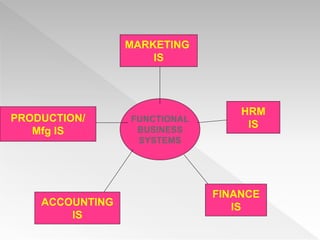
FUNCTIONAL
BUSINESS
SYSTEMS
MARKETING
IS
HRM
IS
FINANCE
ISACCOUNTING
IS
PRODUCTION/
Mfg IS
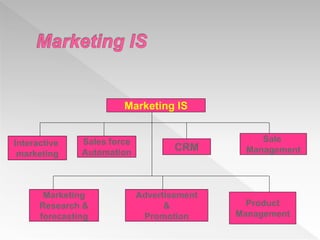
 Marketing is concerned with the planning,
promotion, & sale of existing products in existing
market.
 Business firms have increasingly tuned to IT to
help them to perform vital marketing functions in
the face of the rapid changes of today’s
environment.
Marketing IS
Interactive
marketing
Sales force
Automation
CRM
Sale
Management
Marketing
Research &
forecasting
Advertisement
&
Promotion
Product
Management
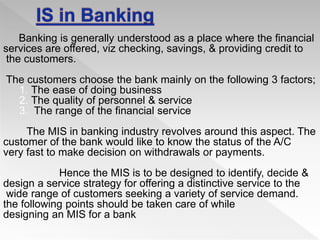
Banking is generally understood as a place where the financial
services are offered, viz checking, savings, & providing credit to
the customers.
The customers choose the bank mainly on the following 3 factors;
1. The ease of doing business
2. The quality of personnel & service
3. The range of the financial service
The MIS in banking industry revolves around this aspect. The
customer of the bank would like to know the status of the A/C
very fast to make decision on withdrawals or payments.
Hence the MIS is to be designed to identify, decide &
design a service strategy for offering a distinctive service to the
wide range of customers seeking a variety of service demand.
the following points should be taken care of while
designing an MIS for a bank
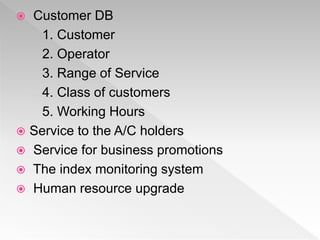
 Customer DB
1. Customer
2. Operator
3. Range of Service
4. Class of customers
5. Working Hours
 Service to the A/C holders
 Service for business promotions
 The index monitoring system
 Human resource upgrade
 IS today is used in almost all the
sectors apart from the sectors
mentioned above, it is also used
in Hospitals, hotel industry,
restaurants and so on.
 Top Down Approach
 Bottom Up Approach
 Integrative Approach
1. Define the objective of the organization,
environment, and the constraints under which it
operates
2. Identify the activities or functions for which
information would be required.
3. The crucial strategic and tactical decisions are also
to be defined and the decisions necessary to
operate the activities are specified
4. From the activities or functions and the decisions
to be made, the major information requirements
are ascertained.
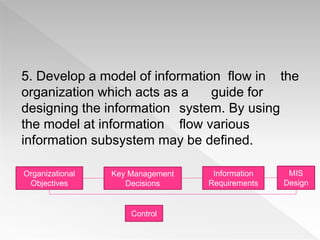
5. Develop a model of information flow in the
organization which acts as a guide for
designing the information system. By using
the model at information flow various
information subsystem may be defined.
Organizational
Objectives
Key Management
Decisions
Information
Requirements
MIS
Design
Control
 Comprise each sub-system into various
modules. The selection of a module for a
developing system is made on the basis of the
priority assigned to them.
 The various sub-system and their modules are
coordinated to achieve the objective of
integration. The information system so
developed is viewed as a total system fully
integrated rather than as a collection of loosely
co-ordinated sub-system.
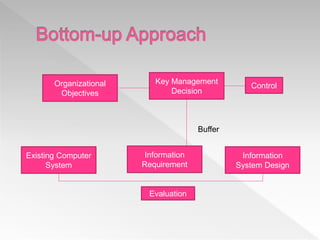
Organizational
Objectives
Information
System Design
Information
Requirement
Existing Computer
System
Key Management
Decision
Control
Evaluation
Buffer
 Th development of information system, for each life stream
system starts after identifying their basic transactions,
information file requirements and information processing
programs.
 After ascertaining the data/information requirements, files
requirements and processing programs for each life stream
system, the formation system for each is developed
 The next step is towards he integration of data kept in different
data files of each information system. The data is integrated
only after thoroughly examining various applications, files and
records. The integrated data enhances the sheer ability and
evaluability of the data base. It also ensures that uniform data
are being used by al programs and also provides added
capability for inquiry processing as well as adhoc requests for
reports
 After the databases are created, various planning and
decisions support models are introduced for supporting the
planning activities involved in management control.
Further these models are integrated to evolve model
bases. The models in the mode base facilitate and support
higher management activities. They are useful for analysis
of different factors to understand difficult situations and to
formulate alternative strategies and options to deal them.
 After the decisions models start functioning, in this step
the models are integrated into a model base having a
variety of models including regression analysis, operations
research model etc.
 Lastly, strategic planning models are added to
the information system. Now data (mainly
external) have to be collected and stored for
strategic planning activity. In this approach, the
system grows in response to the real needs of
users. The main disadvantage is that integration
or synthesis of various sub systems may need
to be redesigned due to the changing
requirements and new interfaces with other
sub-systems.
 This approach can overcome the limitations of
the above two approaches when used
objectively
 Integrative approach permits managers at all
levels to influence the design.
 Top management identifies the structure and
design of MIS suitable to the concern.
 This design is further presented to lower level to
suggest changes, additions or deflections and
return the design with their suggestions to the
top level for approval.
 Is as important as development of the
system.
 It needs to be carefully managed as well as
strong interaction with the client.
 There has to be full support and coordination
between client IS Dept and its functionaries.
 Implementation Plan
 Organizing the MIS Department
 Selection and procurement of Hardware
 Procurement of Software
 Creating the database
 Training the user
 Creating physical infrastructure
 Transition into new system
 Creating a master schedule of the
implementation activities
 Setting timelines for critical and non-critical
activities
 Identifying major bottlenecks and their
solutions
 Communications of the plan.
 Organization is necessary before the
implementation of the system.
 Job Analysis-Roles Defined
 Training
 Human Resources
 Preparation of the vendor list
 Preparation of RFP
 Request for proposal/bid to select vendor
 Evaluation of RFP
 Selection of vendor
 Procurement of Software
 Creating the database
 Training the user
 Creating physical infrastructure
 Transition into new system
 The systems development life
cycle (SDLC), also referred to as the
application development life-cycle, is a
term used in systems engineering,
information systems and software
engineering to describe a process for
planning, creating, testing, and deploying an
information system.
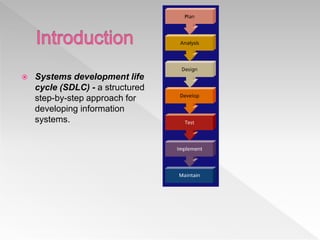
 Systems development life
cycle (SDLC) - a structured
step-by-step approach for
developing information
systems.
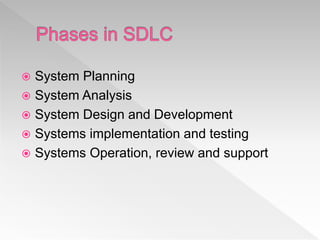
 System Planning
 System Analysis
 System Design and Development
 Systems implementation and testing
 Systems Operation, review and support
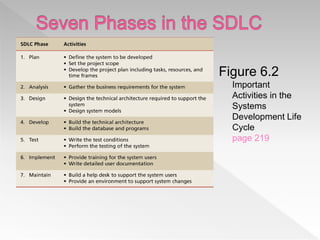
Figure 6.2
Important
Activities in the
Systems
Development Life
Cycle
page 219
 Determine if a new system is needed
 Three primary tasks:
› Define the problem
 By observation and interview, determine what
information is needed by whom, when, where and
why
› Suggest alternative solutions
› Prepare a short report
 Activities
› Define the system to be developed.
› Set the project scope.
› Develop the project plan including tasks,
resources, and timeframes.
Plan Analysis Design Develop Test Implement Maintain
6-133
 Planning phase - involves determining a solid plan for
developing your information system.
 The three of the most important activities involved
during the planning phase:
› Identify and select the system for development
› Set project scope
› Develop project plan
Plan Analysis Design Develop Test Implement Maintain
6-134
 Identify and select the system for development
› Key question: “What systems are required to support the
strategic goals of your organization?”
› KW generate proposals to build new information systems
when they are having a difficult time performing their jobs.
› Companies cannot develop all proposed IS, so they look
into the critical success factors.
 Critical success factor (CSF) - a factor simply critical
to your organization’s success.
Plan Analysis Design Develop Test Implement Maintain
6-135
 Once the system to be developed in defined, then
the project needs to be scoped.
 Set project scope - clearly defines the high-level
system requirements.
 It is a birds-eye-view of the project.
 Project scope document - a written definition of the
project scope and is usually no longer than a
paragraph.
Plan Analysis Design Develop Test Implement Maintain
6-136
 Developing a project plan is the final activity of the
planning phase.
 Project plan - defines the what, when, and who
questions of system development including all activities
to be performed, the individuals, or resources, who will
perform the activities, and the time required to complete
each activity.
Plan Analysis Design Develop Test Implement Maintain
6-137
 The project plan should include:
› Project milestones - represent key dates for which you need a
certain group of activities performed.
› Project manager - an individual who is an expert in project
planning and management, defines and develops the project
plan and tracks the plan to ensure all key project milestones are
completed on time.
Plan Analysis Design Develop Test Implement Maintain
6-138
 The analysis phase involves
› The end users
› The IT specialists
Working together
› To understand and
› Document
the business requirements for the system.
Plan Analysis Design Develop Test Implement Maintain
6-139
 Gather Business requirements - the detailed set of
knowledge worker requests that the system must meet
in order to be successful.
 Key activity = Gathering clearly defined business
requirements.
 Gathering business requirements = investigation.
Plan Analysis Design Develop Test Implement Maintain
6-140
 A useful way to gather system requirements is:
1. Joint application development (JAD) - knowledge workers
and IT specialists meet, sometimes for several days, to define
or review the business requirements for the system.
2. Requirements definition document – prioritizes the business
requirements and places them in a formal comprehensive
document.
3. Sign-off - the knowledge workers’ actual signatures indicating
they approve all of the business requirements.
Plan Analysis Design Develop Test Implement Maintain
6-141
 The primary goal of the design phase
› Build the technical architecture required to
support the system.
 This includes
› Design of the technical architecture
› Design system models.
Plan Analysis Design Develop Test Implement Maintain
6-142
 Technical architecture –
› Defines the hardware, software, and telecommunications equipment
required to run the system.
 The final architecture must meet you needs in terms of
› Time
› Cost
› Technical feasibility
› Flexibility
Plan Analysis Design Develop Test Implement Maintain
6-143
 It is important to ensure that the final
architecture meet
› Current system needs
› Future system needs
Plan Analysis Design Develop Test Implement Maintain
6-144
 Modeling - the activity of drawing a graphical
representation of a design.
 You model everything you build including
› Reports
› Programs
› databases
Plan Analysis Design Develop Test Implement Maintain
6-145
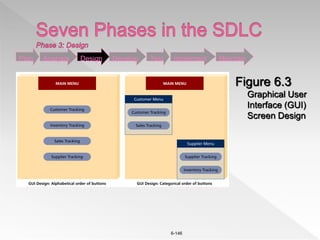
 There are many different types of modeling
activities performed during the design stage
› Graphical user interface (GUI)
 The interface to an information system.
 the ability to model the information system screens for an entire
system.
› Entity relationship diagram
› Data flow diagram
› Flowcharting
Plan Analysis Design Develop Test Implement Maintain
6-146
Plan Analysis Design Develop Test Implement Maintain
Figure 6.3
Graphical User
Interface (GUI)
Screen Design
6-147
 Development phase
› Take all of your detailed design documents from
the design phase and transform them into an
actual system.
Plan Analysis Design Develop Test Implement Maintain
6-148
 Activities during this phase include
› Coding programs
› Creating databases
› Deploying the telecommunications equipment
› Installing hardware and software
 In other words
› Build the technical architecture.
› Build the database and programs.
Plan Analysis Design Develop Test Implement Maintain
6-149
 Testing phase
› Verifies that the system works and meets all of
the business requirements defined in the
analysis phase.
 Test conditions - the detailed steps the
system must perform along with the
expected results of each step.
Plan Analysis Design Develop Test Implement Maintain
6-150
 Testing is critical
› Must have test plans
› Write the test conditions.
 Perform the testing of the system.
Plan Analysis Design Develop Test Implement Maintain
6-151
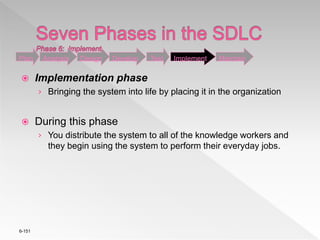
 Implementation phase
› Bringing the system into life by placing it in the organization
 During this phase
› You distribute the system to all of the knowledge workers and
they begin using the system to perform their everyday jobs.
Plan Analysis Design Develop Test Implement Maintain
6-152
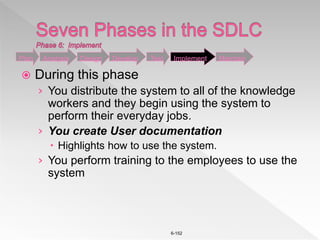
 During this phase
› You distribute the system to all of the knowledge
workers and they begin using the system to
perform their everyday jobs.
› You create User documentation
 Highlights how to use the system.
› You perform training to the employees to use the
system
Plan Analysis Design Develop Test Implement Maintain
6-153
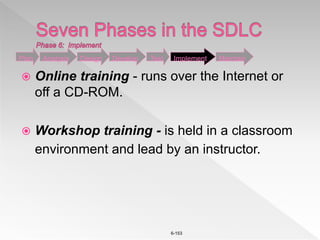
 Online training - runs over the Internet or
off a CD-ROM.
 Workshop training - is held in a classroom
environment and lead by an instructor.
Plan Analysis Design Develop Test Implement Maintain
6-154
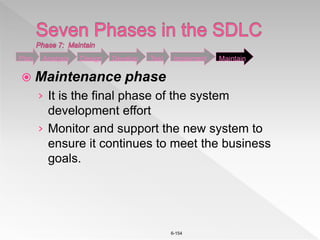
 Maintenance phase
› It is the final phase of the system
development effort
› Monitor and support the new system to
ensure it continues to meet the business
goals.
Plan Analysis Design Develop Test Implement Maintain
6-155
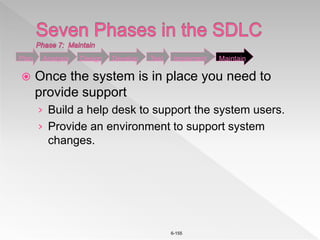
 Once the system is in place you need to
provide support
› Build a help desk to support the system users.
› Provide an environment to support system
changes.
Plan Analysis Design Develop Test Implement Maintain
Foundation of information system

Foundation of information system

  • 1.
  • 2.
    Information is acollection of interrelated data that has been processed into a meaningful form. Information system (IS) is an organized combination of people, hardware, software, communications network and data resources that collects, transforms and disseminates information in an organization. INFORMATION
  • 3.
    The quantities, characters,or symbols on which operations are performed by a computer, which may be stored and transmitted in the form of electrical signals and recorded on magnetic, optical, or mechanical recording media. Data are raw or unorganized forms (alphabets, numbers, or symbols) that refer to, or represent conditions, ideas or objects All data held in the enterprise qualifies as or will need to qualify as information DATA
  • 4.
    In accurate ortimely data is obsolete and lacks integrity Data that is not specific and organized for a purpose cannot be used. Data that doesn’t provide understanding or is redundant is not useful. DATA
  • 5.
    Consists of fourstages: Data Origination: hiring, ordering, selling etc Processing and immediate use : statistical tool Ready access storage: storage units Data Destruction DATA LIFE CYCLE
  • 6.
    It is simplythe conversion of raw data to meaningful information. Data is manipulated to produce results that lead to a resolution of a problem. DATA PROCESSING
  • 7.
  • 8.
    Manual Data Processing:From collection to storage everything is manual Mechanical Data Processing: Typewriters, printing machine Electronic Data Processing Online Transaction processing Batch Processing Centralized data processing Decentralized data processing TYPES OF DATA PROCESSING
  • 9.
    Online system handlestransaction as and when they happen and provides output at the particular instance. As the processing is interactive it lowers delays and provides constant interaction between user and the system. Example: Airline ticket reservation, Banking system ONLINE PROCESSING
  • 10.
     The systemprocesses transactions completely when and where they occur  Users interact directly with the information system.  Users can access data randomly  The information system must be available whenever necessary to support business functions.
  • 11.
     It isthe execution of a series of jobs in a program on a computer without manual intervention. It is a processing mode: the execution of a series of programs each on a set or "batch" of inputs, rather than a single input.  Data is collected and processed in groups or batches.  Eg: Cheque
  • 12.
     It processestransaction data immediately after they are generated and can provide immediate output.  In RTS data is processed as soon as it is originated or recorded, without waiting to accumulate batches of data  Real time data processing involves a continual input, process and output of data. Data must be processed in a small time period (or near real time). Radar systems, customer services and bank ATMs are examples.
  • 13.
     Real timedata processing and analytics allows an organization the ability to take immediate action for those times when acting within seconds or minutes is significant. The goal is to obtain the insight required to act prudently at the right time - which increasingly means immediately.
  • 14.
     Processing performedin one computer or in a cluster of coupled computers in a single location
  • 15.
     The emergenceof data takes place only at one place  The loss of data is minimized  The methods and machines can be standardized  Services of more competent and technical personnel can be taken  It is also very cost –effective particularly in the case of large operations  Duplication of work can be aoided.
  • 16.
     Lack ofco-operation form managers, who do not like to be under control of centralized data processing system  Resistance from managers for mechanizing data processing  Difficult to provide equitable service  Data security is also questioned.
  • 17.
     Although datamay be transmitted between the computers periodically, it implies limited daily communications. Contrast with distributed computing and centralized processing.
  • 18.
     Familiarity withlocal problems  Rapid response to local processing needs  Profit and loss responsibility can be easily fixed.
  • 19.
     There isduplication of activities and redundancy  Difficulty to maintain uniformity  High cost
  • 20.
     Data thatis accurate and timely, specific and organized for a purpose, presented within a context that gives it meaning and relevance, and can lead to an increase in understanding and decrease in uncertainty.  Information is valuable because it can affect behavior, a decision, or an outcome.  For example, if a manager is told his/her company's net profit decreased in the past month, he/she may use this information as a reason to cut financial spending for the next month.
  • 21.
     Processed formof interrelated data in meaningful form is called information.  Raw data that has bee verified to be accurate and timely, is specific and organized for a purpose, is presented within a context that gives it meaning and relevance and which leads to increase in understanding and decrease in uncertainity
  • 22.
     Organizations successcompletely depends on effective flow of information.  when GM tried to introduce the Nova in Latin America they thought they could use the same brand name they used in the United States. They couldn't figure out why no one wanted it until they learned it translated in Spanish to 'No-go.'
  • 23.
     Structure ofthe organization  Size of the organization  Amount of information  Method used  Importance  Necessity  Staff competence  Software and hardware systems
  • 24.
     Different sourcesof information generation.
  • 25.
     Accounting  Finance Personnel  Public Relations  Sales  Market Research  Production  Purchasing
  • 26.
     Government  Auditor Shareholders and investors  Customers
  • 27.
    Information required atdifferent management levels
  • 28.
     Process ofdetermining the value of that information by pin pointing the data to be analyzed
  • 29.
    Start Select data tobe evaluated Estimate expected value of perfect information Compare value with cost of information Discount for: • Deficiencies and inaccuracy • Missing utilities Acquire information Increase value by decreasing inaccuracy or increasing utility of reduce cost by increasing or reducing utility Does actual value of information exceed the cost Wish to continue Stop
  • 32.
     Data: Ihave one item. The data displays a 1, not a zero.  Information: It’s a tomato. Now, we understand the item and its characteristics.  Knowledge: A tomato is a fruit. We can identify patterns in the information and apply them to the item.  Wisdom: Tomato is never added to a fruit salad. There is an underlying, commonly understood principle that governs the item’s purpose.
  • 33.
     Data areraw facts and figures that on their own have no meaning  These can be any alphanumeric characters i.e. text, numbers, symbols Note the “are” bit above? What does this mean?
  • 34.
     Yes, Yes,No, Yes, No, Yes, No, Yes  42, 63, 96, 74, 56, 86  111192, 111234  None of the above data sets have any meaning until they are given a CONTEXT and PROCESSED into a useable form
  • 35.
     To achieveits aims the organisation will need to process data into information.  Data needs to be turned into meaningful information and presented in its most useful format  Data must be processed in a context in order to give it meaning
  • 36.
     Data thathas been processed within a context to give it meaning OR  Data that has been processed into a form that gives it meaning
  • 37.
     In thenext 3 examples explain how the data could be processed to give it meaning  What information can then be derived from the data? Suggested answers are given at the end of this presentation
  • 38.
    Yes, Yes, No,Yes, No, Yes, No, Yes, No, Yes, YesRaw Data Context Responses to the market research question – “Would you buy brand x at price y?” Information ??? Processing
  • 39.
    Raw Data Context Information 42, 63,96, 74, 56, 86 Jayne’s scores in the six subject ??? Processing
  • 40.
    Raw Data Context Information 111192, 111234 Theprevious and current readings of a customer’s car’s dashboard ??? Processing
  • 41.
     Knowledge isthe understanding of rules needed to interpret information “…the capability of understanding the relationship between pieces of information and what to actually do with the information” Debbie Jones – www.teach-ict.com
  • 42.
     Using the3 previous examples: › A Marketing Manager could use this information to decide whether or not to raise or lower price y › Jayne’s teacher could analyse the results to determine whether it would be worth her re-sitting a module › Looking at the pattern of the customer’s previous gas bills may identify that the figure is abnormally low and they are fiddling the gas meter!!!
  • 43.
     Knowledge workershave specialist knowledge that makes them “experts” › Based on formal and informal rules they have learned through training and experience  Examples include doctors, managers, librarians, scientists…
  • 44.
     Because manyrules are based on probabilities computers can be programmed with “subject knowledge” to mimic the role of experts  One of the most common uses of expert systems is in medicine › The ONCOLOG system shown here analyses patient data to provide a reference for doctors, and help for the choice, prescription and follow-up of chemotherapy
  • 45.
    Information Data ContextMeaning= ++ Processing Data – raw facts and figures Information – data that has been processed (in a context) to give it meaning
  • 46.
    Basis of DistinctionData Information Definition Data are raw numbers or other findings which, by themselves, are of limited value. Information is data that has been converted into a meaningful and useful context. Example Ticket sales on a band on tour. Sales report by region and venue – tells us which venue is most profitable. Significance Data by itself alone is not significant. Information is significant by itself. Etymology Data is a plural of datum, which is originally a Latin noun meaning “something given.” Its origin dates back to the 1600s. Its origin dates back to the 1300s
  • 47.
     Environmental Information ›Government Policies › Economic trends › Technological information › Factors of Production  Competitive Information › Industry Demand › Firm Demand › Competition › Past Performance › Present activity › Future Plans
  • 48.
     Internal Information ›Sales Forecast › Financial Plan › Supply Factors › Policies
  • 49.
     Non-action information Action Information  Recurring Information  Non-recurring Information  Documentary Information  Non Documentary Information  Internal Information  External Information
  • 50.
     Accuracy  Timeliness Relevance  Pertinent  Completeness  Accessibility  Granularity  Consistency
  • 51.
     IT hasautomated all company functions from sales to manufacturing. Invoicing to shipping.  New technologies come in handy for business houses to change the processing of the business.  Downloading music, movies, shopping are completely new aspects of IT that has revolutionized businesses.  Droom.in, amazon.com, muncha.com, alibaba.com, are few examples of the revolution.  Ola, mycab, sixt, revolutionized through the use of mobile and IS.
  • 52.
  • 53.
     Information systemsis defined as the process of and tools for storing, managing, using and gathering of data and communications in an organization.  An example of information systems are tools for sending out communications and storing files in a business.
  • 54.
     Economic Importance Information Systems Improve Performance  Importance in Decision Making  Organizational Behavior Change  Communication  Operations  Records
  • 55.
    Basically there are5 components available. Hardware Software Data Procedures People
  • 56.
    Examples Of informationsystem Information system resources: People Resources Specialists- system analysts , Software Developers, Hardware Resources Machines - Computers Video monitors, Optical scanners, Plastic cards Software Resources Programs- operating system programs, Data Resources Product descriptions Customer records, employee files, Network Resources Communications Media , Communication processors
  • 57.
    The term hardwarerefers to machinery. This category includes the computer itself, which is often referred to as the central processing unit (CPU), and all of its support equipments.
  • 58.
     Examples › DellPowerEdge 2600 File Server › Apple iMac › Sony LCD Flat Panel Monitor › iPod › IDAutomation USB Barcode Scanner › RFID Chip
  • 59.
    The term softwarerefers to computer programs and the manuals (if any) that support them.
  • 60.
     Examples › WindowsXP › Graphics Card Driver Software › PowerPoint › mySAP Customer Relationship Management › Peachtree Accounting › iTunes Software
  • 61.
    Data are factsthat are used by programs to produce useful information.
  • 62.
     Examples › IBMDB2 8.2 › Microsoft SQL Server 2000 › Oracle Database 10g › MySQL › Data Mining Software
  • 63.
    Procedures are thepolicies that govern the operation of a computer system.
  • 64.
    People mean theend user of the Systems. Every CBIS (Computer Based Information System) needs people if it is to be useful.
  • 65.
     People arethe 5th component of an Information System  Everyone forgets the importance of people in an information system.  Example: End User, Data Entry Person, Manager, Programmer, DB Administrator, Cashier, Secretary, Professor.
  • 66.
     Examples › Ethernet ›Netgear Wireless Router › Cable Modem › Cell Phone › WiFi, WiMax card › Bluetooth device
  • 67.
     The challengeof competitors  Threat of new entry  Threat of substitute product  Bargaining Power of customer  Bargaining Power of supplier
  • 68.
     used todescribe the interaction of external influences -- threats and opportunities -- that affect an organization’s strategy and ability to compete  competitive advantage - can be achieved by enhancing the firm’s ability to deal with customers, suppliers, substitute products and services, and new entrants to its market
  • 69.
     Objective -use this model to identify potential areas where IT can be used to gain a competitive advantage
  • 70.
     businesses canuse four basic competitive strategies to deal with these competitive forces:  1. Product Differentiation  2. Cost leadership  3. Focused differentiation  4. Cost Focus
  • 71.
    ©The McGraw-Hill Companies,Inc., 1998 3- 6 Irwin/McGraw-Hill Competitive StrategiesCompetitive Strategies Competitive AdvantageCompetitive Advantage CompetitiveCompetitive ScopeScope Lower Cost Differentiation Broad Target Narrow Target Cost Leadership Cost Focus Differentiation Focused Differentiation
  • 72.
     competitive strategyfor creating brand loyalty  Develop products & services which are different from what the competition offers  . superior attributes  . distinguishing features
  • 73.
     to preventnew competitors from entering their markets, businesses produce goods/services at lower price than competition  based on efficient operations  based on effective operations  economies of scale
  • 74.
     develop newmarket niche for specialized products or services  so that business can compete in target market better than its competitors
  • 75.
     Company servesnarrow market segment with product/service  which it offers at a significantly lower cost than competitors
  • 76.
     Use competitivestrategy to combat 5 competitive forces in marketplace  1. threat of new competitors  2. bargaining power of suppliers  3. bargaining power of customers  4. substitute products  5. rivalry within the industry
  • 77.
     Use ITto enact or counteract these forces with respect to › customers › existing & potential competitors › suppliers
  • 78.
     Erect barriersto entry:  use IT to slow down new firms entering market › SABRE › ASAP
  • 79.
     Change basisof competition › novel IS can perhaps change the basis of competition - help offer product/service with new features › e.g. delivery service allows customer to track progress of package › you are now differentiated from competition › no longer compete just on price basis
  • 80.
     Deliver productswith better value  identify and track a market niche with IS that you can serve better than others  try to prevent substitution
  • 81.
     Introduce switchingcosts › cost of switching to competitor › deters customers from switching › e.g. due to training and contracts, travel agents unlikely to switch to different airline reservation system
  • 82.
     Develop Alternatives use IS to maintain information on available alternative sources of supply
  • 83.
     Communication  Globalizationand cultural gap  Availability  Creation of new types of jobs  Cost effectiveness and productivity
  • 84.
     Unemployment andlack of job security  Dominant culture  Security issues  Implementation expenses
  • 87.
     Transaction ProcessingSystems (TPS) › Automate handling of data about business activities (transactions)  Management Information Systems (MIS) › Converts raw data from transaction processing system into meaningful form  Decision Support Systems (DSS) › Designed to help decision makers › Provides interactive environment for decision making
  • 88.
     Expert Systems(ES) › Replicates decision making process › Knowledge representation describes the way an expert would approach the problem 1.88
  • 89.
     A transactionprocess system (TPS) is an information processing system for business transactions involving the collection, modification and retrieval of all transaction data. Characteristics of a TPS include performance, reliability and consistency. TPS is also known as transaction processing or real- time processing
  • 90.
     Supports Operations Updates Operational Databases  Examples: › ATM Machine System – Banking Transactions › Cash Register System – Point of Sale Transactions › Accounting System – Checking Account Transactions › Even Pay-per-view or OnDemand is a TPS
  • 91.
     Supports Management(duh?)  Analysis & Reporting  Charts, Graphs, Summary Tools  Examples: › SCT Banner – Managing College Information (Siena uses it) › Spreadsheet (Excel) – One of the first and most basic › Oracle's Corporate Performance Management
  • 92.
     Support Management What-if Analysis, Decision Modeling, Scenario Building, Highly interactive, ad hoc.  Examples › Enterprise Decision Manager 2.0 Fair Isaac Corporation › AIMMS 3.6  Most DSS’s are custom developed for specific companies; very few out-of-the-box products.
  • 93.
     Supports high-levelstrategic management  Provides critical info from other systems (MIS and DSS).  Portal Concept: one place with links to all information  EIS’s integrate external information such as economic developments and news about related markets and competitors. Helps strategic decision making, not necessarily tactical. › Tactical – doing things the right way right › Strategic – doing the right things
  • 94.
     Management informationsystem, or MIS, broadly refers to a computer-based system that provides managers with the tools to organize, evaluate and efficiently manage departments within an organization.  In order to provide past, present and prediction information, a management information system can include software that helps in decision making, data resources such as databases, the hardware resources of a system, decision support systems, people management and project management applications, and any computerized processes that enable the department to run efficiently.
  • 95.
     A systemthat provides information to support managerial functions like planning, organizing, directing, controlling.  Collects information in a systematic and a routing manner which is in accordance with a well defined set of rules  Includes files, hardware, and software and operations research models of processing, storing, retrieving and transmitting information to the users.
  • 96.
     Manual RecordKeeping Era (1940-1965) › Electronic data processing  Analysis Era (1965-1980)  Knowledge Era (1980 onwards) › Executive Information System › Expert System (1980) › Strategic Information System (1990)
  • 97.
     Facilitate thedecision making process by providing information in the proper time frame  Provide required information at each level of management to carry out their function  Help in highlighting the critical factors to the closely monitored for the successful functioning of organization  Support decision making in both structured and unstructured problem environment  Provide a system of people, device, procedure and others for collecting storing retrieving and transmitting to the user.
  • 98.
     Management Oriented Management Directed  Integrated  Common Data Flow  Heavy Planning Element  Ease of Use and Flexibility
  • 99.
     Management-oriented: Thebasic objective of MIS is to provide information support to the management in the organization for decision making.  Management directed: When MIS is management-oriented, it should be directed by the management because it is the management who tells their needs and requirements more effectively than anybody else.  Integrated: It means a comprehensive or complete view of all the subsystems in the organization of a company. 99
  • 100.
     Common dataflows: The integration of different subsystems will lead to a common data flow which will further help in avoiding duplicacy and redundancy in data collection, storage and processing.  Heavy planning-element: The preparation of MIS is not a one or two day exercise. It usually takes 3 to 5 years and sometimes a much longer period.  Subsystem concept: When a problem is seen in 2 sub parts, then the better solution to the problem is possible. 100
  • 101.
     Common database:This is the basic feature of MIS to achieve the objective of using MIS in business organizations.  Computerized: MIS can be used without a computer. But the use of computers increases the effectiveness and the efficiency of the system.  User friendly/Flexibility: An MIS should be flexible.  Information as a resource: Information is the major ingredient of any MIS. 101
  • 102.
     Provide relevantinformation for facilitating planning and timely control  Data is available in summarized form which minimize information loading  Ease in measuring performance helps in encouraging decentralization in an organization  Improve coordination as all departments are aware of course of action or any change in plan  Enhance quick, cheap and efficient communication  Bring down linguistic, geographical and cultural boundaries.  24*7 availability of information  Automation helps in saving time and papers  Creation of new type of jobs like computer programmer, system analyzer, software and hardware developer etc
  • 103.
     Require constantmonitoring of sensitive data  Security issues like hacking always prevail  Quality of output depends on quality of input  Implementation of MIS is costly as requires hardware, software and training of human resources  Lack of flexibility to upgrade software  Takes only quantitative data  Increase unemployment  Effectiveness decreases due to frequent change in top management and their policies
  • 104.
    Introduction; IT is usedin all business activities to be Performed, business problems to be solved, & business opportunities to be pursued. As a business professionals, one has a specific understanding of how ISs affects a business functions & Appreciation of the major ways.
  • 105.
  • 106.
     Marketing isconcerned with the planning, promotion, & sale of existing products in existing market.  Business firms have increasingly tuned to IT to help them to perform vital marketing functions in the face of the rapid changes of today’s environment.
  • 107.
  • 108.
    Banking is generallyunderstood as a place where the financial services are offered, viz checking, savings, & providing credit to the customers. The customers choose the bank mainly on the following 3 factors; 1. The ease of doing business 2. The quality of personnel & service 3. The range of the financial service The MIS in banking industry revolves around this aspect. The customer of the bank would like to know the status of the A/C very fast to make decision on withdrawals or payments. Hence the MIS is to be designed to identify, decide & design a service strategy for offering a distinctive service to the wide range of customers seeking a variety of service demand. the following points should be taken care of while designing an MIS for a bank
  • 109.
     Customer DB 1.Customer 2. Operator 3. Range of Service 4. Class of customers 5. Working Hours  Service to the A/C holders  Service for business promotions  The index monitoring system  Human resource upgrade
  • 110.
     IS todayis used in almost all the sectors apart from the sectors mentioned above, it is also used in Hospitals, hotel industry, restaurants and so on.
  • 111.
     Top DownApproach  Bottom Up Approach  Integrative Approach
  • 112.
    1. Define theobjective of the organization, environment, and the constraints under which it operates 2. Identify the activities or functions for which information would be required. 3. The crucial strategic and tactical decisions are also to be defined and the decisions necessary to operate the activities are specified 4. From the activities or functions and the decisions to be made, the major information requirements are ascertained.
  • 113.
    5. Develop amodel of information flow in the organization which acts as a guide for designing the information system. By using the model at information flow various information subsystem may be defined. Organizational Objectives Key Management Decisions Information Requirements MIS Design Control
  • 114.
     Comprise eachsub-system into various modules. The selection of a module for a developing system is made on the basis of the priority assigned to them.  The various sub-system and their modules are coordinated to achieve the objective of integration. The information system so developed is viewed as a total system fully integrated rather than as a collection of loosely co-ordinated sub-system.
  • 115.
  • 116.
     Th developmentof information system, for each life stream system starts after identifying their basic transactions, information file requirements and information processing programs.  After ascertaining the data/information requirements, files requirements and processing programs for each life stream system, the formation system for each is developed  The next step is towards he integration of data kept in different data files of each information system. The data is integrated only after thoroughly examining various applications, files and records. The integrated data enhances the sheer ability and evaluability of the data base. It also ensures that uniform data are being used by al programs and also provides added capability for inquiry processing as well as adhoc requests for reports
  • 117.
     After thedatabases are created, various planning and decisions support models are introduced for supporting the planning activities involved in management control. Further these models are integrated to evolve model bases. The models in the mode base facilitate and support higher management activities. They are useful for analysis of different factors to understand difficult situations and to formulate alternative strategies and options to deal them.  After the decisions models start functioning, in this step the models are integrated into a model base having a variety of models including regression analysis, operations research model etc.
  • 118.
     Lastly, strategicplanning models are added to the information system. Now data (mainly external) have to be collected and stored for strategic planning activity. In this approach, the system grows in response to the real needs of users. The main disadvantage is that integration or synthesis of various sub systems may need to be redesigned due to the changing requirements and new interfaces with other sub-systems.
  • 119.
     This approachcan overcome the limitations of the above two approaches when used objectively  Integrative approach permits managers at all levels to influence the design.  Top management identifies the structure and design of MIS suitable to the concern.  This design is further presented to lower level to suggest changes, additions or deflections and return the design with their suggestions to the top level for approval.
  • 120.
     Is asimportant as development of the system.  It needs to be carefully managed as well as strong interaction with the client.  There has to be full support and coordination between client IS Dept and its functionaries.
  • 121.
     Implementation Plan Organizing the MIS Department  Selection and procurement of Hardware  Procurement of Software  Creating the database  Training the user  Creating physical infrastructure  Transition into new system
  • 122.
     Creating amaster schedule of the implementation activities  Setting timelines for critical and non-critical activities  Identifying major bottlenecks and their solutions  Communications of the plan.
  • 123.
     Organization isnecessary before the implementation of the system.  Job Analysis-Roles Defined  Training  Human Resources
  • 124.
     Preparation ofthe vendor list  Preparation of RFP  Request for proposal/bid to select vendor  Evaluation of RFP  Selection of vendor
  • 125.
     Procurement ofSoftware  Creating the database  Training the user  Creating physical infrastructure  Transition into new system
  • 127.
     The systemsdevelopment life cycle (SDLC), also referred to as the application development life-cycle, is a term used in systems engineering, information systems and software engineering to describe a process for planning, creating, testing, and deploying an information system.
  • 128.
     Systems developmentlife cycle (SDLC) - a structured step-by-step approach for developing information systems.
  • 129.
     System Planning System Analysis  System Design and Development  Systems implementation and testing  Systems Operation, review and support
  • 130.
    Figure 6.2 Important Activities inthe Systems Development Life Cycle page 219
  • 131.
     Determine ifa new system is needed  Three primary tasks: › Define the problem  By observation and interview, determine what information is needed by whom, when, where and why › Suggest alternative solutions › Prepare a short report
  • 132.
     Activities › Definethe system to be developed. › Set the project scope. › Develop the project plan including tasks, resources, and timeframes. Plan Analysis Design Develop Test Implement Maintain
  • 133.
    6-133  Planning phase- involves determining a solid plan for developing your information system.  The three of the most important activities involved during the planning phase: › Identify and select the system for development › Set project scope › Develop project plan Plan Analysis Design Develop Test Implement Maintain
  • 134.
    6-134  Identify andselect the system for development › Key question: “What systems are required to support the strategic goals of your organization?” › KW generate proposals to build new information systems when they are having a difficult time performing their jobs. › Companies cannot develop all proposed IS, so they look into the critical success factors.  Critical success factor (CSF) - a factor simply critical to your organization’s success. Plan Analysis Design Develop Test Implement Maintain
  • 135.
    6-135  Once thesystem to be developed in defined, then the project needs to be scoped.  Set project scope - clearly defines the high-level system requirements.  It is a birds-eye-view of the project.  Project scope document - a written definition of the project scope and is usually no longer than a paragraph. Plan Analysis Design Develop Test Implement Maintain
  • 136.
    6-136  Developing aproject plan is the final activity of the planning phase.  Project plan - defines the what, when, and who questions of system development including all activities to be performed, the individuals, or resources, who will perform the activities, and the time required to complete each activity. Plan Analysis Design Develop Test Implement Maintain
  • 137.
    6-137  The projectplan should include: › Project milestones - represent key dates for which you need a certain group of activities performed. › Project manager - an individual who is an expert in project planning and management, defines and develops the project plan and tracks the plan to ensure all key project milestones are completed on time. Plan Analysis Design Develop Test Implement Maintain
  • 138.
    6-138  The analysisphase involves › The end users › The IT specialists Working together › To understand and › Document the business requirements for the system. Plan Analysis Design Develop Test Implement Maintain
  • 139.
    6-139  Gather Businessrequirements - the detailed set of knowledge worker requests that the system must meet in order to be successful.  Key activity = Gathering clearly defined business requirements.  Gathering business requirements = investigation. Plan Analysis Design Develop Test Implement Maintain
  • 140.
    6-140  A usefulway to gather system requirements is: 1. Joint application development (JAD) - knowledge workers and IT specialists meet, sometimes for several days, to define or review the business requirements for the system. 2. Requirements definition document – prioritizes the business requirements and places them in a formal comprehensive document. 3. Sign-off - the knowledge workers’ actual signatures indicating they approve all of the business requirements. Plan Analysis Design Develop Test Implement Maintain
  • 141.
    6-141  The primarygoal of the design phase › Build the technical architecture required to support the system.  This includes › Design of the technical architecture › Design system models. Plan Analysis Design Develop Test Implement Maintain
  • 142.
    6-142  Technical architecture– › Defines the hardware, software, and telecommunications equipment required to run the system.  The final architecture must meet you needs in terms of › Time › Cost › Technical feasibility › Flexibility Plan Analysis Design Develop Test Implement Maintain
  • 143.
    6-143  It isimportant to ensure that the final architecture meet › Current system needs › Future system needs Plan Analysis Design Develop Test Implement Maintain
  • 144.
    6-144  Modeling -the activity of drawing a graphical representation of a design.  You model everything you build including › Reports › Programs › databases Plan Analysis Design Develop Test Implement Maintain
  • 145.
    6-145  There aremany different types of modeling activities performed during the design stage › Graphical user interface (GUI)  The interface to an information system.  the ability to model the information system screens for an entire system. › Entity relationship diagram › Data flow diagram › Flowcharting Plan Analysis Design Develop Test Implement Maintain
  • 146.
    6-146 Plan Analysis DesignDevelop Test Implement Maintain Figure 6.3 Graphical User Interface (GUI) Screen Design
  • 147.
    6-147  Development phase ›Take all of your detailed design documents from the design phase and transform them into an actual system. Plan Analysis Design Develop Test Implement Maintain
  • 148.
    6-148  Activities duringthis phase include › Coding programs › Creating databases › Deploying the telecommunications equipment › Installing hardware and software  In other words › Build the technical architecture. › Build the database and programs. Plan Analysis Design Develop Test Implement Maintain
  • 149.
    6-149  Testing phase ›Verifies that the system works and meets all of the business requirements defined in the analysis phase.  Test conditions - the detailed steps the system must perform along with the expected results of each step. Plan Analysis Design Develop Test Implement Maintain
  • 150.
    6-150  Testing iscritical › Must have test plans › Write the test conditions.  Perform the testing of the system. Plan Analysis Design Develop Test Implement Maintain
  • 151.
    6-151  Implementation phase ›Bringing the system into life by placing it in the organization  During this phase › You distribute the system to all of the knowledge workers and they begin using the system to perform their everyday jobs. Plan Analysis Design Develop Test Implement Maintain
  • 152.
    6-152  During thisphase › You distribute the system to all of the knowledge workers and they begin using the system to perform their everyday jobs. › You create User documentation  Highlights how to use the system. › You perform training to the employees to use the system Plan Analysis Design Develop Test Implement Maintain
  • 153.
    6-153  Online training- runs over the Internet or off a CD-ROM.  Workshop training - is held in a classroom environment and lead by an instructor. Plan Analysis Design Develop Test Implement Maintain
  • 154.
    6-154  Maintenance phase ›It is the final phase of the system development effort › Monitor and support the new system to ensure it continues to meet the business goals. Plan Analysis Design Develop Test Implement Maintain
  • 155.
    6-155  Once thesystem is in place you need to provide support › Build a help desk to support the system users. › Provide an environment to support system changes. Plan Analysis Design Develop Test Implement Maintain