CHAPTER 14
PROJECT MANAGEMENT
Anjan Mahanta
anjan.mahanta@satreephuketipc.com
1
Cambridge International A Level IT
Part 2
14.06 Disaster recovery management
● Sometimes disasters occur, such as a power cut, flood, fire, theft of data,
malware, corruption of data, loss of network admin password or loss of
the network manager.
● When this happens it is necessary to recover from the disaster.
● A disaster recovery plan (DRP) is needed for such events so that recovery
can be completed as quickly and effectively as possible, minimising
disruption to the organisation.
2
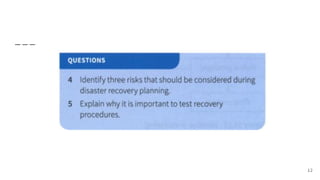
Risk assessment
● Risk assessment involves identifying the potential risks to an organisation, analysing the
potential impact to the organisation and the likelihood of each risk occurring.
● This is often carried out alongside a systematic process known as business impact
analysis (BIA), which quantifies the impact of a disaster in terms of financial and
nonfinancial costs.
● A risk assessment will identify a number of potential hazards including:
○ power cut
○ fire
○ flood
○ denial of access to premises
○ malware
○ unauthorised access to data
○ theft of data
○ corruption of data
○ loss of key personnel 3
Risk assessment
● Some of these risks involve people who could deliberately cause problems. These
people are known as perpetrators.
● Each risk will then be quantified in terms of its likelihood on a scale from 0.0 to 1.0.
where 0.0 represents it never happening to 1.0 which represents it as being almost
inevitable.
● Within an organisation, there will be a number of business activities that are carried out.
Each business activity will need to be identified.
● The impact of that business activity not being able to take place then needs to be
analysed.
● The impact for each activity not being able to take place will be measured on a scale
from 0.0 to I .0 where 0.0 means that there is no impact to 1.0 meaning that the impact
is absolutely critical to the aims of the organisation.
4
Risk assessment
● loss of revenue
● damage to organisations image
● penalty fees
● cost of recovery
● effect on other business activities.Impacts could include:
From this analysis, activities can be categorised. for example:
● activities which must continue
● activities which could be scaled down
● activities which could be suspended.
5
Risk assessment
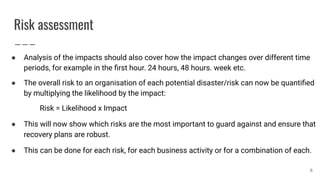
● Analysis of the impacts should also cover how the impact changes over different time
periods, for example in the first hour. 24 hours, 48 hours. week etc.
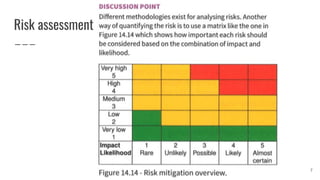
● The overall risk to an organisation of each potential disaster/risk can now be quantified
by multiplying the likelihood by the impact:
Risk = Likelihood x Impact
● This will now show which risks are the most important to guard against and ensure that
recovery plans are robust.
● This can be done for each risk, for each business activity or for a combination of each.
6
Risk assessment
7
Securing the risk
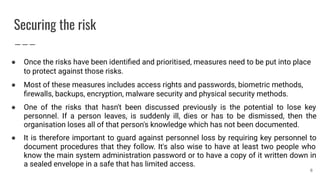
● Once the risks have been identified and prioritised, measures need to be put into place
to protect against those risks.
● Most of these measures includes access rights and passwords, biometric methods,
firewalls, backups, encryption, malware security and physical security methods.
● One of the risks that hasn't been discussed previously is the potential to lose key
personnel. If a person leaves, is suddenly ill, dies or has to be dismissed, then the
organisation loses all of that person's knowledge which has not been documented.
● It is therefore important to guard against personnel loss by requiring key personnel to
document procedures that they follow. It's also wise to have at least two people who
know the main system administration password or to have a copy of it written down in
a sealed envelope in a safe that has limited access.
8
Recovery management
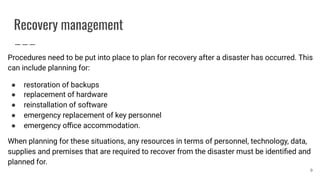
Procedures need to be put into place to plan for recovery after a disaster has occurred. This
can include planning for:
● restoration of backups
● replacement of hardware
● reinstallation of software
● emergency replacement of key personnel
● emergency office accommodation.
When planning for these situations, any resources in terms of personnel, technology, data,
supplies and premises that are required to recover from the disaster must be identified and
planned for.
9
Recovery management
● The recovery point objective (RPO) must also be identified. The RPO is the point in time
prior to the disruption to which data must be recovered.
● It is important to plan how long each recovery process will take. There will be some
parts of recovery where the time is fixed, but other parts where if more resources are
allocated then the recovery can be quicker. When planning for the recovery time, two
key measurements should be considered:
○ maximum tolerable downtime (MTD): this is the maximum time that each
business activity could tolerate not having access to their essential system
functionality
○ recovery time objective (RIO): this is the estimated maximum amount of time that
the organisation or business activity has in which to recover its systems and
resume operations. 10
Recovery testing
● Plans are important, and a plan is better than no plan, but plans don't always work. It is
therefore important to test disaster recovery plans.
● This is particularly applicable to restoring data and systems.
● Backed up data should be tested daily to ensure that the backup process has
succeeded and that the backup data is accessible.
● Full system restorations should be tested periodically by attempting to restore whole
server backups onto a clean server and testing their success.
11
12
Prototyping
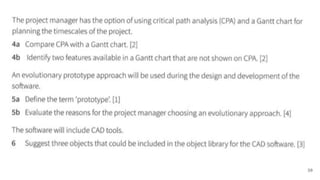
● A prototype is a "mock-up' of a software solution in a primitive form.
● It is used during the design stage to demonstrate how a system will look and work. It is
usually focused on the user interface, rather than any data structures.
● It is used so that the client can get a feel for the new system before it is developed and
can provide feedback that can then be acted upon.
● The client is also able to compare the prototype against the requirements specification.
● The client also has an opportunity to explain their requirements more clearly having
seen the designer's interpretation.
13
Types of prototyping
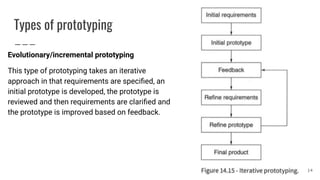
Evolutionary/incremental prototyping
This type of prototyping takes an iterative
approach in that requirements are specified, an
initial prototype is developed, the prototype is
reviewed and then requirements are clarified and
the prototype is improved based on feedback.
14
Types of prototyping
Evolutionary/incremental prototyping
● Each prototype will be build upon the previous one and include more functionality
until a final product is built.
● At each stage, only clearly understood requirements are developed.
● Each prototype can be functional and if required can be used by the client until the
next evolution of the prototype is ready.
● This means that the end users may request enhanced or new features that they
discover they require as the prototypes are being developed, features they wouldn't
have envisaged at the initial requirements specification stage.
15
Types of prototyping
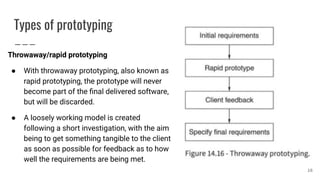
Throwaway/rapid prototyping
● With throwaway prototyping, also known as
rapid prototyping, the prototype will never
become part of the final delivered software,
but will be discarded.
● A loosely working model is created
following a short investigation, with the aim
being to get something tangible to the client
as soon as possible for feedback as to how
well the requirements are being met.
16
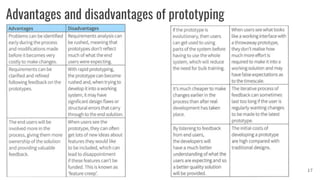
Advantages and disadvantages of prototyping
17
Methods of software development
Rapid application development
● Rapid application development (RAD) uses prototyping to develop a system in a very
short time frame, usually less than six months. Instead of following a traditional
requirement gathering approach, requirements are gathered through focus groups.
● Users are key players in the prototyping stage and provide feedback for refinements.
● This type of user involvement is known as joint application development (JAD)
because the user is jointly involved with the developer in the development of the
system.
● Less time is spent on planning and design and more emphasis is put on the
development phase. 18
Methods of software development
Rapid application development
● Strict deadlines are allocated throughout the development of the system to ensure that the
product is developed and finished on time by allocating time boxes to the development of
each requirement.
● This requires understanding from the user that, if requirements are too complex, then they
must be simplified or removed from the project.
● The RAD approach will also try to reuse any modules of software that already exist and are
available. rather than always developing from scratch. Software application frameworks can
be used to develop the solution whereby a complex graphical user interface can be created
using drag and drop functionality. This enables users to be involved in the actual design of
the interface as part of the JAD approach and they can see the interface taking shape in
real time. 19
Methods of software development
Rapid application development
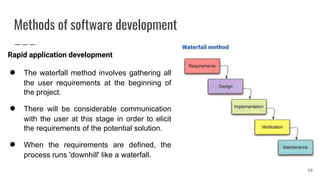
● The waterfall method involves gathering all
the user requirements at the beginning of
the project.
● There will be considerable communication
with the user at this stage in order to elicit
the requirements of the potential solution.
● When the requirements are defined, the
process runs 'downhill' like a waterfall.
20
Methods of software development
Rapid application development
● During the design stage, the interface and the structure of the system will be
designed.
● During implementation, often referred to as development, the system will be
developed, which often involves programming.
● The purpose of the verification phase is to ensure that the project meets the
customer's requirements.
● The system will then be used and during its use there may be problems that are
discovered that need to be corrected or other changes that need to be made. This is
known as maintenance.
21
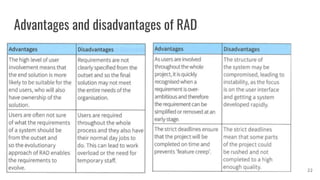
Advantages and disadvantages of RAD
22
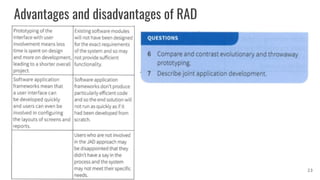
Advantages and disadvantages of RAD
23
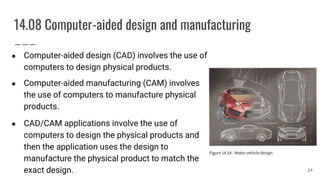
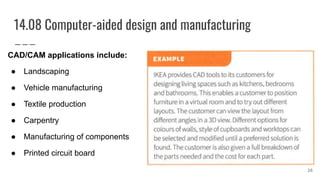
14.08 Computer-aided design and manufacturing
● Computer-aided design (CAD) involves the use of
computers to design physical products.
● Computer-aided manufacturing (CAM) involves
the use of computers to manufacture physical
products.
● CAD/CAM applications involve the use of
computers to design the physical products and
then the application uses the design to
manufacture the physical product to match the
exact design. 24
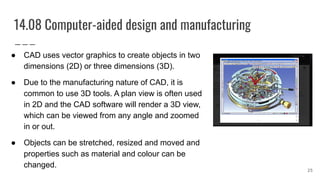
14.08 Computer-aided design and manufacturing
● CAD uses vector graphics to create objects in two
dimensions (2D) or three dimensions (3D).
● Due to the manufacturing nature of CAD, it is
common to use 3D tools. A plan view is often used
in 2D and the CAD software will render a 3D view,
which can be viewed from any angle and zoomed
in or out.
● Objects can be stretched, resized and moved and
properties such as material and colour can be
changed.
25
14.08 Computer-aided design and manufacturing
CAD/CAM applications include:
● Landscaping
● Vehicle manufacturing
● Textile production
● Carpentry
● Manufacturing of components
● Printed circuit board
26
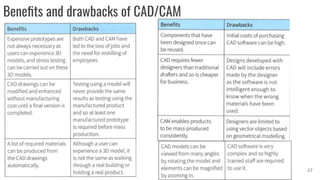
Benefits and drawbacks of CAD/CAM
27
28
29
30

Project management part 2

  • 1.
    CHAPTER 14 PROJECT MANAGEMENT AnjanMahanta anjan.mahanta@satreephuketipc.com 1 Cambridge International A Level IT Part 2
  • 2.
    14.06 Disaster recoverymanagement ● Sometimes disasters occur, such as a power cut, flood, fire, theft of data, malware, corruption of data, loss of network admin password or loss of the network manager. ● When this happens it is necessary to recover from the disaster. ● A disaster recovery plan (DRP) is needed for such events so that recovery can be completed as quickly and effectively as possible, minimising disruption to the organisation. 2
  • 3.
    Risk assessment ● Riskassessment involves identifying the potential risks to an organisation, analysing the potential impact to the organisation and the likelihood of each risk occurring. ● This is often carried out alongside a systematic process known as business impact analysis (BIA), which quantifies the impact of a disaster in terms of financial and nonfinancial costs. ● A risk assessment will identify a number of potential hazards including: ○ power cut ○ fire ○ flood ○ denial of access to premises ○ malware ○ unauthorised access to data ○ theft of data ○ corruption of data ○ loss of key personnel 3
  • 4.
    Risk assessment ● Someof these risks involve people who could deliberately cause problems. These people are known as perpetrators. ● Each risk will then be quantified in terms of its likelihood on a scale from 0.0 to 1.0. where 0.0 represents it never happening to 1.0 which represents it as being almost inevitable. ● Within an organisation, there will be a number of business activities that are carried out. Each business activity will need to be identified. ● The impact of that business activity not being able to take place then needs to be analysed. ● The impact for each activity not being able to take place will be measured on a scale from 0.0 to I .0 where 0.0 means that there is no impact to 1.0 meaning that the impact is absolutely critical to the aims of the organisation. 4
  • 5.
    Risk assessment ● lossof revenue ● damage to organisations image ● penalty fees ● cost of recovery ● effect on other business activities.Impacts could include: From this analysis, activities can be categorised. for example: ● activities which must continue ● activities which could be scaled down ● activities which could be suspended. 5
  • 6.
    Risk assessment ● Analysisof the impacts should also cover how the impact changes over different time periods, for example in the first hour. 24 hours, 48 hours. week etc. ● The overall risk to an organisation of each potential disaster/risk can now be quantified by multiplying the likelihood by the impact: Risk = Likelihood x Impact ● This will now show which risks are the most important to guard against and ensure that recovery plans are robust. ● This can be done for each risk, for each business activity or for a combination of each. 6
  • 7.
  • 8.
    Securing the risk ●Once the risks have been identified and prioritised, measures need to be put into place to protect against those risks. ● Most of these measures includes access rights and passwords, biometric methods, firewalls, backups, encryption, malware security and physical security methods. ● One of the risks that hasn't been discussed previously is the potential to lose key personnel. If a person leaves, is suddenly ill, dies or has to be dismissed, then the organisation loses all of that person's knowledge which has not been documented. ● It is therefore important to guard against personnel loss by requiring key personnel to document procedures that they follow. It's also wise to have at least two people who know the main system administration password or to have a copy of it written down in a sealed envelope in a safe that has limited access. 8
  • 9.
    Recovery management Procedures needto be put into place to plan for recovery after a disaster has occurred. This can include planning for: ● restoration of backups ● replacement of hardware ● reinstallation of software ● emergency replacement of key personnel ● emergency office accommodation. When planning for these situations, any resources in terms of personnel, technology, data, supplies and premises that are required to recover from the disaster must be identified and planned for. 9
  • 10.
    Recovery management ● Therecovery point objective (RPO) must also be identified. The RPO is the point in time prior to the disruption to which data must be recovered. ● It is important to plan how long each recovery process will take. There will be some parts of recovery where the time is fixed, but other parts where if more resources are allocated then the recovery can be quicker. When planning for the recovery time, two key measurements should be considered: ○ maximum tolerable downtime (MTD): this is the maximum time that each business activity could tolerate not having access to their essential system functionality ○ recovery time objective (RIO): this is the estimated maximum amount of time that the organisation or business activity has in which to recover its systems and resume operations. 10
  • 11.
    Recovery testing ● Plansare important, and a plan is better than no plan, but plans don't always work. It is therefore important to test disaster recovery plans. ● This is particularly applicable to restoring data and systems. ● Backed up data should be tested daily to ensure that the backup process has succeeded and that the backup data is accessible. ● Full system restorations should be tested periodically by attempting to restore whole server backups onto a clean server and testing their success. 11
  • 12.
  • 13.
    Prototyping ● A prototypeis a "mock-up' of a software solution in a primitive form. ● It is used during the design stage to demonstrate how a system will look and work. It is usually focused on the user interface, rather than any data structures. ● It is used so that the client can get a feel for the new system before it is developed and can provide feedback that can then be acted upon. ● The client is also able to compare the prototype against the requirements specification. ● The client also has an opportunity to explain their requirements more clearly having seen the designer's interpretation. 13
  • 14.
    Types of prototyping Evolutionary/incrementalprototyping This type of prototyping takes an iterative approach in that requirements are specified, an initial prototype is developed, the prototype is reviewed and then requirements are clarified and the prototype is improved based on feedback. 14
  • 15.
    Types of prototyping Evolutionary/incrementalprototyping ● Each prototype will be build upon the previous one and include more functionality until a final product is built. ● At each stage, only clearly understood requirements are developed. ● Each prototype can be functional and if required can be used by the client until the next evolution of the prototype is ready. ● This means that the end users may request enhanced or new features that they discover they require as the prototypes are being developed, features they wouldn't have envisaged at the initial requirements specification stage. 15
  • 16.
    Types of prototyping Throwaway/rapidprototyping ● With throwaway prototyping, also known as rapid prototyping, the prototype will never become part of the final delivered software, but will be discarded. ● A loosely working model is created following a short investigation, with the aim being to get something tangible to the client as soon as possible for feedback as to how well the requirements are being met. 16
  • 17.
  • 18.
    Methods of softwaredevelopment Rapid application development ● Rapid application development (RAD) uses prototyping to develop a system in a very short time frame, usually less than six months. Instead of following a traditional requirement gathering approach, requirements are gathered through focus groups. ● Users are key players in the prototyping stage and provide feedback for refinements. ● This type of user involvement is known as joint application development (JAD) because the user is jointly involved with the developer in the development of the system. ● Less time is spent on planning and design and more emphasis is put on the development phase. 18
  • 19.
    Methods of softwaredevelopment Rapid application development ● Strict deadlines are allocated throughout the development of the system to ensure that the product is developed and finished on time by allocating time boxes to the development of each requirement. ● This requires understanding from the user that, if requirements are too complex, then they must be simplified or removed from the project. ● The RAD approach will also try to reuse any modules of software that already exist and are available. rather than always developing from scratch. Software application frameworks can be used to develop the solution whereby a complex graphical user interface can be created using drag and drop functionality. This enables users to be involved in the actual design of the interface as part of the JAD approach and they can see the interface taking shape in real time. 19
  • 20.
    Methods of softwaredevelopment Rapid application development ● The waterfall method involves gathering all the user requirements at the beginning of the project. ● There will be considerable communication with the user at this stage in order to elicit the requirements of the potential solution. ● When the requirements are defined, the process runs 'downhill' like a waterfall. 20
  • 21.
    Methods of softwaredevelopment Rapid application development ● During the design stage, the interface and the structure of the system will be designed. ● During implementation, often referred to as development, the system will be developed, which often involves programming. ● The purpose of the verification phase is to ensure that the project meets the customer's requirements. ● The system will then be used and during its use there may be problems that are discovered that need to be corrected or other changes that need to be made. This is known as maintenance. 21
  • 22.
  • 23.
  • 24.
    14.08 Computer-aided designand manufacturing ● Computer-aided design (CAD) involves the use of computers to design physical products. ● Computer-aided manufacturing (CAM) involves the use of computers to manufacture physical products. ● CAD/CAM applications involve the use of computers to design the physical products and then the application uses the design to manufacture the physical product to match the exact design. 24
  • 25.
    14.08 Computer-aided designand manufacturing ● CAD uses vector graphics to create objects in two dimensions (2D) or three dimensions (3D). ● Due to the manufacturing nature of CAD, it is common to use 3D tools. A plan view is often used in 2D and the CAD software will render a 3D view, which can be viewed from any angle and zoomed in or out. ● Objects can be stretched, resized and moved and properties such as material and colour can be changed. 25
  • 26.
    14.08 Computer-aided designand manufacturing CAD/CAM applications include: ● Landscaping ● Vehicle manufacturing ● Textile production ● Carpentry ● Manufacturing of components ● Printed circuit board 26
  • 27.
  • 28.
  • 29.
  • 30.