The 7Cs of learning design
 Gráinne Conole, Leicester University
           14th May 2012
  Masterclass, Dublin City University
                Dublin
Outline

• New media
• Paradoxes
• A new approach to
  design
• Reflections and
  implications
Activity

• What are the
  characteristics of new
  technologies?
• What are their
  implications for
  learning, teaching and
  research?
New media
Characteristics        Implications


                            Conole and Alevizou, 2010
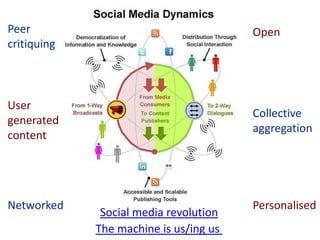
Peer                                    Open
critiquing


User
                                        Collective
generated
                                        aggregation
content


Networked                               Personalised
              Social media revolution
             The machine is us/ing us
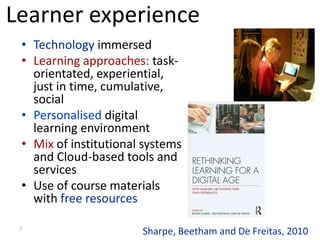
Learner experience
 • Technology immersed
 • Learning approaches: task-
   orientated, experiential,
   just in time, cumulative,
   social
 • Personalised digital
   learning environment
 • Mix of institutional systems
   and Cloud-based tools and
   services
 • Use of course materials
   with free resources

 7
                       Sharpe, Beetham and De Freitas, 2010
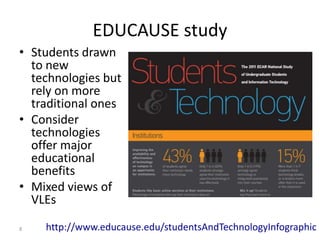
EDUCAUSE study
• Students drawn
  to new
  technologies but
  rely on more
  traditional ones
• Consider
  technologies
  offer major
  educational
  benefits
• Mixed views of
  VLEs

8   http://www.educause.edu/studentsAndTechnologyInfographic
Game changers
• Harness the power of new
  media
• Need to rethink education
• How can we reach more
  learners, more effectively?
• Impact of free resources,
  tools and expertise?
• New business models?
• New digital literacies?

                    http://www.educause.edu/game-changers
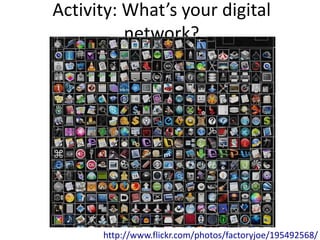
Activity: What’s your digital
          network?


      http://www.flickr.com/photos/factoryjoe/195492568/
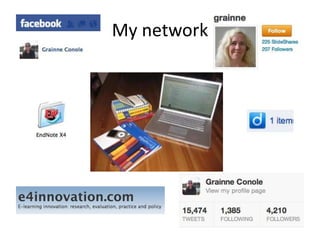
My network
Activity: fb love it or hate it?
Pros                Cons
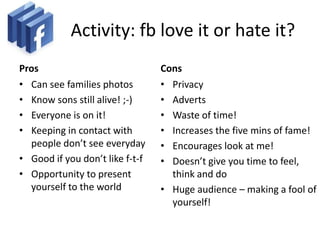
Activity: fb love it or hate it?
Pros                             Cons
• Can see families photos        • Privacy
• Know sons still alive! ;-)     • Adverts
• Everyone is on it!             • Waste of time!
• Keeping in contact with        • Increases the five mins of fame!
  people don’t see everyday      • Encourages look at me!
• Good if you don’t like f-t-f   • Doesn’t give you time to feel,
• Opportunity to present           think and do
  yourself to the world          • Huge audience – making a fool of
                                   yourself!
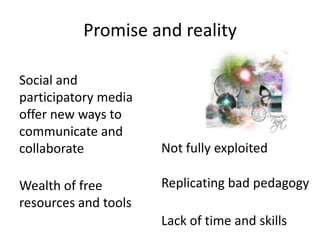
Promise and reality

Social and
participatory media
offer new ways to
communicate and
collaborate           Not fully exploited

Wealth of free        Replicating bad pedagogy
resources and tools
                      Lack of time and skills
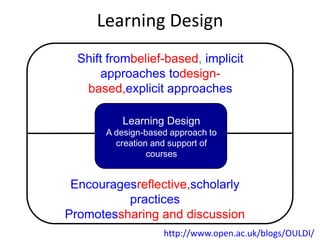
Learning Design
  Shift frombelief-based, implicit
       approaches todesign-
   based,explicit approaches

          Learning Design
       A design-based approach to
         creation and support of
                 courses


 Encouragesreflective,scholarly
          practices
Promotessharing and discussion
                    http://www.open.ac.uk/blogs/OULDI/
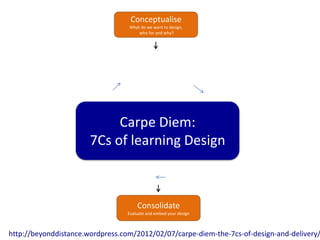
Conceptualise
                                  What do we want to design,
                                      who for and why?


                            Carpe Diem:
                       7Cs of learning Design


                                     Consolidate
                                 Evaluate and embed your design


http://beyonddistance.wordpress.com/2012/02/07/carpe-diem-the-7cs-of-design-and-delivery/
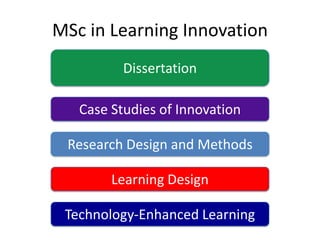
MSc in Learning Innovation
          Dissertation

   Case Studies of Innovation

 Research Design and Methods

        Learning Design

 Technology-Enhanced Learning
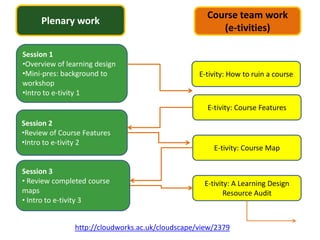
Course team work
     Plenary work
                                                       (e-tivities)

Session 1
•Overview of learning design
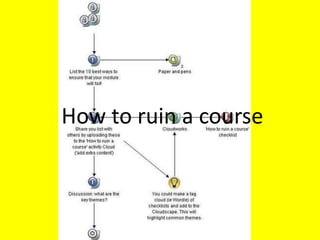
•Mini-pres: background to                         E-tivity: How to ruin a course
workshop
•Intro to e-tivity 1
                                                    E-tivity: Course Features
Session 2
•Review of Course Features
•Intro to e-tivity 2
                                                      E-tivity: Course Map

Session 3
• Review completed course                          E-tivity: A Learning Design
maps                                                      Resource Audit
• Intro to e-tivity 3


               http://cloudworks.ac.uk/cloudscape/view/2379
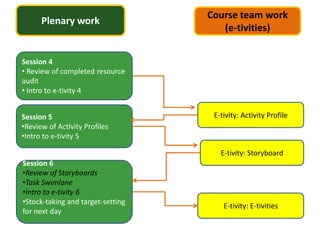
Course team work
      Plenary work
                                      (e-tivities)


Session 4
• Review of completed resource
audit
• Intro to e-tivity 4


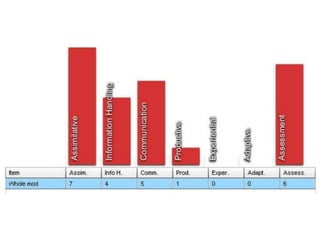
Session 5                           E-tivity: Activity Profile
•Review of Activity Profiles
•Intro to e-tivity 5

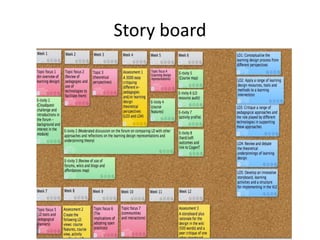
                                      E-tivity: Storyboard
Session 6
•Review of Storyboards
•Task Swimlane
•Intro to e-tivity 6
•Stock-taking and target-setting
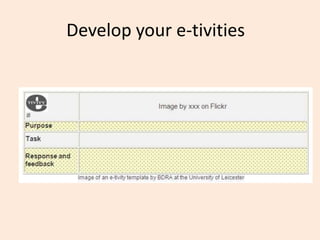
                                       E-tivity: E-tivities
for next day
Background to the workshop
• Useful sites and resources
  – OULDI website
  – Carpe Diem website
  – 7Cs OER page
  – Cloudworks cloudscape
How to ruin a course
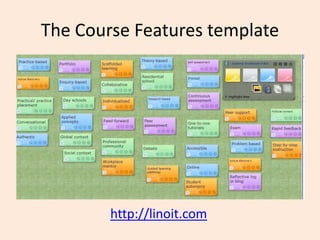
The Course Features template


        http://linoit.com
Course Features resources
• http://tinyurl.com/coursefeatures
• http://tinyurl.com/coursefeatures-Excel
• http://linoit.com
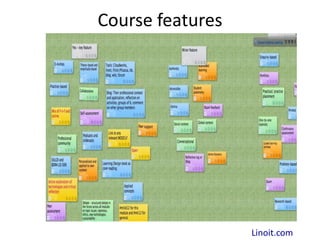
Course features


                  Linoit.com
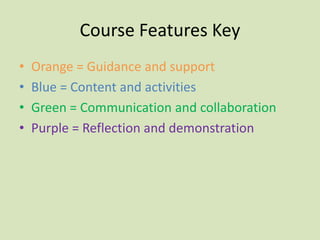
Course Features Key
•   Orange = Guidance and support
•   Blue = Content and activities
•   Green = Communication and collaboration
•   Purple = Reflection and demonstration
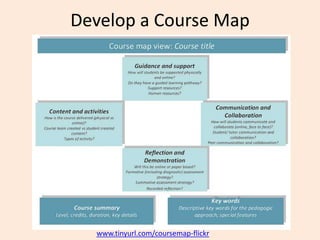
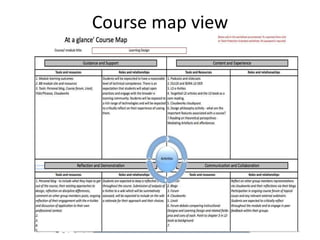
Develop a Course Map


  www.tinyurl.com/coursemap-flickr
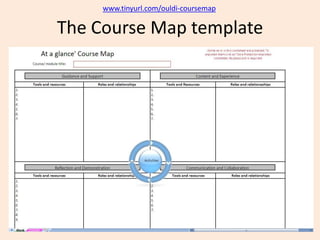
www.tinyurl.com/ouldi-coursemap

The Course Map template
Course map view
Course Map resources
• www.tinyurl.com/coursemap-cloudworks
• www.tinyurl.com/ouldi-coursemap
• www.tinyurl.com/coursemap-ds
• www.tinyurl.com/coursemap-flickr
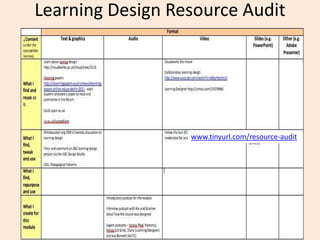
Learning Design Resource Audit


                  www.tinyurl.com/resource-audit
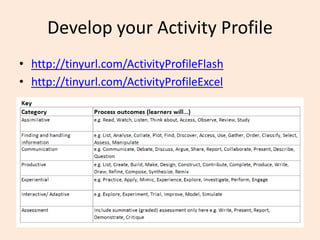
Develop your Activity Profile
• http://tinyurl.com/ActivityProfileFlash
• http://tinyurl.com/ActivityProfileExcel
Activity Profile Resources
• www.cloudworks.ac.uk/cloud/view/3420
• www.tinyurl.com/activity-profile-ds
• www.tinyurl.com/ActivityProfileFlash
• www.tinyurl.com/ActivityProfileExcel
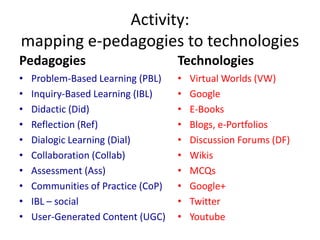
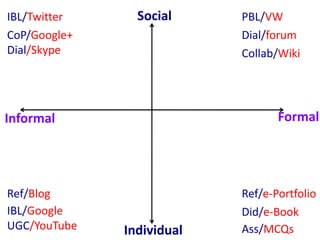
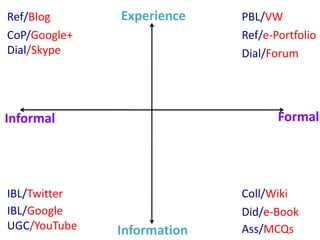
Activity:
mapping e-pedagogies to technologies
Pedagogies                          Technologies
•   Problem-Based Learning (PBL)    •   Virtual Worlds (VW)
•   Inquiry-Based Learning (IBL)    •   Google
•   Didactic (Did)                  •   E-Books
•   Reflection (Ref)                •   Blogs, e-Portfolios
•   Dialogic Learning (Dial)        •   Discussion Forums (DF)
•   Collaboration (Collab)          •   Wikis
•   Assessment (Ass)                •   MCQs
•   Communities of Practice (CoP)   •   Google+
•   IBL – social                    •   Twitter
•   User-Generated Content (UGC)    •   Youtube
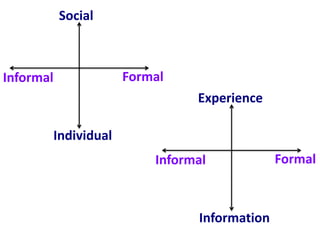
Social


Informal            Formal
                              Experience

       Individual
                        Informal            Formal


                              Information
IBL/Twitter     Social     PBL/VW
CoP/Google+                Dial/forum
Dial/Skype                 Collab/Wiki


Informal                          Formal


Ref/Blog                   Ref/e-Portfolio
IBL/Google                 Did/e-Book
UGC/YouTube   Individual   Ass/MCQs
Ref/Blog      Experience    PBL/VW
CoP/Google+                 Ref/e-Portfolio
Dial/Skype                  Dial/Forum


Informal                           Formal


IBL/Twitter                 Coll/Wiki
IBL/Google                  Did/e-Book
UGC/YouTube   Information   Ass/MCQs
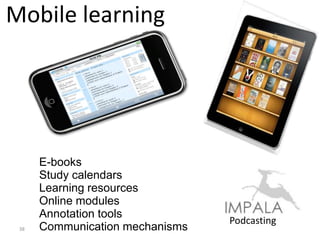
Mobile learning


      E-books
      Study calendars
      Learning resources
      Online modules
      Annotation tools
                                 Podcasting
 38   Communication mechanisms
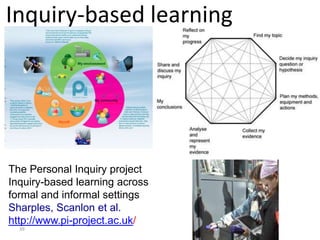
Inquiry-based learning


                 My community


The Personal Inquiry project
Inquiry-based learning across
formal and informal settings
Sharples, Scanlon et al.
http://www.pi-project.ac.uk/
  39
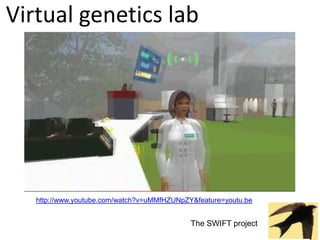
Virtual genetics lab


   http://www.youtube.com/watch?v=uMMfHZUNpZY&feature=youtu.be


                                             The SWIFT project
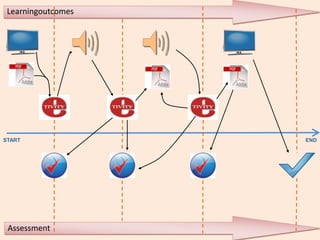
Learningoutcomes


START               END


 Assessment
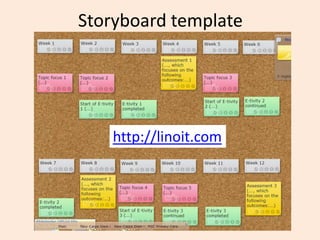
Storyboard template


    http://linoit.com
Story board
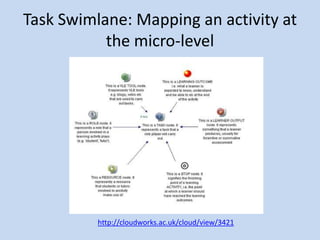
Task Swimlane: Mapping an activity at
           the micro-level


          http://cloudworks.ac.uk/cloud/view/3421
Develop your e-tivities
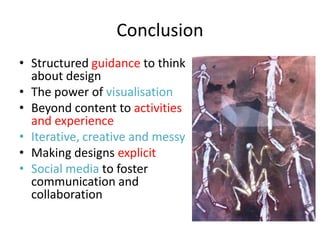
Conclusion
• Structured guidance to think
  about design
• The power of visualisation
• Beyond content to activities
  and experience
• Iterative, creative and messy
• Making designs explicit
• Social media to foster
  communication and
  collaboration
Final thoughts
• Participatory and social media enable new forms of
  communication and collaboration
• Communities in these spaces are complex and
  distributed
• Learners and teachers need to develop new digital
  literacy skills to harness their potential
• We need to rethinkhow we design, support and assess
  learning
• Open, participatory and social media can provide
  mechanisms for us to share and discuss teaching and
  research ideas in new ways
• We are seeing a blurring of boundaries:
  teachers/learners, teaching/research, real/virtual
  spaces, formal/informal modes of communication and
http://cloudworks.ac.uk/cloud/view/6305
                               http://www.ld-grid.org/
Conole, G. (forthcoming), Designing for learning in an open world, New York: Springer
                           Chapters available on dropbox
                              grainne.conole@le.ac.uk

Conole masterclass

  • 1.
    The 7Cs oflearning design Gráinne Conole, Leicester University 14th May 2012 Masterclass, Dublin City University Dublin
  • 2.
    Outline • New media •Paradoxes • A new approach to design • Reflections and implications
  • 3.
    Activity • What arethe characteristics of new technologies? • What are their implications for learning, teaching and research?
  • 4.
    New media Characteristics Implications Conole and Alevizou, 2010
  • 6.
    Peer Open critiquing User Collective generated aggregation content Networked Personalised Social media revolution The machine is us/ing us
  • 7.
    Learner experience •Technology immersed • Learning approaches: task- orientated, experiential, just in time, cumulative, social • Personalised digital learning environment • Mix of institutional systems and Cloud-based tools and services • Use of course materials with free resources 7 Sharpe, Beetham and De Freitas, 2010
  • 8.
    EDUCAUSE study • Studentsdrawn to new technologies but rely on more traditional ones • Consider technologies offer major educational benefits • Mixed views of VLEs 8 http://www.educause.edu/studentsAndTechnologyInfographic
  • 9.
    Game changers • Harnessthe power of new media • Need to rethink education • How can we reach more learners, more effectively? • Impact of free resources, tools and expertise? • New business models? • New digital literacies? http://www.educause.edu/game-changers
  • 10.
    Activity: What’s yourdigital network? http://www.flickr.com/photos/factoryjoe/195492568/
  • 11.
  • 12.
    Activity: fb loveit or hate it? Pros Cons
  • 13.
    Activity: fb loveit or hate it? Pros Cons • Can see families photos • Privacy • Know sons still alive! ;-) • Adverts • Everyone is on it! • Waste of time! • Keeping in contact with • Increases the five mins of fame! people don’t see everyday • Encourages look at me! • Good if you don’t like f-t-f • Doesn’t give you time to feel, • Opportunity to present think and do yourself to the world • Huge audience – making a fool of yourself!
  • 14.
    Promise and reality Socialand participatory media offer new ways to communicate and collaborate Not fully exploited Wealth of free Replicating bad pedagogy resources and tools Lack of time and skills
  • 15.
    Learning Design Shift frombelief-based, implicit approaches todesign- based,explicit approaches Learning Design A design-based approach to creation and support of courses Encouragesreflective,scholarly practices Promotessharing and discussion http://www.open.ac.uk/blogs/OULDI/
  • 16.
    Conceptualise What do we want to design, who for and why? Carpe Diem: 7Cs of learning Design Consolidate Evaluate and embed your design http://beyonddistance.wordpress.com/2012/02/07/carpe-diem-the-7cs-of-design-and-delivery/
  • 17.
    MSc in LearningInnovation Dissertation Case Studies of Innovation Research Design and Methods Learning Design Technology-Enhanced Learning
  • 18.
    Course team work Plenary work (e-tivities) Session 1 •Overview of learning design •Mini-pres: background to E-tivity: How to ruin a course workshop •Intro to e-tivity 1 E-tivity: Course Features Session 2 •Review of Course Features •Intro to e-tivity 2 E-tivity: Course Map Session 3 • Review completed course E-tivity: A Learning Design maps Resource Audit • Intro to e-tivity 3 http://cloudworks.ac.uk/cloudscape/view/2379
  • 19.
    Course team work Plenary work (e-tivities) Session 4 • Review of completed resource audit • Intro to e-tivity 4 Session 5 E-tivity: Activity Profile •Review of Activity Profiles •Intro to e-tivity 5 E-tivity: Storyboard Session 6 •Review of Storyboards •Task Swimlane •Intro to e-tivity 6 •Stock-taking and target-setting E-tivity: E-tivities for next day
  • 20.
    Background to theworkshop • Useful sites and resources – OULDI website – Carpe Diem website – 7Cs OER page – Cloudworks cloudscape
  • 21.
    How to ruina course
  • 22.
    The Course Featurestemplate http://linoit.com
  • 23.
    Course Features resources •http://tinyurl.com/coursefeatures • http://tinyurl.com/coursefeatures-Excel • http://linoit.com
  • 24.
    Course features Linoit.com
  • 25.
    Course Features Key • Orange = Guidance and support • Blue = Content and activities • Green = Communication and collaboration • Purple = Reflection and demonstration
  • 26.
    Develop a CourseMap www.tinyurl.com/coursemap-flickr
  • 27.
  • 28.
  • 29.
    Course Map resources •www.tinyurl.com/coursemap-cloudworks • www.tinyurl.com/ouldi-coursemap • www.tinyurl.com/coursemap-ds • www.tinyurl.com/coursemap-flickr
  • 30.
    Learning Design ResourceAudit www.tinyurl.com/resource-audit
  • 31.
    Develop your ActivityProfile • http://tinyurl.com/ActivityProfileFlash • http://tinyurl.com/ActivityProfileExcel
  • 33.
    Activity Profile Resources •www.cloudworks.ac.uk/cloud/view/3420 • www.tinyurl.com/activity-profile-ds • www.tinyurl.com/ActivityProfileFlash • www.tinyurl.com/ActivityProfileExcel
  • 34.
    Activity: mapping e-pedagogies totechnologies Pedagogies Technologies • Problem-Based Learning (PBL) • Virtual Worlds (VW) • Inquiry-Based Learning (IBL) • Google • Didactic (Did) • E-Books • Reflection (Ref) • Blogs, e-Portfolios • Dialogic Learning (Dial) • Discussion Forums (DF) • Collaboration (Collab) • Wikis • Assessment (Ass) • MCQs • Communities of Practice (CoP) • Google+ • IBL – social • Twitter • User-Generated Content (UGC) • Youtube
  • 35.
    Social Informal Formal Experience Individual Informal Formal Information
  • 36.
    IBL/Twitter Social PBL/VW CoP/Google+ Dial/forum Dial/Skype Collab/Wiki Informal Formal Ref/Blog Ref/e-Portfolio IBL/Google Did/e-Book UGC/YouTube Individual Ass/MCQs
  • 37.
    Ref/Blog Experience PBL/VW CoP/Google+ Ref/e-Portfolio Dial/Skype Dial/Forum Informal Formal IBL/Twitter Coll/Wiki IBL/Google Did/e-Book UGC/YouTube Information Ass/MCQs
  • 38.
    Mobile learning E-books Study calendars Learning resources Online modules Annotation tools Podcasting 38 Communication mechanisms
  • 39.
    Inquiry-based learning My community The Personal Inquiry project Inquiry-based learning across formal and informal settings Sharples, Scanlon et al. http://www.pi-project.ac.uk/ 39
  • 40.
    Virtual genetics lab http://www.youtube.com/watch?v=uMMfHZUNpZY&feature=youtu.be The SWIFT project
  • 41.
  • 42.
    Storyboard template http://linoit.com
  • 43.
  • 44.
    Task Swimlane: Mappingan activity at the micro-level http://cloudworks.ac.uk/cloud/view/3421
  • 45.
  • 46.
    Conclusion • Structured guidanceto think about design • The power of visualisation • Beyond content to activities and experience • Iterative, creative and messy • Making designs explicit • Social media to foster communication and collaboration
  • 47.
    Final thoughts • Participatoryand social media enable new forms of communication and collaboration • Communities in these spaces are complex and distributed • Learners and teachers need to develop new digital literacy skills to harness their potential • We need to rethinkhow we design, support and assess learning • Open, participatory and social media can provide mechanisms for us to share and discuss teaching and research ideas in new ways • We are seeing a blurring of boundaries: teachers/learners, teaching/research, real/virtual spaces, formal/informal modes of communication and
  • 48.
    http://cloudworks.ac.uk/cloud/view/6305 http://www.ld-grid.org/ Conole, G. (forthcoming), Designing for learning in an open world, New York: Springer Chapters available on dropbox grainne.conole@le.ac.uk

Editor's Notes

  • #19 http://cloudworks.ac.uk/cloudscape/view/2379 –Cloudscape for the SAIDE workshop
  • #21 Add all the URLs here
  • #22 For participants to fill in – silent brainstorm.
  • #26 First askparticipants to guesswhat the colours represent. (See previous slide.)
  • #27 Include link to Course Map in Excel
  • #28 Include link to Course Map in Excel
  • #29 Include link to Course Map in Excel