The Digital
Citizenship Project
  Developing a crowdsourced set of
 Digital Citizenship teaching resources
               By Claire Amos
         claireamosnz@gmail.com
Why?
O I was initially thinking about
  how we could improve how
  we taught Digital Citizenship
  at EGGS
O Then I thought…if I’m
  thinking about this, there are
  probably others doing the
  same!
O Wouldn’t it be awesome if
  we all could get involved!!
How?
                                      O Initially posted a request o
                                          the Managed Learning
                                          Environment (MLE)
                                          discussion forum
                                      O   Established a Google Doc
                                      O   Established a Google
                                          Group
                                      O   With 24hrs over 30 people
                                          across the country
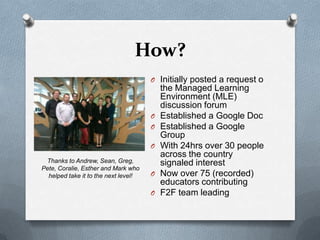
 Thanks to Andrew, Sean, Greg,            signaled interest
Pete, Coralie, Esther and Mark who
  helped take it to the next level!   O   Now over 75 (recorded)
                                          educators contributing
                                      O   F2F team leading
What is crowdsourcing?
Crowdsourcing is a process that involves
outsourcing tasks to a distributed group of
people. This process can occur both online
and offline. The difference between
crowdsourcing and ordinary outsourcing is
that a task or problem is outsourced to an
undefined public rather than a specific body,
such as paid employees.
Source: http://en.wikipedia.org/wiki/Crowdsourcing
When?
O It kicked off in June via an
  email to the MLE list serve,
  then a Google doc and
  Google group was
  established
O Term 2 2012 – ideas,
  resources and feedback was
  gathered
O Term 3 2012 – developed
  the website and
  WikiEducator
O Ulearn 12 – planned
  celebration at National
  Library
The structure
Through discussions we settled on the
following structure:
O Three courses: Primary, Intermediate and
  Secondary
O 10 modules each, based on the NetSafe
  Digital Citizenship definition and themes
O Based in WikiEducator to ensure
  sustainability, openness and Creative
  commons licensing
Module Structure
O Learning Outcome
O NetSafe Theme
O Learn - One or two resources to watch, read or listen
    to - aiming to provide a variety of resource types
O   Recall - A quiz or something to test how much has
    been recalled
O   Think - A range of BIG questions to ponder...
O   Act - Suggested activities for students to do - aiming
    to provide a mixture of visual, aural and kinesthetic
    tasks
O   Expand - Extension resources and activities
O   Contributors - Acknowledging who contributed to
    this module
Module 1 - Defining digital
      citizenship
            Learning Outcome: an
            understanding of the
            concept of Digital
            Citizenship and
            contributes and begins to
            promote the values of
            Digital citizenship through
            discussion.
            NetSafe Digital
            Citizenship Definition:
            contributes and actively
            promotes the values of
            digital citizenship
Module 1 - Defining digital
      citizenship
O Looking at a range of existing definitions
O Discussing their own understanding of
  Digital citizenship
O Redefining Digital citizenship in their own
  language
O Discussing why it is important to their
  success as a student and citizen
Module 2 - Basic ICT skills
Learning Outcome:
ICT skills developed to
assist student in
becoming a confident
and capable user of
ICT.
NetSafe Digital
Citizenship Definition:
is a confident and
capable user of ICT
Module 2 - Basic ICT skills
O File Management and cloud storage
O Understanding browsers – tool bars, tabs,
  homepages, bookmarking etc
O Google Apps – docs, presentations,
  forms, calendars and sites
O Institutional specific skills related to
  portals, LMSs and SMSs
Module 3 - Online safety,
 privacy and sharing
         Learning Outcome: Develops
         an understanding of concept
         of online privacy and
         understands how to set
         privacy settings
         NetSafe Digital Citizenship
         Definition:
         is aware of ICT challenges and
         can manage them effectively
         respects the concepts of
         privacy and freedom of speech
         in a digital world
Module 3 - Online safety,
 privacy and sharing
O Understanding your personal currency
O Establishing privacy and sharing settings
O What are you sharing about others?
Module 4 –
    Online relationships
Learning Outcome:
Develops protocols for
using ICT to relate to
others in positive,
meaningful ways
NetSafe Digital
Citizenship Definition:
uses ICT to relate to
others in positive,
meaningful ways
Module 4 –
    Online relationships
O Facebook, texting, twitter, gaming, online worlds,
  participating in blogs, games etc. - establish
  protocols for relating to others in positive way.
O Respect aligning with expectations existing currently
  in schools - participants could align their school
  existing values with their own “online values”
O Discuss why relationships as this is the most
  important thing in their lives and how this can be
  reinforced by connecting with friends and families.
Module 5 –
Online research
     Learning Outcome:
     Students develop literacy in
     languages, symbols and
     texts of digital technologies
     in the context of online
     research.
     NetSafe Digital Citizenship
     Definition:
     is literate in the language,
     symbols, and texts of digital
     technologies
Module 5 –
         Online research
O How to research effectively online - detecting
  reliable sources
O Introduction to National Library resources,
  tools, epic, Digital NZ, Digistore etc.
O How to conduct effective Google searches, use
  Google scholar, Google Research etc.
O Other search engines.
Module 6 – Copyright,
  copyleft & plagiarism
Learning Outcome: Students develop and
demonstrate honesty and integrity and
ethical behaviour in their use of ICTs.
NetSafe Digital Citizenship Definition:
demonstrates honesty and integrity and
ethical behaviour in their use of ICT
Module 6 – Copyright,
    copyleft & plagiarism
O Understanding copyright and creative
    commons
O   Creating and sharing your own work using
    creative commons licensing
O   How to “mash up and remix” online
    content
O   Learning to reference properly
O   Understanding piracy laws and discussing
    the implications of piracy and illegal
    downloading and sharing
Module 7 - Critical thinking
 Learning Outcome:
 Students develop
 critical thinking skills
 in cyberspace
 NetSafe Digital
 Citizenship
 Definition:
 uses and develops
 critical thinking skills
 in cyberspace
Module 7 - Critical thinking
 O Working with online tools to support
   thinking (e.g. answergarden, wallwisher,
   wordle, webspiration, graphic organisers)
 O How to synthesize information to
   demonstrate new understanding
 O How to reference other people’s thinking
 O Discovering resources to challenge your
   thinking e.g. TED...
Module 8 - Honesty,
integrity and ethical
     behaviour
       Learning Outcome:
       Students develop an
       understanding of ethical
       behaviour on the internet
       NetSafe Digital Citizenship
       Definition:
       demonstrates honesty and
       integrity and ethical
       behaviour in their use of ICT
Module 8 - Honesty,
     integrity and ethical
          behaviour
O Discussing the concept of “Ethical behaviour”
  means offline and online.
O Getting students to systematize, defend, and
  recommend concepts of right and wrong
  behaviour online.
O Get students to create the own “Code of
  online ethics”.
Module 9 - Developing
       portfolios
Learning Outcome:
Students use
technologies to
participate in
educational activities.
NetSafe Digital
Citizenship
Definition:
uses technologies to
participate in
educational, cultural,
and economic
activities
Module 9 - Developing
       portfolios
O Looking at examples of -portfolios
O How to create a portfolio/and or CV with
  Google Sites (or other platforms)
O How to create a portfolio/and or CV with
  MyPortfolio
O Using online careers websites (e.g. Careers
  New Zealand, DreamCatcher) to help
  create a learning pathway
Module 10 - Promoting
 digital citizenship
         Learning Outcome:
         Students contribute and
         actively promote the
         values of Digital
         Citizenship
         NetSafe Digital
         Citizenship Definition:
         contributes and actively
         promotes the values of
         digital citizenship
Module 10 - Promoting
    digital citizenship
O Participants will produce a text of their
  choice (song, poem, poster, film etc.) that
  promotes and respects the values of Digital
  Citizenship.
O Participants will publish these through a
  YouTube channel or Picasa
O Participants complete an online reflection
  to inform future DC courses.
Why WikiEducator?
O anyone can edit
O easy to use and learn
O Wikis are instantaneous so there is no need to wait for a publisher
    to create a new edition or update information
O   people located in different parts of the world can work on the same
    document
O   the wiki software keeps track of every edit made and it's a simple
    process to revert back to a previous version of an article
O   widens access to the power of web publishing to non-technical
    users
O   the wiki has no predetermined structure - consequently it is a
    flexible tool which can be used for a wide range of applications
O   there are a wide range of open source software wiki's to choose
    from so licensing costs shouldn't be a barrier to installing an
    institutional wiki

Source: http://wikieducator.org/Wikieducator_tutorial/What_is_a_wiki/Advantages_and_disadvantages
Why crowdsourced?
O Crowdsourcing connects the developers with
    the audience and/or consumers of the
    resource
O   The solution arrived at, or product developed
    may be better due to the collaboration
O   It is in effect, market tested as it is developed
O   Provides opportunities for unknown or
    emerging innovators or thinkers to become
    leaders
O   It’s free, open and reflects the spirit of the
    NZC Principles of inclusion and community
    engagement
How can you use it?
O Use it simply as a reference or source of
    ideas
O   Take a module and integrate it into broader
    curriculum study
O   Use the course in its entirety as a kind of
    “Digital Citizenship boot camp”
O   Mix and match levels to suit your learners
O   Take it and tweak it
O   Smash it and mash it
O   Use it as is!
How can you get involved?
O Use and contribute to the WikiEducator
    resources
O   Join the VLN Enabling eLearning Digital
    Citizenship group
O   Contribute resources to NetSafe’s myLGP
    website
O   Sign up to the Digital Citizenship Google
    Group list serve
O   Share it with your community!
Digital Citizenship Project
          Celebration –
  Wednesday 10th October 6pm
Come and celebrate the work that has been done by
a huge number of educators around New Zealand in
bringing together some of the best resources
available to promote Digital Citizenship in New
Zealand schools.

Let us show you how this project is coming together
and how you can start using it now.

Led by Claire Amos, the curation of these resources
has been taking place by experienced primary and
secondary educators and supported by the NEAL
network, NetSafe, the National Library of New
Zealand, Creative Commons Aotearoa and the
Greater Christchurch Schools Network.

The Digital Citizenship Project KnowledgeNet Presentation

  • 1.
    The Digital Citizenship Project Developing a crowdsourced set of Digital Citizenship teaching resources By Claire Amos claireamosnz@gmail.com
  • 2.
    Why? O I wasinitially thinking about how we could improve how we taught Digital Citizenship at EGGS O Then I thought…if I’m thinking about this, there are probably others doing the same! O Wouldn’t it be awesome if we all could get involved!!
  • 3.
    How? O Initially posted a request o the Managed Learning Environment (MLE) discussion forum O Established a Google Doc O Established a Google Group O With 24hrs over 30 people across the country Thanks to Andrew, Sean, Greg, signaled interest Pete, Coralie, Esther and Mark who helped take it to the next level! O Now over 75 (recorded) educators contributing O F2F team leading
  • 4.
    What is crowdsourcing? Crowdsourcingis a process that involves outsourcing tasks to a distributed group of people. This process can occur both online and offline. The difference between crowdsourcing and ordinary outsourcing is that a task or problem is outsourced to an undefined public rather than a specific body, such as paid employees. Source: http://en.wikipedia.org/wiki/Crowdsourcing
  • 5.
    When? O It kickedoff in June via an email to the MLE list serve, then a Google doc and Google group was established O Term 2 2012 – ideas, resources and feedback was gathered O Term 3 2012 – developed the website and WikiEducator O Ulearn 12 – planned celebration at National Library
  • 6.
    The structure Through discussionswe settled on the following structure: O Three courses: Primary, Intermediate and Secondary O 10 modules each, based on the NetSafe Digital Citizenship definition and themes O Based in WikiEducator to ensure sustainability, openness and Creative commons licensing
  • 7.
    Module Structure O LearningOutcome O NetSafe Theme O Learn - One or two resources to watch, read or listen to - aiming to provide a variety of resource types O Recall - A quiz or something to test how much has been recalled O Think - A range of BIG questions to ponder... O Act - Suggested activities for students to do - aiming to provide a mixture of visual, aural and kinesthetic tasks O Expand - Extension resources and activities O Contributors - Acknowledging who contributed to this module
  • 8.
    Module 1 -Defining digital citizenship Learning Outcome: an understanding of the concept of Digital Citizenship and contributes and begins to promote the values of Digital citizenship through discussion. NetSafe Digital Citizenship Definition: contributes and actively promotes the values of digital citizenship
  • 9.
    Module 1 -Defining digital citizenship O Looking at a range of existing definitions O Discussing their own understanding of Digital citizenship O Redefining Digital citizenship in their own language O Discussing why it is important to their success as a student and citizen
  • 10.
    Module 2 -Basic ICT skills Learning Outcome: ICT skills developed to assist student in becoming a confident and capable user of ICT. NetSafe Digital Citizenship Definition: is a confident and capable user of ICT
  • 11.
    Module 2 -Basic ICT skills O File Management and cloud storage O Understanding browsers – tool bars, tabs, homepages, bookmarking etc O Google Apps – docs, presentations, forms, calendars and sites O Institutional specific skills related to portals, LMSs and SMSs
  • 12.
    Module 3 -Online safety, privacy and sharing Learning Outcome: Develops an understanding of concept of online privacy and understands how to set privacy settings NetSafe Digital Citizenship Definition: is aware of ICT challenges and can manage them effectively respects the concepts of privacy and freedom of speech in a digital world
  • 13.
    Module 3 -Online safety, privacy and sharing O Understanding your personal currency O Establishing privacy and sharing settings O What are you sharing about others?
  • 14.
    Module 4 – Online relationships Learning Outcome: Develops protocols for using ICT to relate to others in positive, meaningful ways NetSafe Digital Citizenship Definition: uses ICT to relate to others in positive, meaningful ways
  • 15.
    Module 4 – Online relationships O Facebook, texting, twitter, gaming, online worlds, participating in blogs, games etc. - establish protocols for relating to others in positive way. O Respect aligning with expectations existing currently in schools - participants could align their school existing values with their own “online values” O Discuss why relationships as this is the most important thing in their lives and how this can be reinforced by connecting with friends and families.
  • 16.
    Module 5 – Onlineresearch Learning Outcome: Students develop literacy in languages, symbols and texts of digital technologies in the context of online research. NetSafe Digital Citizenship Definition: is literate in the language, symbols, and texts of digital technologies
  • 17.
    Module 5 – Online research O How to research effectively online - detecting reliable sources O Introduction to National Library resources, tools, epic, Digital NZ, Digistore etc. O How to conduct effective Google searches, use Google scholar, Google Research etc. O Other search engines.
  • 18.
    Module 6 –Copyright, copyleft & plagiarism Learning Outcome: Students develop and demonstrate honesty and integrity and ethical behaviour in their use of ICTs. NetSafe Digital Citizenship Definition: demonstrates honesty and integrity and ethical behaviour in their use of ICT
  • 19.
    Module 6 –Copyright, copyleft & plagiarism O Understanding copyright and creative commons O Creating and sharing your own work using creative commons licensing O How to “mash up and remix” online content O Learning to reference properly O Understanding piracy laws and discussing the implications of piracy and illegal downloading and sharing
  • 20.
    Module 7 -Critical thinking Learning Outcome: Students develop critical thinking skills in cyberspace NetSafe Digital Citizenship Definition: uses and develops critical thinking skills in cyberspace
  • 21.
    Module 7 -Critical thinking O Working with online tools to support thinking (e.g. answergarden, wallwisher, wordle, webspiration, graphic organisers) O How to synthesize information to demonstrate new understanding O How to reference other people’s thinking O Discovering resources to challenge your thinking e.g. TED...
  • 22.
    Module 8 -Honesty, integrity and ethical behaviour Learning Outcome: Students develop an understanding of ethical behaviour on the internet NetSafe Digital Citizenship Definition: demonstrates honesty and integrity and ethical behaviour in their use of ICT
  • 23.
    Module 8 -Honesty, integrity and ethical behaviour O Discussing the concept of “Ethical behaviour” means offline and online. O Getting students to systematize, defend, and recommend concepts of right and wrong behaviour online. O Get students to create the own “Code of online ethics”.
  • 24.
    Module 9 -Developing portfolios Learning Outcome: Students use technologies to participate in educational activities. NetSafe Digital Citizenship Definition: uses technologies to participate in educational, cultural, and economic activities
  • 25.
    Module 9 -Developing portfolios O Looking at examples of -portfolios O How to create a portfolio/and or CV with Google Sites (or other platforms) O How to create a portfolio/and or CV with MyPortfolio O Using online careers websites (e.g. Careers New Zealand, DreamCatcher) to help create a learning pathway
  • 26.
    Module 10 -Promoting digital citizenship Learning Outcome: Students contribute and actively promote the values of Digital Citizenship NetSafe Digital Citizenship Definition: contributes and actively promotes the values of digital citizenship
  • 27.
    Module 10 -Promoting digital citizenship O Participants will produce a text of their choice (song, poem, poster, film etc.) that promotes and respects the values of Digital Citizenship. O Participants will publish these through a YouTube channel or Picasa O Participants complete an online reflection to inform future DC courses.
  • 28.
    Why WikiEducator? O anyonecan edit O easy to use and learn O Wikis are instantaneous so there is no need to wait for a publisher to create a new edition or update information O people located in different parts of the world can work on the same document O the wiki software keeps track of every edit made and it's a simple process to revert back to a previous version of an article O widens access to the power of web publishing to non-technical users O the wiki has no predetermined structure - consequently it is a flexible tool which can be used for a wide range of applications O there are a wide range of open source software wiki's to choose from so licensing costs shouldn't be a barrier to installing an institutional wiki Source: http://wikieducator.org/Wikieducator_tutorial/What_is_a_wiki/Advantages_and_disadvantages
  • 29.
    Why crowdsourced? O Crowdsourcingconnects the developers with the audience and/or consumers of the resource O The solution arrived at, or product developed may be better due to the collaboration O It is in effect, market tested as it is developed O Provides opportunities for unknown or emerging innovators or thinkers to become leaders O It’s free, open and reflects the spirit of the NZC Principles of inclusion and community engagement
  • 30.
    How can youuse it? O Use it simply as a reference or source of ideas O Take a module and integrate it into broader curriculum study O Use the course in its entirety as a kind of “Digital Citizenship boot camp” O Mix and match levels to suit your learners O Take it and tweak it O Smash it and mash it O Use it as is!
  • 31.
    How can youget involved? O Use and contribute to the WikiEducator resources O Join the VLN Enabling eLearning Digital Citizenship group O Contribute resources to NetSafe’s myLGP website O Sign up to the Digital Citizenship Google Group list serve O Share it with your community!
  • 32.
    Digital Citizenship Project Celebration – Wednesday 10th October 6pm Come and celebrate the work that has been done by a huge number of educators around New Zealand in bringing together some of the best resources available to promote Digital Citizenship in New Zealand schools. Let us show you how this project is coming together and how you can start using it now. Led by Claire Amos, the curation of these resources has been taking place by experienced primary and secondary educators and supported by the NEAL network, NetSafe, the National Library of New Zealand, Creative Commons Aotearoa and the Greater Christchurch Schools Network.