As part of a three-day CLICKS workshop on Learning Design I created a new
section on tools to support diferent types of activities. I classifed them as tools to
support the following types of activities:
Presentation
Communication
Collaboration
Brainstorming and concept mapping
Reflection
Feedback
Assessment
Recording
Voting
Annotation
Curation
File sharing
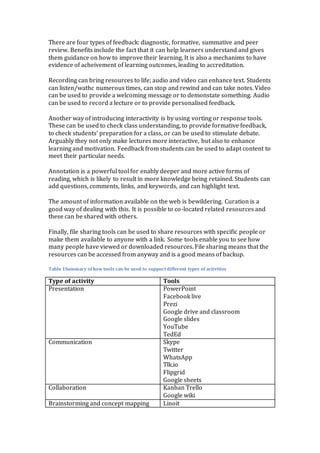
Table 1 lists examples of tools under each category. I also provided tips and hints
for ensuring these tools are well used. For presentations I suggested the
following. Include an outline for the talk. Keep text short. Add a relevant image
with a URL to the source. Use bitly/com to shorten URLs. Use an appropriate
background so there is a contrast with the text. Check spelling and grammar.
Have a logical structure and a clear message. Include a summary and if relevant
include references.
For support effectgive moderation I suggested the following. Have a clear
introduction. Avoid questions that are likely to lead to yes/no answers. Guide
the discussion and summarise at key points and encourage reflection. Keep an
eye on back channels. Keep to time and consider recording key points.
Collaboration is about working with others to achieve a common goal, with a
shared vision and purpose. I suggested the following as the benefits of working
collaboratively. Firstly, it is important to have clear communication, with trust
and respect. Secondly, it is useful to assign roles and have a clear division of
labour.
I listed the following as the benefits of brainstorming and concept mapping.
Firstly, it is useful as a way of generating ideas on a topic. Secondly, it can be
done individually or as a group. Thirdly, it is a way of building on the ideas of
others. Fourthly, ideas can be grouped. Finally it is a way of generating solutions
to a problem.
Thinking about and reflecting on what you have learnt is known to be an
important aspect of learning; I suggested the following benefits of reflection. An
online journal or blog can be to collect ideas and thoughts. It is a mechanism to
relate new concepts to prior experiences, and a means of critically evaluating of
the learning experience. It can lead to the development of an action plan.
There are four types of feedback: diagnostic, formative, summative and peer
review. Benefits include the fact that it can help learners understand and gives
them guidance on how to improve their learning. It is also a mechanims to have
evidence of acheivement of learning outcomes, leading to accreditation.
Recording can bring resources to life; audio and video can enhance text. Students
can listen/wathc numerous times, can stop and rewind and can take notes. Video
can be used to provide a welcoming message or to demonstate something. Audio
can be used to record a lecture or to provide personalised feedback.
Another way of introducing interactivity is by using vorting or response tools.
These can be used to check class understanding, to provide formative feedback,
to check students’ preparation for a class, or can be used to stimulate debate.
Arguably they not only make lectures more interactive, but also to enhance
learning and motivation. Feedback from students can be used to adapt content to
meet their particular needs.
Annotation is a powerful tool for enably deeper and more active forms of
reading, which is likely to result in more knowledge being retained. Students can
add questions, comments, links, and keywords, and can highlight text.
The amount of information available on the web is bewildering. Curation is a
good way of dealing with this. It is possible to co-located related resources and
these can be shared with others.
Finally, file sharing tools can be used to share resources with specific people or
make them available to anyone with a link. Some tools enable you to see how
many people have viewed or downloaded resources. File sharing means that the
resources can be accessed from anyway and is a good means of backup.
Table 1Summary of how tools can be used to supportdifferent types of activities
Type of activity Tools
Presentation PowerPoint
Facebook live
Prezi
Google drive and classroom
Google slides
YouTube
TedEd
Communication Skype
Twitter
WhatsApp
Tlk.io
Flipgrid
Google sheets
Collaboration Kanban Trello
Google wiki
Brainstorming and concept mapping Linoit
Padlet
Mindomo
Coogle
Reflection Wordpress
EduBlogger
Feedback Annotated word files
Audio feedback
Assessment E-portfolios: word, google drive,
dropbox, pathbrite
Recording iPhone
Audacity
Voicethread
Screen-o-matic
Voting Facebook poll
Easypolls
Polleverywhere
Survey monkey
Kahoot
Annotation Diigo
A.nnotate
Curation Scoop.it
Pinterist
File sharing Drop box
Slideshare
Google drive
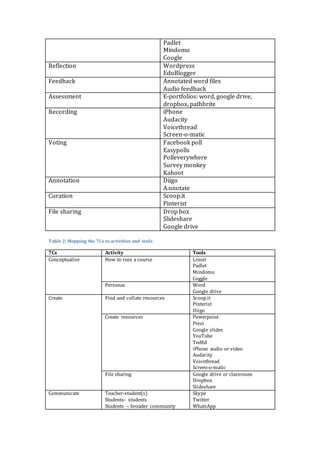
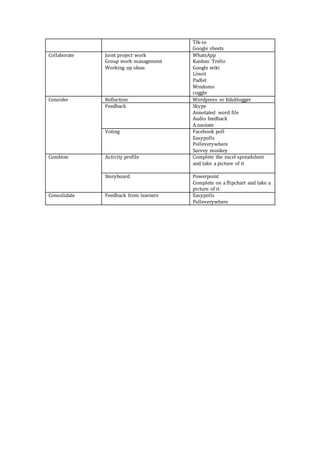
Table 2: Mapping the 7Cs to activities and tools
7Cs Activity Tools
Conceptualise How to ruin a course Linoit
Padlet
Mindomo
Coggle
Personas Word
Google drive
Create Find and collate resources Scoop.it
Pinterist
Diigo
Create resources Powerpoint
Prezi
Google slides
YouTube
TedEd
iPhone audio or video
Audacity
Voicethread
Screen-o-matic
File sharing Google drive or classroom
Dropbox
Slideshare
Communicate Teacher-student(s)
Students- students
Students – broader community
Skype
Twitter
WhatsApp
Tlk-io
Google sheets
Collaborate Joint project work
Group work management
Working up ideas
WhatsApp
Kanban Trello
Google wiki
Linoit
Padlet
Mindomo
coggle
Consider Reflection Wordpress or Edublogger
Feedback Skype
Annotated word file
Audio feedback
A.nnotate
Voting Facebook poll
Easypolls
Polleverywhere
Survey monkey
Combine Activity profile Complete the excel spreadsheet
and take a picture of it
Storyboard Powerpoint
Complete on a flipchart and take a
picture of it
Consolidate Feedback from learners Easypolls
Polleverywhere

Mapping 7 cs_to activities_and_tools

  • 1.
    As part ofa three-day CLICKS workshop on Learning Design I created a new section on tools to support diferent types of activities. I classifed them as tools to support the following types of activities: Presentation Communication Collaboration Brainstorming and concept mapping Reflection Feedback Assessment Recording Voting Annotation Curation File sharing Table 1 lists examples of tools under each category. I also provided tips and hints for ensuring these tools are well used. For presentations I suggested the following. Include an outline for the talk. Keep text short. Add a relevant image with a URL to the source. Use bitly/com to shorten URLs. Use an appropriate background so there is a contrast with the text. Check spelling and grammar. Have a logical structure and a clear message. Include a summary and if relevant include references. For support effectgive moderation I suggested the following. Have a clear introduction. Avoid questions that are likely to lead to yes/no answers. Guide the discussion and summarise at key points and encourage reflection. Keep an eye on back channels. Keep to time and consider recording key points. Collaboration is about working with others to achieve a common goal, with a shared vision and purpose. I suggested the following as the benefits of working collaboratively. Firstly, it is important to have clear communication, with trust and respect. Secondly, it is useful to assign roles and have a clear division of labour. I listed the following as the benefits of brainstorming and concept mapping. Firstly, it is useful as a way of generating ideas on a topic. Secondly, it can be done individually or as a group. Thirdly, it is a way of building on the ideas of others. Fourthly, ideas can be grouped. Finally it is a way of generating solutions to a problem. Thinking about and reflecting on what you have learnt is known to be an important aspect of learning; I suggested the following benefits of reflection. An online journal or blog can be to collect ideas and thoughts. It is a mechanism to relate new concepts to prior experiences, and a means of critically evaluating of the learning experience. It can lead to the development of an action plan.
  • 2.
    There are fourtypes of feedback: diagnostic, formative, summative and peer review. Benefits include the fact that it can help learners understand and gives them guidance on how to improve their learning. It is also a mechanims to have evidence of acheivement of learning outcomes, leading to accreditation. Recording can bring resources to life; audio and video can enhance text. Students can listen/wathc numerous times, can stop and rewind and can take notes. Video can be used to provide a welcoming message or to demonstate something. Audio can be used to record a lecture or to provide personalised feedback. Another way of introducing interactivity is by using vorting or response tools. These can be used to check class understanding, to provide formative feedback, to check students’ preparation for a class, or can be used to stimulate debate. Arguably they not only make lectures more interactive, but also to enhance learning and motivation. Feedback from students can be used to adapt content to meet their particular needs. Annotation is a powerful tool for enably deeper and more active forms of reading, which is likely to result in more knowledge being retained. Students can add questions, comments, links, and keywords, and can highlight text. The amount of information available on the web is bewildering. Curation is a good way of dealing with this. It is possible to co-located related resources and these can be shared with others. Finally, file sharing tools can be used to share resources with specific people or make them available to anyone with a link. Some tools enable you to see how many people have viewed or downloaded resources. File sharing means that the resources can be accessed from anyway and is a good means of backup. Table 1Summary of how tools can be used to supportdifferent types of activities Type of activity Tools Presentation PowerPoint Facebook live Prezi Google drive and classroom Google slides YouTube TedEd Communication Skype Twitter WhatsApp Tlk.io Flipgrid Google sheets Collaboration Kanban Trello Google wiki Brainstorming and concept mapping Linoit
  • 3.
    Padlet Mindomo Coogle Reflection Wordpress EduBlogger Feedback Annotatedword files Audio feedback Assessment E-portfolios: word, google drive, dropbox, pathbrite Recording iPhone Audacity Voicethread Screen-o-matic Voting Facebook poll Easypolls Polleverywhere Survey monkey Kahoot Annotation Diigo A.nnotate Curation Scoop.it Pinterist File sharing Drop box Slideshare Google drive Table 2: Mapping the 7Cs to activities and tools 7Cs Activity Tools Conceptualise How to ruin a course Linoit Padlet Mindomo Coggle Personas Word Google drive Create Find and collate resources Scoop.it Pinterist Diigo Create resources Powerpoint Prezi Google slides YouTube TedEd iPhone audio or video Audacity Voicethread Screen-o-matic File sharing Google drive or classroom Dropbox Slideshare Communicate Teacher-student(s) Students- students Students – broader community Skype Twitter WhatsApp
  • 4.
    Tlk-io Google sheets Collaborate Jointproject work Group work management Working up ideas WhatsApp Kanban Trello Google wiki Linoit Padlet Mindomo coggle Consider Reflection Wordpress or Edublogger Feedback Skype Annotated word file Audio feedback A.nnotate Voting Facebook poll Easypolls Polleverywhere Survey monkey Combine Activity profile Complete the excel spreadsheet and take a picture of it Storyboard Powerpoint Complete on a flipchart and take a picture of it Consolidate Feedback from learners Easypolls Polleverywhere