Lecture 1: Images and image filtering
CSCI 455: Intro to Computer Vision
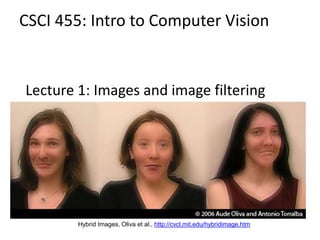
Hybrid Images, Oliva et al., http://cvcl.mit.edu/hybridimage.htm
Acknowledgement
Many of the following slides are modified from the
excellent class notes of similar courses offered in
other schools by Prof Yung-Yu Chuang, Fredo
Durand, Alexei Efros, William Freeman, James Hays,
Svetlana Lazebnik, Andrej Karpathy, Fei-Fei Li,
Srinivasa Narasimhan, Silvio Savarese, Steve Seitz,
Richard Szeliski, Noah Snavely and Li Zhang. The
instructor is extremely thankful to the researchers
for making their notes available online. Please feel
free to use and modify any of the slides, but
acknowledge the original sources where
appropriate.
Reading
• Szeliski, Chapter 3.1-3.2
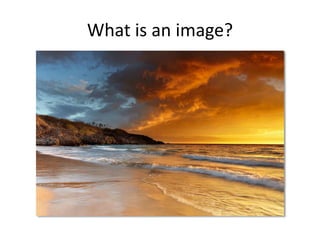
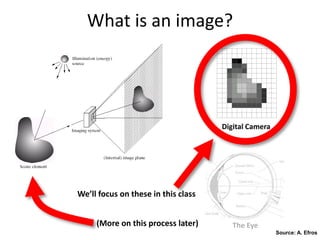
What is an image?
What is an image?
Digital Camera
The Eye
Source: A. Efros
We’ll focus on these in this class
(More on this process later)
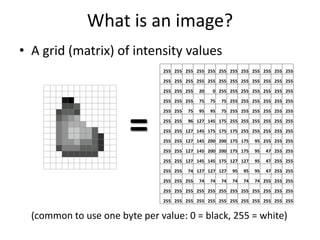
What is an image?
• A grid (matrix) of intensity values
(common to use one byte per value: 0 = black, 255 = white)
=
255 255 255 255 255 255 255 255 255 255 255 255
255 255 255 255 255 255 255 255 255 255 255 255
255 255 255 20 0 255 255 255 255 255 255 255
255 255 255 75 75 75 255 255 255 255 255 255
255 255 75 95 95 75 255 255 255 255 255 255
255 255 96 127 145 175 255 255 255 255 255 255
255 255 127 145 175 175 175 255 255 255 255 255
255 255 127 145 200 200 175 175 95 255 255 255
255 255 127 145 200 200 175 175 95 47 255 255
255 255 127 145 145 175 127 127 95 47 255 255
255 255 74 127 127 127 95 95 95 47 255 255
255 255 255 74 74 74 74 74 74 255 255 255
255 255 255 255 255 255 255 255 255 255 255 255
255 255 255 255 255 255 255 255 255 255 255 255
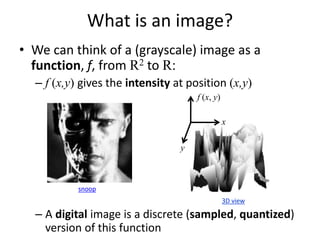
• We can think of a (grayscale) image as a
function, f, from R2 to R:
– f (x,y) gives the intensity at position (x,y)
– A digital image is a discrete (sampled, quantized)
version of this function
What is an image?
x
y
f (x, y)
snoop
3D view
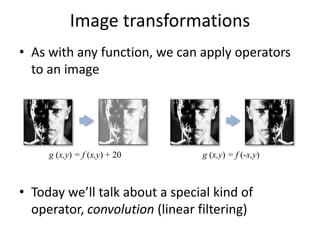
Image transformations
• As with any function, we can apply operators
to an image
• Today we’ll talk about a special kind of
operator, convolution (linear filtering)
g (x,y) = f (x,y) + 20 g (x,y) = f (-x,y)
Filters
• Filtering
– Form a new image whose pixels are a combination
of the original pixels
• Why?
– To get useful information from images
• E.g., extract edges or contours (to understand shape)
– To enhance the image
• E.g., to remove noise
• E.g., to sharpen and “enhance image” a la CSI
– A key operator in Convolutional Neural Networks
Canonical Image Processing problems
• Image Restoration
– denoising
– deblurring
• Image Compression
– JPEG, JPEG2000, MPEG..
• Computing Field Properties
– optical flow
– disparity
• Locating Structural Features
– corners
– edges
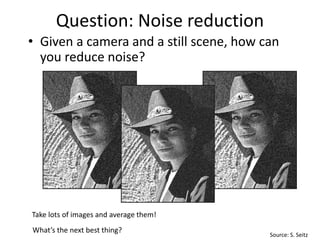
Question: Noise reduction
• Given a camera and a still scene, how can
you reduce noise?
Take lots of images and average them!
What’s the next best thing?
Source: S. Seitz
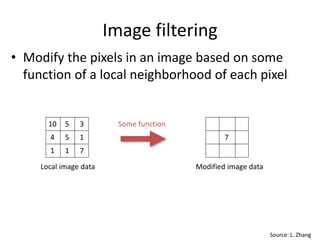
Image filtering
• Modify the pixels in an image based on some
function of a local neighborhood of each pixel
5 14
1 71
5 310
Local image data
7
Modified image data
Some function
Source: L. Zhang
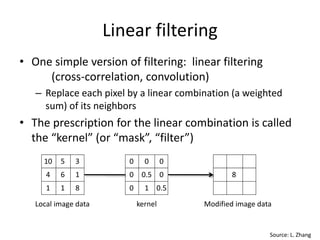
Linear filtering
• One simple version of filtering: linear filtering
(cross-correlation, convolution)
– Replace each pixel by a linear combination (a weighted
sum) of its neighbors
• The prescription for the linear combination is called
the “kernel” (or “mask”, “filter”)
0.5
0.5 00
10
0 00
kernel
8
Modified image data
Source: L. Zhang
Local image data
6 14
1 81
5 310
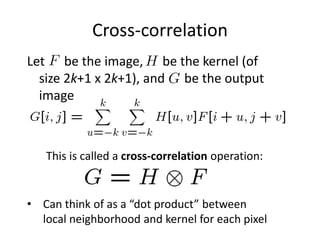
Cross-correlation
This is called a cross-correlation operation:
Let be the image, be the kernel (of
size 2k+1 x 2k+1), and be the output
image
• Can think of as a “dot product” between
local neighborhood and kernel for each pixel
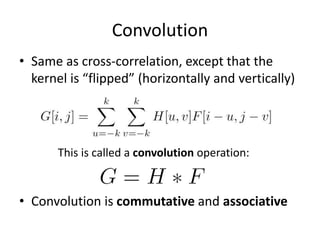
Convolution
• Same as cross-correlation, except that the
kernel is “flipped” (horizontally and vertically)
• Convolution is commutative and associative
This is called a convolution operation:
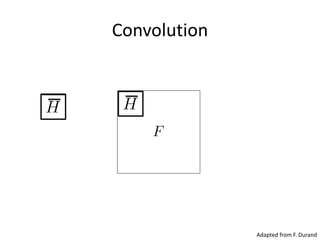
Convolution
Adapted from F. Durand
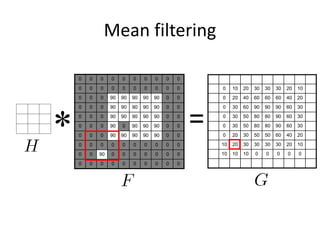
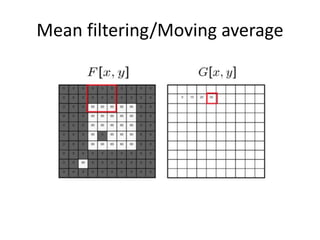
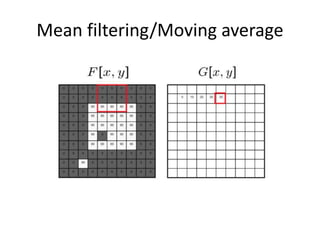
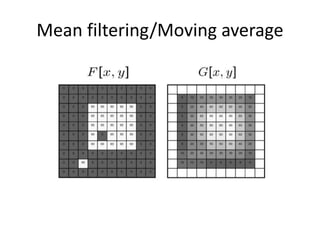
Mean filtering
0 0 0 0 0 0 0 0 0 0
0 0 0 0 0 0 0 0 0 0
0 0 0 90 90 90 90 90 0 0
0 0 0 90 90 90 90 90 0 0
0 0 0 90 90 90 90 90 0 0
0 0 0 90 0 90 90 90 0 0
0 0 0 90 90 90 90 90 0 0
0 0 0 0 0 0 0 0 0 0
0 0 90 0 0 0 0 0 0 0
0 0 0 0 0 0 0 0 0 0
1 1 1
1 1 1
1 1 1
* =
0 10 20 30 30 30 20 10
0 20 40 60 60 60 40 20
0 30 60 90 90 90 60 30
0 30 50 80 80 90 60 30
0 30 50 80 80 90 60 30
0 20 30 50 50 60 40 20
10 20 30 30 30 30 20 10
10 10 10 0 0 0 0 0
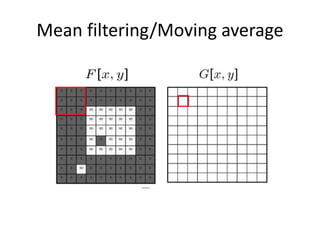
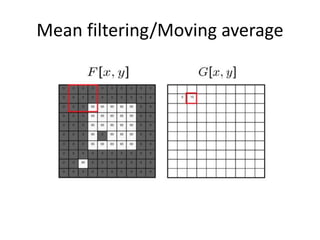
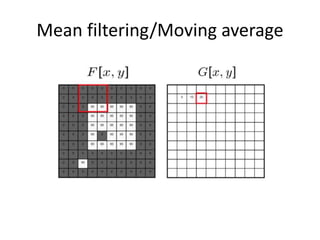
Mean filtering/Moving average
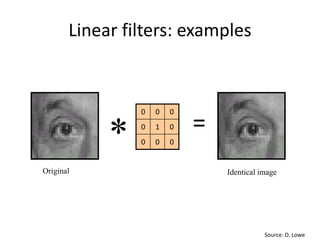
Linear filters: examples
000
010
000
Original Identical image
Source: D. Lowe
* =
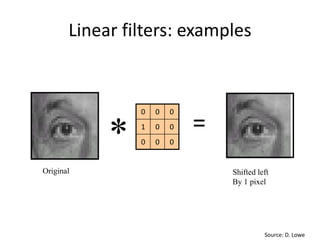
Linear filters: examples
000
001
000
Original Shifted left
By 1 pixel
Source: D. Lowe
* =
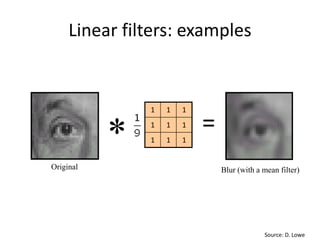
Linear filters: examples
Original
111
111
111
Blur (with a mean filter)
Source: D. Lowe
* =
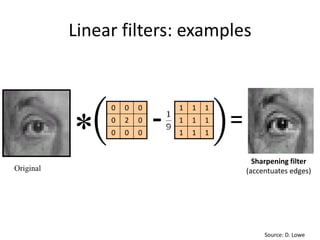
Linear filters: examples
Original
111
111
111
000
020
000
-
Sharpening filter
(accentuates edges)
Source: D. Lowe
=
*
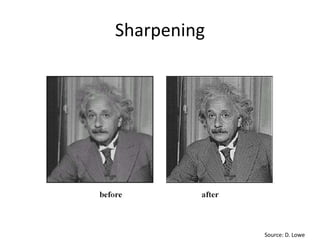
Sharpening
Source: D. Lowe
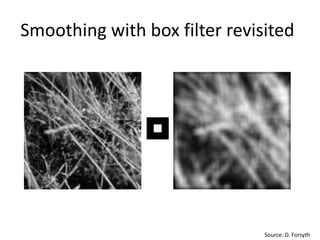
Smoothing with box filter revisited
Source: D. Forsyth
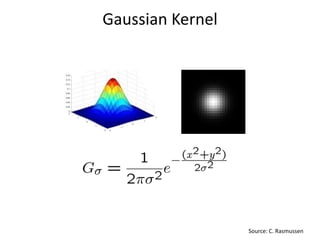
Gaussian Kernel
Source: C. Rasmussen
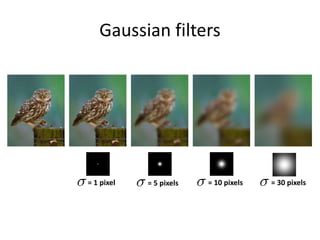
Gaussian filters
= 30 pixels= 1 pixel = 5 pixels = 10 pixels
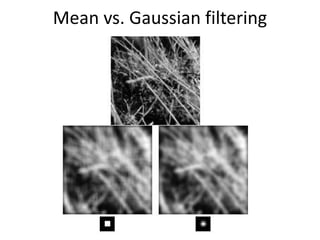
Mean vs. Gaussian filtering
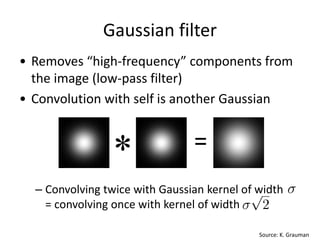
Gaussian filter
• Removes “high-frequency” components from
the image (low-pass filter)
• Convolution with self is another Gaussian
– Convolving twice with Gaussian kernel of width
= convolving once with kernel of width
Source: K. Grauman
* =
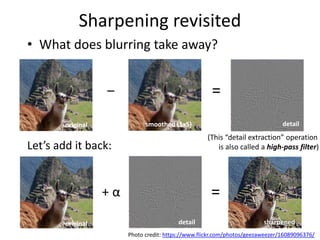
Sharpening revisited
• What does blurring take away?
original smoothed (5x5)
–
detail
=
sharpened
=
Let’s add it back:
original detail
+ α
(This “detail extraction” operation
is also called a high-pass filter)
Photo credit: https://www.flickr.com/photos/geezaweezer/16089096376/
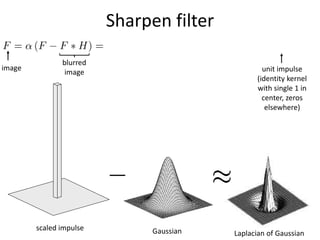
Sharpen filter
Gaussianscaled impulse
Laplacian of Gaussian
image
blurred
image unit impulse
(identity kernel
with single 1 in
center, zeros
elsewhere)
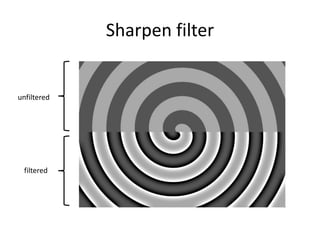
Sharpen filter
unfiltered
filtered
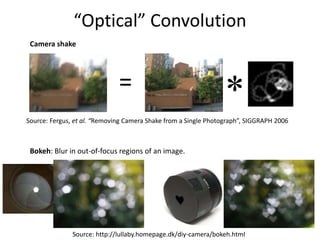
“Optical” Convolution
Source: http://lullaby.homepage.dk/diy-camera/bokeh.html
Bokeh: Blur in out-of-focus regions of an image.
Camera shake
*=
Source: Fergus, et al. “Removing Camera Shake from a Single Photograph”, SIGGRAPH 2006
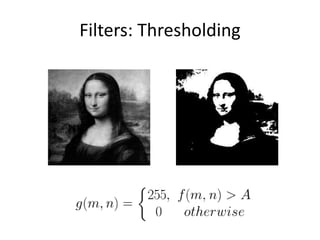
Filters: Thresholding
Linear filters
• Is thresholding a linear filter?
Questions?

Computer vision - images and image filtering

  • 1.
    Lecture 1: Imagesand image filtering CSCI 455: Intro to Computer Vision Hybrid Images, Oliva et al., http://cvcl.mit.edu/hybridimage.htm
  • 2.
    Acknowledgement Many of thefollowing slides are modified from the excellent class notes of similar courses offered in other schools by Prof Yung-Yu Chuang, Fredo Durand, Alexei Efros, William Freeman, James Hays, Svetlana Lazebnik, Andrej Karpathy, Fei-Fei Li, Srinivasa Narasimhan, Silvio Savarese, Steve Seitz, Richard Szeliski, Noah Snavely and Li Zhang. The instructor is extremely thankful to the researchers for making their notes available online. Please feel free to use and modify any of the slides, but acknowledge the original sources where appropriate.
  • 3.
  • 4.
    What is animage?
  • 5.
    What is animage? Digital Camera The Eye Source: A. Efros We’ll focus on these in this class (More on this process later)
  • 6.
    What is animage? • A grid (matrix) of intensity values (common to use one byte per value: 0 = black, 255 = white) = 255 255 255 255 255 255 255 255 255 255 255 255 255 255 255 255 255 255 255 255 255 255 255 255 255 255 255 20 0 255 255 255 255 255 255 255 255 255 255 75 75 75 255 255 255 255 255 255 255 255 75 95 95 75 255 255 255 255 255 255 255 255 96 127 145 175 255 255 255 255 255 255 255 255 127 145 175 175 175 255 255 255 255 255 255 255 127 145 200 200 175 175 95 255 255 255 255 255 127 145 200 200 175 175 95 47 255 255 255 255 127 145 145 175 127 127 95 47 255 255 255 255 74 127 127 127 95 95 95 47 255 255 255 255 255 74 74 74 74 74 74 255 255 255 255 255 255 255 255 255 255 255 255 255 255 255 255 255 255 255 255 255 255 255 255 255 255 255
  • 7.
    • We canthink of a (grayscale) image as a function, f, from R2 to R: – f (x,y) gives the intensity at position (x,y) – A digital image is a discrete (sampled, quantized) version of this function What is an image? x y f (x, y) snoop 3D view
  • 8.
    Image transformations • Aswith any function, we can apply operators to an image • Today we’ll talk about a special kind of operator, convolution (linear filtering) g (x,y) = f (x,y) + 20 g (x,y) = f (-x,y)
  • 9.
    Filters • Filtering – Forma new image whose pixels are a combination of the original pixels • Why? – To get useful information from images • E.g., extract edges or contours (to understand shape) – To enhance the image • E.g., to remove noise • E.g., to sharpen and “enhance image” a la CSI – A key operator in Convolutional Neural Networks
  • 10.
    Canonical Image Processingproblems • Image Restoration – denoising – deblurring • Image Compression – JPEG, JPEG2000, MPEG.. • Computing Field Properties – optical flow – disparity • Locating Structural Features – corners – edges
  • 11.
    Question: Noise reduction •Given a camera and a still scene, how can you reduce noise? Take lots of images and average them! What’s the next best thing? Source: S. Seitz
  • 12.
    Image filtering • Modifythe pixels in an image based on some function of a local neighborhood of each pixel 5 14 1 71 5 310 Local image data 7 Modified image data Some function Source: L. Zhang
  • 13.
    Linear filtering • Onesimple version of filtering: linear filtering (cross-correlation, convolution) – Replace each pixel by a linear combination (a weighted sum) of its neighbors • The prescription for the linear combination is called the “kernel” (or “mask”, “filter”) 0.5 0.5 00 10 0 00 kernel 8 Modified image data Source: L. Zhang Local image data 6 14 1 81 5 310
  • 14.
    Cross-correlation This is calleda cross-correlation operation: Let be the image, be the kernel (of size 2k+1 x 2k+1), and be the output image • Can think of as a “dot product” between local neighborhood and kernel for each pixel
  • 15.
    Convolution • Same ascross-correlation, except that the kernel is “flipped” (horizontally and vertically) • Convolution is commutative and associative This is called a convolution operation:
  • 16.
  • 17.
    Mean filtering 0 00 0 0 0 0 0 0 0 0 0 0 0 0 0 0 0 0 0 0 0 0 90 90 90 90 90 0 0 0 0 0 90 90 90 90 90 0 0 0 0 0 90 90 90 90 90 0 0 0 0 0 90 0 90 90 90 0 0 0 0 0 90 90 90 90 90 0 0 0 0 0 0 0 0 0 0 0 0 0 0 90 0 0 0 0 0 0 0 0 0 0 0 0 0 0 0 0 0 1 1 1 1 1 1 1 1 1 * = 0 10 20 30 30 30 20 10 0 20 40 60 60 60 40 20 0 30 60 90 90 90 60 30 0 30 50 80 80 90 60 30 0 30 50 80 80 90 60 30 0 20 30 50 50 60 40 20 10 20 30 30 30 30 20 10 10 10 10 0 0 0 0 0
  • 18.
  • 19.
  • 20.
  • 21.
  • 22.
  • 23.
  • 24.
    Linear filters: examples 000 010 000 OriginalIdentical image Source: D. Lowe * =
  • 25.
    Linear filters: examples 000 001 000 OriginalShifted left By 1 pixel Source: D. Lowe * =
  • 26.
    Linear filters: examples Original 111 111 111 Blur(with a mean filter) Source: D. Lowe * =
  • 27.
    Linear filters: examples Original 111 111 111 000 020 000 - Sharpeningfilter (accentuates edges) Source: D. Lowe = *
  • 28.
  • 29.
    Smoothing with boxfilter revisited Source: D. Forsyth
  • 30.
  • 31.
    Gaussian filters = 30pixels= 1 pixel = 5 pixels = 10 pixels
  • 32.
  • 33.
    Gaussian filter • Removes“high-frequency” components from the image (low-pass filter) • Convolution with self is another Gaussian – Convolving twice with Gaussian kernel of width = convolving once with kernel of width Source: K. Grauman * =
  • 34.
    Sharpening revisited • Whatdoes blurring take away? original smoothed (5x5) – detail = sharpened = Let’s add it back: original detail + α (This “detail extraction” operation is also called a high-pass filter) Photo credit: https://www.flickr.com/photos/geezaweezer/16089096376/
  • 35.
    Sharpen filter Gaussianscaled impulse Laplacianof Gaussian image blurred image unit impulse (identity kernel with single 1 in center, zeros elsewhere)
  • 36.
  • 37.
    “Optical” Convolution Source: http://lullaby.homepage.dk/diy-camera/bokeh.html Bokeh:Blur in out-of-focus regions of an image. Camera shake *= Source: Fergus, et al. “Removing Camera Shake from a Single Photograph”, SIGGRAPH 2006
  • 38.
  • 39.
    Linear filters • Isthresholding a linear filter?
  • 40.