Digital Image Processing
Asad Ali. From BCS 6th
3395
What is Image Arithmetic?
Image arithmetic is the implementation of standard
arithmetic operations
What is Image Arithmetic?
Image arithmetic is the implementation of standard
arithmetic operations, such as
• Addition
What is Image Arithmetic?
Image arithmetic is the implementation of standard
arithmetic operations, such as
• Addition
• Subtraction
What is Image Arithmetic?
Image arithmetic is the implementation of standard
arithmetic operations, such as
• Addition
• Subtraction
• Multiplication
What is Image Arithmetic?
Image arithmetic is the implementation of standard
arithmetic operations, such as
• Addition
• Subtraction
• Multiplication
• Division
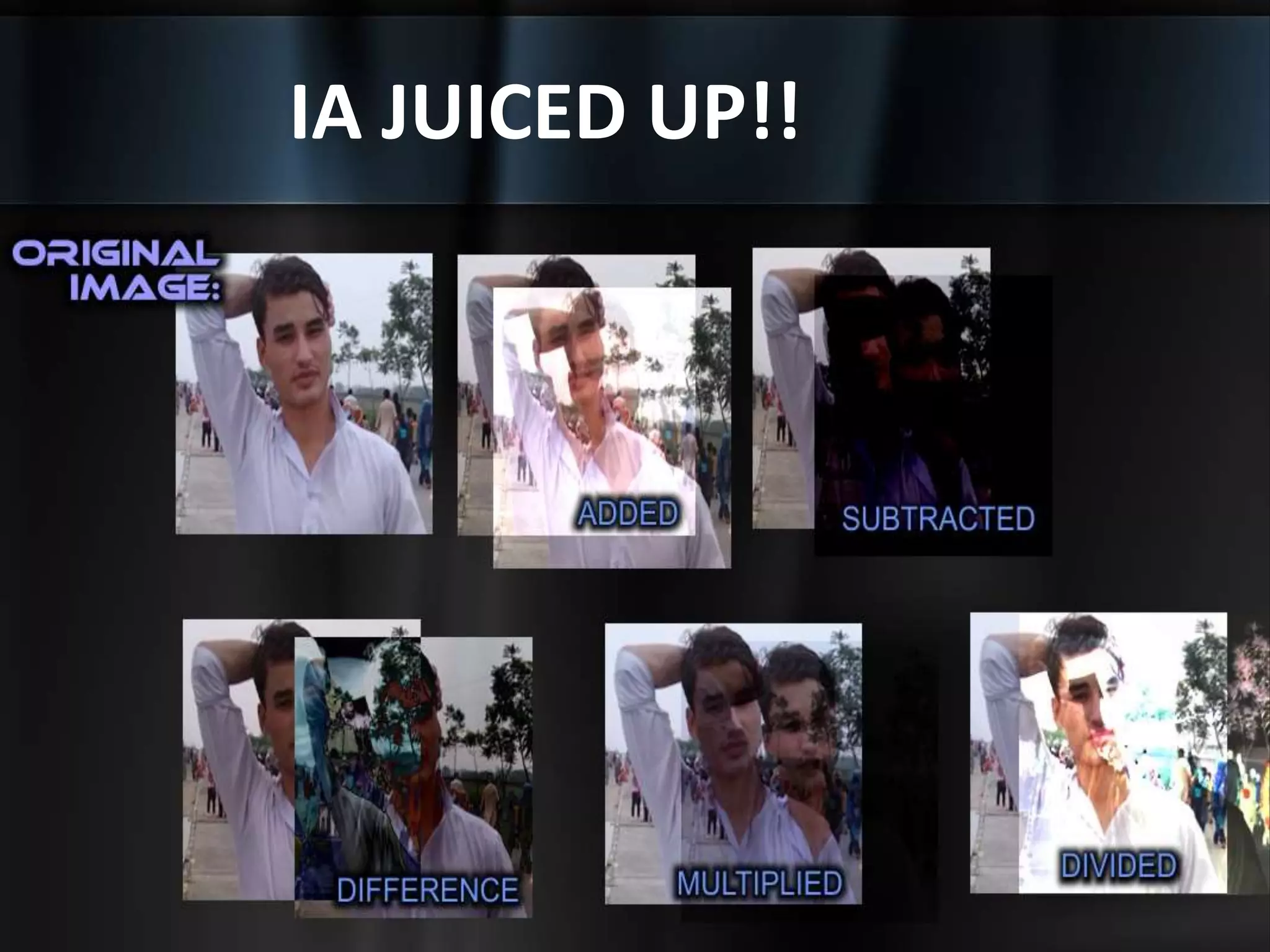
IA JUICED UP!!
Usage of Image Arithmetic
Image arithmetic has many uses in image processing both as a
preliminary step in more complex operations and by itself.
For example:
Image subtraction can be used to detect differences
between two or more images of the same scene or
object.
HOW/WHERE you can use
Image Arithmetic?
You can do image arithmetic using the MATLAB arithmetic
operators.
HOW/WHERE you can use
Image Arithmetic?
You can do image arithmetic using the MATLAB arithmetic
operators.
But:-
Wait Wait Wait..!!!!!
HOW/WHERE you can use
Image Arithmetic?
You can do image arithmetic using the MATLAB arithmetic
operators.
But remember to:
• Convert the images to class.
AND
• Double to use these operators.
Adding Images
To add two images or add a constant value to an image.
Adding Images
To add two images or add a constant value to an image.
• [imadd] function
adds the value of each pixel in one of the input images with the
corresponding pixel in the other input image and returns the
sum in the corresponding pixel of the output image.
USAGE of Adding Images
Image addition has many uses in image processing.
For example:
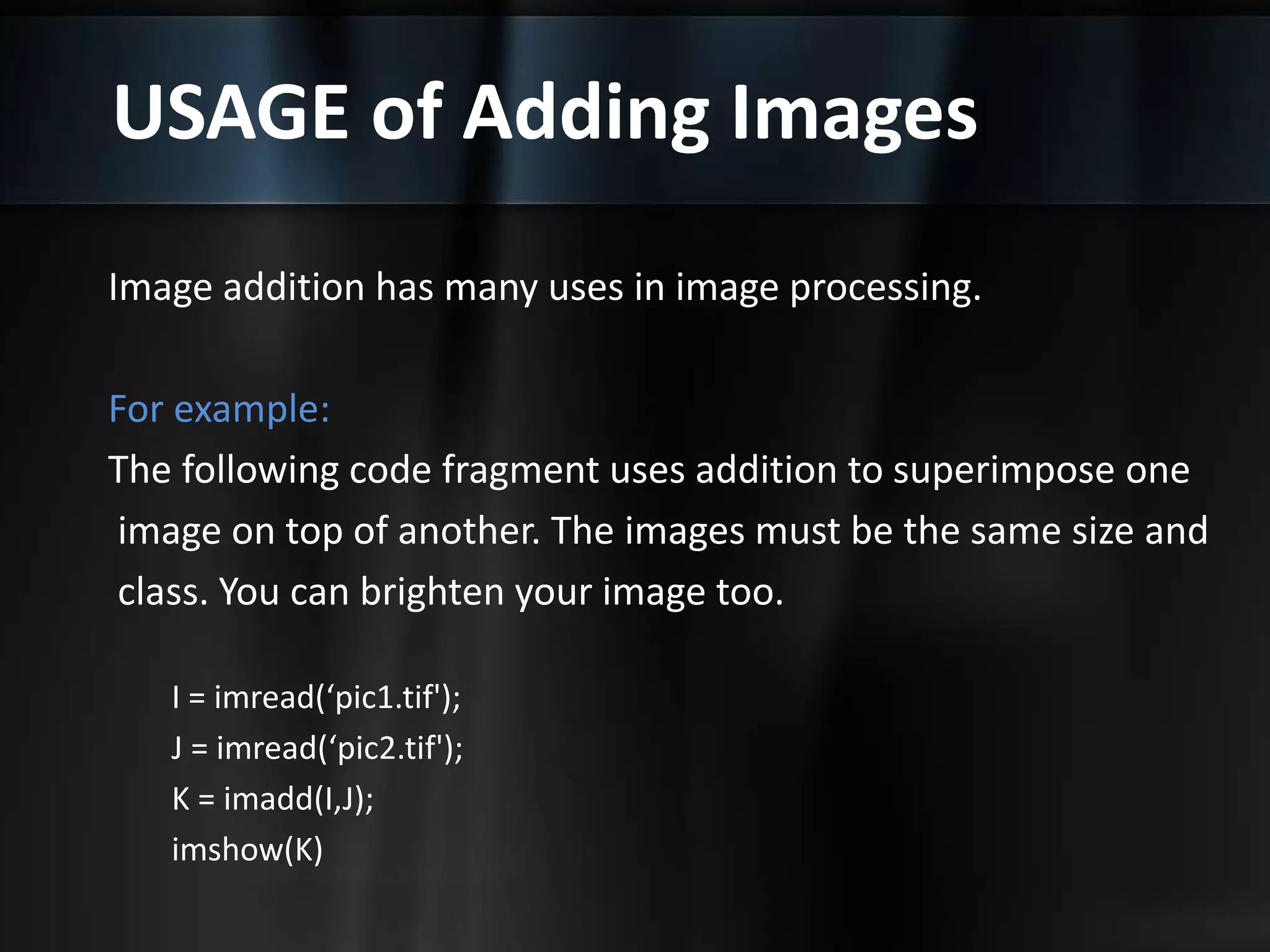
The following code fragment uses addition to superimpose one
image on top of another. The images must be the same size and
class. You can brighten your image too.
USAGE of Adding Images
Image addition has many uses in image processing.
For example:
The following code fragment uses addition to superimpose one
image on top of another. The images must be the same size and
class. You can brighten your image too.
I = imread(‘pic1.tif');
J = imread(‘pic2.tif');
K = imadd(I,J);
imshow(K)
USAGE of Adding Images
Image addition has many uses in image processing.
For example:
The following code fragment uses addition to superimpose one
image on top of another. The images must be the same size and
class. You can brighten your image too.
I = imread(‘pic1.tif');
J = imread(‘pic2.tif');
K = imadd(I,J);
imshow(K)
Multiplying Images
[immultiply] function.This does an element-by-element
multiplication (.*) of each corresponding pixel in a pair
of input images and returns the product of these multiplications
in the corresponding pixel in an output image.
Multiplying Images
[immultiply] function.This does an element-by-element
multiplication (.*) of each corresponding pixel in a pair
of input images and returns the product of these multiplications
in the corresponding pixel in an output image.
Scaling image processing operations.
Scaling brightens an image; a factor less than one darkens an image.
Scaling generally produces a much more natural
brightening/darkening effect than simply adding an offset to the
pixels, since it preserves the relative contrast of the image better.
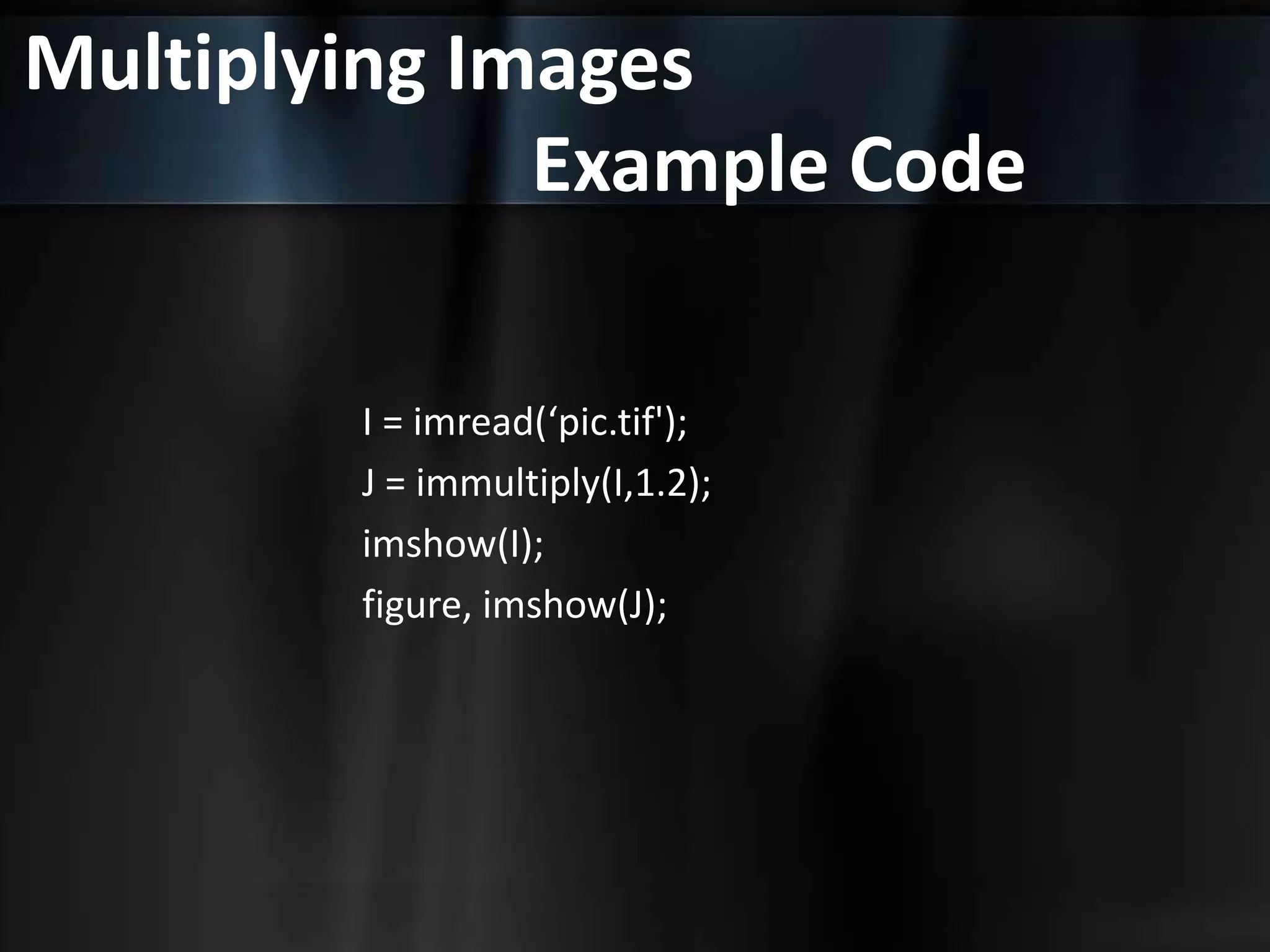
For example, this code scales an image by a constant factor.
Multiplying Images
Example Code
I = imread(‘pic.tif');
J = immultiply(I,1.2);
imshow(I);
figure, imshow(J);
Summary of Image
Arithmetic Functions
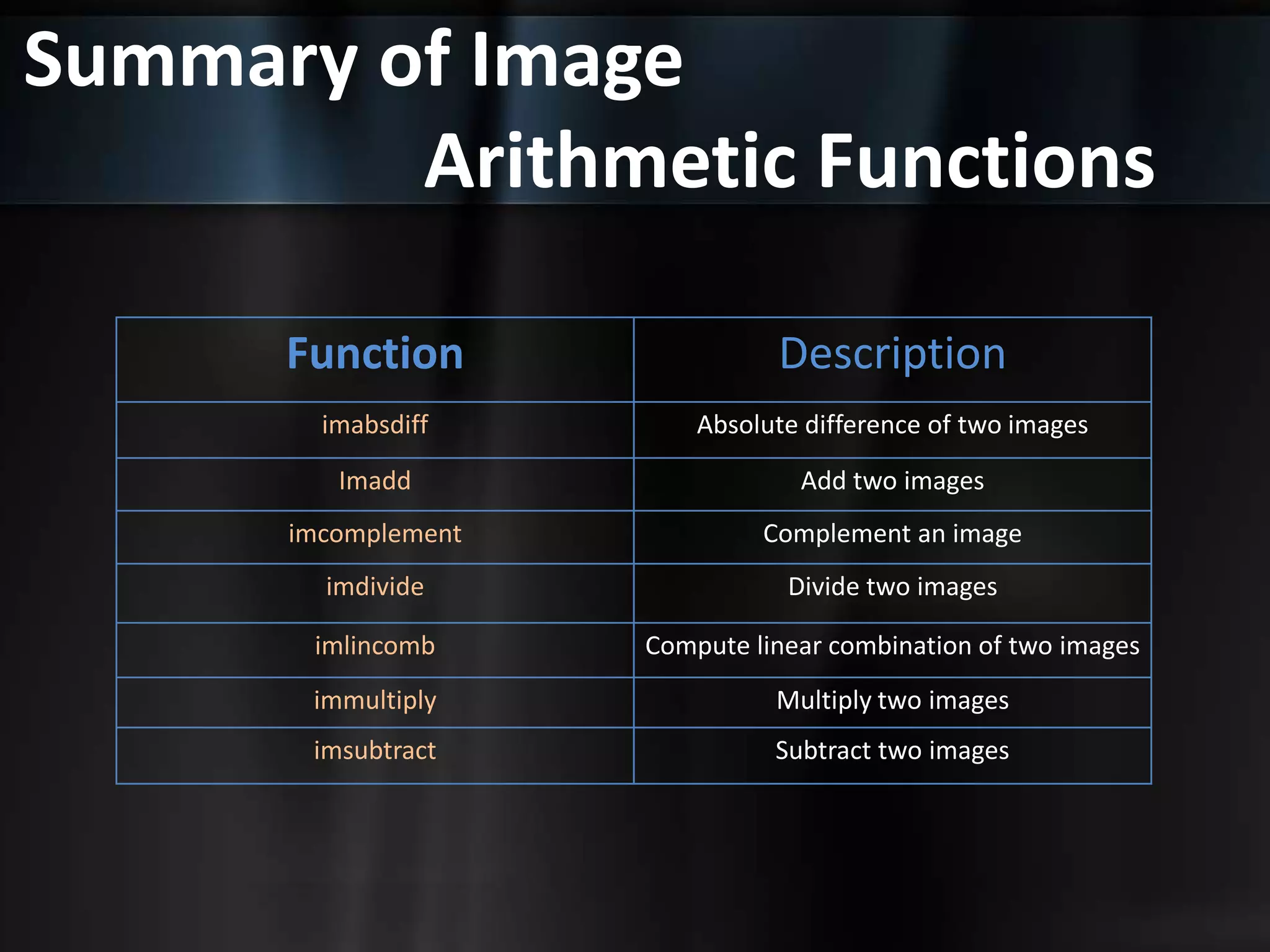
Function Description
imabsdiff Absolute difference of two images
Imadd Add two images
imcomplement Complement an image
imdivide Divide two images
imlincomb Compute linear combination of two images
immultiply Multiply two images
imsubtract Subtract two images

Mathematical operations in image processing

  • 1.
    Digital Image Processing AsadAli. From BCS 6th 3395
  • 2.
    What is ImageArithmetic? Image arithmetic is the implementation of standard arithmetic operations
  • 3.
    What is ImageArithmetic? Image arithmetic is the implementation of standard arithmetic operations, such as • Addition
  • 4.
    What is ImageArithmetic? Image arithmetic is the implementation of standard arithmetic operations, such as • Addition • Subtraction
  • 5.
    What is ImageArithmetic? Image arithmetic is the implementation of standard arithmetic operations, such as • Addition • Subtraction • Multiplication
  • 6.
    What is ImageArithmetic? Image arithmetic is the implementation of standard arithmetic operations, such as • Addition • Subtraction • Multiplication • Division
  • 7.
  • 8.
    Usage of ImageArithmetic Image arithmetic has many uses in image processing both as a preliminary step in more complex operations and by itself. For example: Image subtraction can be used to detect differences between two or more images of the same scene or object.
  • 9.
    HOW/WHERE you canuse Image Arithmetic? You can do image arithmetic using the MATLAB arithmetic operators.
  • 10.
    HOW/WHERE you canuse Image Arithmetic? You can do image arithmetic using the MATLAB arithmetic operators. But:- Wait Wait Wait..!!!!!
  • 11.
    HOW/WHERE you canuse Image Arithmetic? You can do image arithmetic using the MATLAB arithmetic operators. But remember to: • Convert the images to class. AND • Double to use these operators.
  • 12.
    Adding Images To addtwo images or add a constant value to an image.
  • 13.
    Adding Images To addtwo images or add a constant value to an image. • [imadd] function adds the value of each pixel in one of the input images with the corresponding pixel in the other input image and returns the sum in the corresponding pixel of the output image.
  • 14.
    USAGE of AddingImages Image addition has many uses in image processing. For example: The following code fragment uses addition to superimpose one image on top of another. The images must be the same size and class. You can brighten your image too.
  • 15.
    USAGE of AddingImages Image addition has many uses in image processing. For example: The following code fragment uses addition to superimpose one image on top of another. The images must be the same size and class. You can brighten your image too. I = imread(‘pic1.tif'); J = imread(‘pic2.tif'); K = imadd(I,J); imshow(K)
  • 16.
    USAGE of AddingImages Image addition has many uses in image processing. For example: The following code fragment uses addition to superimpose one image on top of another. The images must be the same size and class. You can brighten your image too. I = imread(‘pic1.tif'); J = imread(‘pic2.tif'); K = imadd(I,J); imshow(K)
  • 17.
    Multiplying Images [immultiply] function.Thisdoes an element-by-element multiplication (.*) of each corresponding pixel in a pair of input images and returns the product of these multiplications in the corresponding pixel in an output image.
  • 18.
    Multiplying Images [immultiply] function.Thisdoes an element-by-element multiplication (.*) of each corresponding pixel in a pair of input images and returns the product of these multiplications in the corresponding pixel in an output image. Scaling image processing operations. Scaling brightens an image; a factor less than one darkens an image. Scaling generally produces a much more natural brightening/darkening effect than simply adding an offset to the pixels, since it preserves the relative contrast of the image better. For example, this code scales an image by a constant factor.
  • 19.
    Multiplying Images Example Code I= imread(‘pic.tif'); J = immultiply(I,1.2); imshow(I); figure, imshow(J);
  • 20.
    Summary of Image ArithmeticFunctions Function Description imabsdiff Absolute difference of two images Imadd Add two images imcomplement Complement an image imdivide Divide two images imlincomb Compute linear combination of two images immultiply Multiply two images imsubtract Subtract two images