Computer Vision
Professor
Ahmed M. Badawi
ambadawi@eng.cu.edu.eg
http://scholar.google.com.eg/citations?user=r9pLu6EAAAAJ&hl=en
http://www.bmes.cufe.edu.eg
TA’s:
Eman Marzban
eman.marzban@eng1.cu.edu.eg
Asmaa Mohamed
asmaa.mohamed@eng1.cu.edu.eg
SBE 404, Spring 2020
Course requirements
Prerequisites
- Data structures
- Linear algebra
- Vector calculus
- A good working knowledge of Python/Matlab, C and C++ programming/Matlab (C /C++/C# is a
privilege in projects evaluation). OPENCV and other Python libraries are OK to implement tasks.
No prior knowledge of vision is assumed.
Textbooks
Required (Free):
- Computer Vision: Algorithms and Applications, Richard Szeliski
- Concise Computer Vision Reinhard Klette An Introduction into Theory and Algorithms, Reinhard
Klette
- Digital Image Processing, Rafael C. Gonzalez, Richard E. Woods
- We may also use readings from other books, scientific papers, internet, and theses.
Communications
Via emails and Google Drive accounts to share
images/codes/reports/presentations/assignments/course documents) with instructors/Tas.
Labs: Computer labs will be allocated for this course as well allocated sections with TAs scheduling.
Intended Learning Outcomes (ILOs)
1. Course
description:
After completing the course, the students are expected to have acquired and applied basic
knowledge and understanding of the fundamental concepts, problems, and solution techniques
and algorithms of computer vision and image processing to solve real life computer vision and
medical imaging problems with three practical assignments and one final project in face
detection/recognition. Students will be able to design a computer vision system to solve real
life and biomedical problems.
The topics to be covered are:
 Broad introduction to computer vision and image processing.
 Image enhancement and filters in spatial and frequency domains..
 Features and edge & boundary detection
 Features and image matching.
 Image segmentation
 Classification techniques
 Image recognition
 Image registration
2. Course
Intended
Learning
Outcomes
(ILOs):
a) Knowledge and Understanding
1. Concepts, methods, techniques and algorithms of image processing.
2. Concepts, methods, techniques and algorithms of computer vision
b) Intellectual Skills
3. Analyzing images, visualizing images, filtering images, detecting edges & boundaries, detecting
features and matching images, segmenting images, classifying features and images, recognizing
images, and registering images.
ILOs
2. Course
Intended
Learning
Outcomes
(ILOs):
4. Analyze linear and nonlinear techniques and algorithms in computer vision and
image processing.
5. Analyzing new unseen problems to think how to solve it with the taught tools and
algorithms and design of a computer vision system to real life and biomedical
engineering problems.
c) Professional and Practical Skills
6. Apply knowledge of computer vision to solve real computer vision problems via 4
practical assignments/project, three of which are direct implementation to
techniques and algorithms, and one grand project solving Face detection and Face
recognition problems.
7. Develop the projects in Python/Matlab/C/C++/OpenGl programming
d) General and Transferable Skills
8- Effectively manage tasks, time, and resources.
Course evaluation
Grading System
-The grade will be mainly based on 4 small programming assignments (4 ~ biweekly) and one
grand final project, midterm and final exam (’50’ marks for semester work grade + ’75’ marks for
final exam)
- Midterm exam 16/50
-Projects/Assignments 24/50
-Attendance 10/50
-Project grading means to evaluate homeworks (Assignments), lab works, programming contents,
presentations, and reports.
- Exams cover everything and design problems that you might never thought of before
-All exams are open book
Attendance
- (20 %) of semester work grade is for attendance.
-Attendance is obligatory to all.
-Three unjustified absences are considered fail and dismissal of the course. Course nature is
applied (use of knowledge to solve real problems in CV).
Course objectives
• To understand the fundamental concepts,
problems, and solution techniques and algorithms
of computer vision to solve real life (as consumer)
and medical imaging problems.
• To apply computer vision and image processing
techniques and algorithms to solve problems in
research and applications, such as image
enhancement, features and edge detection and
feature matching, segmentation, classification,
registration and recognition for both real life and
medical imaging fields.
Computer vision and nearby fields
– Computer vision: image to model (image
interpretation, see and understand)
– Computer graphics: Model to image
– Computational photography: image to image
– Machine Vision: Industrial, factory-floor systems
for inspection, measurements, part placement,
etc.
– Machine learning: The field of study that gives
computers the ability to learn without being
explicitly programmed
Today
– Introduction
– Computer vision overview
– Course overview
• Readings
– Book: Richard Szeliski, Computer Vision: Algorithms and Applications
http://szeliski.org/Book/drafts/SzeliskiBook_20100903_draft.pdf
• Intro: Ch 1.0,
• Other preferred readings, Sonka, Shapiro
Some course slides by Steve Seitz, David Lowe, James Hayes, Ahmed Badawi and my colleague
Mohamed Mahfouz Research Work
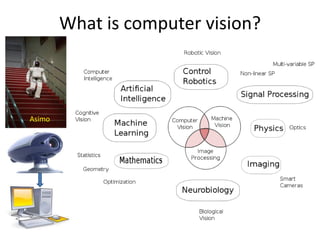
What is computer vision?
Asimo
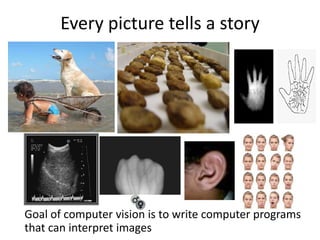
Every picture tells a story
Goal of computer vision is to write computer programs
that can interpret images
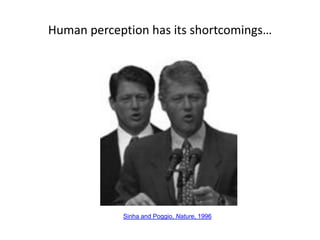
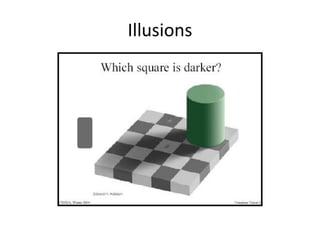
Human perception has its shortcomings…
Sinha and Poggio, Nature, 1996
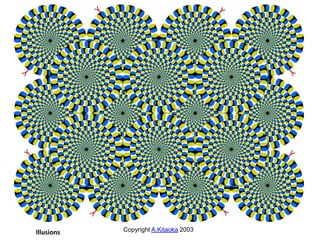
Copyright A.Kitaoka 2003Illusions
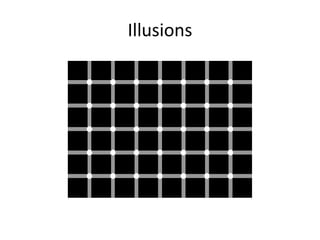
Illusions
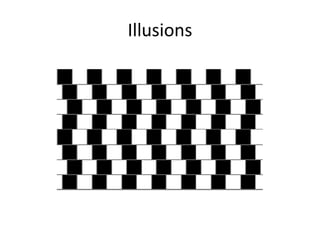
Illusions
Illusions
Illusions
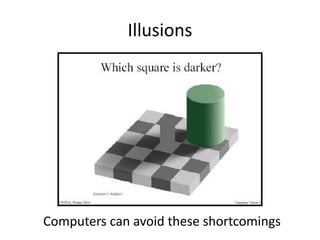
Computers can avoid these shortcomings
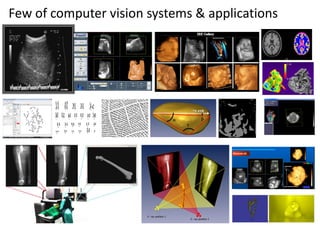
Few of computer vision systems & applications
Can computers match (or beat) human vision?
• Yes and no (but mostly no!)
– humans are much better at “hard and complex” things (tasks)
– computers can be better at “easy straightforward” things
(programmed tasks)
• If you can write a formula for it, computers can excel in performing
• Computer vision can’t solve the whole complex problem (yet), so breaks it
down into “easy” pieces.
• Many of the pieces have important applications.
• From image to model can be a many-to-one mapping
– A variety of surfaces with different material and geometrical
properties, possibly under different lighting conditions, could lead to
identical images
– Inverse mapping is under-constrained – non-unique solution (a lot of
information is lost in the transformation from the 3D world to the 2D
image)
• Image to model is computationally intensive
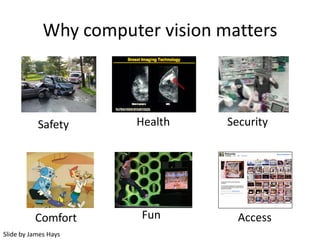
Why computer vision matters
Safety Health Security
Comfort AccessFun
Slide by James Hays
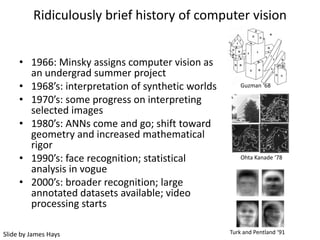
Ridiculously brief history of computer vision
Guzman ‘68
Ohta Kanade ‘78
Turk and Pentland ‘91Slide by James Hays
• 1966: Minsky assigns computer vision as
an undergrad summer project
• 1968’s: interpretation of synthetic worlds
• 1970’s: some progress on interpreting
selected images
• 1980’s: ANNs come and go; shift toward
geometry and increased mathematical
rigor
• 1990’s: face recognition; statistical
analysis in vogue
• 2000’s: broader recognition; large
annotated datasets available; video
processing starts
How vision is used now
• Examples of state-of-the-art
Some of the following slides by Steve Seitz or from David Lowe page http://www.cs.ubc.ca/~lowe/vision.html
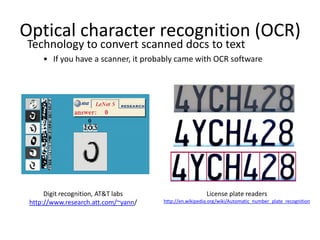
Optical character recognition (OCR)
Digit recognition, AT&T labs
http://www.research.att.com/~yann/
Technology to convert scanned docs to text
• If you have a scanner, it probably came with OCR software
License plate readers
http://en.wikipedia.org/wiki/Automatic_number_plate_recognition
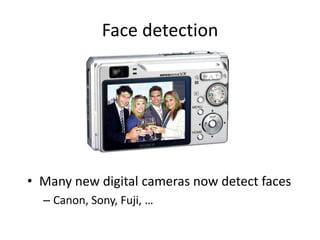
Face detection
• Many new digital cameras now detect faces
– Canon, Sony, Fuji, …
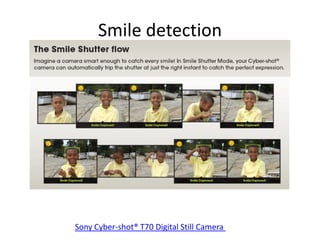
Smile detection
Sony Cyber-shot® T70 Digital Still Camera
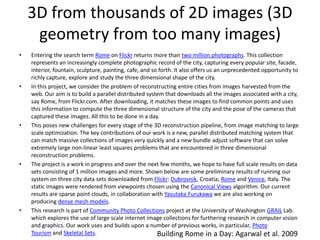
3D from thousands of 2D images (3D
geometry from too many images)
Building Rome in a Day: Agarwal et al. 2009
• Entering the search term Rome on Flickr returns more than two million photographs. This collection
represents an increasingly complete photographic record of the city, capturing every popular site, facade,
interior, fountain, sculpture, painting, cafe, and so forth. It also offers us an unprecedented opportunity to
richly capture, explore and study the three dimensional shape of the city.
• In this project, we consider the problem of reconstructing entire cities from images harvested from the
web. Our aim is to build a parallel distributed system that downloads all the images associated with a city,
say Rome, from Flickr.com. After downloading, it matches these images to find common points and uses
this information to compute the three dimensional structure of the city and the pose of the cameras that
captured these images. All this to be done in a day.
• This poses new challenges for every stage of the 3D reconstruction pipeline, from image matching to large
scale optimization. The key contributions of our work is a new, parallel distributed matching system that
can match massive collections of images very quickly and a new bundle adjust software that can solve
extremely large non-linear least squares problems that are encountered in three dimensional
reconstruction problems.
• The project is a work in progress and over the next few months, we hope to have full scale results on data
sets consisting of 1 million images and more. Shown below are some preliminary results of running our
system on three city data sets downloaded from Flickr: Dubrovnik, Croatia; Rome and Venice, Italy. The
static images were rendered from viewpoints chosen using the Canonical Views algorithm. Our current
results are sparse point clouds, in collaboration with Yasutaka Furukawa we are also working on
producing dense mesh models.
• This research is part of Community Photo Collections project at the University of Washington GRAIL Lab.
which explores the use of large scale internet image collections for furthering research in computer vision
and graphics. Our work uses and builds upon a number of previous works, in particular, Photo
Tourism and Skeletal Sets.
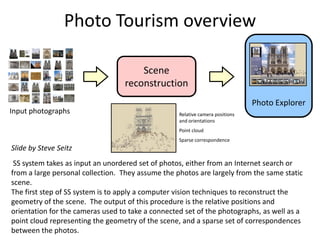
Photo Tourism overview
Scene
reconstruction
Photo Explorer
Input photographs Relative camera positions
and orientations
Point cloud
Sparse correspondence
SS system takes as input an unordered set of photos, either from an Internet search or
from a large personal collection. They assume the photos are largely from the same static
scene.
The first step of SS system is to apply a computer vision techniques to reconstruct the
geometry of the scene. The output of this procedure is the relative positions and
orientation for the cameras used to take a connected set of the photographs, as well as a
point cloud representing the geometry of the scene, and a sparse set of correspondences
between the photos.
Slide by Steve Seitz
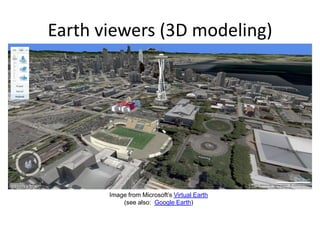
Earth viewers (3D modeling)
Image from Microsoft’s Virtual Earth
(see also: Google Earth)
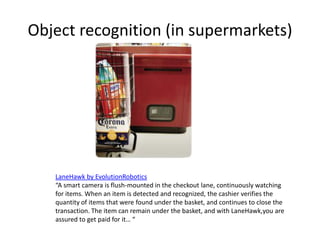
Object recognition (in supermarkets)
LaneHawk by EvolutionRobotics
“A smart camera is flush-mounted in the checkout lane, continuously watching
for items. When an item is detected and recognized, the cashier verifies the
quantity of items that were found under the basket, and continues to close the
transaction. The item can remain under the basket, and with LaneHawk,you are
assured to get paid for it… “
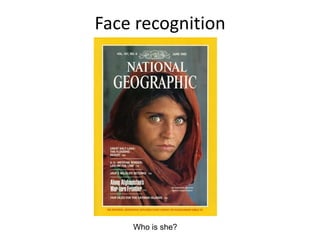
Face recognition
Who is she?
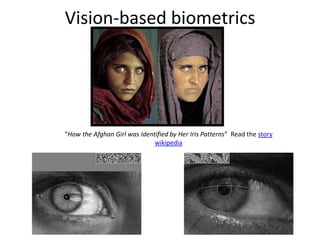
Vision-based biometrics
“How the Afghan Girl was Identified by Her Iris Patterns” Read the story
wikipedia
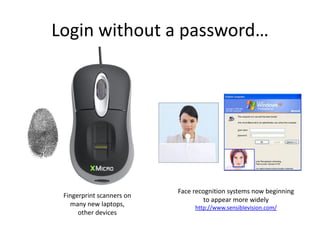
Login without a password…
Fingerprint scanners on
many new laptops,
other devices
Face recognition systems now beginning
to appear more widely
http://www.sensiblevision.com/
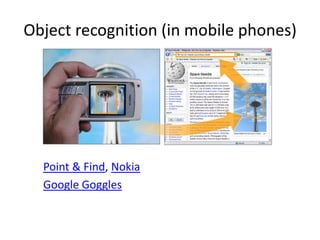
Object recognition (in mobile phones)
Point & Find, Nokia
Google Goggles
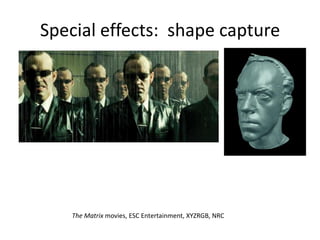
The Matrix movies, ESC Entertainment, XYZRGB, NRC
Special effects: shape capture
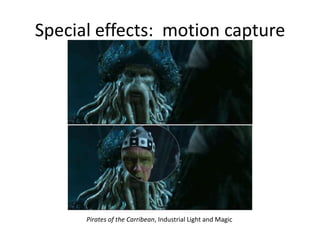
Pirates of the Carribean, Industrial Light and Magic
Special effects: motion capture
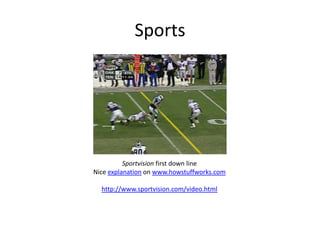
Sports
Sportvision first down line
Nice explanation on www.howstuffworks.com
http://www.sportvision.com/video.html
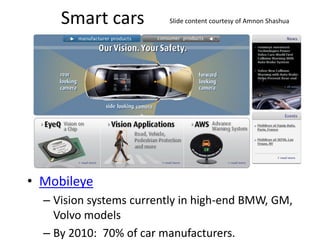
Smart cars
• Mobileye
– Vision systems currently in high-end BMW, GM,
Volvo models
– By 2010: 70% of car manufacturers.
Slide content courtesy of Amnon Shashua
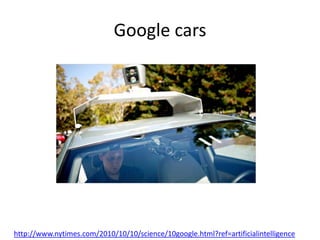
Google cars
http://www.nytimes.com/2010/10/10/science/10google.html?ref=artificialintelligence
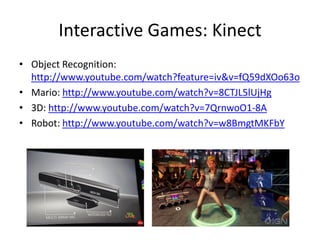
Interactive Games: Kinect
• Object Recognition:
http://www.youtube.com/watch?feature=iv&v=fQ59dXOo63o
• Mario: http://www.youtube.com/watch?v=8CTJL5lUjHg
• 3D: http://www.youtube.com/watch?v=7QrnwoO1-8A
• Robot: http://www.youtube.com/watch?v=w8BmgtMKFbY
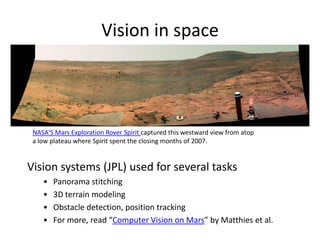
Vision in space
Vision systems (JPL) used for several tasks
• Panorama stitching
• 3D terrain modeling
• Obstacle detection, position tracking
• For more, read “Computer Vision on Mars” by Matthies et al.
NASA'S Mars Exploration Rover Spirit captured this westward view from atop
a low plateau where Spirit spent the closing months of 2007.
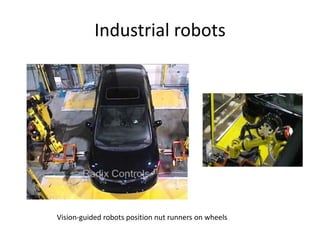
Industrial robots
Vision-guided robots position nut runners on wheels
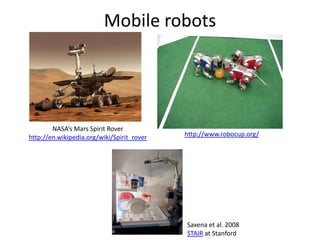
Mobile robots
http://www.robocup.org/
NASA’s Mars Spirit Rover
http://en.wikipedia.org/wiki/Spirit_rover
Saxena et al. 2008
STAIR at Stanford
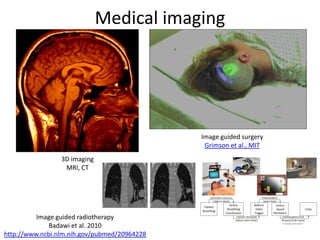
Medical imaging
Image guided surgery
Grimson et al., MIT
3D imaging
MRI, CT
Image guided radiotherapy
Badawi et al. 2010
http://www.ncbi.nlm.nih.gov/pubmed/20964228
Current state of the art applications
• To learn more about vision applications and companies
– David Lowe maintains an excellent overview of vision companies
• http://www.cs.ubc.ca/spider/lowe/vision.html
Applications categories:
• Automobile driver assistance
• Eye and Head Tracking
• Film and Video: Sports analysis
• Games and Gesture Recognition
• General purpose vision systems
• Industrial automation and inspection: Automotive industry
• Industrial automation and inspection: Electronics industry
• Industrial automation and inspection: Food and agriculture
• Industrial automation and inspection: Printing and textiles
• Medical and biomedical
• Object Recognition for Mobile Devices
• Panoramic Photography
• People tracking
• Safety monitoring
• Security: Biometrics
• Security: Monitoring and Surveillance
• Three-dimensional modeling
• Traffic and road management
• Web Applications
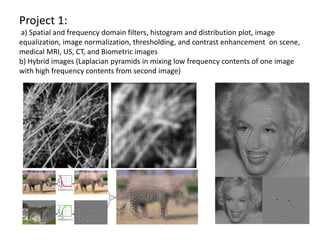
Project 1:
a) Spatial and frequency domain filters, histogram and distribution plot, image
equalization, image normalization, thresholding, and contrast enhancement on scene,
medical MRI, US, CT, and Biometric images
b) Hybrid images (Laplacian pyramids in mixing low frequency contents of one image
with high frequency contents from second image)
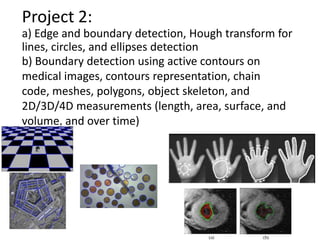
b) Boundary detection using active contours on
medical images, contours representation, chain
code, meshes, polygons, object skeleton, and
2D/3D/4D measurements (length, area, surface, and
volume, and over time)
Project 2:
a) Edge and boundary detection, Hough transform for
lines, circles, and ellipses detection
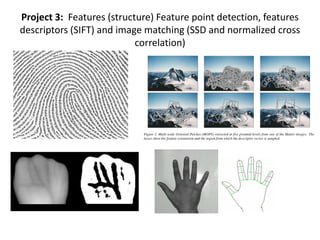
Project 3: Features (structure) Feature point detection, features
descriptors (SIFT) and image matching (SSD and normalized cross
correlation)
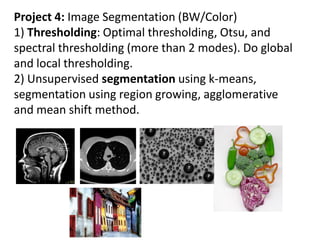
Project 4: Image Segmentation (BW/Color)
1) Thresholding: Optimal thresholding, Otsu, and
spectral thresholding (more than 2 modes). Do global
and local thresholding.
2) Unsupervised segmentation using k-means,
segmentation using region growing, agglomerative
and mean shift method.
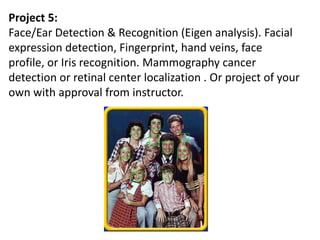
Project 5:
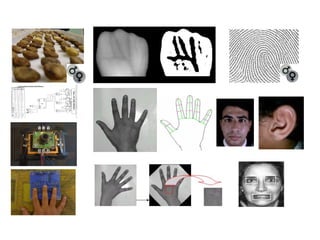
Face/Ear Detection & Recognition (Eigen analysis). Facial
expression detection, Fingerprint, hand veins, face
profile, or Iris recognition. Mammography cancer
detection or retinal center localization . Or project of your
own with approval from instructor.

Lecture 1 computer vision introduction

  • 1.
    Computer Vision Professor Ahmed M.Badawi ambadawi@eng.cu.edu.eg http://scholar.google.com.eg/citations?user=r9pLu6EAAAAJ&hl=en http://www.bmes.cufe.edu.eg TA’s: Eman Marzban eman.marzban@eng1.cu.edu.eg Asmaa Mohamed asmaa.mohamed@eng1.cu.edu.eg SBE 404, Spring 2020
  • 2.
    Course requirements Prerequisites - Datastructures - Linear algebra - Vector calculus - A good working knowledge of Python/Matlab, C and C++ programming/Matlab (C /C++/C# is a privilege in projects evaluation). OPENCV and other Python libraries are OK to implement tasks. No prior knowledge of vision is assumed. Textbooks Required (Free): - Computer Vision: Algorithms and Applications, Richard Szeliski - Concise Computer Vision Reinhard Klette An Introduction into Theory and Algorithms, Reinhard Klette - Digital Image Processing, Rafael C. Gonzalez, Richard E. Woods - We may also use readings from other books, scientific papers, internet, and theses. Communications Via emails and Google Drive accounts to share images/codes/reports/presentations/assignments/course documents) with instructors/Tas. Labs: Computer labs will be allocated for this course as well allocated sections with TAs scheduling.
  • 3.
    Intended Learning Outcomes(ILOs) 1. Course description: After completing the course, the students are expected to have acquired and applied basic knowledge and understanding of the fundamental concepts, problems, and solution techniques and algorithms of computer vision and image processing to solve real life computer vision and medical imaging problems with three practical assignments and one final project in face detection/recognition. Students will be able to design a computer vision system to solve real life and biomedical problems. The topics to be covered are:  Broad introduction to computer vision and image processing.  Image enhancement and filters in spatial and frequency domains..  Features and edge & boundary detection  Features and image matching.  Image segmentation  Classification techniques  Image recognition  Image registration 2. Course Intended Learning Outcomes (ILOs): a) Knowledge and Understanding 1. Concepts, methods, techniques and algorithms of image processing. 2. Concepts, methods, techniques and algorithms of computer vision b) Intellectual Skills 3. Analyzing images, visualizing images, filtering images, detecting edges & boundaries, detecting features and matching images, segmenting images, classifying features and images, recognizing images, and registering images.
  • 4.
    ILOs 2. Course Intended Learning Outcomes (ILOs): 4. Analyzelinear and nonlinear techniques and algorithms in computer vision and image processing. 5. Analyzing new unseen problems to think how to solve it with the taught tools and algorithms and design of a computer vision system to real life and biomedical engineering problems. c) Professional and Practical Skills 6. Apply knowledge of computer vision to solve real computer vision problems via 4 practical assignments/project, three of which are direct implementation to techniques and algorithms, and one grand project solving Face detection and Face recognition problems. 7. Develop the projects in Python/Matlab/C/C++/OpenGl programming d) General and Transferable Skills 8- Effectively manage tasks, time, and resources.
  • 5.
    Course evaluation Grading System -Thegrade will be mainly based on 4 small programming assignments (4 ~ biweekly) and one grand final project, midterm and final exam (’50’ marks for semester work grade + ’75’ marks for final exam) - Midterm exam 16/50 -Projects/Assignments 24/50 -Attendance 10/50 -Project grading means to evaluate homeworks (Assignments), lab works, programming contents, presentations, and reports. - Exams cover everything and design problems that you might never thought of before -All exams are open book Attendance - (20 %) of semester work grade is for attendance. -Attendance is obligatory to all. -Three unjustified absences are considered fail and dismissal of the course. Course nature is applied (use of knowledge to solve real problems in CV).
  • 6.
    Course objectives • Tounderstand the fundamental concepts, problems, and solution techniques and algorithms of computer vision to solve real life (as consumer) and medical imaging problems. • To apply computer vision and image processing techniques and algorithms to solve problems in research and applications, such as image enhancement, features and edge detection and feature matching, segmentation, classification, registration and recognition for both real life and medical imaging fields.
  • 7.
    Computer vision andnearby fields – Computer vision: image to model (image interpretation, see and understand) – Computer graphics: Model to image – Computational photography: image to image – Machine Vision: Industrial, factory-floor systems for inspection, measurements, part placement, etc. – Machine learning: The field of study that gives computers the ability to learn without being explicitly programmed
  • 8.
    Today – Introduction – Computervision overview – Course overview • Readings – Book: Richard Szeliski, Computer Vision: Algorithms and Applications http://szeliski.org/Book/drafts/SzeliskiBook_20100903_draft.pdf • Intro: Ch 1.0, • Other preferred readings, Sonka, Shapiro Some course slides by Steve Seitz, David Lowe, James Hayes, Ahmed Badawi and my colleague Mohamed Mahfouz Research Work
  • 9.
  • 10.
  • 11.
    What is computervision? Asimo
  • 12.
    Every picture tellsa story Goal of computer vision is to write computer programs that can interpret images
  • 13.
    Human perception hasits shortcomings… Sinha and Poggio, Nature, 1996
  • 14.
  • 15.
  • 16.
  • 17.
  • 18.
  • 19.
    Few of computervision systems & applications
  • 22.
    Can computers match(or beat) human vision? • Yes and no (but mostly no!) – humans are much better at “hard and complex” things (tasks) – computers can be better at “easy straightforward” things (programmed tasks) • If you can write a formula for it, computers can excel in performing • Computer vision can’t solve the whole complex problem (yet), so breaks it down into “easy” pieces. • Many of the pieces have important applications. • From image to model can be a many-to-one mapping – A variety of surfaces with different material and geometrical properties, possibly under different lighting conditions, could lead to identical images – Inverse mapping is under-constrained – non-unique solution (a lot of information is lost in the transformation from the 3D world to the 2D image) • Image to model is computationally intensive
  • 23.
    Why computer visionmatters Safety Health Security Comfort AccessFun Slide by James Hays
  • 24.
    Ridiculously brief historyof computer vision Guzman ‘68 Ohta Kanade ‘78 Turk and Pentland ‘91Slide by James Hays • 1966: Minsky assigns computer vision as an undergrad summer project • 1968’s: interpretation of synthetic worlds • 1970’s: some progress on interpreting selected images • 1980’s: ANNs come and go; shift toward geometry and increased mathematical rigor • 1990’s: face recognition; statistical analysis in vogue • 2000’s: broader recognition; large annotated datasets available; video processing starts
  • 25.
    How vision isused now • Examples of state-of-the-art Some of the following slides by Steve Seitz or from David Lowe page http://www.cs.ubc.ca/~lowe/vision.html
  • 26.
    Optical character recognition(OCR) Digit recognition, AT&T labs http://www.research.att.com/~yann/ Technology to convert scanned docs to text • If you have a scanner, it probably came with OCR software License plate readers http://en.wikipedia.org/wiki/Automatic_number_plate_recognition
  • 27.
    Face detection • Manynew digital cameras now detect faces – Canon, Sony, Fuji, …
  • 28.
    Smile detection Sony Cyber-shot®T70 Digital Still Camera
  • 29.
    3D from thousandsof 2D images (3D geometry from too many images) Building Rome in a Day: Agarwal et al. 2009 • Entering the search term Rome on Flickr returns more than two million photographs. This collection represents an increasingly complete photographic record of the city, capturing every popular site, facade, interior, fountain, sculpture, painting, cafe, and so forth. It also offers us an unprecedented opportunity to richly capture, explore and study the three dimensional shape of the city. • In this project, we consider the problem of reconstructing entire cities from images harvested from the web. Our aim is to build a parallel distributed system that downloads all the images associated with a city, say Rome, from Flickr.com. After downloading, it matches these images to find common points and uses this information to compute the three dimensional structure of the city and the pose of the cameras that captured these images. All this to be done in a day. • This poses new challenges for every stage of the 3D reconstruction pipeline, from image matching to large scale optimization. The key contributions of our work is a new, parallel distributed matching system that can match massive collections of images very quickly and a new bundle adjust software that can solve extremely large non-linear least squares problems that are encountered in three dimensional reconstruction problems. • The project is a work in progress and over the next few months, we hope to have full scale results on data sets consisting of 1 million images and more. Shown below are some preliminary results of running our system on three city data sets downloaded from Flickr: Dubrovnik, Croatia; Rome and Venice, Italy. The static images were rendered from viewpoints chosen using the Canonical Views algorithm. Our current results are sparse point clouds, in collaboration with Yasutaka Furukawa we are also working on producing dense mesh models. • This research is part of Community Photo Collections project at the University of Washington GRAIL Lab. which explores the use of large scale internet image collections for furthering research in computer vision and graphics. Our work uses and builds upon a number of previous works, in particular, Photo Tourism and Skeletal Sets.
  • 30.
    Photo Tourism overview Scene reconstruction PhotoExplorer Input photographs Relative camera positions and orientations Point cloud Sparse correspondence SS system takes as input an unordered set of photos, either from an Internet search or from a large personal collection. They assume the photos are largely from the same static scene. The first step of SS system is to apply a computer vision techniques to reconstruct the geometry of the scene. The output of this procedure is the relative positions and orientation for the cameras used to take a connected set of the photographs, as well as a point cloud representing the geometry of the scene, and a sparse set of correspondences between the photos. Slide by Steve Seitz
  • 31.
    Earth viewers (3Dmodeling) Image from Microsoft’s Virtual Earth (see also: Google Earth)
  • 32.
    Object recognition (insupermarkets) LaneHawk by EvolutionRobotics “A smart camera is flush-mounted in the checkout lane, continuously watching for items. When an item is detected and recognized, the cashier verifies the quantity of items that were found under the basket, and continues to close the transaction. The item can remain under the basket, and with LaneHawk,you are assured to get paid for it… “
  • 33.
  • 34.
    Vision-based biometrics “How theAfghan Girl was Identified by Her Iris Patterns” Read the story wikipedia
  • 35.
    Login without apassword… Fingerprint scanners on many new laptops, other devices Face recognition systems now beginning to appear more widely http://www.sensiblevision.com/
  • 36.
    Object recognition (inmobile phones) Point & Find, Nokia Google Goggles
  • 37.
    The Matrix movies,ESC Entertainment, XYZRGB, NRC Special effects: shape capture
  • 38.
    Pirates of theCarribean, Industrial Light and Magic Special effects: motion capture
  • 39.
    Sports Sportvision first downline Nice explanation on www.howstuffworks.com http://www.sportvision.com/video.html
  • 40.
    Smart cars • Mobileye –Vision systems currently in high-end BMW, GM, Volvo models – By 2010: 70% of car manufacturers. Slide content courtesy of Amnon Shashua
  • 41.
  • 42.
    Interactive Games: Kinect •Object Recognition: http://www.youtube.com/watch?feature=iv&v=fQ59dXOo63o • Mario: http://www.youtube.com/watch?v=8CTJL5lUjHg • 3D: http://www.youtube.com/watch?v=7QrnwoO1-8A • Robot: http://www.youtube.com/watch?v=w8BmgtMKFbY
  • 43.
    Vision in space Visionsystems (JPL) used for several tasks • Panorama stitching • 3D terrain modeling • Obstacle detection, position tracking • For more, read “Computer Vision on Mars” by Matthies et al. NASA'S Mars Exploration Rover Spirit captured this westward view from atop a low plateau where Spirit spent the closing months of 2007.
  • 44.
    Industrial robots Vision-guided robotsposition nut runners on wheels
  • 45.
    Mobile robots http://www.robocup.org/ NASA’s MarsSpirit Rover http://en.wikipedia.org/wiki/Spirit_rover Saxena et al. 2008 STAIR at Stanford
  • 46.
    Medical imaging Image guidedsurgery Grimson et al., MIT 3D imaging MRI, CT Image guided radiotherapy Badawi et al. 2010 http://www.ncbi.nlm.nih.gov/pubmed/20964228
  • 47.
    Current state ofthe art applications • To learn more about vision applications and companies – David Lowe maintains an excellent overview of vision companies • http://www.cs.ubc.ca/spider/lowe/vision.html Applications categories: • Automobile driver assistance • Eye and Head Tracking • Film and Video: Sports analysis • Games and Gesture Recognition • General purpose vision systems • Industrial automation and inspection: Automotive industry • Industrial automation and inspection: Electronics industry • Industrial automation and inspection: Food and agriculture • Industrial automation and inspection: Printing and textiles • Medical and biomedical • Object Recognition for Mobile Devices • Panoramic Photography • People tracking • Safety monitoring • Security: Biometrics • Security: Monitoring and Surveillance • Three-dimensional modeling • Traffic and road management • Web Applications
  • 48.
    Project 1: a) Spatialand frequency domain filters, histogram and distribution plot, image equalization, image normalization, thresholding, and contrast enhancement on scene, medical MRI, US, CT, and Biometric images b) Hybrid images (Laplacian pyramids in mixing low frequency contents of one image with high frequency contents from second image)
  • 49.
    b) Boundary detectionusing active contours on medical images, contours representation, chain code, meshes, polygons, object skeleton, and 2D/3D/4D measurements (length, area, surface, and volume, and over time) Project 2: a) Edge and boundary detection, Hough transform for lines, circles, and ellipses detection
  • 50.
    Project 3: Features(structure) Feature point detection, features descriptors (SIFT) and image matching (SSD and normalized cross correlation)
  • 51.
    Project 4: ImageSegmentation (BW/Color) 1) Thresholding: Optimal thresholding, Otsu, and spectral thresholding (more than 2 modes). Do global and local thresholding. 2) Unsupervised segmentation using k-means, segmentation using region growing, agglomerative and mean shift method.
  • 52.
    Project 5: Face/Ear Detection& Recognition (Eigen analysis). Facial expression detection, Fingerprint, hand veins, face profile, or Iris recognition. Mammography cancer detection or retinal center localization . Or project of your own with approval from instructor.