Now Playing:
Digital Love
Daft Punk
from Discovery
Released March 13, 2001
Graphics Grab Bag
Rick Skarbez, Instructor
COMP 575
November 27, 2007
Announcements
• You need to arrange to talk to me
before December 1 for your project
update
• I am going to attempt to reserve a
room/time on December 11 for project
presentations
• The final deadline for project
submissions will be the evening of
December 12
• The final exam is Friday, December 14
The Pursuit of
Photorealism
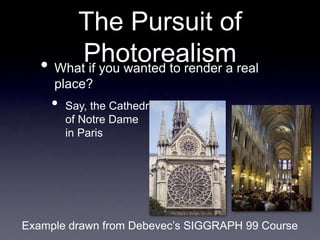
• What if you wanted to render a real
place?
• Say, the Cathedral
of Notre Dame
in Paris
Example drawn from Debevec’s SIGGRAPH 99 Course
The Pursuit of
Photorealism
• You could:
• Acquire accurate measurements of the
building
• Use these measurements to construct a
geometric model
• Apply the appropriate material properties to
every surface
• Use some advanced global illumination
technique to simulate light bouncing around
the cathedral
The Pursuit of
Photorealism
• Alternatively, you could:
• Take a picture of the cathedral from the
desired viewpoint
• This would be much easier
• Also, it would look better
• Pictures are by definition photorealistic
What is IBR?
• It can mean any number of things
• As a short definition, we can say that it is
any technique that uses images (of some
kind), either directly rendering with them or
using them to create models
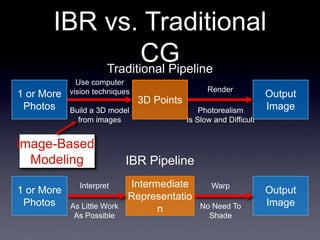
IBR vs. Traditional
CG
Use computer
vision techniques
Build a 3D model
from images
1 or More
Photos
Interpret
As Little Work
As Possible
Warp
No Need To
Shade
1 or More
Photos
Output
Image
Intermediate
Representatio
n
IBR Pipeline
Render
Photorealism
Is Slow and Difficult
Output
Image
3D Points
Traditional Pipeline
Image-Based
Modeling
The Math Behind
Photographs
• Can think of a photograph as a
“catalog” of the colors of the rays that
pass through a single point in space
• i.e. a pinhole, or a camera lens
• We can parametrize any ray
as [Φ, θ, x, y, z]
• The ray through point (x,y,z)
in direction (Φ, θ)
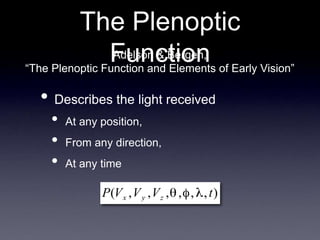
The Plenoptic
Function
• Describes the light received
• At any position,
• From any direction,
• At any time
Adelson & Bergen,
“The Plenoptic Function and Elements of Early Vision”
The Plenoptic
Function
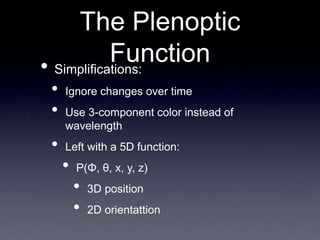
• Simplifications:
• Ignore changes over time
• Use 3-component color instead of
wavelength
• Left with a 5D function:
• P(Φ, θ, x, y, z)
• 3D position
• 2D orientattion
Panoramas
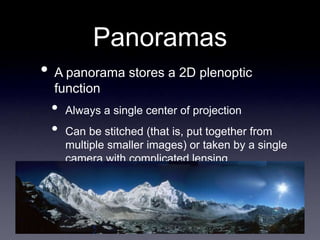
• A panorama stores a 2D plenoptic
function
• Always a single center of projection
• Can be stitched (that is, put together from
multiple smaller images) or taken by a single
camera with complicated lensing
Panoramas as Virtual
Environments
• Pros:
• Easy to make
• Cons:
• No sense of 3D
• Fixed viewpoint
• Hard to navigate
Function:
Light Fields and
Lumigraphs
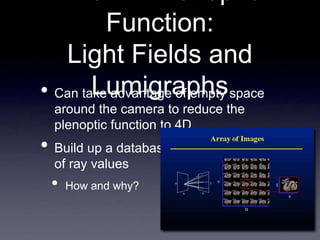
• Can take advantage of empty space
around the camera to reduce the
plenoptic function to 4D
• Build up a database
of ray values
• How and why?
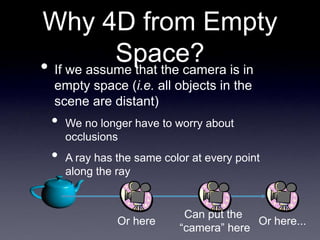
Why 4D from Empty
Space?
• If we assume that the camera is in
empty space (i.e. all objects in the
scene are distant)
• We no longer have to worry about
occlusions
• A ray has the same color at every point
along the ray
Can put the
“camera” here
Or here...
Or here
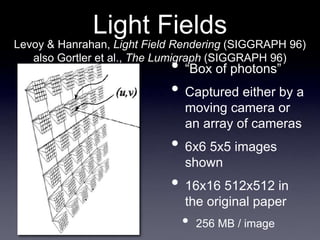
Light Fields
• “Box of photons”
• Captured either by a
moving camera or
an array of cameras
• 6x6 5x5 images
shown
• 16x16 512x512 in
the original paper
• 256 MB / image
Levoy & Hanrahan, Light Field Rendering (SIGGRAPH 96)
also Gortler et al., The Lumigraph (SIGGRAPH 96)
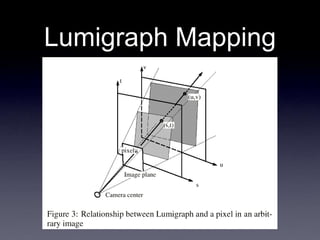
Lumigraph Mapping
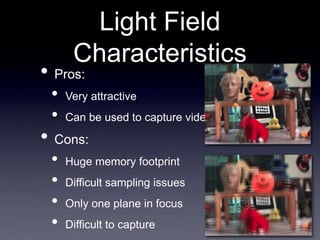
Light Field
Characteristics
• Pros:
• Very attractive
• Can be used to capture video
• Cons:
• Huge memory footprint
• Difficult sampling issues
• Only one plane in focus
• Difficult to capture
No Geometry
• Note that neither of these techniques
make any assumptions at all about
geometry
• Just show images
• Another technique in this vein is
Concentric Mosaics, from Shum & He
(SIGGRAPH 99)
Facade
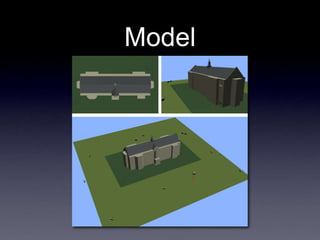
• Use a small number of images to
generate a “blocks” model
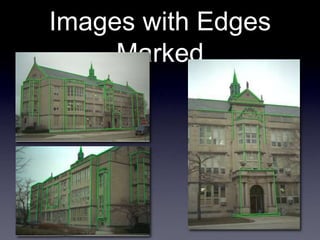
• Establish edge correspondences
• Reconstruct by minimizing error
• Do view-dependent texture mapping
Debevec, SIGGRAPH 96
Images with Edges
Marked
Model
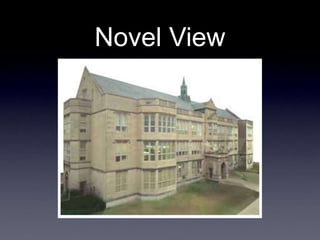
Novel View
IBR Review
• Attempts to use real photographs to
generate high-quality images without
manual modeling
• Can include:
• Automatically building geometry from
images
• Rendering a dynamic scene with no
geometry
• Something in between
• Any questions?
Today
• Grab bag
• Filtering and image processing
• Computer graphics in video games
• Particle effects
Image Processing
• In short, “Image Processing” is just any
process that operates on a single
image, producing a modified new image
• Think about a program like Photoshop
• Sharpen, blur, sepia tone, red-eye removal,
etc.
Image
In
Image
Process #1
Image
Process #2
Image Out
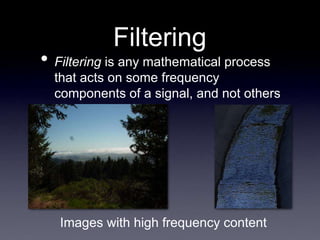
Filtering
• Filtering is any mathematical process
that acts on some frequency
components of a signal, and not others
Images with high frequency content
Filtering and Image
Processing
• Many image processing tasks are filters
applied to the image signal
• Blurring preserves low frequencies and
dampens high ones
• Sharpening does the opposite
• NOTE: Because of Photoshop
terminology, virtually any image
processing function can be called a
“filter”, even when it is not a filter in the
mathematical sense
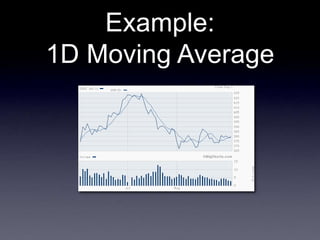
Example:
1D Moving Average
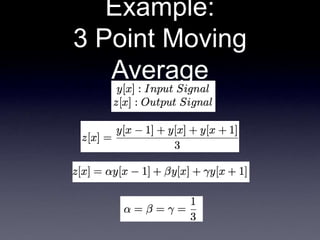
Example:
3 Point Moving
Average
Example:
3 Point Moving
Average
6 9 12 3 15 3 6
y[x] =
coefficients
=
1/3 1/3 1/3
multiplied by
and sums to
subtotals = 3 4 1
equals
- -
z[x] = ? - - - -
8
Example:
3 Point Moving
Average
6 9 12 3 15 3 6
- - 8
y[x] =
z[x] =
coefficients
=
1/3 1/3 1/3
multiplied by
and sums to
subtotals = 4 1 5
equals
10 - - -
Example:
3 Point Moving
Average
6 9 12 3 15 3 6
- - 8 10 - - -
y[x] =
z[x] =
coefficients
=
1/3 1/3 1/3
multiplied by
and sums to
subtotals = 1 5 1
equals
7
Example:
3 Point Moving
Average
Kernel = 1/3 1/3 1/3
0 1 2 3 4
-1
-2
-3
-4
1/3
h[x]
“Box Filter”
h[x] = 0 0 1/3 1/3 1/3 0 0
h[0]
h[-1]
h[-2]
h[-3] h[1] h[2] h[3]
...
...
(a.k.a. the Impulse
Response Function)
Filtering and
Convolution
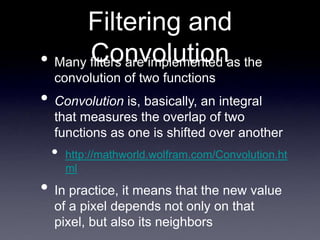
• Many filters are implemented as the
convolution of two functions
• Convolution is, basically, an integral
that measures the overlap of two
functions as one is shifted over another
• http://mathworld.wolfram.com/Convolution.ht
ml
• In practice, it means that the new value
of a pixel depends not only on that
pixel, but also its neighbors
Convolution
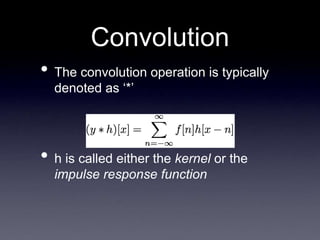
• The convolution operation is typically
denoted as ‘*’
• h is called either the kernel or the
impulse response function
Why “Impulse
Response Function”?
0 1 2 3 4
-1
-2
-3
-4
1/3
h[x]
Kernel
0 1 2 3 4
-1
-2
-3
-4
1/3
f[x] ∗ h[x]
Result
The kernel
models how the
system
responds to an
impulse input
... and any
signal is really
just a set of
impulses of
differing
magnitudes at
different times
0 1 2 3 4
-1
-2
-3
-4
Impulse
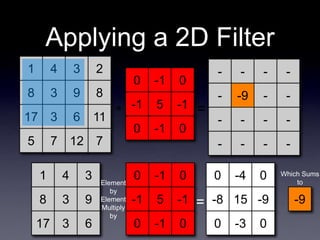
Applying a 2D Filter
1 4 3 2
8 3 9 8
17 3 6 11
5 7 12 7
0 -1 0
-1 5 -1
0 -1 0
- - - -
- ? - -
- - - -
- - - -
∗ =
1 4 3
8 3 9
17 3 6
0 -1 0
-1 5 -1
0 -1 0
Element
by
Element
Multiply
by
0 -4 0
-8 15 -9
0 -3 0
=
Which Sums
to
-9
-9
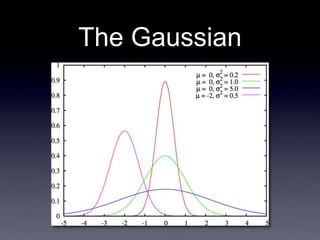
The Gaussian
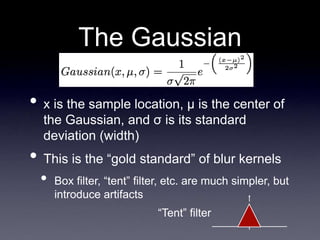
The Gaussian
• x is the sample location, μ is the center of
the Gaussian, and σ is its standard
deviation (width)
• This is the “gold standard” of blur kernels
• Box filter, “tent” filter, etc. are much simpler, but
introduce artifacts
“Tent” filter
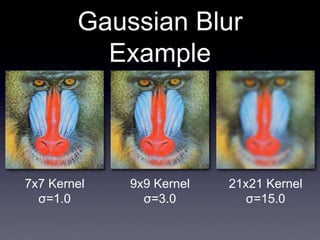
Gaussian Blur
Example
21x21 Kernel
σ=15.0
9x9 Kernel
σ=3.0
7x7 Kernel
σ=1.0
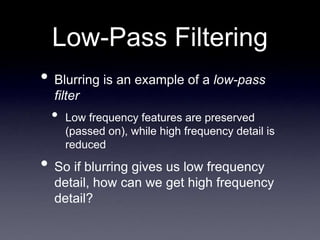
Low-Pass Filtering
• Blurring is an example of a low-pass
filter
• Low frequency features are preserved
(passed on), while high frequency detail is
reduced
• So if blurring gives us low frequency
detail, how can we get high frequency
detail?
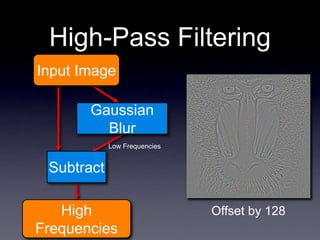
High-Pass Filtering
Gaussian
Blur
Subtract
Input Image
High
Frequencies
Low Frequencies
Offset by 128
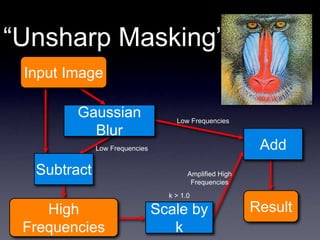
“Unsharp Masking”
Gaussian
Blur
Subtract
Input Image
High
Frequencies
Low Frequencies
Scale by
k
Add
Result
k > 1.0
Low Frequencies
Amplified High
Frequencies
Filtering Review
• Filtering is an umbrella term for many
different image processing techniques
• In many cases, applying a filter to an
image involves applying a convolution
with another function, commonly a
Gaussian
• Some examples of image filters include
sharpening and blur filters
Computer Graphics
and Video Games
• At this point, you already have all the
basic knowledge you need for video
game programming
• At least as far as basic graphics are
concerned
• We used OpenGL, many games these
days will use DirectX
• If you can do one, you can do the other
What You Don’t
Know:
Shaders
• Current, graphically advanced games
will make extensive use of shaders
• These will generally be incorporated with
OpenGL or DirectX code
• GLSL is the high-level, OpenGL-based
shader
• HLSL is the high-level, DirectX-based
shader
• Cg is a lower-level shader, usable with both
APIs
What You Don’t
Know:
Shaders
• Current, graphically advanced games
will make extensive use of shaders
• These will generally be incorporated with
OpenGL or DirectX code
• GLSL is the high-level, OpenGL-based
shader
• HLSL is the high-level, DirectX-based
shader
• Cg is a lower-level shader, usable with both
APIs
Shader Tutorials: Cg
• Kilgard, “Cg in 2 Pages”
• http://xxx.lanl.gov/ftp/cs/papers/0302/0302013.pdf
• NeHe Cg Tutorial
• http://nehe.gamedev.net/data/lessons/lesson.asp?lesson=47
Shader Tutorials:
GLSL
• GLSL Reference Sheet
• http://www.mew.cx/glsl_quickref.pdf
• Lighthouse3D GLSL Tutorial
• http://www.lighthouse3d.com/opengl/glsl/
• NeHe GLSL Tutorial
• http://nehe.gamedev.net/data/articles/article.asp?article=21
Shader Tutorials:
HLSL
• Riemer’s HLSL Intro & Tutorial
• http://www.riemers.net/eng/Tutorials/DirectX/Csharp/series3.php
• Pieter Germishuys HLSL Tutorial
• http://www.pieterg.com/Tutorials/hlsl1.php
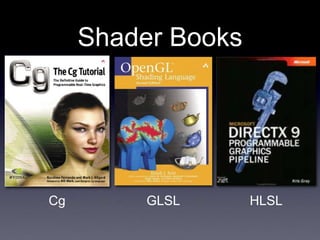
Shader Books
GLSL
Cg HLSL
What You Don’t
Know:
Graphics Middleware
• Many games are not developed directly in
OpenGL/DirectX (at least not entirely)
• They often use middleware engines such
as Emergent’s Gamebryo or Criterion’s
Renderware (now owned by EA; no longer
sold), or the open source Ogre3D
• http://www.emergent.net/index.php/homepage/products-and-
services/gamebryo
• http://www.ogre3d.org/
Middleware
• Nothing I can really teach you about this
• If you need use this in your work, then you
have the preparation you need to learn it
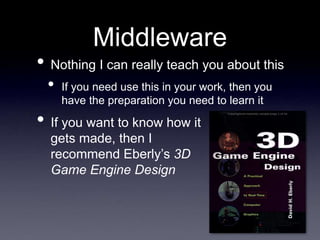
• If you want to know how it
gets made, then I
recommend Eberly’s 3D
Game Engine Design
What You Don’t
Know:
Physics
• Modern games generally seek accurate
(or at least semi-accurate) physics
behavior
• Almost nobody builds this from scratch
• There are middleware solutions; Ageia’s
PhysX and Havok are the most common
• PhysX: http://www.ageia.com/physx/
• Havok: http://www.havok.com/
Physics Tutorial
• If you want to learn more about physics
simulation, a good place to start would
be Chris Hecker’s tutorial on rigid body
dynamics
• http://chrishecker.com/Rigid_Body_Dynamics
What You Don’t
Know:
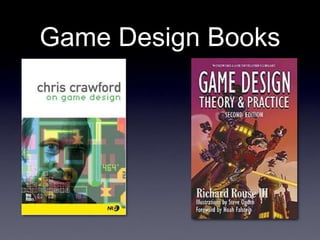
Game Design
• Even if you know everything about how
to make a pretty game, that doesn’t
mean anything about how to make a
good game
• Of course, this goes far, far beyond the scope
of this course
• I can tell you some books you could read
if this is something you’re interested in,
though
Game Design Books
What You Don’t
Know:
Modeling
• Well, I don’t know it either
• Modeling is art
• That said, you will likely use tools like
3D Studio Max, Maya, or Blender for
modeling
Game and Simulation
Houses in the
Triangle
• Epic
• Gamebryo
• Red Storm
• EA
• Many more:
• Triangle IGDA:
http://www.igda.org/nctriangle/
Game Development
Discussion
• Any questions?
Particle Systems
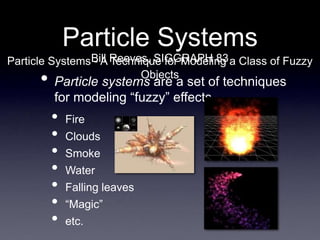
• Particle systems are a set of techniques
for modeling “fuzzy” effects
• Fire
• Clouds
• Smoke
• Water
• Falling leaves
• “Magic”
• etc.
Bill Reeves, SIGGRAPH 83
Particle Systems - A Technique for Modeling a Class of Fuzzy
Objects
Particle Systems
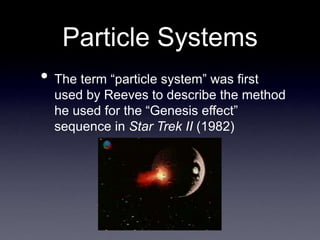
• The term “particle system” was first
used by Reeves to describe the method
he used for the “Genesis effect”
sequence in Star Trek II (1982)
Particle Systems
• Particle systems are different from normal
object representations in several ways:
1. An object is not represented by surface
primitives, but by a “cloud” of particles
2. The system is not static; new particles are
created and old ones are destroyed
3. The result is generally non-deterministic;
stochastic processes are used to modify
appearance
The Emitter
• The source of a particle system is
called the emitter
• The emitter consists of
• A location in 3D space, from which new
particles spawn
• All the initial particle behavior parameters
• Velocity, spawning rate, lifetime, color, etc.
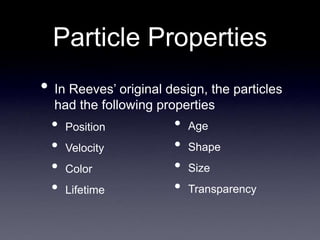
Particle Properties
• In Reeves’ original design, the particles
had the following properties
• Position
• Velocity
• Color
• Lifetime
• Age
• Shape
• Size
• Transparency
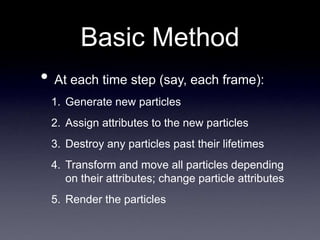
Basic Method
• At each time step (say, each frame):
1. Generate new particles
2. Assign attributes to the new particles
3. Destroy any particles past their lifetimes
4. Transform and move all particles depending
on their attributes; change particle attributes
5. Render the particles
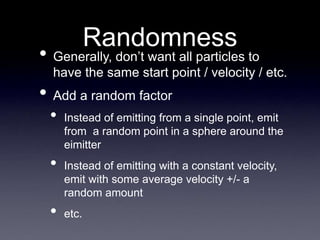
Randomness
• Generally, don’t want all particles to
have the same start point / velocity / etc.
• Add a random factor
• Instead of emitting from a single point, emit
from a random point in a sphere around the
eimitter
• Instead of emitting with a constant velocity,
emit with some average velocity +/- a
random amount
• etc.
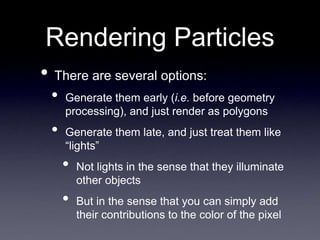
Rendering Particles
• There are several options:
• Generate them early (i.e. before geometry
processing), and just render as polygons
• Generate them late, and just treat them like
“lights”
• Not lights in the sense that they illuminate
other objects
• But in the sense that you can simply add
their contributions to the color of the pixel
Really Cool
Extension:
Flocking
• In 1987, Craig Reynolds developed a
way to extend particle systems to
“boids” (bird-objects or bird-oids)
• These are basically particles, but with
attached geometry, and some basic
“intelligence”
Craig Reynolds, SIGGRAPH 87
Flocks, Herds, and Schools: A Distributed Behavioral Model
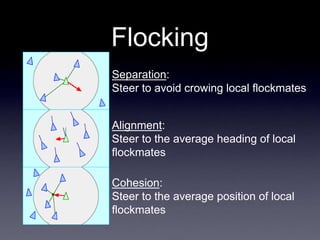
Flocking
Separation:
Steer to avoid crowing local flockmates
Alignment:
Steer to the average heading of local
flockmates
Cohesion:
Steer to the average position of local
flockmates
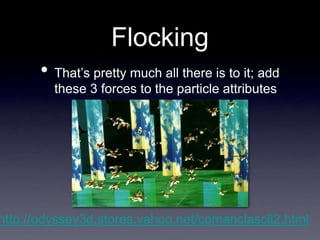
Flocking
• That’s pretty much all there is to it; add
these 3 forces to the particle attributes
http://odyssey3d.stores.yahoo.net/comanclascli2.html
Next Time
• Course / final exam review

november29.ppt

  • 1.
    Now Playing: Digital Love DaftPunk from Discovery Released March 13, 2001
  • 2.
    Graphics Grab Bag RickSkarbez, Instructor COMP 575 November 27, 2007
  • 3.
    Announcements • You needto arrange to talk to me before December 1 for your project update • I am going to attempt to reserve a room/time on December 11 for project presentations • The final deadline for project submissions will be the evening of December 12 • The final exam is Friday, December 14
  • 4.
    The Pursuit of Photorealism •What if you wanted to render a real place? • Say, the Cathedral of Notre Dame in Paris Example drawn from Debevec’s SIGGRAPH 99 Course
  • 5.
    The Pursuit of Photorealism •You could: • Acquire accurate measurements of the building • Use these measurements to construct a geometric model • Apply the appropriate material properties to every surface • Use some advanced global illumination technique to simulate light bouncing around the cathedral
  • 6.
    The Pursuit of Photorealism •Alternatively, you could: • Take a picture of the cathedral from the desired viewpoint • This would be much easier • Also, it would look better • Pictures are by definition photorealistic
  • 7.
    What is IBR? •It can mean any number of things • As a short definition, we can say that it is any technique that uses images (of some kind), either directly rendering with them or using them to create models
  • 8.
    IBR vs. Traditional CG Usecomputer vision techniques Build a 3D model from images 1 or More Photos Interpret As Little Work As Possible Warp No Need To Shade 1 or More Photos Output Image Intermediate Representatio n IBR Pipeline Render Photorealism Is Slow and Difficult Output Image 3D Points Traditional Pipeline Image-Based Modeling
  • 9.
    The Math Behind Photographs •Can think of a photograph as a “catalog” of the colors of the rays that pass through a single point in space • i.e. a pinhole, or a camera lens • We can parametrize any ray as [Φ, θ, x, y, z] • The ray through point (x,y,z) in direction (Φ, θ)
  • 10.
    The Plenoptic Function • Describesthe light received • At any position, • From any direction, • At any time Adelson & Bergen, “The Plenoptic Function and Elements of Early Vision”
  • 11.
    The Plenoptic Function • Simplifications: •Ignore changes over time • Use 3-component color instead of wavelength • Left with a 5D function: • P(Φ, θ, x, y, z) • 3D position • 2D orientattion
  • 12.
    Panoramas • A panoramastores a 2D plenoptic function • Always a single center of projection • Can be stitched (that is, put together from multiple smaller images) or taken by a single camera with complicated lensing
  • 13.
    Panoramas as Virtual Environments •Pros: • Easy to make • Cons: • No sense of 3D • Fixed viewpoint • Hard to navigate
  • 14.
    Function: Light Fields and Lumigraphs •Can take advantage of empty space around the camera to reduce the plenoptic function to 4D • Build up a database of ray values • How and why?
  • 15.
    Why 4D fromEmpty Space? • If we assume that the camera is in empty space (i.e. all objects in the scene are distant) • We no longer have to worry about occlusions • A ray has the same color at every point along the ray Can put the “camera” here Or here... Or here
  • 16.
    Light Fields • “Boxof photons” • Captured either by a moving camera or an array of cameras • 6x6 5x5 images shown • 16x16 512x512 in the original paper • 256 MB / image Levoy & Hanrahan, Light Field Rendering (SIGGRAPH 96) also Gortler et al., The Lumigraph (SIGGRAPH 96)
  • 17.
  • 18.
    Light Field Characteristics • Pros: •Very attractive • Can be used to capture video • Cons: • Huge memory footprint • Difficult sampling issues • Only one plane in focus • Difficult to capture
  • 19.
    No Geometry • Notethat neither of these techniques make any assumptions at all about geometry • Just show images • Another technique in this vein is Concentric Mosaics, from Shum & He (SIGGRAPH 99)
  • 20.
    Facade • Use asmall number of images to generate a “blocks” model • Establish edge correspondences • Reconstruct by minimizing error • Do view-dependent texture mapping Debevec, SIGGRAPH 96
  • 21.
  • 22.
  • 23.
  • 24.
    IBR Review • Attemptsto use real photographs to generate high-quality images without manual modeling • Can include: • Automatically building geometry from images • Rendering a dynamic scene with no geometry • Something in between • Any questions?
  • 25.
    Today • Grab bag •Filtering and image processing • Computer graphics in video games • Particle effects
  • 26.
    Image Processing • Inshort, “Image Processing” is just any process that operates on a single image, producing a modified new image • Think about a program like Photoshop • Sharpen, blur, sepia tone, red-eye removal, etc. Image In Image Process #1 Image Process #2 Image Out
  • 27.
    Filtering • Filtering isany mathematical process that acts on some frequency components of a signal, and not others Images with high frequency content
  • 28.
    Filtering and Image Processing •Many image processing tasks are filters applied to the image signal • Blurring preserves low frequencies and dampens high ones • Sharpening does the opposite • NOTE: Because of Photoshop terminology, virtually any image processing function can be called a “filter”, even when it is not a filter in the mathematical sense
  • 29.
  • 30.
  • 31.
    Example: 3 Point Moving Average 69 12 3 15 3 6 y[x] = coefficients = 1/3 1/3 1/3 multiplied by and sums to subtotals = 3 4 1 equals - - z[x] = ? - - - - 8
  • 32.
    Example: 3 Point Moving Average 69 12 3 15 3 6 - - 8 y[x] = z[x] = coefficients = 1/3 1/3 1/3 multiplied by and sums to subtotals = 4 1 5 equals 10 - - -
  • 33.
    Example: 3 Point Moving Average 69 12 3 15 3 6 - - 8 10 - - - y[x] = z[x] = coefficients = 1/3 1/3 1/3 multiplied by and sums to subtotals = 1 5 1 equals 7
  • 34.
    Example: 3 Point Moving Average Kernel= 1/3 1/3 1/3 0 1 2 3 4 -1 -2 -3 -4 1/3 h[x] “Box Filter” h[x] = 0 0 1/3 1/3 1/3 0 0 h[0] h[-1] h[-2] h[-3] h[1] h[2] h[3] ... ... (a.k.a. the Impulse Response Function)
  • 35.
    Filtering and Convolution • Manyfilters are implemented as the convolution of two functions • Convolution is, basically, an integral that measures the overlap of two functions as one is shifted over another • http://mathworld.wolfram.com/Convolution.ht ml • In practice, it means that the new value of a pixel depends not only on that pixel, but also its neighbors
  • 36.
    Convolution • The convolutionoperation is typically denoted as ‘*’ • h is called either the kernel or the impulse response function
  • 37.
    Why “Impulse Response Function”? 01 2 3 4 -1 -2 -3 -4 1/3 h[x] Kernel 0 1 2 3 4 -1 -2 -3 -4 1/3 f[x] ∗ h[x] Result The kernel models how the system responds to an impulse input ... and any signal is really just a set of impulses of differing magnitudes at different times 0 1 2 3 4 -1 -2 -3 -4 Impulse
  • 38.
    Applying a 2DFilter 1 4 3 2 8 3 9 8 17 3 6 11 5 7 12 7 0 -1 0 -1 5 -1 0 -1 0 - - - - - ? - - - - - - - - - - ∗ = 1 4 3 8 3 9 17 3 6 0 -1 0 -1 5 -1 0 -1 0 Element by Element Multiply by 0 -4 0 -8 15 -9 0 -3 0 = Which Sums to -9 -9
  • 39.
  • 40.
    The Gaussian • xis the sample location, μ is the center of the Gaussian, and σ is its standard deviation (width) • This is the “gold standard” of blur kernels • Box filter, “tent” filter, etc. are much simpler, but introduce artifacts “Tent” filter
  • 41.
    Gaussian Blur Example 21x21 Kernel σ=15.0 9x9Kernel σ=3.0 7x7 Kernel σ=1.0
  • 42.
    Low-Pass Filtering • Blurringis an example of a low-pass filter • Low frequency features are preserved (passed on), while high frequency detail is reduced • So if blurring gives us low frequency detail, how can we get high frequency detail?
  • 43.
  • 44.
    “Unsharp Masking” Gaussian Blur Subtract Input Image High Frequencies LowFrequencies Scale by k Add Result k > 1.0 Low Frequencies Amplified High Frequencies
  • 45.
    Filtering Review • Filteringis an umbrella term for many different image processing techniques • In many cases, applying a filter to an image involves applying a convolution with another function, commonly a Gaussian • Some examples of image filters include sharpening and blur filters
  • 46.
    Computer Graphics and VideoGames • At this point, you already have all the basic knowledge you need for video game programming • At least as far as basic graphics are concerned • We used OpenGL, many games these days will use DirectX • If you can do one, you can do the other
  • 47.
    What You Don’t Know: Shaders •Current, graphically advanced games will make extensive use of shaders • These will generally be incorporated with OpenGL or DirectX code • GLSL is the high-level, OpenGL-based shader • HLSL is the high-level, DirectX-based shader • Cg is a lower-level shader, usable with both APIs
  • 48.
    What You Don’t Know: Shaders •Current, graphically advanced games will make extensive use of shaders • These will generally be incorporated with OpenGL or DirectX code • GLSL is the high-level, OpenGL-based shader • HLSL is the high-level, DirectX-based shader • Cg is a lower-level shader, usable with both APIs
  • 49.
    Shader Tutorials: Cg •Kilgard, “Cg in 2 Pages” • http://xxx.lanl.gov/ftp/cs/papers/0302/0302013.pdf • NeHe Cg Tutorial • http://nehe.gamedev.net/data/lessons/lesson.asp?lesson=47
  • 50.
    Shader Tutorials: GLSL • GLSLReference Sheet • http://www.mew.cx/glsl_quickref.pdf • Lighthouse3D GLSL Tutorial • http://www.lighthouse3d.com/opengl/glsl/ • NeHe GLSL Tutorial • http://nehe.gamedev.net/data/articles/article.asp?article=21
  • 51.
    Shader Tutorials: HLSL • Riemer’sHLSL Intro & Tutorial • http://www.riemers.net/eng/Tutorials/DirectX/Csharp/series3.php • Pieter Germishuys HLSL Tutorial • http://www.pieterg.com/Tutorials/hlsl1.php
  • 52.
  • 53.
    What You Don’t Know: GraphicsMiddleware • Many games are not developed directly in OpenGL/DirectX (at least not entirely) • They often use middleware engines such as Emergent’s Gamebryo or Criterion’s Renderware (now owned by EA; no longer sold), or the open source Ogre3D • http://www.emergent.net/index.php/homepage/products-and- services/gamebryo • http://www.ogre3d.org/
  • 54.
    Middleware • Nothing Ican really teach you about this • If you need use this in your work, then you have the preparation you need to learn it • If you want to know how it gets made, then I recommend Eberly’s 3D Game Engine Design
  • 55.
    What You Don’t Know: Physics •Modern games generally seek accurate (or at least semi-accurate) physics behavior • Almost nobody builds this from scratch • There are middleware solutions; Ageia’s PhysX and Havok are the most common • PhysX: http://www.ageia.com/physx/ • Havok: http://www.havok.com/
  • 56.
    Physics Tutorial • Ifyou want to learn more about physics simulation, a good place to start would be Chris Hecker’s tutorial on rigid body dynamics • http://chrishecker.com/Rigid_Body_Dynamics
  • 57.
    What You Don’t Know: GameDesign • Even if you know everything about how to make a pretty game, that doesn’t mean anything about how to make a good game • Of course, this goes far, far beyond the scope of this course • I can tell you some books you could read if this is something you’re interested in, though
  • 58.
  • 59.
    What You Don’t Know: Modeling •Well, I don’t know it either • Modeling is art • That said, you will likely use tools like 3D Studio Max, Maya, or Blender for modeling
  • 60.
    Game and Simulation Housesin the Triangle • Epic • Gamebryo • Red Storm • EA • Many more: • Triangle IGDA: http://www.igda.org/nctriangle/
  • 61.
  • 62.
    Particle Systems • Particlesystems are a set of techniques for modeling “fuzzy” effects • Fire • Clouds • Smoke • Water • Falling leaves • “Magic” • etc. Bill Reeves, SIGGRAPH 83 Particle Systems - A Technique for Modeling a Class of Fuzzy Objects
  • 63.
    Particle Systems • Theterm “particle system” was first used by Reeves to describe the method he used for the “Genesis effect” sequence in Star Trek II (1982)
  • 64.
    Particle Systems • Particlesystems are different from normal object representations in several ways: 1. An object is not represented by surface primitives, but by a “cloud” of particles 2. The system is not static; new particles are created and old ones are destroyed 3. The result is generally non-deterministic; stochastic processes are used to modify appearance
  • 65.
    The Emitter • Thesource of a particle system is called the emitter • The emitter consists of • A location in 3D space, from which new particles spawn • All the initial particle behavior parameters • Velocity, spawning rate, lifetime, color, etc.
  • 66.
    Particle Properties • InReeves’ original design, the particles had the following properties • Position • Velocity • Color • Lifetime • Age • Shape • Size • Transparency
  • 67.
    Basic Method • Ateach time step (say, each frame): 1. Generate new particles 2. Assign attributes to the new particles 3. Destroy any particles past their lifetimes 4. Transform and move all particles depending on their attributes; change particle attributes 5. Render the particles
  • 68.
    Randomness • Generally, don’twant all particles to have the same start point / velocity / etc. • Add a random factor • Instead of emitting from a single point, emit from a random point in a sphere around the eimitter • Instead of emitting with a constant velocity, emit with some average velocity +/- a random amount • etc.
  • 69.
    Rendering Particles • Thereare several options: • Generate them early (i.e. before geometry processing), and just render as polygons • Generate them late, and just treat them like “lights” • Not lights in the sense that they illuminate other objects • But in the sense that you can simply add their contributions to the color of the pixel
  • 70.
    Really Cool Extension: Flocking • In1987, Craig Reynolds developed a way to extend particle systems to “boids” (bird-objects or bird-oids) • These are basically particles, but with attached geometry, and some basic “intelligence” Craig Reynolds, SIGGRAPH 87 Flocks, Herds, and Schools: A Distributed Behavioral Model
  • 71.
    Flocking Separation: Steer to avoidcrowing local flockmates Alignment: Steer to the average heading of local flockmates Cohesion: Steer to the average position of local flockmates
  • 72.
    Flocking • That’s prettymuch all there is to it; add these 3 forces to the particle attributes http://odyssey3d.stores.yahoo.net/comanclascli2.html
  • 73.
    Next Time • Course/ final exam review