


CNIT 129S: Securing
Web Applications
Ch 4: Mapping the Application
Mapping
• Enumerate application's content and
functionality
• Some is hidden, requiring guesswork and
luck to discover
• Examine every aspect of behavior, security
mechanisms, and technologies
• Determine attack surface and vulnerabilities
Enumerating Content and
Functionality
Web Spiders
• Load web page, find all links on it
• (into the targeted domain)
• Load those pages, find more links
• Continue until no new content is discovered
Web Application Spiders
• Also parse HTML forms
• Fill in the forms with preset or random values
and submit them
• Trying to walk through multistage functionality
• Can also parse client-side JavaScript to extract
URLs
• Tools: WebScarab, Zed Attack Proxy, and CAT
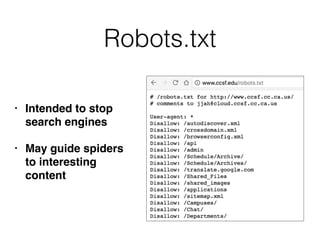
Robots.txt
• Intended to stop
search engines
• May guide spiders
to interesting
content
Limitations of Automatic
Spidering
• May fail to handle unusual navigation
mechanisms, such as dynamically created
JavaScript menus
• So it may miss whole areas of an application
• Links buried in compiled client-side objects like
Flash or Java may be missed
Limitations of Automatic
Spidering
• Forms may have validation checks, such as user
registration forms
• Email address, telephone number, address, zip
code
• Too complex for most spiders, which use a single
text string for all form fields
• Spider cannot understand the "Invalid" error
messages
Limitations of Automatic
Spidering
• Spiders only fetch each URL once
• But applications use forms-based navigation, in
which the same URL may return different content
and functions
• For example, a bank may implement every user
action with POST to /account.jsp with parameters
determining the action
• Spiders aren't smart enough to handle that
Limitations of Automatic
Spidering
• Some applications place volatile data within
URLs
• Parameters containing timers or random
number seeds
• Spider will fetch the same page over and over,
thinking it's new
• May freeze up
Limitations of Automatic
Spidering
• Authentication: spider must be able to submit valid
credentials
• Perhaps using a valid cookie
• However, spiders often break the authenticated
session, by
• Requesting a logout function
• Submitting invalid input to a sensitive function
• Requesting pages out-of-sequence
Warning
• Spiders may find an administrative page and
click every link
• Delete User, Shut Down Database, Restart
Server...
User-Directed Spidering
• More sophisticated and controlled technique
than automated spidering, usually preferable
• User walks through application using a browser
connected to Burp (or another proxy)
• The proxy collects all requests and responses
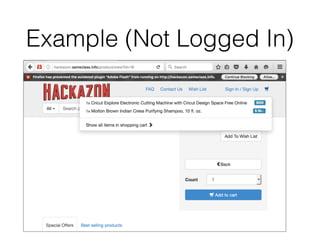
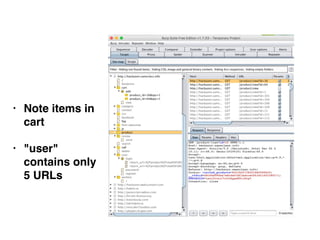
Example (Not Logged In)
• Note items in
cart
• "user"
contains only
5 URLs
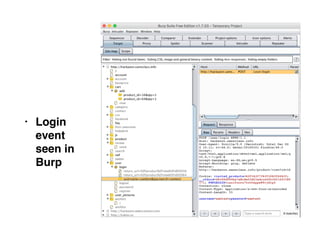
• Login
event
seen in
Burp
Advantages of
User-Directed Spidering
• User can follow unusual or complex navigation
mechanisms
• User can enter valid data where needed
• User can log in as needed
• User can avoid dangerous functionality, such as
deleteUser.jsp
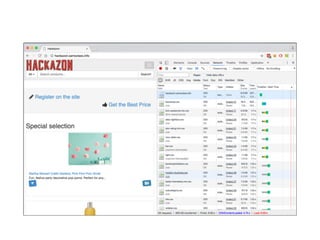
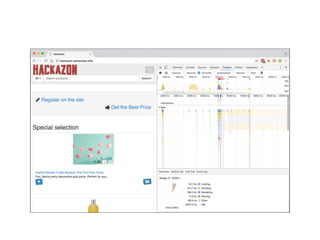
Browser Tools
• Chrome's Developer Tools can show details of
requests and responses within the browser
• No proxy needed
• Often useful; shows timing as well as content
Discovering Hidden Content
• Finding it requires automates testing, manual
testing, and luck
• Testing or debugging features left in application
• Different functionality for different categories of
users
• Anonymous, authenticated, administrators
• Backup copies of live files
• May be non-executable and reveal source code
Discovering Hidden Content
• Backup archives that contain snapshot of entire
application
• New functionality implemented for testing but
not yet linked from main application
• Default functionality in an off-the-shelf
application that has been superficially hidden
from the user but not removed
• Old versions of files--may still be exploitable
Discovering Hidden Content
• Configuration and include files containing sensitive
data such as database credentials
• Source files from which application functions were
compiled
• Comments in source code; may contain usernames
and passwords, "test this" marks, and other useful
data
• Log files--may contain valid usernames, session
tokens, etc.
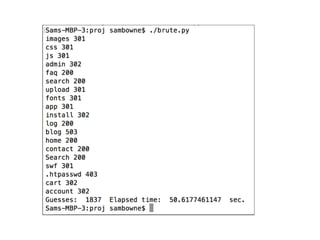
Brute-Force Techniques
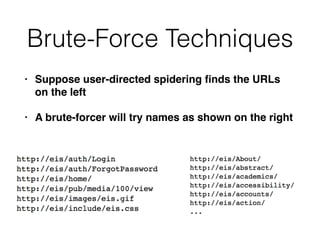
• Suppose user-directed spidering finds the URLs
on the left
• A brute-forcer will try names as shown on the right
Burp's Brute-Forcer
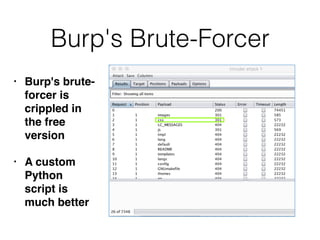
• Burp's brute-
forcer is
crippled in
the free
version
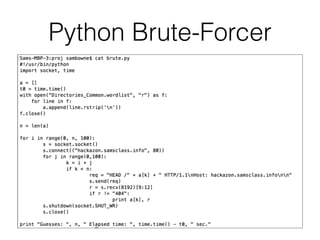
• A custom
Python
script is
much better
Python Brute-Forcer
Inference from Published
Content
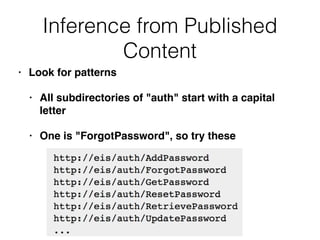
• Look for patterns
• All subdirectories of "auth" start with a capital
letter
• One is "ForgotPassword", so try these
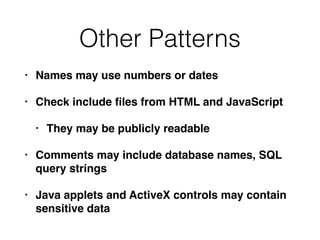
Other Patterns
• Names may use numbers or dates
• Check include files from HTML and JavaScript
• They may be publicly readable
• Comments may include database names, SQL
query strings
• Java applets and ActiveX controls may contain
sensitive data
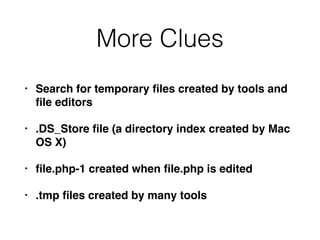
More Clues
• Search for temporary files created by tools and
file editors
• .DS_Store file (a directory index created by Mac
OS X)
• file.php-1 created when file.php is edited
• .tmp files created by many tools
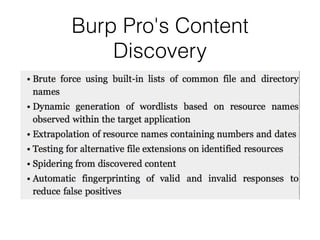
Burp Pro's Content
Discovery
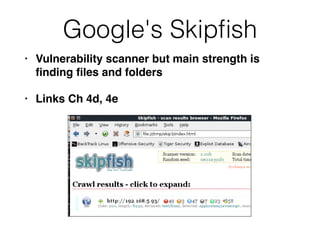
Google's Skipfish
• Vulnerability scanner but main strength is
finding files and folders
• Links Ch 4d, 4e
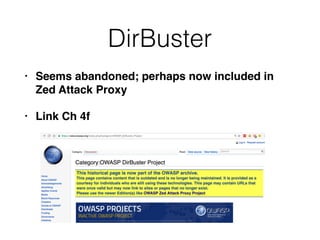
DirBuster
• Seems abandoned; perhaps now included in
Zed Attack Proxy
• Link Ch 4f
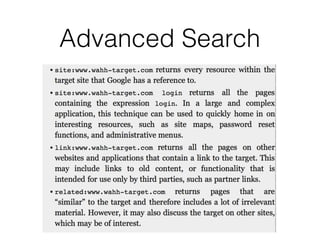
Public Information
• Search engines (and cached content)
• Web archives such as the Wayback Machine
• Posts to forums like Stack Exchange
Advanced Search
Web Server Vulnerabilities
• Some Web servers let you list directory
contents or see raw source code
• Sample and diagnostic scripts may contain
vulnerabilities
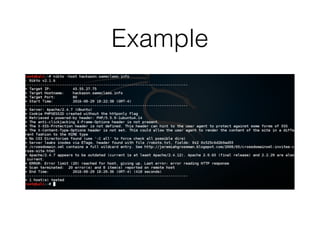
Nikto and Wikto
• Scans servers for known vulnerable files and
versions
• Wikto is the Windows version
• Nikto is the Linux version
• Included in Kali
• Fast and easy to use
• Has false positives like all vulnerability scanners
• Must verify results with manual testing
Example
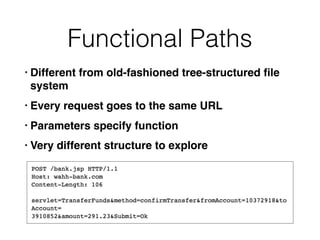
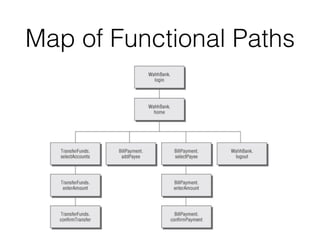
Functional Paths
• Different from old-fashioned tree-structured file
system
• Every request goes to the same URL
• Parameters specify function
• Very different structure to explore
Map of Functional Paths
Discovering Hidden
Parameters
• Try adding "debug=true" to requests
• Or test, hide, source, etc.
• Burp Intruder can do this (see Ch 14)
Analyzing the Application
• Key areas
• Core functionality
• Peripheral behavior: off-site links, error
messages, administrative and logging
functions, and use of redirects
• Core security mechanisms: session state,
access control, authentication
• User registration, password change, account
recovery
Key Areas (continued)
• Everywhere the application processes user-
supplied input
• URL, query string, POST data, cookies
• Client-side technologies
• Forms, scripts, thick-client components (Java
applets, ActiveX controls, and Flash), and
cookies
Key Areas (continued)
• Server-side technologies
• Static and dynamic pages, request
parameters, SSL, Web server software,
interaction with databases, email systems,
and other back-end components
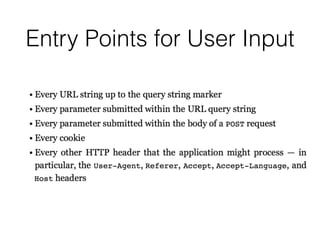
Entry Points for User Input
URL File Paths
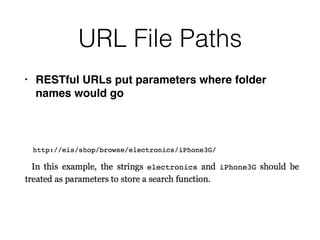
• RESTful URLs put parameters where folder
names would go
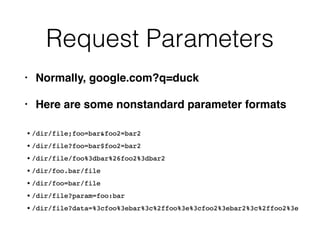
Request Parameters
• Normally, google.com?q=duck
• Here are some nonstandard parameter formats
HTTP Headers
• User-Agent is used to detect small screens
• Sometimes to modify content to boost search
engine rankings
• May allow XSS and other injection attacks
• Changing User-Agent may reveal a different
user interface
HTTP Headers
• Applications behind a load balancer or proxy
may use X-Forwarded-For header to identify
source
• Can be manipulated by attacker to inject content
Out-of-Band Channels
• User data may come in via
• Email
• Publishing content via HTTP from another
server (e.g. WebDAV)
• IDS that sniffs traffic and puts it into a Web
application
• API interface for non-browser user agents,
such as cell phone apps, and then shares data
with the primary web application
Identifying Server-Side
Technologies
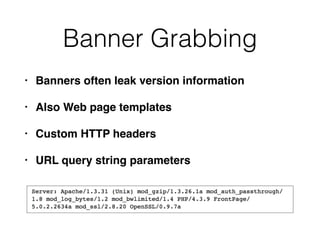
Banner Grabbing
• Banners often leak version information
• Also Web page templates
• Custom HTTP headers
• URL query string parameters
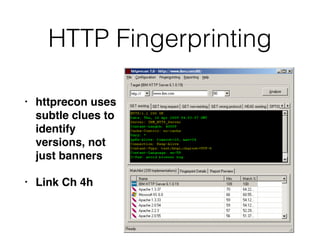
HTTP Fingerprinting
• httprecon uses
subtle clues to
identify
versions, not
just banners
• Link Ch 4h
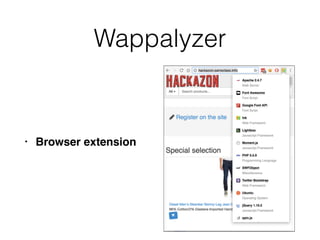
Wappalyzer
• Browser extension
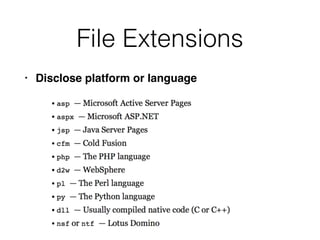
File Extensions
• Disclose platform or language
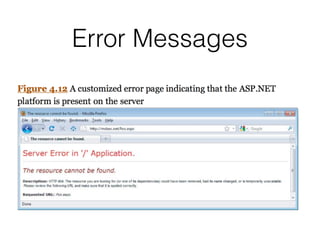
Error Messages
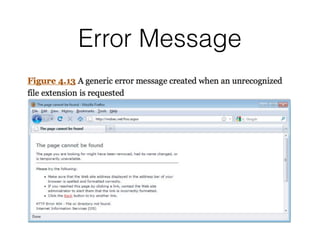
Error Message
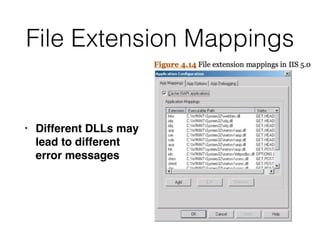
File Extension Mappings
• Different DLLs may
lead to different
error messages
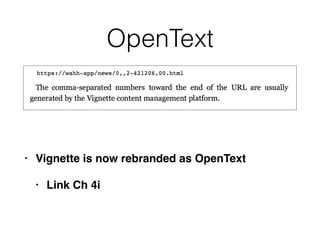
OpenText
• Vignette is now rebranded as OpenText
• Link Ch 4i
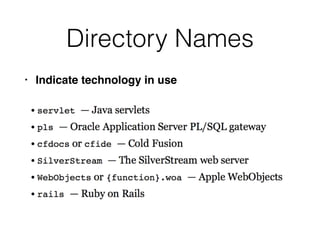
Directory Names
• Indicate technology in use
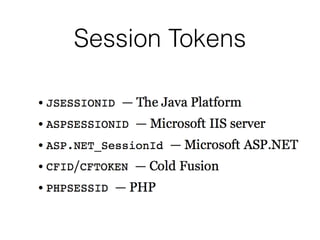
Session Tokens
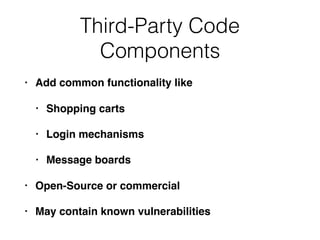
Third-Party Code
Components
• Add common functionality like
• Shopping carts
• Login mechanisms
• Message boards
• Open-Source or commercial
• May contain known vulnerabilities
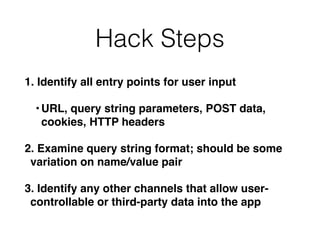
Hack Steps
1. Identify all entry points for user input
•URL, query string parameters, POST data,
cookies, HTTP headers
2. Examine query string format; should be some
variation on name/value pair
3. Identify any other channels that allow user-
controllable or third-party data into the app
Hack Steps
4. View HTTP server banner returned by the app;
it may use several different servers
5. Check for other software identifiers in custom
HTTP headers or HTML source code
6. Run httprint to fingerprint the web server
7. Research software versions for vulnerabilities
8. Review map of URLs to find interesting file
extensions, directories, etc. with clues about
the technologies in use
httprint
• Not updated since 2005 (link Ch 4j)
• Alternatives include nmap, Netcraft, and
SHODAN (Link Ch 4k)
• Also the Wappalyzer Chrome extension
Hack Steps
9. Review names of session tokens to identify
technologies being used
10. Use lists of common technologies, or Google,
to identify technologies in use, or discover other
websites that use the same technologies
11. Google unusual cookie names, scripts, HTTP
headers, etc. If possible, download and install
the software to analyze it and find vulnerabilities
Identifying Server-Side
Functionality
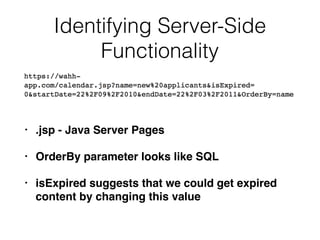
• .jsp - Java Server Pages
• OrderBy parameter looks like SQL
• isExpired suggests that we could get expired
content by changing this value
Identifying Server-Side
Functionality
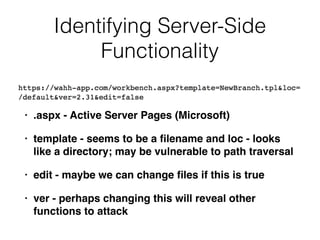
• .aspx - Active Server Pages (Microsoft)
• template - seems to be a filename and loc - looks
like a directory; may be vulnerable to path traversal
• edit - maybe we can change files if this is true
• ver - perhaps changing this will reveal other
functions to attack
Identifying Server-Side
Functionality
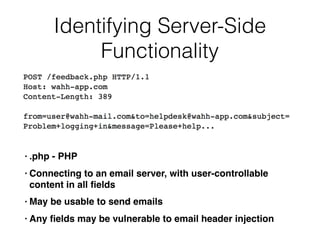
• .php - PHP
• Connecting to an email server, with user-controllable
content in all fields
• May be usable to send emails
• Any fields may be vulnerable to email header injection
Identifying Server-Side
Functionality
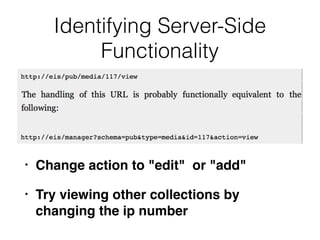
• Change action to "edit" or "add"
• Try viewing other collections by
changing the ip number
Extrapolating Application
Behavior
• An application often behaves consistently
across the range of its functionality
• Because code is re-used or written by the
same developer, or to the same specifications
• So if your SQL injections are being filtered out,
try injecting elsewhere to see what filtering is in
effect
Extrapolating Application
Behavior
• If app obfuscates data, try finding a place where
a user can enter an obfuscated sting and
retrieve the original
• Such as an error message
• Or test systematically-varying values and
deduce the obfuscation scheme
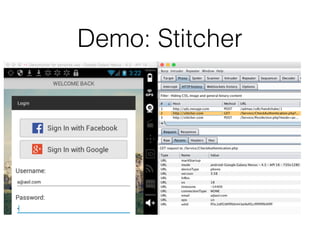
Demo: Stitcher
Error Handling
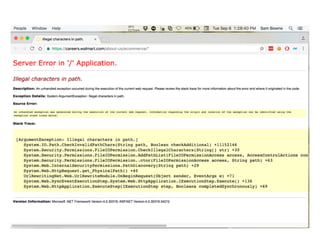
• Some errors may be properly handled and give
little information

Others may crash and return verbose error
information
Isolate Unique Application
Behavior
• App may use a consistent framework that
prevents attacks
• Look for extra parts "bolted on" later, which may
not be integrated into the framework
• Debug functions, CAPTCHAs, usage tracking,
third-party code
• Different GUI appearance, parameter naming
conventions, comments in source code
Mapping the Attack Surface
• Client-side validation
• Database interaction -- SQL injection
• File uploading and downloading -- Path
traversal, stored XSS
• Display of user-supplied data - XSS
• Dynamic redirects -- Redirection and header
attacks
Mapping the Attack Surface
• Social networking features -- username
enumeration, stored XSS
• Login -- Username enumeration, weak
passwords, brute-force attacks
• Multistage login -- Logic flaws
• Session state -- Predictable tokens, insecure
token handling
Mapping the Attack Surface
• Access controls -- Horizontal and vertical privilege
escalation
• User impersonation functions -- Privilege escalation
• Cleartext communications -- Session hijacking,
credential theft
• Off-site links -- Leakage of query string parameters
in the Referer header
• Interfaces to external systems -- Shortcuts handling
sessions or access controls
Mapping the Attack Surface
• Error messages -- Information leakage
• Email interaction -- Email or command injection
• Native code components or interaction -- Buffer
overflows
• Third-party components -- Known vulnerabilities
• Identifiable Web server -- Common
configuration errors, known bugs
Example
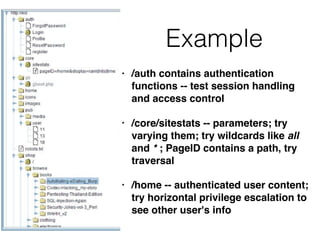
• /auth contains authentication
functions -- test session handling
and access control
• /core/sitestats -- parameters; try
varying them; try wildcards like all
and * ; PageID contains a path, try
traversal
• /home -- authenticated user content;
try horizontal privilege escalation to
see other user's info
Example
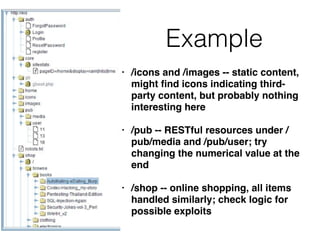
• /icons and /images -- static content,
might find icons indicating third-
party content, but probably nothing
interesting here
• /pub -- RESTful resources under /
pub/media and /pub/user; try
changing the numerical value at the
end
• /shop -- online shopping, all items
handled similarly; check logic for
possible exploits

CNIT 129S: Ch 4: Mapping the Application

  • 1.
    CNIT 129S: Securing WebApplications Ch 4: Mapping the Application
  • 2.
    Mapping • Enumerate application'scontent and functionality • Some is hidden, requiring guesswork and luck to discover • Examine every aspect of behavior, security mechanisms, and technologies • Determine attack surface and vulnerabilities
  • 3.
  • 4.
    Web Spiders • Loadweb page, find all links on it • (into the targeted domain) • Load those pages, find more links • Continue until no new content is discovered
  • 5.
    Web Application Spiders •Also parse HTML forms • Fill in the forms with preset or random values and submit them • Trying to walk through multistage functionality • Can also parse client-side JavaScript to extract URLs • Tools: WebScarab, Zed Attack Proxy, and CAT
  • 6.
    Robots.txt • Intended tostop search engines • May guide spiders to interesting content
  • 7.
    Limitations of Automatic Spidering •May fail to handle unusual navigation mechanisms, such as dynamically created JavaScript menus • So it may miss whole areas of an application • Links buried in compiled client-side objects like Flash or Java may be missed
  • 8.
    Limitations of Automatic Spidering •Forms may have validation checks, such as user registration forms • Email address, telephone number, address, zip code • Too complex for most spiders, which use a single text string for all form fields • Spider cannot understand the "Invalid" error messages
  • 9.
    Limitations of Automatic Spidering •Spiders only fetch each URL once • But applications use forms-based navigation, in which the same URL may return different content and functions • For example, a bank may implement every user action with POST to /account.jsp with parameters determining the action • Spiders aren't smart enough to handle that
  • 10.
    Limitations of Automatic Spidering •Some applications place volatile data within URLs • Parameters containing timers or random number seeds • Spider will fetch the same page over and over, thinking it's new • May freeze up
  • 11.
    Limitations of Automatic Spidering •Authentication: spider must be able to submit valid credentials • Perhaps using a valid cookie • However, spiders often break the authenticated session, by • Requesting a logout function • Submitting invalid input to a sensitive function • Requesting pages out-of-sequence
  • 12.
    Warning • Spiders mayfind an administrative page and click every link • Delete User, Shut Down Database, Restart Server...
  • 13.
    User-Directed Spidering • Moresophisticated and controlled technique than automated spidering, usually preferable • User walks through application using a browser connected to Burp (or another proxy) • The proxy collects all requests and responses
  • 14.
  • 15.
    • Note itemsin cart • "user" contains only 5 URLs
  • 16.
  • 17.
    Advantages of User-Directed Spidering •User can follow unusual or complex navigation mechanisms • User can enter valid data where needed • User can log in as needed • User can avoid dangerous functionality, such as deleteUser.jsp
  • 18.
    Browser Tools • Chrome'sDeveloper Tools can show details of requests and responses within the browser • No proxy needed • Often useful; shows timing as well as content
  • 21.
    Discovering Hidden Content •Finding it requires automates testing, manual testing, and luck • Testing or debugging features left in application • Different functionality for different categories of users • Anonymous, authenticated, administrators • Backup copies of live files • May be non-executable and reveal source code
  • 22.
    Discovering Hidden Content •Backup archives that contain snapshot of entire application • New functionality implemented for testing but not yet linked from main application • Default functionality in an off-the-shelf application that has been superficially hidden from the user but not removed • Old versions of files--may still be exploitable
  • 23.
    Discovering Hidden Content •Configuration and include files containing sensitive data such as database credentials • Source files from which application functions were compiled • Comments in source code; may contain usernames and passwords, "test this" marks, and other useful data • Log files--may contain valid usernames, session tokens, etc.
  • 24.
    Brute-Force Techniques • Supposeuser-directed spidering finds the URLs on the left • A brute-forcer will try names as shown on the right
  • 25.
    Burp's Brute-Forcer • Burp'sbrute- forcer is crippled in the free version • A custom Python script is much better
  • 26.
  • 28.
    Inference from Published Content •Look for patterns • All subdirectories of "auth" start with a capital letter • One is "ForgotPassword", so try these
  • 29.
    Other Patterns • Namesmay use numbers or dates • Check include files from HTML and JavaScript • They may be publicly readable • Comments may include database names, SQL query strings • Java applets and ActiveX controls may contain sensitive data
  • 30.
    More Clues • Searchfor temporary files created by tools and file editors • .DS_Store file (a directory index created by Mac OS X) • file.php-1 created when file.php is edited • .tmp files created by many tools
  • 31.
  • 32.
    Google's Skipfish • Vulnerabilityscanner but main strength is finding files and folders • Links Ch 4d, 4e
  • 33.
    DirBuster • Seems abandoned;perhaps now included in Zed Attack Proxy • Link Ch 4f
  • 34.
    Public Information • Searchengines (and cached content) • Web archives such as the Wayback Machine • Posts to forums like Stack Exchange
  • 35.
  • 36.
    Web Server Vulnerabilities •Some Web servers let you list directory contents or see raw source code • Sample and diagnostic scripts may contain vulnerabilities
  • 37.
    Nikto and Wikto •Scans servers for known vulnerable files and versions • Wikto is the Windows version • Nikto is the Linux version • Included in Kali • Fast and easy to use • Has false positives like all vulnerability scanners • Must verify results with manual testing
  • 38.
  • 39.
    Functional Paths • Differentfrom old-fashioned tree-structured file system • Every request goes to the same URL • Parameters specify function • Very different structure to explore
  • 40.
  • 41.
    Discovering Hidden Parameters • Tryadding "debug=true" to requests • Or test, hide, source, etc. • Burp Intruder can do this (see Ch 14)
  • 42.
    Analyzing the Application •Key areas • Core functionality • Peripheral behavior: off-site links, error messages, administrative and logging functions, and use of redirects • Core security mechanisms: session state, access control, authentication • User registration, password change, account recovery
  • 43.
    Key Areas (continued) •Everywhere the application processes user- supplied input • URL, query string, POST data, cookies • Client-side technologies • Forms, scripts, thick-client components (Java applets, ActiveX controls, and Flash), and cookies
  • 44.
    Key Areas (continued) •Server-side technologies • Static and dynamic pages, request parameters, SSL, Web server software, interaction with databases, email systems, and other back-end components
  • 45.
    Entry Points forUser Input
  • 46.
    URL File Paths •RESTful URLs put parameters where folder names would go
  • 47.
    Request Parameters • Normally,google.com?q=duck • Here are some nonstandard parameter formats
  • 48.
    HTTP Headers • User-Agentis used to detect small screens • Sometimes to modify content to boost search engine rankings • May allow XSS and other injection attacks • Changing User-Agent may reveal a different user interface
  • 49.
    HTTP Headers • Applicationsbehind a load balancer or proxy may use X-Forwarded-For header to identify source • Can be manipulated by attacker to inject content
  • 50.
    Out-of-Band Channels • Userdata may come in via • Email • Publishing content via HTTP from another server (e.g. WebDAV) • IDS that sniffs traffic and puts it into a Web application • API interface for non-browser user agents, such as cell phone apps, and then shares data with the primary web application
  • 51.
  • 52.
    Banner Grabbing • Bannersoften leak version information • Also Web page templates • Custom HTTP headers • URL query string parameters
  • 53.
    HTTP Fingerprinting • httpreconuses subtle clues to identify versions, not just banners • Link Ch 4h
  • 54.
  • 55.
    File Extensions • Discloseplatform or language
  • 56.
  • 57.
  • 58.
    File Extension Mappings •Different DLLs may lead to different error messages
  • 59.
    OpenText • Vignette isnow rebranded as OpenText • Link Ch 4i
  • 60.
  • 61.
  • 62.
    Third-Party Code Components • Addcommon functionality like • Shopping carts • Login mechanisms • Message boards • Open-Source or commercial • May contain known vulnerabilities
  • 63.
    Hack Steps 1. Identifyall entry points for user input •URL, query string parameters, POST data, cookies, HTTP headers 2. Examine query string format; should be some variation on name/value pair 3. Identify any other channels that allow user- controllable or third-party data into the app
  • 64.
    Hack Steps 4. ViewHTTP server banner returned by the app; it may use several different servers 5. Check for other software identifiers in custom HTTP headers or HTML source code 6. Run httprint to fingerprint the web server 7. Research software versions for vulnerabilities 8. Review map of URLs to find interesting file extensions, directories, etc. with clues about the technologies in use
  • 65.
    httprint • Not updatedsince 2005 (link Ch 4j) • Alternatives include nmap, Netcraft, and SHODAN (Link Ch 4k) • Also the Wappalyzer Chrome extension
  • 66.
    Hack Steps 9. Reviewnames of session tokens to identify technologies being used 10. Use lists of common technologies, or Google, to identify technologies in use, or discover other websites that use the same technologies 11. Google unusual cookie names, scripts, HTTP headers, etc. If possible, download and install the software to analyze it and find vulnerabilities
  • 67.
    Identifying Server-Side Functionality • .jsp- Java Server Pages • OrderBy parameter looks like SQL • isExpired suggests that we could get expired content by changing this value
  • 68.
    Identifying Server-Side Functionality • .aspx- Active Server Pages (Microsoft) • template - seems to be a filename and loc - looks like a directory; may be vulnerable to path traversal • edit - maybe we can change files if this is true • ver - perhaps changing this will reveal other functions to attack
  • 69.
    Identifying Server-Side Functionality • .php- PHP • Connecting to an email server, with user-controllable content in all fields • May be usable to send emails • Any fields may be vulnerable to email header injection
  • 70.
    Identifying Server-Side Functionality • Changeaction to "edit" or "add" • Try viewing other collections by changing the ip number
  • 71.
    Extrapolating Application Behavior • Anapplication often behaves consistently across the range of its functionality • Because code is re-used or written by the same developer, or to the same specifications • So if your SQL injections are being filtered out, try injecting elsewhere to see what filtering is in effect
  • 72.
    Extrapolating Application Behavior • Ifapp obfuscates data, try finding a place where a user can enter an obfuscated sting and retrieve the original • Such as an error message • Or test systematically-varying values and deduce the obfuscation scheme
  • 73.
  • 74.
    Error Handling • Someerrors may be properly handled and give little information
 Others may crash and return verbose error information
  • 76.
    Isolate Unique Application Behavior •App may use a consistent framework that prevents attacks • Look for extra parts "bolted on" later, which may not be integrated into the framework • Debug functions, CAPTCHAs, usage tracking, third-party code • Different GUI appearance, parameter naming conventions, comments in source code
  • 77.
    Mapping the AttackSurface • Client-side validation • Database interaction -- SQL injection • File uploading and downloading -- Path traversal, stored XSS • Display of user-supplied data - XSS • Dynamic redirects -- Redirection and header attacks
  • 78.
    Mapping the AttackSurface • Social networking features -- username enumeration, stored XSS • Login -- Username enumeration, weak passwords, brute-force attacks • Multistage login -- Logic flaws • Session state -- Predictable tokens, insecure token handling
  • 79.
    Mapping the AttackSurface • Access controls -- Horizontal and vertical privilege escalation • User impersonation functions -- Privilege escalation • Cleartext communications -- Session hijacking, credential theft • Off-site links -- Leakage of query string parameters in the Referer header • Interfaces to external systems -- Shortcuts handling sessions or access controls
  • 80.
    Mapping the AttackSurface • Error messages -- Information leakage • Email interaction -- Email or command injection • Native code components or interaction -- Buffer overflows • Third-party components -- Known vulnerabilities • Identifiable Web server -- Common configuration errors, known bugs
  • 81.
    Example • /auth containsauthentication functions -- test session handling and access control • /core/sitestats -- parameters; try varying them; try wildcards like all and * ; PageID contains a path, try traversal • /home -- authenticated user content; try horizontal privilege escalation to see other user's info
  • 82.
    Example • /icons and/images -- static content, might find icons indicating third- party content, but probably nothing interesting here • /pub -- RESTful resources under / pub/media and /pub/user; try changing the numerical value at the end • /shop -- online shopping, all items handled similarly; check logic for possible exploits