Detecting WMI Exploitation
Michael Gough – Co-Founder
IMFSecurity.com
LOG-MD.com
Whoami
• Blue Team Defender Ninja, Incident Responder, Logaholic
• Creator of all those “Windows Logging Cheat Sheets” and the
Malware Management Framework
• Including LOG-MD and Windows Logging ATT&CK cheat sheets
• Co-Creator of “Log-MD” – The Log and Malicious Discovery Tool
• Co-Host
– “Brakeing Down Incident Response”
LOG-MD.com
WMI ?
Some say it “Wimee”
LOG-MD.com
Why care about WMI?
• MITRE ATT&CK
– 2 techniques (T1047 & T1084)
– mentioned in 27 other techniques
– This does not include all the functions WMI calls like
PowerShell, etc.
• Adversary's use it for many things
– Query system for information
– Remotely execute payloads
– Remotely persist
• It is one reason why we created the ATT&CK cheat
sheets and added the WMI features to LOG-MD
LOG-MD.com
What is WMI?
• Windows Management Interface
• Think of it as SNMP on steroids
• Admins can interact with unlike SNMP
• You can query all kinds of information about the
system
• You can write WMI scripts or applications to
automate administrative tasks on remote
computers but WMI also supplies management
data to other parts of the operating system and
products
LOG-MD.com
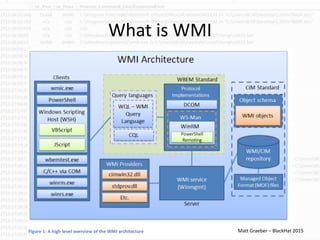
What is WMI
LOG-MD.com Matt Graeber – BlackHat 2015
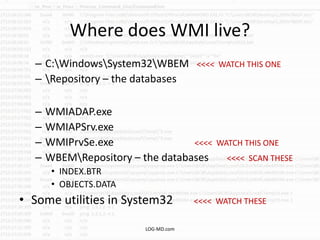
Where does WMI live?
– C:WindowsSystem32WBEM <<<< WATCH THIS ONE
– Repository – the databases
– WMIADAP.exe
– WMIAPSrv.exe
– WMIPrvSe.exe <<<< WATCH THIS ONE
– WBEMRepository – the databases <<<< SCAN THESE
• INDEX.BTR
• OBJECTS.DATA
• Some utilities in System32 <<<< WATCH THESE
LOG-MD.com
Tool Failures
LOG-MD.com
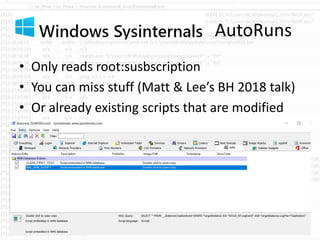
AutoRuns
• Only reads root:susbscription
• You can miss stuff (Matt & Lee’s BH 2018 talk)
• Or already existing scripts that are modified
LOG-MD.com
Sysmon
• Does not detect anything outside
root:subscription
• Does not see WMI calls
• Does not collect WinRM
• Does not collect authentication
• Does not collect PowerShell
LOG-MD.com
Do you have a tool that…
• Searches the WMI database?
• Searches for WMI persistence?
• Searches for WMI execution?
• Searches for WMI Authentication?
• Are you catching my drift?
LOG-MD.com
SO HOW DO WE GET
PWNED BY WMI?
LOG-MD.com
AHHHHHHHHHH !!!
• WMI scares me
• Few detect it well
• It can be low noise if done well
• Pentesters/Red Teamers and Advanced
attackers love it for the low noise recon
• And “all you need is creds” to use it remotely
• WMI has a LOT of capabilities
• Lack of tools to hunt
LOG-MD.com
WMI PWNAGE
Sooooo many ways..
• Install a malicious .mof
• Side load with malicious Dll in wbem
• Remotely execute WMI and launch malicious code, an
.EXE, script, Whitelist bypass EXE
• Remotely install a task
• Remotely install a service
• Remotely launch PowerShell code
• Add code and/or persistence to the WMI database
• Kill running processes – aka YOUR security tools
• Etc…
LOG-MD.com
WMI PWNAGE
• MOFs can be installed from anywhere
• WMIADAP.exe, WMIAPSrv.exe, and
WMIPrvSe.exe start and stop normally on
servers doing management functions
• Drop a malicious Dll in the WBEM directory
that is needed by WMI and pOOf side loads
when WMI starts, no AutoRun needed ;-(
– WINNTI Group used this in gaming
LOG-MD.com
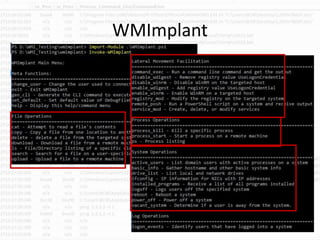
WMI PWNAGE TOOLS
• WMILM
• WMImplant
• PowerSploit
• PowerShell Empire
LOG-MD.com
WMImplant
LOG-MD.com
WMI PWNAGE
• WMI attacks often use PowerShell once on the
system, but many Red Teamers avoid this
since it is well known, but still commonly used
– Good logging can/will catch Red Team PowerShell
• DCOM and WinRM are also used a lot in these
attacks
LOG-MD.com
DETECTING
WMI
EXPLOITATION
LOG-MD.com
All Oses are not created equal
• Windows 10 and Server 2016 have more
logging options
• If you are on Windows 7 or Server 2012, you
will not get as much logging
• So yet another reason to upgrade to the latest
version of Windows
LOG-MD.com
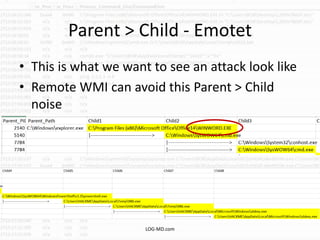
Parent > Child - Emotet
• This is what we want to see an attack look like
• Remote WMI can avoid this Parent > Child
noise
LOG-MD.com
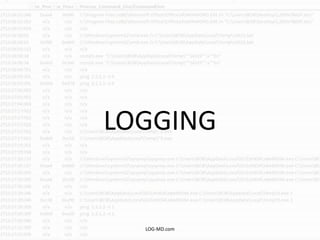
LOGGING
LOG-MD.com
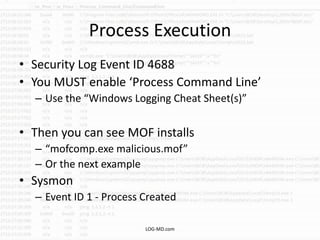
Process Execution
• Security Log Event ID 4688
• You MUST enable ‘Process Command Line’
– Use the “Windows Logging Cheat Sheet(s)”
• Then you can see MOF installs
– “mofcomp.exe malicious.mof”
– Or the next example
• Sysmon
– Event ID 1 - Process Created
LOG-MD.com
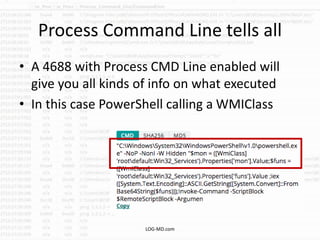
Process Command Line tells all
• A 4688 with Process CMD Line enabled will
give you all kinds of info on what executed
• In this case PowerShell calling a WMIClass
LOG-MD.com
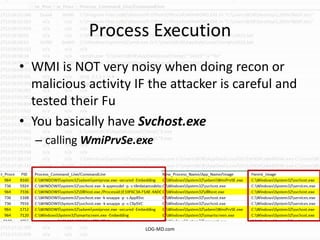
Process Execution
• WMI is NOT very noisy when doing recon or
malicious activity IF the attacker is careful and
tested their Fu
• You basically have Svchost.exe
– calling WmiPrvSe.exe
LOG-MD.com
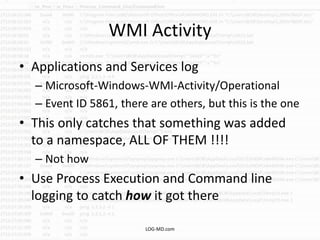
WMI Activity
• Applications and Services log
– Microsoft-Windows-WMI-Activity/Operational
– Event ID 5861, there are others, but this is the one
• This only catches that something was added
to a namespace, ALL OF THEM !!!!
– Not how
• Use Process Execution and Command line
logging to catch how it got there
LOG-MD.com
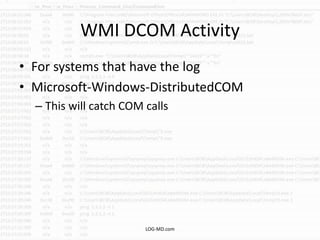
WMI DCOM Activity
• For systems that have the log
• Microsoft-Windows-DistributedCOM
– This will catch COM calls
LOG-MD.com
WMI to QUERY
TARGET SYSTEM
LOG-MD.com
Authentication
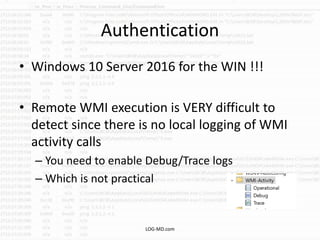
• Windows 10 Server 2016 for the WIN !!!
• Remote WMI execution is VERY difficult to
detect since there is no local logging of WMI
activity calls
– You need to enable Debug/Trace logs
– Which is not practical
LOG-MD.com
Authentication
• A user account must authenticate to the
remote system
• Of course it is a valid user, so not that
unusual…
• Unless it is WMI
• The clue is WHAT is launched and the type of
authentication… well Windows 10 anyways
• Windows 7 and Server 2012 won’t have this
data
LOG-MD.com
Authentication
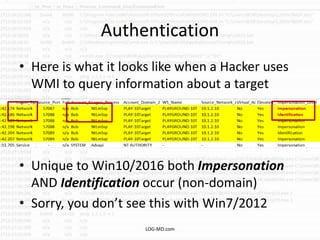
• Here is what it looks like when a Hacker uses
WMI to query information about a target
• Unique to Win10/2016 both Impersonation
AND Identification occur (non-domain)
• Sorry, you don’t see this with Win7/2012
LOG-MD.com
Network
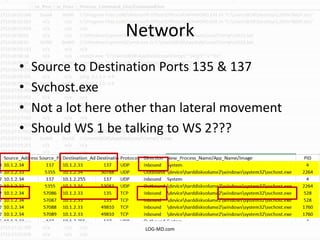
• Source to Destination Ports 135 & 137
• Svchost.exe
• Not a lot here other than lateral movement
• Should WS 1 be talking to WS 2???
LOG-MD.com
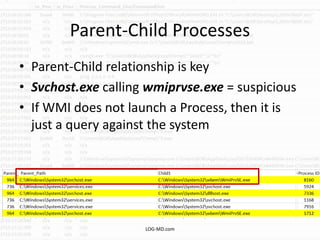
Parent-Child Processes
• Parent-Child relationship is key
• Svchost.exe calling wmiprvse.exe = suspicious
• If WMI does not launch a Process, then it is
just a query against the system
LOG-MD.com
PUSH THE PAYLOAD
LOG-MD.com
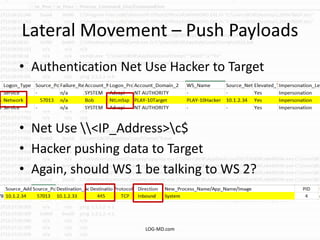
Lateral Movement – Push Payloads
• Authentication Net Use Hacker to Target
• Net Use <IP_Address>c$
• Hacker pushing data to Target
• Again, should WS 1 be talking to WS 2?
LOG-MD.com
USE WMI TO
REMOTELY EXECUTE
THE PAYLOAD
LOG-MD.com
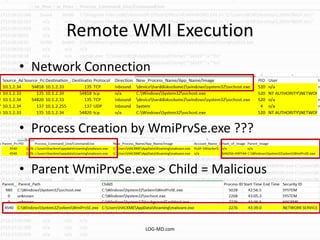
Remote WMI Execution
• Network Connection
• Process Creation by WmiPrvSe.exe ???
• Parent WmiPrvSe.exe > Child = Malicious
LOG-MD.com
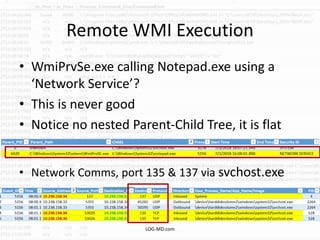
Remote WMI Execution
• WmiPrvSe.exe calling Notepad.exe using a
‘Network Service’?
• This is never good
• Notice no nested Parent-Child Tree, it is flat
• Network Comms, port 135 & 137 via svchost.exe
LOG-MD.com
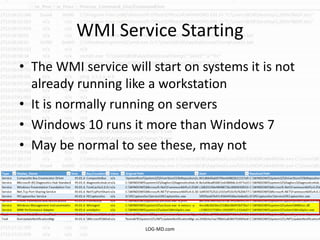
WMI Service Starting
• The WMI service will start on systems it is not
already running like a workstation
• It is normally running on servers
• Windows 10 runs it more than Windows 7
• May be normal to see these, may not
LOG-MD.com
USE WMI TO START A
TASK OR SERVICE
LOG-MD.com
WMI May Create these
• Creating a Task is noisy
• Monitor for Event ID 106 (Task Registered)
• Monitor for Event ID 100 & 110 (Task Started)
• Task Scheduler/Operational log
– NOT enabled by default ;-(
• Creating a Service is noisy
• Monitor for Event ID 7045 – New Service
• Monitor for Event ID 7040 – Start/Stop (maybe)
LOG-MD.com
Details
• More advanced auditing can catch more Task
details
• Security Log 4698, 4699, 4700, 4702
• Requires Object Access - “Other object access”
enabled – Success (more noisy)
• Services 7040 and 7045 do NOT log non-
Microsoft supported services
– Need to change DACLS and enable “Handle
Manipulation”
• The “Windows Advanced Logging Cheat Sheet”
has the details
LOG-MD.com
Details - Sysmon is an option
• Sysmon, an optional service that can detect
new additions to the WMI database
• Unfortunately only the root:subscription
• Not the other namespaces
– (Matt and Lee BH talk 2018)
• Event IDs 19, 20, and 21
LOG-MD.com
Details - Windows Logging Service (WLS)
• Government National Security Project
• Syslog agent replacement
• Sysmon on steroids
• Provides WMI user call details
• https://kcnsc.doe.gov/docs/default-
source/kcnsc-software/windows-logging-
service-
summary_073117.pdf?sfvrsn=26b745c4_2
LOG-MD.com
POWERSHELL
LOG-MD.com
PowerShell
• Don’t forget to enable logging !!!! And
upgrade to PowerShell 5, it has the logging we
need.
– Watch the ShowMeCon 2018 “Detecting
PowerShell exploitation” – IronGeek.com video
• Detect and hunt for odd PowerShell
• There are two (2) logs
– Windows Powershell
– Microsoft-Windows-PowerShell/Operational
LOG-MD.com
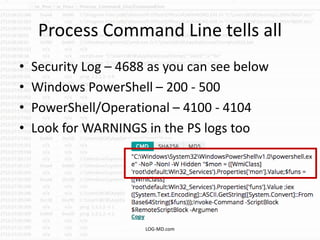
Process Command Line tells all
• Security Log – 4688 as you can see below
• Windows PowerShell – 200 - 500
• PowerShell/Operational – 4100 - 4104
• Look for WARNINGS in the PS logs too
LOG-MD.com
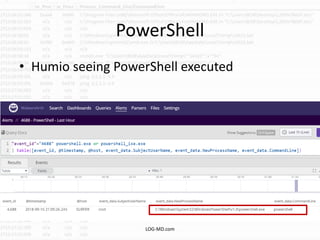
PowerShell
• Humio seeing PowerShell executed
LOG-MD.com
PowerShell
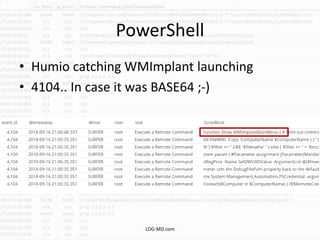
• Humio catching WMImplant launching
• 4104.. In case it was BASE64 ;-)
LOG-MD.com
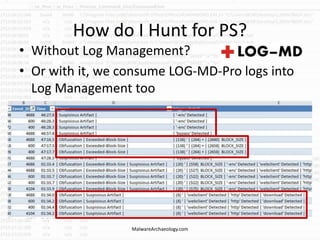
How do I Hunt for PS?
• Without Log Management?
• Or with it, we consume LOG-MD-Pro logs into
Log Management too
MalwareArchaeology.com
TOOLS
LOG-MD.com
WMI Tools
• LOG-MD
– Use the AutoRuns parameter to query all AutoRuns
including WMI and ALL namespaces, not just root
– Thanks Matt ;-)
– Scan only WMI persistence (-wmi) LOG-MD-Pro only
• Sysinternals AutoRuns
– Only lists root:subscriptions ;-(
• WMI Explorer
– Explore the full set of WMI management classes, objects
and their properties
• WBEMTest
– Built-in diagnostic tool
LOG-MD.com
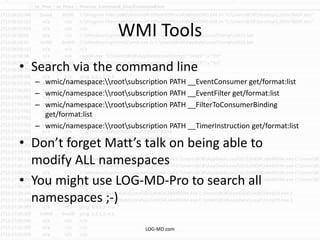
WMI Tools
• Search via the command line
– wmic/namespace:rootsubscription PATH __EventConsumer get/format:list
– wmic/namespace:rootsubscription PATH __EventFilter get/format:list
– wmic/namespace:rootsubscription PATH __FilterToConsumerBinding
get/format:list
– wmic/namespace:rootsubscription PATH __TimerInstruction get/format:list
• Don’t forget Matt’s talk on being able to
modify ALL namespaces
• You might use LOG-MD-Pro to search all
namespaces ;-)
LOG-MD.com
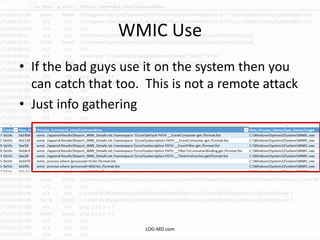
WMIC Use
• If the bad guys use it on the system then you
can catch that too. This is not a remote attack
• Just info gathering
LOG-MD.com
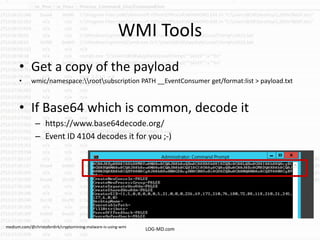
WMI Tools
• Get a copy of the payload
• wmic/namespace:rootsubscription PATH __EventConsumer get/format:list > payload.txt
• If Base64 which is common, decode it
– https://www.base64decode.org/
– Event ID 4104 decodes it for you ;-)
LOG-MD.commedium.com/@christoferdirk/cryptomining-malware-is-using-wmi
HUNTING FOR
WMI PWNAGE
LOG-MD.com
Hunting for WMI Pwnage
• AutoRuns
– Baseline your system(s) and check them regularly
– IF your tool can look for WMI
• Scan the WMI Database for anything new
• Check 4688 Process Command Line for any
indication of WMI/WMIC or WMI Tool use
• Check PowerShell logs for any BASE64 calls
• Check PowerShell logs for WMI buzzwords
• Check Auth logs 4624 for WMI logins
• Check WMI-Activity logs for new additions
LOG-MD.com
RECOMMENDATIONS
LOG-MD.com
HUNT !
• Some say create a hypothesis
• I say start by eliminating things you CAN hunt
for and know you do NOT have
• Then build more hypothesis
• Map your capabilities to ATT&CK
• For Windows logging and LOG-MD there are 2
Cheat Sheets mapped to ATT&CK
– MalwareArchaeology.com/cheat-sheets
LOG-MD.com
Recommendations
• Log Process command line with 4688 events
• Pay attention to Parent-Child executions
• Monitor WMI-Activity/Operational logs
• Monitor Authentication 4624 events where
WMIxxx.exe is the ‘Process Name’
• Monitor Windows Firewall connections 5156
events, ports 5985 & 5986 (WinRM) and 135
(DCOM)
• Monitor Windows Remote
Management/Operational logs
LOG-MD.com
Recommendations
• Upgrade to PowerShell 5 and enable logging
• Monitor PowerShell executions
• Hunt for Malicious PowerShell indicators
– Eliminate that you do NOT have any
– Base64
– Size of script blocks
– Count obfuscation characters (+ ‘ & ^ $ , etc.)
– Suspicious words
• http, webclient, download, Get-WMIObject, iex, IEX, etc.,
root, WMI, bypass, -enc, -nop, etc. CASE mAttErS
LOG-MD.com
Recommendations
• Hunt for WMI persistence
– Eliminate that you do NOT have any
• Hunt for Large payloads in the Registry (> 20k)
– Eliminate that you do NOT have any
• Be sure to validate existing scripts already in WMI
that they have not been modified (hashes)
• Monitor C:WindowsSystem32WBEM for any
new Dlls (Event ID 4663)
• Monitor HKLMSOFTWAREMicrosoftWbem
(Event ID 4657)
LOG-MD.com
Monitor WMI
• Maybe consider a WMI monitoring solution
• WMI_Monitor - PowerShell script that will
monitor for any new WMI Consumers and
Processes
– https://github.com/realparisi/WMI_Monitor
– Monitor Application log for ID 8
• Matt Graeber WMI Detector
– https://gist.github.com/mattifestation/aff0cb8bf66c7f
6ef44a
LOG-MD.com
Conclusion
• WMI is dangerous
• It is not very noisy when executed remotely
– One line Parent > Child process
• Uses built-in items to fly under the radar -
Living off the Land (LoL)
• Enable the logging and monitor them!
• Hunt for WMI use and persistence indicators
and eliminate you do not have it
LOG-MD.com
Additional Reading
• Matt Graeber and Lee Christensen – Blackhat 2018 –
Subverting Sysmon
• https://i.blackhat.com/us-18/Wed-August-8/us-18-Graeber-Subverting-Sysmon-Application-Of-A-
Formalized-Security-Product-Evasion-Methodology-wp.pdf
• Graeber– BlackHat 2015
• https://www.blackhat.com/docs/us-15/materials/us-15-Graeber-Abusing-Windows-Management-Instrumentation-WMI-To-
Build-A-Persistent%20Asynchronous-And-Fileless-Backdoor-wp.pdf
• FireEye - Dissecting One of APT29’s Fileless WMI and
PowerShell Backdoors (POSHSPY)
• https://www.fireeye.com/blog/threat-research/2017/03/dissecting_one_ofap.html
• TrendMicro – Understanding WMI Malware
• http://la.trendmicro.com/media/misc/understanding-wmi-malware-research-paper-en.pdf
• FireEye – WMI vs. WMI
• https://www.fireeye.com/blog/threat-research/2016/08/wmi_vs_wmi_monitor.html
LOG-MD.com
Questions
• You can find us on the Twitters
– @HackerHurricane
• LOG-MD.com
• MalwareArchaeology.com
• Preso will be on SlideShare and linked on
MalwareArchaeology.com
• Listen to the PodCast to hear the rest of this topic
– BDIRPodcast.com
LOG-MD.com

Detecting WMI Exploitation v1.1

  • 1.
    Detecting WMI Exploitation MichaelGough – Co-Founder IMFSecurity.com LOG-MD.com
  • 2.
    Whoami • Blue TeamDefender Ninja, Incident Responder, Logaholic • Creator of all those “Windows Logging Cheat Sheets” and the Malware Management Framework • Including LOG-MD and Windows Logging ATT&CK cheat sheets • Co-Creator of “Log-MD” – The Log and Malicious Discovery Tool • Co-Host – “Brakeing Down Incident Response” LOG-MD.com
  • 3.
    WMI ? Some sayit “Wimee” LOG-MD.com
  • 4.
    Why care aboutWMI? • MITRE ATT&CK – 2 techniques (T1047 & T1084) – mentioned in 27 other techniques – This does not include all the functions WMI calls like PowerShell, etc. • Adversary's use it for many things – Query system for information – Remotely execute payloads – Remotely persist • It is one reason why we created the ATT&CK cheat sheets and added the WMI features to LOG-MD LOG-MD.com
  • 5.
    What is WMI? •Windows Management Interface • Think of it as SNMP on steroids • Admins can interact with unlike SNMP • You can query all kinds of information about the system • You can write WMI scripts or applications to automate administrative tasks on remote computers but WMI also supplies management data to other parts of the operating system and products LOG-MD.com
  • 6.
    What is WMI LOG-MD.comMatt Graeber – BlackHat 2015
  • 7.
    Where does WMIlive? – C:WindowsSystem32WBEM <<<< WATCH THIS ONE – Repository – the databases – WMIADAP.exe – WMIAPSrv.exe – WMIPrvSe.exe <<<< WATCH THIS ONE – WBEMRepository – the databases <<<< SCAN THESE • INDEX.BTR • OBJECTS.DATA • Some utilities in System32 <<<< WATCH THESE LOG-MD.com
  • 8.
  • 9.
    AutoRuns • Only readsroot:susbscription • You can miss stuff (Matt & Lee’s BH 2018 talk) • Or already existing scripts that are modified LOG-MD.com
  • 10.
    Sysmon • Does notdetect anything outside root:subscription • Does not see WMI calls • Does not collect WinRM • Does not collect authentication • Does not collect PowerShell LOG-MD.com
  • 11.
    Do you havea tool that… • Searches the WMI database? • Searches for WMI persistence? • Searches for WMI execution? • Searches for WMI Authentication? • Are you catching my drift? LOG-MD.com
  • 12.
    SO HOW DOWE GET PWNED BY WMI? LOG-MD.com
  • 13.
    AHHHHHHHHHH !!! • WMIscares me • Few detect it well • It can be low noise if done well • Pentesters/Red Teamers and Advanced attackers love it for the low noise recon • And “all you need is creds” to use it remotely • WMI has a LOT of capabilities • Lack of tools to hunt LOG-MD.com
  • 14.
    WMI PWNAGE Sooooo manyways.. • Install a malicious .mof • Side load with malicious Dll in wbem • Remotely execute WMI and launch malicious code, an .EXE, script, Whitelist bypass EXE • Remotely install a task • Remotely install a service • Remotely launch PowerShell code • Add code and/or persistence to the WMI database • Kill running processes – aka YOUR security tools • Etc… LOG-MD.com
  • 15.
    WMI PWNAGE • MOFscan be installed from anywhere • WMIADAP.exe, WMIAPSrv.exe, and WMIPrvSe.exe start and stop normally on servers doing management functions • Drop a malicious Dll in the WBEM directory that is needed by WMI and pOOf side loads when WMI starts, no AutoRun needed ;-( – WINNTI Group used this in gaming LOG-MD.com
  • 16.
    WMI PWNAGE TOOLS •WMILM • WMImplant • PowerSploit • PowerShell Empire LOG-MD.com
  • 17.
  • 18.
    WMI PWNAGE • WMIattacks often use PowerShell once on the system, but many Red Teamers avoid this since it is well known, but still commonly used – Good logging can/will catch Red Team PowerShell • DCOM and WinRM are also used a lot in these attacks LOG-MD.com
  • 19.
  • 20.
    All Oses arenot created equal • Windows 10 and Server 2016 have more logging options • If you are on Windows 7 or Server 2012, you will not get as much logging • So yet another reason to upgrade to the latest version of Windows LOG-MD.com
  • 21.
    Parent > Child- Emotet • This is what we want to see an attack look like • Remote WMI can avoid this Parent > Child noise LOG-MD.com
  • 22.
  • 23.
    Process Execution • SecurityLog Event ID 4688 • You MUST enable ‘Process Command Line’ – Use the “Windows Logging Cheat Sheet(s)” • Then you can see MOF installs – “mofcomp.exe malicious.mof” – Or the next example • Sysmon – Event ID 1 - Process Created LOG-MD.com
  • 24.
    Process Command Linetells all • A 4688 with Process CMD Line enabled will give you all kinds of info on what executed • In this case PowerShell calling a WMIClass LOG-MD.com
  • 25.
    Process Execution • WMIis NOT very noisy when doing recon or malicious activity IF the attacker is careful and tested their Fu • You basically have Svchost.exe – calling WmiPrvSe.exe LOG-MD.com
  • 26.
    WMI Activity • Applicationsand Services log – Microsoft-Windows-WMI-Activity/Operational – Event ID 5861, there are others, but this is the one • This only catches that something was added to a namespace, ALL OF THEM !!!! – Not how • Use Process Execution and Command line logging to catch how it got there LOG-MD.com
  • 27.
    WMI DCOM Activity •For systems that have the log • Microsoft-Windows-DistributedCOM – This will catch COM calls LOG-MD.com
  • 28.
    WMI to QUERY TARGETSYSTEM LOG-MD.com
  • 29.
    Authentication • Windows 10Server 2016 for the WIN !!! • Remote WMI execution is VERY difficult to detect since there is no local logging of WMI activity calls – You need to enable Debug/Trace logs – Which is not practical LOG-MD.com
  • 30.
    Authentication • A useraccount must authenticate to the remote system • Of course it is a valid user, so not that unusual… • Unless it is WMI • The clue is WHAT is launched and the type of authentication… well Windows 10 anyways • Windows 7 and Server 2012 won’t have this data LOG-MD.com
  • 31.
    Authentication • Here iswhat it looks like when a Hacker uses WMI to query information about a target • Unique to Win10/2016 both Impersonation AND Identification occur (non-domain) • Sorry, you don’t see this with Win7/2012 LOG-MD.com
  • 32.
    Network • Source toDestination Ports 135 & 137 • Svchost.exe • Not a lot here other than lateral movement • Should WS 1 be talking to WS 2??? LOG-MD.com
  • 33.
    Parent-Child Processes • Parent-Childrelationship is key • Svchost.exe calling wmiprvse.exe = suspicious • If WMI does not launch a Process, then it is just a query against the system LOG-MD.com
  • 34.
  • 35.
    Lateral Movement –Push Payloads • Authentication Net Use Hacker to Target • Net Use <IP_Address>c$ • Hacker pushing data to Target • Again, should WS 1 be talking to WS 2? LOG-MD.com
  • 36.
    USE WMI TO REMOTELYEXECUTE THE PAYLOAD LOG-MD.com
  • 37.
    Remote WMI Execution •Network Connection • Process Creation by WmiPrvSe.exe ??? • Parent WmiPrvSe.exe > Child = Malicious LOG-MD.com
  • 38.
    Remote WMI Execution •WmiPrvSe.exe calling Notepad.exe using a ‘Network Service’? • This is never good • Notice no nested Parent-Child Tree, it is flat • Network Comms, port 135 & 137 via svchost.exe LOG-MD.com
  • 39.
    WMI Service Starting •The WMI service will start on systems it is not already running like a workstation • It is normally running on servers • Windows 10 runs it more than Windows 7 • May be normal to see these, may not LOG-MD.com
  • 40.
    USE WMI TOSTART A TASK OR SERVICE LOG-MD.com
  • 41.
    WMI May Createthese • Creating a Task is noisy • Monitor for Event ID 106 (Task Registered) • Monitor for Event ID 100 & 110 (Task Started) • Task Scheduler/Operational log – NOT enabled by default ;-( • Creating a Service is noisy • Monitor for Event ID 7045 – New Service • Monitor for Event ID 7040 – Start/Stop (maybe) LOG-MD.com
  • 42.
    Details • More advancedauditing can catch more Task details • Security Log 4698, 4699, 4700, 4702 • Requires Object Access - “Other object access” enabled – Success (more noisy) • Services 7040 and 7045 do NOT log non- Microsoft supported services – Need to change DACLS and enable “Handle Manipulation” • The “Windows Advanced Logging Cheat Sheet” has the details LOG-MD.com
  • 43.
    Details - Sysmonis an option • Sysmon, an optional service that can detect new additions to the WMI database • Unfortunately only the root:subscription • Not the other namespaces – (Matt and Lee BH talk 2018) • Event IDs 19, 20, and 21 LOG-MD.com
  • 44.
    Details - WindowsLogging Service (WLS) • Government National Security Project • Syslog agent replacement • Sysmon on steroids • Provides WMI user call details • https://kcnsc.doe.gov/docs/default- source/kcnsc-software/windows-logging- service- summary_073117.pdf?sfvrsn=26b745c4_2 LOG-MD.com
  • 45.
  • 46.
    PowerShell • Don’t forgetto enable logging !!!! And upgrade to PowerShell 5, it has the logging we need. – Watch the ShowMeCon 2018 “Detecting PowerShell exploitation” – IronGeek.com video • Detect and hunt for odd PowerShell • There are two (2) logs – Windows Powershell – Microsoft-Windows-PowerShell/Operational LOG-MD.com
  • 47.
    Process Command Linetells all • Security Log – 4688 as you can see below • Windows PowerShell – 200 - 500 • PowerShell/Operational – 4100 - 4104 • Look for WARNINGS in the PS logs too LOG-MD.com
  • 48.
    PowerShell • Humio seeingPowerShell executed LOG-MD.com
  • 49.
    PowerShell • Humio catchingWMImplant launching • 4104.. In case it was BASE64 ;-) LOG-MD.com
  • 50.
    How do IHunt for PS? • Without Log Management? • Or with it, we consume LOG-MD-Pro logs into Log Management too MalwareArchaeology.com
  • 51.
  • 52.
    WMI Tools • LOG-MD –Use the AutoRuns parameter to query all AutoRuns including WMI and ALL namespaces, not just root – Thanks Matt ;-) – Scan only WMI persistence (-wmi) LOG-MD-Pro only • Sysinternals AutoRuns – Only lists root:subscriptions ;-( • WMI Explorer – Explore the full set of WMI management classes, objects and their properties • WBEMTest – Built-in diagnostic tool LOG-MD.com
  • 53.
    WMI Tools • Searchvia the command line – wmic/namespace:rootsubscription PATH __EventConsumer get/format:list – wmic/namespace:rootsubscription PATH __EventFilter get/format:list – wmic/namespace:rootsubscription PATH __FilterToConsumerBinding get/format:list – wmic/namespace:rootsubscription PATH __TimerInstruction get/format:list • Don’t forget Matt’s talk on being able to modify ALL namespaces • You might use LOG-MD-Pro to search all namespaces ;-) LOG-MD.com
  • 54.
    WMIC Use • Ifthe bad guys use it on the system then you can catch that too. This is not a remote attack • Just info gathering LOG-MD.com
  • 55.
    WMI Tools • Geta copy of the payload • wmic/namespace:rootsubscription PATH __EventConsumer get/format:list > payload.txt • If Base64 which is common, decode it – https://www.base64decode.org/ – Event ID 4104 decodes it for you ;-) LOG-MD.commedium.com/@christoferdirk/cryptomining-malware-is-using-wmi
  • 56.
  • 57.
    Hunting for WMIPwnage • AutoRuns – Baseline your system(s) and check them regularly – IF your tool can look for WMI • Scan the WMI Database for anything new • Check 4688 Process Command Line for any indication of WMI/WMIC or WMI Tool use • Check PowerShell logs for any BASE64 calls • Check PowerShell logs for WMI buzzwords • Check Auth logs 4624 for WMI logins • Check WMI-Activity logs for new additions LOG-MD.com
  • 58.
  • 59.
    HUNT ! • Somesay create a hypothesis • I say start by eliminating things you CAN hunt for and know you do NOT have • Then build more hypothesis • Map your capabilities to ATT&CK • For Windows logging and LOG-MD there are 2 Cheat Sheets mapped to ATT&CK – MalwareArchaeology.com/cheat-sheets LOG-MD.com
  • 60.
    Recommendations • Log Processcommand line with 4688 events • Pay attention to Parent-Child executions • Monitor WMI-Activity/Operational logs • Monitor Authentication 4624 events where WMIxxx.exe is the ‘Process Name’ • Monitor Windows Firewall connections 5156 events, ports 5985 & 5986 (WinRM) and 135 (DCOM) • Monitor Windows Remote Management/Operational logs LOG-MD.com
  • 61.
    Recommendations • Upgrade toPowerShell 5 and enable logging • Monitor PowerShell executions • Hunt for Malicious PowerShell indicators – Eliminate that you do NOT have any – Base64 – Size of script blocks – Count obfuscation characters (+ ‘ & ^ $ , etc.) – Suspicious words • http, webclient, download, Get-WMIObject, iex, IEX, etc., root, WMI, bypass, -enc, -nop, etc. CASE mAttErS LOG-MD.com
  • 62.
    Recommendations • Hunt forWMI persistence – Eliminate that you do NOT have any • Hunt for Large payloads in the Registry (> 20k) – Eliminate that you do NOT have any • Be sure to validate existing scripts already in WMI that they have not been modified (hashes) • Monitor C:WindowsSystem32WBEM for any new Dlls (Event ID 4663) • Monitor HKLMSOFTWAREMicrosoftWbem (Event ID 4657) LOG-MD.com
  • 63.
    Monitor WMI • Maybeconsider a WMI monitoring solution • WMI_Monitor - PowerShell script that will monitor for any new WMI Consumers and Processes – https://github.com/realparisi/WMI_Monitor – Monitor Application log for ID 8 • Matt Graeber WMI Detector – https://gist.github.com/mattifestation/aff0cb8bf66c7f 6ef44a LOG-MD.com
  • 64.
    Conclusion • WMI isdangerous • It is not very noisy when executed remotely – One line Parent > Child process • Uses built-in items to fly under the radar - Living off the Land (LoL) • Enable the logging and monitor them! • Hunt for WMI use and persistence indicators and eliminate you do not have it LOG-MD.com
  • 65.
    Additional Reading • MattGraeber and Lee Christensen – Blackhat 2018 – Subverting Sysmon • https://i.blackhat.com/us-18/Wed-August-8/us-18-Graeber-Subverting-Sysmon-Application-Of-A- Formalized-Security-Product-Evasion-Methodology-wp.pdf • Graeber– BlackHat 2015 • https://www.blackhat.com/docs/us-15/materials/us-15-Graeber-Abusing-Windows-Management-Instrumentation-WMI-To- Build-A-Persistent%20Asynchronous-And-Fileless-Backdoor-wp.pdf • FireEye - Dissecting One of APT29’s Fileless WMI and PowerShell Backdoors (POSHSPY) • https://www.fireeye.com/blog/threat-research/2017/03/dissecting_one_ofap.html • TrendMicro – Understanding WMI Malware • http://la.trendmicro.com/media/misc/understanding-wmi-malware-research-paper-en.pdf • FireEye – WMI vs. WMI • https://www.fireeye.com/blog/threat-research/2016/08/wmi_vs_wmi_monitor.html LOG-MD.com
  • 66.
    Questions • You canfind us on the Twitters – @HackerHurricane • LOG-MD.com • MalwareArchaeology.com • Preso will be on SlideShare and linked on MalwareArchaeology.com • Listen to the PodCast to hear the rest of this topic – BDIRPodcast.com LOG-MD.com