Statistics for Managers
Using Microsoft® Excel
4th Edition
Chapter 6
The Normal Distribution and
Other Continuous Distributions
Statistics for Managers Using Microsoft Excel, 4e © 2004 Prentice-Hall, Inc.

Chap 6-1
Chapter Goals
After completing this chapter, you should be
able to:


Describe the characteristics of the normal distribution



Translate normal distribution problems into standardized
normal distribution problems



Find probabilities using a normal distribution table



Evaluate the normality assumption

Recognize when to apply the uniform and exponential
distributions
Statistics for Managers Using


Microsoft Excel, 4e © 2004
Prentice-Hall, Inc.

Chap 6-2
Chapter Goals
(continued)

After completing this chapter, you should be
able to:


Define the concept of a sampling distribution



Determine the mean and standard deviation for the
_
sampling distribution of the sample mean, X



Determine the mean and standard deviation for the
sampling distribution of the sample proportion, ps

Describe the Central Limit Theorem and its importance
_
Statistics for Managers Using
 Apply sampling distributions for both X and p
s
Microsoft Excel, 4e © 2004
Chap 6-3
Prentice-Hall, Inc.

Probability Distributions
Probability
Distributions
Ch. 5

Discrete
Probability
Distributions

Continuous
Probability
Distributions

Binomial

Normal

Poisson

Ch. 6

Uniform

Statistics for Hypergeometric
Managers Using
Microsoft Excel, 4e © 2004
Prentice-Hall, Inc.

Exponential
Chap 6-4
Continuous Probability Distributions


A continuous random variable is a variable that
can assume any value on a continuum (can
assume an uncountable number of values)





thickness of an item
time required to complete a task
temperature of a solution
height, in inches

These can potentially take on any value,
depending only on the ability to measure
Statisticsaccurately. Using
for Managers


Microsoft Excel, 4e © 2004
Prentice-Hall, Inc.

Chap 6-5
The Normal Distribution
Probability
Distributions
Continuous
Probability
Distributions
Normal
Uniform
Statistics for Managers Using
Microsoft Excel, 4e © 2004
Prentice-Hall, Inc.

Exponential
Chap 6-6
The Normal Distribution
‘Bell Shaped’
 Symmetrical
 Mean, Median and Mode
are Equal


f(X)

Location is determined by the
mean, μ
Spread is determined by the
standard deviation, σ
The random variable has an
infinite theoretical range:
Statistics for Managers Using
+ ∞ to − ∞
Microsoft Excel, 4e © 2004
Prentice-Hall, Inc.

σ
μ
Mean
= Median
= Mode
Chap 6-7

X
Many Normal Distributions

By varying the parameters μ and σ, we obtain
different normal distributions
Statistics for Managers Using
Microsoft Excel, 4e © 2004
Prentice-Hall, Inc.

Chap 6-8
The Normal Distribution
Shape
f(X)

Changing μ shifts the
distribution left or right.

σ

Statistics for Managers Using
Microsoft Excel, 4e © 2004
Prentice-Hall, Inc.

μ

Changing σ increases
or decreases the
spread.
X
Chap 6-9
The Normal Probability
Density Function


The formula for the normal probability density
function is

f(X) =
Where

1
−(1/2)[(X −μ)/σ] 2
e
2πσ

e = the mathematical constant approximated by 2.71828
π = the mathematical constant approximated by 3.14159
μ = the population mean

Statistics forσManagers Using
= the population standard deviation
Microsoft Excel, 4e © 2004 continuous variable
X = any value of the
Prentice-Hall, Inc.

Chap 6-10
The Standardized Normal


Any normal distribution (with any mean and
standard deviation combination) can be
transformed into the standardized normal
distribution (Z)



Need to transform X units into Z units

Statistics for Managers Using
Microsoft Excel, 4e © 2004
Prentice-Hall, Inc.

Chap 6-11
Translation to the Standardized
Normal Distribution


Translate from X to the standardized normal
(the “Z” distribution) by subtracting the mean
of X and dividing by its standard deviation:

X −μ
Z=
σ
Z always has mean =
Statistics for Managers Using 0 and standard deviation = 1
Microsoft Excel, 4e © 2004
Chap 6-12
Prentice-Hall, Inc.
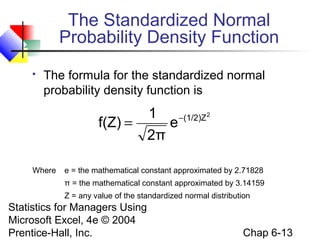
The Standardized Normal
Probability Density Function


The formula for the standardized normal
probability density function is

f(Z) =
Where

1
−(1/2)Z 2
e
2π

e = the mathematical constant approximated by 2.71828
π = the mathematical constant approximated by 3.14159
Z = any value of the standardized normal distribution

Statistics for Managers Using
Microsoft Excel, 4e © 2004
Prentice-Hall, Inc.

Chap 6-13
The Standardized
Normal Distribution




Also known as the “Z” distribution
Mean is 0
Standard Deviation is 1
f(Z)
1
0

Z

Values above the mean have positive Z-values,
Statistics for Managers Using
values below the mean have negative Z-values
Microsoft Excel, 4e © 2004
Chap 6-14
Prentice-Hall, Inc.
Example


If X is distributed normally with mean of 100
and standard deviation of 50, the Z value for
X = 200 is

X − μ 200 − 100
Z=
=
= 2.0
σ
50
This says that X = 200 is two standard
deviations (2 increments of 50 units) above
the Managers Using
Statistics formean of 100.


Microsoft Excel, 4e © 2004
Prentice-Hall, Inc.

Chap 6-15
Comparing X and Z units

100
0

200
2.0

X
Z

(μ = 100, σ = 50)
(μ = 0, σ = 1)

Note that the distribution is the same, only the
scale has changed. We can express the problem in
Statistics for Managers or in standardized units (Z)
original units (X) Using
Microsoft Excel, 4e © 2004
Chap 6-16
Prentice-Hall, Inc.
Finding Normal Probabilities
Probability is the
Probability is measured
area under the
curve! under the curve
f(X)

by the area

P (a ≤ X ≤ b)
= P (a < X < b)
(Note that the probability
of any individual value is
zero)

a
Statistics for Managers Using
Microsoft Excel, 4e © 2004
Prentice-Hall, Inc.

b

X
Chap 6-17
Probability as
Area Under the Curve
The total area under the curve is 1.0, and the curve is
symmetric, so half is above the mean, half is below
f(X) P( −∞ < X < μ) = 0.5

0.5
Statistics for Managers Using
P( −∞
Microsoft Excel, 4e © 2004 <
Prentice-Hall, Inc.

P(μ < X < ∞) = 0.5

0.5

μ

X

X < ∞ ) = 1.0
Chap 6-18
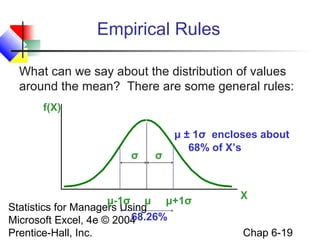
Empirical Rules
What can we say about the distribution of values
around the mean? There are some general rules:
f(X)

σ

σ

μ ± 1σ encloses about
68% of X’s

μ-1σ μ μ+1σ
Statistics for Managers Using
68.26%
Microsoft Excel, 4e © 2004
Prentice-Hall, Inc.

X
Chap 6-19
The Empirical Rule
(continued)


μ ± 2σ covers about 95% of X’s



μ ± 3σ covers about 99.7% of X’s

2σ

3σ

2σ
μ

95.44%
Statistics for Managers Using
Microsoft Excel, 4e © 2004
Prentice-Hall, Inc.

x

3σ
μ

x

99.72%

Chap 6-20
The Standardized Normal Table
The Standardized Normal table in the
textbook (Appendix table E.2) gives the
probability less than a desired value for Z
(i.e., from negative infinity to Z)


.9772

Example:
P(Z < 2.00) = .9772
Statistics for Managers Using
Microsoft Excel, 4e © 2004
Prentice-Hall, Inc.

0

2.00

Z
Chap 6-21
The Standardized Normal Table
(continued)

The column gives the value of
Z to the second decimal point
Z

The row shows
the value of Z
to the first
decimal point

0.00

0.01

0.02 …

0.0
0.1

.
.
.

2.0

P(Z Managers2.0
Statistics for < 2.00) = .9772
Using
Microsoft Excel, 4e © 2004
Prentice-Hall, Inc.

.9772

The value within the
table gives the
probability from Z = − ∞
up to the desired Z
value
Chap 6-22
General Procedure for
Finding Probabilities
To find P(a < X < b) when X is
distributed normally:


Draw the normal curve for the problem in
terms of X



Translate X-values to Z-values



Use the Standardized Normal Table

Statistics for Managers Using
Microsoft Excel, 4e © 2004
Prentice-Hall, Inc.

Chap 6-23
Finding Normal Probabilities




Suppose X is normal with mean 8.0 and
standard deviation 5.0
Find P(X < 8.6)

Statistics for Managers Using
Microsoft Excel, 4e © 2004
Prentice-Hall, Inc.

X

8.0
8.6

Chap 6-24
Finding Normal Probabilities
(continued)


Suppose X is normal with mean 8.0 and
standard deviation 5.0. Find P(X < 8.6)
Z=

X − μ 8.6 − 8.0
=
= 0.12
σ
5.0

μ=8
σ = 10

8 8.6

μ=0
σ=1

X

Statistics for Managers Using
P(X < 8.6)
Microsoft Excel, 4e © 2004
Prentice-Hall, Inc.

0 0.12

Z

P(Z < 0.12)
Chap 6-25
Solution: Finding P(Z < 0.12)
Standardized Normal Probability
Table (Portion)

Z

.00

.01

P(X < 8.6)
= P(Z < 0.12)

.02

.5478

0.0 .5000 .5040 .5080

0.1 .5398 .5438 .5478
0.2 .5793 .5832 .5871
0.3 .6179 .6217 .6255
Statistics for Managers Using
Microsoft Excel, 4e © 2004
Prentice-Hall, Inc.

Z

0.00
0.12

Chap 6-26
Upper Tail Probabilities




Suppose X is normal with mean 8.0 and
standard deviation 5.0.
Now Find P(X > 8.6)

Statistics for Managers Using
Microsoft Excel, 4e © 2004
Prentice-Hall, Inc.

X

8.0
8.6

Chap 6-27
Upper Tail Probabilities
(continued)



Now Find P(X > 8.6)…

P(X > 8.6) = P(Z > 0.12) = 1.0 - P(Z ≤ 0.12)
= 1.0 - .5478 = .4522
.5478

1.000

Z

Statistics for Managers Using
0
Microsoft Excel, 4e © 2004
0.12
Prentice-Hall, Inc.

1.0 - .5478
= .4522

Z

0
0.12

Chap 6-28
Probability Between
Two Values


Suppose X is normal with mean 8.0 and
standard deviation 5.0. Find P(8 < X < 8.6)

Calculate Z-values:

X −μ 8 − 8
Z=
=
=0
σ
5
X − μ 8.6 − 8
Z=
=
= 0.12
σ
5
Statistics for Managers Using
Microsoft Excel, 4e © 2004
Prentice-Hall, Inc.

8 8.6

X

0 0.12

Z

P(8 < X < 8.6)
= P(0 < Z < 0.12)
Chap 6-29
Solution: Finding P(0 < Z < 0.12)
Standardized Normal Probability
Table (Portion)

Z

.00

.01

.02

0.0 .5000 .5040 .5080

0.1 .5398 .5438 .5478

P(8 < X < 8.6)
= P(0 < Z < 0.12)
= P(Z < 0.12) – P(Z ≤ 0)
= .5478 - .5000 = .0478
.0478

.5000

0.2 .5793 .5832 .5871
0.3 .6179 .6217 .6255
Statistics for Managers Using
Microsoft Excel, 4e © 2004
Prentice-Hall, Inc.

0.00
0.12

Z

Chap 6-30
Probabilities in the Lower Tail




Suppose X is normal with mean 8.0 and
standard deviation 5.0.
Now Find P(7.4 < X < 8)

Statistics for Managers Using
Microsoft Excel, 4e © 2004
Prentice-Hall, Inc.

7.4

8.0

X

Chap 6-31
Probabilities in the Lower Tail
(continued)

Now Find P(7.4 < X < 8)…
P(7.4 < X < 8)
= P(-0.12 < Z < 0)

.0478

= P(Z < 0) – P(Z ≤ -0.12)
= .5000 - .4522 = .0478
The Normal distribution is
symmetric, so this probability
Statistics for Managers Using
is the same as P(0 < Z < 0.12)
Microsoft Excel, 4e © 2004
Prentice-Hall, Inc.

.4522

X
Z

7.4 8.0
-0.12 0

Chap 6-32
Finding the X value for a
Known Probability


Steps to find the X value for a known
probability:
1. Find the Z value for the known probability
2. Convert to X units using the formula:

X = μ + Zσ
Statistics for Managers Using
Microsoft Excel, 4e © 2004
Prentice-Hall, Inc.

Chap 6-33
Finding the X value for a
Known Probability
(continued)

Example:
 Suppose X is normal with mean 8.0 and
standard deviation 5.0.
 Now find the X value so that only 20% of all
values are below this X
.2000
Statistics for Managers Using
Microsoft Excel, 4e © 2004
Prentice-Hall, Inc.

?
?

8.0
0

X
Z

Chap 6-34
Find the Z value for
20% in the Lower Tail
1. Find the Z value for the known probability
Standardized Normal Probability
Table (Portion)

Z
-0.9

…

.03

.04

.05



20% area in the lower
tail is consistent with a
Z value of -0.84

… .1762 .1736 .1711

-0.8 … .2033 .2005 .1977
-0.7 … .2327 .2296 .2266
Statistics for Managers Using
Microsoft Excel, 4e © 2004
Prentice-Hall, Inc.

.2000

?
8.0
-0.84 0

Chap 6-35

X
Z
Finding the X value
2. Convert to X units using the formula:

X = μ + Zσ
= 8.0 + ( −0.84)5.0
= 3.80
So 20% of the values from a distribution
with mean 8.0 and standard deviation
5.0 are less than
Statistics for Managers Using 3.80
Microsoft Excel, 4e © 2004
Chap 6-36
Prentice-Hall, Inc.
Assessing Normality




Not all continuous random variables are
normally distributed
It is important to evaluate how well the data set
is approximated by a normal distribution

Statistics for Managers Using
Microsoft Excel, 4e © 2004
Prentice-Hall, Inc.

Chap 6-37
Assessing Normality
(continued)


Construct charts or graphs






For small- or moderate-sized data sets, do stem-andleaf display and box-and-whisker plot look
symmetric?
For large data sets, does the histogram or polygon
appear bell-shaped?

Compute descriptive summary measures

Do the mean, median and mode have similar values?
 Is the interquartile range approximately 1.33 σ?
 Is the range approximately 6 σ?
Statistics for Managers Using
Microsoft Excel, 4e © 2004
Chap 6-38
Prentice-Hall, Inc.

Assessing Normality
(continued)


Observe the distribution of the data set








Do approximately 2/3 of the observations lie within
mean ± 1 standard deviation?
Do approximately 80% of the observations lie within
mean ± 1.28 standard deviations?
Do approximately 95% of the observations lie within
mean ± 2 standard deviations?

Evaluate normal probability plot

Is the normal probability plot approximately linear
with positive Using
Statistics for Managers slope?


Microsoft Excel, 4e © 2004
Prentice-Hall, Inc.

Chap 6-39
The Normal Probability Plot


Normal probability plot


Arrange data into ordered array



Find corresponding standardized normal quantile
values



Plot the pairs of points with observed data values on
the vertical axis and the standardized normal quantile
values on the horizontal axis

Evaluate the plot for evidence of linearity
Statistics for Managers Using
Microsoft Excel, 4e © 2004
Chap 6-40
Prentice-Hall, Inc.

The Normal Probability Plot
(continued)

A normal probability plot for data
from a normal distribution will be
approximately linear:

X

90
60
30

-2 -1
Statistics for Managers Using 0
Microsoft Excel, 4e © 2004
Prentice-Hall, Inc.

1

2

Z
Chap 6-41
Normal Probability Plot
(continued)

Left-Skewed

Right-Skewed

X 90

X 90

60

60

30

30
-2 -1 0

1

2 Z

-2 -1 0

1

2 Z

Rectangular
X 90
60

Statistics for Managers Using
30
Microsoft Excel, -1 0© 1 2 Z
4e 2004
-2
Prentice-Hall, Inc.

Nonlinear plots indicate
a deviation from
normality
Chap 6-42
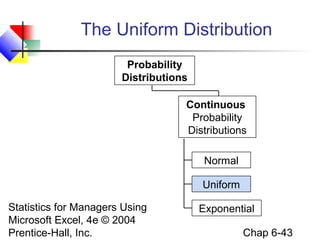
The Uniform Distribution
Probability
Distributions
Continuous
Probability
Distributions
Normal
Uniform
Statistics for Managers Using
Microsoft Excel, 4e © 2004
Prentice-Hall, Inc.

Exponential
Chap 6-43
The Uniform Distribution


The uniform distribution is a
probability distribution that has equal
probabilities for all possible
outcomes of the random variable



Also called a rectangular distribution

Statistics for Managers Using
Microsoft Excel, 4e © 2004
Prentice-Hall, Inc.

Chap 6-44
The Uniform Distribution
(continued)

The Continuous Uniform Distribution:
1
b−a

if a ≤ X ≤ b

0

otherwise

f(X) =

where
f(X) = value of the density function at any X value
a = minimum value of X
b = maximum value of
for Managers Using X

Statistics
Microsoft Excel, 4e © 2004
Prentice-Hall, Inc.

Chap 6-45
Properties of the
Uniform Distribution


The mean of a uniform distribution is
a +b
μ=
2



The standard deviation is
σ=

Statistics for Managers Using
Microsoft Excel, 4e © 2004
Prentice-Hall, Inc.

(b - a)2
12
Chap 6-46
Uniform Distribution Example
Example: Uniform probability distribution
over the range 2 ≤ X ≤ 6:
1
f(X) = 6 - 2 = .25 for 2 ≤ X ≤ 6
f(X)
μ=

.25
2
Statistics for Managers Using6
Microsoft Excel, 4e © 2004
Prentice-Hall, Inc.

X

σ=

a +b 2 +6
=
=4
2
2
(b - a)2
=
12

(6 - 2)2
= 1.1547
12

Chap 6-47
The Exponential Distribution
Probability
Distributions
Continuous
Probability
Distributions
Normal
Uniform
Statistics for Managers Using
Microsoft Excel, 4e © 2004
Prentice-Hall, Inc.

Exponential
Chap 6-48
The Exponential Distribution


Used to model the length of time between two
occurrences of an event (the time between
arrivals)


Examples:




Time between trucks arriving at an unloading dock
Time between transactions at an ATM Machine
Time between phone calls to the main operator

Statistics for Managers Using
Microsoft Excel, 4e © 2004
Prentice-Hall, Inc.

Chap 6-49
The Exponential Distribution




Defined by a single parameter, its mean λ
(lambda)
The probability that an arrival time is less than
some specified time X is

P(arrival time < X) = 1 − e
where

− λX

e = mathematical constant approximated by 2.71828
λ = the population mean number of arrivals per unit

Statistics for Managers Using continuous variable where 0 < X < ∞
X = any value of the
Microsoft Excel, 4e © 2004
Chap 6-50
Prentice-Hall, Inc.
Exponential Distribution
Example
Example: Customers arrive at the service counter at
the rate of 15 per hour. What is the probability that the
arrival time between consecutive customers is less
than three minutes?


The mean number of arrivals per hour is 15, so λ = 15



Three minutes is .05 hours



P(arrival time < .05) = 1 – e-λX = 1 – e-(15)(.05) = .5276

So there is a 52.76% probability that the arrival time
between successive customers is less than three
Statistics for Managers Using
minutes
Microsoft Excel, 4e © 2004


Prentice-Hall, Inc.

Chap 6-51
Sampling Distributions
Sampling
Distributions

Sampling
Distributions
of the
Mean

Statistics for Managers Using
Microsoft Excel, 4e © 2004
Prentice-Hall, Inc.

Sampling
Distributions
of the
Proportion
Chap 6-52
Sampling Distributions


A sampling distribution is a
distribution of all of the possible
values of a statistic for a given size
sample selected from a population

Statistics for Managers Using
Microsoft Excel, 4e © 2004
Prentice-Hall, Inc.

Chap 6-53
Developing a
Sampling Distribution


Assume there is a population …



Population size N=4



B

C

D

Random variable, X,
is age of individuals



A

Values of X: 18, 20,
22, 24 (years)

Statistics for Managers Using
Microsoft Excel, 4e © 2004
Prentice-Hall, Inc.

Chap 6-54
Developing a
Sampling Distribution
(continued)

Summary Measures for the Population Distribution:

∑X
μ=

P(x)

i

N

.3

18 + 20 + 22 + 24
=
= 21
4
σ=

∑ (X − μ)
i

N

.2
.1
0

2

= 2.236

Statistics for Managers Using
Microsoft Excel, 4e © 2004
Prentice-Hall, Inc.

18

20

22

24

A

B

C

D

Uniform Distribution
Chap 6-55

x
Developing a
Sampling Distribution
(continued)

Now consider all possible samples of size n=2

1st
Obs

2nd Observation
18
20
22
24

18 18,18 18,20 18,22 18,24

16 Sample
Means

20 20,18 20,20 20,22 20,24

1st 2nd Observation
Obs 18 20 22 24

22 22,18 22,20 22,22 22,24

18 18 19 20 21

24 24,18 24,20 24,22 24,24

20 19 20 21 22

16 possible samples
(sampling Using
for Managerswith
replacement)

Statistics
Microsoft Excel, 4e © 2004
Prentice-Hall, Inc.

22 20 21 22 23
24 21 22 23 24
Chap 6-56
Developing a
Sampling Distribution
(continued)

Sampling Distribution of All Sample Means

Sample Means
Distribution

16 Sample Means
1st 2nd Observation
Obs 18 20 22 24

18 18 19 20 21
20 19 20 21 22
22 20 21 22 23

Statistics for Managers Using
24 21 22 23 24
Microsoft Excel, 4e © 2004
Prentice-Hall, Inc.

_

P(X)
.3
.2
.1
0

18 19

20 21 22 23

24

(no longerChap 6-57
uniform)

_

X
Developing a
Sampling Distribution
(continued)

Summary Measures of this Sampling Distribution:

μX

∑X
=

σX =

N

i

18 + 19 + 21 +  + 24
=
= 21
16

( X i − μ X )2
∑
N

(18 - 21)2 + (19 - 21)2 +  + (24 - 21)2
=
= 1.58
Statistics for Managers Using
16
Microsoft Excel, 4e © 2004
Prentice-Hall, Inc.

Chap 6-58
Comparing the Population with its
Sampling Distribution
Population
N=4

μ = 21

σ = 2.236

Sample Means Distribution
n=2

μX = 21

σ X = 1.58

_

P(X)
.3

P(X)
.3

.2

.2

.1

.1

0
Statistics for Managers Using X
18
20
22
24
A
B
C
Microsoft Excel, 4e © 2004D
Prentice-Hall, Inc.

0

18 19

20 21 22 23

24

Chap 6-59

_

X
Sampling Distributions
of the Mean
Sampling
Distributions

Sampling
Distributions
of the
Mean

Statistics for Managers Using
Microsoft Excel, 4e © 2004
Prentice-Hall, Inc.

Sampling
Distributions
of the
Proportion
Chap 6-60
Standard Error of the Mean




Different samples of the same size from the same
population will yield different sample means
A measure of the variability in the mean from sample to
sample is given by the Standard Error of the Mean:

σ
σX =
n
Note that the standard error of the mean decreases as
Statistics forsample sizeUsing
the Managers increases
Microsoft Excel, 4e © 2004
Chap 6-61
Prentice-Hall, Inc.

If the Population is Normal


If a population is normal with mean μ and
standard deviation σ, the sampling distribution
of X is also normally distributed with

μX = μ

and

σ
σX =
n

Statistics (This assumes that sampling is with replacement or
for Managers Using
sampling is without replacement from an infinite population)
Microsoft Excel, 4e © 2004
Chap 6-62
Prentice-Hall, Inc.
Z-value for Sampling Distribution
of the Mean


Z-value for the sampling distribution of X :

Z=

where:

( X − μX )
σX

( X − μ)
=
σ
n

X = sample mean

μ = population mean

σ = population standard deviation
n = Using
Statistics for Managers sample size
Microsoft Excel, 4e © 2004
Prentice-Hall, Inc.

Chap 6-63
Finite Population Correction


Apply the Finite Population Correction if:
 the sample is large relative to the population
(n is greater than 5% of N)
and…
 Sampling is without replacement

( X − μ)
Then
Z=
σ N −n
Statistics for Managers Using n N − 1
Microsoft Excel, 4e © 2004
Prentice-Hall, Inc.

Chap 6-64
Sampling Distribution Properties
Normal Population
Distribution

μx = μ



(i.e.

x is unbiased )

μ

x

μx

x

Normal Sampling
Distribution
(has the same mean)

Statistics for Managers Using
Microsoft Excel, 4e © 2004
Prentice-Hall, Inc.

Chap 6-65
Sampling Distribution Properties
(continued)


For sampling with replacement:
As n increases,

Larger
sample size

σ x decreases
Smaller
sample size

Statistics for Managers Using
Microsoft Excel, 4e © 2004
Prentice-Hall, Inc.

x

μ
Chap 6-66
If the Population is not Normal


We can apply the Central Limit Theorem:



Even if the population is not normal,
…sample means from the population will be
approximately normal as long as the sample size is
large enough.

Properties of the sampling distribution:

μ x = μUsing
and
Statistics for Managers
Microsoft Excel, 4e © 2004
Prentice-Hall, Inc.

σ
σx =
n
Chap 6-67
Central Limit Theorem
As the
sample
size gets
large
enough…

n↑

Statistics for Managers Using
Microsoft Excel, 4e © 2004
Prentice-Hall, Inc.

the sampling
distribution
becomes
almost normal
regardless of
shape of
population

Chap 6-68

x
If the Population is not Normal
(continued)

Sampling distribution
properties:

Population Distribution

Central Tendency

μx = μ
Variation

σ
σx =
n

x

μ
Sampling Distribution
(becomes normal as n increases)
Larger
sample
size

Smaller
sample size

(Sampling with

Statistics for Managers Using
replacement)
Microsoft Excel, 4e © 2004
Prentice-Hall, Inc.

μx

Chap 6-69

x
How Large is Large Enough?


For most distributions, n > 30 will give a
sampling distribution that is nearly normal



For fairly symmetric distributions, n > 15



For normal population distributions, the
sampling distribution of the mean is always
normally distributed

Statistics for Managers Using
Microsoft Excel, 4e © 2004
Prentice-Hall, Inc.

Chap 6-70
Example


Suppose a population has mean μ = 8 and
standard deviation σ = 3. Suppose a random
sample of size n = 36 is selected.



What is the probability that the sample mean is
between 7.8 and 8.2?

Statistics for Managers Using
Microsoft Excel, 4e © 2004
Prentice-Hall, Inc.

Chap 6-71
Example
(continued)

Solution:


Even if the population is not normally
distributed, the central limit theorem can be
used (n > 30)



… so the sampling distribution of
approximately normal



… with mean μx = 8

x

is

σ
3
=
= 0.5
 …and standard deviation σ x =
Statistics for Managers Using
n
36
Microsoft Excel, 4e © 2004
Chap 6-72
Prentice-Hall, Inc.
Example
(continued)

Solution (continued):


μX -μ
 7.8 - 8
8.2 - 8 
P(7.8 < μ X < 8.2) = P
<
<

3
σ
3


36
n
36 

= P(-0.5 < Z < 0.5) = 0.3830
Population
Distribution
???
?
??
?
??
?
?

Sampling
Distribution

?

Sample

Statistics for Managers Using
7.8
8.2
μ=8
X © 2004
μX = 8
Microsoft Excel, 4e
Prentice-Hall, Inc.

Standard Normal
Distribution

.1915
+.1915

Standardize

x

-0.5

μz = 0

0.5

Chap 6-73

Z
Sampling Distributions
of the Proportion
Sampling
Distributions

Sampling
Distributions
of the
Mean

Statistics for Managers Using
Microsoft Excel, 4e © 2004
Prentice-Hall, Inc.

Sampling
Distributions
of the
Proportion
Chap 6-74
Population Proportions, p
p = the proportion of the population having
some characteristic


ps =

Sample proportion ( ps ) provides an estimate
of p:

X
number of items in the sample having the characteristic of interest
=
n
sample size


0 ≤ ps ≤ 1



ps has a binomial distribution

(assuming sampling with replacement from a finite
Statistics for Managers Usingan infinite population) population or
without replacement from
Microsoft Excel, 4e © 2004
Chap 6-75
Prentice-Hall, Inc.
Sampling Distribution of p


Approximated by a
normal distribution if:


.3
.2
.1
0

np ≥ 5
and

n(1− p) ≥ 5
where

μps = p

P( ps)

and

0

σps

Sampling Distribution

.2

.4

.6

p(1 − p)
=
n

8

1

Statistics for Managers Using
Microsoft Excel, 4e ©(where p = population proportion)
2004
Chap 6-76
Prentice-Hall, Inc.

ps
Z-Value for Proportions
Standardize ps to a Z value with the formula:

ps − p
Z=
=
σ ps
If sampling is without replacement
and n is greater than 5% of the
population size, then σ p must use
the finite population correction
Statistics for Managers Using
factor:

ps − p
p(1 − p)
n



Microsoft Excel, 4e © 2004
Prentice-Hall, Inc.

σ ps =

p(1 − p) N − n
n
N −1
Chap 6-77
Example


If the true proportion of voters who support
Proposition A is p = .4, what is the probability
that a sample of size 200 yields a sample
proportion between .40 and .45?



i.e.: if p = .4 and n = 200, what is
P(.40 ≤ ps ≤ .45) ?

Statistics for Managers Using
Microsoft Excel, 4e © 2004
Prentice-Hall, Inc.

Chap 6-78
Example
(continued)


Find σ ps :

if p = .4 and n = 200, what is
P(.40 ≤ ps ≤ .45) ?
σ ps

p(1 − p)
.4(1 − .4)
=
=
= .03464
n
200

Convert to
.45 − .40 
 .40 − .40
P(.40 ≤ p s ≤ .45) = P
≤Z≤

standard
.03464 
 .03464
normal:
Statistics for Managers Using
= P(0 ≤ Z ≤ 1.44)
Microsoft Excel, 4e © 2004
Chap 6-79
Prentice-Hall, Inc.
Example
(continued)


if p = .4 and n = 200, what is
P(.40 ≤ ps ≤ .45) ?

Use standard normal table:

P(0 ≤ Z ≤ 1.44) = .4251
Standardized
Normal Distribution

Sampling Distribution

.4251
Standardize

.40
Statistics for Managers .45 ps
Using
Microsoft Excel, 4e © 2004
Prentice-Hall, Inc.

0

1.44

Z

Chap 6-80
Chapter Summary


Presented key continuous distributions


normal, uniform, exponential



Found probabilities using formulas and tables



Recognized when to apply different distributions



Applied distributions to decision problems

Statistics for Managers Using
Microsoft Excel, 4e © 2004
Prentice-Hall, Inc.

Chap 6-81
Chapter Summary
(continued)



Introduced sampling distributions
Described the sampling distribution of the mean







For normal populations
Using the Central Limit Theorem

Described the sampling distribution of a
proportion
Calculated probabilities using sampling
distributions

Statistics for Managers Using
Microsoft Excel, 4e © 2004
Prentice-Hall, Inc.

Chap 6-82

Chap06 normal distributions & continous

  • 1.
    Statistics for Managers UsingMicrosoft® Excel 4th Edition Chapter 6 The Normal Distribution and Other Continuous Distributions Statistics for Managers Using Microsoft Excel, 4e © 2004 Prentice-Hall, Inc. Chap 6-1
  • 2.
    Chapter Goals After completingthis chapter, you should be able to:  Describe the characteristics of the normal distribution  Translate normal distribution problems into standardized normal distribution problems  Find probabilities using a normal distribution table  Evaluate the normality assumption Recognize when to apply the uniform and exponential distributions Statistics for Managers Using  Microsoft Excel, 4e © 2004 Prentice-Hall, Inc. Chap 6-2
  • 3.
    Chapter Goals (continued) After completingthis chapter, you should be able to:  Define the concept of a sampling distribution  Determine the mean and standard deviation for the _ sampling distribution of the sample mean, X  Determine the mean and standard deviation for the sampling distribution of the sample proportion, ps Describe the Central Limit Theorem and its importance _ Statistics for Managers Using  Apply sampling distributions for both X and p s Microsoft Excel, 4e © 2004 Chap 6-3 Prentice-Hall, Inc. 
  • 4.
    Probability Distributions Probability Distributions Ch. 5 Discrete Probability Distributions Continuous Probability Distributions Binomial Normal Poisson Ch.6 Uniform Statistics for Hypergeometric Managers Using Microsoft Excel, 4e © 2004 Prentice-Hall, Inc. Exponential Chap 6-4
  • 5.
    Continuous Probability Distributions  Acontinuous random variable is a variable that can assume any value on a continuum (can assume an uncountable number of values)     thickness of an item time required to complete a task temperature of a solution height, in inches These can potentially take on any value, depending only on the ability to measure Statisticsaccurately. Using for Managers  Microsoft Excel, 4e © 2004 Prentice-Hall, Inc. Chap 6-5
  • 6.
    The Normal Distribution Probability Distributions Continuous Probability Distributions Normal Uniform Statisticsfor Managers Using Microsoft Excel, 4e © 2004 Prentice-Hall, Inc. Exponential Chap 6-6
  • 7.
    The Normal Distribution ‘BellShaped’  Symmetrical  Mean, Median and Mode are Equal  f(X) Location is determined by the mean, μ Spread is determined by the standard deviation, σ The random variable has an infinite theoretical range: Statistics for Managers Using + ∞ to − ∞ Microsoft Excel, 4e © 2004 Prentice-Hall, Inc. σ μ Mean = Median = Mode Chap 6-7 X
  • 8.
    Many Normal Distributions Byvarying the parameters μ and σ, we obtain different normal distributions Statistics for Managers Using Microsoft Excel, 4e © 2004 Prentice-Hall, Inc. Chap 6-8
  • 9.
    The Normal Distribution Shape f(X) Changingμ shifts the distribution left or right. σ Statistics for Managers Using Microsoft Excel, 4e © 2004 Prentice-Hall, Inc. μ Changing σ increases or decreases the spread. X Chap 6-9
  • 10.
    The Normal Probability DensityFunction  The formula for the normal probability density function is f(X) = Where 1 −(1/2)[(X −μ)/σ] 2 e 2πσ e = the mathematical constant approximated by 2.71828 π = the mathematical constant approximated by 3.14159 μ = the population mean Statistics forσManagers Using = the population standard deviation Microsoft Excel, 4e © 2004 continuous variable X = any value of the Prentice-Hall, Inc. Chap 6-10
  • 11.
    The Standardized Normal  Anynormal distribution (with any mean and standard deviation combination) can be transformed into the standardized normal distribution (Z)  Need to transform X units into Z units Statistics for Managers Using Microsoft Excel, 4e © 2004 Prentice-Hall, Inc. Chap 6-11
  • 12.
    Translation to theStandardized Normal Distribution  Translate from X to the standardized normal (the “Z” distribution) by subtracting the mean of X and dividing by its standard deviation: X −μ Z= σ Z always has mean = Statistics for Managers Using 0 and standard deviation = 1 Microsoft Excel, 4e © 2004 Chap 6-12 Prentice-Hall, Inc.
  • 13.
    The Standardized Normal ProbabilityDensity Function  The formula for the standardized normal probability density function is f(Z) = Where 1 −(1/2)Z 2 e 2π e = the mathematical constant approximated by 2.71828 π = the mathematical constant approximated by 3.14159 Z = any value of the standardized normal distribution Statistics for Managers Using Microsoft Excel, 4e © 2004 Prentice-Hall, Inc. Chap 6-13
  • 14.
    The Standardized Normal Distribution    Alsoknown as the “Z” distribution Mean is 0 Standard Deviation is 1 f(Z) 1 0 Z Values above the mean have positive Z-values, Statistics for Managers Using values below the mean have negative Z-values Microsoft Excel, 4e © 2004 Chap 6-14 Prentice-Hall, Inc.
  • 15.
    Example  If X isdistributed normally with mean of 100 and standard deviation of 50, the Z value for X = 200 is X − μ 200 − 100 Z= = = 2.0 σ 50 This says that X = 200 is two standard deviations (2 increments of 50 units) above the Managers Using Statistics formean of 100.  Microsoft Excel, 4e © 2004 Prentice-Hall, Inc. Chap 6-15
  • 16.
    Comparing X andZ units 100 0 200 2.0 X Z (μ = 100, σ = 50) (μ = 0, σ = 1) Note that the distribution is the same, only the scale has changed. We can express the problem in Statistics for Managers or in standardized units (Z) original units (X) Using Microsoft Excel, 4e © 2004 Chap 6-16 Prentice-Hall, Inc.
  • 17.
    Finding Normal Probabilities Probabilityis the Probability is measured area under the curve! under the curve f(X) by the area P (a ≤ X ≤ b) = P (a < X < b) (Note that the probability of any individual value is zero) a Statistics for Managers Using Microsoft Excel, 4e © 2004 Prentice-Hall, Inc. b X Chap 6-17
  • 18.
    Probability as Area Underthe Curve The total area under the curve is 1.0, and the curve is symmetric, so half is above the mean, half is below f(X) P( −∞ < X < μ) = 0.5 0.5 Statistics for Managers Using P( −∞ Microsoft Excel, 4e © 2004 < Prentice-Hall, Inc. P(μ < X < ∞) = 0.5 0.5 μ X X < ∞ ) = 1.0 Chap 6-18
  • 19.
    Empirical Rules What canwe say about the distribution of values around the mean? There are some general rules: f(X) σ σ μ ± 1σ encloses about 68% of X’s μ-1σ μ μ+1σ Statistics for Managers Using 68.26% Microsoft Excel, 4e © 2004 Prentice-Hall, Inc. X Chap 6-19
  • 20.
    The Empirical Rule (continued)  μ± 2σ covers about 95% of X’s  μ ± 3σ covers about 99.7% of X’s 2σ 3σ 2σ μ 95.44% Statistics for Managers Using Microsoft Excel, 4e © 2004 Prentice-Hall, Inc. x 3σ μ x 99.72% Chap 6-20
  • 21.
    The Standardized NormalTable The Standardized Normal table in the textbook (Appendix table E.2) gives the probability less than a desired value for Z (i.e., from negative infinity to Z)  .9772 Example: P(Z < 2.00) = .9772 Statistics for Managers Using Microsoft Excel, 4e © 2004 Prentice-Hall, Inc. 0 2.00 Z Chap 6-21
  • 22.
    The Standardized NormalTable (continued) The column gives the value of Z to the second decimal point Z The row shows the value of Z to the first decimal point 0.00 0.01 0.02 … 0.0 0.1 . . . 2.0 P(Z Managers2.0 Statistics for < 2.00) = .9772 Using Microsoft Excel, 4e © 2004 Prentice-Hall, Inc. .9772 The value within the table gives the probability from Z = − ∞ up to the desired Z value Chap 6-22
  • 23.
    General Procedure for FindingProbabilities To find P(a < X < b) when X is distributed normally:  Draw the normal curve for the problem in terms of X  Translate X-values to Z-values  Use the Standardized Normal Table Statistics for Managers Using Microsoft Excel, 4e © 2004 Prentice-Hall, Inc. Chap 6-23
  • 24.
    Finding Normal Probabilities   SupposeX is normal with mean 8.0 and standard deviation 5.0 Find P(X < 8.6) Statistics for Managers Using Microsoft Excel, 4e © 2004 Prentice-Hall, Inc. X 8.0 8.6 Chap 6-24
  • 25.
    Finding Normal Probabilities (continued)  SupposeX is normal with mean 8.0 and standard deviation 5.0. Find P(X < 8.6) Z= X − μ 8.6 − 8.0 = = 0.12 σ 5.0 μ=8 σ = 10 8 8.6 μ=0 σ=1 X Statistics for Managers Using P(X < 8.6) Microsoft Excel, 4e © 2004 Prentice-Hall, Inc. 0 0.12 Z P(Z < 0.12) Chap 6-25
  • 26.
    Solution: Finding P(Z< 0.12) Standardized Normal Probability Table (Portion) Z .00 .01 P(X < 8.6) = P(Z < 0.12) .02 .5478 0.0 .5000 .5040 .5080 0.1 .5398 .5438 .5478 0.2 .5793 .5832 .5871 0.3 .6179 .6217 .6255 Statistics for Managers Using Microsoft Excel, 4e © 2004 Prentice-Hall, Inc. Z 0.00 0.12 Chap 6-26
  • 27.
    Upper Tail Probabilities   SupposeX is normal with mean 8.0 and standard deviation 5.0. Now Find P(X > 8.6) Statistics for Managers Using Microsoft Excel, 4e © 2004 Prentice-Hall, Inc. X 8.0 8.6 Chap 6-27
  • 28.
    Upper Tail Probabilities (continued)  NowFind P(X > 8.6)… P(X > 8.6) = P(Z > 0.12) = 1.0 - P(Z ≤ 0.12) = 1.0 - .5478 = .4522 .5478 1.000 Z Statistics for Managers Using 0 Microsoft Excel, 4e © 2004 0.12 Prentice-Hall, Inc. 1.0 - .5478 = .4522 Z 0 0.12 Chap 6-28
  • 29.
    Probability Between Two Values  SupposeX is normal with mean 8.0 and standard deviation 5.0. Find P(8 < X < 8.6) Calculate Z-values: X −μ 8 − 8 Z= = =0 σ 5 X − μ 8.6 − 8 Z= = = 0.12 σ 5 Statistics for Managers Using Microsoft Excel, 4e © 2004 Prentice-Hall, Inc. 8 8.6 X 0 0.12 Z P(8 < X < 8.6) = P(0 < Z < 0.12) Chap 6-29
  • 30.
    Solution: Finding P(0< Z < 0.12) Standardized Normal Probability Table (Portion) Z .00 .01 .02 0.0 .5000 .5040 .5080 0.1 .5398 .5438 .5478 P(8 < X < 8.6) = P(0 < Z < 0.12) = P(Z < 0.12) – P(Z ≤ 0) = .5478 - .5000 = .0478 .0478 .5000 0.2 .5793 .5832 .5871 0.3 .6179 .6217 .6255 Statistics for Managers Using Microsoft Excel, 4e © 2004 Prentice-Hall, Inc. 0.00 0.12 Z Chap 6-30
  • 31.
    Probabilities in theLower Tail   Suppose X is normal with mean 8.0 and standard deviation 5.0. Now Find P(7.4 < X < 8) Statistics for Managers Using Microsoft Excel, 4e © 2004 Prentice-Hall, Inc. 7.4 8.0 X Chap 6-31
  • 32.
    Probabilities in theLower Tail (continued) Now Find P(7.4 < X < 8)… P(7.4 < X < 8) = P(-0.12 < Z < 0) .0478 = P(Z < 0) – P(Z ≤ -0.12) = .5000 - .4522 = .0478 The Normal distribution is symmetric, so this probability Statistics for Managers Using is the same as P(0 < Z < 0.12) Microsoft Excel, 4e © 2004 Prentice-Hall, Inc. .4522 X Z 7.4 8.0 -0.12 0 Chap 6-32
  • 33.
    Finding the Xvalue for a Known Probability  Steps to find the X value for a known probability: 1. Find the Z value for the known probability 2. Convert to X units using the formula: X = μ + Zσ Statistics for Managers Using Microsoft Excel, 4e © 2004 Prentice-Hall, Inc. Chap 6-33
  • 34.
    Finding the Xvalue for a Known Probability (continued) Example:  Suppose X is normal with mean 8.0 and standard deviation 5.0.  Now find the X value so that only 20% of all values are below this X .2000 Statistics for Managers Using Microsoft Excel, 4e © 2004 Prentice-Hall, Inc. ? ? 8.0 0 X Z Chap 6-34
  • 35.
    Find the Zvalue for 20% in the Lower Tail 1. Find the Z value for the known probability Standardized Normal Probability Table (Portion) Z -0.9 … .03 .04 .05  20% area in the lower tail is consistent with a Z value of -0.84 … .1762 .1736 .1711 -0.8 … .2033 .2005 .1977 -0.7 … .2327 .2296 .2266 Statistics for Managers Using Microsoft Excel, 4e © 2004 Prentice-Hall, Inc. .2000 ? 8.0 -0.84 0 Chap 6-35 X Z
  • 36.
    Finding the Xvalue 2. Convert to X units using the formula: X = μ + Zσ = 8.0 + ( −0.84)5.0 = 3.80 So 20% of the values from a distribution with mean 8.0 and standard deviation 5.0 are less than Statistics for Managers Using 3.80 Microsoft Excel, 4e © 2004 Chap 6-36 Prentice-Hall, Inc.
  • 37.
    Assessing Normality   Not allcontinuous random variables are normally distributed It is important to evaluate how well the data set is approximated by a normal distribution Statistics for Managers Using Microsoft Excel, 4e © 2004 Prentice-Hall, Inc. Chap 6-37
  • 38.
    Assessing Normality (continued)  Construct chartsor graphs    For small- or moderate-sized data sets, do stem-andleaf display and box-and-whisker plot look symmetric? For large data sets, does the histogram or polygon appear bell-shaped? Compute descriptive summary measures Do the mean, median and mode have similar values?  Is the interquartile range approximately 1.33 σ?  Is the range approximately 6 σ? Statistics for Managers Using Microsoft Excel, 4e © 2004 Chap 6-38 Prentice-Hall, Inc. 
  • 39.
    Assessing Normality (continued)  Observe thedistribution of the data set     Do approximately 2/3 of the observations lie within mean ± 1 standard deviation? Do approximately 80% of the observations lie within mean ± 1.28 standard deviations? Do approximately 95% of the observations lie within mean ± 2 standard deviations? Evaluate normal probability plot Is the normal probability plot approximately linear with positive Using Statistics for Managers slope?  Microsoft Excel, 4e © 2004 Prentice-Hall, Inc. Chap 6-39
  • 40.
    The Normal ProbabilityPlot  Normal probability plot  Arrange data into ordered array  Find corresponding standardized normal quantile values  Plot the pairs of points with observed data values on the vertical axis and the standardized normal quantile values on the horizontal axis Evaluate the plot for evidence of linearity Statistics for Managers Using Microsoft Excel, 4e © 2004 Chap 6-40 Prentice-Hall, Inc. 
  • 41.
    The Normal ProbabilityPlot (continued) A normal probability plot for data from a normal distribution will be approximately linear: X 90 60 30 -2 -1 Statistics for Managers Using 0 Microsoft Excel, 4e © 2004 Prentice-Hall, Inc. 1 2 Z Chap 6-41
  • 42.
    Normal Probability Plot (continued) Left-Skewed Right-Skewed X90 X 90 60 60 30 30 -2 -1 0 1 2 Z -2 -1 0 1 2 Z Rectangular X 90 60 Statistics for Managers Using 30 Microsoft Excel, -1 0© 1 2 Z 4e 2004 -2 Prentice-Hall, Inc. Nonlinear plots indicate a deviation from normality Chap 6-42
  • 43.
    The Uniform Distribution Probability Distributions Continuous Probability Distributions Normal Uniform Statisticsfor Managers Using Microsoft Excel, 4e © 2004 Prentice-Hall, Inc. Exponential Chap 6-43
  • 44.
    The Uniform Distribution  Theuniform distribution is a probability distribution that has equal probabilities for all possible outcomes of the random variable  Also called a rectangular distribution Statistics for Managers Using Microsoft Excel, 4e © 2004 Prentice-Hall, Inc. Chap 6-44
  • 45.
    The Uniform Distribution (continued) TheContinuous Uniform Distribution: 1 b−a if a ≤ X ≤ b 0 otherwise f(X) = where f(X) = value of the density function at any X value a = minimum value of X b = maximum value of for Managers Using X Statistics Microsoft Excel, 4e © 2004 Prentice-Hall, Inc. Chap 6-45
  • 46.
    Properties of the UniformDistribution  The mean of a uniform distribution is a +b μ= 2  The standard deviation is σ= Statistics for Managers Using Microsoft Excel, 4e © 2004 Prentice-Hall, Inc. (b - a)2 12 Chap 6-46
  • 47.
    Uniform Distribution Example Example:Uniform probability distribution over the range 2 ≤ X ≤ 6: 1 f(X) = 6 - 2 = .25 for 2 ≤ X ≤ 6 f(X) μ= .25 2 Statistics for Managers Using6 Microsoft Excel, 4e © 2004 Prentice-Hall, Inc. X σ= a +b 2 +6 = =4 2 2 (b - a)2 = 12 (6 - 2)2 = 1.1547 12 Chap 6-47
  • 48.
    The Exponential Distribution Probability Distributions Continuous Probability Distributions Normal Uniform Statisticsfor Managers Using Microsoft Excel, 4e © 2004 Prentice-Hall, Inc. Exponential Chap 6-48
  • 49.
    The Exponential Distribution  Usedto model the length of time between two occurrences of an event (the time between arrivals)  Examples:    Time between trucks arriving at an unloading dock Time between transactions at an ATM Machine Time between phone calls to the main operator Statistics for Managers Using Microsoft Excel, 4e © 2004 Prentice-Hall, Inc. Chap 6-49
  • 50.
    The Exponential Distribution   Definedby a single parameter, its mean λ (lambda) The probability that an arrival time is less than some specified time X is P(arrival time < X) = 1 − e where − λX e = mathematical constant approximated by 2.71828 λ = the population mean number of arrivals per unit Statistics for Managers Using continuous variable where 0 < X < ∞ X = any value of the Microsoft Excel, 4e © 2004 Chap 6-50 Prentice-Hall, Inc.
  • 51.
    Exponential Distribution Example Example: Customersarrive at the service counter at the rate of 15 per hour. What is the probability that the arrival time between consecutive customers is less than three minutes?  The mean number of arrivals per hour is 15, so λ = 15  Three minutes is .05 hours  P(arrival time < .05) = 1 – e-λX = 1 – e-(15)(.05) = .5276 So there is a 52.76% probability that the arrival time between successive customers is less than three Statistics for Managers Using minutes Microsoft Excel, 4e © 2004  Prentice-Hall, Inc. Chap 6-51
  • 52.
    Sampling Distributions Sampling Distributions Sampling Distributions of the Mean Statisticsfor Managers Using Microsoft Excel, 4e © 2004 Prentice-Hall, Inc. Sampling Distributions of the Proportion Chap 6-52
  • 53.
    Sampling Distributions  A samplingdistribution is a distribution of all of the possible values of a statistic for a given size sample selected from a population Statistics for Managers Using Microsoft Excel, 4e © 2004 Prentice-Hall, Inc. Chap 6-53
  • 54.
    Developing a Sampling Distribution  Assumethere is a population …  Population size N=4  B C D Random variable, X, is age of individuals  A Values of X: 18, 20, 22, 24 (years) Statistics for Managers Using Microsoft Excel, 4e © 2004 Prentice-Hall, Inc. Chap 6-54
  • 55.
    Developing a Sampling Distribution (continued) SummaryMeasures for the Population Distribution: ∑X μ= P(x) i N .3 18 + 20 + 22 + 24 = = 21 4 σ= ∑ (X − μ) i N .2 .1 0 2 = 2.236 Statistics for Managers Using Microsoft Excel, 4e © 2004 Prentice-Hall, Inc. 18 20 22 24 A B C D Uniform Distribution Chap 6-55 x
  • 56.
    Developing a Sampling Distribution (continued) Nowconsider all possible samples of size n=2 1st Obs 2nd Observation 18 20 22 24 18 18,18 18,20 18,22 18,24 16 Sample Means 20 20,18 20,20 20,22 20,24 1st 2nd Observation Obs 18 20 22 24 22 22,18 22,20 22,22 22,24 18 18 19 20 21 24 24,18 24,20 24,22 24,24 20 19 20 21 22 16 possible samples (sampling Using for Managerswith replacement) Statistics Microsoft Excel, 4e © 2004 Prentice-Hall, Inc. 22 20 21 22 23 24 21 22 23 24 Chap 6-56
  • 57.
    Developing a Sampling Distribution (continued) SamplingDistribution of All Sample Means Sample Means Distribution 16 Sample Means 1st 2nd Observation Obs 18 20 22 24 18 18 19 20 21 20 19 20 21 22 22 20 21 22 23 Statistics for Managers Using 24 21 22 23 24 Microsoft Excel, 4e © 2004 Prentice-Hall, Inc. _ P(X) .3 .2 .1 0 18 19 20 21 22 23 24 (no longerChap 6-57 uniform) _ X
  • 58.
    Developing a Sampling Distribution (continued) SummaryMeasures of this Sampling Distribution: μX ∑X = σX = N i 18 + 19 + 21 +  + 24 = = 21 16 ( X i − μ X )2 ∑ N (18 - 21)2 + (19 - 21)2 +  + (24 - 21)2 = = 1.58 Statistics for Managers Using 16 Microsoft Excel, 4e © 2004 Prentice-Hall, Inc. Chap 6-58
  • 59.
    Comparing the Populationwith its Sampling Distribution Population N=4 μ = 21 σ = 2.236 Sample Means Distribution n=2 μX = 21 σ X = 1.58 _ P(X) .3 P(X) .3 .2 .2 .1 .1 0 Statistics for Managers Using X 18 20 22 24 A B C Microsoft Excel, 4e © 2004D Prentice-Hall, Inc. 0 18 19 20 21 22 23 24 Chap 6-59 _ X
  • 60.
    Sampling Distributions of theMean Sampling Distributions Sampling Distributions of the Mean Statistics for Managers Using Microsoft Excel, 4e © 2004 Prentice-Hall, Inc. Sampling Distributions of the Proportion Chap 6-60
  • 61.
    Standard Error ofthe Mean   Different samples of the same size from the same population will yield different sample means A measure of the variability in the mean from sample to sample is given by the Standard Error of the Mean: σ σX = n Note that the standard error of the mean decreases as Statistics forsample sizeUsing the Managers increases Microsoft Excel, 4e © 2004 Chap 6-61 Prentice-Hall, Inc. 
  • 62.
    If the Populationis Normal  If a population is normal with mean μ and standard deviation σ, the sampling distribution of X is also normally distributed with μX = μ and σ σX = n Statistics (This assumes that sampling is with replacement or for Managers Using sampling is without replacement from an infinite population) Microsoft Excel, 4e © 2004 Chap 6-62 Prentice-Hall, Inc.
  • 63.
    Z-value for SamplingDistribution of the Mean  Z-value for the sampling distribution of X : Z= where: ( X − μX ) σX ( X − μ) = σ n X = sample mean μ = population mean σ = population standard deviation n = Using Statistics for Managers sample size Microsoft Excel, 4e © 2004 Prentice-Hall, Inc. Chap 6-63
  • 64.
    Finite Population Correction  Applythe Finite Population Correction if:  the sample is large relative to the population (n is greater than 5% of N) and…  Sampling is without replacement ( X − μ) Then Z= σ N −n Statistics for Managers Using n N − 1 Microsoft Excel, 4e © 2004 Prentice-Hall, Inc. Chap 6-64
  • 65.
    Sampling Distribution Properties NormalPopulation Distribution μx = μ  (i.e. x is unbiased ) μ x μx x Normal Sampling Distribution (has the same mean) Statistics for Managers Using Microsoft Excel, 4e © 2004 Prentice-Hall, Inc. Chap 6-65
  • 66.
    Sampling Distribution Properties (continued)  Forsampling with replacement: As n increases, Larger sample size σ x decreases Smaller sample size Statistics for Managers Using Microsoft Excel, 4e © 2004 Prentice-Hall, Inc. x μ Chap 6-66
  • 67.
    If the Populationis not Normal  We can apply the Central Limit Theorem:   Even if the population is not normal, …sample means from the population will be approximately normal as long as the sample size is large enough. Properties of the sampling distribution: μ x = μUsing and Statistics for Managers Microsoft Excel, 4e © 2004 Prentice-Hall, Inc. σ σx = n Chap 6-67
  • 68.
    Central Limit Theorem Asthe sample size gets large enough… n↑ Statistics for Managers Using Microsoft Excel, 4e © 2004 Prentice-Hall, Inc. the sampling distribution becomes almost normal regardless of shape of population Chap 6-68 x
  • 69.
    If the Populationis not Normal (continued) Sampling distribution properties: Population Distribution Central Tendency μx = μ Variation σ σx = n x μ Sampling Distribution (becomes normal as n increases) Larger sample size Smaller sample size (Sampling with Statistics for Managers Using replacement) Microsoft Excel, 4e © 2004 Prentice-Hall, Inc. μx Chap 6-69 x
  • 70.
    How Large isLarge Enough?  For most distributions, n > 30 will give a sampling distribution that is nearly normal  For fairly symmetric distributions, n > 15  For normal population distributions, the sampling distribution of the mean is always normally distributed Statistics for Managers Using Microsoft Excel, 4e © 2004 Prentice-Hall, Inc. Chap 6-70
  • 71.
    Example  Suppose a populationhas mean μ = 8 and standard deviation σ = 3. Suppose a random sample of size n = 36 is selected.  What is the probability that the sample mean is between 7.8 and 8.2? Statistics for Managers Using Microsoft Excel, 4e © 2004 Prentice-Hall, Inc. Chap 6-71
  • 72.
    Example (continued) Solution:  Even if thepopulation is not normally distributed, the central limit theorem can be used (n > 30)  … so the sampling distribution of approximately normal  … with mean μx = 8 x is σ 3 = = 0.5  …and standard deviation σ x = Statistics for Managers Using n 36 Microsoft Excel, 4e © 2004 Chap 6-72 Prentice-Hall, Inc.
  • 73.
    Example (continued) Solution (continued):   μX -μ 7.8 - 8 8.2 - 8  P(7.8 < μ X < 8.2) = P < <  3 σ 3   36 n 36   = P(-0.5 < Z < 0.5) = 0.3830 Population Distribution ??? ? ?? ? ?? ? ? Sampling Distribution ? Sample Statistics for Managers Using 7.8 8.2 μ=8 X © 2004 μX = 8 Microsoft Excel, 4e Prentice-Hall, Inc. Standard Normal Distribution .1915 +.1915 Standardize x -0.5 μz = 0 0.5 Chap 6-73 Z
  • 74.
    Sampling Distributions of theProportion Sampling Distributions Sampling Distributions of the Mean Statistics for Managers Using Microsoft Excel, 4e © 2004 Prentice-Hall, Inc. Sampling Distributions of the Proportion Chap 6-74
  • 75.
    Population Proportions, p p= the proportion of the population having some characteristic  ps = Sample proportion ( ps ) provides an estimate of p: X number of items in the sample having the characteristic of interest = n sample size  0 ≤ ps ≤ 1  ps has a binomial distribution (assuming sampling with replacement from a finite Statistics for Managers Usingan infinite population) population or without replacement from Microsoft Excel, 4e © 2004 Chap 6-75 Prentice-Hall, Inc.
  • 76.
    Sampling Distribution ofp  Approximated by a normal distribution if:  .3 .2 .1 0 np ≥ 5 and n(1− p) ≥ 5 where μps = p P( ps) and 0 σps Sampling Distribution .2 .4 .6 p(1 − p) = n 8 1 Statistics for Managers Using Microsoft Excel, 4e ©(where p = population proportion) 2004 Chap 6-76 Prentice-Hall, Inc. ps
  • 77.
    Z-Value for Proportions Standardizeps to a Z value with the formula: ps − p Z= = σ ps If sampling is without replacement and n is greater than 5% of the population size, then σ p must use the finite population correction Statistics for Managers Using factor: ps − p p(1 − p) n  Microsoft Excel, 4e © 2004 Prentice-Hall, Inc. σ ps = p(1 − p) N − n n N −1 Chap 6-77
  • 78.
    Example  If the trueproportion of voters who support Proposition A is p = .4, what is the probability that a sample of size 200 yields a sample proportion between .40 and .45?  i.e.: if p = .4 and n = 200, what is P(.40 ≤ ps ≤ .45) ? Statistics for Managers Using Microsoft Excel, 4e © 2004 Prentice-Hall, Inc. Chap 6-78
  • 79.
    Example (continued)  Find σ ps: if p = .4 and n = 200, what is P(.40 ≤ ps ≤ .45) ? σ ps p(1 − p) .4(1 − .4) = = = .03464 n 200 Convert to .45 − .40   .40 − .40 P(.40 ≤ p s ≤ .45) = P ≤Z≤  standard .03464   .03464 normal: Statistics for Managers Using = P(0 ≤ Z ≤ 1.44) Microsoft Excel, 4e © 2004 Chap 6-79 Prentice-Hall, Inc.
  • 80.
    Example (continued)  if p =.4 and n = 200, what is P(.40 ≤ ps ≤ .45) ? Use standard normal table: P(0 ≤ Z ≤ 1.44) = .4251 Standardized Normal Distribution Sampling Distribution .4251 Standardize .40 Statistics for Managers .45 ps Using Microsoft Excel, 4e © 2004 Prentice-Hall, Inc. 0 1.44 Z Chap 6-80
  • 81.
    Chapter Summary  Presented keycontinuous distributions  normal, uniform, exponential  Found probabilities using formulas and tables  Recognized when to apply different distributions  Applied distributions to decision problems Statistics for Managers Using Microsoft Excel, 4e © 2004 Prentice-Hall, Inc. Chap 6-81
  • 82.
    Chapter Summary (continued)   Introduced samplingdistributions Described the sampling distribution of the mean     For normal populations Using the Central Limit Theorem Described the sampling distribution of a proportion Calculated probabilities using sampling distributions Statistics for Managers Using Microsoft Excel, 4e © 2004 Prentice-Hall, Inc. Chap 6-82

Editor's Notes