Statistics for Managers
Using Microsoft® Excel
4th Edition
Chapter 4
Basic Probability

Statistics for Managers Using Microsoft Excel, 4e © 2004 Prentice-Hall, Inc.

Chap 4-1
Chapter Goals
After completing this chapter, you should be
able to:
 Explain basic probability concepts and definitions
 Use contingency tables to view a sample space
 Apply common rules of probability
 Compute conditional probabilities
 Determine whether events are statistically
independent
 Use Bayes’ Theorem
Statistics for Managers Using for conditional probabilities
Microsoft Excel, 4e © 2004
Prentice-Hall, Inc.

Chap 4-2
Important Terms








Probability – the chance that an uncertain event
will occur (always between 0 and 1)
Event – Each possible type of occurrence or
outcome
Simple Event – an event that can be described
by a single characteristic
Sample Space – the collection of all possible
events

Statistics for Managers Using
Microsoft Excel, 4e © 2004
Prentice-Hall, Inc.

Chap 4-3
Assessing Probability


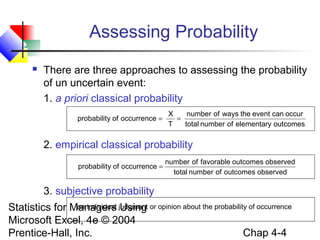
There are three approaches to assessing the probability
of un uncertain event:
1. a priori classical probability
probability of occurrence =

X
number of ways the event can occur
=
T
total number of elementary outcomes

2. empirical classical probability
probability of occurrence =

number of favorable outcomes observed
total number of outcomes observed

3. subjective probability
an individual Using
Statistics for Managers judgment or opinion about the probability of occurrence
Microsoft Excel, 4e © 2004
Chap 4-4
Prentice-Hall, Inc.
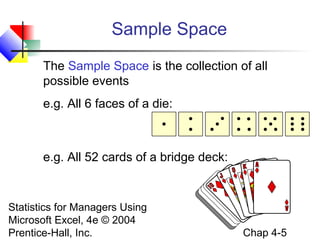
Sample Space
The Sample Space is the collection of all
possible events
e.g. All 6 faces of a die:

e.g. All 52 cards of a bridge deck:

Statistics for Managers Using
Microsoft Excel, 4e © 2004
Prentice-Hall, Inc.

Chap 4-5
Events


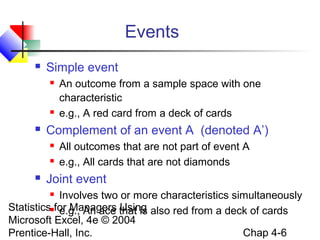
Simple event






Complement of an event A (denoted A’)





An outcome from a sample space with one
characteristic
e.g., A red card from a deck of cards
All outcomes that are not part of event A
e.g., All cards that are not diamonds

Joint event

Involves two or more characteristics simultaneously
Statisticsfor Managers that is also red from a deck of cards
e.g., An ace Using
Microsoft Excel, 4e © 2004
Chap 4-6
Prentice-Hall, Inc.

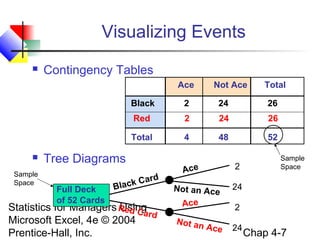
Visualizing Events


Contingency Tables
Ace

Not Ace

Total

Black

26

2

24

26

Total

Sample
Space

24

Red



2

4

48

52

Tree Diagrams
Full Deck
of 52 Cards

ar
ack C
Bl

d

Statistics for Managers Red Ca
Using
rd
Microsoft Excel, 4e © 2004
Prentice-Hall, Inc.

2

Ac e

No t a n A c e

Ace
No t a n

Sample
Space

24
2

Ace

24

Chap 4-7
Mutually Exclusive Events


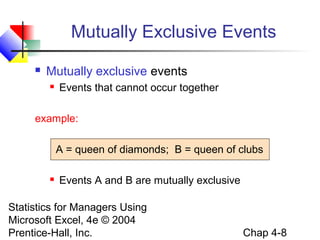
Mutually exclusive events


Events that cannot occur together

example:
A = queen of diamonds; B = queen of clubs


Events A and B are mutually exclusive

Statistics for Managers Using
Microsoft Excel, 4e © 2004
Prentice-Hall, Inc.

Chap 4-8
Collectively Exhaustive Events


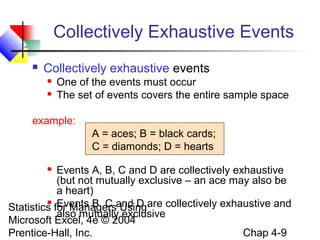
Collectively exhaustive events



One of the events must occur
The set of events covers the entire sample space

example:
A = aces; B = black cards;
C = diamonds; D = hearts
Events A, B, C and D are collectively exhaustive
(but not mutually exclusive – an ace may also be
a heart)
 Events B, C
Statistics for Managersand D are collectively exhaustive and
Using
also mutually exclusive
Microsoft Excel, 4e © 2004
Chap 4-9
Prentice-Hall, Inc.

Probability




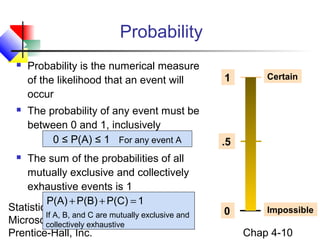
Probability is the numerical measure
of the likelihood that an event will
occur
The probability of any event must be
between 0 and 1, inclusively
0 ≤ P(A) ≤ 1 For any event A

The sum of the probabilities of all
mutually exclusive and collectively
exhaustive events is 1
P(A) + P(B) + P(C) = 1
Statistics for Managers Using
If A, B, and C are mutually exclusive and
Microsoft Excel, 4e © 2004
collectively exhaustive
Prentice-Hall, Inc.

1

Certain

.5



0

Impossible

Chap 4-10
Computing Joint and
Marginal Probabilities


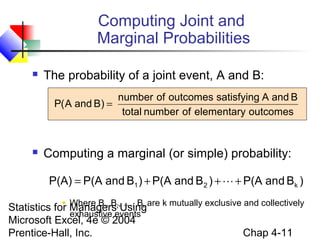
The probability of a joint event, A and B:
number of outcomes satisfying A and B
P( A and B) =
total number of elementary outcomes



Computing a marginal (or simple) probability:
P(A) = P(A and B1 ) + P(A and B 2 ) +  + P(A and Bk )

Where B1, B …, Bk
Statistics for Managers2,Usingare k mutually exclusive and collectively
exhaustive events
Microsoft Excel, 4e © 2004
Chap 4-11
Prentice-Hall, Inc.

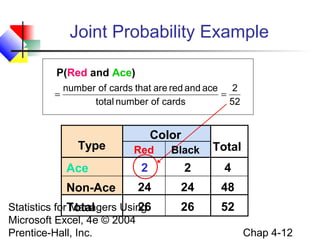
Joint Probability Example
P(Red and Ace)
=

number of cards that are red and ace 2
=
total number of cards
52

Type

Color
Red

Black

Total

Ace

2

2

4

Non-Ace

24

24

48

Statistics forTotal
Managers Using
26
Microsoft Excel, 4e © 2004
Prentice-Hall, Inc.

26

52
Chap 4-12
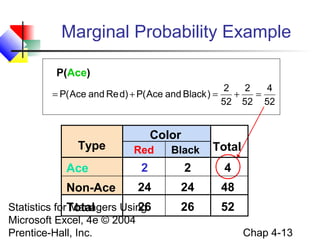
Marginal Probability Example
P(Ace)
= P( Ace and Re d) + P( Ace and Black ) =

Type

Color

2
2
4
+
=
52 52 52

Red

Black

Total

Ace

2

2

4

Non-Ace

24

24

48

Statistics forTotal
Managers Using
26
Microsoft Excel, 4e © 2004
Prentice-Hall, Inc.

26

52
Chap 4-13
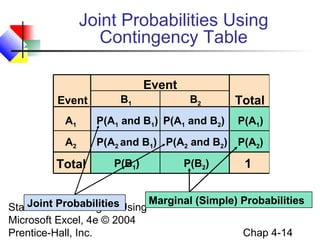
Joint Probabilities Using
Contingency Table
Event
Event

B1

B2

Total

A1

P(A1 and B1) P(A1 and B2)

A2

P(A2 and B1) P(A2 and B2) P(A2)

Total

P(B1)

P(B2)

P(A1)

1

Joint for Managers Using Marginal (Simple) Probabilities
Statistics Probabilities
Microsoft Excel, 4e © 2004
Chap 4-14
Prentice-Hall, Inc.
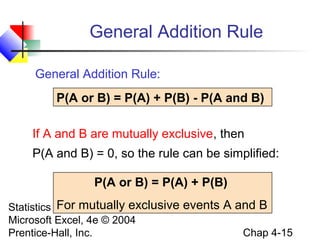
General Addition Rule
General Addition Rule:
P(A or B) = P(A) + P(B) - P(A and B)
If A and B are mutually exclusive, then
P(A and B) = 0, so the rule can be simplified:
P(A or B) = P(A) + P(B)
For mutually exclusive events A and B
Statistics for Managers Using
Microsoft Excel, 4e © 2004
Chap 4-15
Prentice-Hall, Inc.
General Addition Rule Example
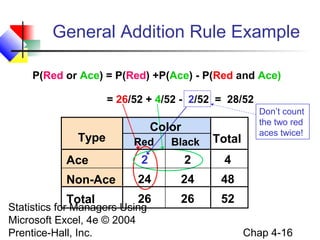
P(Red or Ace) = P(Red) +P(Ace) - P(Red and Ace)
= 26/52 + 4/52 - 2/52 = 28/52

Type

Color
Red

Black

Total

Ace

2

2

4

Non-Ace

24

24

48

Total

26

26

Don’t count
the two red
aces twice!

52

Statistics for Managers Using
Microsoft Excel, 4e © 2004
Prentice-Hall, Inc.

Chap 4-16
Computing Conditional
Probabilities


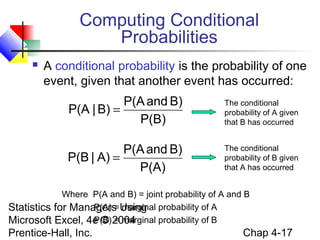
A conditional probability is the probability of one
event, given that another event has occurred:

P(A and B)
P(A | B) =
P(B)

The conditional
probability of A given
that B has occurred

P(A and B)
P(B | A) =
P(A)

The conditional
probability of B given
that A has occurred

Where P(A and B) = joint probability of A and B
P(A) = marginal
Statistics for Managers Using probability of A
P(B) = marginal probability of B
Microsoft Excel, 4e © 2004

Prentice-Hall, Inc.

Chap 4-17
Conditional Probability Example




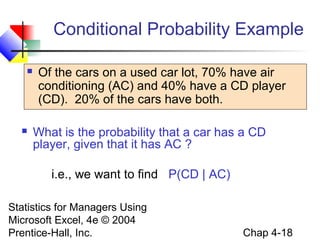
Of the cars on a used car lot, 70% have air
conditioning (AC) and 40% have a CD player
(CD). 20% of the cars have both.
What is the probability that a car has a CD
player, given that it has AC ?
i.e., we want to find P(CD | AC)

Statistics for Managers Using
Microsoft Excel, 4e © 2004
Prentice-Hall, Inc.

Chap 4-18
Conditional Probability Example
(continued)


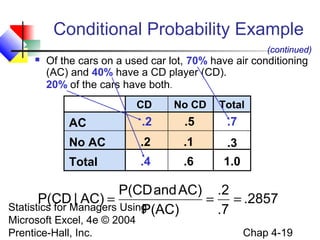
Of the cars on a used car lot, 70% have air conditioning
(AC) and 40% have a CD player (CD).
20% of the cars have both.
CD

No CD

Total

AC

.2

.5

.7

No AC

.2

.1

.3

Total

.4

.6

1.0

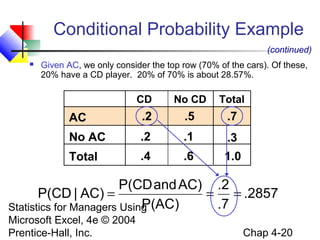
P(CD and AC) .2
P(CD | AC) =
= = .2857
Statistics for Managers Using
P(AC)
.7
Microsoft Excel, 4e © 2004
Prentice-Hall, Inc.

Chap 4-19
Conditional Probability Example
(continued)


Given AC, we only consider the top row (70% of the cars). Of these,
20% have a CD player. 20% of 70% is about 28.57%.

CD

No CD

Total

AC

.2

.5

.7

No AC

.2

.1

.3

Total

.4

.6

1.0

P(CD and AC) .2
P(CD | AC) =
= = .2857
P(AC)
.7
Statistics for Managers Using
Microsoft Excel, 4e © 2004
Prentice-Hall, Inc.

Chap 4-20
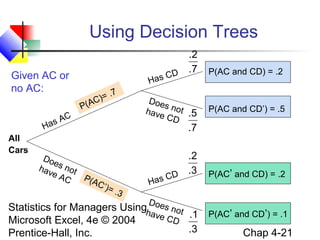
Using Decision Trees
.2
D .7
C
Has

Given AC or
no AC:
P(A
H

All
Cars

)= .
C

7

C
sA
a

Do
e
hav s not
eA
P(A
C
C’)
= .3

P(AC and CD) = .2

D oe
s no
t .5
have
CD

P(AC and CD’) = .5

.7

.2
D .3
C
Has
D

P(AC’ and CD) = .2

Statistics for Managers Usingh oes not
ave
CD .1 P(AC’ and CD’) = .1
Microsoft Excel, 4e © 2004
.3
Chap 4-21
Prentice-Hall, Inc.
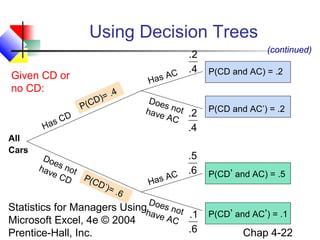
Using Decision Trees
C
as A
H

Given CD or
no CD:
P(C
H

All
Cars

C
as

)= .
D

4

D

Do
e
hav s not
eC
D P(C
D’)
= .6

.2
.4

D oe
s no
t .2
have
AC

(continued)
P(CD and AC) = .2

P(CD and AC’) = .2

.4

.5
.6
C
A
Has
D

P(CD’ and AC) = .5

Statistics for Managers Usingh oes not
ave
AC .1 P(CD’ and AC’) = .1
Microsoft Excel, 4e © 2004
.6
Chap 4-22
Prentice-Hall, Inc.
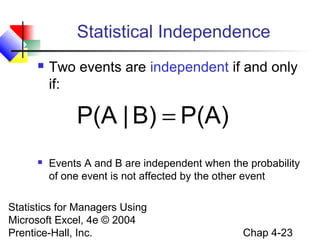
Statistical Independence


Two events are independent if and only
if:

P(A | B) = P(A)


Events A and B are independent when the probability
of one event is not affected by the other event

Statistics for Managers Using
Microsoft Excel, 4e © 2004
Prentice-Hall, Inc.

Chap 4-23
Multiplication Rules


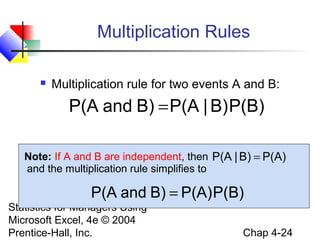
Multiplication rule for two events A and B:

P(A and B) = P(A | B) P(B)
Note: If A and B are independent, then P(A | B) = P(A)
and the multiplication rule simplifies to

P(A and B) = P(A) P(B)

Statistics for Managers Using
Microsoft Excel, 4e © 2004
Prentice-Hall, Inc.

Chap 4-24
Marginal Probability


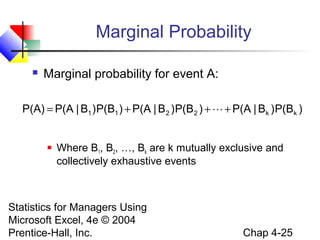
Marginal probability for event A:

P(A) = P(A | B1 ) P(B1 ) + P(A | B 2 ) P(B 2 ) +  + P(A | Bk ) P(Bk )



Where B1, B2, …, Bk are k mutually exclusive and
collectively exhaustive events

Statistics for Managers Using
Microsoft Excel, 4e © 2004
Prentice-Hall, Inc.

Chap 4-25
Bayes’ Theorem
P(A | Bi )P(Bi )
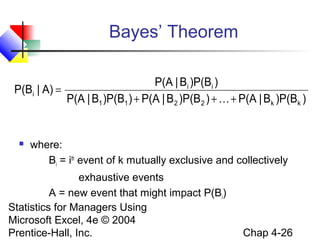
P(Bi | A) =
P(A | B1 )P(B1 ) + P(A | B 2 )P(B 2 ) +  + P(A | Bk )P(Bk )



where:
Bi = ith event of k mutually exclusive and collectively

exhaustive events
A = new event that might impact P(Bi)
Statistics for Managers Using
Microsoft Excel, 4e © 2004
Prentice-Hall, Inc.

Chap 4-26
Bayes’ Theorem Example


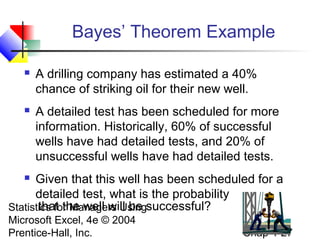
A drilling company has estimated a 40%
chance of striking oil for their new well.



A detailed test has been scheduled for more
information. Historically, 60% of successful
wells have had detailed tests, and 20% of
unsuccessful wells have had detailed tests.

Given that this well has been scheduled for a
detailed test, what is the probability
that the well will be
Statistics for Managers Usingsuccessful?


Microsoft Excel, 4e © 2004
Prentice-Hall, Inc.

Chap 4-27
Bayes’ Theorem Example
(continued)


Let S = successful well
U = unsuccessful well



P(S) = .4 , P(U) = .6



Define the detailed test event as D



Conditional probabilities:
P(D|S) = .6

(prior probabilities)

P(D|U) = .2

 Goal is to find P(S|D)
Statistics for Managers Using
Microsoft Excel, 4e © 2004
Prentice-Hall, Inc.

Chap 4-28
Bayes’ Theorem Example
(continued)

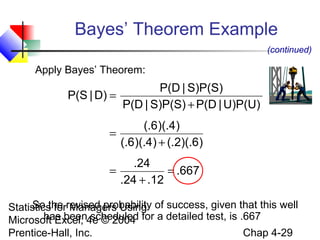
Apply Bayes’ Theorem:

P(D | S)P(S)
P(S | D) =
P(D | S)P(S) + P(D | U)P(U)
(.6)(.4)
=
(.6)(.4) + (.2)(.6)
.24
=
= .667
.24 + .12
So the Managers Using
Statistics forrevised probability of success, given that this well
has been scheduled
Microsoft Excel, 4e © 2004 for a detailed test, is .667
Chap 4-29
Prentice-Hall, Inc.
Bayes’ Theorem Example
(continued)


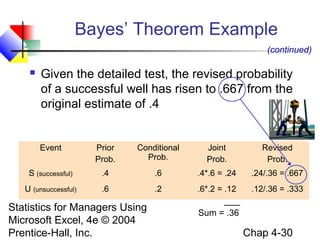
Given the detailed test, the revised probability
of a successful well has risen to .667 from the
original estimate of .4

Event

Prior
Prob.

Conditional
Prob.

Joint
Prob.

Revised
Prob.

S (successful)

.4

.6

.4*.6 = .24

.24/.36 = .667

U (unsuccessful)

.6

.2

.6*.2 = .12

.12/.36 = .333

Statistics for Managers Using
Microsoft Excel, 4e © 2004
Prentice-Hall, Inc.

Sum = .36

Chap 4-30
Chapter Summary


Discussed basic probability concepts




Examined basic probability rules




Sample spaces and events, contingency tables, simple
probability, and joint probability
General addition rule, addition rule for mutually exclusive events,
rule for collectively exhaustive events

Defined conditional probability


Statistical independence, marginal probability, decision trees,
and the multiplication rule

Discussed Bayes’ theorem
Statistics for Managers Using
Microsoft Excel, 4e © 2004
Prentice-Hall, Inc.


Chap 4-31

Chap04 basic probability

  • 1.
    Statistics for Managers UsingMicrosoft® Excel 4th Edition Chapter 4 Basic Probability Statistics for Managers Using Microsoft Excel, 4e © 2004 Prentice-Hall, Inc. Chap 4-1
  • 2.
    Chapter Goals After completingthis chapter, you should be able to:  Explain basic probability concepts and definitions  Use contingency tables to view a sample space  Apply common rules of probability  Compute conditional probabilities  Determine whether events are statistically independent  Use Bayes’ Theorem Statistics for Managers Using for conditional probabilities Microsoft Excel, 4e © 2004 Prentice-Hall, Inc. Chap 4-2
  • 3.
    Important Terms     Probability –the chance that an uncertain event will occur (always between 0 and 1) Event – Each possible type of occurrence or outcome Simple Event – an event that can be described by a single characteristic Sample Space – the collection of all possible events Statistics for Managers Using Microsoft Excel, 4e © 2004 Prentice-Hall, Inc. Chap 4-3
  • 4.
    Assessing Probability  There arethree approaches to assessing the probability of un uncertain event: 1. a priori classical probability probability of occurrence = X number of ways the event can occur = T total number of elementary outcomes 2. empirical classical probability probability of occurrence = number of favorable outcomes observed total number of outcomes observed 3. subjective probability an individual Using Statistics for Managers judgment or opinion about the probability of occurrence Microsoft Excel, 4e © 2004 Chap 4-4 Prentice-Hall, Inc.
  • 5.
    Sample Space The SampleSpace is the collection of all possible events e.g. All 6 faces of a die: e.g. All 52 cards of a bridge deck: Statistics for Managers Using Microsoft Excel, 4e © 2004 Prentice-Hall, Inc. Chap 4-5
  • 6.
    Events  Simple event    Complement ofan event A (denoted A’)    An outcome from a sample space with one characteristic e.g., A red card from a deck of cards All outcomes that are not part of event A e.g., All cards that are not diamonds Joint event Involves two or more characteristics simultaneously Statisticsfor Managers that is also red from a deck of cards e.g., An ace Using Microsoft Excel, 4e © 2004 Chap 4-6 Prentice-Hall, Inc. 
  • 7.
    Visualizing Events  Contingency Tables Ace NotAce Total Black 26 2 24 26 Total Sample Space 24 Red  2 4 48 52 Tree Diagrams Full Deck of 52 Cards ar ack C Bl d Statistics for Managers Red Ca Using rd Microsoft Excel, 4e © 2004 Prentice-Hall, Inc. 2 Ac e No t a n A c e Ace No t a n Sample Space 24 2 Ace 24 Chap 4-7
  • 8.
    Mutually Exclusive Events  Mutuallyexclusive events  Events that cannot occur together example: A = queen of diamonds; B = queen of clubs  Events A and B are mutually exclusive Statistics for Managers Using Microsoft Excel, 4e © 2004 Prentice-Hall, Inc. Chap 4-8
  • 9.
    Collectively Exhaustive Events  Collectivelyexhaustive events   One of the events must occur The set of events covers the entire sample space example: A = aces; B = black cards; C = diamonds; D = hearts Events A, B, C and D are collectively exhaustive (but not mutually exclusive – an ace may also be a heart)  Events B, C Statistics for Managersand D are collectively exhaustive and Using also mutually exclusive Microsoft Excel, 4e © 2004 Chap 4-9 Prentice-Hall, Inc. 
  • 10.
    Probability   Probability is thenumerical measure of the likelihood that an event will occur The probability of any event must be between 0 and 1, inclusively 0 ≤ P(A) ≤ 1 For any event A The sum of the probabilities of all mutually exclusive and collectively exhaustive events is 1 P(A) + P(B) + P(C) = 1 Statistics for Managers Using If A, B, and C are mutually exclusive and Microsoft Excel, 4e © 2004 collectively exhaustive Prentice-Hall, Inc. 1 Certain .5  0 Impossible Chap 4-10
  • 11.
    Computing Joint and MarginalProbabilities  The probability of a joint event, A and B: number of outcomes satisfying A and B P( A and B) = total number of elementary outcomes  Computing a marginal (or simple) probability: P(A) = P(A and B1 ) + P(A and B 2 ) +  + P(A and Bk ) Where B1, B …, Bk Statistics for Managers2,Usingare k mutually exclusive and collectively exhaustive events Microsoft Excel, 4e © 2004 Chap 4-11 Prentice-Hall, Inc. 
  • 12.
    Joint Probability Example P(Redand Ace) = number of cards that are red and ace 2 = total number of cards 52 Type Color Red Black Total Ace 2 2 4 Non-Ace 24 24 48 Statistics forTotal Managers Using 26 Microsoft Excel, 4e © 2004 Prentice-Hall, Inc. 26 52 Chap 4-12
  • 13.
    Marginal Probability Example P(Ace) =P( Ace and Re d) + P( Ace and Black ) = Type Color 2 2 4 + = 52 52 52 Red Black Total Ace 2 2 4 Non-Ace 24 24 48 Statistics forTotal Managers Using 26 Microsoft Excel, 4e © 2004 Prentice-Hall, Inc. 26 52 Chap 4-13
  • 14.
    Joint Probabilities Using ContingencyTable Event Event B1 B2 Total A1 P(A1 and B1) P(A1 and B2) A2 P(A2 and B1) P(A2 and B2) P(A2) Total P(B1) P(B2) P(A1) 1 Joint for Managers Using Marginal (Simple) Probabilities Statistics Probabilities Microsoft Excel, 4e © 2004 Chap 4-14 Prentice-Hall, Inc.
  • 15.
    General Addition Rule GeneralAddition Rule: P(A or B) = P(A) + P(B) - P(A and B) If A and B are mutually exclusive, then P(A and B) = 0, so the rule can be simplified: P(A or B) = P(A) + P(B) For mutually exclusive events A and B Statistics for Managers Using Microsoft Excel, 4e © 2004 Chap 4-15 Prentice-Hall, Inc.
  • 16.
    General Addition RuleExample P(Red or Ace) = P(Red) +P(Ace) - P(Red and Ace) = 26/52 + 4/52 - 2/52 = 28/52 Type Color Red Black Total Ace 2 2 4 Non-Ace 24 24 48 Total 26 26 Don’t count the two red aces twice! 52 Statistics for Managers Using Microsoft Excel, 4e © 2004 Prentice-Hall, Inc. Chap 4-16
  • 17.
    Computing Conditional Probabilities  A conditionalprobability is the probability of one event, given that another event has occurred: P(A and B) P(A | B) = P(B) The conditional probability of A given that B has occurred P(A and B) P(B | A) = P(A) The conditional probability of B given that A has occurred Where P(A and B) = joint probability of A and B P(A) = marginal Statistics for Managers Using probability of A P(B) = marginal probability of B Microsoft Excel, 4e © 2004 Prentice-Hall, Inc. Chap 4-17
  • 18.
    Conditional Probability Example   Ofthe cars on a used car lot, 70% have air conditioning (AC) and 40% have a CD player (CD). 20% of the cars have both. What is the probability that a car has a CD player, given that it has AC ? i.e., we want to find P(CD | AC) Statistics for Managers Using Microsoft Excel, 4e © 2004 Prentice-Hall, Inc. Chap 4-18
  • 19.
    Conditional Probability Example (continued)  Ofthe cars on a used car lot, 70% have air conditioning (AC) and 40% have a CD player (CD). 20% of the cars have both. CD No CD Total AC .2 .5 .7 No AC .2 .1 .3 Total .4 .6 1.0 P(CD and AC) .2 P(CD | AC) = = = .2857 Statistics for Managers Using P(AC) .7 Microsoft Excel, 4e © 2004 Prentice-Hall, Inc. Chap 4-19
  • 20.
    Conditional Probability Example (continued)  GivenAC, we only consider the top row (70% of the cars). Of these, 20% have a CD player. 20% of 70% is about 28.57%. CD No CD Total AC .2 .5 .7 No AC .2 .1 .3 Total .4 .6 1.0 P(CD and AC) .2 P(CD | AC) = = = .2857 P(AC) .7 Statistics for Managers Using Microsoft Excel, 4e © 2004 Prentice-Hall, Inc. Chap 4-20
  • 21.
    Using Decision Trees .2 D.7 C Has Given AC or no AC: P(A H All Cars )= . C 7 C sA a Do e hav s not eA P(A C C’) = .3 P(AC and CD) = .2 D oe s no t .5 have CD P(AC and CD’) = .5 .7 .2 D .3 C Has D P(AC’ and CD) = .2 Statistics for Managers Usingh oes not ave CD .1 P(AC’ and CD’) = .1 Microsoft Excel, 4e © 2004 .3 Chap 4-21 Prentice-Hall, Inc.
  • 22.
    Using Decision Trees C asA H Given CD or no CD: P(C H All Cars C as )= . D 4 D Do e hav s not eC D P(C D’) = .6 .2 .4 D oe s no t .2 have AC (continued) P(CD and AC) = .2 P(CD and AC’) = .2 .4 .5 .6 C A Has D P(CD’ and AC) = .5 Statistics for Managers Usingh oes not ave AC .1 P(CD’ and AC’) = .1 Microsoft Excel, 4e © 2004 .6 Chap 4-22 Prentice-Hall, Inc.
  • 23.
    Statistical Independence  Two eventsare independent if and only if: P(A | B) = P(A)  Events A and B are independent when the probability of one event is not affected by the other event Statistics for Managers Using Microsoft Excel, 4e © 2004 Prentice-Hall, Inc. Chap 4-23
  • 24.
    Multiplication Rules  Multiplication rulefor two events A and B: P(A and B) = P(A | B) P(B) Note: If A and B are independent, then P(A | B) = P(A) and the multiplication rule simplifies to P(A and B) = P(A) P(B) Statistics for Managers Using Microsoft Excel, 4e © 2004 Prentice-Hall, Inc. Chap 4-24
  • 25.
    Marginal Probability  Marginal probabilityfor event A: P(A) = P(A | B1 ) P(B1 ) + P(A | B 2 ) P(B 2 ) +  + P(A | Bk ) P(Bk )  Where B1, B2, …, Bk are k mutually exclusive and collectively exhaustive events Statistics for Managers Using Microsoft Excel, 4e © 2004 Prentice-Hall, Inc. Chap 4-25
  • 26.
    Bayes’ Theorem P(A |Bi )P(Bi ) P(Bi | A) = P(A | B1 )P(B1 ) + P(A | B 2 )P(B 2 ) +  + P(A | Bk )P(Bk )  where: Bi = ith event of k mutually exclusive and collectively exhaustive events A = new event that might impact P(Bi) Statistics for Managers Using Microsoft Excel, 4e © 2004 Prentice-Hall, Inc. Chap 4-26
  • 27.
    Bayes’ Theorem Example  Adrilling company has estimated a 40% chance of striking oil for their new well.  A detailed test has been scheduled for more information. Historically, 60% of successful wells have had detailed tests, and 20% of unsuccessful wells have had detailed tests. Given that this well has been scheduled for a detailed test, what is the probability that the well will be Statistics for Managers Usingsuccessful?  Microsoft Excel, 4e © 2004 Prentice-Hall, Inc. Chap 4-27
  • 28.
    Bayes’ Theorem Example (continued)  LetS = successful well U = unsuccessful well  P(S) = .4 , P(U) = .6  Define the detailed test event as D  Conditional probabilities: P(D|S) = .6 (prior probabilities) P(D|U) = .2  Goal is to find P(S|D) Statistics for Managers Using Microsoft Excel, 4e © 2004 Prentice-Hall, Inc. Chap 4-28
  • 29.
    Bayes’ Theorem Example (continued) ApplyBayes’ Theorem: P(D | S)P(S) P(S | D) = P(D | S)P(S) + P(D | U)P(U) (.6)(.4) = (.6)(.4) + (.2)(.6) .24 = = .667 .24 + .12 So the Managers Using Statistics forrevised probability of success, given that this well has been scheduled Microsoft Excel, 4e © 2004 for a detailed test, is .667 Chap 4-29 Prentice-Hall, Inc.
  • 30.
    Bayes’ Theorem Example (continued)  Giventhe detailed test, the revised probability of a successful well has risen to .667 from the original estimate of .4 Event Prior Prob. Conditional Prob. Joint Prob. Revised Prob. S (successful) .4 .6 .4*.6 = .24 .24/.36 = .667 U (unsuccessful) .6 .2 .6*.2 = .12 .12/.36 = .333 Statistics for Managers Using Microsoft Excel, 4e © 2004 Prentice-Hall, Inc. Sum = .36 Chap 4-30
  • 31.
    Chapter Summary  Discussed basicprobability concepts   Examined basic probability rules   Sample spaces and events, contingency tables, simple probability, and joint probability General addition rule, addition rule for mutually exclusive events, rule for collectively exhaustive events Defined conditional probability  Statistical independence, marginal probability, decision trees, and the multiplication rule Discussed Bayes’ theorem Statistics for Managers Using Microsoft Excel, 4e © 2004 Prentice-Hall, Inc.  Chap 4-31

Editor's Notes