Statistics for Managers
Using Microsoft® Excel
4th Edition
Chapter 1
Introduction and Data Collection

Statistics for Managers Using Microsoft Excel, 4e © 2004 Prentice-Hall, Inc.

Chap 1-1
Chapter Goals
After completing this chapter, you should be
able to:


Explain key definitions:
♦ Population vs. Sample

♦ Primary vs. Secondary Data

♦ Parameter vs. Statistic

♦ Descriptive vs. Inferential Statistics



Describe key data collection methods



Describe different sampling methods




Probability Samples vs. Non-probability Samples

Select a random sample using a random numbers table

Identify types of data and levels of measurement
Statistics for Managers Using
 Describe
Microsoft Excel, the © 2004 types of survey error
4e different
Chap 1-2
Prentice-Hall, Inc.

Why a Manager Needs to
Know about Statistics
To know how to:


properly present information



draw conclusions about populations based
on sample information



improve processes



obtain reliable forecasts

Statistics for Managers Using
Microsoft Excel, 4e © 2004
Prentice-Hall, Inc.

Chap 1-3
Key Definitions


A population (universe) is the collection of all
items or things under consideration



A sample is a portion of the population
selected for analysis



A parameter is a summary measure that
describes a characteristic of the population

A statistic is a summary measure computed
from a sample to describe a characteristic of
Statistics for Managers Using
the population


Microsoft Excel, 4e © 2004
Prentice-Hall, Inc.

Chap 1-4
Population vs. Sample
Population
a b

Sample

cd

b

ef gh i jk l m n
o p q rs t u v w
x y

z

Measures used to describe
the population are Using
Statistics for Managerscalled
parameters
Microsoft Excel, 4e © 2004

Prentice-Hall, Inc.

c

gi
o

n
r

u

y
Measures computed from
sample data are called
statistics

Chap 1-5
Two Branches of Statistics


Descriptive statistics




Collecting, summarizing, and describing data

Inferential statistics


Drawing conclusions and/or making decisions
concerning a population based only on sample
data

Statistics for Managers Using
Microsoft Excel, 4e © 2004
Prentice-Hall, Inc.

Chap 1-6
Descriptive Statistics


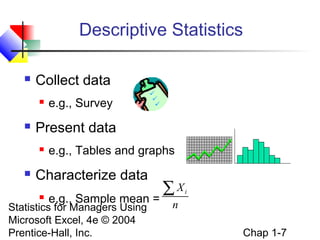
Collect data




Present data




e.g., Survey

e.g., Tables and graphs

Characterize data


e.g., Sample mean =

Statistics for Managers Using
Microsoft Excel, 4e © 2004
Prentice-Hall, Inc.

∑X

i

n

Chap 1-7
Inferential Statistics


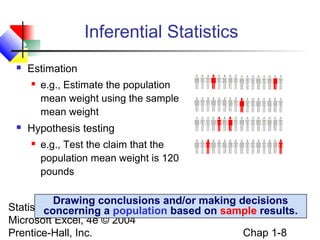
Estimation




e.g., Estimate the population
mean weight using the sample
mean weight

Hypothesis testing


e.g., Test the claim that the
population mean weight is 120
pounds

Drawing conclusions and/or making decisions
Statistics for Managers Using
concerning a population based on sample results.
Microsoft Excel, 4e © 2004
Chap 1-8
Prentice-Hall, Inc.
Why We Need Data


To provide input to survey



To provide input to study



To measure performance of service or
production process



To evaluate conformance to standards



To assist in formulating alternative courses of
action

 To for Managers Using
Statistics satisfy curiosity
Microsoft Excel, 4e © 2004
Prentice-Hall, Inc.

Chap 1-9
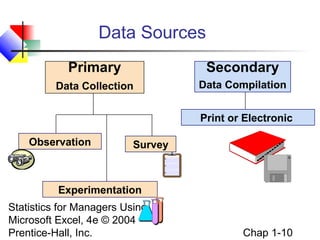
Data Sources
Primary

Secondary

Data Collection

Data Compilation
Print or Electronic

Observation

Survey

Experimentation
Statistics for Managers Using
Microsoft Excel, 4e © 2004
Prentice-Hall, Inc.

Chap 1-10
Reasons for Drawing a Sample


Less time consuming than a census



Less costly to administer than a census



Less cumbersome and more practical to
administer than a census of the targeted
population

Statistics for Managers Using
Microsoft Excel, 4e © 2004
Prentice-Hall, Inc.

Chap 1-11
Types of Samples Used


Non – probability Sample




Items included are chosen without regard to
their probability of occurrence

Probability Sample


Items in the sample are chosen on the basis
of known probabilities

Statistics for Managers Using
Microsoft Excel, 4e © 2004
Prentice-Hall, Inc.

Chap 1-12
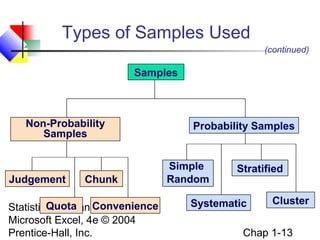
Types of Samples Used
(continued)

Samples

Non-Probability
Samples

Judgement

Chunk

Quota Convenience
Statistics for Managers Using
Microsoft Excel, 4e © 2004
Prentice-Hall, Inc.

Probability Samples

Simple
Random

Stratified

Systematic

Cluster

Chap 1-13
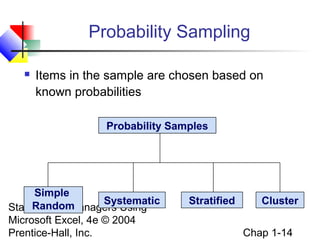
Probability Sampling


Items in the sample are chosen based on
known probabilities
Probability Samples

Simple
Systematic
Random
Statistics for Managers Using
Microsoft Excel, 4e © 2004
Prentice-Hall, Inc.

Stratified

Cluster
Chap 1-14
Simple Random Samples


Every individual or item from the frame has an
equal chance of being selected



Selection may be with replacement or without
replacement



Samples obtained from table of random
numbers or computer random number
generators

Statistics for Managers Using
Microsoft Excel, 4e © 2004
Prentice-Hall, Inc.

Chap 1-15
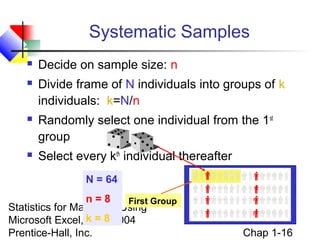
Systematic Samples


Decide on sample size: n



Divide frame of N individuals into groups of k
individuals: k=N/n



Randomly select one individual from the 1st
group



Select every kth individual thereafter
N = 64

n=8
First Group
Statistics for Managers Using
Microsoft Excel, k =© 2004
4e 8
Prentice-Hall, Inc.

Chap 1-16
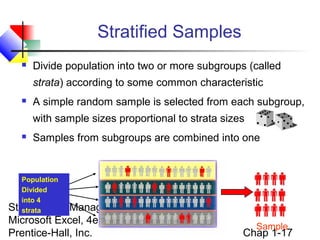
Stratified Samples


Divide population into two or more subgroups (called
strata) according to some common characteristic



A simple random sample is selected from each subgroup,
with sample sizes proportional to strata sizes



Samples from subgroups are combined into one

Population
Divided
into 4
Statistics for
strata

Managers Using
Microsoft Excel, 4e © 2004
Prentice-Hall, Inc.

Sample

Chap 1-17
Cluster Samples


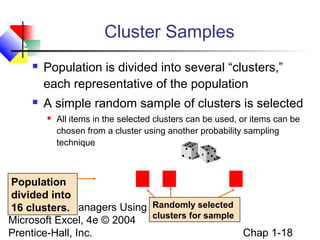
Population is divided into several “clusters,”
each representative of the population



A simple random sample of clusters is selected


All items in the selected clusters can be used, or items can be
chosen from a cluster using another probability sampling
technique

Population
divided into
Statistics for Managers Using Randomly selected
16 clusters.
clusters for sample
Microsoft Excel, 4e © 2004
Chap 1-18
Prentice-Hall, Inc.
Advantages and Disadvantages


Simple random sample and systematic sample





Stratified sample




Simple to use
May not be a good representation of the population’s
underlying characteristics
Ensures representation of individuals across the
entire population

Cluster sample

More cost effective
 Less efficient (need
Statistics for Managers Using larger sample to acquire the
same 4e © 2004
Microsoft Excel, level of precision)
Chap 1-19
Prentice-Hall, Inc.

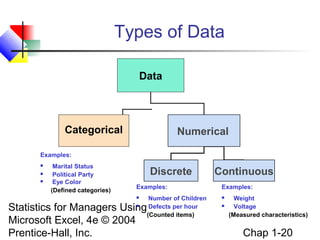
Types of Data
Data

Categorical

Numerical

Examples:




Marital Status
Political Party
Eye Color
(Defined categories)

Discrete
Examples:


Number of Children
Defects per hour
(Counted items)

Statistics for Managers Using
Microsoft Excel, 4e © 2004
Prentice-Hall, Inc.


Continuous
Examples:



Weight
Voltage
(Measured characteristics)

Chap 1-20
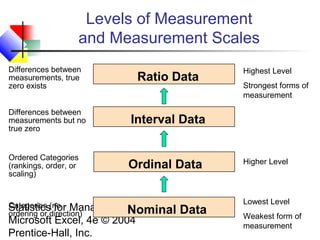
Levels of Measurement
and Measurement Scales
Differences between
measurements, true
zero exists

Ratio Data

Differences between
measurements but no
true zero

Interval Data

Ordered Categories
(rankings, order, or
scaling)

Ordinal Data

Categories for
Statistics(no Managers
ordering or direction)

Using
Nominal Data
Microsoft Excel, 4e © 2004
Prentice-Hall, Inc.

Highest Level
Strongest forms of
measurement

Higher Level

Lowest Level
Weakest form of
measurement
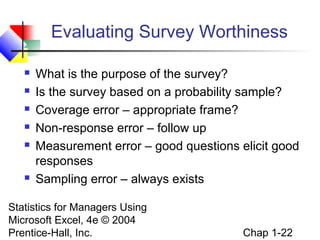
Evaluating Survey Worthiness








What is the purpose of the survey?
Is the survey based on a probability sample?
Coverage error – appropriate frame?
Non-response error – follow up
Measurement error – good questions elicit good
responses
Sampling error – always exists

Statistics for Managers Using
Microsoft Excel, 4e © 2004
Prentice-Hall, Inc.

Chap 1-22
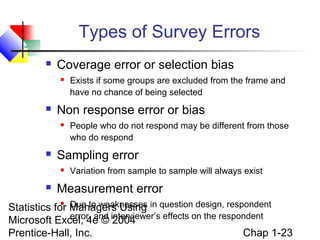
Types of Survey Errors


Coverage error or selection bias




Non response error or bias




People who do not respond may be different from those
who do respond

Sampling error




Exists if some groups are excluded from the frame and
have no chance of being selected

Variation from sample to sample will always exist

Measurement error

Due to weaknesses
Statistics for Managers Using in question design, respondent
error, and
Microsoft Excel, 4e © interviewer’s effects on the respondent
2004
Chap 1-23
Prentice-Hall, Inc.

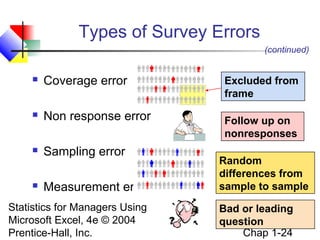
Types of Survey Errors
(continued)


Coverage error



Non response error



Sampling error



Measurement error

Statistics for Managers Using
Microsoft Excel, 4e © 2004
Prentice-Hall, Inc.

Excluded from
frame
Follow up on
nonresponses
Random
differences from
sample to sample
Bad or leading
question
Chap 1-24
Chapter Summary


Reviewed why a manager needs to know statistics



Introduced key definitions:
♦ Population vs. Sample

♦ Primary vs. Secondary data types

♦ Qualitative vs. Qualitative data

♦ Time Series vs. Cross-Sectional data



Examined descriptive vs. inferential statistics



Described different types of samples

Reviewed data types and measurement levels
 Examined survey worthiness and types of survey
Statistics for Managers Using
errors
Microsoft Excel, 4e © 2004


Prentice-Hall, Inc.

Chap 1-25

Chap01 intro & data collection

  • 1.
    Statistics for Managers UsingMicrosoft® Excel 4th Edition Chapter 1 Introduction and Data Collection Statistics for Managers Using Microsoft Excel, 4e © 2004 Prentice-Hall, Inc. Chap 1-1
  • 2.
    Chapter Goals After completingthis chapter, you should be able to:  Explain key definitions: ♦ Population vs. Sample ♦ Primary vs. Secondary Data ♦ Parameter vs. Statistic ♦ Descriptive vs. Inferential Statistics  Describe key data collection methods  Describe different sampling methods   Probability Samples vs. Non-probability Samples Select a random sample using a random numbers table Identify types of data and levels of measurement Statistics for Managers Using  Describe Microsoft Excel, the © 2004 types of survey error 4e different Chap 1-2 Prentice-Hall, Inc. 
  • 3.
    Why a ManagerNeeds to Know about Statistics To know how to:  properly present information  draw conclusions about populations based on sample information  improve processes  obtain reliable forecasts Statistics for Managers Using Microsoft Excel, 4e © 2004 Prentice-Hall, Inc. Chap 1-3
  • 4.
    Key Definitions  A population(universe) is the collection of all items or things under consideration  A sample is a portion of the population selected for analysis  A parameter is a summary measure that describes a characteristic of the population A statistic is a summary measure computed from a sample to describe a characteristic of Statistics for Managers Using the population  Microsoft Excel, 4e © 2004 Prentice-Hall, Inc. Chap 1-4
  • 5.
    Population vs. Sample Population ab Sample cd b ef gh i jk l m n o p q rs t u v w x y z Measures used to describe the population are Using Statistics for Managerscalled parameters Microsoft Excel, 4e © 2004 Prentice-Hall, Inc. c gi o n r u y Measures computed from sample data are called statistics Chap 1-5
  • 6.
    Two Branches ofStatistics  Descriptive statistics   Collecting, summarizing, and describing data Inferential statistics  Drawing conclusions and/or making decisions concerning a population based only on sample data Statistics for Managers Using Microsoft Excel, 4e © 2004 Prentice-Hall, Inc. Chap 1-6
  • 7.
    Descriptive Statistics  Collect data   Presentdata   e.g., Survey e.g., Tables and graphs Characterize data  e.g., Sample mean = Statistics for Managers Using Microsoft Excel, 4e © 2004 Prentice-Hall, Inc. ∑X i n Chap 1-7
  • 8.
    Inferential Statistics  Estimation   e.g., Estimatethe population mean weight using the sample mean weight Hypothesis testing  e.g., Test the claim that the population mean weight is 120 pounds Drawing conclusions and/or making decisions Statistics for Managers Using concerning a population based on sample results. Microsoft Excel, 4e © 2004 Chap 1-8 Prentice-Hall, Inc.
  • 9.
    Why We NeedData  To provide input to survey  To provide input to study  To measure performance of service or production process  To evaluate conformance to standards  To assist in formulating alternative courses of action  To for Managers Using Statistics satisfy curiosity Microsoft Excel, 4e © 2004 Prentice-Hall, Inc. Chap 1-9
  • 10.
    Data Sources Primary Secondary Data Collection DataCompilation Print or Electronic Observation Survey Experimentation Statistics for Managers Using Microsoft Excel, 4e © 2004 Prentice-Hall, Inc. Chap 1-10
  • 11.
    Reasons for Drawinga Sample  Less time consuming than a census  Less costly to administer than a census  Less cumbersome and more practical to administer than a census of the targeted population Statistics for Managers Using Microsoft Excel, 4e © 2004 Prentice-Hall, Inc. Chap 1-11
  • 12.
    Types of SamplesUsed  Non – probability Sample   Items included are chosen without regard to their probability of occurrence Probability Sample  Items in the sample are chosen on the basis of known probabilities Statistics for Managers Using Microsoft Excel, 4e © 2004 Prentice-Hall, Inc. Chap 1-12
  • 13.
    Types of SamplesUsed (continued) Samples Non-Probability Samples Judgement Chunk Quota Convenience Statistics for Managers Using Microsoft Excel, 4e © 2004 Prentice-Hall, Inc. Probability Samples Simple Random Stratified Systematic Cluster Chap 1-13
  • 14.
    Probability Sampling  Items inthe sample are chosen based on known probabilities Probability Samples Simple Systematic Random Statistics for Managers Using Microsoft Excel, 4e © 2004 Prentice-Hall, Inc. Stratified Cluster Chap 1-14
  • 15.
    Simple Random Samples  Everyindividual or item from the frame has an equal chance of being selected  Selection may be with replacement or without replacement  Samples obtained from table of random numbers or computer random number generators Statistics for Managers Using Microsoft Excel, 4e © 2004 Prentice-Hall, Inc. Chap 1-15
  • 16.
    Systematic Samples  Decide onsample size: n  Divide frame of N individuals into groups of k individuals: k=N/n  Randomly select one individual from the 1st group  Select every kth individual thereafter N = 64 n=8 First Group Statistics for Managers Using Microsoft Excel, k =© 2004 4e 8 Prentice-Hall, Inc. Chap 1-16
  • 17.
    Stratified Samples  Divide populationinto two or more subgroups (called strata) according to some common characteristic  A simple random sample is selected from each subgroup, with sample sizes proportional to strata sizes  Samples from subgroups are combined into one Population Divided into 4 Statistics for strata Managers Using Microsoft Excel, 4e © 2004 Prentice-Hall, Inc. Sample Chap 1-17
  • 18.
    Cluster Samples  Population isdivided into several “clusters,” each representative of the population  A simple random sample of clusters is selected  All items in the selected clusters can be used, or items can be chosen from a cluster using another probability sampling technique Population divided into Statistics for Managers Using Randomly selected 16 clusters. clusters for sample Microsoft Excel, 4e © 2004 Chap 1-18 Prentice-Hall, Inc.
  • 19.
    Advantages and Disadvantages  Simplerandom sample and systematic sample    Stratified sample   Simple to use May not be a good representation of the population’s underlying characteristics Ensures representation of individuals across the entire population Cluster sample More cost effective  Less efficient (need Statistics for Managers Using larger sample to acquire the same 4e © 2004 Microsoft Excel, level of precision) Chap 1-19 Prentice-Hall, Inc. 
  • 20.
    Types of Data Data Categorical Numerical Examples:    MaritalStatus Political Party Eye Color (Defined categories) Discrete Examples:  Number of Children Defects per hour (Counted items) Statistics for Managers Using Microsoft Excel, 4e © 2004 Prentice-Hall, Inc.  Continuous Examples:   Weight Voltage (Measured characteristics) Chap 1-20
  • 21.
    Levels of Measurement andMeasurement Scales Differences between measurements, true zero exists Ratio Data Differences between measurements but no true zero Interval Data Ordered Categories (rankings, order, or scaling) Ordinal Data Categories for Statistics(no Managers ordering or direction) Using Nominal Data Microsoft Excel, 4e © 2004 Prentice-Hall, Inc. Highest Level Strongest forms of measurement Higher Level Lowest Level Weakest form of measurement
  • 22.
    Evaluating Survey Worthiness       Whatis the purpose of the survey? Is the survey based on a probability sample? Coverage error – appropriate frame? Non-response error – follow up Measurement error – good questions elicit good responses Sampling error – always exists Statistics for Managers Using Microsoft Excel, 4e © 2004 Prentice-Hall, Inc. Chap 1-22
  • 23.
    Types of SurveyErrors  Coverage error or selection bias   Non response error or bias   People who do not respond may be different from those who do respond Sampling error   Exists if some groups are excluded from the frame and have no chance of being selected Variation from sample to sample will always exist Measurement error Due to weaknesses Statistics for Managers Using in question design, respondent error, and Microsoft Excel, 4e © interviewer’s effects on the respondent 2004 Chap 1-23 Prentice-Hall, Inc. 
  • 24.
    Types of SurveyErrors (continued)  Coverage error  Non response error  Sampling error  Measurement error Statistics for Managers Using Microsoft Excel, 4e © 2004 Prentice-Hall, Inc. Excluded from frame Follow up on nonresponses Random differences from sample to sample Bad or leading question Chap 1-24
  • 25.
    Chapter Summary  Reviewed whya manager needs to know statistics  Introduced key definitions: ♦ Population vs. Sample ♦ Primary vs. Secondary data types ♦ Qualitative vs. Qualitative data ♦ Time Series vs. Cross-Sectional data  Examined descriptive vs. inferential statistics  Described different types of samples Reviewed data types and measurement levels  Examined survey worthiness and types of survey Statistics for Managers Using errors Microsoft Excel, 4e © 2004  Prentice-Hall, Inc. Chap 1-25