Statistics for Managers
Using Microsoft® Excel
4th Edition
Chapter 16
Decision Making

Statistics for Managers Using Microsoft Excel, 4e © 2004 Prentice-Hall, Inc.

Chap 16-1
Chapter Goals
After completing this chapter, you should be
able to:


Describe basic features of decision making



Construct a payoff table and an opportunity-loss table



Define and apply the expected value criterion for decision
making



Compute the value of perfect information

Describe utility and attitudes toward risk
Statistics for Managers Using
Microsoft Excel, 4e © 2004
Prentice-Hall, Inc.


Chap 16-2
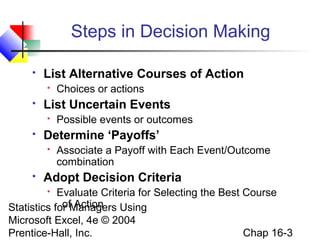
Steps in Decision Making


List Alternative Courses of Action




List Uncertain Events




Possible events or outcomes

Determine ‘Payoffs’




Choices or actions
Associate a Payoff with Each Event/Outcome
combination

Adopt Decision Criteria

Evaluate Criteria for Selecting the Best Course
of Action
Statistics for Managers Using
Microsoft Excel, 4e © 2004
Chap 16-3
Prentice-Hall, Inc.

List Possible Actions or Events
Two
Methods of
Listing
Payoff Table

Statistics for Managers Using
Microsoft Excel, 4e © 2004
Prentice-Hall, Inc.

Decision Tree

Chap 16-4
A Payoff Table
A payoff table shows alternatives,
states of nature, and payoffs
Investment
Choice
(Action)

Profit in $1,000’s
(Events)
Strong
Economy

Large factory
200
Statistics for Managers Using
Average factory
90
Microsoftfactory 4e © 2004
Small Excel,
40
Prentice-Hall, Inc.

Stable
Economy

50
120
30

Weak
Economy

-120
-30
20
Chap 16-5
Sample Decision Tree
Strong Economy

90

Stable Economy

120
-30

Strong Economy

Statistics for Managers Using
Microsoft Excel, 4e © 2004
Prentice-Hall, Inc.

-120

Weak Economy

Small factory

50

Strong Economy

Average factory

Stable Economy
Weak Economy

Large factory

200

40

Stable Economy

30

Weak Economy

20

Payoffs
Chap 16-6
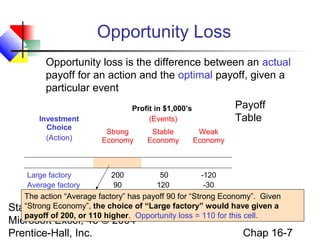
Opportunity Loss
Opportunity loss is the difference between an actual
payoff for an action and the optimal payoff, given a
particular event
Investment
Choice
(Action)

Payoff
Table

Profit in $1,000’s
(Events)
Strong
Economy

Stable
Economy

Weak
Economy

Large factory
200
50
-120
Average factory
90
120
-30
Small factory
40
30
20
The action “Average factory” has payoff 90 for “Strong Economy”. Given

“Strong for Managers Using
Statistics Economy”, the choice of “Large factory” would have given a
payoff of 200, or 110 higher. Opportunity loss = 110 for this cell.
Microsoft Excel, 4e © 2004
Chap 16-7
Prentice-Hall, Inc.
Opportunity Loss
(continued)
Investment
Choice
(Action)

Large factory
Average factory
Small factory

Payoff
Table

Profit in $1,000’s
(States of Nature)
Strong
Economy

200
90
40

Stable
Economy

50
120
30
Investment
Choice
(Action)

Statistics for Managers Using
Microsoft Excel, 4e © Large factory
2004
Average factory
Prentice-Hall, Inc.

Weak
Economy

Opportunity
Loss Table

-120
-30
20
Opportunity Loss in $1,000’s
(Events)
Strong
Economy

0
110

Stable
Economy

70
0
Chap

Weak
Economy

140
50
16-8
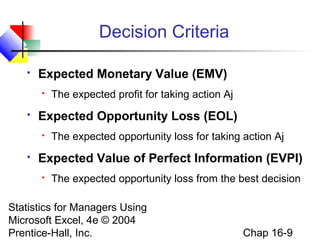
Decision Criteria


Expected Monetary Value (EMV)




Expected Opportunity Loss (EOL)




The expected profit for taking action Aj

The expected opportunity loss for taking action Aj

Expected Value of Perfect Information (EVPI)


The expected opportunity loss from the best decision

Statistics for Managers Using
Microsoft Excel, 4e © 2004
Prentice-Hall, Inc.

Chap 16-9
Expected Monetary Value
Solution
Goal: Maximize expected value


The expected monetary value is the weighted
average payoff, given specified probabilities for
each event
N

EMV( j) = ∑ x ijPi
i=1

Where EMV(j) = expected monetary value of action j
xij = payoff for action j when event i occurs

Statistics for Managers Using
P = probability of event i
Microsoft Excel, 4e ©i 2004
Prentice-Hall, Inc.

Chap 16-10
Expected Monetary Value
Solution

(continued)



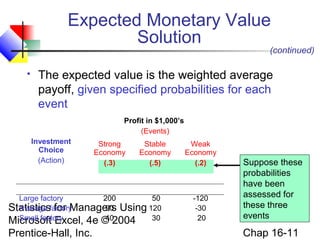
The expected value is the weighted average
payoff, given specified probabilities for each
event
Profit in $1,000’s
(Events)
Investment
Choice
(Action)

Strong
Economy
(.3)

Stable
Economy
(.5)

Large factory
200
50
Average for Managers Using 120
90
Statisticsfactory
Small factory
40
30
Microsoft Excel, 4e © 2004

Prentice-Hall, Inc.

Weak
Economy
(.2)

-120
-30
20

Suppose these
probabilities
have been
assessed for
these three
events

Chap 16-11
Expected Monetary Value
Solution

(continued)

Goal: Maximize expected value
Payoff Table:
Profit in $1,000’s
(Events)
Investment
Choice
(Action)

Large factory
Average factory
Small factory

Strong
Economy
(.3)

Stable
Economy
(.5)

Weak
Economy
(.2)

200
90
40

50
120
30

-120
-30
20

Expected
Values
(EMV)
61
81
31

Maximize
expected
value by
choosing
Average
factory

Example: EMV (Average factory) = 90(.3) + 120(.5) + (-30)(.2)
Statistics for Managers Using
= 81
Microsoft Excel, 4e © 2004
Chap 16-12
Prentice-Hall, Inc.
Decision Tree Analysis


A Decision tree shows a decision problem,
beginning with the initial decision and ending
will all possible outcomes and payoffs.
Use a square to denote decision nodes
Use a circle to denote uncertain events

Statistics for Managers Using
Microsoft Excel, 4e © 2004
Prentice-Hall, Inc.

Chap 16-13
Add Probabilities and Payoffs
(continued)
Strong Economy (.3)

Large factory

200

Stable Economy (.5)

50

Weak Economy

(.2)

-120

Strong Economy (.3)

Average factory

90

Stable Economy (.5)

120

Weak Economy

(.2)

-30

Strong Economy (.3)

Decision
Small factory

Statistics for Managers Using
Uncertain Events
Microsoft Excel, 4e © 2004
Prentice-Hall, Inc.

40

Stable Economy (.5)

30

Weak Economy

(.2)

20

Probabilities Payoffs

Chap 16-14
Fold Back the Tree
EMV=200(.3)+50(.5)+(-120)(.2)=61

Large factory

Strong Economy (.3)

200

Stable Economy (.5)

50

Weak Economy
EMV=90(.3)+120(.5)+(-30)(.2)=81

Average factory

Small factory

Statistics for Managers Using
Microsoft Excel, 4e © 2004
Prentice-Hall, Inc.

-120

Strong Economy (.3)

90

Stable Economy (.5)

120

Weak Economy
EMV=40(.3)+30(.5)+20(.2)=31

(.2)

(.2)

-30

Strong Economy (.3)

40

Stable Economy (.5)

30

Weak Economy

(.2)

20

Chap 16-15
Make the Decision
EV=61

Large factory

Strong Economy (.3)

200

Stable Economy (.5)

50

Weak Economy
EV=81

Average factory

Strong Economy (.3)
Stable Economy (.5)
Weak Economy

EV=31

Small factory

Statistics for Managers Using
Microsoft Excel, 4e © 2004
Prentice-Hall, Inc.

(.2)

(.2)

-120
90
120
-30

Strong Economy (.3)

EMV=81

40

Stable Economy (.5)

Maximum

30

Weak Economy

(.2)

20

Chap 16-16
Expected Opportunity Loss
Solution
Goal: Minimize expected opportunity loss


The expected opportunity loss is the weighted
average loss, given specified probabilities for
each event
N

EOL( j) = ∑ L ijPi
i =1

Where EOL(j) = expected monetary value of action j
Lij = Using
Statistics for Managers opp. loss for action j when event i occurs
Microsoft Excel, 4e © 2004
Pi = probability of event i
Chap 16-17
Prentice-Hall, Inc.
Expected Opportunity Loss
Solution
Goal: Minimize expected opportunity loss
Opportunity Loss Table
Opportunity Loss in $1,000’s
(Events)
Investment
Choice
(Action)

Large factory
Average factory
Small factory

Strong
Economy
(.3)

Stable
Economy
(.5)

Weak
Economy
(.2)

0
110
160

70
0
90

140
50
0

Expected
Op. Loss
(EOL)
63
43
93

Minimize
expected
op. loss by
choosing
Average
factory

Statistics for Managers Using
Example: EOL (Large factory) = 0(.3) + 70(.5) + (140)(.2)
Microsoft Excel, 4e © 2004
= 63
Chap 16-18
Prentice-Hall, Inc.
Value of Information


Expected Value of Perfect Information, EVPI

Expected Value of Perfect Information
EVPI = Expected profit under certainty
– expected monetary value of the best alternative

(EVPI is equal to the expected opportunity loss
from the best decision)
Statistics for Managers Using
Microsoft Excel, 4e © 2004
Prentice-Hall, Inc.

Chap 16-19
Expected Profit Under Certainty


Expected
profit under
certainty
= expected
value of the
best
decision,
given perfect
information

Profit in $1,000’s
(Events)
Investment
Choice
(Action)

Strong
Economy
(.3)

Large factory
200
Average factory
90
Small factory
Value of best decision 40

for each event:

200

Stable
Economy
(.5)

Weak
Economy
(.2)

50
120
30

-120
-30
20

120

20

Example: Best decision
given “Strong
Statistics for Managers Using Economy” is
“Large factory”
Microsoft Excel, 4e © 2004

Prentice-Hall, Inc.

Chap 16-20
Expected Profit Under Certainty
(continued)
Profit in $1,000’s
(Events)
Investment
Choice
(Action)

Strong
Economy
(.3)

Stable
Economy
(.5)

Weak
Economy
(.2)

Now weight
Large factory
200
50
-120
these outcomes Average factory
90
120
-30
with their
Small factory
40
30
20
200
120
20
probabilities to
find the
200(.3)+120(.5)+20(.2) Expected
expected value:
Statistics for Managers Using = 124
profit under
Microsoft Excel, 4e © 2004
certainty
Chap 16-21
Prentice-Hall, Inc.


Value of Information Solution
Expected Value of Perfect Information (EVPI)
EVPI = Expected profit under certainty
– Expected monetary value of the best decision
Recall:

Expected profit under certainty = 124
EMV is maximized by choosing “Average factory”,
where EMV = 81

so:

EVPI = 124 – 81
= 43

Statistics for Managers Using would be willing to spend to obtain
(EVPI is the maximum you
Microsoft Excel, 4e © 2004
perfect information)
Chap 16-22
Prentice-Hall, Inc.
Accounting for Variability
Consider the choice of Stock A vs. Stock B
Percent Return
(Events)
Stock Choice
(Action)

Strong
Economy
(.7)

Weak
Economy
(.3)

Stock A

30

-10

Stock B

14

8

Statistics for Managers Using
Microsoft Excel, 4e © 2004
Prentice-Hall, Inc.

Expected
Return:
18.0
12.2

Stock A has a higher
EMV, but what about
risk?

Chap 16-23
Accounting for Variability
(continued)

Calculate the variance and standard deviation for
Stock A and Stock B:
Percent Return
(Events)
Stock Choice
(Action)

Strong
Economy
(.7)

Weak
Economy
(.3)

Stock A

30

-10

Stock B

14

8

N

Expected
Standard
Return:
Variance: Deviation:
18.0

Example: σ = ∑ ( Xi − Using
Statistics for Managers μ) P( Xi ) = (30 − 18)
i=1
Microsoft Excel, 4e © 2004
Prentice-Hall, Inc.
2
A

2

2

336.0

18.33

7.56

12.2

2.75

(.7) + ( −10 − 18 )2 (.3) = 336.0

Chap 16-24
Accounting for Variability
(continued)

Calculate the coefficient of variation for each stock:

CVA =

σA
18.33
× 100% =
× 100% = 101.83%
EMVA
18.0

CVB =

Stock A has
much more
relative
variability

σB
2.75
× 100% =
× 100% = 22.54%
EMVB
12.2

Statistics for Managers Using
Microsoft Excel, 4e © 2004
Prentice-Hall, Inc.

Chap 16-25
Return-to-Risk Ratio
Return-to-Risk Ratio (RTRR):

EMV(j)
RTRR(j) =
σj
Expresses the relationship between the return
(expected payoff) and the risk (standard deviation)
Statistics for Managers Using
Microsoft Excel, 4e © 2004
Prentice-Hall, Inc.

Chap 16-26
Return-to-Risk Ratio
RTRR(j) =

EMV(j)
σj

RTRR(A) =

EMV(A) 18.0
=
= 0.982
σA
18.33

RTRR(B) =

EMV(B) 12.2
=
= 4.436
σB
2.75

You might want to consider Stock B if you don’t
like risk. Although Stock A has a higher Expected
Statistics for Managers has a much larger return to risk
Return, Stock B Using
Microsoft Excel, a much smaller CV
ratio and 4e © 2004
Chap 16-27
Prentice-Hall, Inc.
Decision Making in PHStat


PHStat | decision-making | expected
monetary value



Check the “expected opportunity loss” and
“measures of valuation” boxes

Statistics for Managers Using
Microsoft Excel, 4e © 2004
Prentice-Hall, Inc.

Chap 16-28
Decision Making
with Sample Information
Prior
Probability


Permits revising old
probabilities based on new
information

New
Information
Revised
Probability

Statistics for Managers Using
Microsoft Excel, 4e © 2004
Prentice-Hall, Inc.

Chap 16-29
Revised Probabilities
Example
Additional Information: Economic forecast is strong economy
 When the economy was strong, the forecaster was correct
90% of the time.
 When the economy was weak, the forecaster was correct 70%
of the time.
F1 = strong forecast
F2 = weak forecast
E1 = strong economy = 0.70
E = Managers Using
Statistics2forweak economy = 0.30
Microsoft Excel, 4e © 2004
P(F1 | Inc.
P(F1 | E2) = 0.30
Prentice-Hall,E1) = 0.90

Prior probabilities
from stock choice
example

Chap 16-30
Revised Probabilities
Example

(continued)

P(F1 | E1 ) = .9 , P(F1 | E 2 ) = .3
P(E1 ) = .7 , P(E 2 ) = .3


Revised Probabilities (Bayes’ Theorem)

P(E1 )P(F1 | E1 )
(.7)(.9)
P(E1 | F1 ) =
=
= .875
P(F1 )
(.7)(.9) + (.3)(.3)
P(E 2 )P(F1 | E 2 )
P(E 2 | F1 =
= .125
Statistics for Managers )Using
P(F1 )
Microsoft Excel, 4e © 2004
Prentice-Hall, Inc.

Chap 16-31
EMV with
Revised Probabilities
Pi

Event

Stock A

xijPi

Stock B

xijPi

.875

strong

30

26.25

14

12.25

.125

weak

-10

-1.25

8

1.00

Revised
probabilities

Σ = 25.0

Σ = 11.25
EMV Stock B = 11.25

EMV Stock A = 25.0
Statistics for Managers Using Maximum
Microsoft Excel, 4e © 2004
EMV
Prentice-Hall, Inc.

Chap 16-32
EOL Table with
Revised Probabilities
Pi

Event

Stock A

xijPi

Stock B

xijPi

.875

strong

0

0

16

14.00

.125

weak

18

2.25

0

0

Σ = 2.25

Revised
probabilities

Σ = 14.00
EOL Stock B = 14.00

EOL Stock A = 2.25
Statistics for Managers Using
Microsoft Excel, 4e © 2004
Prentice-Hall, Inc.

Minimum
EOL

Chap 16-33
Accounting for Variability with
Revised Probabilities
Calculate the variance and standard deviation for
Stock A and Stock B:
Percent Return
(Events)
Stock Choice
(Action)

Strong
Economy
(.875)

Weak
Economy
(.125)

Stock A

30

-10

Stock B

14

8

N

Expected
Standard
Return:
Variance: Deviation:
25.0

Example: σ = ∑ ( Xi − μ) P( Xi ) =
Statistics for Managers Using (30 − 25)
i=1
Microsoft Excel, 4e © 2004
Prentice-Hall, Inc.
2
A

2

2

175.0

13.229

3.94

13.25

1.984

(.875 ) + ( −10 − 25 )2 (.125 ) = 175.0

Chap 16-34
Accounting for Variability with
Revised Probabilities

(continued)

The coefficient of variation for each stock using the
results from the revised probabilities:
CVA =

σA
13.229
× 100% =
× 100% = 52.92%
EMVA
25.0

CVB =

σB
1.984
× 100% =
× 100% = 14.97%
EMVB
13.25

Statistics for Managers Using
Microsoft Excel, 4e © 2004
Prentice-Hall, Inc.

Chap 16-35
Return-to-Risk Ratio with
Revised Probabilities
EMV(A)
25.0
RTRR(A) =
=
= 1.890
σA
13.229

EMV(B) 13.25
RTRR(B) =
=
= 7.011
σB
1.984
With the revised probabilities, both stocks have
higher expected returns, lower CV’s, and larger
return to risk ratios
Statistics for Managers Using
Microsoft Excel, 4e © 2004
Prentice-Hall, Inc.

Chap 16-36
Utility


Utility is the pleasure or satisfaction
obtained from an action.



The utility of an outcome may not be the same
for each individual.

Statistics for Managers Using
Microsoft Excel, 4e © 2004
Prentice-Hall, Inc.

Chap 16-37
Utility


Example: each incremental $1 of profit does not
have the same value to every individual:



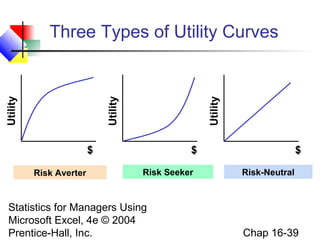
A risk averse person, once reaching a goal,
assigns less utility to each incremental $1.



A risk seeker assigns more utility to each
incremental $1.



A risk neutral person assigns the same utility to
each extra $1.

Statistics for Managers Using
Microsoft Excel, 4e © 2004
Prentice-Hall, Inc.

Chap 16-38
Utility

Utility

Utility

Three Types of Utility Curves

$
Risk Averter

$
Risk Seeker

Statistics for Managers Using
Microsoft Excel, 4e © 2004
Prentice-Hall, Inc.

$
Risk-Neutral

Chap 16-39
Maximizing Expected
Utility


Making decisions in terms of utility, not $




Translate $ outcomes into utility outcomes
Calculate expected utilities for each action
Choose the action to maximize expected utility

Statistics for Managers Using
Microsoft Excel, 4e © 2004
Prentice-Hall, Inc.

Chap 16-40
Chapter Summary


Described the payoff table and decision trees




Opportunity loss

Provided criteria for decision making




Expected monetary value
Expected opportunity loss
Return to risk ratio

Introduced expected profit under certainty and the
value of perfect information
 Discussed decision making with sample
information
Statistics for Managers Using
 Addressed
Microsoft Excel, 4e the concept of utility
© 2004


Prentice-Hall, Inc.

Chap 16-41

Chap16 decision making

  • 1.
    Statistics for Managers UsingMicrosoft® Excel 4th Edition Chapter 16 Decision Making Statistics for Managers Using Microsoft Excel, 4e © 2004 Prentice-Hall, Inc. Chap 16-1
  • 2.
    Chapter Goals After completingthis chapter, you should be able to:  Describe basic features of decision making  Construct a payoff table and an opportunity-loss table  Define and apply the expected value criterion for decision making  Compute the value of perfect information Describe utility and attitudes toward risk Statistics for Managers Using Microsoft Excel, 4e © 2004 Prentice-Hall, Inc.  Chap 16-2
  • 3.
    Steps in DecisionMaking  List Alternative Courses of Action   List Uncertain Events   Possible events or outcomes Determine ‘Payoffs’   Choices or actions Associate a Payoff with Each Event/Outcome combination Adopt Decision Criteria Evaluate Criteria for Selecting the Best Course of Action Statistics for Managers Using Microsoft Excel, 4e © 2004 Chap 16-3 Prentice-Hall, Inc. 
  • 4.
    List Possible Actionsor Events Two Methods of Listing Payoff Table Statistics for Managers Using Microsoft Excel, 4e © 2004 Prentice-Hall, Inc. Decision Tree Chap 16-4
  • 5.
    A Payoff Table Apayoff table shows alternatives, states of nature, and payoffs Investment Choice (Action) Profit in $1,000’s (Events) Strong Economy Large factory 200 Statistics for Managers Using Average factory 90 Microsoftfactory 4e © 2004 Small Excel, 40 Prentice-Hall, Inc. Stable Economy 50 120 30 Weak Economy -120 -30 20 Chap 16-5
  • 6.
    Sample Decision Tree StrongEconomy 90 Stable Economy 120 -30 Strong Economy Statistics for Managers Using Microsoft Excel, 4e © 2004 Prentice-Hall, Inc. -120 Weak Economy Small factory 50 Strong Economy Average factory Stable Economy Weak Economy Large factory 200 40 Stable Economy 30 Weak Economy 20 Payoffs Chap 16-6
  • 7.
    Opportunity Loss Opportunity lossis the difference between an actual payoff for an action and the optimal payoff, given a particular event Investment Choice (Action) Payoff Table Profit in $1,000’s (Events) Strong Economy Stable Economy Weak Economy Large factory 200 50 -120 Average factory 90 120 -30 Small factory 40 30 20 The action “Average factory” has payoff 90 for “Strong Economy”. Given “Strong for Managers Using Statistics Economy”, the choice of “Large factory” would have given a payoff of 200, or 110 higher. Opportunity loss = 110 for this cell. Microsoft Excel, 4e © 2004 Chap 16-7 Prentice-Hall, Inc.
  • 8.
    Opportunity Loss (continued) Investment Choice (Action) Large factory Averagefactory Small factory Payoff Table Profit in $1,000’s (States of Nature) Strong Economy 200 90 40 Stable Economy 50 120 30 Investment Choice (Action) Statistics for Managers Using Microsoft Excel, 4e © Large factory 2004 Average factory Prentice-Hall, Inc. Weak Economy Opportunity Loss Table -120 -30 20 Opportunity Loss in $1,000’s (Events) Strong Economy 0 110 Stable Economy 70 0 Chap Weak Economy 140 50 16-8
  • 9.
    Decision Criteria  Expected MonetaryValue (EMV)   Expected Opportunity Loss (EOL)   The expected profit for taking action Aj The expected opportunity loss for taking action Aj Expected Value of Perfect Information (EVPI)  The expected opportunity loss from the best decision Statistics for Managers Using Microsoft Excel, 4e © 2004 Prentice-Hall, Inc. Chap 16-9
  • 10.
    Expected Monetary Value Solution Goal:Maximize expected value  The expected monetary value is the weighted average payoff, given specified probabilities for each event N EMV( j) = ∑ x ijPi i=1 Where EMV(j) = expected monetary value of action j xij = payoff for action j when event i occurs Statistics for Managers Using P = probability of event i Microsoft Excel, 4e ©i 2004 Prentice-Hall, Inc. Chap 16-10
  • 11.
    Expected Monetary Value Solution (continued)  Theexpected value is the weighted average payoff, given specified probabilities for each event Profit in $1,000’s (Events) Investment Choice (Action) Strong Economy (.3) Stable Economy (.5) Large factory 200 50 Average for Managers Using 120 90 Statisticsfactory Small factory 40 30 Microsoft Excel, 4e © 2004 Prentice-Hall, Inc. Weak Economy (.2) -120 -30 20 Suppose these probabilities have been assessed for these three events Chap 16-11
  • 12.
    Expected Monetary Value Solution (continued) Goal:Maximize expected value Payoff Table: Profit in $1,000’s (Events) Investment Choice (Action) Large factory Average factory Small factory Strong Economy (.3) Stable Economy (.5) Weak Economy (.2) 200 90 40 50 120 30 -120 -30 20 Expected Values (EMV) 61 81 31 Maximize expected value by choosing Average factory Example: EMV (Average factory) = 90(.3) + 120(.5) + (-30)(.2) Statistics for Managers Using = 81 Microsoft Excel, 4e © 2004 Chap 16-12 Prentice-Hall, Inc.
  • 13.
    Decision Tree Analysis  ADecision tree shows a decision problem, beginning with the initial decision and ending will all possible outcomes and payoffs. Use a square to denote decision nodes Use a circle to denote uncertain events Statistics for Managers Using Microsoft Excel, 4e © 2004 Prentice-Hall, Inc. Chap 16-13
  • 14.
    Add Probabilities andPayoffs (continued) Strong Economy (.3) Large factory 200 Stable Economy (.5) 50 Weak Economy (.2) -120 Strong Economy (.3) Average factory 90 Stable Economy (.5) 120 Weak Economy (.2) -30 Strong Economy (.3) Decision Small factory Statistics for Managers Using Uncertain Events Microsoft Excel, 4e © 2004 Prentice-Hall, Inc. 40 Stable Economy (.5) 30 Weak Economy (.2) 20 Probabilities Payoffs Chap 16-14
  • 15.
    Fold Back theTree EMV=200(.3)+50(.5)+(-120)(.2)=61 Large factory Strong Economy (.3) 200 Stable Economy (.5) 50 Weak Economy EMV=90(.3)+120(.5)+(-30)(.2)=81 Average factory Small factory Statistics for Managers Using Microsoft Excel, 4e © 2004 Prentice-Hall, Inc. -120 Strong Economy (.3) 90 Stable Economy (.5) 120 Weak Economy EMV=40(.3)+30(.5)+20(.2)=31 (.2) (.2) -30 Strong Economy (.3) 40 Stable Economy (.5) 30 Weak Economy (.2) 20 Chap 16-15
  • 16.
    Make the Decision EV=61 Largefactory Strong Economy (.3) 200 Stable Economy (.5) 50 Weak Economy EV=81 Average factory Strong Economy (.3) Stable Economy (.5) Weak Economy EV=31 Small factory Statistics for Managers Using Microsoft Excel, 4e © 2004 Prentice-Hall, Inc. (.2) (.2) -120 90 120 -30 Strong Economy (.3) EMV=81 40 Stable Economy (.5) Maximum 30 Weak Economy (.2) 20 Chap 16-16
  • 17.
    Expected Opportunity Loss Solution Goal:Minimize expected opportunity loss  The expected opportunity loss is the weighted average loss, given specified probabilities for each event N EOL( j) = ∑ L ijPi i =1 Where EOL(j) = expected monetary value of action j Lij = Using Statistics for Managers opp. loss for action j when event i occurs Microsoft Excel, 4e © 2004 Pi = probability of event i Chap 16-17 Prentice-Hall, Inc.
  • 18.
    Expected Opportunity Loss Solution Goal:Minimize expected opportunity loss Opportunity Loss Table Opportunity Loss in $1,000’s (Events) Investment Choice (Action) Large factory Average factory Small factory Strong Economy (.3) Stable Economy (.5) Weak Economy (.2) 0 110 160 70 0 90 140 50 0 Expected Op. Loss (EOL) 63 43 93 Minimize expected op. loss by choosing Average factory Statistics for Managers Using Example: EOL (Large factory) = 0(.3) + 70(.5) + (140)(.2) Microsoft Excel, 4e © 2004 = 63 Chap 16-18 Prentice-Hall, Inc.
  • 19.
    Value of Information  ExpectedValue of Perfect Information, EVPI Expected Value of Perfect Information EVPI = Expected profit under certainty – expected monetary value of the best alternative (EVPI is equal to the expected opportunity loss from the best decision) Statistics for Managers Using Microsoft Excel, 4e © 2004 Prentice-Hall, Inc. Chap 16-19
  • 20.
    Expected Profit UnderCertainty  Expected profit under certainty = expected value of the best decision, given perfect information Profit in $1,000’s (Events) Investment Choice (Action) Strong Economy (.3) Large factory 200 Average factory 90 Small factory Value of best decision 40 for each event: 200 Stable Economy (.5) Weak Economy (.2) 50 120 30 -120 -30 20 120 20 Example: Best decision given “Strong Statistics for Managers Using Economy” is “Large factory” Microsoft Excel, 4e © 2004 Prentice-Hall, Inc. Chap 16-20
  • 21.
    Expected Profit UnderCertainty (continued) Profit in $1,000’s (Events) Investment Choice (Action) Strong Economy (.3) Stable Economy (.5) Weak Economy (.2) Now weight Large factory 200 50 -120 these outcomes Average factory 90 120 -30 with their Small factory 40 30 20 200 120 20 probabilities to find the 200(.3)+120(.5)+20(.2) Expected expected value: Statistics for Managers Using = 124 profit under Microsoft Excel, 4e © 2004 certainty Chap 16-21 Prentice-Hall, Inc. 
  • 22.
    Value of InformationSolution Expected Value of Perfect Information (EVPI) EVPI = Expected profit under certainty – Expected monetary value of the best decision Recall: Expected profit under certainty = 124 EMV is maximized by choosing “Average factory”, where EMV = 81 so: EVPI = 124 – 81 = 43 Statistics for Managers Using would be willing to spend to obtain (EVPI is the maximum you Microsoft Excel, 4e © 2004 perfect information) Chap 16-22 Prentice-Hall, Inc.
  • 23.
    Accounting for Variability Considerthe choice of Stock A vs. Stock B Percent Return (Events) Stock Choice (Action) Strong Economy (.7) Weak Economy (.3) Stock A 30 -10 Stock B 14 8 Statistics for Managers Using Microsoft Excel, 4e © 2004 Prentice-Hall, Inc. Expected Return: 18.0 12.2 Stock A has a higher EMV, but what about risk? Chap 16-23
  • 24.
    Accounting for Variability (continued) Calculatethe variance and standard deviation for Stock A and Stock B: Percent Return (Events) Stock Choice (Action) Strong Economy (.7) Weak Economy (.3) Stock A 30 -10 Stock B 14 8 N Expected Standard Return: Variance: Deviation: 18.0 Example: σ = ∑ ( Xi − Using Statistics for Managers μ) P( Xi ) = (30 − 18) i=1 Microsoft Excel, 4e © 2004 Prentice-Hall, Inc. 2 A 2 2 336.0 18.33 7.56 12.2 2.75 (.7) + ( −10 − 18 )2 (.3) = 336.0 Chap 16-24
  • 25.
    Accounting for Variability (continued) Calculatethe coefficient of variation for each stock: CVA = σA 18.33 × 100% = × 100% = 101.83% EMVA 18.0 CVB = Stock A has much more relative variability σB 2.75 × 100% = × 100% = 22.54% EMVB 12.2 Statistics for Managers Using Microsoft Excel, 4e © 2004 Prentice-Hall, Inc. Chap 16-25
  • 26.
    Return-to-Risk Ratio Return-to-Risk Ratio(RTRR): EMV(j) RTRR(j) = σj Expresses the relationship between the return (expected payoff) and the risk (standard deviation) Statistics for Managers Using Microsoft Excel, 4e © 2004 Prentice-Hall, Inc. Chap 16-26
  • 27.
    Return-to-Risk Ratio RTRR(j) = EMV(j) σj RTRR(A)= EMV(A) 18.0 = = 0.982 σA 18.33 RTRR(B) = EMV(B) 12.2 = = 4.436 σB 2.75 You might want to consider Stock B if you don’t like risk. Although Stock A has a higher Expected Statistics for Managers has a much larger return to risk Return, Stock B Using Microsoft Excel, a much smaller CV ratio and 4e © 2004 Chap 16-27 Prentice-Hall, Inc.
  • 28.
    Decision Making inPHStat  PHStat | decision-making | expected monetary value  Check the “expected opportunity loss” and “measures of valuation” boxes Statistics for Managers Using Microsoft Excel, 4e © 2004 Prentice-Hall, Inc. Chap 16-28
  • 29.
    Decision Making with SampleInformation Prior Probability  Permits revising old probabilities based on new information New Information Revised Probability Statistics for Managers Using Microsoft Excel, 4e © 2004 Prentice-Hall, Inc. Chap 16-29
  • 30.
    Revised Probabilities Example Additional Information:Economic forecast is strong economy  When the economy was strong, the forecaster was correct 90% of the time.  When the economy was weak, the forecaster was correct 70% of the time. F1 = strong forecast F2 = weak forecast E1 = strong economy = 0.70 E = Managers Using Statistics2forweak economy = 0.30 Microsoft Excel, 4e © 2004 P(F1 | Inc. P(F1 | E2) = 0.30 Prentice-Hall,E1) = 0.90 Prior probabilities from stock choice example Chap 16-30
  • 31.
    Revised Probabilities Example (continued) P(F1 |E1 ) = .9 , P(F1 | E 2 ) = .3 P(E1 ) = .7 , P(E 2 ) = .3  Revised Probabilities (Bayes’ Theorem) P(E1 )P(F1 | E1 ) (.7)(.9) P(E1 | F1 ) = = = .875 P(F1 ) (.7)(.9) + (.3)(.3) P(E 2 )P(F1 | E 2 ) P(E 2 | F1 = = .125 Statistics for Managers )Using P(F1 ) Microsoft Excel, 4e © 2004 Prentice-Hall, Inc. Chap 16-31
  • 32.
    EMV with Revised Probabilities Pi Event StockA xijPi Stock B xijPi .875 strong 30 26.25 14 12.25 .125 weak -10 -1.25 8 1.00 Revised probabilities Σ = 25.0 Σ = 11.25 EMV Stock B = 11.25 EMV Stock A = 25.0 Statistics for Managers Using Maximum Microsoft Excel, 4e © 2004 EMV Prentice-Hall, Inc. Chap 16-32
  • 33.
    EOL Table with RevisedProbabilities Pi Event Stock A xijPi Stock B xijPi .875 strong 0 0 16 14.00 .125 weak 18 2.25 0 0 Σ = 2.25 Revised probabilities Σ = 14.00 EOL Stock B = 14.00 EOL Stock A = 2.25 Statistics for Managers Using Microsoft Excel, 4e © 2004 Prentice-Hall, Inc. Minimum EOL Chap 16-33
  • 34.
    Accounting for Variabilitywith Revised Probabilities Calculate the variance and standard deviation for Stock A and Stock B: Percent Return (Events) Stock Choice (Action) Strong Economy (.875) Weak Economy (.125) Stock A 30 -10 Stock B 14 8 N Expected Standard Return: Variance: Deviation: 25.0 Example: σ = ∑ ( Xi − μ) P( Xi ) = Statistics for Managers Using (30 − 25) i=1 Microsoft Excel, 4e © 2004 Prentice-Hall, Inc. 2 A 2 2 175.0 13.229 3.94 13.25 1.984 (.875 ) + ( −10 − 25 )2 (.125 ) = 175.0 Chap 16-34
  • 35.
    Accounting for Variabilitywith Revised Probabilities (continued) The coefficient of variation for each stock using the results from the revised probabilities: CVA = σA 13.229 × 100% = × 100% = 52.92% EMVA 25.0 CVB = σB 1.984 × 100% = × 100% = 14.97% EMVB 13.25 Statistics for Managers Using Microsoft Excel, 4e © 2004 Prentice-Hall, Inc. Chap 16-35
  • 36.
    Return-to-Risk Ratio with RevisedProbabilities EMV(A) 25.0 RTRR(A) = = = 1.890 σA 13.229 EMV(B) 13.25 RTRR(B) = = = 7.011 σB 1.984 With the revised probabilities, both stocks have higher expected returns, lower CV’s, and larger return to risk ratios Statistics for Managers Using Microsoft Excel, 4e © 2004 Prentice-Hall, Inc. Chap 16-36
  • 37.
    Utility  Utility is thepleasure or satisfaction obtained from an action.  The utility of an outcome may not be the same for each individual. Statistics for Managers Using Microsoft Excel, 4e © 2004 Prentice-Hall, Inc. Chap 16-37
  • 38.
    Utility  Example: each incremental$1 of profit does not have the same value to every individual:  A risk averse person, once reaching a goal, assigns less utility to each incremental $1.  A risk seeker assigns more utility to each incremental $1.  A risk neutral person assigns the same utility to each extra $1. Statistics for Managers Using Microsoft Excel, 4e © 2004 Prentice-Hall, Inc. Chap 16-38
  • 39.
    Utility Utility Utility Three Types ofUtility Curves $ Risk Averter $ Risk Seeker Statistics for Managers Using Microsoft Excel, 4e © 2004 Prentice-Hall, Inc. $ Risk-Neutral Chap 16-39
  • 40.
    Maximizing Expected Utility  Making decisionsin terms of utility, not $    Translate $ outcomes into utility outcomes Calculate expected utilities for each action Choose the action to maximize expected utility Statistics for Managers Using Microsoft Excel, 4e © 2004 Prentice-Hall, Inc. Chap 16-40
  • 41.
    Chapter Summary  Described thepayoff table and decision trees   Opportunity loss Provided criteria for decision making    Expected monetary value Expected opportunity loss Return to risk ratio Introduced expected profit under certainty and the value of perfect information  Discussed decision making with sample information Statistics for Managers Using  Addressed Microsoft Excel, 4e the concept of utility © 2004  Prentice-Hall, Inc. Chap 16-41