Presented by:
Romel Escano
7 QC Tools
TRAINING OBJECTIVES :
 Enumerate and explain the various quantitative tools and problem
solving techniques for decision making ; and
 Apply the appropriate tools and techniques in problem solving for
quality and productivity improvement.
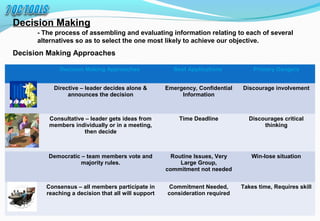
Decision Making Approaches Best Applications Primary Dangers
Directive – leader decides alone &
announces the decision
Emergency, Confidential
Information
Discourage involvement
Consultative – leader gets ideas from
members individually or in a meeting,
then decide
Time Deadline Discourages critical
thinking
Democratic – team members vote and
majority rules.
Routine Issues, Very
Large Group,
commitment not needed
Win-lose situation
Consensus – all members participate in
reaching a decision that all will support
Commitment Needed,
consideration required
Takes time, Requires skill
Decision Making
- The process of assembling and evaluating information relating to each of several
alternatives so as to select the one most likely to achieve our objective.
Decision Making Approaches
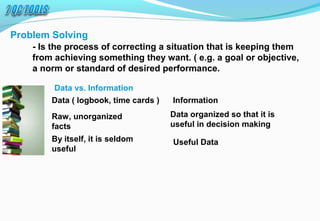
Problem Solving
- Is the process of correcting a situation that is keeping them
from achieving something they want. ( e.g. a goal or objective,
a norm or standard of desired performance.
Data vs. Information
Data ( logbook, time cards ) Information
Raw, unorganized
facts
By itself, it is seldom
useful
Data organized so that it is
useful in decision making
Useful Data
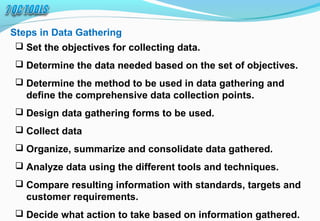
Steps in Data Gathering
 Set the objectives for collecting data.
 Determine the data needed based on the set of objectives.
 Determine the method to be used in data gathering and
define the comprehensive data collection points.
 Design data gathering forms to be used.
 Collect data
 Organize, summarize and consolidate data gathered.
 Analyze data using the different tools and techniques.
 Compare resulting information with standards, targets and
customer requirements.
 Decide what action to take based on information gathered.
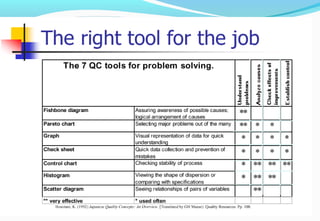
1. Checksheet
2. Pareto Chart
3. Cause and effect Diagram (Ishikawa diagram)
4. Scattered diagram
5. Charts and graph
6. Histogram
7. Control chart
7 QC TOOLS
1. Check1. Check
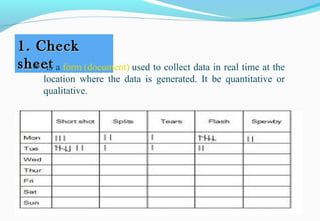
sheetsheet  is a form (document) used to collect data in real time at the 
location  where  the  data  is  generated.  It  be  quantitative  or 
qualitative.
Use of Check sheet :
• To check the shape of the probability distribution 
of a process
• To quantify defects by type
• To quantify defects by location
• To quantify defects by cause (machine, worker)
• To keep track of the completion of steps in a 
multistep procedure
2. Pareto2. Pareto
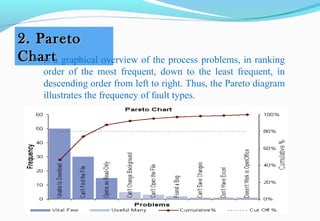
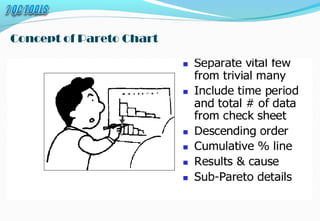
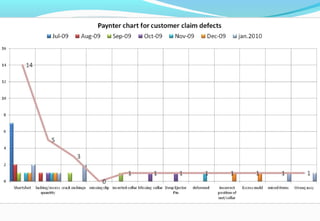
ChartChart is a graphical overview of the process problems, in ranking 
order  of  the  most  frequent,  down  to  the  least  frequent,  in 
descending order from left to right. Thus, the Pareto diagram 
illustrates the frequency of fault types. 
Concept of Pareto Chart
3. Fishbone Diagram (Ishikawa3. Fishbone Diagram (Ishikawa
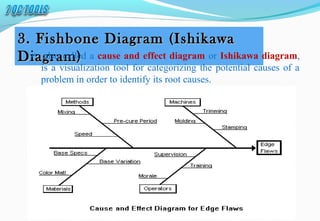
Diagram)Diagram)  also called a cause and effect diagram or Ishikawa diagram, 
is a visualization tool for categorizing the potential causes of a 
problem in order to identify its root causes. 
Use of Fishbone Diagram:
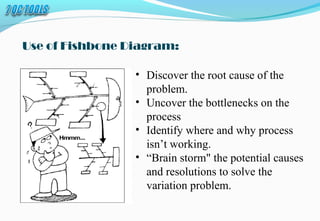
• Discover the root cause of the 
problem.
• Uncover the bottlenecks on the 
process
• Identify where and why process 
isn’t working.
• “Brain storm" the potential causes 
and resolutions to solve the 
variation problem.
It is important to prepare your group with the main theme
that "NO IDEA OR THOUGHT IS STUPID!" Every idea
should be presented, anything that pops into anyone's
head should be brought out. Even if the one idea is not
seen as appropriate to the group, it could very well trigger
another thought or idea in someone else. Thus, it is
imperative that you have your group understand, that
there are no silly thoughts, no suggestions that should go
unconsidered and everyone's ideas and input are needed.
4. Scatter Diagram4. Scatter Diagram
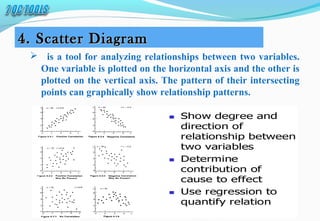
   is a tool for analyzing relationships between two variables.
One variable is plotted on the horizontal axis and the other is
plotted on the vertical axis. The pattern of their intersecting
points can graphically show relationship patterns.
When to use Scatter Diagram?
• When you have paired numerical data.
• When your dependent variable may have multiple values 
for each value of your independent variable.
• When trying to determine whether the two variables are 
related, such as…
• When trying to identify potential root causes of problems.
• After brainstorming causes and effects using a fishbone diagram, 
to determine objectively whether a particular cause and effect are 
related.
• When determining whether two effects that appear to be related 
both occur with the same cause.
• When testing for autocorrelation before constructing a control 
chart.
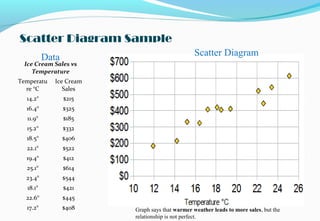
Ice Cream Sales vs
Temperature
Temperatu
re °C
Ice Cream
Sales
14.2° $215
16.4° $325
11.9° $185
15.2° $332
18.5° $406
22.1° $522
19.4° $412
25.1° $614
23.4° $544
18.1° $421
22.6° $445
17.2° $408
Scatter DiagramData
Scatter Diagram Sample
Graph says that warmer weather leads to more sales, but the 
relationship is not perfect.
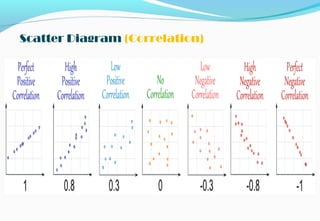
Scatter Diagram (Correlation)
5. Histogram5. Histogram
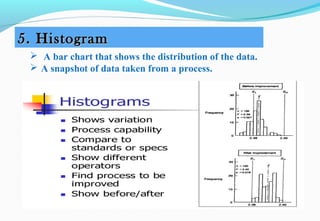
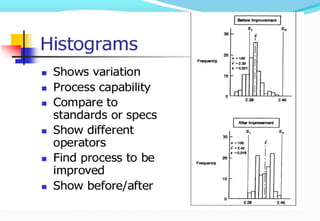
  A bar chart that shows the distribution of the data.
 A snapshot of data taken from a process.
The Histogram 
The common person believes that if a part is made in mass production from a
machine, all of the parts will be exactly alike.
The truth is that even with the best of machines and processes, no two parts are
exactly the same.
The product will have a main or "mean" specification limit, with plus/minus
tolerance that states that as long as the part is produced within this range, to that
range, it is an acceptable part. The object is to hit the target specification,
however, that is not always totally possible.
The purpose of a Histogram is to take the data that is collected from a process
and then display it graphically to view how the distribution of the data, centers
itself around the mean, or main specification. From the data, the histogram will
graphically show:
1.The center of the data.
2.The spread of the data.
3.Any data skewness (slant, bias or run at an angle).
4.The presence of outliers (product outside the specification range).
5.The presence of multiple modes (or peaks) within the data.
6. Control Charts6. Control Charts
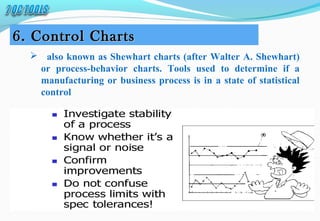
   also known as Shewhart charts (after Walter A. Shewhart)
or process-behavior charts. Tools used to determine if a
manufacturing or business process is in a state of statistical
control
Use of Control Charts
 Help you recognize and understand variability and how to control it.
 Identify special causes of variation and changes in performance.
 Keep you from fixing a process that is varying randomly within
control limits; that is no special causes are present. If you want to
improve it, you have to objectively identify and eliminate the root
causes of the process variation.
 Assist in the diagnosis of process problems.
 Determine if process improvement effects are having the desired
affects.
7. Stratification7. Stratification
 is the process of dividing members of the population into
homogeneous subgroups before sampling. In case of Quality
Control, stratification generally means to divide data into several
groups according to common factors and tendencies ( eg; types
of defects and cause of defects).
When to use Stratification?
 Help you recognize and understand variability and how to control it.
 Identify special causes of variation and changes in performance.
 Keep you from fixing a process that is varying randomly within
control limits; that is no special causes are present. If you want to
improve it, you have to objectively identify and eliminate the root
causes of the process variation.
 Assist in the diagnosis of process problems.
 Determine if process improvement effects are having the desired
affects.
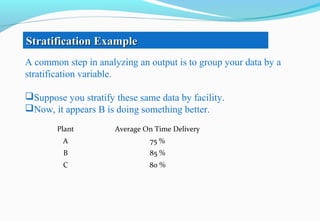
A common step in analyzing an output is to group your data by a
stratification variable.
Suppose you stratify these same data by facility.
Now, it appears B is doing something better.
Stratification ExampleStratification Example
Plant Average On Time Delivery
A 75 %
B 85 %
C 80 %
Stratification and Root CauseStratification and Root Cause
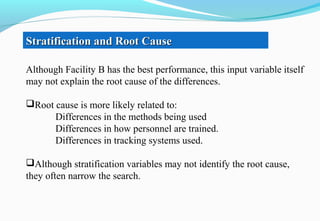
Although Facility B has the best performance, this input variable itself
may not explain the root cause of the differences.
Root cause is more likely related to:
Differences in the methods being used
Differences in how personnel are trained.
Differences in tracking systems used.
Although stratification variables may not identify the root cause,
they often narrow the search.
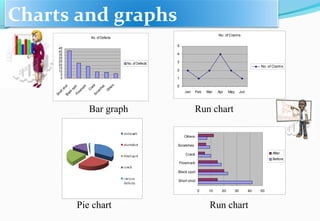
Pie chart
No. of Defects
0
5
10
15
20
25
30
35
40
45
ShortshotBlack
spotFlowm
ark
CrackScratches
Others
No. of Defects
Charts and graphs
No. of Claims
0
1
2
3
4
5
Jan Feb Mar Apr May Jun
No. of Claims
Bar graph Run chart
0 10 20 30 40 50
Short shot
Black spot
Flowmark
Crack
Scratches
Others
After
Before
Run chart
7 qc tools

7 qc tools

  • 1.
  • 2.
    TRAINING OBJECTIVES : Enumerate and explain the various quantitative tools and problem solving techniques for decision making ; and  Apply the appropriate tools and techniques in problem solving for quality and productivity improvement.
  • 3.
    Decision Making ApproachesBest Applications Primary Dangers Directive – leader decides alone & announces the decision Emergency, Confidential Information Discourage involvement Consultative – leader gets ideas from members individually or in a meeting, then decide Time Deadline Discourages critical thinking Democratic – team members vote and majority rules. Routine Issues, Very Large Group, commitment not needed Win-lose situation Consensus – all members participate in reaching a decision that all will support Commitment Needed, consideration required Takes time, Requires skill Decision Making - The process of assembling and evaluating information relating to each of several alternatives so as to select the one most likely to achieve our objective. Decision Making Approaches
  • 4.
    Problem Solving - Isthe process of correcting a situation that is keeping them from achieving something they want. ( e.g. a goal or objective, a norm or standard of desired performance. Data vs. Information Data ( logbook, time cards ) Information Raw, unorganized facts By itself, it is seldom useful Data organized so that it is useful in decision making Useful Data
  • 5.
    Steps in DataGathering  Set the objectives for collecting data.  Determine the data needed based on the set of objectives.  Determine the method to be used in data gathering and define the comprehensive data collection points.  Design data gathering forms to be used.  Collect data  Organize, summarize and consolidate data gathered.  Analyze data using the different tools and techniques.  Compare resulting information with standards, targets and customer requirements.  Decide what action to take based on information gathered.
  • 9.
    1. Checksheet 2. ParetoChart 3. Cause and effect Diagram (Ishikawa diagram) 4. Scattered diagram 5. Charts and graph 6. Histogram 7. Control chart 7 QC TOOLS
  • 10.
    1. Check1. Check sheetsheet is a form (document) used to collect data in real time at the  location  where  the  data  is  generated.  It  be  quantitative  or  qualitative.
  • 11.
    Use of Checksheet : • To check the shape of the probability distribution  of a process • To quantify defects by type • To quantify defects by location • To quantify defects by cause (machine, worker) • To keep track of the completion of steps in a  multistep procedure
  • 12.
    2. Pareto2. Pareto ChartChartis a graphical overview of the process problems, in ranking  order  of  the  most  frequent,  down  to  the  least  frequent,  in  descending order from left to right. Thus, the Pareto diagram  illustrates the frequency of fault types. 
  • 13.
  • 14.
    3. Fishbone Diagram(Ishikawa3. Fishbone Diagram (Ishikawa Diagram)Diagram)  also called a cause and effect diagram or Ishikawa diagram,  is a visualization tool for categorizing the potential causes of a  problem in order to identify its root causes. 
  • 15.
    Use of FishboneDiagram: • Discover the root cause of the  problem. • Uncover the bottlenecks on the  process • Identify where and why process  isn’t working. • “Brain storm" the potential causes  and resolutions to solve the  variation problem.
  • 16.
    It is importantto prepare your group with the main theme that "NO IDEA OR THOUGHT IS STUPID!" Every idea should be presented, anything that pops into anyone's head should be brought out. Even if the one idea is not seen as appropriate to the group, it could very well trigger another thought or idea in someone else. Thus, it is imperative that you have your group understand, that there are no silly thoughts, no suggestions that should go unconsidered and everyone's ideas and input are needed.
  • 17.
    4. Scatter Diagram4.Scatter Diagram    is a tool for analyzing relationships between two variables. One variable is plotted on the horizontal axis and the other is plotted on the vertical axis. The pattern of their intersecting points can graphically show relationship patterns.
  • 18.
    When to useScatter Diagram? • When you have paired numerical data. • When your dependent variable may have multiple values  for each value of your independent variable. • When trying to determine whether the two variables are  related, such as… • When trying to identify potential root causes of problems. • After brainstorming causes and effects using a fishbone diagram,  to determine objectively whether a particular cause and effect are  related. • When determining whether two effects that appear to be related  both occur with the same cause. • When testing for autocorrelation before constructing a control  chart.
  • 19.
    Ice Cream Salesvs Temperature Temperatu re °C Ice Cream Sales 14.2° $215 16.4° $325 11.9° $185 15.2° $332 18.5° $406 22.1° $522 19.4° $412 25.1° $614 23.4° $544 18.1° $421 22.6° $445 17.2° $408 Scatter DiagramData Scatter Diagram Sample Graph says that warmer weather leads to more sales, but the  relationship is not perfect.
  • 20.
  • 21.
    5. Histogram5. Histogram  A bar chart that shows the distribution of the data.  A snapshot of data taken from a process.
  • 23.
    The Histogram  The commonperson believes that if a part is made in mass production from a machine, all of the parts will be exactly alike. The truth is that even with the best of machines and processes, no two parts are exactly the same. The product will have a main or "mean" specification limit, with plus/minus tolerance that states that as long as the part is produced within this range, to that range, it is an acceptable part. The object is to hit the target specification, however, that is not always totally possible. The purpose of a Histogram is to take the data that is collected from a process and then display it graphically to view how the distribution of the data, centers itself around the mean, or main specification. From the data, the histogram will graphically show: 1.The center of the data. 2.The spread of the data. 3.Any data skewness (slant, bias or run at an angle). 4.The presence of outliers (product outside the specification range). 5.The presence of multiple modes (or peaks) within the data.
  • 24.
    6. Control Charts6.Control Charts    also known as Shewhart charts (after Walter A. Shewhart) or process-behavior charts. Tools used to determine if a manufacturing or business process is in a state of statistical control
  • 25.
    Use of ControlCharts  Help you recognize and understand variability and how to control it.  Identify special causes of variation and changes in performance.  Keep you from fixing a process that is varying randomly within control limits; that is no special causes are present. If you want to improve it, you have to objectively identify and eliminate the root causes of the process variation.  Assist in the diagnosis of process problems.  Determine if process improvement effects are having the desired affects.
  • 26.
    7. Stratification7. Stratification is the process of dividing members of the population into homogeneous subgroups before sampling. In case of Quality Control, stratification generally means to divide data into several groups according to common factors and tendencies ( eg; types of defects and cause of defects).
  • 27.
    When to useStratification?  Help you recognize and understand variability and how to control it.  Identify special causes of variation and changes in performance.  Keep you from fixing a process that is varying randomly within control limits; that is no special causes are present. If you want to improve it, you have to objectively identify and eliminate the root causes of the process variation.  Assist in the diagnosis of process problems.  Determine if process improvement effects are having the desired affects.
  • 28.
    A common stepin analyzing an output is to group your data by a stratification variable. Suppose you stratify these same data by facility. Now, it appears B is doing something better. Stratification ExampleStratification Example Plant Average On Time Delivery A 75 % B 85 % C 80 %
  • 29.
    Stratification and RootCauseStratification and Root Cause Although Facility B has the best performance, this input variable itself may not explain the root cause of the differences. Root cause is more likely related to: Differences in the methods being used Differences in how personnel are trained. Differences in tracking systems used. Although stratification variables may not identify the root cause, they often narrow the search.
  • 30.
    Pie chart No. ofDefects 0 5 10 15 20 25 30 35 40 45 ShortshotBlack spotFlowm ark CrackScratches Others No. of Defects Charts and graphs No. of Claims 0 1 2 3 4 5 Jan Feb Mar Apr May Jun No. of Claims Bar graph Run chart 0 10 20 30 40 50 Short shot Black spot Flowmark Crack Scratches Others After Before Run chart

Editor's Notes

  • #19 What is meant by "paired data"? The term "cause-and-effect" relationship between two kinds of data may also refer to a relationship between one cause and another, or between one cause and several others. For example, you could consider the relationship between an ingredient and the product hardness; between the cutting speed of a blade and the variations observed in length of parts; or the relationship between the illumination levels on the production floor and the mistakes made in quality inspection of product produced.
  • #25 Control charts are an efficient way of analyzing performance data to evaluate a process. Control charts have many uses; they can be used in manufacturing to test if machinery are producing products within specifications. Also, they have many simple applications such as professors using them to evaluate tests scores. To create a control chart, it is helpful to have Excel; it will simplify your life.