Best Performing Consulting Organization
by
“TQM / 7 QC Tools”
Adding Value In Totality !!
Introduction
• The 7 QC Tools are simple statistical tools used for problem
solving
• Inspired after seven famous weapons of Benkei. Viz
1. Masakari-Broad Axe
2. Kumade- Rake
3. Nagihama - Sickle weapon
4. hizuchi- Wooden mallet
5. Nokogiri- Saw
6. Tetsubo- iron staff
7. sasumata- Half moon spear
• It was possibly introduced by Kaoru Ishikawa who in turn was
influenced by a series of lectures W. Edwards Deming had
given to Japanese engineers and scientists in 1950
Conti…
• “The term “7 tools for QC” is named after the 7 tools of the
famous warrior,Benkei. Benkei owned 7 weapons, which he
used to win all his battles. Similarly, from my own
experience, you will find that you will be able to solve 95% of
the problems around you if you wisely use the 7 tools of QC.”
- ISHIKAWA KAORU, Professor Emeritus, University of Tokyo
• These tools have been the foundation of Japan's astonishing
industrial resurgence after the second world war.
Basic QC Tools
• The following are the 7 QC Tools :
1.Pareto Diagram
2.Cause & Effect Diagram
3.Histogram
4.Control Charts
5.Scatter Diagrams
6.Flowchart
7.Check Sheets
Pareto Diagram 1/2
• Origin of the tool lies in the observation by an Italian
economist Vilfredo Pareto that a large portion of wealth was
in the hands of a few people.
• Dr.Juran suggested the use of this principle to quality control
for separating the "vital few" problems from the "useful
many".
• Also referred as 80/20 rule viz your 80% of problems are due
to 20% of cause.
• It is used in the field of materials management for ABC
analysis. 20% of the items purchased by a company account
for 80% of the value. These constitute the A items on which
maximum attention is paid
• It works on cumulative frequency and shows how few items
exert maximum influence
Pareto Diagram 2/2
For E.g
• 80 % of sales revenue is earned by 20% of firm’s products
• 20 % of the items in a factory Store may account for 80 % of
the volume of items issued
• 80 % of defects are caused by 20% of the possible defects
type
• Also used in conjunction with Brainstorming, Cause and Effect
Analysis and Cumulative Line Chart. The Diagram displays, in
decreasing order, the relative contribution of each cause or
problem to the total
• The relative contribution can be based on the number of
occurrences, the quality damage or the cost associated with
each cause or problem
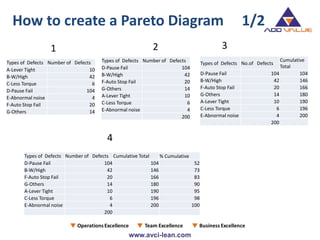
How to create a Pareto Diagram 1/2
Types of Defects Number of Defects
A-Lever Tight 10
B-W/High 42
C-Less Torque 6
D-Pause Fail 104
E-Abnormal noise 4
F-Auto Stop Fail 20
G-Others 14
1 2 3
4
Types of Defects Number of Defects
D-Pause Fail 104
B-W/High 42
F-Auto Stop Fail 20
G-Others 14
A-Lever Tight 10
C-Less Torque 6
E-Abnormal noise 4
200
Types of Defects No.of Defects
Cumulative
Total
D-Pause Fail 104 104
B-W/High 42 146
F-Auto Stop Fail 20 166
G-Others 14 180
A-Lever Tight 10 190
C-Less Torque 6 196
E-Abnormal noise 4 200
200
Types of Defects Number of Defects Cumulative Total % Cumulative
D-Pause Fail 104 104 52
B-W/High 42 146 73
F-Auto Stop Fail 20 166 83
G-Others 14 180 90
A-Lever Tight 10 190 95
C-Less Torque 6 196 98
E-Abnormal noise 4 200 100
200
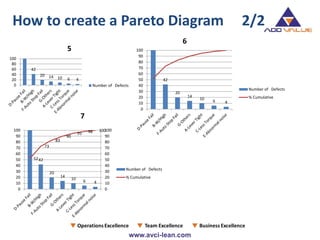
42
20 14 10 6 4
0
20
40
60
80
100
5
Number of Defects
42
20
14
10
6 4
0
10
20
30
40
50
60
70
80
90
100
Number of Defects
% Cumulative
6
42
20
14
10
6 4
52
73
83
90
95 98 100
0
10
20
30
40
50
60
70
80
90
100
0
10
20
30
40
50
60
70
80
90
100
Number of Defects
% Cumulative
7
How to create a Pareto Diagram 2/2
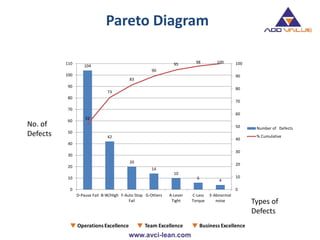
Pareto Diagram
104
42
20
14
10
6
4
52
73
83
90
95 98 100
0
10
20
30
40
50
60
70
80
90
100
0
10
20
30
40
50
60
70
80
90
100
110
D-Pause Fail B-W/High F-Auto Stop
Fail
G-Others A-Lever
Tight
C-Less
Torque
E-Abnormal
noise
Number of Defects
% Cumulative
No. of
Defects
Types of
Defects
Cause & Effect Diagram 1/2
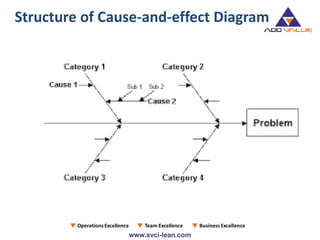
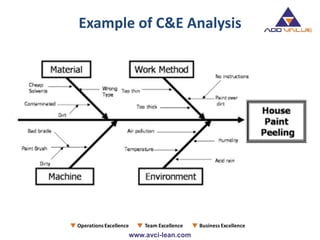
• It is called Fish-Bone Diagram due to the shape of the completed
structure.
• This was proposed by Kaoru Ishikawa in the 1960s,hence also
referred as Ishikawa Diagram
• The Ishikawa diagram shows the causes of a certain event. A
common use of the Ishikawa diagram is in product design, to
identify potential factors causing an overall effect
• It shows the relation between a quality characteristics and factors
• Causes in the diagram are often based on a certain set of causes,
such as the 5M+1E,8 P's or 4 S's
• Cause-and-effect diagrams can reveal key relationships among
various variables, and the possible causes provide additional insight
into process behaviour.
Cause & Effect Diagram 2/2
• Causes in a typical diagram are normally grouped into categories,
the main ones of which are:
• The 5M+1E- recommended for the manufacturing industry
Machine, Method, Materials, Measurement, Men and Environment
• The 8 P's - recommended for the administration and service
industries
Price, Promotion, People, Processes, Place / Plant, Policies,
Procedures, and Product (or Service)
• The 4 S's - recommended for the service industry
Surroundings, Suppliers, Systems, Skills
• Causes should be specific, measurable, and controllable derived
from brainstorming sessions. Then causes should be sorted
through affinity-grouping to collect similar ideas together. These
groups should then be labeled as categories of the fishbone.
Structure of Cause-and-effect Diagram
Procedure for making
C&E diagram
STEP 1:
• Determine the Pain point/ characteristic
STEP 2:
• Draw in the backbone from left to right, and enclose the
characteristic in a square
• Next, write the primary causes which affect the characteristics
as big bones also enclosed by squares
STEP 3:
• Write the causes (Secondary Causes) which affect the big bones
(Primary Causes) as medium sized bones
• Write the causes (Territory Causes) which affect the medium
sized bones as small bones.
STEP 4:
• Assign an importance to each factor, and mark the particularly
important factors that seem to have a significant effect on the
quality characteristics.
STEP 5:
• Record any necessary information
Conti…
Example of C&E Analysis
Histogram 1/2
• Histogram is a graphical technique to represent dispersion of
data
• Ideally it will have symmetrical shape tapering away on both
sides from target value
• For E.g
1. Production from same production line usually differs slightly
in dimensions, hardness, or others qualities
2. when we commute to work every day, the time required
varies from one day to other
Thus , Histogram can be used to
• To find out if the lot has acceptance dispersion
• To compare with target value and specification limits to
identify special causes of variation
• Histogram is a graph that represents the class frequencies by
vertical adjacent rectangles in a frequency distribution.
• In a histogram, the magnitude of the class interval is plotted
along the horizontal axis and the frequency on the vertical
axis
• Since each class has lower and upper values, hence two equal
vertical lines represent the frequency.
• Upper ends of the two lines representing the class interval are
joined together. The height of rectangle thus obtained are
proportional to their frequencies.
Histogram 2/2
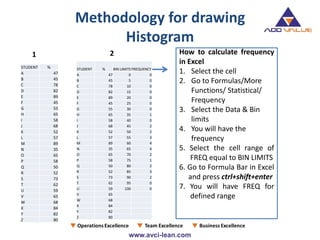
Methodology for drawing
Histogram
1 2 How to calculate frequency
in Excel
1. Select the cell
2. Go to Formulas/More
Functions/ Statistical/
Frequency
3. Select the Data & Bin
limits
4. You will have the
frequency
5. Select the cell range of
FREQ equal to BIN LIMITS
6. Go to Formula Bar in Excel
and press ctrl+shift+enter
7. You will have FREQ for
defined range
STUDENT %
A 47
B 45
C 78
D 82
E 89
F 45
G 55
H 65
I 58
J 68
K 52
L 57
M 89
N 35
O 65
P 58
Q 50
R 52
S 73
T 62
U 59
V 65
W 68
X 84
Y 82
Z 80
STUDENT % BIN LIMITS FREQUENCY
A 47 0 0
B 45 5 0
C 78 10 0
D 82 15 0
E 89 20 0
F 45 25 0
G 55 30 0
H 65 35 1
I 58 40 0
J 68 45 2
K 52 50 2
L 57 55 3
M 89 60 4
N 35 65 4
O 65 70 2
P 58 75 1
Q 50 80 2
R 52 85 3
S 73 90 2
T 62 95 0
U 59 100 0
V 65
W 68
X 84
Y 82
Z 80
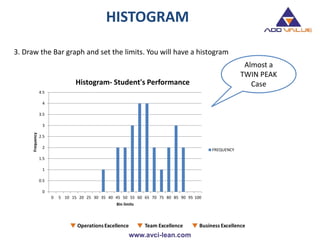
HISTOGRAM
Almost a
TWIN PEAK
Case
3. Draw the Bar graph and set the limits. You will have a histogram
0
0.5
1
1.5
2
2.5
3
3.5
4
4.5
0 5 10 15 20 25 30 35 40 45 50 55 60 65 70 75 80 85 90 95 100
Frequency
Bin limits
Histogram- Student's Performance
FREQUENCY
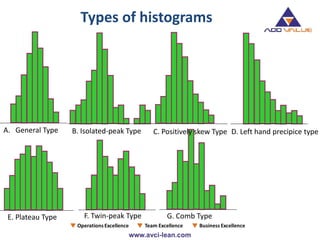
Types of histograms
A. General Type
G. Comb Type
C. Positively skew Type D. Left hand precipice type
E. Plateau Type F. Twin-peak Type
B. Isolated-peak Type
Control Charts 1/2
• Variability is inherent in all manufacturing processes. These
variations may be due to two causes :
i. Random / Chance causes (un-preventable)
ii. Assignable causes (preventable)
• Control charts was developed by Dr. Walter A. Shewhart during
1920's while he was with Bell Telephone Laboratories.
• These charts separate out assignable causes.
• Control chart makes possible the diagnosis and correction of
many production troubles and brings substantial improvements
in the quality of the products and reduction of spoilage and
rework.
• It tells us when to leave a process alone as well as when to take
action to correct trouble
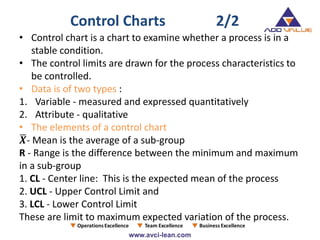
• Control chart is a chart to examine whether a process is in a
stable condition.
• The control limits are drawn for the process characteristics to
be controlled.
• Data is of two types :
1. Variable - measured and expressed quantitatively
2. Attribute - qualitative
• The elements of a control chart
𝑿- Mean is the average of a sub-group
R - Range is the difference between the minimum and maximum
in a sub-group
1. CL - Center line: This is the expected mean of the process
2. UCL - Upper Control Limit and
3. LCL - Lower Control Limit
These are limit to maximum expected variation of the process.
Control Charts 2/2
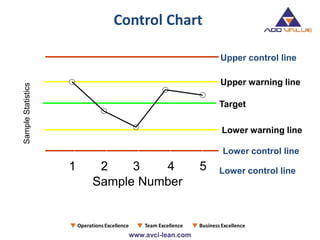
1 2 3 4 5
Target
Lower control line
Upper warning line
Lower warning line
Sample Number
Upper control line
Lower control line
SampleStatistics
Control Chart
Interpreting Control Chart
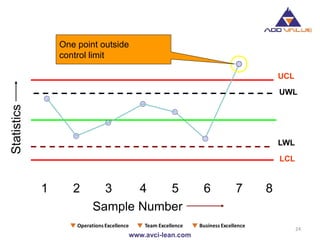
24
UCL
1 2 3 4 5 6 7 8
Sample Number
Statistics
UWL
LCL
LWL
One point outside
control limit
Interpreting Control Chart
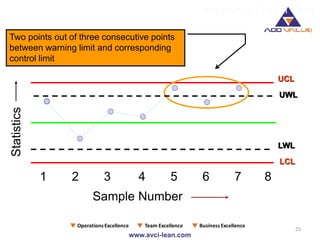
25
UCL
1 2 3 4 5 6 7 8
Sample Number
Statistics
UWL
LCL
LWL
Two points out of three consecutive points
between warning limit and corresponding
control limit
Interpreting Control Chart
26
UCL
1 2 3 4 5 6 7 8
Sample Number
Statistics
UWL
LCL
LWL
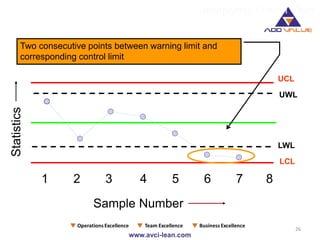
Two consecutive points between warning limit and
corresponding control limit
Interpreting Control Chart
27
UCL
1 2 3 4 5 6 7 8
UWL
LCL
LWL
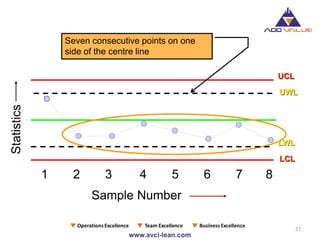
Seven consecutive points on one
side of the centre line
Sample Number
Statistics
Interpreting Control Chart
28
UCL
1 2 3 4 5 6 7 8
Sample Number
Statistics
UWL
LCL
LWL
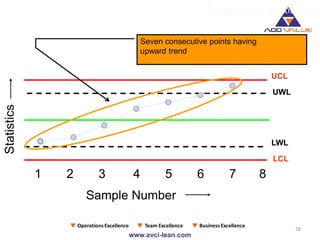
Seven consecutive points having
upward trend
Interpreting Control Chart
29
UCL
1 2 3 4 5 6 7 8
Sample Number
Statistics
UWL
LCL
LWL
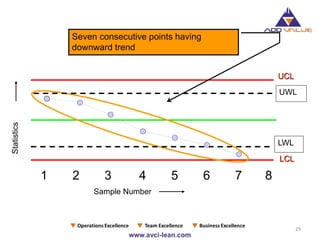
Seven consecutive points having
downward trend
Scatter Diagram 1/2
• A relationship may or may not exist between two variables
• If a relationship exists, it may be positive or negative, it may
be strong or weak and may be simple or complex
• A tool to study the relationship between two variables is
known as Scatter Diagram
• Examples:
• The relationship between moisture content in threads and
elongation.
• The relationship between an Ingredient and Product
Hardness.
• The relationship between cutting speed and variations in the
length of parts.
• The method consists of plotting the two series on a graph and
fitting a Line of Best Fit free hand
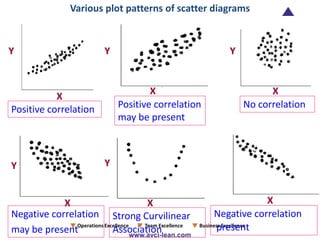
• The direction of line shows the extent of correlation. If the line
goes upward from left to right, it means the correlation is positive.
• If the line goes downward from left to right, it means the
correlation is negative.
• If the points on the plot are scattered largely, it shows little or no
correlation.
• Although Scatter Diagrams are very convenient tools for asserting
two-way relationships, they don’t provide formal measures of
these relationships.
• Scatter Diagrams also don’t provide any means of establishing
whether any apparent associations are actually due to chance or
not.
Scatter Diagram 2/2
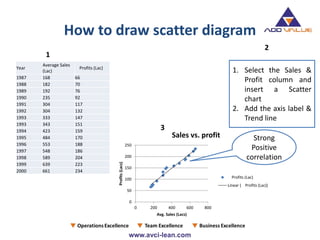
How to draw scatter diagram
Year
Average Sales
(Lac)
Profits (Lac)
1987 168 66
1988 182 70
1989 192 76
1990 235 92
1991 304 117
1992 304 132
1993 333 147
1993 343 151
1994 423 159
1995 484 170
1996 553 188
1997 548 186
1998 589 204
1999 639 223
2000 661 234
1
1. Select the Sales &
Profit column and
insert a Scatter
chart
2. Add the axis label &
Trend line
2
0
50
100
150
200
250
0 200 400 600 800
Profits(Lacs)
Avg. Sales (Lacs)
Sales vs. profit
Profits (Lac)
Linear ( Profits (Lac))
3
Strong
Positive
correlation
Y Y
YY
Y
XX
X
XX
Positive correlation Positive correlation
may be present
No correlation
Negative correlation
may be present
Negative correlation
present
Various plot patterns of scatter diagrams
X
Y
Strong Curvilinear
Association
Flow chart 1/2
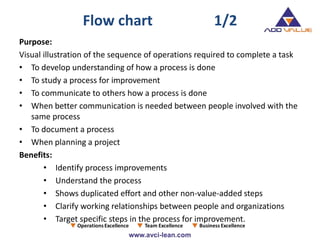
Purpose:
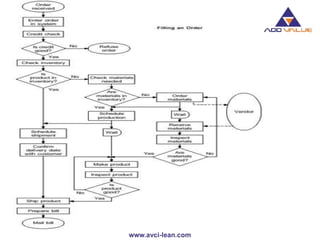
Visual illustration of the sequence of operations required to complete a task
• To develop understanding of how a process is done
• To study a process for improvement
• To communicate to others how a process is done
• When better communication is needed between people involved with the
same process
• To document a process
• When planning a project
Benefits:
• Identify process improvements
• Understand the process
• Shows duplicated effort and other non-value-added steps
• Clarify working relationships between people and organizations
• Target specific steps in the process for improvement.
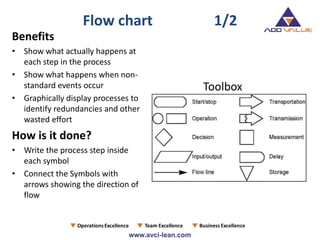
Benefits
• Show what actually happens at
each step in the process
• Show what happens when non-
standard events occur
• Graphically display processes to
identify redundancies and other
wasted effort
How is it done?
• Write the process step inside
each symbol
• Connect the Symbols with
arrows showing the direction of
flow
Toolbox
Flow chart 1/2
Check sheet
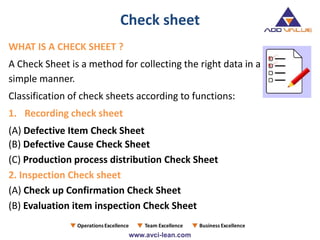
WHAT IS A CHECK SHEET ?
A Check Sheet is a method for collecting the right data in a
simple manner.
Classification of check sheets according to functions:
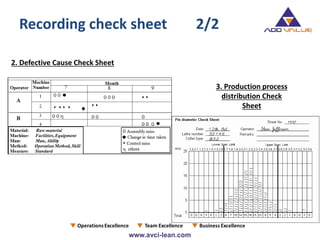
1. Recording check sheet
(A) Defective Item Check Sheet
(B) Defective Cause Check Sheet
(C) Production process distribution Check Sheet
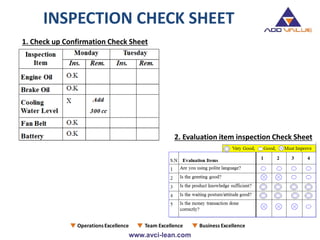
2. Inspection Check sheet
(A) Check up Confirmation Check Sheet
(B) Evaluation item inspection Check Sheet
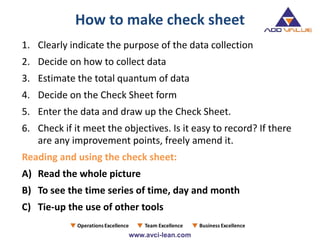
How to make check sheet
1. Clearly indicate the purpose of the data collection
2. Decide on how to collect data
3. Estimate the total quantum of data
4. Decide on the Check Sheet form
5. Enter the data and draw up the Check Sheet.
6. Check if it meet the objectives. Is it easy to record? If there
are any improvement points, freely amend it.
Reading and using the check sheet:
A) Read the whole picture
B) To see the time series of time, day and month
C) Tie-up the use of other tools
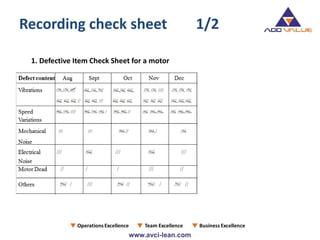
1. Defective Item Check Sheet for a motor
Recording check sheet 1/2
3. Production process
distribution Check
Sheet
2. Defective Cause Check Sheet
Recording check sheet 2/2
INSPECTION CHECK SHEET
1. Check up Confirmation Check Sheet
2. Evaluation item inspection Check Sheet
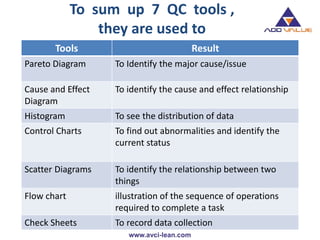
To sum up 7 QC tools ,
they are used to
Tools Result
Pareto Diagram To Identify the major cause/issue
Cause and Effect
Diagram
To identify the cause and effect relationship
Histogram To see the distribution of data
Control Charts To find out abnormalities and identify the
current status
Scatter Diagrams To identify the relationship between two
things
Flow chart illustration of the sequence of operations
required to complete a task
Check Sheets To record data collection
ADDVALUE Services
VALUE ADDED COACHING-VAC®
BUSINESS COACHING LIFE COACHING
Operation
Excellence
Team
Excellence
Business
Excellence
Counselling
Therapy
Astrology
Adding Value In Totality !!
Best Performing Consulting Organization
AddValue at a glance
Business Coaching Life Coaching
Thank You

The Basics 7 QC Tools - ADDVALUE - Nilesh Arora

  • 1.
    Best Performing ConsultingOrganization by “TQM / 7 QC Tools” Adding Value In Totality !!
  • 2.
    Introduction • The 7QC Tools are simple statistical tools used for problem solving • Inspired after seven famous weapons of Benkei. Viz 1. Masakari-Broad Axe 2. Kumade- Rake 3. Nagihama - Sickle weapon 4. hizuchi- Wooden mallet 5. Nokogiri- Saw 6. Tetsubo- iron staff 7. sasumata- Half moon spear • It was possibly introduced by Kaoru Ishikawa who in turn was influenced by a series of lectures W. Edwards Deming had given to Japanese engineers and scientists in 1950
  • 3.
    Conti… • “The term“7 tools for QC” is named after the 7 tools of the famous warrior,Benkei. Benkei owned 7 weapons, which he used to win all his battles. Similarly, from my own experience, you will find that you will be able to solve 95% of the problems around you if you wisely use the 7 tools of QC.” - ISHIKAWA KAORU, Professor Emeritus, University of Tokyo • These tools have been the foundation of Japan's astonishing industrial resurgence after the second world war.
  • 4.
    Basic QC Tools •The following are the 7 QC Tools : 1.Pareto Diagram 2.Cause & Effect Diagram 3.Histogram 4.Control Charts 5.Scatter Diagrams 6.Flowchart 7.Check Sheets
  • 5.
    Pareto Diagram 1/2 •Origin of the tool lies in the observation by an Italian economist Vilfredo Pareto that a large portion of wealth was in the hands of a few people. • Dr.Juran suggested the use of this principle to quality control for separating the "vital few" problems from the "useful many". • Also referred as 80/20 rule viz your 80% of problems are due to 20% of cause. • It is used in the field of materials management for ABC analysis. 20% of the items purchased by a company account for 80% of the value. These constitute the A items on which maximum attention is paid • It works on cumulative frequency and shows how few items exert maximum influence
  • 6.
    Pareto Diagram 2/2 ForE.g • 80 % of sales revenue is earned by 20% of firm’s products • 20 % of the items in a factory Store may account for 80 % of the volume of items issued • 80 % of defects are caused by 20% of the possible defects type • Also used in conjunction with Brainstorming, Cause and Effect Analysis and Cumulative Line Chart. The Diagram displays, in decreasing order, the relative contribution of each cause or problem to the total • The relative contribution can be based on the number of occurrences, the quality damage or the cost associated with each cause or problem
  • 7.
    How to createa Pareto Diagram 1/2 Types of Defects Number of Defects A-Lever Tight 10 B-W/High 42 C-Less Torque 6 D-Pause Fail 104 E-Abnormal noise 4 F-Auto Stop Fail 20 G-Others 14 1 2 3 4 Types of Defects Number of Defects D-Pause Fail 104 B-W/High 42 F-Auto Stop Fail 20 G-Others 14 A-Lever Tight 10 C-Less Torque 6 E-Abnormal noise 4 200 Types of Defects No.of Defects Cumulative Total D-Pause Fail 104 104 B-W/High 42 146 F-Auto Stop Fail 20 166 G-Others 14 180 A-Lever Tight 10 190 C-Less Torque 6 196 E-Abnormal noise 4 200 200 Types of Defects Number of Defects Cumulative Total % Cumulative D-Pause Fail 104 104 52 B-W/High 42 146 73 F-Auto Stop Fail 20 166 83 G-Others 14 180 90 A-Lever Tight 10 190 95 C-Less Torque 6 196 98 E-Abnormal noise 4 200 100 200
  • 8.
    42 20 14 106 4 0 20 40 60 80 100 5 Number of Defects 42 20 14 10 6 4 0 10 20 30 40 50 60 70 80 90 100 Number of Defects % Cumulative 6 42 20 14 10 6 4 52 73 83 90 95 98 100 0 10 20 30 40 50 60 70 80 90 100 0 10 20 30 40 50 60 70 80 90 100 Number of Defects % Cumulative 7 How to create a Pareto Diagram 2/2
  • 9.
    Pareto Diagram 104 42 20 14 10 6 4 52 73 83 90 95 98100 0 10 20 30 40 50 60 70 80 90 100 0 10 20 30 40 50 60 70 80 90 100 110 D-Pause Fail B-W/High F-Auto Stop Fail G-Others A-Lever Tight C-Less Torque E-Abnormal noise Number of Defects % Cumulative No. of Defects Types of Defects
  • 10.
    Cause & EffectDiagram 1/2 • It is called Fish-Bone Diagram due to the shape of the completed structure. • This was proposed by Kaoru Ishikawa in the 1960s,hence also referred as Ishikawa Diagram • The Ishikawa diagram shows the causes of a certain event. A common use of the Ishikawa diagram is in product design, to identify potential factors causing an overall effect • It shows the relation between a quality characteristics and factors • Causes in the diagram are often based on a certain set of causes, such as the 5M+1E,8 P's or 4 S's • Cause-and-effect diagrams can reveal key relationships among various variables, and the possible causes provide additional insight into process behaviour.
  • 11.
    Cause & EffectDiagram 2/2 • Causes in a typical diagram are normally grouped into categories, the main ones of which are: • The 5M+1E- recommended for the manufacturing industry Machine, Method, Materials, Measurement, Men and Environment • The 8 P's - recommended for the administration and service industries Price, Promotion, People, Processes, Place / Plant, Policies, Procedures, and Product (or Service) • The 4 S's - recommended for the service industry Surroundings, Suppliers, Systems, Skills • Causes should be specific, measurable, and controllable derived from brainstorming sessions. Then causes should be sorted through affinity-grouping to collect similar ideas together. These groups should then be labeled as categories of the fishbone.
  • 12.
  • 13.
    Procedure for making C&Ediagram STEP 1: • Determine the Pain point/ characteristic STEP 2: • Draw in the backbone from left to right, and enclose the characteristic in a square • Next, write the primary causes which affect the characteristics as big bones also enclosed by squares STEP 3: • Write the causes (Secondary Causes) which affect the big bones (Primary Causes) as medium sized bones • Write the causes (Territory Causes) which affect the medium sized bones as small bones.
  • 14.
    STEP 4: • Assignan importance to each factor, and mark the particularly important factors that seem to have a significant effect on the quality characteristics. STEP 5: • Record any necessary information Conti…
  • 15.
  • 16.
    Histogram 1/2 • Histogramis a graphical technique to represent dispersion of data • Ideally it will have symmetrical shape tapering away on both sides from target value • For E.g 1. Production from same production line usually differs slightly in dimensions, hardness, or others qualities 2. when we commute to work every day, the time required varies from one day to other Thus , Histogram can be used to • To find out if the lot has acceptance dispersion • To compare with target value and specification limits to identify special causes of variation
  • 17.
    • Histogram isa graph that represents the class frequencies by vertical adjacent rectangles in a frequency distribution. • In a histogram, the magnitude of the class interval is plotted along the horizontal axis and the frequency on the vertical axis • Since each class has lower and upper values, hence two equal vertical lines represent the frequency. • Upper ends of the two lines representing the class interval are joined together. The height of rectangle thus obtained are proportional to their frequencies. Histogram 2/2
  • 18.
    Methodology for drawing Histogram 12 How to calculate frequency in Excel 1. Select the cell 2. Go to Formulas/More Functions/ Statistical/ Frequency 3. Select the Data & Bin limits 4. You will have the frequency 5. Select the cell range of FREQ equal to BIN LIMITS 6. Go to Formula Bar in Excel and press ctrl+shift+enter 7. You will have FREQ for defined range STUDENT % A 47 B 45 C 78 D 82 E 89 F 45 G 55 H 65 I 58 J 68 K 52 L 57 M 89 N 35 O 65 P 58 Q 50 R 52 S 73 T 62 U 59 V 65 W 68 X 84 Y 82 Z 80 STUDENT % BIN LIMITS FREQUENCY A 47 0 0 B 45 5 0 C 78 10 0 D 82 15 0 E 89 20 0 F 45 25 0 G 55 30 0 H 65 35 1 I 58 40 0 J 68 45 2 K 52 50 2 L 57 55 3 M 89 60 4 N 35 65 4 O 65 70 2 P 58 75 1 Q 50 80 2 R 52 85 3 S 73 90 2 T 62 95 0 U 59 100 0 V 65 W 68 X 84 Y 82 Z 80
  • 19.
    HISTOGRAM Almost a TWIN PEAK Case 3.Draw the Bar graph and set the limits. You will have a histogram 0 0.5 1 1.5 2 2.5 3 3.5 4 4.5 0 5 10 15 20 25 30 35 40 45 50 55 60 65 70 75 80 85 90 95 100 Frequency Bin limits Histogram- Student's Performance FREQUENCY
  • 20.
    Types of histograms A.General Type G. Comb Type C. Positively skew Type D. Left hand precipice type E. Plateau Type F. Twin-peak Type B. Isolated-peak Type
  • 21.
    Control Charts 1/2 •Variability is inherent in all manufacturing processes. These variations may be due to two causes : i. Random / Chance causes (un-preventable) ii. Assignable causes (preventable) • Control charts was developed by Dr. Walter A. Shewhart during 1920's while he was with Bell Telephone Laboratories. • These charts separate out assignable causes. • Control chart makes possible the diagnosis and correction of many production troubles and brings substantial improvements in the quality of the products and reduction of spoilage and rework. • It tells us when to leave a process alone as well as when to take action to correct trouble
  • 22.
    • Control chartis a chart to examine whether a process is in a stable condition. • The control limits are drawn for the process characteristics to be controlled. • Data is of two types : 1. Variable - measured and expressed quantitatively 2. Attribute - qualitative • The elements of a control chart 𝑿- Mean is the average of a sub-group R - Range is the difference between the minimum and maximum in a sub-group 1. CL - Center line: This is the expected mean of the process 2. UCL - Upper Control Limit and 3. LCL - Lower Control Limit These are limit to maximum expected variation of the process. Control Charts 2/2
  • 23.
    1 2 34 5 Target Lower control line Upper warning line Lower warning line Sample Number Upper control line Lower control line SampleStatistics Control Chart
  • 24.
    Interpreting Control Chart 24 UCL 12 3 4 5 6 7 8 Sample Number Statistics UWL LCL LWL One point outside control limit
  • 25.
    Interpreting Control Chart 25 UCL 12 3 4 5 6 7 8 Sample Number Statistics UWL LCL LWL Two points out of three consecutive points between warning limit and corresponding control limit
  • 26.
    Interpreting Control Chart 26 UCL 12 3 4 5 6 7 8 Sample Number Statistics UWL LCL LWL Two consecutive points between warning limit and corresponding control limit
  • 27.
    Interpreting Control Chart 27 UCL 12 3 4 5 6 7 8 UWL LCL LWL Seven consecutive points on one side of the centre line Sample Number Statistics
  • 28.
    Interpreting Control Chart 28 UCL 12 3 4 5 6 7 8 Sample Number Statistics UWL LCL LWL Seven consecutive points having upward trend
  • 29.
    Interpreting Control Chart 29 UCL 12 3 4 5 6 7 8 Sample Number Statistics UWL LCL LWL Seven consecutive points having downward trend
  • 30.
    Scatter Diagram 1/2 •A relationship may or may not exist between two variables • If a relationship exists, it may be positive or negative, it may be strong or weak and may be simple or complex • A tool to study the relationship between two variables is known as Scatter Diagram • Examples: • The relationship between moisture content in threads and elongation. • The relationship between an Ingredient and Product Hardness. • The relationship between cutting speed and variations in the length of parts.
  • 31.
    • The methodconsists of plotting the two series on a graph and fitting a Line of Best Fit free hand • The direction of line shows the extent of correlation. If the line goes upward from left to right, it means the correlation is positive. • If the line goes downward from left to right, it means the correlation is negative. • If the points on the plot are scattered largely, it shows little or no correlation. • Although Scatter Diagrams are very convenient tools for asserting two-way relationships, they don’t provide formal measures of these relationships. • Scatter Diagrams also don’t provide any means of establishing whether any apparent associations are actually due to chance or not. Scatter Diagram 2/2
  • 32.
    How to drawscatter diagram Year Average Sales (Lac) Profits (Lac) 1987 168 66 1988 182 70 1989 192 76 1990 235 92 1991 304 117 1992 304 132 1993 333 147 1993 343 151 1994 423 159 1995 484 170 1996 553 188 1997 548 186 1998 589 204 1999 639 223 2000 661 234 1 1. Select the Sales & Profit column and insert a Scatter chart 2. Add the axis label & Trend line 2 0 50 100 150 200 250 0 200 400 600 800 Profits(Lacs) Avg. Sales (Lacs) Sales vs. profit Profits (Lac) Linear ( Profits (Lac)) 3 Strong Positive correlation
  • 33.
    Y Y YY Y XX X XX Positive correlationPositive correlation may be present No correlation Negative correlation may be present Negative correlation present Various plot patterns of scatter diagrams X Y Strong Curvilinear Association
  • 34.
    Flow chart 1/2 Purpose: Visualillustration of the sequence of operations required to complete a task • To develop understanding of how a process is done • To study a process for improvement • To communicate to others how a process is done • When better communication is needed between people involved with the same process • To document a process • When planning a project Benefits: • Identify process improvements • Understand the process • Shows duplicated effort and other non-value-added steps • Clarify working relationships between people and organizations • Target specific steps in the process for improvement.
  • 35.
    Benefits • Show whatactually happens at each step in the process • Show what happens when non- standard events occur • Graphically display processes to identify redundancies and other wasted effort How is it done? • Write the process step inside each symbol • Connect the Symbols with arrows showing the direction of flow Toolbox Flow chart 1/2
  • 37.
    Check sheet WHAT ISA CHECK SHEET ? A Check Sheet is a method for collecting the right data in a simple manner. Classification of check sheets according to functions: 1. Recording check sheet (A) Defective Item Check Sheet (B) Defective Cause Check Sheet (C) Production process distribution Check Sheet 2. Inspection Check sheet (A) Check up Confirmation Check Sheet (B) Evaluation item inspection Check Sheet
  • 38.
    How to makecheck sheet 1. Clearly indicate the purpose of the data collection 2. Decide on how to collect data 3. Estimate the total quantum of data 4. Decide on the Check Sheet form 5. Enter the data and draw up the Check Sheet. 6. Check if it meet the objectives. Is it easy to record? If there are any improvement points, freely amend it. Reading and using the check sheet: A) Read the whole picture B) To see the time series of time, day and month C) Tie-up the use of other tools
  • 39.
    1. Defective ItemCheck Sheet for a motor Recording check sheet 1/2
  • 40.
    3. Production process distributionCheck Sheet 2. Defective Cause Check Sheet Recording check sheet 2/2
  • 41.
    INSPECTION CHECK SHEET 1.Check up Confirmation Check Sheet 2. Evaluation item inspection Check Sheet
  • 42.
    To sum up7 QC tools , they are used to Tools Result Pareto Diagram To Identify the major cause/issue Cause and Effect Diagram To identify the cause and effect relationship Histogram To see the distribution of data Control Charts To find out abnormalities and identify the current status Scatter Diagrams To identify the relationship between two things Flow chart illustration of the sequence of operations required to complete a task Check Sheets To record data collection
  • 44.
    ADDVALUE Services VALUE ADDEDCOACHING-VAC® BUSINESS COACHING LIFE COACHING Operation Excellence Team Excellence Business Excellence Counselling Therapy Astrology Adding Value In Totality !!
  • 45.
    Best Performing ConsultingOrganization AddValue at a glance Business Coaching Life Coaching
  • 46.