7 Q C Tools 1
Introduction of 7 QC Tools ?
In 1950, the Japanese Union of Scientists and Engineers
(JUSE) invited legendary quality guru W. Edwards
Deming to go to Japan and train hundreds of Japanese
engineers, managers and scholars in statistical process
control. Deming also delivered a series of lectures to
Japanese business managers on the subject, and during his
lectures, he would emphasis the importance of what he
called the “basic tool” that were available to use in quality
control.
7 Q C Tools 2
What are 7 QC Tools ?
QC tools are the means for Colleting data
, analyzing data , identifying root causes and
measuring the results.
THESE TOOLS ARE RELATED TO
Numerical DATA processing
USER HAS TO ARRIVE AT THE
SOLUTION & IMPLEMENT
7 Q C Tools 3
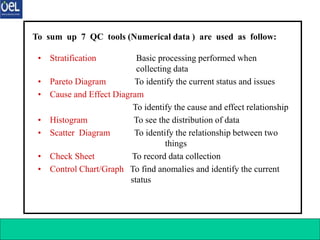
• Stratification Basic processing performed when
collecting data
• Pareto Diagram To identify the current status and issues
• Cause and Effect Diagram
To identify the cause and effect relationship
• Histogram To see the distribution of data
• Scatter Diagram To identify the relationship between two
things
• Check Sheet To record data collection
• Control Chart/Graph To find anomalies and identify the current
status
To sum up 7 QC tools (Numerical data ) are used as follow:
7 Q C Tools 4
Pareto Diagram
1. What is Pareto diagram ?
A Pareto diagram is a combination of bar and line graphs of
accumulated data, where data associated with a problem
(e.g., a defect found, mechanical failure, or a complaint
from a customer) are divided into smaller groups by cause
or by phenomenon and sorted, for example, by the number
of occurrences or the amount of money involved. (The
name “Pareto” came from an Italian mathematician who
created the diagram.)
7 Q C Tools 5
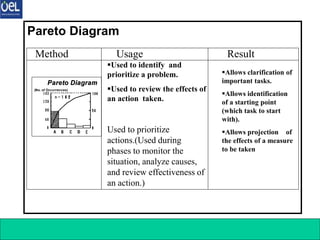
Pareto Diagram
Pareto Diagram
(No. of Occurrences)
Pareto Diagram
Pareto Diagram
(No. of Occurrences)
Used to prioritize
actions.(Used during
phases to monitor the
situation, analyze causes,
and review effectiveness of
an action.)
Used to identify and
prioritize a problem.
Used to review the effects of
an action taken.
Allows clarification of
important tasks.
Allows identification
of a starting point
(which task to start
with).
Allows projection of
the effects of a measure
to be taken
Method Usage Result
Pareto Diagram
7 Q C Tools 6
Pareto Diagram
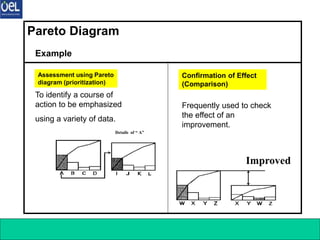
To identify a course of
action to be emphasized
using a variety of data.
Example
Assessment using Pareto
diagram (prioritization)
Confirmation of Effect
(Comparison)
Details of “ A”
Frequently used to check
the effect of an
improvement.
Improved
7 Q C Tools 7
Cause & Effect Diagram
1. What is Cause & effect Diagram ?
A cause and effect diagram is “a fish-bone diagram that
presents a systematic representation of the relationship
between the effect (result) and affecting factors (causes).”
Solving a problem in a scientific manner requires
clarification of a cause and effect relationship, where the
effect (e.g., the result of work) varies according to factors
(e.g., facilities and machines used, method of work, workers,
and materials and parts used). To obtain a good work result,
we must identify the effects of various factors and develop
measures to improve the result accordingly.
7 Q C Tools 8
Can obtain a clear
overall picture of causal
relation. (A change in
the cause triggers a
variation in the
result.)○ Can clarify
the cause and effect
relationship.
Can list up all causes
to identify important
causes.
Can determine the
direction of action
(countermeasure).
Method Usage Result
Cause & Effect Diagram
Used when
clarifying a cause
and effect
relationship.[Used
during a phase to
analyze causes.]
 Used to develop
countermeasures.
[Used during a phase to plan
countermeasures.]
Material Method
Man
Machine
Cause (4M’s) Result
(Controlled State)
Effect
Cause and Effect
Cause and Effect
Diagram
Diagram
Material Method
Man
Machine
Cause (4M’s) Result
(Controlled State)
Effect
Cause and Effect
Cause and Effect
Diagram
Diagram
7 Q C Tools 9
Cause & Effect Diagram
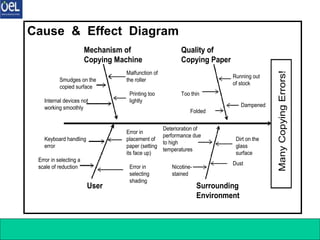
Mechanism of
Copying Machine
Quality of
Copying Paper
User Surrounding
Environment
Smudges on the
copied surface
Internal devices not
working smoothly
Malfunction of
the roller
Printing too
lightly
Too thin
Folded
Running out
of stock
Dampened
Keyboard handling
error
Error in selecting a
scale of reduction
Error in
placement of
paper (setting
its face up)
Error in
selecting
shading
Deterioration of
performance due
to high
temperatures
Nicotine-
stained
Dirt on the
glass
surface
Dust
Many
Copying
Errors!
Mechanism of
Copying Machine
Quality of
Copying Paper
User Surrounding
Environment
Smudges on the
copied surface
Internal devices not
working smoothly
Malfunction of
the roller
Printing too
lightly
Too thin
Folded
Running out
of stock
Dampened
Keyboard handling
error
Error in selecting a
scale of reduction
Error in
placement of
paper (setting
its face up)
Error in
selecting
shading
Deterioration of
performance due
to high
temperatures
Nicotine-
stained
Dirt on the
glass
surface
Dust
Many
Copying
Errors!
7 Q C Tools 10
Stratification
1. What is Stratification ?
Stratification means to “divide the whole into smaller portions
according to certain criteria.” In case of quality control,
stratification generally means to divide data into several groups
according to common factors or tendencies (e.g., type of defect
and cause of defect).
Dividing into groups “fosters understanding of a situation.”
This represents the basic principle of quality control.
7 Q C Tools 11
Method Usage Result
Stratification
Grouping by day,
time, place,
worker, or
process
X
Y
Z
Number of Units
★★★★★★★
△△△△
○○○
•Used to observe variations
among strata.
•Used to identify the
relationship between cause
and effect.
•Used to identify a purpose
and means to serve the
purpose
[Used during phases to monitor
the situation, analyze causes,
review effectiveness of an action,
perform standardization, and
implement a selected control
measure.]
•Allows observation
of variations among
strata.
•By performing a
cause analysis using
the stratified data,
the following can be
accomplished.
1.Identification and control of a
problem
2.“Division of data (obtained by
using each QC tool) into several
groups”
7 Q C Tools 12
Check Sheet
1. What is Check sheet ?
A check sheet is “a sheet designed in advance to allow easy
collection and aggregation of data.” By just entering check
marks on a check sheet, data can be collected to extract
necessary information, or a thorough inspection can be
performed in an efficient manner, eliminating a possibility
of skipping any of the required inspection items.
A check sheet is also effective in performing stratification
(categorization).
7 Q C Tools 13
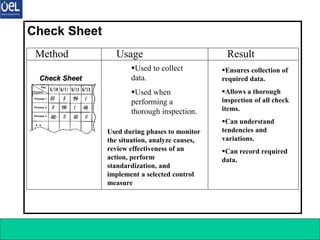
Ensures collection of
required data.
Allows a thorough
inspection of all check
items.
Can understand
tendencies and
variations.
Can record required
data.
Method Usage Result
Check Sheet
Check Sheet
Check Sheet
Day
Process
Process 1
Process 2
Process 3
Check Sheet
Check Sheet
Day
Process
Process 1
Process 2
Process 3
Used to collect
data.
Used when
performing a
thorough inspection.
Used during phases to monitor
the situation, analyze causes,
review effectiveness of an
action, perform
standardization, and
implement a selected control
measure
7 Q C Tools 14
Check Sheet
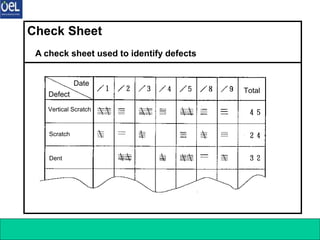
A check sheet used to identify defects
Date
Defect
Vertical Scratch
Scratch
Dent
Total
Date
Defect
Vertical Scratch
Scratch
Dent
Total
7 Q C Tools 15
Control Chart (Control Chart / Graph 1)
1. What is Control Chart ?
A control chart is used to examine a process to see if
it is stable or to maintain the stability of a process.
This method is often used to analyze a process. To
do so, a chart is created from data collected for a
certain period of time, and dots plotted on the chart
are examined to see how they are distributed or if they
are within the established control limit. After some
actions are taken to control and standardize various
factors, this method is also used to examine if a
process is stabilized by these actions, and if so, to
keep the process in a stable state.
7 Q C Tools 16
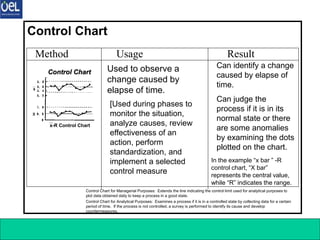
Method Usage Result
Control Chart
Control Chart
Control Chart
x-R Control Chart
Control Chart
Control Chart
x-R Control Chart
[Used during phases to
monitor the situation,
analyze causes, review
effectiveness of an
action, perform
standardization, and
implement a selected
control measure
Used to observe a
change caused by
elapse of time.
In the example “x bar ” -R
control chart, “X bar”
represents the central value,
while “R” indicates the range.
Can identify a change
caused by elapse of
time.
Can judge the
process if it is in its
normal state or there
are some anomalies
by examining the dots
plotted on the chart.
Control Chart for Managerial Purposes: Extends the line indicating the control limit used for analytical purposes to
plot data obtained daily to keep a process in a good state.
Control Chart for Analytical Purposes: Examines a process if it is in a controlled state by collecting data for a certain
period of time. If the process is not controlled, a survey is performed to identify its cause and develop
countermeasures.
7 Q C Tools 17
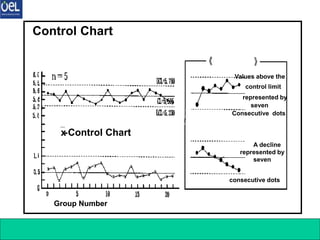
Control Chart
x
-Control Chart
Group Number
Examples of Values
Represented by Dots
control limit
seven
A decline
represented by
seven
x
-Control Chart
Group Number
Values above the
control limit
represented by
seven
Consecutive dots
A decline
represented by
seven
consecutive dots
7 Q C Tools 18
Graph
1. What is Graph ?
A graph is “a graphical representation of data, which allows a
person to understand the meaning of these data at a glance.”
Unprocessed data simply represent a list of numbers, and
finding certain tendencies or magnitude of situation from these
numbers is difficult, sometimes resulting in an interpretational
error. A graph is a effective means to monitor or judge the
situation, allowing quick and precise understanding of the
current or actual situation.
A graph is a visual and summarized representation of data that
need to be quickly and precisely conveyed to others.
7 Q C Tools 19
Method Usage Result
Graph
0
20
40
60
80
100
120
1st Qtr 2nd Qtr 3rd Qtr 4th Qtr
East
1st Qtr
13%
2nd Qtr
17%
3rd Qtr
57%
4th Qtr
13%
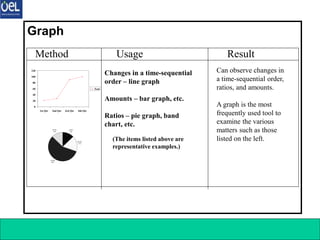
Changes in a time-sequential
order – line graph
Amounts – bar graph, etc.
Ratios – pie graph, band
chart, etc.
(The items listed above are
representative examples.)
Can observe changes in
a time-sequential order,
ratios, and amounts.
A graph is the most
frequently used tool to
examine the various
matters such as those
listed on the left.
7 Q C Tools 20
Graph
Sales
Sales
Office
Iwate Tokyo Osaka Shizuoka
[Bar Graph of Sales]
・Survey Period: Dec. 1999
・Prepared by: M/T
[Band Chart of Expenses]
(¥million)
Before
Taking
Actions
After
Taking
Actions
Chemicals
Chemicals
(430)
(430)
Chemicals
Chemicals
(240)
(240)
Oils
Oils
(200)
(200)
Oils
Oils
(150)
(150)
Electricity
Electricity
(170)
(170)
Electricity
Electricity
(108)
(108)
(Total: ¥8 million)
(Total: ¥4.95 million)
Sales
million)
Sales
Office
A B C D
[Bar Graph of Sales]
・Survey Period: Dec. 1999
・Prepared by: M/T
[Band Chart of Expenses]
million)
Before
Taking
Actions
After
Taking
Actions
Chemicals
Chemicals
(430)
(430)
Chemicals
Chemicals
(240)
(240)
Oils
Oils
(200)
(200)
Oils
Oils
(150)
(150)
Electricity
Electricity
(170)
(170)
Electricity
Electricity
(108)
(108)
(Total: 8 million)
(Total: 4.95 million)
7 Q C Tools 21
Histogram
1. What is Histogram ?
When creating a histogram, “a range of data is divided into
smaller sections having a uniform span,and the number of data
contained in each section (the number of occurrences) is
counted to develop a frequency distribution table.” Then, “a
graph is formed from this table by using vertical bars, each
having the height proportional to the number of occurrences in
each section.”
7 Q C Tools 22
Method Usage Result
Histogram
Histogram
Histogram
Standard
Range
Range of
Variations
X Axis (Values
Actually
Measured)
Histogram
Histogram
Standard
Range
Range of
Variations
X Axis (Values
Actually
Measured)
•Used to assess the actual
conditions.
•Used to analyze a process to
identify a problem point that needs
to be improved by finding the
location of the mean value or
degree of variations in the graph.
•Used to examine that the target
quality is maintained throughout
the process.
•Others
[Used during phases to
monitor the situation, analyze
causes, and review
effectiveness of an action.]
•Can identify the
location of the mean
(central) value or
degree of variations.
•Can find out the scope
of a defect by inserting
standard values.
•Can identify the
condition of
distribution (e.g.,
whether there is an
isolated, extreme
value).
7 Q C Tools 23
Scatter Diagram
1. What is Scatter Diagram ?
A scatter diagram is used to “examine the relationship between
the two, paired, interrelated data types, ” such as “height and
weight of a person.” A scatter diagram provides a means to
find whether or not these two data types are interrelated. It is
also utilized to determine how closely they are related to
identify a problem point that should be controlled or improved.
7 Q C Tools 24
Method Usage Result
Scatter Diagram
•Used to identify a relationship
between two matters.
•Used to identify a relationship
between two matters and establish
countermeasures based on their
cause and effect relation.
Example Usage
1.Relationship between thermal
treatment temperature of a steel
material and its tensile strengths
2.Relationship between visit made
by a salesman and volume of sales
3.Relationship between the number
of persons visiting a department
store and volume of sales
4 Others
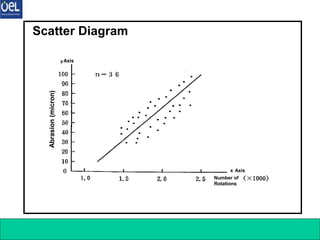
Scatter Diagram
Scatter Diagram
y Axis
x Axis
Abrasion
Number of
Rotations
Scatter Diagram
Scatter Diagram
y Axis
x Axis
Abrasion
Number of
Rotations
[Used during phases to monitor the
situation, analyze causes, and review
effectiveness of an action.]
•Can identify cause
and effect relation.
•Can understand the
relationship
between two
results.
7 Q C Tools 25
Scatter Diagram
Abrasion
(micron)
yAxis
x Axis
Number of
Rotations
Abrasion
(micron)
yAxis
x Axis
Number of
Rotations
7 Q C Tools 26
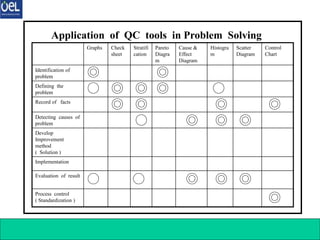
Process control
( Standardization )
Evaluation of result
Implementation
Develop
Improvement
method
( Solution )
Detecting causes of
problem
Record of facts
Defining the
problem
Identification of
problem
Control
Chart
Scatter
Diagram
Histogra
m
Cause &
Effect
Diagram
Pareto
Diagra
m
Stratifi
cation
Check
sheet
Graphs
Application of QC tools in Problem Solving
7 Q C Tools

7 QC TOOLS training for Quality Engineers .ppt

  • 1.
    7 Q CTools 1 Introduction of 7 QC Tools ? In 1950, the Japanese Union of Scientists and Engineers (JUSE) invited legendary quality guru W. Edwards Deming to go to Japan and train hundreds of Japanese engineers, managers and scholars in statistical process control. Deming also delivered a series of lectures to Japanese business managers on the subject, and during his lectures, he would emphasis the importance of what he called the “basic tool” that were available to use in quality control.
  • 2.
    7 Q CTools 2 What are 7 QC Tools ? QC tools are the means for Colleting data , analyzing data , identifying root causes and measuring the results. THESE TOOLS ARE RELATED TO Numerical DATA processing USER HAS TO ARRIVE AT THE SOLUTION & IMPLEMENT
  • 3.
    7 Q CTools 3 • Stratification Basic processing performed when collecting data • Pareto Diagram To identify the current status and issues • Cause and Effect Diagram To identify the cause and effect relationship • Histogram To see the distribution of data • Scatter Diagram To identify the relationship between two things • Check Sheet To record data collection • Control Chart/Graph To find anomalies and identify the current status To sum up 7 QC tools (Numerical data ) are used as follow:
  • 4.
    7 Q CTools 4 Pareto Diagram 1. What is Pareto diagram ? A Pareto diagram is a combination of bar and line graphs of accumulated data, where data associated with a problem (e.g., a defect found, mechanical failure, or a complaint from a customer) are divided into smaller groups by cause or by phenomenon and sorted, for example, by the number of occurrences or the amount of money involved. (The name “Pareto” came from an Italian mathematician who created the diagram.)
  • 5.
    7 Q CTools 5 Pareto Diagram Pareto Diagram (No. of Occurrences) Pareto Diagram Pareto Diagram (No. of Occurrences) Used to prioritize actions.(Used during phases to monitor the situation, analyze causes, and review effectiveness of an action.) Used to identify and prioritize a problem. Used to review the effects of an action taken. Allows clarification of important tasks. Allows identification of a starting point (which task to start with). Allows projection of the effects of a measure to be taken Method Usage Result Pareto Diagram
  • 6.
    7 Q CTools 6 Pareto Diagram To identify a course of action to be emphasized using a variety of data. Example Assessment using Pareto diagram (prioritization) Confirmation of Effect (Comparison) Details of “ A” Frequently used to check the effect of an improvement. Improved
  • 7.
    7 Q CTools 7 Cause & Effect Diagram 1. What is Cause & effect Diagram ? A cause and effect diagram is “a fish-bone diagram that presents a systematic representation of the relationship between the effect (result) and affecting factors (causes).” Solving a problem in a scientific manner requires clarification of a cause and effect relationship, where the effect (e.g., the result of work) varies according to factors (e.g., facilities and machines used, method of work, workers, and materials and parts used). To obtain a good work result, we must identify the effects of various factors and develop measures to improve the result accordingly.
  • 8.
    7 Q CTools 8 Can obtain a clear overall picture of causal relation. (A change in the cause triggers a variation in the result.)○ Can clarify the cause and effect relationship. Can list up all causes to identify important causes. Can determine the direction of action (countermeasure). Method Usage Result Cause & Effect Diagram Used when clarifying a cause and effect relationship.[Used during a phase to analyze causes.]  Used to develop countermeasures. [Used during a phase to plan countermeasures.] Material Method Man Machine Cause (4M’s) Result (Controlled State) Effect Cause and Effect Cause and Effect Diagram Diagram Material Method Man Machine Cause (4M’s) Result (Controlled State) Effect Cause and Effect Cause and Effect Diagram Diagram
  • 9.
    7 Q CTools 9 Cause & Effect Diagram Mechanism of Copying Machine Quality of Copying Paper User Surrounding Environment Smudges on the copied surface Internal devices not working smoothly Malfunction of the roller Printing too lightly Too thin Folded Running out of stock Dampened Keyboard handling error Error in selecting a scale of reduction Error in placement of paper (setting its face up) Error in selecting shading Deterioration of performance due to high temperatures Nicotine- stained Dirt on the glass surface Dust Many Copying Errors! Mechanism of Copying Machine Quality of Copying Paper User Surrounding Environment Smudges on the copied surface Internal devices not working smoothly Malfunction of the roller Printing too lightly Too thin Folded Running out of stock Dampened Keyboard handling error Error in selecting a scale of reduction Error in placement of paper (setting its face up) Error in selecting shading Deterioration of performance due to high temperatures Nicotine- stained Dirt on the glass surface Dust Many Copying Errors!
  • 10.
    7 Q CTools 10 Stratification 1. What is Stratification ? Stratification means to “divide the whole into smaller portions according to certain criteria.” In case of quality control, stratification generally means to divide data into several groups according to common factors or tendencies (e.g., type of defect and cause of defect). Dividing into groups “fosters understanding of a situation.” This represents the basic principle of quality control.
  • 11.
    7 Q CTools 11 Method Usage Result Stratification Grouping by day, time, place, worker, or process X Y Z Number of Units ★★★★★★★ △△△△ ○○○ •Used to observe variations among strata. •Used to identify the relationship between cause and effect. •Used to identify a purpose and means to serve the purpose [Used during phases to monitor the situation, analyze causes, review effectiveness of an action, perform standardization, and implement a selected control measure.] •Allows observation of variations among strata. •By performing a cause analysis using the stratified data, the following can be accomplished. 1.Identification and control of a problem 2.“Division of data (obtained by using each QC tool) into several groups”
  • 12.
    7 Q CTools 12 Check Sheet 1. What is Check sheet ? A check sheet is “a sheet designed in advance to allow easy collection and aggregation of data.” By just entering check marks on a check sheet, data can be collected to extract necessary information, or a thorough inspection can be performed in an efficient manner, eliminating a possibility of skipping any of the required inspection items. A check sheet is also effective in performing stratification (categorization).
  • 13.
    7 Q CTools 13 Ensures collection of required data. Allows a thorough inspection of all check items. Can understand tendencies and variations. Can record required data. Method Usage Result Check Sheet Check Sheet Check Sheet Day Process Process 1 Process 2 Process 3 Check Sheet Check Sheet Day Process Process 1 Process 2 Process 3 Used to collect data. Used when performing a thorough inspection. Used during phases to monitor the situation, analyze causes, review effectiveness of an action, perform standardization, and implement a selected control measure
  • 14.
    7 Q CTools 14 Check Sheet A check sheet used to identify defects Date Defect Vertical Scratch Scratch Dent Total Date Defect Vertical Scratch Scratch Dent Total
  • 15.
    7 Q CTools 15 Control Chart (Control Chart / Graph 1) 1. What is Control Chart ? A control chart is used to examine a process to see if it is stable or to maintain the stability of a process. This method is often used to analyze a process. To do so, a chart is created from data collected for a certain period of time, and dots plotted on the chart are examined to see how they are distributed or if they are within the established control limit. After some actions are taken to control and standardize various factors, this method is also used to examine if a process is stabilized by these actions, and if so, to keep the process in a stable state.
  • 16.
    7 Q CTools 16 Method Usage Result Control Chart Control Chart Control Chart x-R Control Chart Control Chart Control Chart x-R Control Chart [Used during phases to monitor the situation, analyze causes, review effectiveness of an action, perform standardization, and implement a selected control measure Used to observe a change caused by elapse of time. In the example “x bar ” -R control chart, “X bar” represents the central value, while “R” indicates the range. Can identify a change caused by elapse of time. Can judge the process if it is in its normal state or there are some anomalies by examining the dots plotted on the chart. Control Chart for Managerial Purposes: Extends the line indicating the control limit used for analytical purposes to plot data obtained daily to keep a process in a good state. Control Chart for Analytical Purposes: Examines a process if it is in a controlled state by collecting data for a certain period of time. If the process is not controlled, a survey is performed to identify its cause and develop countermeasures.
  • 17.
    7 Q CTools 17 Control Chart x -Control Chart Group Number Examples of Values Represented by Dots control limit seven A decline represented by seven x -Control Chart Group Number Values above the control limit represented by seven Consecutive dots A decline represented by seven consecutive dots
  • 18.
    7 Q CTools 18 Graph 1. What is Graph ? A graph is “a graphical representation of data, which allows a person to understand the meaning of these data at a glance.” Unprocessed data simply represent a list of numbers, and finding certain tendencies or magnitude of situation from these numbers is difficult, sometimes resulting in an interpretational error. A graph is a effective means to monitor or judge the situation, allowing quick and precise understanding of the current or actual situation. A graph is a visual and summarized representation of data that need to be quickly and precisely conveyed to others.
  • 19.
    7 Q CTools 19 Method Usage Result Graph 0 20 40 60 80 100 120 1st Qtr 2nd Qtr 3rd Qtr 4th Qtr East 1st Qtr 13% 2nd Qtr 17% 3rd Qtr 57% 4th Qtr 13% Changes in a time-sequential order – line graph Amounts – bar graph, etc. Ratios – pie graph, band chart, etc. (The items listed above are representative examples.) Can observe changes in a time-sequential order, ratios, and amounts. A graph is the most frequently used tool to examine the various matters such as those listed on the left.
  • 20.
    7 Q CTools 20 Graph Sales Sales Office Iwate Tokyo Osaka Shizuoka [Bar Graph of Sales] ・Survey Period: Dec. 1999 ・Prepared by: M/T [Band Chart of Expenses] (¥million) Before Taking Actions After Taking Actions Chemicals Chemicals (430) (430) Chemicals Chemicals (240) (240) Oils Oils (200) (200) Oils Oils (150) (150) Electricity Electricity (170) (170) Electricity Electricity (108) (108) (Total: ¥8 million) (Total: ¥4.95 million) Sales million) Sales Office A B C D [Bar Graph of Sales] ・Survey Period: Dec. 1999 ・Prepared by: M/T [Band Chart of Expenses] million) Before Taking Actions After Taking Actions Chemicals Chemicals (430) (430) Chemicals Chemicals (240) (240) Oils Oils (200) (200) Oils Oils (150) (150) Electricity Electricity (170) (170) Electricity Electricity (108) (108) (Total: 8 million) (Total: 4.95 million)
  • 21.
    7 Q CTools 21 Histogram 1. What is Histogram ? When creating a histogram, “a range of data is divided into smaller sections having a uniform span,and the number of data contained in each section (the number of occurrences) is counted to develop a frequency distribution table.” Then, “a graph is formed from this table by using vertical bars, each having the height proportional to the number of occurrences in each section.”
  • 22.
    7 Q CTools 22 Method Usage Result Histogram Histogram Histogram Standard Range Range of Variations X Axis (Values Actually Measured) Histogram Histogram Standard Range Range of Variations X Axis (Values Actually Measured) •Used to assess the actual conditions. •Used to analyze a process to identify a problem point that needs to be improved by finding the location of the mean value or degree of variations in the graph. •Used to examine that the target quality is maintained throughout the process. •Others [Used during phases to monitor the situation, analyze causes, and review effectiveness of an action.] •Can identify the location of the mean (central) value or degree of variations. •Can find out the scope of a defect by inserting standard values. •Can identify the condition of distribution (e.g., whether there is an isolated, extreme value).
  • 23.
    7 Q CTools 23 Scatter Diagram 1. What is Scatter Diagram ? A scatter diagram is used to “examine the relationship between the two, paired, interrelated data types, ” such as “height and weight of a person.” A scatter diagram provides a means to find whether or not these two data types are interrelated. It is also utilized to determine how closely they are related to identify a problem point that should be controlled or improved.
  • 24.
    7 Q CTools 24 Method Usage Result Scatter Diagram •Used to identify a relationship between two matters. •Used to identify a relationship between two matters and establish countermeasures based on their cause and effect relation. Example Usage 1.Relationship between thermal treatment temperature of a steel material and its tensile strengths 2.Relationship between visit made by a salesman and volume of sales 3.Relationship between the number of persons visiting a department store and volume of sales 4 Others Scatter Diagram Scatter Diagram y Axis x Axis Abrasion Number of Rotations Scatter Diagram Scatter Diagram y Axis x Axis Abrasion Number of Rotations [Used during phases to monitor the situation, analyze causes, and review effectiveness of an action.] •Can identify cause and effect relation. •Can understand the relationship between two results.
  • 25.
    7 Q CTools 25 Scatter Diagram Abrasion (micron) yAxis x Axis Number of Rotations Abrasion (micron) yAxis x Axis Number of Rotations
  • 26.
    7 Q CTools 26 Process control ( Standardization ) Evaluation of result Implementation Develop Improvement method ( Solution ) Detecting causes of problem Record of facts Defining the problem Identification of problem Control Chart Scatter Diagram Histogra m Cause & Effect Diagram Pareto Diagra m Stratifi cation Check sheet Graphs Application of QC tools in Problem Solving
  • 27.
    7 Q CTools