Production Reflection
Jay birkin
Process
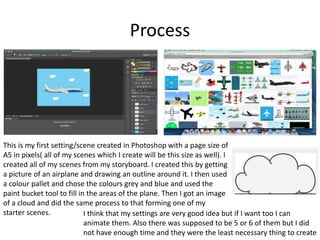
This is my first setting/scene created in Photoshop with a page size of
A5 in pixels( all of my scenes which I create will be this size as well). I
created all of my scenes from my storyboard. I created this by getting
a picture of an airplane and drawing an outline around it. I then used
a colour pallet and chose the colours grey and blue and used the
paint bucket tool to fill in the areas of the plane. Then I got an image
of a cloud and did the same process to that forming one of my
starter scenes. I think that my settings are very good idea but if I want too I can
animate them. Also there was supposed to be 5 or 6 of them but I did
not have enough time and they were the least necessary thing to create
Process
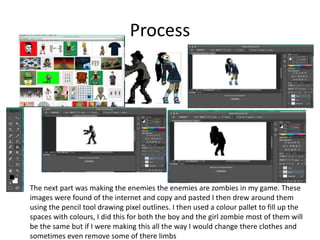
The next part was making the enemies the enemies are zombies in my game. These
images were found of the internet and copy and pasted I then drew around them
using the pencil tool drawing pixel outlines. I then used a colour pallet to fill up the
spaces with colours, I did this for both the boy and the girl zombie most of them will
be the same but if I were making this all the way I would change there clothes and
sometimes even remove some of there limbs
Process
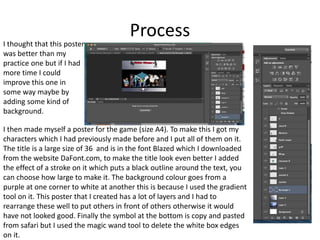
I then made myself a poster for the game (size A4). To make this I got my
characters which I had previously made before and I put all of them on it.
The title is a large size of 36 and is in the font Blazed which I downloaded
from the website DaFont.com, to make the title look even better I added
the effect of a stroke on it which puts a black outline around the text, you
can choose how large to make it. The background colour goes from a
purple at one corner to white at another this is because I used the gradient
tool on it. This poster that I created has a lot of layers and I had to
rearrange these well to put others in front of others otherwise it would
have not looked good. Finally the symbol at the bottom is copy and pasted
from safari but I used the magic wand tool to delete the white box edges
on it.
I thought that this poster
was better than my
practice one but if I had
more time I could
improve this one in
some way maybe by
adding some kind of
background.
Process
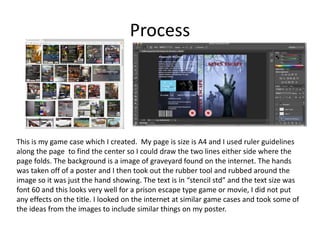
This is my game case which I created. My page is size is A4 and I used ruler guidelines
along the page to find the center so I could draw the two lines either side where the
page folds. The background is a image of graveyard found on the internet. The hands
was taken off of a poster and I then took out the rubber tool and rubbed around the
image so it was just the hand showing. The text is in “stencil std” and the text size was
font 60 and this looks very well for a prison escape type game or movie, I did not put
any effects on the title. I looked on the internet at similar game cases and took some of
the ideas from the images to include similar things on my poster.
Process
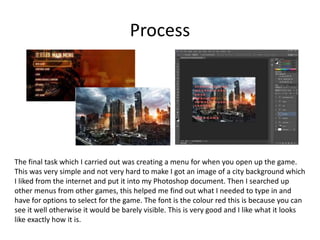
The final task which I carried out was creating a menu for when you open up the game.
This was very simple and not very hard to make I got an image of a city background which
I liked from the internet and put it into my Photoshop document. Then I searched up
other menus from other games, this helped me find out what I needed to type in and
have for options to select for the game. The font is the colour red this is because you can
see it well otherwise it would be barely visible. This is very good and I like what it looks
like exactly how it is.

6. production reflection

  • 1.
  • 2.
    Process This is myfirst setting/scene created in Photoshop with a page size of A5 in pixels( all of my scenes which I create will be this size as well). I created all of my scenes from my storyboard. I created this by getting a picture of an airplane and drawing an outline around it. I then used a colour pallet and chose the colours grey and blue and used the paint bucket tool to fill in the areas of the plane. Then I got an image of a cloud and did the same process to that forming one of my starter scenes. I think that my settings are very good idea but if I want too I can animate them. Also there was supposed to be 5 or 6 of them but I did not have enough time and they were the least necessary thing to create
  • 3.
    Process The next partwas making the enemies the enemies are zombies in my game. These images were found of the internet and copy and pasted I then drew around them using the pencil tool drawing pixel outlines. I then used a colour pallet to fill up the spaces with colours, I did this for both the boy and the girl zombie most of them will be the same but if I were making this all the way I would change there clothes and sometimes even remove some of there limbs
  • 4.
    Process I then mademyself a poster for the game (size A4). To make this I got my characters which I had previously made before and I put all of them on it. The title is a large size of 36 and is in the font Blazed which I downloaded from the website DaFont.com, to make the title look even better I added the effect of a stroke on it which puts a black outline around the text, you can choose how large to make it. The background colour goes from a purple at one corner to white at another this is because I used the gradient tool on it. This poster that I created has a lot of layers and I had to rearrange these well to put others in front of others otherwise it would have not looked good. Finally the symbol at the bottom is copy and pasted from safari but I used the magic wand tool to delete the white box edges on it. I thought that this poster was better than my practice one but if I had more time I could improve this one in some way maybe by adding some kind of background.
  • 5.
    Process This is mygame case which I created. My page is size is A4 and I used ruler guidelines along the page to find the center so I could draw the two lines either side where the page folds. The background is a image of graveyard found on the internet. The hands was taken off of a poster and I then took out the rubber tool and rubbed around the image so it was just the hand showing. The text is in “stencil std” and the text size was font 60 and this looks very well for a prison escape type game or movie, I did not put any effects on the title. I looked on the internet at similar game cases and took some of the ideas from the images to include similar things on my poster.
  • 6.
    Process The final taskwhich I carried out was creating a menu for when you open up the game. This was very simple and not very hard to make I got an image of a city background which I liked from the internet and put it into my Photoshop document. Then I searched up other menus from other games, this helped me find out what I needed to type in and have for options to select for the game. The font is the colour red this is because you can see it well otherwise it would be barely visible. This is very good and I like what it looks like exactly how it is.

Editor's Notes

  • #3 Discuss the tools and processes used in your production. Log your thoughts and feelings about your work.
  • #4 Discuss the tools and processes used in your production. Log your thoughts and feelings about your work.
  • #5 Discuss the tools and processes used in your production. Log your thoughts and feelings about your work.
  • #6 Discuss the tools and processes used in your production. Log your thoughts and feelings about your work.
  • #7 Discuss the tools and processes used in your production. Log your thoughts and feelings about your work.