Pre-Production
Style Sheet – Video Game
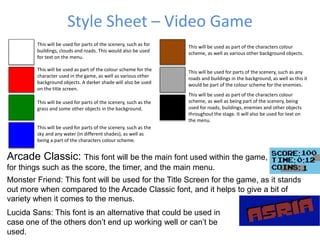
Arcade Classic: This font will be the main font used within the game,
for things such as the score, the timer, and the main menu.
Monster Friend: This font will be used for the Title Screen for the game, as it stands
out more when compared to the Arcade Classic font, and it helps to give a bit of
variety when it comes to the menus.
This will be used for parts of the scenery, such as for
buildings, clouds and roads. This would also be used
for text on the menu.
This will be used as part of the colour scheme for the
character used in the game, as well as various other
background objects. A darker shade will also be used
on the title screen.
This will be used for parts of the scenery, such as the
grass and some other objects in the background.
This will be used for parts of the scenery, such as the
sky and any water (in different shades), as well as
being a part of the characters colour scheme.
This will be used as part of the characters colour
scheme, as well as various other background objects.
This will be used for parts of the scenery, such as any
roads and buildings in the background, as well as this it
would be part of the colour scheme for the enemies.
This will be used as part of the characters colour
scheme, as well as being part of the scenery, being
used for roads, buildings, enemies and other objects
throughout the stage. It will also be used for text on
the menu.
Lucida Sans: This font is an alternative that could be used in
case one of the others don’t end up working well or can’t be
used.
Style Sheet – Video Game
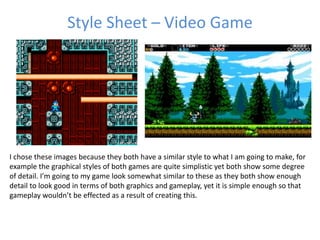
I chose these images because they both have a similar style to what I am going to make, for
example the graphical styles of both games are quite simplistic yet both show some degree
of detail. I’m going to my game look somewhat similar to these as they both show enough
detail to look good in terms of both graphics and gameplay, yet it is simple enough so that
gameplay wouldn’t be effected as a result of creating this.
Style Sheet – Box Art
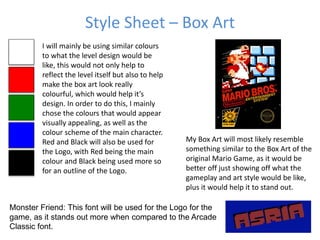
Monster Friend: This font will be used for the Logo for the
game, as it stands out more when compared to the Arcade
Classic font.
I will mainly be using similar colours
to what the level design would be
like, this would not only help to
reflect the level itself but also to help
make the box art look really
colourful, which would help it’s
design. In order to do this, I mainly
chose the colours that would appear
visually appealing, as well as the
colour scheme of the main character.
Red and Black will also be used for
the Logo, with Red being the main
colour and Black being used more so
for an outline of the Logo.
My Box Art will most likely resemble
something similar to the Box Art of the
original Mario Game, as it would be
better off just showing off what the
gameplay and art style would be like,
plus it would help it to stand out.
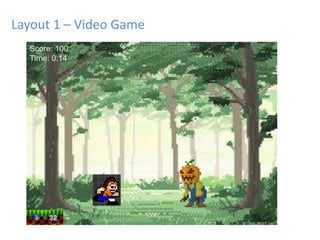
Layout 1 – Video Game
Score: 100
Time: 0:14
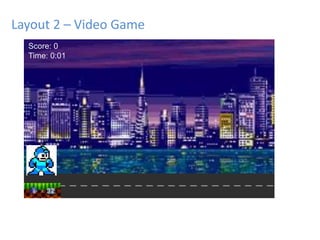
Layout 2 – Video Game
Score: 0
Time: 0:01
• I’m going to add in a score, timer and a lives system so
that players will be able to compare what they get in the
game to other players through the leaderboard.
• One of the themes considered for the game is a forest
stage, I used this background in order to see what it could
potentially look like.
• The other considered was a city stage, this is more
towards what I am planning to do in the production so I
wanted to see what it would look like.
• The character is similar in design to what I am going to
use in my game.
Layout Rationale – Video Game
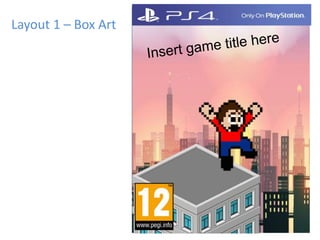
Layout 1 – Box Art
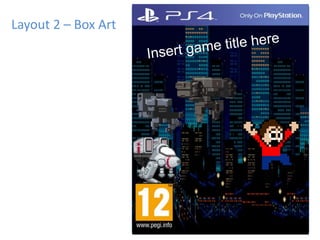
Layout 2 – Box Art
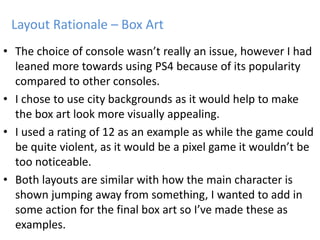
• The choice of console wasn’t really an issue, however I had
leaned more towards using PS4 because of its popularity
compared to other consoles.
• I chose to use city backgrounds as it would help to make
the box art look more visually appealing.
• I used a rating of 12 as an example as while the game could
be quite violent, as it would be a pixel game it wouldn’t be
too noticeable.
• Both layouts are similar with how the main character is
shown jumping away from something, I wanted to add in
some action for the final box art so I’ve made these as
examples.
Layout Rationale – Box Art
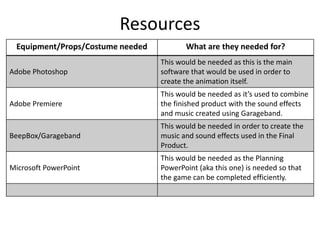
Resources
Equipment/Props/Costume needed What are they needed for?
Adobe Photoshop
This would be needed as this is the main
software that would be used in order to
create the animation itself.
Adobe Premiere
This would be needed as it’s used to combine
the finished product with the sound effects
and music created using Garageband.
BeepBox/Garageband
This would be needed in order to create the
music and sound effects used in the Final
Product.
Microsoft PowerPoint
This would be needed as the Planning
PowerPoint (aka this one) is needed so that
the game can be completed efficiently.
Timing
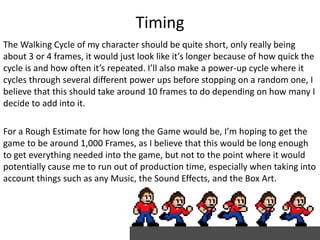
The Walking Cycle of my character should be quite short, only really being
about 3 or 4 frames, it would just look like it’s longer because of how quick the
cycle is and how often it’s repeated. I’ll also make a power-up cycle where it
cycles through several different power ups before stopping on a random one, I
believe that this should take around 10 frames to do depending on how many I
decide to add into it.
For a Rough Estimate for how long the Game would be, I’m hoping to get the
game to be around 1,000 Frames, as I believe that this would be long enough
to get everything needed into the game, but not to the point where it would
potentially cause me to run out of production time, especially when taking into
account things such as any Music, the Sound Effects, and the Box Art.
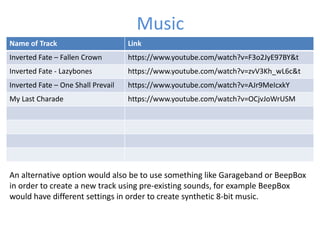
Name of Track Link
Inverted Fate – Fallen Crown https://www.youtube.com/watch?v=F3o2JyE97BY&t
Inverted Fate - Lazybones https://www.youtube.com/watch?v=zvV3Kh_wL6c&t
Inverted Fate – One Shall Prevail https://www.youtube.com/watch?v=AJr9MeIcxkY
My Last Charade https://www.youtube.com/watch?v=OCjvJoWrUSM
Music
An alternative option would also be to use something like Garageband or BeepBox
in order to create a new track using pre-existing sounds, for example BeepBox
would have different settings in order to create synthetic 8-bit music.
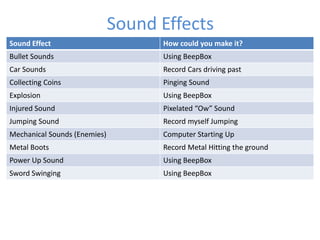
Sound Effect How could you make it?
Bullet Sounds Using BeepBox
Car Sounds Record Cars driving past
Collecting Coins Pinging Sound
Explosion Using BeepBox
Injured Sound Pixelated “Ow” Sound
Jumping Sound Record myself Jumping
Mechanical Sounds (Enemies) Computer Starting Up
Metal Boots Record Metal Hitting the ground
Power Up Sound Using BeepBox
Sword Swinging Using BeepBox
Sound Effects
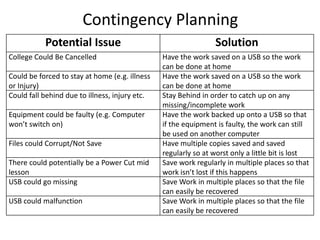
Contingency Planning
Potential Issue Solution
College Could Be Cancelled Have the work saved on a USB so the work
can be done at home
Could be forced to stay at home (e.g. illness
or Injury)
Have the work saved on a USB so the work
can be done at home
Could fall behind due to illness, injury etc. Stay Behind in order to catch up on any
missing/incomplete work
Equipment could be faulty (e.g. Computer
won’t switch on)
Have the work backed up onto a USB so that
if the equipment is faulty, the work can still
be used on another computer
Files could Corrupt/Not Save Have multiple copies saved and saved
regularly so at worst only a little bit is lost
There could potentially be a Power Cut mid
lesson
Save work regularly in multiple places so that
work isn’t lost if this happens
USB could go missing Save Work in multiple places so that the file
can easily be recovered
USB could malfunction Save Work in multiple places so that the file
can easily be recovered
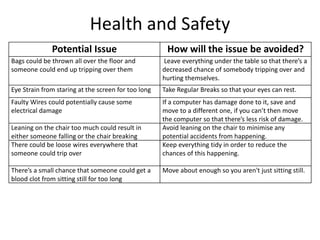
Health and Safety
Potential Issue How will the issue be avoided?
Bags could be thrown all over the floor and
someone could end up tripping over them
Leave everything under the table so that there’s a
decreased chance of somebody tripping over and
hurting themselves.
Eye Strain from staring at the screen for too long Take Regular Breaks so that your eyes can rest.
Faulty Wires could potentially cause some
electrical damage
If a computer has damage done to it, save and
move to a different one, if you can’t then move
the computer so that there’s less risk of damage.
Leaning on the chair too much could result in
either someone falling or the chair breaking
Avoid leaning on the chair to minimise any
potential accidents from happening.
There could be loose wires everywhere that
someone could trip over
Keep everything tidy in order to reduce the
chances of this happening.
There’s a small chance that someone could get a
blood clot from sitting still for too long
Move about enough so you aren't just sitting still.

5. pre production

  • 1.
  • 2.
    Style Sheet –Video Game Arcade Classic: This font will be the main font used within the game, for things such as the score, the timer, and the main menu. Monster Friend: This font will be used for the Title Screen for the game, as it stands out more when compared to the Arcade Classic font, and it helps to give a bit of variety when it comes to the menus. This will be used for parts of the scenery, such as for buildings, clouds and roads. This would also be used for text on the menu. This will be used as part of the colour scheme for the character used in the game, as well as various other background objects. A darker shade will also be used on the title screen. This will be used for parts of the scenery, such as the grass and some other objects in the background. This will be used for parts of the scenery, such as the sky and any water (in different shades), as well as being a part of the characters colour scheme. This will be used as part of the characters colour scheme, as well as various other background objects. This will be used for parts of the scenery, such as any roads and buildings in the background, as well as this it would be part of the colour scheme for the enemies. This will be used as part of the characters colour scheme, as well as being part of the scenery, being used for roads, buildings, enemies and other objects throughout the stage. It will also be used for text on the menu. Lucida Sans: This font is an alternative that could be used in case one of the others don’t end up working well or can’t be used.
  • 3.
    Style Sheet –Video Game I chose these images because they both have a similar style to what I am going to make, for example the graphical styles of both games are quite simplistic yet both show some degree of detail. I’m going to my game look somewhat similar to these as they both show enough detail to look good in terms of both graphics and gameplay, yet it is simple enough so that gameplay wouldn’t be effected as a result of creating this.
  • 4.
    Style Sheet –Box Art Monster Friend: This font will be used for the Logo for the game, as it stands out more when compared to the Arcade Classic font. I will mainly be using similar colours to what the level design would be like, this would not only help to reflect the level itself but also to help make the box art look really colourful, which would help it’s design. In order to do this, I mainly chose the colours that would appear visually appealing, as well as the colour scheme of the main character. Red and Black will also be used for the Logo, with Red being the main colour and Black being used more so for an outline of the Logo. My Box Art will most likely resemble something similar to the Box Art of the original Mario Game, as it would be better off just showing off what the gameplay and art style would be like, plus it would help it to stand out.
  • 5.
    Layout 1 –Video Game Score: 100 Time: 0:14
  • 6.
    Layout 2 –Video Game Score: 0 Time: 0:01
  • 7.
    • I’m goingto add in a score, timer and a lives system so that players will be able to compare what they get in the game to other players through the leaderboard. • One of the themes considered for the game is a forest stage, I used this background in order to see what it could potentially look like. • The other considered was a city stage, this is more towards what I am planning to do in the production so I wanted to see what it would look like. • The character is similar in design to what I am going to use in my game. Layout Rationale – Video Game
  • 8.
    Layout 1 –Box Art
  • 9.
    Layout 2 –Box Art
  • 10.
    • The choiceof console wasn’t really an issue, however I had leaned more towards using PS4 because of its popularity compared to other consoles. • I chose to use city backgrounds as it would help to make the box art look more visually appealing. • I used a rating of 12 as an example as while the game could be quite violent, as it would be a pixel game it wouldn’t be too noticeable. • Both layouts are similar with how the main character is shown jumping away from something, I wanted to add in some action for the final box art so I’ve made these as examples. Layout Rationale – Box Art
  • 11.
    Resources Equipment/Props/Costume needed Whatare they needed for? Adobe Photoshop This would be needed as this is the main software that would be used in order to create the animation itself. Adobe Premiere This would be needed as it’s used to combine the finished product with the sound effects and music created using Garageband. BeepBox/Garageband This would be needed in order to create the music and sound effects used in the Final Product. Microsoft PowerPoint This would be needed as the Planning PowerPoint (aka this one) is needed so that the game can be completed efficiently.
  • 12.
    Timing The Walking Cycleof my character should be quite short, only really being about 3 or 4 frames, it would just look like it’s longer because of how quick the cycle is and how often it’s repeated. I’ll also make a power-up cycle where it cycles through several different power ups before stopping on a random one, I believe that this should take around 10 frames to do depending on how many I decide to add into it. For a Rough Estimate for how long the Game would be, I’m hoping to get the game to be around 1,000 Frames, as I believe that this would be long enough to get everything needed into the game, but not to the point where it would potentially cause me to run out of production time, especially when taking into account things such as any Music, the Sound Effects, and the Box Art.
  • 13.
    Name of TrackLink Inverted Fate – Fallen Crown https://www.youtube.com/watch?v=F3o2JyE97BY&t Inverted Fate - Lazybones https://www.youtube.com/watch?v=zvV3Kh_wL6c&t Inverted Fate – One Shall Prevail https://www.youtube.com/watch?v=AJr9MeIcxkY My Last Charade https://www.youtube.com/watch?v=OCjvJoWrUSM Music An alternative option would also be to use something like Garageband or BeepBox in order to create a new track using pre-existing sounds, for example BeepBox would have different settings in order to create synthetic 8-bit music.
  • 14.
    Sound Effect Howcould you make it? Bullet Sounds Using BeepBox Car Sounds Record Cars driving past Collecting Coins Pinging Sound Explosion Using BeepBox Injured Sound Pixelated “Ow” Sound Jumping Sound Record myself Jumping Mechanical Sounds (Enemies) Computer Starting Up Metal Boots Record Metal Hitting the ground Power Up Sound Using BeepBox Sword Swinging Using BeepBox Sound Effects
  • 15.
    Contingency Planning Potential IssueSolution College Could Be Cancelled Have the work saved on a USB so the work can be done at home Could be forced to stay at home (e.g. illness or Injury) Have the work saved on a USB so the work can be done at home Could fall behind due to illness, injury etc. Stay Behind in order to catch up on any missing/incomplete work Equipment could be faulty (e.g. Computer won’t switch on) Have the work backed up onto a USB so that if the equipment is faulty, the work can still be used on another computer Files could Corrupt/Not Save Have multiple copies saved and saved regularly so at worst only a little bit is lost There could potentially be a Power Cut mid lesson Save work regularly in multiple places so that work isn’t lost if this happens USB could go missing Save Work in multiple places so that the file can easily be recovered USB could malfunction Save Work in multiple places so that the file can easily be recovered
  • 16.
    Health and Safety PotentialIssue How will the issue be avoided? Bags could be thrown all over the floor and someone could end up tripping over them Leave everything under the table so that there’s a decreased chance of somebody tripping over and hurting themselves. Eye Strain from staring at the screen for too long Take Regular Breaks so that your eyes can rest. Faulty Wires could potentially cause some electrical damage If a computer has damage done to it, save and move to a different one, if you can’t then move the computer so that there’s less risk of damage. Leaning on the chair too much could result in either someone falling or the chair breaking Avoid leaning on the chair to minimise any potential accidents from happening. There could be loose wires everywhere that someone could trip over Keep everything tidy in order to reduce the chances of this happening. There’s a small chance that someone could get a blood clot from sitting still for too long Move about enough so you aren't just sitting still.

Editor's Notes

  • #3 Explore colours, fonts and image styles similar to what you want to produce. Discuss all three elements in relation to why you chose them and where you may use them in your project. Go over as many pages as you need to
  • #4 Explore colours, fonts and image styles similar to what you want to produce. Discuss all three elements in relation to why you chose them and where you may use them in your project. Go over as many pages as you need to
  • #5 Explore colours, fonts and image styles similar to what you want to produce. Discuss all three elements in relation to why you chose them and where you may use them in your project. Go over as many pages as you need to
  • #6 Mock up of a potential design using the colours and fonts established in your style sheet and sourced images Alter this slide to make it appropriate for your planned product types. Add further layout slides to create at least one for each product you plan to make.
  • #7 Mock up of a potential design using the colours and fonts established in your style sheet and sourced images. Alter this slide to make it appropriate for your planned product types. Add further layout slides to create at least one for each product you plan to make.
  • #9 Mock up of a potential design using the colours and fonts established in your style sheet and sourced images. Alter this slide to make it appropriate for your planned product types. Add further layout slides to create at least one for each product you plan to make.
  • #10 Mock up of a potential design using the colours and fonts established in your style sheet and sourced images. Alter this slide to make it appropriate for your planned product types. Add further layout slides to create at least one for each product you plan to make.