Production Reflection
Rebecca Edwards
Process
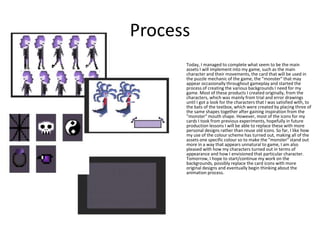
Today, I managed to complete what seem to be the main
assets I will implement into my game, such as the main
character and their movements, the card that will be used in
the puzzle mechanic of the game, the "monster" that may
appear occasionally throughout gameplay and started the
process of creating the various backgrounds I need for my
game. Most of these products I created originally, from the
characters, which was mainly from trial and error drawings
until I got a look for the characters that I was satisfied with, to
the bats of the textbox, which were created by placing three of
the same shapes together after gaining inspiration from the
"monster" mouth shape. However, most of the icons for my
cards I took from previous experiments, hopefully in future
production lessons I will be able to replace these with more
personal designs rather than reuse old icons. So far, I like how
my use of the colour scheme has turned out, making all of the
assets one specific colour so to make the "monster" stand out
more in a way that appears unnatural to game, I am also
pleased with how my characters turned out in terms of
appearance and how I envisioned that particular character.
Tomorrow, I hope to start/continue my work on the
backgrounds, possibly replace the card icons with more
original designs and eventually begin thinking about the
animation process.
Process
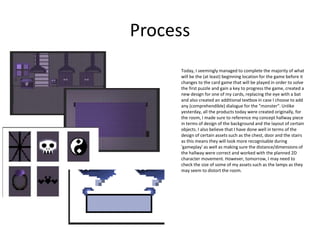
Today, I seemingly managed to complete the majority of what
will be the (at least) beginning location for the game before it
changes to the card game that will be played in order to solve
the first puzzle and gain a key to progress the game, created a
new design for one of my cards, replacing the eye with a bat
and also created an additional textbox in case I choose to add
any (comprehendible) dialogue for the "monster". Unlike
yesterday, all the products today were created originally, for
the room, I made sure to reference my concept hallway piece
in terms of design of the background and the layout of certain
objects. I also believe that I have done well in terms of the
design of certain assets such as the chest, door and the stairs
as this means they will look more recognisable during
'gameplay' as well as making sure the distance/dimensions of
the hallway were correct and worked with the planned 2D
character movement. However, tomorrow, I may need to
check the size of some of my assets such as the lamps as they
may seem to distort the room.
Process
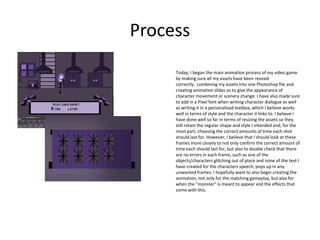
Today, I began the main animation process of my video game
by making sure all my assets have been resized
correctly, combining my assets into one Photoshop file and
creating animation slides so to give the appearance of
character movement or scenery change. I have also made sure
to add in a Pixel font when writing character dialogue as well
as writing it in a personalised textbox, which I believe works
well in terms of style and the character it links to. I believe I
have done well so far in terms of resizing the assets so they
still retain the regular shape and style I intended and, for the
most part, choosing the correct amounts of time each shot
should last for. However, I believe that I should look at these
frames more closely to not only confirm the correct amount of
time each should last for, but also to double check that there
are no errors in each frame, such as one of the
objects/characters glitching out of place and none of the text I
have created for the characters speech, pops up in any
unwanted frames. I hopefully want to also begin creating the
animation, not only for the matching gameplay, but also for
when the "monster" is meant to appear and the effects that
come with this.
Process
Today, I covered a different area of my production and instead
of continuing my animation process, I created the box art for
my game (which I decided would be playable on a PC format
rather than a console). Firstly, I focused on creating a game
logo before the box art, choosing the same colour scheme that
is clearly visible throughout gameplay and also incorporated
aspects of the game into it, such as the bat designs I had
created for the character text box and due to the game taking
place at night, I also added the moon icon behind the main
text. I then went on the create the main box art around this
logo, taken images from the internet such as the house, using
the tools I had been taught such as the gradient tool and the
rectangle tool to create the colour backgrounds, using
screenshots taken of my in progress animation to display what
gameplay would consist of and lastly, using the program Lorem
Ipsum to generate paragraphs to fill in what would be the
game summary/description. However, I do think I could have
improved a lot on the background imagery as the contrasting
colours on each part of the box may appear as confusing to the
audience. This is mainly because I tried to look up multiple
images I could use , but I either couldn't find any that fit the art
style of the box art or when I enlarged them, they came out
too pixelated and so couldn't be used. I could try to improve
this in future by either using the pixelated images anyway or
try and create my own graphics similar to the image I need.
Process
Today, I once again continued my animation process,
managing to finish the short card game animation that helps to
outline other puzzles that would appear throughout gameplay.
Firstly, I finished all of the short puzzle scene, here the premise
was to match up a total of four pairs of images, where after
solving, a part would be unlocked and a key would be collected
and the rest was mainly walk cycles of my character and
working out the animation times of text boxes, inventor box
etc. Some of my strengths I have noticed today have mainly
been when examining the animation and the time each scene
should last, which I believe was used well when creating
aspects such as the inventory animation and what I plan to be
the "monster scene" animation. I also believe that I succeeded
I creating the colour effect for my "monster scene", which I
created by using Colour Overlays on my assets and for the
background I created a blue Rectangle which I then lowered
the opacity of. However, I do believe that I should complete
this animation soon in order to move on to the music/sound
effects and I should also double check some of my previous
animation slides and their lasting times so t make sue that they
all sync up with my current slides eg. I have set time for each
of my character text slides and which should appear at time,
so I should make sure that my current text slides follow this
same pattern for more accurate consistency in my animation.
Process
Today, I completed what I invisioned to be the enitiry of my
animation. As well as finishing all scenes I wanted in my
gameplay and checked the times throughout the enitire
animation to check each shot lasted for as long as required
and didn't look weird, I also managed to create a simple start
screen that the game would fade into and fade out (using the
Tween tool to add 5 frames inbetween the two desired
frames)of once the gameplay starts as well as making the
screen fade out at the end of the animation to show the end of
that paticuler scene and animation altogether. However, I did
run into a light problem concerning the colour overlays during
the monster scene, as I had created the overlay for the
character an background differently, using a faded blue
rectangle for the background and adding the overlay to the
character individually. This became a problem as throughout
the overlay scenes, the characters overlay seemed to glitch on
and off. This was quickly resolved, however, when I simply
took the overlays off the character and instead moved the
blue rectangle so it would overlay my background and my
character without also overlay the monster. Now that the
main animation is finished, I now need to focus on my music
and sound effects, which I hope to reflect the run down,
spooky atmosphere of the game as well as the sound effects
reflecting what's happening at that point in the game
, improving upon certain assets such as my box art, which
seems to be lacking mainly in the back part of the box and,
once the music and soud effects have been made/collected,
plae all the animation assets into Premiere and edit them
together in order to create the final finished animation.
Process
Today, I double checked and completed my animation and made
sure to export it in the correct mode, created my piece of music
that will play over the majority of the animation, tried to improve
part of my box art by changing the colour of the back side of the
box ( by duplicating and placing the front side's rectangle), started
looking for sound effects that I could use in my final animation
such as a door closing, lights flickering etc. and began the process
of placing the music, animation and current sound effects
together in order to create the final animation. Even though I
seem to have completed most of these areas there are still some
that concern me, such as my custom music either being too simple
or too jovial for the type of game that I have created, the box art
which I still believe could benefit from furthur improvments and
also the fact that when placing it in Premiere, I saw that my
animation seems to have taken up way too much time and
overextending the amount of time our animations were meant to
last for only a few seconds whereas mine takes up around 5
minutes However, I believe this is important as it conveys all areas
of gameplay I need, such the exploration aspect, the puzzle aspect
and the jumpscare aspect I had referenced early on in my planning
as well as fitting in aspects such as the start screen as well as the
extended amount of time I have left for the player to read text
boxes. Tomorrow, I hope to finish off this final animation by
adding all my custom/found effects so to as create the correct
atmosphere and to make sure some of the animation areas work
the way I intend, such as the jump scare scenes as well as look
more into improving my box art, by possibly reflecting on other
popular gaming merchandise.
For the Beep Box song:
https://www.beepbox.co/#6n31s1kbl00
e0at5m0a7g0fj7i0r1o3210T0w1f1d1c0h
0v0T0w1f1d1c0h0v0T0w1f1d1c0h0v0T2
w1d1v0b4i8h8zd0000h4h4h0000000000
0000004h4h4jcM000p21jFzY623jhilF7jw
gMxBF7jjbAxmgE8lAdh2ExggE1g0apqV2
w42paq_9ei0FK7Y0FwsrG1kT38FyglEaQ
4g0
Process
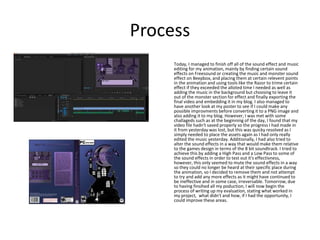
Today, I managed to finish off all of the sound effect and music
editing for my animation, mainly by finding certain sound
effects on Freesound or creating the music and monster sound
effect on Beepbox, and placing them at certain relevent points
in the animation and using tools like the Razor to trime certain
effect if they exceeded the alloted time I needed as well as
adding the music in the background but choosing to leave it
out of the monster section for effect and finally exporting the
final video and embedding it in my blog. I also managed to
have another look at my poster to see if I could make any
possible improvments before converting it to a PNG image and
also adding it to my blog. However, I was met with some
challageds such as at the beginning of the day, I found that my
video file hadn't saved properly so the progress I had made in
it from yesterday was lost, but this was quicky resolved as I
simply needed to place the assets again as I had only really
edited the music yesterday. Additionally, I had also tried to
alter the sound effects in a way that would make them relative
to the games design in terms of the 8 bit soundtrack. I tried to
achieve this by adding a High Pass and a Low Pass to some of
the sound effects in order to test out it's effectivness,
however, this only seemed to mute the sound effects in a way
so they could no longer be heard at their specific place during
the animation, so I decided to remove them and not attempt
to try and add any more effects as it might have continued to
be ineffective and in some case, irreversable. Tomorrow, due
to having finsihed all my poduction, I will now begin the
process of writing up my evaluation, stating what worked in
my project, what didn't and how, if I had the opportunity, I
could improve these areas.

6. production reflection (1)

  • 1.
  • 2.
    Process Today, I managedto complete what seem to be the main assets I will implement into my game, such as the main character and their movements, the card that will be used in the puzzle mechanic of the game, the "monster" that may appear occasionally throughout gameplay and started the process of creating the various backgrounds I need for my game. Most of these products I created originally, from the characters, which was mainly from trial and error drawings until I got a look for the characters that I was satisfied with, to the bats of the textbox, which were created by placing three of the same shapes together after gaining inspiration from the "monster" mouth shape. However, most of the icons for my cards I took from previous experiments, hopefully in future production lessons I will be able to replace these with more personal designs rather than reuse old icons. So far, I like how my use of the colour scheme has turned out, making all of the assets one specific colour so to make the "monster" stand out more in a way that appears unnatural to game, I am also pleased with how my characters turned out in terms of appearance and how I envisioned that particular character. Tomorrow, I hope to start/continue my work on the backgrounds, possibly replace the card icons with more original designs and eventually begin thinking about the animation process.
  • 3.
    Process Today, I seeminglymanaged to complete the majority of what will be the (at least) beginning location for the game before it changes to the card game that will be played in order to solve the first puzzle and gain a key to progress the game, created a new design for one of my cards, replacing the eye with a bat and also created an additional textbox in case I choose to add any (comprehendible) dialogue for the "monster". Unlike yesterday, all the products today were created originally, for the room, I made sure to reference my concept hallway piece in terms of design of the background and the layout of certain objects. I also believe that I have done well in terms of the design of certain assets such as the chest, door and the stairs as this means they will look more recognisable during 'gameplay' as well as making sure the distance/dimensions of the hallway were correct and worked with the planned 2D character movement. However, tomorrow, I may need to check the size of some of my assets such as the lamps as they may seem to distort the room.
  • 4.
    Process Today, I beganthe main animation process of my video game by making sure all my assets have been resized correctly, combining my assets into one Photoshop file and creating animation slides so to give the appearance of character movement or scenery change. I have also made sure to add in a Pixel font when writing character dialogue as well as writing it in a personalised textbox, which I believe works well in terms of style and the character it links to. I believe I have done well so far in terms of resizing the assets so they still retain the regular shape and style I intended and, for the most part, choosing the correct amounts of time each shot should last for. However, I believe that I should look at these frames more closely to not only confirm the correct amount of time each should last for, but also to double check that there are no errors in each frame, such as one of the objects/characters glitching out of place and none of the text I have created for the characters speech, pops up in any unwanted frames. I hopefully want to also begin creating the animation, not only for the matching gameplay, but also for when the "monster" is meant to appear and the effects that come with this.
  • 5.
    Process Today, I covereda different area of my production and instead of continuing my animation process, I created the box art for my game (which I decided would be playable on a PC format rather than a console). Firstly, I focused on creating a game logo before the box art, choosing the same colour scheme that is clearly visible throughout gameplay and also incorporated aspects of the game into it, such as the bat designs I had created for the character text box and due to the game taking place at night, I also added the moon icon behind the main text. I then went on the create the main box art around this logo, taken images from the internet such as the house, using the tools I had been taught such as the gradient tool and the rectangle tool to create the colour backgrounds, using screenshots taken of my in progress animation to display what gameplay would consist of and lastly, using the program Lorem Ipsum to generate paragraphs to fill in what would be the game summary/description. However, I do think I could have improved a lot on the background imagery as the contrasting colours on each part of the box may appear as confusing to the audience. This is mainly because I tried to look up multiple images I could use , but I either couldn't find any that fit the art style of the box art or when I enlarged them, they came out too pixelated and so couldn't be used. I could try to improve this in future by either using the pixelated images anyway or try and create my own graphics similar to the image I need.
  • 6.
    Process Today, I onceagain continued my animation process, managing to finish the short card game animation that helps to outline other puzzles that would appear throughout gameplay. Firstly, I finished all of the short puzzle scene, here the premise was to match up a total of four pairs of images, where after solving, a part would be unlocked and a key would be collected and the rest was mainly walk cycles of my character and working out the animation times of text boxes, inventor box etc. Some of my strengths I have noticed today have mainly been when examining the animation and the time each scene should last, which I believe was used well when creating aspects such as the inventory animation and what I plan to be the "monster scene" animation. I also believe that I succeeded I creating the colour effect for my "monster scene", which I created by using Colour Overlays on my assets and for the background I created a blue Rectangle which I then lowered the opacity of. However, I do believe that I should complete this animation soon in order to move on to the music/sound effects and I should also double check some of my previous animation slides and their lasting times so t make sue that they all sync up with my current slides eg. I have set time for each of my character text slides and which should appear at time, so I should make sure that my current text slides follow this same pattern for more accurate consistency in my animation.
  • 7.
    Process Today, I completedwhat I invisioned to be the enitiry of my animation. As well as finishing all scenes I wanted in my gameplay and checked the times throughout the enitire animation to check each shot lasted for as long as required and didn't look weird, I also managed to create a simple start screen that the game would fade into and fade out (using the Tween tool to add 5 frames inbetween the two desired frames)of once the gameplay starts as well as making the screen fade out at the end of the animation to show the end of that paticuler scene and animation altogether. However, I did run into a light problem concerning the colour overlays during the monster scene, as I had created the overlay for the character an background differently, using a faded blue rectangle for the background and adding the overlay to the character individually. This became a problem as throughout the overlay scenes, the characters overlay seemed to glitch on and off. This was quickly resolved, however, when I simply took the overlays off the character and instead moved the blue rectangle so it would overlay my background and my character without also overlay the monster. Now that the main animation is finished, I now need to focus on my music and sound effects, which I hope to reflect the run down, spooky atmosphere of the game as well as the sound effects reflecting what's happening at that point in the game , improving upon certain assets such as my box art, which seems to be lacking mainly in the back part of the box and, once the music and soud effects have been made/collected, plae all the animation assets into Premiere and edit them together in order to create the final finished animation.
  • 8.
    Process Today, I doublechecked and completed my animation and made sure to export it in the correct mode, created my piece of music that will play over the majority of the animation, tried to improve part of my box art by changing the colour of the back side of the box ( by duplicating and placing the front side's rectangle), started looking for sound effects that I could use in my final animation such as a door closing, lights flickering etc. and began the process of placing the music, animation and current sound effects together in order to create the final animation. Even though I seem to have completed most of these areas there are still some that concern me, such as my custom music either being too simple or too jovial for the type of game that I have created, the box art which I still believe could benefit from furthur improvments and also the fact that when placing it in Premiere, I saw that my animation seems to have taken up way too much time and overextending the amount of time our animations were meant to last for only a few seconds whereas mine takes up around 5 minutes However, I believe this is important as it conveys all areas of gameplay I need, such the exploration aspect, the puzzle aspect and the jumpscare aspect I had referenced early on in my planning as well as fitting in aspects such as the start screen as well as the extended amount of time I have left for the player to read text boxes. Tomorrow, I hope to finish off this final animation by adding all my custom/found effects so to as create the correct atmosphere and to make sure some of the animation areas work the way I intend, such as the jump scare scenes as well as look more into improving my box art, by possibly reflecting on other popular gaming merchandise. For the Beep Box song: https://www.beepbox.co/#6n31s1kbl00 e0at5m0a7g0fj7i0r1o3210T0w1f1d1c0h 0v0T0w1f1d1c0h0v0T0w1f1d1c0h0v0T2 w1d1v0b4i8h8zd0000h4h4h0000000000 0000004h4h4jcM000p21jFzY623jhilF7jw gMxBF7jjbAxmgE8lAdh2ExggE1g0apqV2 w42paq_9ei0FK7Y0FwsrG1kT38FyglEaQ 4g0
  • 9.
    Process Today, I managedto finish off all of the sound effect and music editing for my animation, mainly by finding certain sound effects on Freesound or creating the music and monster sound effect on Beepbox, and placing them at certain relevent points in the animation and using tools like the Razor to trime certain effect if they exceeded the alloted time I needed as well as adding the music in the background but choosing to leave it out of the monster section for effect and finally exporting the final video and embedding it in my blog. I also managed to have another look at my poster to see if I could make any possible improvments before converting it to a PNG image and also adding it to my blog. However, I was met with some challageds such as at the beginning of the day, I found that my video file hadn't saved properly so the progress I had made in it from yesterday was lost, but this was quicky resolved as I simply needed to place the assets again as I had only really edited the music yesterday. Additionally, I had also tried to alter the sound effects in a way that would make them relative to the games design in terms of the 8 bit soundtrack. I tried to achieve this by adding a High Pass and a Low Pass to some of the sound effects in order to test out it's effectivness, however, this only seemed to mute the sound effects in a way so they could no longer be heard at their specific place during the animation, so I decided to remove them and not attempt to try and add any more effects as it might have continued to be ineffective and in some case, irreversable. Tomorrow, due to having finsihed all my poduction, I will now begin the process of writing up my evaluation, stating what worked in my project, what didn't and how, if I had the opportunity, I could improve these areas.

Editor's Notes

  • #3 Discuss the tools and processes used in your production. Log your thoughts and feelings about your work.
  • #4 Discuss the tools and processes used in your production. Log your thoughts and feelings about your work.
  • #5 Discuss the tools and processes used in your production. Log your thoughts and feelings about your work.
  • #6 Discuss the tools and processes used in your production. Log your thoughts and feelings about your work.
  • #7 Discuss the tools and processes used in your production. Log your thoughts and feelings about your work.
  • #8 Discuss the tools and processes used in your production. Log your thoughts and feelings about your work.
  • #9 Discuss the tools and processes used in your production. Log your thoughts and feelings about your work.
  • #10 Discuss the tools and processes used in your production. Log your thoughts and feelings about your work.